



Start here
A few places to begin, from the aircraft’s story to the people who fly it.
Meet the aircraft
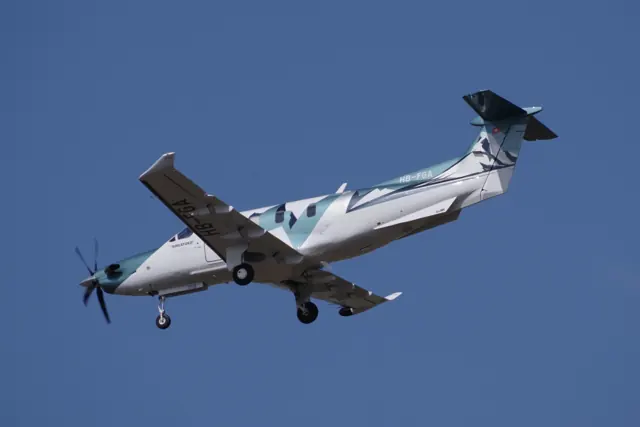
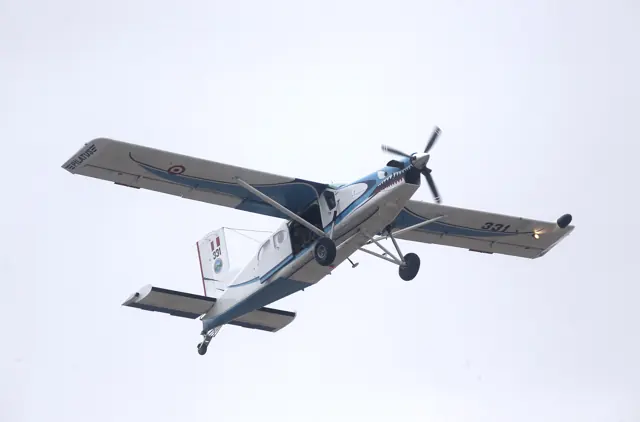
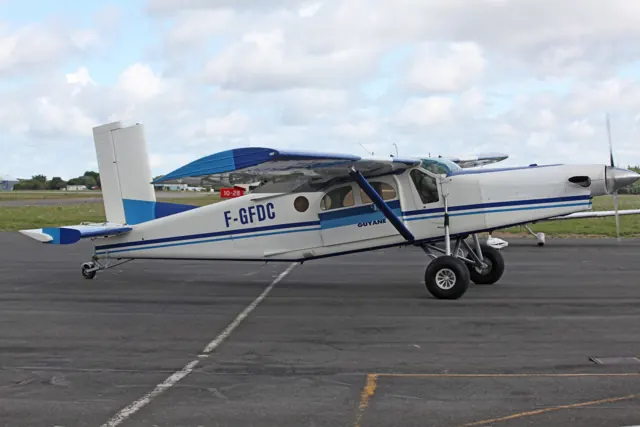
The Porter first flew with piston power in 1959. Turboprop versions later became familiar in parachuting and remote-area transport, retaining the narrow fuselage, high wing and long landing-gear legs.
Aircraft background
Wikipedia contributors · Read more ↗Early starts and village arrivals in Papua
Dearden moved from the Caravan to the Porter after training in Borneo, then spent several years flying in Papua. His working days started before sunrise, taking advantage of calmer early conditions. Flights brought passengers and government services to villages, alongside food, building materials, fuel and medical transport when needed.
Susi Air PC-6 pilot based at Wamena, interviewed by Pilatus. Manufacturer-hosted account; publication date not established.
Pilatus Aircraft · Read more ↗Engine handling has consequences in the simulation
The developer documents a working throttle gate and condition-lever latch, with engine damage from excessive torque when its more detailed engine mode is selected. Passenger doors respond to acceleration, and tiedowns and chocks restrain the aircraft. The tablet also offers simplified engine and steering options.
Pilatus PC-6 B2 · Thranda · Thranda · X-Plane 12 · X-Plane 11
Thranda · Read more ↗Into the cockpit
 YouTube
 EdoStuff Aviation · 28 min ·
Pilatus PC-6 Turbo Porter Full Flight - Cockpit View - Piket Airfield LDSS HD
A cockpit view of a PC-6 skydiving flight from Piket airfield in Croatia.
Real aircraft · Pilatus PC-6 B2
Watch on YouTube ↗Preview images are served by AirframeDB. Videos open on YouTube only when you choose to watch.
Meet Pilatus PC-6 B2
The Porter first flew with piston power in 1959. Turboprop versions later became familiar in parachuting and remote-area transport, retaining the narrow fuselage, high wing and long landing-gear legs.
The simulator represents the PC-6 B2. Engines, limits and equipment differ across Porter variants; wheel and float options, cabin layouts and avionics are documented for each package.
Pilatus PC-6 B2
Aircraft type designators
Use the code for the model you are flying. The linked authority lists the applicable aircraft.
History & design
A working link between remote communities
Dearden’s Susi Air account describes the Porter carrying passengers, essential supplies and medical traffic in Papua. Its role included regular government-supported routes as well as individual cargo missions.
Pilatus Aircraft · Flying in extreme conditions ↗Attributed operator experience; route arrangements at the time of the interview
Development milestones
First flight: Porter - 4 May 1959 Turbo-Porter - 2 May 1961
Wikipedia contributors · Pilatus PC-6 Porter ↗Pilatus PC-6 Porter · family/variant named by the source · Wikipedia revision 1373021552
Pilot accounts
Early starts and village arrivals in Papua
Dearden moved from the Caravan to the Porter after training in Borneo, then spent several years flying in Papua. His working days started before sunrise, taking advantage of calmer early conditions. Flights brought passengers and government services to villages, alongside food, building materials, fuel and medical transport when needed.
He liked the Porter’s predictable, balanced controls and the work it could do at steep, short airstrips. The seats were a less comfortable part of the experience. Mountain scenery made the job memorable, but so did the people: an arrival could reunite families and bring a village something it had been waiting for.
Susi Air PC-6 pilot based at Wamena, interviewed by Pilatus. Manufacturer-hosted account; publication date not established.
Read the full account · Pilatus Aircraft ↗A differences course becomes a busy parachuting day
The blogger travelled from Sicily to Sardinia with a colleague for the course. A detailed briefing and an evening meal with the parachuting group made the introduction sociable before the next day’s work with a Zimex examiner. Cockpit familiarisation led into actual parachute flights, with aircraft handling, positioning and radio work competing for attention.
Electric trim and its backup arrangements were among the differences that needed deliberate practice. The writer found the breaker placement awkward during a simulated trim problem, while the changed warning panel and navigation equipment also required adjustment. Repeated flights brought greater familiarity, helped by instruction and a proper debrief.
GOLF’s Pilot Aviation Blog · 15 May 2018. Firsthand Italian-language account of B2H4 differences training after experience with the B2H2; full author name not established.
Read the full account · GOLF’s Pilot Aviation Blog ↗A tall amphibian that became graceful in flight
Climbing aboard felt more like negotiating gym equipment than entering an ordinary aeroplane. Once in the cockpit, Hirschman appreciated the exceptional downward view through the large transparent doors. The float-equipped Porter looked ungainly on the ground, yet its controls proved balanced and manageable during the flight.
Lake operations introduced another set of details, including water rudders and a depth display that was unfamiliar to him. The session included water landings, runway landings and formation work for photographs. By the end, the aircraft’s precision had changed his impression of its appearance: the awkward-looking machine had become graceful in use. His favourable account belongs to this particular amphibian, intended for medical work in Brazil, rather than to every Porter configuration.
AOPA Pilot · July 2019. Amphibious PC-6 on Wipline 6100 floats, flown with Cedric Gitchenko around Bartow and Lake Hancock, Florida; different undercarriage from the tailwheel B2.
Read the full account · AOPA Pilot ↗In your simulator
Systems, equipment and documentation for each developer’s aircraft.
Compare simulator versions →MSFS 2024PC-6 B2
Microsoft Flight Simulator · Released
PC-6 B2
Microsoft Flight Simulator · Released
MSFS 2020PC-6 B2
Microsoft Flight Simulator · Released
PC-6 B2
Microsoft Flight Simulator · Released
X-Plane 12 · X-Plane 11Pilatus PC-6 B2 · Thranda
Thranda · Released
Pilatus PC-6 B2 · Thranda
Thranda · Released
X-Plane 12 Enhancement Pilatus PC-6 B2
SimCoders · Released
Pilatus PC-6 B2
SimCoders · Released
MSFS 2020PC-6 Porter
Blackbird Simulations · Released
PC-6 Porter
Blackbird Simulations · Released
MSFS 2024PC-6 Porter
FlightSimGames · Released
PC-6 Porter
FlightSimGames · Released
Aircraft specifications
Published figures for the named real-aircraft variant. Simulator equipment and performance can differ.
| Specification | Published value |
|---|---|
| Length | 11 m (36 ft 1 in) |
| Wingspan | 15.87 m (52 ft 1 in) |
| Height | 3.2 m (10 ft 6 in) |
| Wing area | 30.15 m² (324.5 sq ft) |
| Empty weight | 1,270 kg (2,800 lb) |
| Max takeoff weight | 2,800 kg (6,173 lb) |
| Powerplant | 1 × Pratt & Whitney Canada PT6A-27 turboprop engine, 410 kW (550 hp) (de-rated from 507 kW (680 hp)) |
| Propellers | 3-bladed constant-speed reversible propeller |
| Maximum speed | 232 km/h (144 mph, 125 kn) |
| Cruise speed | 213 km/h (132 mph, 115 kn) |
| Stall speed | 96 km/h (60 mph, 52 kn) |
| Range | 730 km (450 mi, 390 nmi) with maximum payload |
| Service ceiling | 8,197 m (26,893 ft) |
Manuals & resources
Find your next read
Choose a topic for a short introduction and a link to the original source. Simulator references identify the developer and edition they cover.
Simulator documentation
Engine handling has consequences in the simulationPilatus PC-6 B2 · Thranda · Thranda · X-Plane 12 · X-Plane 11
The developer documents a working throttle gate and condition-lever latch, with engine damage from excessive torque when its more detailed engine mode is selected. Passenger doors respond to acceleration, and tiedowns and chocks restrain the aircraft. The tablet also offers simplified engine and steering options.
Thranda’s documented simulator behaviour; no physical-control qualification
Thranda · Read the source ↗Configure a Porter for wheels, water or cargoPilatus PC-6 B2 · Thranda · Thranda · X-Plane 12 · X-Plane 11
Thranda’s X-Plane 12 Porter includes land and amphibian versions, with selectable tyres, skis and underwing fuel tanks. Its EFB manages seats, cargo and fuel alongside panel layouts, including G1000 configurations and optional RealityXP integration. Loading and equipment choices are exposed in the weight-and-balance interface.
Gathered XP12 listing · distinct from the older XP11 package
Thranda · Read the source ↗The Porter REP targets Thranda’s X-Plane 12 aircraftPilatus PC-6 B2 · SimCoders · X-Plane 12
SimCoders explicitly requires the XP12 Turbo Porter and also supports its amphibian. Documented additions include a custom tailwheel model, engine-temperature and hot-start behaviour, persistent component condition and a maintenance hangar. An optional virtual economy connects flying with fuel and repair costs.
Gathered SimCoders product page · XP12 base-aircraft requirement
SimCoders · Read the source ↗Pilot account
Early starts and village arrivals in PapuaSusi Air PC-6 pilot based at Wamena, interviewed by Pilatus. Manufacturer-hosted account; publication date not established.
Dearden moved from the Caravan to the Porter after training in Borneo, then spent several years flying in Papua. His working days started before sunrise, taking advantage of calmer early conditions. Flights brought passengers and government services to villages, alongside food, building materials, fuel and medical transport when needed. He liked the Porter’s predictable, balanced controls and the work it could do at steep, short airstrips.
Matt Dearden
Pilatus Aircraft · Read the source ↗A differences course becomes a busy parachuting dayGOLF’s Pilot Aviation Blog · 15 May 2018. Firsthand Italian-language account of B2H4 differences training after experience with the B2H2; full author name not established.
The blogger travelled from Sicily to Sardinia with a colleague for the course. A detailed briefing and an evening meal with the parachuting group made the introduction sociable before the next day’s work with a Zimex examiner. Cockpit familiarisation led into actual parachute flights, with aircraft handling, positioning and radio work competing for attention. Electric trim and its backup arrangements were among the differences that needed deliberate practice.
GOLF
GOLF’s Pilot Aviation Blog · Read the source ↗Developer documentation
PC-6 Porter — product listingPC-6 Porter · MSFS 2020
Product listing captured 2026-09-30; edition scope from the reviewed catalogue
blackbirdsims.com · Read the source ↗PC-6 Porter — product listingPC-6 Porter · MSFS 2024
Product listing captured 2026-09-24; edition scope from the reviewed catalogue
FlightSimGames · Read the source ↗Read the original documentation from the people who created it. Manuals open on their publisher’s website.
Manual
Microsoft Flight Simulator aircraft manualsMicrosoft / aircraft developersAircraft background
Pilatus PC-6 PorterWikipedia contributors · Research background · Wikipedia revision 1373021552 · retrieved 2026-09-12Resource
MSFS 2024 FAQ and edition aircraft inventoryMicrosoft MSFS 2020 FAQ and edition aircraft inventoryMicrosoftProduct
Pilatus PC-6 Turbo Porter - DGS Series XP12Thranda · Official developer / designated store catalogue · checked 2026-09-12 Pilatus PC-6 Turbo Porter - DGS Series XP11Thranda · Official developer / designated store catalogue · checked 2026-09-12 Reality Expansion Pack · Thranda Pilatus Turbo PorterSimCoders · Official developer / designated store catalogue · checked 2026-09-12 PC-6 for MSFS2020blackbirdsims.com · Product listing captured 2026-09-30; edition scope from the reviewed catalogue FSG PC6 current product scope, interfaces and documentationFlightSimGames · Product listing captured 2026-09-24; edition scope from the reviewed catalogueType designator
ICAO Doc 8643 — aircraft type designatorsInternational Civil Aviation Organization · Public search data retrieved 2026-09-14; authority update 2026-09-03Built-in force-feedback profiles
Read the documentary basis, editable starting settings and remaining questions for the aircraft you fly. Each explanation refers to the exact profile revision shown.
Catalogue programme-20261022-v1 · 14 profile choices
Blackbird PC-6 Turbo Porter
Blackbird Simulations · Free and Pro · Revision 5 · Inherited starting point
MSFS 2020 · MSFS 2024
Blackbird PC-6 Turbo Porter: The selected resistance accompanies the STOL utility aircraft’s controls.
Blackbird PC-6 Turbo Porter Straight Floats
Blackbird Simulations · Free and Pro · Revision 2 · Inherited starting point
MSFS 2020 · MSFS 2024
Blackbird PC-6 Turbo Porter Straight Floats: The selected resistance accompanies the STOL utility aircraft’s controls.
Blackbird PC-6 Turbo Porter Skis
Blackbird Simulations · Free and Pro · Revision 2 · Inherited starting point
MSFS 2020 · MSFS 2024
Blackbird PC-6 Turbo Porter Skis: The selected resistance accompanies the STOL utility aircraft’s controls.
FlightSimGames Pilatus PC-6 Wheels
FlightSimGames · Free and Pro · Revision 1 · Inherited starting point
MSFS 2024
FlightSimGames Pilatus PC-6 Wheels: The selected resistance accompanies the STOL utility aircraft’s controls.
FlightSimGames Pilatus PC-6 Amphibian
FlightSimGames · Free and Pro · Revision 1 · Inherited starting point
MSFS 2024
FlightSimGames Pilatus PC-6 Amphibian: The selected resistance accompanies the STOL utility aircraft’s controls.
SimCoders REP / Thranda PC-6 (amphibian, XP12)
SimCoders · Free and Pro · Revision 1 · Inherited starting point
X-Plane 12
SimCoders REP / Thranda PC-6 (amphibian, XP12): The selected resistance accompanies the STOL utility aircraft’s controls.
SimCoders REP / Thranda PC-6 (wheels, XP12)
SimCoders · Free and Pro · Revision 1 · Inherited starting point
X-Plane 12
SimCoders REP / Thranda PC-6 (wheels, XP12): The selected resistance accompanies the STOL utility aircraft’s controls.
Thranda PC-6 Turbo Porter
Thranda · Free and Pro · Revision 3 · Inherited starting point
X-Plane 12
Thranda PC-6 Turbo Porter: The selected resistance accompanies the STOL utility aircraft’s controls.
Thranda PC-6 Turbo Porter Amphibian Water Operations
Thranda · Free and Pro · Revision 2 · Inherited starting point
X-Plane 12
Thranda PC-6 Turbo Porter Amphibian Water Operations: The selected resistance accompanies the STOL utility aircraft’s controls.
Thranda PC-6 Turbo Porter Skis
Thranda · Free and Pro · Revision 2 · Inherited starting point
X-Plane 12
Thranda PC-6 Turbo Porter Skis: The selected resistance accompanies the STOL utility aircraft’s controls.
Pilatus PC-6 B2 (wheels)
Free and Pro · Revision 3 · Partial review
MSFS 2020 · MSFS 2024 · X-Plane 11 · X-Plane 12
Pilatus PC-6 B2 (wheels): The selected resistance accompanies the STOL utility aircraft’s controls.
Pilatus PC-6 B2 (floats)
Free and Pro · Revision 1 · Partial review
MSFS 2020 · MSFS 2024 · X-Plane 11 · X-Plane 12
Pilatus PC-6 B2 (floats): The selected resistance accompanies the STOL utility aircraft’s controls.
Pilatus PC-6 B2 (skis)
Free and Pro · Revision 1 · Partial review
MSFS 2020 · MSFS 2024 · X-Plane 11 · X-Plane 12
Pilatus PC-6 B2 (skis): The selected resistance accompanies the STOL utility aircraft’s controls.
Pilatus PC-6 B2 Amphibian
Free and Pro · Revision 1 · Partial review
MSFS 2020 · MSFS 2024 · X-Plane 12
A high-wing utility aircraft known for short-field work and a broad choice of working configurations.
Pilatus PC-6 B2 (skis)
Pilatus PC-6 B2 (skis): The selected resistance accompanies the STOL utility aircraft’s controls.
Aircraft and simulator scope
- Pilatus PC-6 B2 (skis) · MSFS 2020 · Variant starting point
- Pilatus PC-6 B2 (skis) · MSFS 2024 · Variant starting point
- Pilatus PC-6 B2 (skis) · X-Plane 11 · Variant starting point
- Pilatus PC-6 B2 (skis) · X-Plane 12 · Variant starting point
Pilatus PC-6 B2 (skis) · Family sources identify only the variants and product versions described above.
The simulator model and controls
The Porter first flew with piston power in 1959. Turboprop versions later became familiar in parachuting and remote-area transport, retaining the narrow fuselage, high wing and long landing-gear legs.
This starting point selects Pilatus PC-6 B2 (skis). Its aircraft-level settings do not select a particular developer’s custom systems.
How this profile feels
The selected resistance accompanies the STOL utility aircraft’s controls. Spring resistance builds with the selected airspeed response. A separate aerodynamic term adds speed-dependent control load.
Whole-stabilizer trim changes the pitch-force balance. Valid trim provides the configured pressure relief. Autopilot following is off.
Controls and trim
The Porter’s pitch trim changes horizontal-stabilizer setting. Mechanical-handwheel and electric-motor installations have separate fits. Flap extension, power and loading change the aircraft’s pitch balance, with wheel, ski, straight-float and amphibious configurations separately documented.
About the values
The gains are normalized profile settings. They describe the chosen effect balance; hand force depends on the device and its output limits. IAS references are tuning values rather than operating limits. Physical acceptance of this revision remains pending.
What the documentation establishes
Thranda pages identify separate XP11/XP12 PC-6B2 products; generic installations need separate scope.
Documentary review and sources
These decisions describe the documentary basis and remaining gaps for this revision. Aircraft documentation and a starting setting describe different kinds of evidence.
Aircraft and variant
ReviewedThis starting point selects Pilatus PC-6 B2 (skis). Its aircraft-level settings do not select a particular developer’s custom systems.
Flight controls
Not yet reviewedThe Porter’s pitch trim changes horizontal-stabilizer setting. Mechanical-handwheel and electric-motor installations have separate fits. Flap extension, power and loading change the aircraft’s pitch balance, with wheel, ski, straight-float and amphibious configurations separately documented.
Trim
Not yet reviewedWhole-stabilizer trim changes the pitch-force balance. Pitch authority 0.3 provides load relief and permitted centre movement; roll authority is 0.14.
Autopilot and stability
Not yet reviewedAutopilot following is off; the configured spring and load retain the hardware feel.
Equipment
Not yet reviewedGear, flap and ground cues follow the selected settings and available simulator-reported states.
Speeds and limits
Not yet reviewedThe indicated-speed references set the profile response scale; they are separate from aircraft operating limits.
Simulator integration
Not yet reviewedThe profile targets msfs2020, msfs2024, xplane11, xplane12. Add-on-specific controls use only the supported references configured by this profile.
Force-feedback settings
Not yet reviewedThe settings define the profile’s effect balance. Device output limits affect physical hand force.
Starting settings and their rationale
These configured values are starting estimates. The explanations describe what each setting controls; physical validation appears separately below.
| Setting | Starting value | What it controls and why |
|---|---|---|
| Spring strength | Starting value0.74 | What it controls and whyThe selected resistance accompanies the STOL utility aircraft’s controls. The baseline spring is 0.74. Its low-speed blend reaches baseline strength at 52.5 KIAS. |
| Master force gain | Starting value0.85 | What it controls and whyScales overall profile strength while preserving effect balance, subject to device and output limits. |
| Profile force gain | Starting value0.68 | What it controls and whyThe aerodynamic-load gain is 0.68 with an indicated-speed reference of 105 KIAS. This supplies speed-dependent loading alongside the spring. |
| Force tuning speed/reference | Starting value105.0 kt | What it controls and whySets the IAS reference for aerodynamic loading. It is an estimate, not published cruise TAS or a flight limit. |
| Spring response reference speed | Starting value52.5 kt | What it controls and whySets the IAS where the low-speed blend reaches baseline strength; high-speed stiffening also uses it. |
| Aileron force scale | Starting value0.72 | What it controls and whyRoll and pitch aerodynamic scales are 0.72 and 1, respectively. They set the aerodynamic axis balance. No custom spring-travel curve is enabled. |
| Elevator force scale | Starting value1.0 | What it controls and whyScales pitch aerodynamic loading; pitch spring travel and trim responses are separate settings. |
| Trim feel | Starting valueEnabled | What it controls and whyRetained for compatibility and group membership. Trim relief, rather than this flag, controls centre movement. |
| Trim relief | Starting valueEnabled | What it controls and whyAllows trim relief with supported control law and valid telemetry. Axis authorities set its amount. |
| Autopilot follow | Starting valueDisabled | What it controls and whyAutopilot following is off; the configured spring and load retain the hardware feel. |
| Autopilot neutral hold | Starting valueDisabled | What it controls and whyPermits centering hold during a supported AP state, separate from following a moving target. |
| Output force limit | Starting value0.55 | What it controls and whyCaps directed-force output. Native spring effects and device limits remain separate. |
All 44 starting settings and their rationale
The settings define the profile’s effect balance. Device output limits affect physical hand force.
| Setting | Starting value | What it controls and why |
|---|---|---|
| Spring strength | Starting value0.74 | What it controls and whyThe selected resistance accompanies the STOL utility aircraft’s controls. The baseline spring is 0.74. Its low-speed blend reaches baseline strength at 52.5 KIAS. |
| Spring deadband | Starting value0.05 | What it controls and whySets travel around the centre before the baseline spring resists. Smaller values engage it sooner. |
| Profile force gain | Starting value0.68 | What it controls and whyThe aerodynamic-load gain is 0.68 with an indicated-speed reference of 105 KIAS. This supplies speed-dependent loading alongside the spring. |
| Master force gain | Starting value0.85 | What it controls and whyScales overall profile strength while preserving effect balance, subject to device and output limits. |
| QBlend Enabled | Starting valueEnabled | What it controls and whyAllows baseline spring strength to rise with indicated airspeed where the control law permits it. |
| QSpring Minimum Factor | Starting value0.55 | What it controls and whySets low-speed spring strength as a fraction of baseline when blending is enabled. One keeps full strength. |
| QSpring Start Knots | Starting value14.7 kt | What it controls and whySets the IAS where the low-speed spring blend starts rising. This is a feel threshold, not a flight limit. |
| Spring response reference speed | Starting value52.5 kt | What it controls and whySets the IAS where the low-speed blend reaches baseline strength; high-speed stiffening also uses it. |
| Force tuning speed/reference | Starting value105.0 kt | What it controls and whySets the IAS reference for aerodynamic loading. It is an estimate, not published cruise TAS or a flight limit. |
| Airspeed spring stiffening gain | Starting value0.1 | What it controls and whyThe high-speed spring-stiffening gain is 0.1. It strengthens the permitted spring response above 52.5 KIAS, with the squared-speed ratio capped at 5. |
| Airspeed spring stiffening limit | Starting value5 | What it controls and whyLimits the squared airspeed ratio used for high-speed spring stiffening; it is not a device-force cap. |
| Aileron force scale | Starting value0.72 | What it controls and whyRoll and pitch aerodynamic scales are 0.72 and 1, respectively. They set the aerodynamic axis balance. No custom spring-travel curve is enabled. |
| Elevator force scale | Starting value1.0 | What it controls and whyScales pitch aerodynamic loading; pitch spring travel and trim responses are separate settings. |
| Output force limit | Starting value0.55 | What it controls and whyCaps directed-force output. Native spring effects and device limits remain separate. |
| Trim feel | Starting valueEnabled | What it controls and whyRetained for compatibility and group membership. Trim relief, rather than this flag, controls centre movement. |
| Trim relief | Starting valueEnabled | What it controls and whyAllows trim relief with supported control law and valid telemetry. Axis authorities set its amount. |
| Elevator Authority | Starting value0.3 | What it controls and whyWhole-stabilizer trim changes the pitch-force balance. Pitch authority 0.3 provides load relief and permitted centre movement; roll authority is 0.14. |
| Aileron Authority | Starting value0.14 | What it controls and whyScales supported roll-trim relief and permitted centre movement. Zero removes roll response. |
| Force Trim Enabled | Starting valueDisabled | What it controls and whyEnables local force trim, separate from aircraft-owned trim and add-on integration qualification. |
| GLoad Enabled | Starting valueEnabled | What it controls and whyAllows load-factor changes to modify permitted spring laws. Passive fly-by-wire feel can suppress it. |
| Rate Damping Enabled | Starting valueEnabled | What it controls and whyEnables rate damping with the configured coefficients and control law. |
| Autopilot follow | Starting valueDisabled | What it controls and whyAutopilot following is off; the configured spring and load retain the hardware feel. |
| Autopilot follow authority | Starting value0.1 | What it controls and whySets admitted AP-follow gain, not a percentage of travel. Runtime ownership and input limits still apply. |
| Autopilot neutral hold | Starting valueDisabled | What it controls and whyPermits centering hold during a supported AP state, separate from following a moving target. |
| Autopilot neutral hold strength | Starting value0.6 | What it controls and whySets admitted AP neutral-hold strength; inactive while neutral hold is disabled. |
| Enabled | Starting valueEnabled | What it controls and whyEnables aerodynamic cues; each still needs nonzero strength and its simulator conditions. |
| Gain | Starting value0.28 | What it controls and whySets stall-buffet strength. Zero removes the cue without changing simulator stalls or warnings. |
| Gain | Starting value0 | What it controls and whySets high-Mach buffet strength; onset and full-strength thresholds are separate. |
| Gain | Starting value0.14 | What it controls and whySets flap buffet at the configured position and speed gates. Flap movement texture is separate. |
| Maximum flap index | Starting value3 | What it controls and whySets the final flap index for detent normalization. UP plus three detents uses maximum index3. |
| Minimum flap index | Starting value2 | What it controls and whySets the first flap detent that admits buffet; this is a handle index, not degrees. |
| Gain | Starting value0 | What it controls and whySets gear aerodynamic buffet; movement and ground-contact cues are separate. |
| Shaker Enabled | Starting valueDisabled | What it controls and whyPermits shaker at supported warning conditions; the switch does not establish aircraft equipment. |
| Stick shaker amplitude | Starting value0.5 | What it controls and whySets triggered shaker strength; inactive while the shaker feature is disabled. |
| Enabled | Starting valueEnabled | What it controls and whyEnables ground effects; each still needs its own strength and contact or motion telemetry. |
| Gain | Starting value0.42 | What it controls and whySets rolling texture strength, modified by speed, surface and undercarriage configuration. |
| Gain | Starting value0.32 | What it controls and whySets gear-bump texture during ground motion, separate from touchdown impact. |
| Gain | Starting value0.82 | What it controls and whySets landing-impact strength; landing telemetry and response shape determine the pulse. |
| Gain | Starting value0.48 | What it controls and whySets reverse-thrust vibration with valid reverser and engine conditions. Zero removes the cue. |
| Enabled | Starting valueEnabled | What it controls and whyEnables engine cues with nonzero settings and valid running-engine telemetry. |
| Gain | Starting value0.06 | What it controls and whySets estimated engine vibration using configured telemetry and response, not measured cockpit vibration. |
| Enabled | Starting valueEnabled | What it controls and whyEnables accessory cues with configured strengths and observed accessory movement. |
| Gain | Starting value0.12 | What it controls and whySets texture from observed flap movement; a command without movement does not establish the cue. |
| Gain | Starting value0 | What it controls and whySets texture from observed gear movement, separate from aerodynamic and touchdown effects. |
Limits and open questions
- The product pages do not establish PC-6 force gearing.
- Trim authority remains unresolved.
- Configurable AP panels are documented; follow off does not assert absent equipment.
- Pilatus PC-6 B2 (skis) uses family control evidence. An exact float or ski supplement, contact geometry and installation equipment were not reviewed.
- Wheel/float/ski anchors lack installation-specific IAS evidence.
- XP11 release notes do not qualify XP12 feedback.
- STOL/propwash and contact cues remain estimates, not equal hand forces across installations.
Physical validation
No physical force validation is recorded in this public catalogue for this revision. Documentary review and software checks do not establish how a particular device feels.
Discuss this aircraft (0)
Questions, observations and useful sources from the community.
No published discussions yet. Bring a question or share a useful source.
Open aircraft discussions →Content expanded · What’s new
Something missing or a source that needs attention?
Suggest a correction ↗