
Start here
A few places to begin, from the aircraft’s story to the people who fly it.
Meet the aircraft
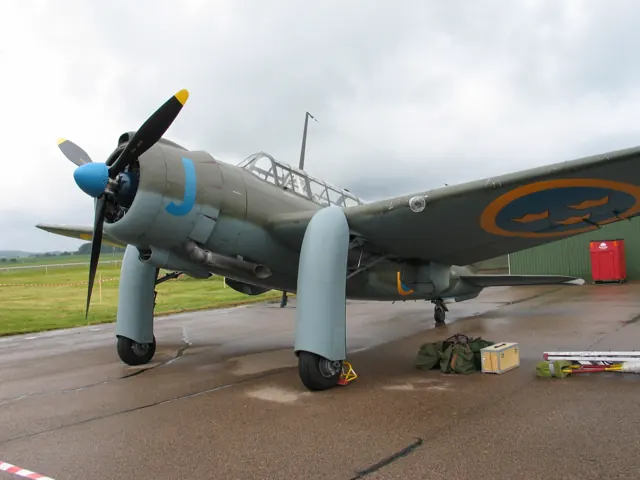
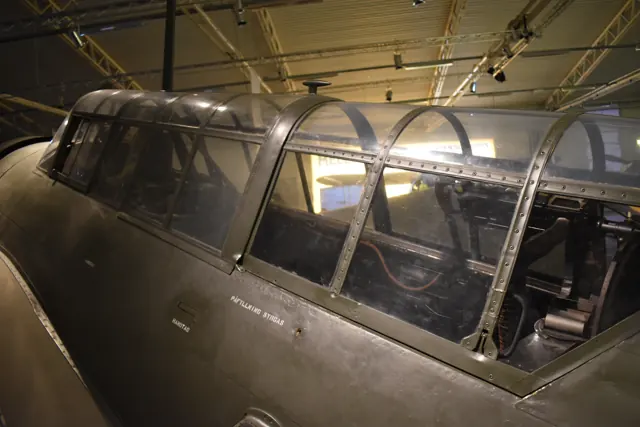
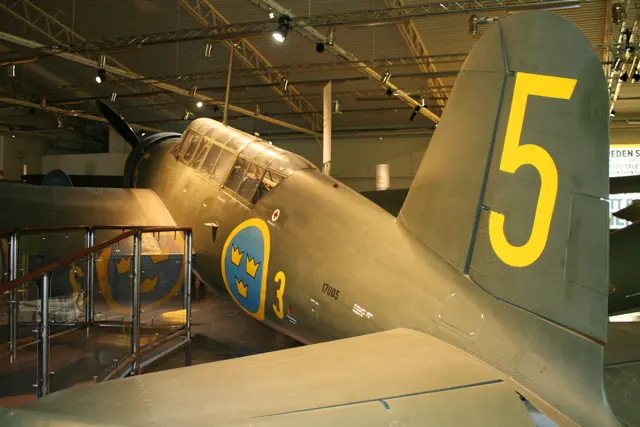
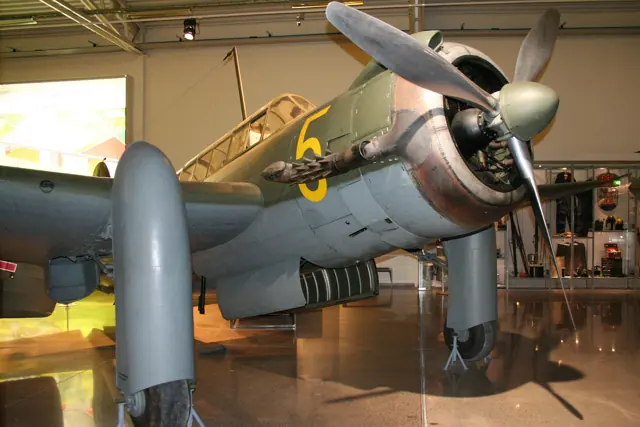
The Saab 17 began at ASJA before that company became part of Saab. A single radial engine powered the all-metal mid-wing reconnaissance and dive-bombing aircraft. Versions were fitted for land, winter and maritime operation, with different undercarriage arrangements and equipment.
Aircraft background
Wikipedia contributors · Read more ↗A jet test pilot enjoys the old bomber’s demanding routine
Even after five seasons, Sjöstrand still found the starting routine remarkable. It took much more time and effort than starting the jets he normally flew, with priming, the flywheel starter and quick changes of hand keeping him occupied. He nevertheless found charm in that mechanical involvement. Taxiing required particular care because the nose obscured the view ahead and the aircraft needed considerable space to turn.
Pilot of restored B 17A SE-BYH. Flightpath prints his surname as Sjostrandt; Saab’s own anniversary interview identifies him as Johan Sjöstrand. His observations concern this aircraft, not every Saab 17 variant.
Flightpath / Luigino Caliaro · Read more ↗Trim and undercarriage controls
The 2023 B 17A guide labels trim and normal/emergency gear controls. This older MSFS 2020 manual does not establish unchanged MSFS 2024 operation.
17 B · Microsoft Flight Simulator · MSFS 2024
Microsoft / aircraft developers · Read more ↗Into the cockpit
 YouTube
 Saab · 5 min ·
Saab B 17
Saab shares footage of its restored, airworthy 17A.
Related variant · restored Saab 17A; this catalogue entry identifies 17B
Watch on YouTube ↗Preview images are served by AirframeDB. Videos open on YouTube only when you choose to watch.
Meet Saab 17
The Saab 17 began at ASJA before that company became part of Saab. A single radial engine powered the all-metal mid-wing reconnaissance and dive-bombing aircraft. Versions were fitted for land, winter and maritime operation, with different undercarriage arrangements and equipment.
Saab 17
Aircraft type designators
A model-specific ICAO or FAA designator has not been confirmed in the references reviewed for this aircraft.
History & design
A working aircraft becomes a flying museum exhibit
B 17A 17239 served with the Swedish Air Force and later worked as a civilian target tug under registration SE-BYH. After withdrawal it entered museum storage. Saab’s anniversary restoration returned it to flight in June 1997, with Kjell Nordström at the controls, and restored the wartime Blue Johan markings. The aircraft’s long career spans military service, commercial work and preservation.
Flightpath / Luigino Caliaro · Sweden’s Own: Bla Johan ↗Flightpath, printed page 46 · historical status, not a current airworthiness assertion
The letters identify roles and engine variants
Saab’s history distinguishes the B 17 bomber from the S 17 reconnaissance aircraft. Production versions also differed by engine. This page covers the Saab 17 family; the pilot accounts identify the prototype or B 17A where the source does so. The simulator’s original Local Legend release specifically names the B 17A.
Saab · Pionjäråren — Saab 17, 18 och 21 ↗Manufacturer family history; simulator variant identified separately in the linked release
Development milestones
First flight: 18 May 1940
Wikipedia contributors · Saab 17 ↗Saab 17 · family/variant named by the source · Wikipedia revision 1360933848
Pilot accounts
A jet test pilot enjoys the old bomber’s demanding routine
Even after five seasons, Sjöstrand still found the starting routine remarkable. It took much more time and effort than starting the jets he normally flew, with priming, the flywheel starter and quick changes of hand keeping him occupied. He nevertheless found charm in that mechanical involvement. Taxiing required particular care because the nose obscured the view ahead and the aircraft needed considerable space to turn.
In the air, he described large stick movements and heavy roll forces at higher speeds. Power changes brought more adjustments, and an aerobatic display required planning rather than rapid improvisation. Landing returned his attention to directional control, especially as the tailwheel touched. After the work came a small pleasure: opening the side window to enjoy fresh air.
Pilot of restored B 17A SE-BYH. Flightpath prints his surname as Sjostrandt; Saab’s own anniversary interview identifies him as Johan Sjöstrand. His observations concern this aircraft, not every Saab 17 variant.
Read the full account · Flightpath / Luigino Caliaro ↗The restored aircraft’s first flight keeps its pilot busy
Nordström remembered the engine shaking the aircraft during warm-up and the poor view making taxiing laborious. After takeoff, rising oil temperature prompted a radio call to his escort pilot. Reducing engine speed and increasing airspeed brought the temperature down, allowing the planned handling checks to continue.
He found comfortable control forces in turns, but stopped accelerating when a trim problem demanded considerable effort to hold level. The landing circuit was deliberately wide, giving him time for checks and reflection. He remained alert to yaw during the rollout. Only when the aircraft slowed to taxiing pace could he take a breather.
His own recollection of the first flight with restored B 17A 17239, printed pages 124–126. The neighbouring Nihlstrand passage is a separate voice; both summaries share one source allowance.
Read the full account · Aeroplane / Jan Forsgren with Kjell Nordström ↗An operational pilot weighs the bomber’s strengths and irritations
Nihlstrand considered the B 17 conventional in the air. Coming from the A 21, he found it cumbersome, but accepted that a bomber needed a sturdy structure. Landing was less appealing: attempts to arrive fully stalled could produce repeated bounces and sometimes a ground loop.
He also questioned the undercarriage fairings used as dive brakes. In his experience, they were seldom necessary, while their effect on trim added another demand alongside watching the target and speed. Despite these frustrations, his verdict acknowledged what Saab had achieved under difficult circumstances. Pilots tolerated its peculiarities partly because their alternatives were so limited.
Quoted recollection of B 17A service with F 6 at Karlsborg, printed page 125. His comments on other engines and accident causes are not adopted as independently established findings.
Read the full account · Aeroplane / Jan Forsgren with Kjell Nordström ↗The prototype flight ends with an injured pilot bringing it home
Saab’s account of the first flight describes a problem almost immediately after takeoff. The cockpit canopy opened and began moving violently. Smith caught it with his left hand and continued flying with the other, leaving him to manage the aircraft and the loose canopy together.
Before landing, he decided to release the canopy over a field near Vreta Kloster so that both hands would be available for control. It struck his face as he let it go, cutting an eyebrow. He then brought the aircraft down while able to see through only one eye. The manufacturer records the episode as part of the prototype’s difficult introduction to flight.
Pilot experience reported in Saab’s historical retrospective, rather than a first-person interview. The event concerns the 1940 prototype, before the later production variants.
Read the full account · Saab ↗In your simulator
Systems, equipment and documentation for each developer’s aircraft.
Compare simulator versions →MSFS 202417 B
Microsoft Flight Simulator · Released
17 B
Microsoft Flight Simulator · Released
MSFS 2020Saab B 17A
Microsoft Flight Simulator · Released
Saab B 17A
Microsoft Flight Simulator · Released
Aircraft specifications
Published figures for the named real-aircraft variant. Simulator equipment and performance can differ.
| Specification | Published value |
|---|---|
| Length | 10 m (32 ft 10 in) |
| Wingspan | 13.7 m (44 ft 11 in) |
| Height | 4.5 m (14 ft 9 in) |
| Wing area | 28.5 m² (307 sq ft) |
| Empty weight | 2,680 kg (5,908 lb) |
| Gross weight | 3,870 kg (8,532 lb) |
| Powerplant | 1 × Piaggio P.XIbis R.C.40D 14 cylinder air-cooled radial piston engine, 790 kW (1,060 hp) |
| Propellers | 3-bladed Piaggio P.1001 variable pitch propeller |
| Maximum speed | 435 km/h (270 mph, 235 kn) |
| Cruise speed | 370 km/h (230 mph, 200 kn) |
| Range | 1,700 km (1,100 mi, 920 nmi) |
| Service ceiling | 9,800 m (32,200 ft) |
| Rate of climb | 10 m/s (2,000 ft/min) |
Manuals & resources
Find your next read
Choose a topic for a short introduction and a link to the original source. Simulator references identify the developer and edition they cover.
Simulator documentation
Trim and undercarriage controls17 B · Microsoft Flight Simulator · MSFS 2024
The 2023 B 17A guide labels trim and normal/emergency gear controls. This older MSFS 2020 manual does not establish unchanged MSFS 2024 operation.
Legacy guide 1.0.2 · PDF page 27; 2024 roster label is 17 B, original release is B 17A
Microsoft / aircraft developers · Read the source ↗Change the cockpit language and measurement systemSaab B 17A · Microsoft Flight Simulator · MSFS 2020
The EFB Settings page switches Swedish/metric gauges and labels to English/imperial.
B 17A guide 1.0.2, 14 November 2023 · MSFS 2020, PDF pages 11–13
Microsoft / aircraft developers · Read the source ↗Find a checklist item directly in the cockpitSaab B 17A · Microsoft Flight Simulator · MSFS 2020
The checklist’s blue eye moves the view to the relevant control. It also provides an Auto Complete option.
MSFS 2020 guide · PDF page 8
Microsoft / aircraft developers · Read the source ↗Open the canopies or clear the control stick from viewSaab B 17A · Microsoft Flight Simulator · MSFS 2020
Cockpit levers open the canopies and side window. Clicking the bracket below the stick hides or restores it.
MSFS 2020 guide · PDF pages 20–22
Microsoft / aircraft developers · Read the source ↗Use the EFB for the route and airport weatherSaab B 17A · Microsoft Flight Simulator · MSFS 2020
Its map displays a World Map route; the Home page shows departure and arrival METARs.
MSFS 2020 guide · PDF page 11
Microsoft / aircraft developers · Read the source ↗Show or hide the tablet from the instrument panelSaab B 17A · Microsoft Flight Simulator · MSFS 2020
Click the button on the right side of the front panel.
MSFS 2020 guide · PDF page 14
Microsoft / aircraft developers · Read the source ↗Pilot account
A jet test pilot enjoys the old bomber’s demanding routinePilot of restored B 17A SE-BYH. Flightpath prints his surname as Sjostrandt; Saab’s own anniversary interview identifies him as Johan Sjöstrand. His observations concern this aircraft, not every Saab 17 variant.
Even after five seasons, Sjöstrand still found the starting routine remarkable. It took much more time and effort than starting the jets he normally flew, with priming, the flywheel starter and quick changes of hand keeping him occupied. He nevertheless found charm in that mechanical involvement. Taxiing required particular care because the nose obscured the view ahead and the aircraft needed considerable space to turn.
Johan Sjöstrand
Flightpath / Luigino Caliaro · Read the source ↗The restored aircraft’s first flight keeps its pilot busyHis own recollection of the first flight with restored B 17A 17239, printed pages 124–126. The neighbouring Nihlstrand passage is a separate voice; both summaries share one source allowance.
Nordström remembered the engine shaking the aircraft during warm-up and the poor view making taxiing laborious. After takeoff, rising oil temperature prompted a radio call to his escort pilot. Reducing engine speed and increasing airspeed brought the temperature down, allowing the planned handling checks to continue. He found comfortable control forces in turns, but stopped accelerating when a trim problem demanded considerable effort to hold level.
Kjell Nordström
Aeroplane / Jan Forsgren with Kjell Nordström · Read the source ↗Read the original documentation from the people who created it. Manuals open on their publisher’s website.
Manual
Microsoft Flight Simulator aircraft manualsMicrosoft / aircraft developers SAAB17_MSFS_Manual-v2Microsoft / aircraft developersAircraft background
Saab 17Wikipedia contributors · Research background · Wikipedia revision 1360933848 · retrieved 2026-09-12 B 17 — Saabs första flygplan fyller 70 årSaab · May 2010 · manufacturer history and Johan Sjöstrand identificationResource
MSFS 2024 FAQ and edition aircraft inventoryMicrosoftDeveloper documentation
Microsoft Flight Simulator Releases Local Legend 13: The Saab B 17AMicrosoft Flight Simulator Team · 2023-11-07 · release and package scopeBuilt-in force-feedback profiles
Read the documentary basis, editable starting settings and remaining questions for the aircraft you fly. Each explanation refers to the exact profile revision shown.
Catalogue programme-20261022-v1 · 1 profile choice
Saab 17
Free and Pro · Revision 1 · Partial review
MSFS 2024 · MSFS 2020
Saab 17: The selected loading accompanies the period military-aircraft controls.
Saab 17
Saab 17: The selected loading accompanies the period military-aircraft controls.
Aircraft and simulator scope
- Saab 17 · MSFS 2024 · family starting point
- Saab 17 · MSFS 2020 · family starting point
Saab 17 · Family sources identify only the variants and product versions described above.
The simulator model and controls
The Saab 17 began at ASJA before that company became part of Saab. A single radial engine powered the all-metal mid-wing reconnaissance and dive-bombing aircraft. Versions were fitted for land, winter and maritime operation, with different undercarriage arrangements and equipment.
This starting point selects Saab 17. Its aircraft-level settings do not select a particular developer’s custom systems.
How this profile feels
The selected loading accompanies the period military-aircraft controls. Spring resistance builds with the selected airspeed response. A separate aerodynamic term adds speed-dependent control load.
Pitch relief retains the represented variant’s scope. Valid trim provides the configured pressure relief. Autopilot following is off.
Controls and trim
The Saab17 family uses a radial engine and mid-wing airframe with land, winter and maritime variants. Undercarriage fairings and mission equipment identify those variants, separately from Saab’s later regional-airliner designs.
About the values
The gains are normalized profile settings. They describe the chosen effect balance; hand force depends on the device and its output limits. IAS references are tuning values rather than operating limits. Physical acceptance of this revision remains pending.
What the documentation establishes
Microsoft manual identifies Saab B17A, not float S17BS.
Manual identifies landing gear/cowl/bomb-bay controls; no float identity is assigned.
Documentary review and sources
These decisions describe the documentary basis and remaining gaps for this revision. Aircraft documentation and a starting setting describe different kinds of evidence.
Aircraft and variant
ReviewedThis starting point selects Saab 17. Its aircraft-level settings do not select a particular developer’s custom systems.
Flight controls
Not yet reviewedThe Saab17 family uses a radial engine and mid-wing airframe with land, winter and maritime variants. Undercarriage fairings and mission equipment identify those variants, separately from Saab’s later regional-airliner designs.
Trim
Not yet reviewedPitch relief retains the represented variant’s scope. Pitch authority 0.3 provides load relief and permitted centre movement; roll authority is 0.12.
Autopilot and stability
Not yet reviewedAutopilot following is off; the configured spring and load retain the hardware feel.
Equipment
ReviewedGear, flap and ground cues follow the selected settings and available simulator-reported states.
Speeds and limits
Not yet reviewedThe indicated-speed references set the profile response scale; they are separate from aircraft operating limits.
Simulator integration
Not yet reviewedThe profile targets msfs2024, msfs2020. Add-on-specific controls use only the supported references configured by this profile.
Force-feedback settings
Not yet reviewedThe settings define the profile’s effect balance. Device output limits affect physical hand force.
Starting settings and their rationale
These configured values are starting estimates. The explanations describe what each setting controls; physical validation appears separately below.
| Setting | Starting value | What it controls and why |
|---|---|---|
| Spring strength | Starting value0.74 | What it controls and whyThe selected loading accompanies the period military-aircraft controls. The baseline spring is 0.74. Its low-speed blend reaches baseline strength at 85 KIAS. |
| Master force gain | Starting value0.85 | What it controls and whyScales overall profile strength while preserving effect balance, subject to device and output limits. |
| Profile force gain | Starting value0.95 | What it controls and whyThe aerodynamic-load gain is 0.95 with an indicated-speed reference of 170 KIAS. This supplies speed-dependent loading alongside the spring. |
| Force tuning speed/reference | Starting value170.0 kt | What it controls and whySets the IAS reference for aerodynamic loading. It is an estimate, not published cruise TAS or a flight limit. |
| Spring response reference speed | Starting value85.0 kt | What it controls and whySets the IAS where the low-speed blend reaches baseline strength; high-speed stiffening also uses it. |
| Aileron force scale | Starting value0.72 | What it controls and whyRoll and pitch aerodynamic scales are 0.72 and 1, respectively. They set the aerodynamic axis balance. No custom spring-travel curve is enabled. |
| Elevator force scale | Starting value1.0 | What it controls and whyScales pitch aerodynamic loading; pitch spring travel and trim responses are separate settings. |
| Trim feel | Starting valueEnabled | What it controls and whyRetained for compatibility and group membership. Trim relief, rather than this flag, controls centre movement. |
| Trim relief | Starting valueEnabled | What it controls and whyAllows trim relief with supported control law and valid telemetry. Axis authorities set its amount. |
| Autopilot follow | Starting valueDisabled | What it controls and whyAutopilot following is off; the configured spring and load retain the hardware feel. |
| Autopilot neutral hold | Starting valueDisabled | What it controls and whyPermits centering hold during a supported AP state, separate from following a moving target. |
| Output force limit | Starting value0.55 | What it controls and whyCaps directed-force output. Native spring effects and device limits remain separate. |
All 44 starting settings and their rationale
The settings define the profile’s effect balance. Device output limits affect physical hand force.
| Setting | Starting value | What it controls and why |
|---|---|---|
| Spring strength | Starting value0.74 | What it controls and whyThe selected loading accompanies the period military-aircraft controls. The baseline spring is 0.74. Its low-speed blend reaches baseline strength at 85 KIAS. |
| Spring deadband | Starting value0.045 | What it controls and whySets travel around the centre before the baseline spring resists. Smaller values engage it sooner. |
| Profile force gain | Starting value0.95 | What it controls and whyThe aerodynamic-load gain is 0.95 with an indicated-speed reference of 170 KIAS. This supplies speed-dependent loading alongside the spring. |
| Master force gain | Starting value0.85 | What it controls and whyScales overall profile strength while preserving effect balance, subject to device and output limits. |
| QBlend Enabled | Starting valueEnabled | What it controls and whyAllows baseline spring strength to rise with indicated airspeed where the control law permits it. |
| QSpring Minimum Factor | Starting value0.5 | What it controls and whySets low-speed spring strength as a fraction of baseline when blending is enabled. One keeps full strength. |
| QSpring Start Knots | Starting value20 kt | What it controls and whySets the IAS where the low-speed spring blend starts rising. This is a feel threshold, not a flight limit. |
| Spring response reference speed | Starting value85.0 kt | What it controls and whySets the IAS where the low-speed blend reaches baseline strength; high-speed stiffening also uses it. |
| Force tuning speed/reference | Starting value170.0 kt | What it controls and whySets the IAS reference for aerodynamic loading. It is an estimate, not published cruise TAS or a flight limit. |
| Airspeed spring stiffening gain | Starting value0.1 | What it controls and whyThe high-speed spring-stiffening gain is 0.1. It strengthens the permitted spring response above 85 KIAS, with the squared-speed ratio capped at 5. |
| Airspeed spring stiffening limit | Starting value5 | What it controls and whyLimits the squared airspeed ratio used for high-speed spring stiffening; it is not a device-force cap. |
| Aileron force scale | Starting value0.72 | What it controls and whyRoll and pitch aerodynamic scales are 0.72 and 1, respectively. They set the aerodynamic axis balance. No custom spring-travel curve is enabled. |
| Elevator force scale | Starting value1.0 | What it controls and whyScales pitch aerodynamic loading; pitch spring travel and trim responses are separate settings. |
| Output force limit | Starting value0.55 | What it controls and whyCaps directed-force output. Native spring effects and device limits remain separate. |
| Trim feel | Starting valueEnabled | What it controls and whyRetained for compatibility and group membership. Trim relief, rather than this flag, controls centre movement. |
| Trim relief | Starting valueEnabled | What it controls and whyAllows trim relief with supported control law and valid telemetry. Axis authorities set its amount. |
| Elevator Authority | Starting value0.3 | What it controls and whyPitch relief retains the represented variant’s scope. Pitch authority 0.3 provides load relief and permitted centre movement; roll authority is 0.12. |
| Aileron Authority | Starting value0.12 | What it controls and whyScales supported roll-trim relief and permitted centre movement. Zero removes roll response. |
| Force Trim Enabled | Starting valueDisabled | What it controls and whyEnables local force trim, separate from aircraft-owned trim and add-on integration qualification. |
| GLoad Enabled | Starting valueEnabled | What it controls and whyAllows load-factor changes to modify permitted spring laws. Passive fly-by-wire feel can suppress it. |
| Rate Damping Enabled | Starting valueEnabled | What it controls and whyEnables rate damping with the configured coefficients and control law. |
| Autopilot follow | Starting valueDisabled | What it controls and whyAutopilot following is off; the configured spring and load retain the hardware feel. |
| Autopilot follow authority | Starting value0.05 | What it controls and whySets admitted AP-follow gain, not a percentage of travel. Runtime ownership and input limits still apply. |
| Autopilot neutral hold | Starting valueDisabled | What it controls and whyPermits centering hold during a supported AP state, separate from following a moving target. |
| Autopilot neutral hold strength | Starting value0.6 | What it controls and whySets admitted AP neutral-hold strength; inactive while neutral hold is disabled. |
| Enabled | Starting valueEnabled | What it controls and whyEnables aerodynamic cues; each still needs nonzero strength and its simulator conditions. |
| Gain | Starting value0.35 | What it controls and whySets stall-buffet strength. Zero removes the cue without changing simulator stalls or warnings. |
| Gain | Starting value0 | What it controls and whySets high-Mach buffet strength; onset and full-strength thresholds are separate. |
| Gain | Starting value0.14 | What it controls and whySets flap buffet at the configured position and speed gates. Flap movement texture is separate. |
| Maximum flap index | Starting value3 | What it controls and whySets the final flap index for detent normalization. UP plus three detents uses maximum index3. |
| Minimum flap index | Starting value2 | What it controls and whySets the first flap detent that admits buffet; this is a handle index, not degrees. |
| Gain | Starting value0.1 | What it controls and whySets gear aerodynamic buffet; movement and ground-contact cues are separate. |
| Shaker Enabled | Starting valueDisabled | What it controls and whyPermits shaker at supported warning conditions; the switch does not establish aircraft equipment. |
| Stick shaker amplitude | Starting value0.5 | What it controls and whySets triggered shaker strength; inactive while the shaker feature is disabled. |
| Enabled | Starting valueEnabled | What it controls and whyEnables ground effects; each still needs its own strength and contact or motion telemetry. |
| Gain | Starting value0.42 | What it controls and whySets rolling texture strength, modified by speed, surface and undercarriage configuration. |
| Gain | Starting value0.3 | What it controls and whySets gear-bump texture during ground motion, separate from touchdown impact. |
| Gain | Starting value0.75 | What it controls and whySets landing-impact strength; landing telemetry and response shape determine the pulse. |
| Gain | Starting value0 | What it controls and whySets reverse-thrust vibration with valid reverser and engine conditions. Zero removes the cue. |
| Enabled | Starting valueEnabled | What it controls and whyEnables engine cues with nonzero settings and valid running-engine telemetry. |
| Gain | Starting value0.12 | What it controls and whySets estimated engine vibration using configured telemetry and response, not measured cockpit vibration. |
| Enabled | Starting valueEnabled | What it controls and whyEnables accessory cues with configured strengths and observed accessory movement. |
| Gain | Starting value0.12 | What it controls and whySets texture from observed flap movement; a command without movement does not establish the cue. |
| Gain | Starting value0.12 | What it controls and whySets texture from observed gear movement, separate from aerodynamic and touchdown effects. |
Limits and open questions
- Simulator guide does not establish gearing or dive-force gradients.
- Trim authority remains unresolved.
- Follow is off; fitted servo equipment was not established.
- Cruise 217 KTAS is not relabelled as IAS loading reference.
- Control labels do not establish trim/gear-signal semantics.
- Dive-bomber role does not calibrate airbrake/gear forces.
Physical validation
No physical force validation is recorded in this public catalogue for this revision. Documentary review and software checks do not establish how a particular device feels.
Discuss this aircraft (0)
Questions, observations and useful sources from the community.
No published discussions yet. Bring a question or share a useful source.
Open aircraft discussions →Content expanded · What’s new
Something missing or a source that needs attention?
Suggest a correction ↗