
Start here
A few places to begin, from the aircraft’s story to the people who fly it.
Meet the aircraft
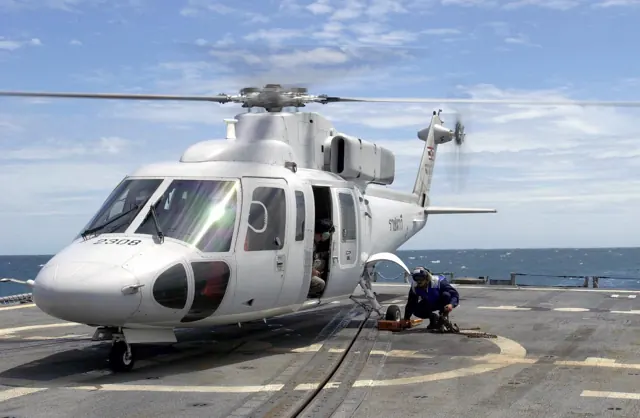
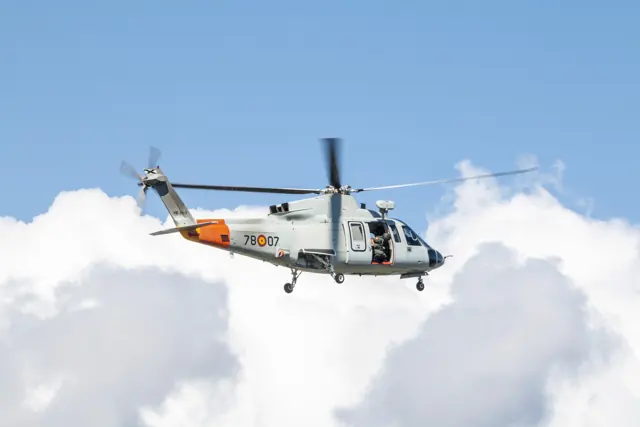
The S-76 was Sikorsky's first helicopter developed for the civil market. Twin turbines, a four-bladed main rotor and retractable gear supported passenger, offshore and emergency-service roles.
Aircraft background
Wikipedia contributors · Read more ↗An offshore pilot adjusts to the D model
After years flying the S-76, Reid encountered a noticeably different workplace in the D model. He described a quieter cabin and reduced vibration, along with fuel consumption that mattered to the payload available on familiar offshore routes. These were practical comparisons within an operator that had used several generations of the family.
Vertical interview · August 2015. National Helicopter Services chief pilot comparing S-76 variants in Trinidad and Tobago offshore work; fleet and capability statements are dated to the report.
Vertical · Read more ↗Autopilot engagement and coupling have separate commands
The guide distinguishes switching both autopilots on or off from disconnecting their actuators from the flight director. It also documents a separate collective-drive arm command. Those controls represent different actions in the package, even where the simulator’s event names resemble fixed-wing functions.
S-76C++ · CowanSim · MSFS 2020 / MSFS 2024
CowanSim · Read more ↗Into the cockpit
 YouTube
 TheHDAviation · 5 min ·
Sikorsky S-76 Helicopter Startup and Takeoff
An S-76C-2 starts and departs Vancouver Harbour on scheduled service.
Real aircraft · S-76C-2
Watch on YouTube ↗Preview images are served by AirframeDB. Videos open on YouTube only when you choose to watch.
Meet Sikorsky S-76
The S-76 was Sikorsky's first helicopter developed for the civil market. Twin turbines, a four-bladed main rotor and retractable gear supported passenger, offshore and emergency-service roles.
Engines and avionics changed across the programme. An S-76C+ photograph shows that particular version; simulator manuals identify the cockpit and autopilot equipment represented by their models.
Sikorsky S-76
Aircraft type designators
Use the code for the model you are flying. The linked authority lists the applicable aircraft.
History & design
A medical programme changes aircraft as its needs grow
Helinet’s Children’s Hospital Los Angeles programme progressed from an early A109 to S-76 variants with more cabin space. Robinson’s 2019 report describes an S-76B and C+ serving patient transfers, supported by dedicated pilots, medical crews and maintenance staff.
Vertical · How Helinet Aviation supports CHLA with S-76 helicopters ↗Operator’s paediatric transport programme as reported in 2019
The flight decision is separated from the patient’s condition
The report explains that Helinet pilots were not told a patient’s age or condition when considering a flight request. That programme policy aimed to keep emotional pressure out of the weather and flight-planning decision.
Vertical · How Helinet Aviation supports CHLA with S-76 helicopters ↗Specific operator policy reported in 2019
Development milestones
First flight: 13 March 1977 ( 1977-03-13 )
Wikipedia contributors · Sikorsky S-76 ↗Sikorsky S-76 · family/variant named by the source · Wikipedia revision 1367154066
Pilot accounts
An offshore pilot adjusts to the D model
After years flying the S-76, Reid encountered a noticeably different workplace in the D model. He described a quieter cabin and reduced vibration, along with fuel consumption that mattered to the payload available on familiar offshore routes. These were practical comparisons within an operator that had used several generations of the family.
The Thales cockpit required a change from earlier S-76 panels, but Reid welcomed the way information could be selected and controlled. He also valued the accuracy of the flight-control system in everyday flying. His enthusiasm sits within the specific environment of National Helicopter Services: hot, humid conditions and journeys to offshore installations. The interview presents his operating experience, without treating his positive assessment as a guarantee for every load or departure.
Vertical interview · August 2015. National Helicopter Services chief pilot comparing S-76 variants in Trinidad and Tobago offshore work; fleet and capability statements are dated to the report.
Read the full account · Vertical ↗The copilot who decided she would not fly another leg
Naktenis recalled passengers waiting in a running S-76 while approaching weather made the departure increasingly uncomfortable. She repeatedly questioned the decision to leave, but the captain continued after speaking with management. As visibility deteriorated further along the short route to JFK, her requests to turn back went unheeded.
They landed, and the passengers continued to their connections. Naktenis’s response was to resign and arrange a car home, leaving the helicopter without its required copilot. In retrospect she wished she had refused to remain aboard before departure. Her account describes the pressure she experienced and the boundary she eventually drew. It is an attributed recollection of one flight, rather than an investigation identifying an operator or a general judgement about the S-76.
AOPA Pilot · February 2026 issue. Retrospective S-76 flight from Manhattan’s East 34th Street heliport to JFK; exact date, operator, registration and variant are not disclosed.
Read the full account · AOPA Pilot ↗Showing visitors an experimental way to share control
Ward accompanied journalist Eric Adams during a demonstration of Sikorsky’s experimental Matrix system. He handled the start and taxi, then supervised as Adams used a tablet and alternative controls in flight. Ward also demonstrated the transition between conventional pilot inputs and the computer-managed flight, a central part of what the visit was intended to show.
In the interview, Ward described the resistance that such technology could initially provoke among experienced pilots. He wanted the system to leave crews more attention for their missions, and reported that pilots who tried it often changed their minds. This account combines his explanation with Adams’s observations during the flight. It concerns an experimental aircraft filled with test equipment, and does not imply that ordinary S-76s or their simulator models provide those capabilities.
Vertical · April 2019. Sikorsky test pilot interviewed and observed by Eric Adams aboard SARA, a heavily modified S-76 autonomy demonstrator; these controls are not standard S-76 equipment.
Read the full account · Vertical ↗In your simulator
Systems, equipment and documentation for each developer’s aircraft.
Compare simulator versions →X-Plane 12Sikorsky S-76
Laminar Research · Released
Sikorsky S-76
Laminar Research · Released
X-Plane 11Sikorsky S-76
Laminar Research · Released
Sikorsky S-76
Laminar Research · Released
MSFS 2020 / MSFS 2024S-76C++
CowanSim · Released
S-76C++
CowanSim · Released
Aircraft specifications
Published figures for the named real-aircraft variant. Simulator equipment and performance can differ.
| Specification | Published value |
|---|---|
| Length | 52 ft 6 in (16 m) from tip of main rotor to tip of tail rotor |
| Height | 14 ft 6 in (4.42 m) to tip of tail rotor |
| Empty weight | 7,005 lb (3,177 kg) in utility configuration |
| Gross weight | 11,700 lb (5,306 kg) |
| Powerplant | 2 × Turbomeca Arriel 2S2 turboshaft, 922 shp (688 kW) each |
| Main rotor diameter | 44 ft 0 in (13.41 m) |
| Maximum speed | 155 kn (178 mph, 287 km/h) at maximum takeoff weight at sea level in standard atmospheric conditions |
| Cruise speed | 155 kn (178 mph, 287 km/h) maximum cruise speed is the same as maximum speed |
| Range | 411 nmi (473 mi, 761 km) no reserves, at long-range cruise speed at 4,000 ft altitude |
| Service ceiling | 13,800 ft (4,200 m) |
Manuals & resources
Find your next read
Choose a topic for a short introduction and a link to the original source. Simulator references identify the developer and edition they cover.
Simulator documentation
Autopilot engagement and coupling have separate commandsS-76C++ · CowanSim · MSFS 2020 / MSFS 2024
The guide distinguishes switching both autopilots on or off from disconnecting their actuators from the flight director. It also documents a separate collective-drive arm command. Those controls represent different actions in the package, even where the simulator’s event names resemble fixed-wing functions.
Setup and controls manual · PDF pp.7–8
CowanSim · Read the source ↗An additional S-76 choice for MSFSS-76C++ · CowanSim · MSFS 2020 / MSFS 2024
CowanSim’s official manual identifies the S-76C++ package for MSFS 2020 and 2024. Its v1.2.0 description includes alternative VIP, medical and offshore cabin configurations. This is separate from the S-76 supplied with X-Plane.
Official manual v1.0 · package v1.2.0 · PDF pp.1–2
CowanSim · Read the source ↗Pilot account
An offshore pilot adjusts to the D modelVertical interview · August 2015. National Helicopter Services chief pilot comparing S-76 variants in Trinidad and Tobago offshore work; fleet and capability statements are dated to the report.
After years flying the S-76, Reid encountered a noticeably different workplace in the D model. He described a quieter cabin and reduced vibration, along with fuel consumption that mattered to the payload available on familiar offshore routes. These were practical comparisons within an operator that had used several generations of the family. The Thales cockpit required a change from earlier S-76 panels, but Reid welcomed the way information could be selected and controlled.
Sean Reid
Vertical · Read the source ↗The copilot who decided she would not fly another legAOPA Pilot · February 2026 issue. Retrospective S-76 flight from Manhattan’s East 34th Street heliport to JFK; exact date, operator, registration and variant are not disclosed.
Naktenis recalled passengers waiting in a running S-76 while approaching weather made the departure increasingly uncomfortable. She repeatedly questioned the decision to leave, but the captain continued after speaking with management. As visibility deteriorated further along the short route to JFK, her requests to turn back went unheeded. They landed, and the passengers continued to their connections.
Christine Naktenis
AOPA Pilot · Read the source ↗Read the original documentation from the people who created it. Manuals open on their publisher’s website.
Manual
X-Plane 12 Desktop ManualLaminar Research X-Plane aircraft and avionics manualsLaminar Research X-Plane 11 Desktop ManualLaminar ResearchAircraft background
Sikorsky S-76Wikipedia contributors · Research background · Wikipedia revision 1367154066 · retrieved 2026-09-12 How Helinet Aviation supports CHLA with S-76 helicoptersVertical · Skip Robinson · 13 March 2019Developer documentation
CowanSim S-76C++ official manual v1.0CowanSim · Package v1.2.0; MSFS 2020 and 2024 · PDF pp.1–2 CowanSim S76C++ setup and controls manualCowanSim · Gathered developer guide · PDF pp.1–13 August 21st, 2025 Development UpdateMicrosoft Flight Simulator Team · MSFS 2020 Marketplace update listing · 21 August 2025Type designator
ICAO Doc 8643 — aircraft type designatorsInternational Civil Aviation Organization · Public search data retrieved 2026-09-14; authority update 2026-09-03Built-in force-feedback profiles
Read the documentary basis, editable starting settings and remaining questions for the aircraft you fly. Each explanation refers to the exact profile revision shown.
Catalogue programme-20261022-v1 · 2 profile choices
CowanSim S-76C
CowanSim · Free and Pro · Revision 2 · Inherited starting point
MSFS 2020 · MSFS 2024
CowanSim S-76C: The spring and damping approximate a supported cyclic around those AFCS functions.
Sikorsky S-76
Free and Pro · Revision 1 · Review pending
X-Plane 12 · X-Plane 11 · MSFS 2024 · MSFS 2020
Sikorsky S-76: The spring and damping approximate a supported cyclic around those AFCS functions.
Sikorsky S-76
Sikorsky S-76: The spring and damping approximate a supported cyclic around those AFCS functions.
Aircraft and simulator scope
- Sikorsky S-76 · X-Plane 12 · family starting point
- Sikorsky S-76 · X-Plane 11 · family starting point
- Sikorsky S-76 · MSFS 2024 · family starting point
- Sikorsky S-76 · MSFS 2020 · family starting point
Sikorsky S-76 · Family sources identify only the variants and product versions described above.
The simulator model and controls
The S-76 was Sikorsky's first helicopter developed for the civil market. Twin turbines, a four-bladed main rotor and retractable gear supported passenger, offshore and emergency-service roles.
This starting point selects Sikorsky S-76. Its aircraft-level settings do not select a particular developer’s custom systems.
How this profile feels
The spring and damping approximate a supported cyclic around those AFCS functions. Spring resistance builds with the selected airspeed response. A separate aerodynamic term adds speed-dependent control load. Cyclic damping adds resistance to hardware motion.
Mode-dependent beep trim is broader than a local spring-centre latch. Local force trim is off. Autopilot following is off.
Controls and trim
The S76 documentation separates SAS, attitude retention, four-axis automatic flight and the flight director. Beep-trim meaning changes in IAS and vertical-speed modes; rotor-trim reset is a separate command.
About the values
The gains are normalized profile settings. They describe the chosen effect balance; hand force depends on the device and its output limits. IAS references are tuning values rather than operating limits. Physical acceptance of this revision remains pending.
Documentary review and sources
These decisions describe the documentary basis and remaining gaps for this revision. Aircraft documentation and a starting setting describe different kinds of evidence.
Aircraft and variant
Not yet reviewedThis starting point selects Sikorsky S-76. Its aircraft-level settings do not select a particular developer’s custom systems.
Flight controls
Not yet reviewedThe S76 documentation separates SAS, attitude retention, four-axis automatic flight and the flight director. Beep-trim meaning changes in IAS and vertical-speed modes; rotor-trim reset is a separate command.
Trim
Not yet reviewedMode-dependent beep trim is broader than a local spring-centre latch. Local force trim is off. Autopilot following is off.
Autopilot and stability
Not yet reviewedAutopilot following is off; the configured spring and load retain the hardware feel.
Equipment
Not yet reviewedGear, flap and ground cues follow the selected settings and available simulator-reported states.
Speeds and limits
Not yet reviewedThe indicated-speed references set the profile response scale; they are separate from aircraft operating limits.
Simulator integration
Not yet reviewedThe profile targets xplane12, xplane11, msfs2024, msfs2020. Add-on-specific controls use only the supported references configured by this profile.
Force-feedback settings
Not yet reviewedThe settings define the profile’s effect balance. Device output limits affect physical hand force.
Starting settings and their rationale
These configured values are starting estimates. The explanations describe what each setting controls; physical validation appears separately below.
| Setting | Starting value | What it controls and why |
|---|---|---|
| Spring strength | Starting value0 | What it controls and whyThe spring and damping approximate a supported cyclic around those AFCS functions. The baseline spring is 0. Its low-speed blend reaches baseline strength at 70 KIAS. |
| Master force gain | Starting value0.85 | What it controls and whyScales overall profile strength while preserving effect balance, subject to device and output limits. |
| Profile force gain | Starting value0.35 | What it controls and whyThe aerodynamic-load gain is 0.35 with an indicated-speed reference of 140 KIAS. This supplies speed-dependent loading alongside the spring. |
| Force tuning speed/reference | Starting value140.0 kt | What it controls and whySets the IAS reference for aerodynamic loading. It is an estimate, not published cruise TAS or a flight limit. |
| Spring response reference speed | Starting value70.0 kt | What it controls and whySets the IAS where the low-speed blend reaches baseline strength; high-speed stiffening also uses it. |
| Aileron force scale | Starting value1 | What it controls and whyRoll and pitch aerodynamic scales are 1 and 1, respectively. They set the aerodynamic axis balance. No custom spring-travel curve is enabled. |
| Elevator force scale | Starting value1 | What it controls and whyScales pitch aerodynamic loading; pitch spring travel and trim responses are separate settings. |
| Trim feel | Starting valueDisabled | What it controls and whyRetained for compatibility and group membership. Trim relief, rather than this flag, controls centre movement. |
| Trim relief | Starting valueDisabled | What it controls and whyAllows trim relief with supported control law and valid telemetry. Axis authorities set its amount. |
| Autopilot follow | Starting valueDisabled | What it controls and whyAutopilot following is off; the configured spring and load retain the hardware feel. |
| Autopilot neutral hold | Starting valueDisabled | What it controls and whyPermits centering hold during a supported AP state, separate from following a moving target. |
| Output force limit | Starting value0.55 | What it controls and whyCaps directed-force output. Native spring effects and device limits remain separate. |
All 44 starting settings and their rationale
The settings define the profile’s effect balance. Device output limits affect physical hand force.
| Setting | Starting value | What it controls and why |
|---|---|---|
| Spring strength | Starting value0 | What it controls and whyThe spring and damping approximate a supported cyclic around those AFCS functions. The baseline spring is 0. Its low-speed blend reaches baseline strength at 70 KIAS. |
| Spring deadband | Starting value0.02 | What it controls and whySets travel around the centre before the baseline spring resists. Smaller values engage it sooner. |
| Profile force gain | Starting value0.35 | What it controls and whyThe aerodynamic-load gain is 0.35 with an indicated-speed reference of 140 KIAS. This supplies speed-dependent loading alongside the spring. |
| Master force gain | Starting value0.85 | What it controls and whyScales overall profile strength while preserving effect balance, subject to device and output limits. |
| QBlend Enabled | Starting valueEnabled | What it controls and whyAllows baseline spring strength to rise with indicated airspeed where the control law permits it. |
| QSpring Minimum Factor | Starting value1 | What it controls and whySets low-speed spring strength as a fraction of baseline when blending is enabled. One keeps full strength. |
| QSpring Start Knots | Starting value19.6 kt | What it controls and whySets the IAS where the low-speed spring blend starts rising. This is a feel threshold, not a flight limit. |
| Spring response reference speed | Starting value70.0 kt | What it controls and whySets the IAS where the low-speed blend reaches baseline strength; high-speed stiffening also uses it. |
| Force tuning speed/reference | Starting value140.0 kt | What it controls and whySets the IAS reference for aerodynamic loading. It is an estimate, not published cruise TAS or a flight limit. |
| Airspeed spring stiffening gain | Starting value0 | What it controls and whyAdds permitted spring resistance above the full-blend speed. Zero removes this high-speed increase. |
| Airspeed spring stiffening limit | Starting value5 | What it controls and whyLimits the squared airspeed ratio used for high-speed spring stiffening; it is not a device-force cap. |
| Aileron force scale | Starting value1 | What it controls and whyRoll and pitch aerodynamic scales are 1 and 1, respectively. They set the aerodynamic axis balance. No custom spring-travel curve is enabled. |
| Elevator force scale | Starting value1 | What it controls and whyScales pitch aerodynamic loading; pitch spring travel and trim responses are separate settings. |
| Output force limit | Starting value0.55 | What it controls and whyCaps directed-force output. Native spring effects and device limits remain separate. |
| Trim feel | Starting valueDisabled | What it controls and whyRetained for compatibility and group membership. Trim relief, rather than this flag, controls centre movement. |
| Trim relief | Starting valueDisabled | What it controls and whyAllows trim relief with supported control law and valid telemetry. Axis authorities set its amount. |
| Elevator Authority | Starting value0.3 | What it controls and whyScales supported pitch-trim relief and permitted centre movement. Zero removes pitch response. |
| Aileron Authority | Starting value0.3 | What it controls and whyScales supported roll-trim relief and permitted centre movement. Zero removes roll response. |
| Force Trim Enabled | Starting valueDisabled | What it controls and whyMode-dependent beep trim is broader than a local spring-centre latch. Local force trim is off. The stored latch parameters are inactive; the profile does not supply a local hold-where-left neutral. |
| GLoad Enabled | Starting valueDisabled | What it controls and whyAllows load-factor changes to modify permitted spring laws. Passive fly-by-wire feel can suppress it. |
| Rate Damping Enabled | Starting valueEnabled | What it controls and whyEnables rate damping with the configured coefficients and control law. |
| Autopilot follow | Starting valueDisabled | What it controls and whyAutopilot following is off; the configured spring and load retain the hardware feel. |
| Autopilot follow authority | Starting value0.05 | What it controls and whySets admitted AP-follow gain, not a percentage of travel. Runtime ownership and input limits still apply. |
| Autopilot neutral hold | Starting valueDisabled | What it controls and whyPermits centering hold during a supported AP state, separate from following a moving target. |
| Autopilot neutral hold strength | Starting value0.6 | What it controls and whySets admitted AP neutral-hold strength; inactive while neutral hold is disabled. |
| Enabled | Starting valueEnabled | What it controls and whyEnables aerodynamic cues; each still needs nonzero strength and its simulator conditions. |
| Gain | Starting value0 | What it controls and whySets stall-buffet strength. Zero removes the cue without changing simulator stalls or warnings. |
| Gain | Starting value0 | What it controls and whySets high-Mach buffet strength; onset and full-strength thresholds are separate. |
| Gain | Starting value0 | What it controls and whySets flap buffet at the configured position and speed gates. Flap movement texture is separate. |
| Maximum flap index | Starting value1 | What it controls and whySets the final flap index for detent normalization. UP plus three detents uses maximum index3. |
| Minimum flap index | Starting value1 | What it controls and whySets the first flap detent that admits buffet; this is a handle index, not degrees. |
| Gain | Starting value0.1 | What it controls and whySets gear aerodynamic buffet; movement and ground-contact cues are separate. |
| Shaker Enabled | Starting valueDisabled | What it controls and whyPermits shaker at supported warning conditions; the switch does not establish aircraft equipment. |
| Stick shaker amplitude | Starting value0.5 | What it controls and whySets triggered shaker strength; inactive while the shaker feature is disabled. |
| Enabled | Starting valueEnabled | What it controls and whyEnables ground effects; each still needs its own strength and contact or motion telemetry. |
| Gain | Starting value0.15 | What it controls and whySets rolling texture strength, modified by speed, surface and undercarriage configuration. |
| Gain | Starting value0 | What it controls and whySets gear-bump texture during ground motion, separate from touchdown impact. |
| Gain | Starting value0.5 | What it controls and whySets landing-impact strength; landing telemetry and response shape determine the pulse. |
| Gain | Starting value0 | What it controls and whySets reverse-thrust vibration with valid reverser and engine conditions. Zero removes the cue. |
| Enabled | Starting valueEnabled | What it controls and whyEnables engine cues with nonzero settings and valid running-engine telemetry. |
| Gain | Starting value0.06 | What it controls and whySets estimated engine vibration using configured telemetry and response, not measured cockpit vibration. |
| Enabled | Starting valueEnabled | What it controls and whyEnables accessory cues with configured strengths and observed accessory movement. |
| Gain | Starting value0 | What it controls and whySets texture from observed flap movement; a command without movement does not establish the cue. |
| Gain | Starting value0.12 | What it controls and whySets texture from observed gear movement, separate from aerodynamic and touchdown effects. |
Limits and open questions
- The selected source is multi-aircraft noise research, not a matched S-76 identity/control manual.
- Noise measurements do not establish cyclic/hydraulic gearing.
- Force trim is off; prior generic trim text is not an enabled-system claim.
- No S-76 AFCS demand contract; follow stays off.
- Four-blade/turbine/retracting-wheel settings need exact equipment evidence.
- Noise-test speed points do not calibrate IAS forces.
- Noise documentation cannot qualify XP12 control signals.
- Rotor/cyclic estimates do not implement S-76 SAS/AFCS forces.
Physical validation
No physical force validation is recorded in this public catalogue for this revision. Documentary review and software checks do not establish how a particular device feels.
Discuss this aircraft (0)
Questions, observations and useful sources from the community.
No published discussions yet. Bring a question or share a useful source.
Open aircraft discussions →Content expanded · What’s new
Something missing or a source that needs attention?
Suggest a correction ↗