
Start here
A few places to begin, from the aircraft’s story to the people who fly it.
Meet the aircraft
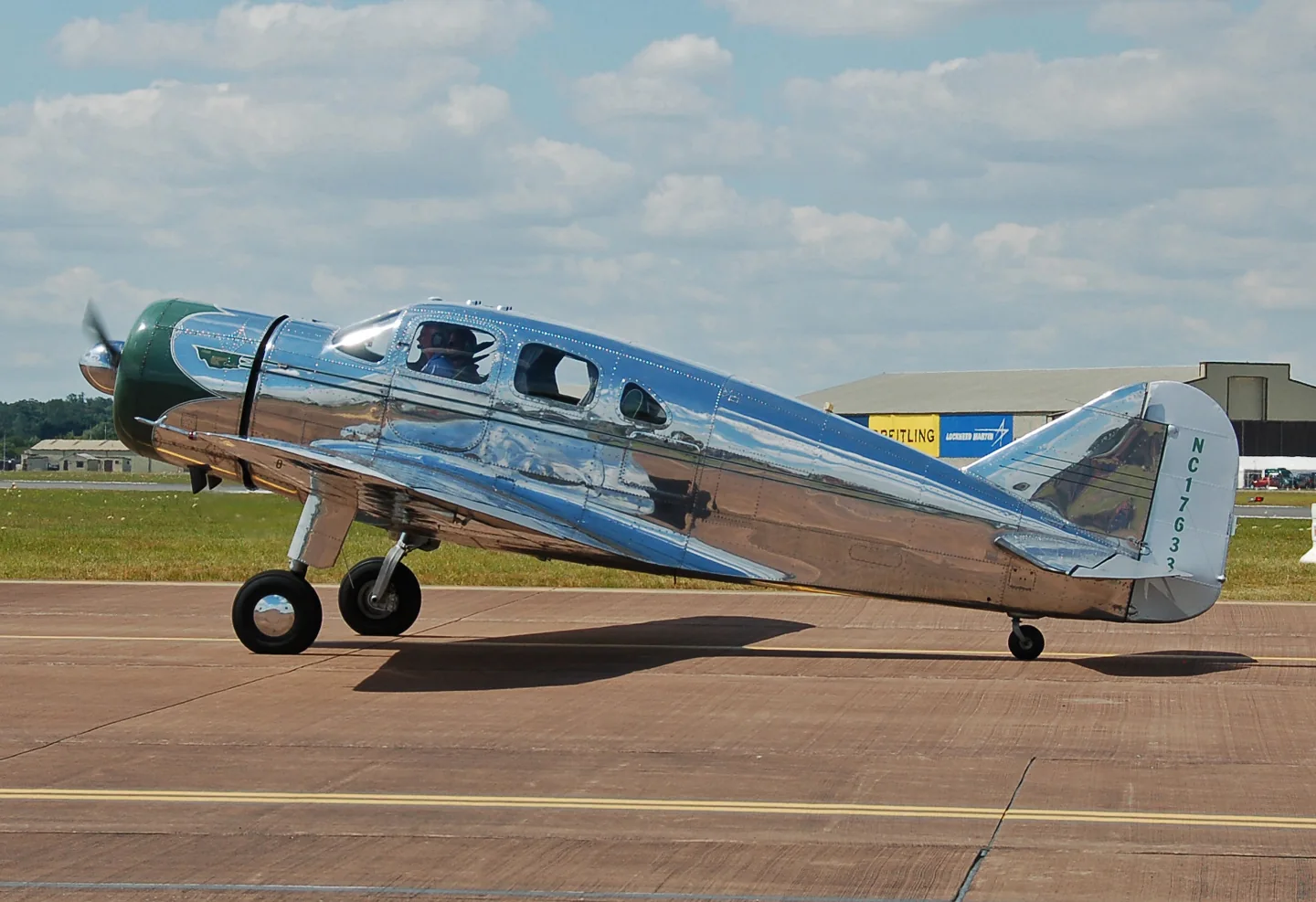
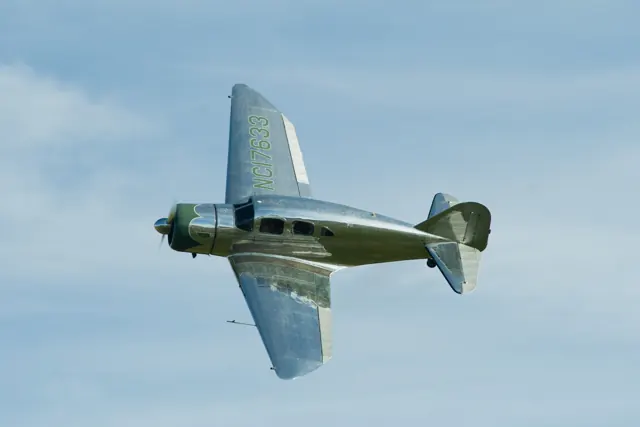
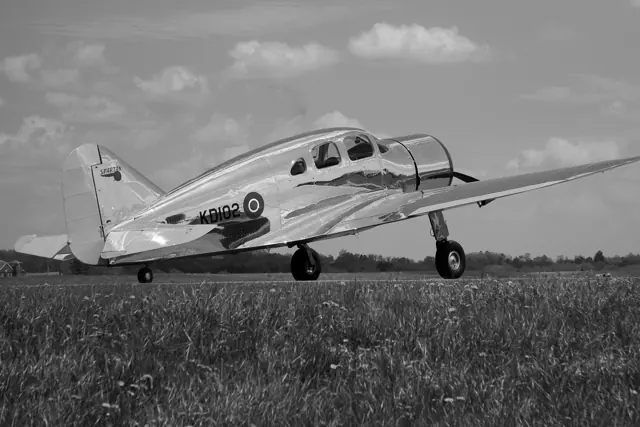
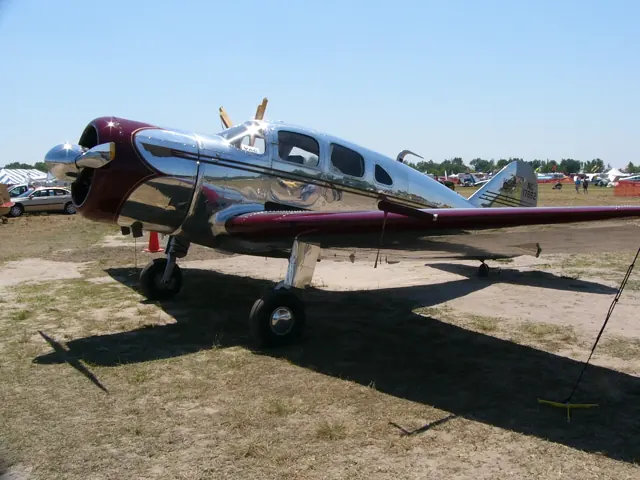
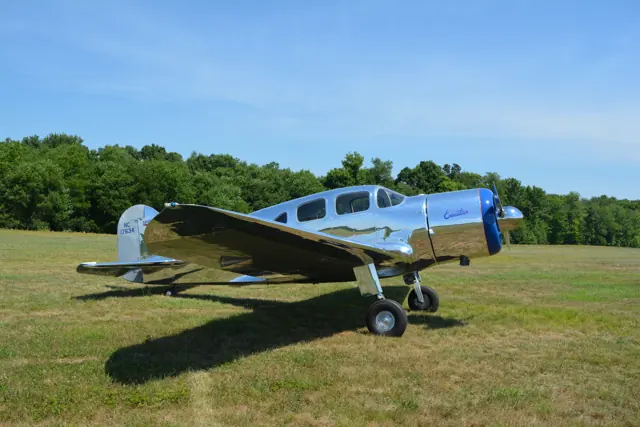
Spartan built the 7W Executive in the late 1930s and early 1940s for private and business flying. Its enclosed cabin, all-metal fuselage and retractable landing gear were features of the design. Surviving aircraft remain in the photographic record.
Aircraft background
Wikipedia contributors · Read more ↗A long-imagined aircraft becomes the journey to Oshkosh
Savage’s interest began with admiration for an aircraft he had seen in a hangar. Years of research and anticipation eventually led to ownership. Flying it to Oshkosh gave that ambition a practical expression: a journey that took much of a day by road became a few hours accompanied by the radial engine’s distinctive sound. He valued comfortable travel more than extracting the highest possible speed.
Rag & Tube · December 2016, reprinted by the owner. Spartan serial 17, NC17634, acquired in 2008.
VintageSpartanAircraft.com / Rag & Tube · Read more ↗Choose a classic, modern or mixed cockpit
The Spartan package offers Classic, Modern and Hybrid configurations. The Classic variant can switch instruments through its EFB; the Hybrid combines a modern panel with the older cabin style.
Spartan 7W Executive · iniBuilds · MSFS 2020 · MSFS 2024
iniBuilds · Read more ↗Into the cockpit
 YouTube
 iniBuilds · 22 min ·
Welcome to the Spartan 7W Executive | Microsoft Flight Simulator
iniBuilds introduces its Spartan Executive for MSFS 2020 and 2024.
Simulator · iniBuilds Spartan · MSFS 2020/2024
Watch on YouTube ↗Preview images are served by AirframeDB. Videos open on YouTube only when you choose to watch.
Meet Spartan 7W Executive
Spartan built the 7W Executive in the late 1930s and early 1940s for private and business flying. Its enclosed cabin, all-metal fuselage and retractable landing gear were features of the design. Surviving aircraft remain in the photographic record.
Spartan 7W Executive
Spartan → · Explore the family →
Spartan 7W Executive
Wikipedia contributors · Spartan Executive ↗iniBuilds · MSFS 2020 · MSFS 2024 →Aircraft type designators
Use the code for the model you are flying. The linked authority lists the applicable aircraft.
History & design
Development milestones
First flight: March 8, 1936
Wikipedia contributors · Spartan Executive ↗Spartan Executive · family/variant named by the source · Wikipedia revision 1313937045
Pilot accounts
A long-imagined aircraft becomes the journey to Oshkosh
Savage’s interest began with admiration for an aircraft he had seen in a hangar. Years of research and anticipation eventually led to ownership. Flying it to Oshkosh gave that ambition a practical expression: a journey that took much of a day by road became a few hours accompanied by the radial engine’s distinctive sound.
He valued comfortable travel more than extracting the highest possible speed. The aircraft also made even an ordinary arrival a public occasion, with cameras appearing as the engine announced its presence. After putting it away, he would sometimes stop and take another photograph himself.
Rag & Tube · December 2016, reprinted by the owner. Spartan serial 17, NC17634, acquired in 2008.
Read the full account · VintageSpartanAircraft.com / Rag & Tube ↗The busy panel becomes a rewarding travelling companion
The writer recognised how discouraging the Spartan’s many controls could look to someone used to a simpler aeroplane. During the first climb, sorting out the cockpit could consume enough attention that the airport slipped several miles behind. Once settled, the aircraft’s steady ride and responsive handling made it much easier to appreciate.
Approach and landing supplied another surprise: the aircraft could descend much more steeply than the pilot’s familiar visual judgement suggested. The report liked its final landing feel while noting the care required with the limited forward view.
November 1939 flight evaluation, transcribed by VintageSpartanAircraft.com. The original publication did not identify the writer; historical cockpit practice is retained as period context.
Read the full account · Air Facts / VintageSpartanAircraft.com ↗A working aircraft becomes a cherished visitor to fly-ins
Hartness rescued a Spartan that had spent years abandoned and damaged. A comprehensive restoration, including replacement of its skin, brought it back to flying condition in 1974. In the years that followed, he used the Executive in his business before gradually making it an aircraft he flew for pleasure.
By the time of Davisson’s report, Hartness described a quieter stage of its life, visiting fly-ins and taking special trips. His affection had survived decades of ownership, and he wanted the aircraft to remain at Triple Tree.
Budd Davisson’s Vintage Airplane report · May/June 2017, printed pages 23–24. Spartan serial 13, NC13PH; Hartness’s recollection of business and leisure flying.
Read the full account · Vintage Airplane ↗In your simulator
Systems, equipment and documentation for each developer’s aircraft.
MSFS 2020 · MSFS 2024Spartan 7W Executive
iniBuilds · Released
Spartan 7W Executive
iniBuilds · Released
Aircraft specifications
Published figures for the named real-aircraft variant. Simulator equipment and performance can differ.
| Specification | Published value |
|---|---|
| Length | 26 ft 10 in (8.18 m) |
| Wingspan | 39 ft 0 in (11.89 m) |
| Height | 8 ft 0 in (2.44 m) |
| Wing area | 250 sq ft (23 m² ) |
| Empty weight | 3,400 lb (1,542 kg) |
| Max takeoff weight | 4,400 lb (1,996 kg) |
| Powerplant | 1 × Pratt & Whitney R-985 9-cylinder air-cooled radial piston engine , 450 hp (340 kW) |
| Propellers | 2-bladed variable-pitch propeller |
| Maximum speed | 257 mph (414 km/h, 223 kn) |
| Cruise speed | 215 mph (346 km/h, 187 kn) |
| Range | 1,000 mi (1,600 km, 870 nmi) |
| Service ceiling | 24,000 ft (7,300 m) |
| Rate of climb | 1,080 ft/min (5.5 m/s) |
Manuals & resources
Find your next read
Choose a topic for a short introduction and a link to the original source. Simulator references identify the developer and edition they cover.
Simulator documentation
Choose a classic, modern or mixed cockpitSpartan 7W Executive · iniBuilds · MSFS 2020 · MSFS 2024
The Spartan package offers Classic, Modern and Hybrid configurations. The Classic variant can switch instruments through its EFB; the Hybrid combines a modern panel with the older cabin style.
iniBuilds MSFS2020 and MSFS2024 product description
iniBuilds · Read the source ↗Set up the aircraft on the groundSpartan 7W Executive · iniBuilds · MSFS 2020 · MSFS 2024
The EFB controls exterior items including covers, wheel chocks, safety flags and an oil drip tray. The listing specifically assigns its external preflight walk-around feature to MSFS2024.
Edition-specific feature retained from the developer listing
iniBuilds · Read the source ↗Navigation equipment follows the chosen cockpitSpartan 7W Executive · iniBuilds · MSFS 2020 · MSFS 2024
The developer lists navigation instruments, an autopilot and radio communications integrated into the different cockpit arrangements. The Modern cabin also offers selectable night-lighting colours.
Spartan product feature list; specific equipment should be checked for the chosen variant
iniBuilds · Read the source ↗Pilot account
A long-imagined aircraft becomes the journey to OshkoshRag & Tube · December 2016, reprinted by the owner. Spartan serial 17, NC17634, acquired in 2008.
Savage’s interest began with admiration for an aircraft he had seen in a hangar. Years of research and anticipation eventually led to ownership. Flying it to Oshkosh gave that ambition a practical expression: a journey that took much of a day by road became a few hours accompanied by the radial engine’s distinctive sound. He valued comfortable travel more than extracting the highest possible speed.
Jim Savage
VintageSpartanAircraft.com / Rag & Tube · Read the source ↗The busy panel becomes a rewarding travelling companionNovember 1939 flight evaluation, transcribed by VintageSpartanAircraft.com. The original publication did not identify the writer; historical cockpit practice is retained as period context.
The writer recognised how discouraging the Spartan’s many controls could look to someone used to a simpler aeroplane. During the first climb, sorting out the cockpit could consume enough attention that the airport slipped several miles behind. Once settled, the aircraft’s steady ride and responsive handling made it much easier to appreciate. Approach and landing supplied another surprise: the aircraft could descend much more steeply than the pilot’s familiar visual judgement suggested.
Unnamed Air Facts pilot
Air Facts / VintageSpartanAircraft.com · Read the source ↗Read the original documentation from the people who created it. Manuals open on their publisher’s website.
Aircraft background
Spartan ExecutiveWikipedia contributors · Research background · retrieved 2026-09-12Product
Spartan 7W Executive for MSFSiniBuilds · Official developer / designated store catalogue · checked 2026-09-12Type designator
ICAO Doc 8643 — aircraft type designatorsInternational Civil Aviation Organization · Public search data retrieved 2026-09-14; authority update 2026-09-03Built-in force-feedback profiles
Read the documentary basis, editable starting settings and remaining questions for the aircraft you fly. Each explanation refers to the exact profile revision shown.
Catalogue programme-20261022-v1 · 2 profile choices
iniBuilds Spartan 7W Executive
iniBuilds · Free and Pro · Revision 2 · Inherited starting point
MSFS 2020 · MSFS 2024
iniBuilds Spartan 7W Executive: The mechanical linkage motivates reversible transport loading.
Spartan 7W Executive
Free and Pro · Revision 1 · Partial review
MSFS 2024 · MSFS 2020
Spartan 7W Executive: The mechanical linkage motivates reversible transport loading.
iniBuilds Spartan 7W Executive
iniBuilds Spartan 7W Executive: The mechanical linkage motivates reversible transport loading.
Aircraft and simulator scope
- iniBuilds Spartan 7W Executive · iniBuilds · MSFS 2020 · Add-on starting point
- iniBuilds Spartan 7W Executive · iniBuilds · MSFS 2024 · Add-on starting point
The simulator model and controls
Spartan built the 7W Executive in the late 1930s and early 1940s for private and business flying. Its enclosed cabin, all-metal fuselage and retractable landing gear were features of the design. Surviving aircraft remain in the photographic record.
This profile selects iniBuilds Spartan 7W Executive for MSFS 2020, MSFS 2024.
How this profile feels
The mechanical linkage motivates reversible transport loading. Spring resistance builds with the selected airspeed response. A separate aerodynamic term adds speed-dependent control load.
The screw-driven elevator tab supplies pitch trim independently of vacuum flaps. Valid trim provides the configured pressure relief. Autopilot following is off.
Controls and trim
The Spartan uses pushrod/cable elevator control and chain/cable/pushrod ailerons. A non-reversing screw drives its cable-operated elevator tab. Vacuum circuits separately operate wing and centre flaps, while electric gear has an emergency handcrank.
The selected implementation
iniBuilds’ Spartan offers classic, modern Garmin and hybrid cockpit/cabin combinations. The historical aircraft uses manual linkage and an electrically driven landing gear with an emergency handcrank.
About the values
The gains are normalized profile settings. They describe the chosen effect balance; hand force depends on the device and its output limits. IAS references are tuning values rather than operating limits. Physical acceptance of this revision remains pending.
Documentary review and sources
These decisions describe the documentary basis and remaining gaps for this revision. Aircraft documentation and a starting setting describe different kinds of evidence.
Aircraft and variant
InheritedThis profile selects iniBuilds Spartan 7W Executive for MSFS 2020, MSFS 2024.
Flight controls
InheritedThe Spartan uses pushrod/cable elevator control and chain/cable/pushrod ailerons. A non-reversing screw drives its cable-operated elevator tab. Vacuum circuits separately operate wing and centre flaps, while electric gear has an emergency handcrank.
Trim
InheritedThe screw-driven elevator tab supplies pitch trim independently of vacuum flaps. Pitch authority 0.3 provides load relief and permitted centre movement; roll authority is 0.
Autopilot and stability
InheritedAutopilot following is off; the configured spring and load retain the hardware feel.
Equipment
InheritediniBuilds’ Spartan offers classic, modern Garmin and hybrid cockpit/cabin combinations. The historical aircraft uses manual linkage and an electrically driven landing gear with an emergency handcrank.
Speeds and limits
InheritedThe indicated-speed references set the profile response scale; they are separate from aircraft operating limits.
Simulator integration
InheritedThe profile targets msfs2020, msfs2024. Add-on-specific controls use only the supported references configured by this profile.
Force-feedback settings
InheritedThe settings define the profile’s effect balance. Device output limits affect physical hand force.
Starting settings and their rationale
These configured values are starting estimates. The explanations describe what each setting controls; physical validation appears separately below.
| Setting | Starting value | What it controls and why |
|---|---|---|
| Spring strength | Starting value0.74 | What it controls and whyThe mechanical linkage motivates reversible transport loading. The baseline spring is 0.74. Its low-speed blend reaches baseline strength at 75 KIAS. |
| Master force gain | Starting value0.85 | What it controls and whyScales overall profile strength while preserving effect balance, subject to device and output limits. |
| Profile force gain | Starting value0.8 | What it controls and whyThe aerodynamic-load gain is 0.8 with an indicated-speed reference of 140 KIAS. This supplies speed-dependent loading alongside the spring. |
| Force tuning speed/reference | Starting value140 kt | What it controls and whySets the IAS reference for aerodynamic loading. It is an estimate, not published cruise TAS or a flight limit. |
| Spring response reference speed | Starting value75 kt | What it controls and whySets the IAS where the low-speed blend reaches baseline strength; high-speed stiffening also uses it. |
| Aileron force scale | Starting value0.75 | What it controls and whyRoll and pitch aerodynamic scales are 0.75 and 1, respectively. They set the aerodynamic axis balance. No custom spring-travel curve is enabled. |
| Elevator force scale | Starting value1 | What it controls and whyScales pitch aerodynamic loading; pitch spring travel and trim responses are separate settings. |
| Trim feel | Starting valueDisabled | What it controls and whyRetained for compatibility and group membership. Trim relief, rather than this flag, controls centre movement. |
| Trim relief | Starting valueEnabled | What it controls and whyAllows trim relief with supported control law and valid telemetry. Axis authorities set its amount. |
| Autopilot follow | Starting valueDisabled | What it controls and whyAutopilot following is off; the configured spring and load retain the hardware feel. |
| Autopilot neutral hold | Starting valueDisabled | What it controls and whyPermits centering hold during a supported AP state, separate from following a moving target. |
| Output force limit | Starting value0.55 | What it controls and whyCaps directed-force output. Native spring effects and device limits remain separate. |
All 44 starting settings and their rationale
The settings define the profile’s effect balance. Device output limits affect physical hand force.
| Setting | Starting value | What it controls and why |
|---|---|---|
| Spring strength | Starting value0.74 | What it controls and whyThe mechanical linkage motivates reversible transport loading. The baseline spring is 0.74. Its low-speed blend reaches baseline strength at 75 KIAS. |
| Spring deadband | Starting value0.04 | What it controls and whySets travel around the centre before the baseline spring resists. Smaller values engage it sooner. |
| Profile force gain | Starting value0.8 | What it controls and whyThe aerodynamic-load gain is 0.8 with an indicated-speed reference of 140 KIAS. This supplies speed-dependent loading alongside the spring. |
| Master force gain | Starting value0.85 | What it controls and whyScales overall profile strength while preserving effect balance, subject to device and output limits. |
| QBlend Enabled | Starting valueEnabled | What it controls and whyAllows baseline spring strength to rise with indicated airspeed where the control law permits it. |
| QSpring Minimum Factor | Starting value0.55 | What it controls and whySets low-speed spring strength as a fraction of baseline when blending is enabled. One keeps full strength. |
| QSpring Start Knots | Starting value25 kt | What it controls and whySets the IAS where the low-speed spring blend starts rising. This is a feel threshold, not a flight limit. |
| Spring response reference speed | Starting value75 kt | What it controls and whySets the IAS where the low-speed blend reaches baseline strength; high-speed stiffening also uses it. |
| Force tuning speed/reference | Starting value140 kt | What it controls and whySets the IAS reference for aerodynamic loading. It is an estimate, not published cruise TAS or a flight limit. |
| Airspeed spring stiffening gain | Starting value0.15 | What it controls and whyThe high-speed spring-stiffening gain is 0.15. It strengthens the permitted spring response above 75 KIAS, with the squared-speed ratio capped at 5. |
| Airspeed spring stiffening limit | Starting value5 | What it controls and whyLimits the squared airspeed ratio used for high-speed spring stiffening; it is not a device-force cap. |
| Aileron force scale | Starting value0.75 | What it controls and whyRoll and pitch aerodynamic scales are 0.75 and 1, respectively. They set the aerodynamic axis balance. No custom spring-travel curve is enabled. |
| Elevator force scale | Starting value1 | What it controls and whyScales pitch aerodynamic loading; pitch spring travel and trim responses are separate settings. |
| Output force limit | Starting value0.55 | What it controls and whyCaps directed-force output. Native spring effects and device limits remain separate. |
| Trim feel | Starting valueDisabled | What it controls and whyRetained for compatibility and group membership. Trim relief, rather than this flag, controls centre movement. |
| Trim relief | Starting valueEnabled | What it controls and whyAllows trim relief with supported control law and valid telemetry. Axis authorities set its amount. |
| Elevator Authority | Starting value0.3 | What it controls and whyThe screw-driven elevator tab supplies pitch trim independently of vacuum flaps. Pitch authority 0.3 provides load relief and permitted centre movement; roll authority is 0. |
| Aileron Authority | Starting value0 | What it controls and whyScales supported roll-trim relief and permitted centre movement. Zero removes roll response. |
| Force Trim Enabled | Starting valueDisabled | What it controls and whyEnables local force trim, separate from aircraft-owned trim and add-on integration qualification. |
| GLoad Enabled | Starting valueEnabled | What it controls and whyAllows load-factor changes to modify permitted spring laws. Passive fly-by-wire feel can suppress it. |
| Rate Damping Enabled | Starting valueEnabled | What it controls and whyEnables rate damping with the configured coefficients and control law. |
| Autopilot follow | Starting valueDisabled | What it controls and whyAutopilot following is off; the configured spring and load retain the hardware feel. |
| Autopilot follow authority | Starting value0.1 | What it controls and whySets admitted AP-follow gain, not a percentage of travel. Runtime ownership and input limits still apply. |
| Autopilot neutral hold | Starting valueDisabled | What it controls and whyPermits centering hold during a supported AP state, separate from following a moving target. |
| Autopilot neutral hold strength | Starting value0.6 | What it controls and whySets admitted AP neutral-hold strength; inactive while neutral hold is disabled. |
| Enabled | Starting valueEnabled | What it controls and whyEnables aerodynamic cues; each still needs nonzero strength and its simulator conditions. |
| Gain | Starting value0.35 | What it controls and whySets stall-buffet strength. Zero removes the cue without changing simulator stalls or warnings. |
| Gain | Starting value0 | What it controls and whySets high-Mach buffet strength; onset and full-strength thresholds are separate. |
| Gain | Starting value0 | What it controls and whySets flap buffet at the configured position and speed gates. Flap movement texture is separate. |
| Maximum flap index | Starting value3 | What it controls and whySets the final flap index for detent normalization. UP plus three detents uses maximum index3. |
| Minimum flap index | Starting value2 | What it controls and whySets the first flap detent that admits buffet; this is a handle index, not degrees. |
| Gain | Starting value0 | What it controls and whySets gear aerodynamic buffet; movement and ground-contact cues are separate. |
| Shaker Enabled | Starting valueDisabled | What it controls and whyPermits shaker at supported warning conditions; the switch does not establish aircraft equipment. |
| Stick shaker amplitude | Starting value0.5 | What it controls and whySets triggered shaker strength; inactive while the shaker feature is disabled. |
| Enabled | Starting valueEnabled | What it controls and whyEnables ground effects; each still needs its own strength and contact or motion telemetry. |
| Gain | Starting value0.4 | What it controls and whySets rolling texture strength, modified by speed, surface and undercarriage configuration. |
| Gain | Starting value0.25 | What it controls and whySets gear-bump texture during ground motion, separate from touchdown impact. |
| Gain | Starting value0.65 | What it controls and whySets landing-impact strength; landing telemetry and response shape determine the pulse. |
| Gain | Starting value0 | What it controls and whySets reverse-thrust vibration with valid reverser and engine conditions. Zero removes the cue. |
| Enabled | Starting valueEnabled | What it controls and whyEnables engine cues with nonzero settings and valid running-engine telemetry. |
| Gain | Starting value0.12 | What it controls and whySets estimated engine vibration using configured telemetry and response, not measured cockpit vibration. |
| Enabled | Starting valueEnabled | What it controls and whyEnables accessory cues with configured strengths and observed accessory movement. |
| Gain | Starting value0.12 | What it controls and whySets texture from observed flap movement; a command without movement does not establish the cue. |
| Gain | Starting value0.12 | What it controls and whySets texture from observed gear movement, separate from aerodynamic and touchdown effects. |
Limits and open questions
- Force amplitudes, curves and speed references are engineering estimates. Installed-product and physical acceptance remain deferred.
- Belly-flap telemetry and AP servo/trim contracts are unqualified; generic spoiler signals produce no synthetic belly-flap force.
- Original manufacturer manual establishes mechanics, not current add-on limits or force calibration. Product1.0.6 exceeds the selected1.0.5 changelog.
Physical validation
No physical force validation is recorded in this public catalogue for this revision. Documentary review and software checks do not establish how a particular device feels.
Discuss this aircraft (0)
Questions, observations and useful sources from the community.
No published discussions yet. Bring a question or share a useful source.
Open aircraft discussions →Content expanded · What’s new
Something missing or a source that needs attention?
Suggest a correction ↗