
Start here
A few places to begin, from the aircraft’s story to the people who fly it.
Meet the aircraft
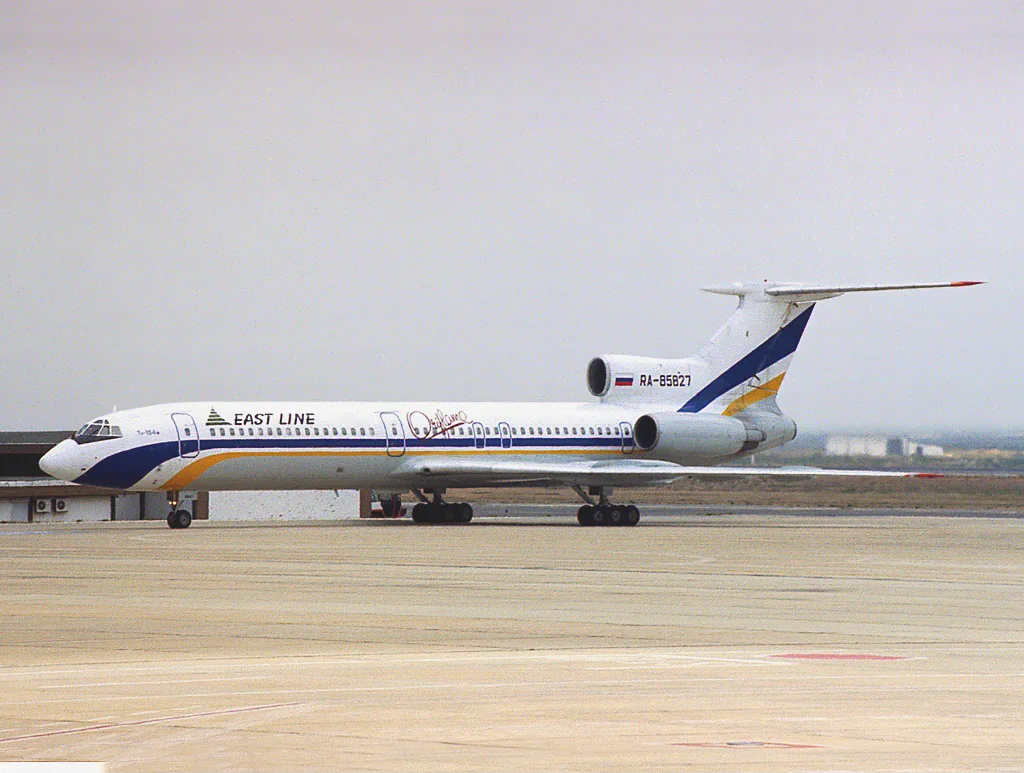
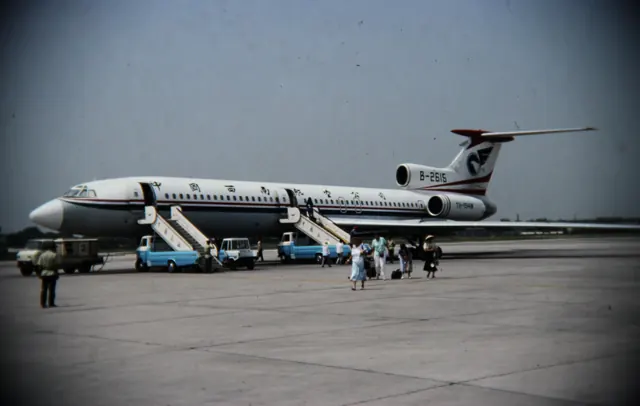
Tupolev designed the Tu-154 in the 1960s for medium-range routes. Three rear-mounted engines and a high horizontal tail formed its outline. It served across the Soviet Union, its successor states and overseas airlines. Felis represents the Tu-154M; the original product and community continuations support different versions.
Aircraft background
Wikipedia contributors · Read more ↗A move into the Tu-154 brings a different pace of work
Epishkin had hoped to move to the Il-76, but that opportunity did not work out. He eventually accepted the invitation to join Tu-154 flying at Minsk. Compared with the Yak-40, the larger aircraft demanded closer attention as speed built after a change of attitude. The adjustment was part of learning a more complicated machine. He was comfortable remaining a copilot after his earlier experience in command.
Interview with a former Yak-40 captain who converted to the Tu-154 in 1986. He describes entering the Tu-154B-2 as a copilot; this is not a Tu-154M checkout report.
Airforce.ru · Read more ↗Check the simulator edition before following this listing
The Felis listing specifies X-Plane 11 and explicitly excludes X-Plane 12. It names version 2.06 and offers a switch between Russian and English cockpit labels.
Tupolev Tu-154 · Felis · X-Plane 11
Felis · Read more ↗Into the cockpit
 YouTube
 Gouto · 7 min ·
✈TUPOLEV TU-154 🇭🇺 Complete Tour + Cockpit and Cabin View! | Soviet 40+ Year-Old Trijet in 4K
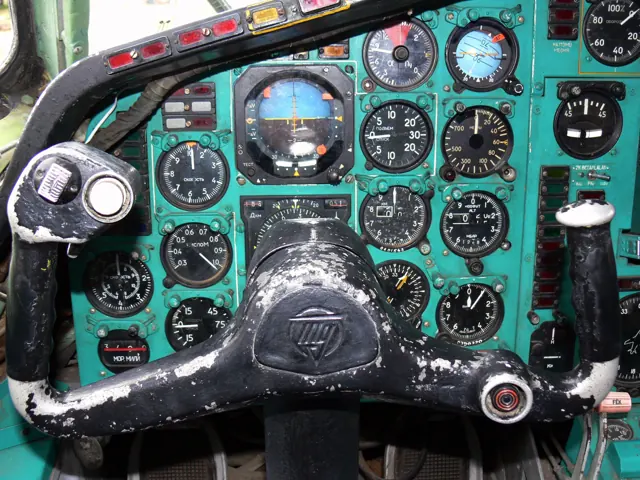
A tour of a preserved Tu-154B-2 at Aeropark in Budapest.
Real aircraft · Tupolev Tu-154
Watch on YouTube ↗Preview images are served by AirframeDB. Videos open on YouTube only when you choose to watch.
Meet Tupolev Tu-154
Tupolev designed the Tu-154 in the 1960s for medium-range routes. Three rear-mounted engines and a high horizontal tail formed its outline. It served across the Soviet Union, its successor states and overseas airlines. Felis represents the Tu-154M; the original product and community continuations support different versions.
Tupolev Tu-154
Tupolev → · Explore the family →
Tupolev Tu-154
Wikipedia contributors · Tupolev Tu-154 ↗Felis · X-Plane 11 →Aircraft type designators
Use the code for the model you are flying. The linked authority lists the applicable aircraft.
History & design
Development milestones
Designer: Tupolev Design Bureau
First flight: 4 October 1968 ( 1968-10-04 )
Wikipedia contributors · Tupolev Tu-154 ↗Tupolev Tu-154 · family/variant named by the source · Wikipedia revision 1372712967
Pilot accounts
A move into the Tu-154 brings a different pace of work
Epishkin had hoped to move to the Il-76, but that opportunity did not work out. He eventually accepted the invitation to join Tu-154 flying at Minsk. Compared with the Yak-40, the larger aircraft demanded closer attention as speed built after a change of attitude. The adjustment was part of learning a more complicated machine.
He was comfortable remaining a copilot after his earlier experience in command. In the interview, he describes the captain’s work as keeping track of the engineer, navigator and other pilot while also doing his own job. Having already known the responsibilities of command, Epishkin did not feel driven to repeat that career step.
Interview with a former Yak-40 captain who converted to the Tu-154 in 1986. He describes entering the Tu-154B-2 as a copilot; this is not a Tu-154M checkout report.
Read the full account · Airforce.ru ↗Learning the same aircraft through different captains
Okan remembered beginning Tu-154 airline work in Krasnoyarsk with three experienced captains whose methods were broadly consistent. As a very new copilot, he welcomed their continuing instruction and credited them with teaching him well within the circumstances of the time. Their similar approach gave him a relatively steady introduction to the aircraft.
Moving to Sibir brought captains with more individual preferences. He learned that a technique accepted on one flight might be criticised on another. Later, among crews drawn from several different backgrounds in Moscow, he was struck by how the same aircraft and operating manual could produce different interpretations.
First-person memoir in the publisher’s free preview. Early Tu-154 copilot years at Sibaviatrans and Sibir; later Boeing passages are outside this selection.
Read the full account · Ridero / Denis Okan ↗Leaving the Tupolev closes a chapter of a pilot’s life
Kochemasov’s diary marked the end of his Tu-154 years with sadness. Almost a decade had passed since he first took its controls, and moving on felt like closing a chapter of his life. Even after conversion to another airliner, the Tupolev remained the aircraft against which he found himself making comparisons.
The interview does not present that attachment as an inability to enjoy the new work. He also recalled his first flight as a Boeing 737 captain with pleasure. Affection for the Tu-154 coexisted with the satisfaction of learning and flying its successor.
Former Tu-154 captain interviewed after converting to the Boeing 737. AviaPort reproduces the January 2010 Izvestia article; his sentiments are personal assessments.
Read the full account · Izvestia / AviaPort ↗In your simulator
Systems, equipment and documentation for each developer’s aircraft.
X-Plane 11Tupolev Tu-154
Felis · Released
Tupolev Tu-154
Felis · Released
Manuals & resources
Find your next read
Choose a topic for a short introduction and a link to the original source. Simulator references identify the developer and edition they cover.
Simulator documentation
Check the simulator edition before following this listingTupolev Tu-154 · Felis · X-Plane 11
The Felis listing specifies X-Plane 11 and explicitly excludes X-Plane 12. It names version 2.06 and offers a switch between Russian and English cockpit labels.
Official store listing · checked 13 September 2026
Felis · Read the source ↗Nosewheel steering has a ground-panel settingTupolev Tu-154 · Felis · X-Plane 11
Version 2.06 documents tiller control selected on the GND panel and revised toe-brake axis handling. It also lists Better Pushback compatibility.
Developer change notes · 12 October 2020; no undocumented binding inferred
Felis · Read the source ↗Navigation equipment has documented alternativesTupolev Tu-154 · Felis · X-Plane 11
The version 2.02 notes offer the default or RealityXP GNS430 in place of the KLN90B. These are listed options; third-party equipment availability is separate.
Felis version history · 18 June 2018
Felis · Read the source ↗Use the service menus for loading and failuresTupolev Tu-154 · Felis · X-Plane 11
The feature list includes load and weight management. Version notes describe a service panel for repairing failures on the ground, with APU failures added in 2.06.
Product features and version history · 2018–2020
Felis · Read the source ↗A Belavia airframe supplied the development referenceTupolev Tu-154 · Felis · X-Plane 11
Felis identifies Tu-154M registration 85748 as a reference and thanks the Belavia crew for documents, photographs and videos. This records the model’s development sources.
Developer product description; no independent fidelity qualification
Felis · Read the source ↗Pilot account
A move into the Tu-154 brings a different pace of workInterview with a former Yak-40 captain who converted to the Tu-154 in 1986. He describes entering the Tu-154B-2 as a copilot; this is not a Tu-154M checkout report.
Epishkin had hoped to move to the Il-76, but that opportunity did not work out. He eventually accepted the invitation to join Tu-154 flying at Minsk. Compared with the Yak-40, the larger aircraft demanded closer attention as speed built after a change of attitude. The adjustment was part of learning a more complicated machine. He was comfortable remaining a copilot after his earlier experience in command.
Sergey Epishkin
Airforce.ru · Read the source ↗Learning the same aircraft through different captainsFirst-person memoir in the publisher’s free preview. Early Tu-154 copilot years at Sibaviatrans and Sibir; later Boeing passages are outside this selection.
Okan remembered beginning Tu-154 airline work in Krasnoyarsk with three experienced captains whose methods were broadly consistent. As a very new copilot, he welcomed their continuing instruction and credited them with teaching him well within the circumstances of the time. Their similar approach gave him a relatively steady introduction to the aircraft. Moving to Sibir brought captains with more individual preferences.
Denis Okan
Ridero / Denis Okan · Read the source ↗Read the original documentation from the people who created it. Manuals open on their publisher’s website.
Aircraft background
Tupolev Tu-154Wikipedia contributors · Research background · retrieved 2026-09-12Product
Tu-154MFelis · Official developer / designated store catalogue · checked 2026-09-12Type designator
ICAO Doc 8643 — aircraft type designatorsInternational Civil Aviation Organization · Public search data retrieved 2026-09-14; authority update 2026-09-03Aircraft documentation
Tu-154 transport aircraft, historical fleet recordCzech Ministry of Defence · Czech Ministry of Defence historical Tu-154 fleet page, technical table explicitly for Tu-154M.Built-in force-feedback profiles
Read the documentary basis, editable starting settings and remaining questions for the aircraft you fly. Each explanation refers to the exact profile revision shown.
Catalogue programme-20261022-v1 · 1 profile choice
Tupolev Tu-154
Free and Pro · Revision 1 · Partial review
X-Plane 11
Tupolev Tu-154: The profile supplies the selected powered-transport resistance.
Tupolev Tu-154
Tupolev Tu-154: The profile supplies the selected powered-transport resistance.
Aircraft and simulator scope
- Tupolev Tu-154 · X-Plane 11 · family starting point
Tupolev Tu-154 · Historical XP11 catalogue scope; compatibility is not transferred to XP12.
The simulator model and controls
Tupolev designed the Tu-154 in the 1960s for medium-range routes. Three rear-mounted engines and a high horizontal tail formed its outline. It served across the Soviet Union, its successor states and overseas airlines. Felis represents the Tu-154M; the original product and community continuations support different versions.
This starting point selects Tupolev Tu-154. Its aircraft-level settings do not select a particular developer’s custom systems.
How this profile feels
The profile supplies the selected powered-transport resistance. Spring resistance builds with the selected airspeed response. A separate aerodynamic term adds speed-dependent control load.
Configured pitch relief retains the represented cockpit’s trim scope. Valid trim provides the configured pressure relief. Autopilot following is enabled for supported control references.
Controls and trim
The Tu154M uses three rear-mounted engines and a high tail for medium-range transport. Felis’ original simulation and community continuations have separately identified versions around the cockpit’s period automatic-flight and crew systems.
About the values
The gains are normalized profile settings. They describe the chosen effect balance; hand force depends on the device and its output limits. IAS references are tuning values rather than operating limits. Physical acceptance of this revision remains pending.
What the documentation establishes
The store identifies Felis Tu-154M version2.06 and explicitly states XP11, not XP12.
Documentary review and sources
These decisions describe the documentary basis and remaining gaps for this revision. Aircraft documentation and a starting setting describe different kinds of evidence.
Aircraft and variant
ReviewedThis starting point selects Tupolev Tu-154. Its aircraft-level settings do not select a particular developer’s custom systems.
Flight controls
Not yet reviewedThe Tu154M uses three rear-mounted engines and a high tail for medium-range transport. Felis’ original simulation and community continuations have separately identified versions around the cockpit’s period automatic-flight and crew systems.
Trim
Not yet reviewedConfigured pitch relief retains the represented cockpit’s trim scope. Pitch authority 0.3 relieves permitted loading; hydraulic centre movement is off. Roll authority is 0.09.
Autopilot and stability
Not yet reviewedFollowing is on at 0.1 authority when a supported, valid autopilot control reference is available.
Equipment
Not yet reviewedGear, flap and ground cues follow the selected settings and available simulator-reported states.
Speeds and limits
Not yet reviewedThe indicated-speed references set the profile response scale; they are separate from aircraft operating limits.
Simulator integration
Not yet reviewedThe profile targets xplane11. Add-on-specific controls use only the supported references configured by this profile.
Force-feedback settings
Not yet reviewedThe settings define the profile’s effect balance. Device output limits affect physical hand force.
Starting settings and their rationale
These configured values are starting estimates. The explanations describe what each setting controls; physical validation appears separately below.
| Setting | Starting value | What it controls and why |
|---|---|---|
| Spring strength | Starting value0.8 | What it controls and whyThe profile supplies the selected powered-transport resistance. The baseline spring is 0.8. Its low-speed blend reaches baseline strength at 90 KIAS. |
| Master force gain | Starting value0.85 | What it controls and whyScales overall profile strength while preserving effect balance, subject to device and output limits. |
| Profile force gain | Starting value0.25 | What it controls and whyThe aerodynamic-load gain is 0.25 with an indicated-speed reference of 270 KIAS. The hydraulic-load factor of 0.35 scales that modeled term; it is a selected artificial-feel approximation. |
| Force tuning speed/reference | Starting value270.0 kt | What it controls and whySets the IAS reference for aerodynamic loading. It is an estimate, not published cruise TAS or a flight limit. |
| Spring response reference speed | Starting value90 kt | What it controls and whySets the IAS where the low-speed blend reaches baseline strength; high-speed stiffening also uses it. |
| Aileron force scale | Starting value0.65 | What it controls and whyRoll and pitch aerodynamic scales are 0.65 and 0.65, respectively. They set the aerodynamic axis balance. No custom spring-travel curve is enabled. |
| Elevator force scale | Starting value0.65 | What it controls and whyScales pitch aerodynamic loading; pitch spring travel and trim responses are separate settings. |
| Trim feel | Starting valueEnabled | What it controls and whyRetained for compatibility and group membership. Trim relief, rather than this flag, controls centre movement. |
| Trim relief | Starting valueEnabled | What it controls and whyAllows trim relief with supported control law and valid telemetry. Axis authorities set its amount. |
| Autopilot follow | Starting valueEnabled | What it controls and whyFollowing is on at 0.1 authority when a supported, valid autopilot control reference is available. |
| Autopilot neutral hold | Starting valueDisabled | What it controls and whyPermits centering hold during a supported AP state, separate from following a moving target. |
| Output force limit | Starting value0.55 | What it controls and whyCaps directed-force output. Native spring effects and device limits remain separate. |
All 44 starting settings and their rationale
The settings define the profile’s effect balance. Device output limits affect physical hand force.
| Setting | Starting value | What it controls and why |
|---|---|---|
| Spring strength | Starting value0.8 | What it controls and whyThe profile supplies the selected powered-transport resistance. The baseline spring is 0.8. Its low-speed blend reaches baseline strength at 90 KIAS. |
| Spring deadband | Starting value0.035 | What it controls and whySets travel around the centre before the baseline spring resists. Smaller values engage it sooner. |
| Profile force gain | Starting value0.25 | What it controls and whyThe aerodynamic-load gain is 0.25 with an indicated-speed reference of 270 KIAS. The hydraulic-load factor of 0.35 scales that modeled term; it is a selected artificial-feel approximation. |
| Master force gain | Starting value0.85 | What it controls and whyScales overall profile strength while preserving effect balance, subject to device and output limits. |
| QBlend Enabled | Starting valueEnabled | What it controls and whyAllows baseline spring strength to rise with indicated airspeed where the control law permits it. |
| QSpring Minimum Factor | Starting value0.55 | What it controls and whySets low-speed spring strength as a fraction of baseline when blending is enabled. One keeps full strength. |
| QSpring Start Knots | Starting value20 kt | What it controls and whySets the IAS where the low-speed spring blend starts rising. This is a feel threshold, not a flight limit. |
| Spring response reference speed | Starting value90 kt | What it controls and whySets the IAS where the low-speed blend reaches baseline strength; high-speed stiffening also uses it. |
| Force tuning speed/reference | Starting value270.0 kt | What it controls and whySets the IAS reference for aerodynamic loading. It is an estimate, not published cruise TAS or a flight limit. |
| Airspeed spring stiffening gain | Starting value0 | What it controls and whyThe high-speed spring-stiffening gain is 0. No additional speed-driven stiffening is added; this does not disable independent aerodynamic loading. |
| Airspeed spring stiffening limit | Starting value5 | What it controls and whyLimits the squared airspeed ratio used for high-speed spring stiffening; it is not a device-force cap. |
| Aileron force scale | Starting value0.65 | What it controls and whyRoll and pitch aerodynamic scales are 0.65 and 0.65, respectively. They set the aerodynamic axis balance. No custom spring-travel curve is enabled. |
| Elevator force scale | Starting value0.65 | What it controls and whyScales pitch aerodynamic loading; pitch spring travel and trim responses are separate settings. |
| Output force limit | Starting value0.55 | What it controls and whyCaps directed-force output. Native spring effects and device limits remain separate. |
| Trim feel | Starting valueEnabled | What it controls and whyRetained for compatibility and group membership. Trim relief, rather than this flag, controls centre movement. |
| Trim relief | Starting valueEnabled | What it controls and whyAllows trim relief with supported control law and valid telemetry. Axis authorities set its amount. |
| Elevator Authority | Starting value0.3 | What it controls and whyConfigured pitch relief retains the represented cockpit’s trim scope. Pitch authority 0.3 relieves permitted loading; hydraulic centre movement is off. Roll authority is 0.09. |
| Aileron Authority | Starting value0.09 | What it controls and whyScales supported roll-trim relief and permitted centre movement. Zero removes roll response. |
| Force Trim Enabled | Starting valueDisabled | What it controls and whyEnables local force trim, separate from aircraft-owned trim and add-on integration qualification. |
| GLoad Enabled | Starting valueEnabled | What it controls and whyAllows load-factor changes to modify permitted spring laws. Passive fly-by-wire feel can suppress it. |
| Rate Damping Enabled | Starting valueEnabled | What it controls and whyEnables rate damping with the configured coefficients and control law. |
| Autopilot follow | Starting valueEnabled | What it controls and whyFollowing is on at 0.1 authority when a supported, valid autopilot control reference is available. |
| Autopilot follow authority | Starting value0.1 | What it controls and whySets admitted AP-follow gain, not a percentage of travel. Runtime ownership and input limits still apply. |
| Autopilot neutral hold | Starting valueDisabled | What it controls and whyPermits centering hold during a supported AP state, separate from following a moving target. |
| Autopilot neutral hold strength | Starting value0.6 | What it controls and whySets admitted AP neutral-hold strength; inactive while neutral hold is disabled. |
| Enabled | Starting valueEnabled | What it controls and whyEnables aerodynamic cues; each still needs nonzero strength and its simulator conditions. |
| Gain | Starting value0.3 | What it controls and whySets stall-buffet strength. Zero removes the cue without changing simulator stalls or warnings. |
| Gain | Starting value0.22 | What it controls and whySets high-Mach buffet strength; onset and full-strength thresholds are separate. |
| Gain | Starting value0.14 | What it controls and whySets flap buffet at the configured position and speed gates. Flap movement texture is separate. |
| Maximum flap index | Starting value4 | What it controls and whySets the final flap index for detent normalization. UP plus three detents uses maximum index3. |
| Minimum flap index | Starting value2 | What it controls and whySets the first flap detent that admits buffet; this is a handle index, not degrees. |
| Gain | Starting value0.1 | What it controls and whySets gear aerodynamic buffet; movement and ground-contact cues are separate. |
| Shaker Enabled | Starting valueEnabled | What it controls and whyPermits shaker at supported warning conditions; the switch does not establish aircraft equipment. |
| Stick shaker amplitude | Starting value0.9 | What it controls and whySets triggered shaker strength; inactive while the shaker feature is disabled. |
| Enabled | Starting valueEnabled | What it controls and whyEnables ground effects; each still needs its own strength and contact or motion telemetry. |
| Gain | Starting value0.4 | What it controls and whySets rolling texture strength, modified by speed, surface and undercarriage configuration. |
| Gain | Starting value0.32 | What it controls and whySets gear-bump texture during ground motion, separate from touchdown impact. |
| Gain | Starting value0.9 | What it controls and whySets landing-impact strength; landing telemetry and response shape determine the pulse. |
| Gain | Starting value0.5 | What it controls and whySets reverse-thrust vibration with valid reverser and engine conditions. Zero removes the cue. |
| Enabled | Starting valueEnabled | What it controls and whyEnables engine cues with nonzero settings and valid running-engine telemetry. |
| Gain | Starting value0.06 | What it controls and whySets estimated engine vibration using configured telemetry and response, not measured cockpit vibration. |
| Enabled | Starting valueEnabled | What it controls and whyEnables accessory cues with configured strengths and observed accessory movement. |
| Gain | Starting value0.12 | What it controls and whySets texture from observed flap movement; a command without movement does not establish the cue. |
| Gain | Starting value0.12 | What it controls and whySets texture from observed gear movement, separate from aerodynamic and touchdown effects. |
Limits and open questions
- Cockpit-language IAS units and custom AP behavior are version-specific. An XP11 Soviet transport starting profile does not qualify XP12 or a measured artificial-feel law.
- No simulator launch or physical force validation.
Physical validation
No physical force validation is recorded in this public catalogue for this revision. Documentary review and software checks do not establish how a particular device feels.
Discuss this aircraft (0)
Questions, observations and useful sources from the community.
No published discussions yet. Bring a question or share a useful source.
Open aircraft discussions →Content expanded · What’s new
Something missing or a source that needs attention?
Suggest a correction ↗