

Start here
A few places to begin, from the aircraft’s story to the people who fly it.
Meet the aircraft
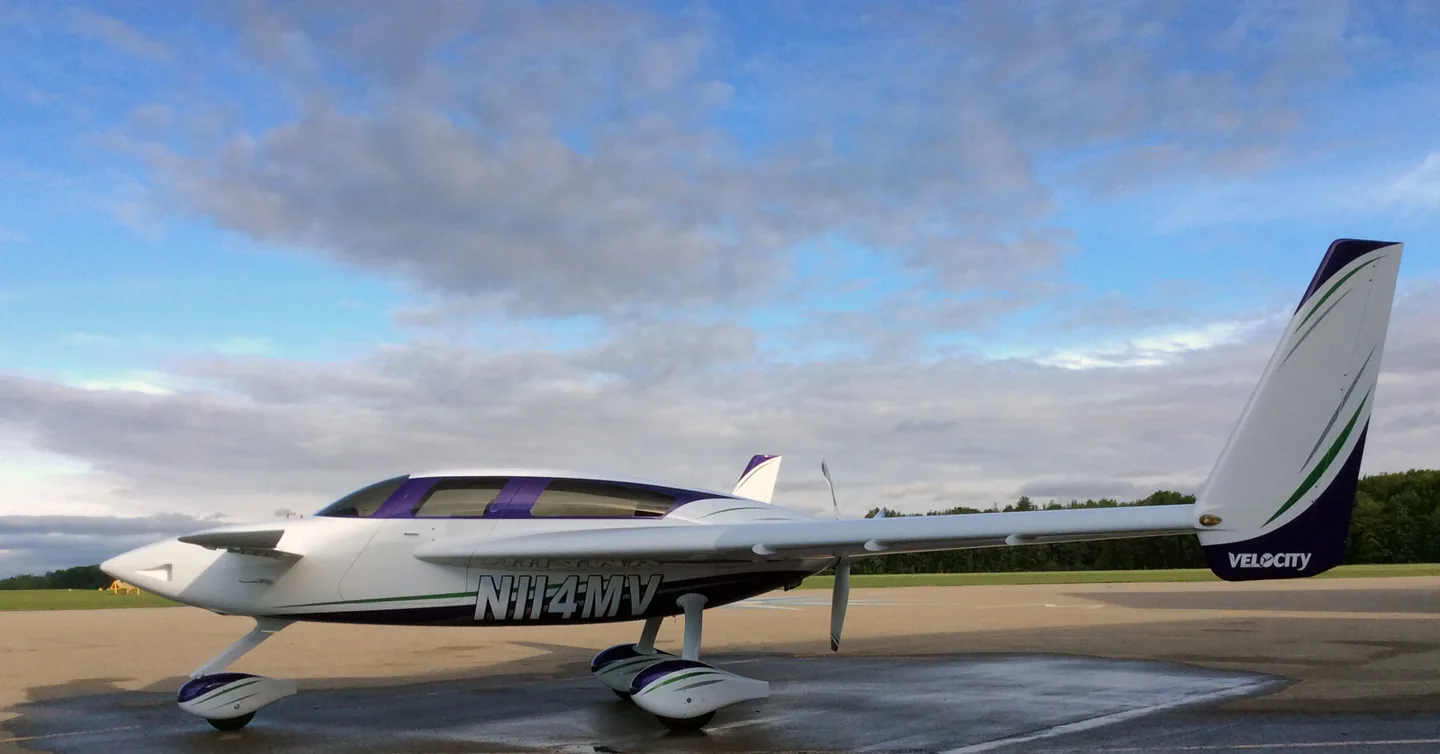
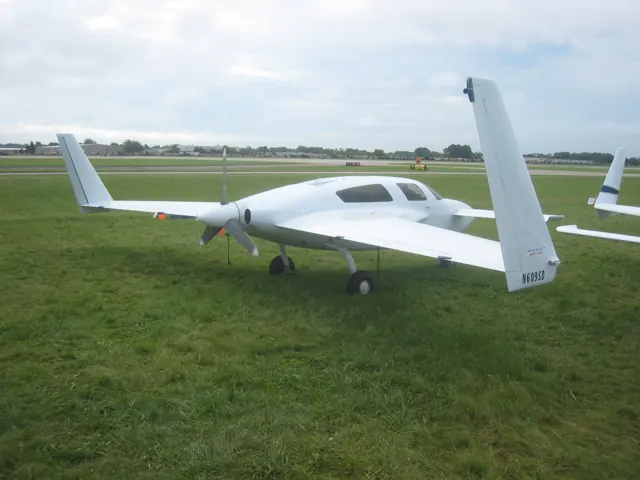
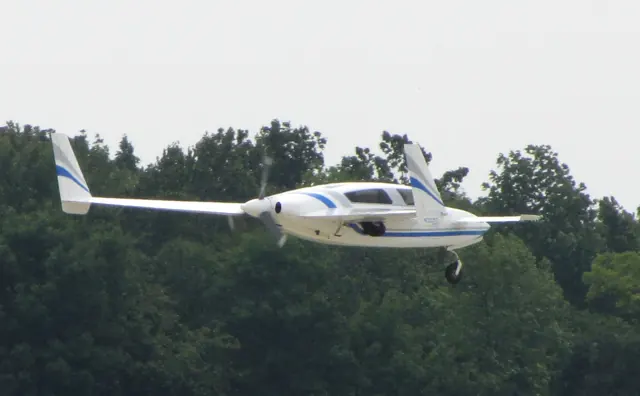
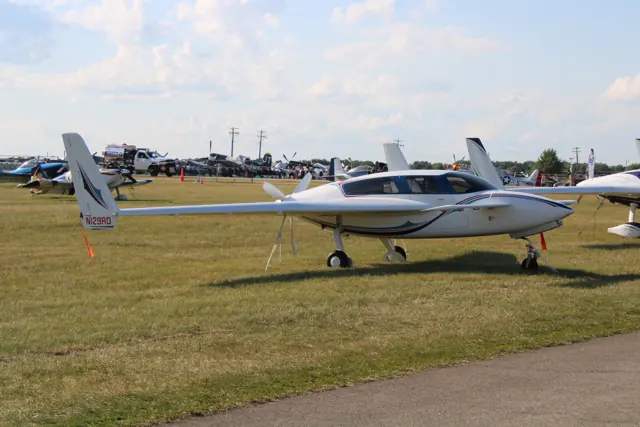
Velocity developed the XL from its smaller SE kit aircraft. The enlarged design uses a canard ahead of the main wing and a rear-mounted pusher propeller. Black Square documents the equipment and systems of its simulator interpretation separately from the real-aircraft specifications.
Aircraft background
Wikipedia contributors · Read more ↗An Oshkosh journey becomes a family occasion
Guerra’s journey to AirVenture brought the family together around the aircraft he had built. He and his father entered the AirVenture Cup Race, while his mother watched the finish and then joined them at Oshkosh. Their third place in the Sport class added a result to celebrate, but the visit offered much more than a finishing position.
Builder’s 2004 AirVenture account. XL-RG N724X, Race 24, flown with his father Ricardo “Rick” Guerra Sr.; this aircraft is not the simulated TXL-RG.
Ricardo Guerra Jr. · Read more ↗Panel choices change the reference you need
The product’s version 1.3 notes describe Working Title G3X Touch support and flight-plan crossfill with supported TDS GTNxi750 and PMS50 GTN750 installations. The available navigation workflow depends on the panel and optional avionics selected. Consult the matching equipment documentation.
Black Square Velocity XL · MSFS 2020/2024
Black Square · Read more ↗Into the cockpit
 YouTube
 Mark Riley · 13 min ·
Velocity N929X 2016 Airventure Approach and Landing
An owner records a Velocity approach and landing at Oshkosh.
Real aircraft · Velocity XL
Watch on YouTube ↗Preview images are served by AirframeDB. Videos open on YouTube only when you choose to watch.
Meet Velocity XL
Velocity developed the XL from its smaller SE kit aircraft. The enlarged design uses a canard ahead of the main wing and a rear-mounted pusher propeller. Black Square documents the equipment and systems of its simulator interpretation separately from the real-aircraft specifications.
Velocity XL
Aircraft type designators
Use the code for the model you are flying. The linked authority lists the applicable aircraft.
History & design
A canard with room to grow
The XL enlarged Velocity’s earlier SE design while retaining its distinctive canard layout and rear-mounted engine. Fixed and retractable landing gear versions exist, as do four- and five-seat cabin arrangements. As a kit aircraft it can also have different engine installations. Specifications for one example describe that configuration, rather than every aircraft a builder might complete.
Wikipedia contributors · Velocity XL ↗Research-based history of the real aircraft family; see the linked source.
Pilot accounts
An Oshkosh journey becomes a family occasion
Guerra’s journey to AirVenture brought the family together around the aircraft he had built. He and his father entered the AirVenture Cup Race, while his mother watched the finish and then joined them at Oshkosh. Their third place in the Sport class added a result to celebrate, but the visit offered much more than a finishing position.
The aircraft took its place among the show displays, and the family explored the grounds and museum. Dinner with other Velocity builders turned familiar names from the mailing list into people they could meet.
Builder’s 2004 AirVenture account. XL-RG N724X, Race 24, flown with his father Ricardo “Rick” Guerra Sr.; this aircraft is not the simulated TXL-RG.
Read the full account · Ricardo Guerra Jr. ↗A quiet flight closes a decade of building
After more than ten years of work, Sieders took his Velocity up for the flight that would complete its initial test period. The calm conditions left him free to enjoy a short outing and reflect on how far the project had come. His description makes a routine-looking flight feel like the end of a long chapter.
Much of the post is a thank-you to the people who helped him reach that point. Friends assisted with moving the aircraft, upholstery and painting, while others kept encouraging him to finish. His family had lived with the project’s demands on their garage and time.
Personal project blog · November 2021. Velocity XL FG-5; flight 29 completed the initial forty-hour test period, not his final flight in the aircraft.
Read the full account · Sieders Family Velocity Project ↗A demonstration helps a prospective buyer say no
A demonstration flight gave PedroB801 a chance to compare the Velocity he admired with the aircraft he felt ready to own. He enjoyed its speed once airborne, but came away concerned about the landing speed and the response of the ailerons at the slower end of the flight. The experience was exciting without settling his doubts.
In follow-up replies, he clarified that the chief pilot had made the landing after he flew the approach to short final. Looking at several completed aircraft also made him conscious of differences in build quality. His decision was personal: for his experience at that time, the Velocity did not feel like the right purchase despite its appeal.
Pilots of America · June 2015. Public forum handle; Velocity XL-RG demonstration at Sebastian. He flew to short final, with the chief pilot making the landing.
Read the full account · Pilots of America ↗In your simulator
Systems, equipment and documentation for each developer’s aircraft.
MSFS 2020 · MSFS 2024Velocity XL
Black Square · Released
Velocity XL
Black Square · Released
Aircraft specifications
Published figures for the named real-aircraft variant. Simulator equipment and performance can differ.
| Specification | Published value |
|---|---|
| Length | 20 ft 0 in (6.10 m) |
| Wingspan | 31 ft 0 in (9.45 m) rear wing; forewing 13 ft 8 in (4.17 m) |
| Height | 8 ft 5 in (2.56 m) |
| Wing area | 102 sq ft (9.5 m² ) rear wing. |
| Empty weight | 1,700 lb (771 kg) |
| Max takeoff weight | 2,701 lb (1,225 kg) |
| Powerplant | 1 × Continental IO-550 air-cooled flat six , 310 hp (230 kW) |
| Propellers | 3-bladed Catto |
| Cruise speed | 240 mph (380 km/h, 210 kn) normal at 75% power |
| Stall speed | 75 mph (121 km/h, 65 kn) |
| Range | 1,150 mi (1,850 km, 1,000 nmi) at 65% power |
Manuals & resources
Find your next read
Choose a topic for a short introduction and a link to the original source. Simulator references identify the developer and edition they cover.
Simulator documentation
More to explore than the canard layoutBlack Square Velocity XL · MSFS 2020/2024
Black Square documents an electric/hydraulic landing-gear system with a backup release, header-tank fuel logic and custom engine-management features. Its product guide is a starting point for understanding those systems in this simulator model.
Aircraft features · gear, fuel and engine systems
Black Square · Read the source ↗Panel choices change the reference you needBlack Square Velocity XL · MSFS 2020/2024
The product’s version 1.3 notes describe Working Title G3X Touch support and flight-plan crossfill with supported TDS GTNxi750 and PMS50 GTN750 installations. The available navigation workflow depends on the panel and optional avionics selected. Consult the matching equipment documentation.
Version 1.3 changes · avionics integrations
Black Square · Read the source ↗A glass cockpit with an additional navigation dependencyVelocity XL · Black Square · MSFS 2020 · MSFS 2024
The listed panel combines dual G3X Touch displays, a GTN 750 and a GFC500 controller. The GTN requires the freeware PMS-50 add-on.
Black Square Velocity XL product description · MSFS 2020/2024 PC
Black Square · Read the source ↗The landing gear has its own warning and backup logicVelocity XL · Black Square · MSFS 2020 · MSFS 2024
Black Square documents a two-green indication arrangement, an electric hydraulic system and a backup release valve.
Developer feature list; TXL-RG implementation
Black Square · Read the source ↗Cabin systems add more to the flightVelocity XL · Black Square · MSFS 2020 · MSFS 2024
The developer lists working circuit breakers, environmental controls and inflatable door-seal sounds, with a door-ajar warning. Side-sticks can be hidden.
Product description; implementation claims, not runtime qualification
Black Square · Read the source ↗Fuel and temperature need attentionVelocity XL · Black Square · MSFS 2020 · MSFS 2024
The feature list describes a combining header tank and engine-temperature management through custom G3X indications, alongside a dedicated turbocharger simulation.
Documented simulation features; no external variable mapping inferred
Black Square · Read the source ↗Pilot account
An Oshkosh journey becomes a family occasionBuilder’s 2004 AirVenture account. XL-RG N724X, Race 24, flown with his father Ricardo “Rick” Guerra Sr.; this aircraft is not the simulated TXL-RG.
Guerra’s journey to AirVenture brought the family together around the aircraft he had built. He and his father entered the AirVenture Cup Race, while his mother watched the finish and then joined them at Oshkosh. Their third place in the Sport class added a result to celebrate, but the visit offered much more than a finishing position. The aircraft took its place among the show displays, and the family explored the grounds and museum.
Ricardo “Rich” Guerra Jr.
Ricardo Guerra Jr. · Read the source ↗A quiet flight closes a decade of buildingPersonal project blog · November 2021. Velocity XL FG-5; flight 29 completed the initial forty-hour test period, not his final flight in the aircraft.
After more than ten years of work, Sieders took his Velocity up for the flight that would complete its initial test period. The calm conditions left him free to enjoy a short outing and reflect on how far the project had come. His description makes a routine-looking flight feel like the end of a long chapter. Much of the post is a thank-you to the people who helped him reach that point.
Patrick Sieders
Sieders Family Velocity Project · Read the source ↗Read the original documentation from the people who created it. Manuals open on their publisher’s website.
Aircraft background
Velocity XLWikipedia contributors · Research background · retrieved 2026-09-12Product
Velocity XLBlack Square · Official developer / designated store catalogue · checked 2026-09-12Type designator
ICAO Doc 8643 — aircraft type designatorsInternational Civil Aviation Organization · Public search data retrieved 2026-09-14; authority update 2026-09-03Built-in force-feedback profiles
Read the documentary basis, editable starting settings and remaining questions for the aircraft you fly. Each explanation refers to the exact profile revision shown.
Catalogue programme-20261022-v1 · 3 profile choices
Black Square Velocity XL
Black Square · Free and Pro · Revision 1 · Inherited starting point
MSFS 2020 · MSFS 2024
Black Square Velocity XL: The profile supplies the canard aircraft’s selected mechanical-control loading.
Velocity XL
Free and Pro · Revision 1 · Partial review
MSFS 2024 · MSFS 2020
Velocity XL: The profile supplies the canard aircraft’s selected mechanical-control loading.
Velocity XL (fixed gear)
Free and Pro · Revision 1 · Review pending
MSFS 2024 · MSFS 2020
Velocity XL (fixed gear): The profile supplies the canard aircraft’s selected mechanical-control loading.
Black Square Velocity XL
Black Square Velocity XL: The profile supplies the canard aircraft’s selected mechanical-control loading.
Aircraft and simulator scope
- Black Square Velocity XL · Black Square · MSFS 2020 · Add-on starting point
- Black Square Velocity XL · Black Square · MSFS 2024 · Add-on starting point
The simulator model and controls
Velocity developed the XL from its smaller SE kit aircraft. The enlarged design uses a canard ahead of the main wing and a rear-mounted pusher propeller. Black Square documents the equipment and systems of its simulator interpretation separately from the real-aircraft specifications.
This profile selects Black Square Velocity XL for MSFS 2020, MSFS 2024.
How this profile feels
The profile supplies the canard aircraft’s selected mechanical-control loading. Spring resistance builds with the selected airspeed response. A separate aerodynamic term adds speed-dependent control load.
Electric pitch trim is separate from the canard stall behaviour and rudder trim. Valid trim provides the configured pressure relief. Autopilot following is off.
Controls and trim
The Velocity TXL-RG uses a canard elevator, conventional ailerons and electric elevator/rudder trim. Its turbocharged pusher and retractable gear have no wing flaps. The manual describes canard-first stall and possible pitch bucking.
The selected implementation
Black Square’s turbocharged TXL-RG pusher has a canard elevator, electric elevator/rudder trim, retractable tricycle gear and no flaps. Its manual describes progressive canard stall and possible pitch bucking.
About the values
The gains are normalized profile settings. They describe the chosen effect balance; hand force depends on the device and its output limits. IAS references are tuning values rather than operating limits. Physical acceptance of this revision remains pending.
Documentary review and sources
These decisions describe the documentary basis and remaining gaps for this revision. Aircraft documentation and a starting setting describe different kinds of evidence.
Aircraft and variant
InheritedThis profile selects Black Square Velocity XL for MSFS 2020, MSFS 2024.
Flight controls
InheritedThe Velocity TXL-RG uses a canard elevator, conventional ailerons and electric elevator/rudder trim. Its turbocharged pusher and retractable gear have no wing flaps. The manual describes canard-first stall and possible pitch bucking.
Trim
InheritedElectric pitch trim is separate from the canard stall behaviour and rudder trim. Pitch authority 0.3 provides load relief and permitted centre movement; roll authority is 0.
Autopilot and stability
InheritedAutopilot following is off; the configured spring and load retain the hardware feel.
Equipment
InheritedBlack Square’s turbocharged TXL-RG pusher has a canard elevator, electric elevator/rudder trim, retractable tricycle gear and no flaps. Its manual describes progressive canard stall and possible pitch bucking.
Speeds and limits
InheritedThe indicated-speed references set the profile response scale; they are separate from aircraft operating limits.
Simulator integration
InheritedThe profile targets msfs2020, msfs2024. Add-on-specific controls use only the supported references configured by this profile.
Force-feedback settings
InheritedThe settings define the profile’s effect balance. Device output limits affect physical hand force.
Starting settings and their rationale
These configured values are starting estimates. The explanations describe what each setting controls; physical validation appears separately below.
| Setting | Starting value | What it controls and why |
|---|---|---|
| Spring strength | Starting value0.74 | What it controls and whyThe profile supplies the canard aircraft’s selected mechanical-control loading. The baseline spring is 0.74. Its low-speed blend reaches baseline strength at 75 KIAS. |
| Master force gain | Starting value0.85 | What it controls and whyScales overall profile strength while preserving effect balance, subject to device and output limits. |
| Profile force gain | Starting value0.8 | What it controls and whyThe aerodynamic-load gain is 0.8 with an indicated-speed reference of 150 KIAS. This supplies speed-dependent loading alongside the spring. |
| Force tuning speed/reference | Starting value150 kt | What it controls and whySets the IAS reference for aerodynamic loading. It is an estimate, not published cruise TAS or a flight limit. |
| Spring response reference speed | Starting value75.0 kt | What it controls and whySets the IAS where the low-speed blend reaches baseline strength; high-speed stiffening also uses it. |
| Aileron force scale | Starting value0.72 | What it controls and whyRoll and pitch aerodynamic scales are 0.72 and 1, respectively. They set the aerodynamic axis balance. No custom spring-travel curve is enabled. |
| Elevator force scale | Starting value1.0 | What it controls and whyScales pitch aerodynamic loading; pitch spring travel and trim responses are separate settings. |
| Trim feel | Starting valueEnabled | What it controls and whyRetained for compatibility and group membership. Trim relief, rather than this flag, controls centre movement. |
| Trim relief | Starting valueEnabled | What it controls and whyAllows trim relief with supported control law and valid telemetry. Axis authorities set its amount. |
| Autopilot follow | Starting valueDisabled | What it controls and whyAutopilot following is off; the configured spring and load retain the hardware feel. |
| Autopilot neutral hold | Starting valueDisabled | What it controls and whyPermits centering hold during a supported AP state, separate from following a moving target. |
| Output force limit | Starting value0.55 | What it controls and whyCaps directed-force output. Native spring effects and device limits remain separate. |
All 44 starting settings and their rationale
The settings define the profile’s effect balance. Device output limits affect physical hand force.
| Setting | Starting value | What it controls and why |
|---|---|---|
| Spring strength | Starting value0.74 | What it controls and whyThe profile supplies the canard aircraft’s selected mechanical-control loading. The baseline spring is 0.74. Its low-speed blend reaches baseline strength at 75 KIAS. |
| Spring deadband | Starting value0.045 | What it controls and whySets travel around the centre before the baseline spring resists. Smaller values engage it sooner. |
| Profile force gain | Starting value0.8 | What it controls and whyThe aerodynamic-load gain is 0.8 with an indicated-speed reference of 150 KIAS. This supplies speed-dependent loading alongside the spring. |
| Master force gain | Starting value0.85 | What it controls and whyScales overall profile strength while preserving effect balance, subject to device and output limits. |
| QBlend Enabled | Starting valueEnabled | What it controls and whyAllows baseline spring strength to rise with indicated airspeed where the control law permits it. |
| QSpring Minimum Factor | Starting value0.5 | What it controls and whySets low-speed spring strength as a fraction of baseline when blending is enabled. One keeps full strength. |
| QSpring Start Knots | Starting value21.0 kt | What it controls and whySets the IAS where the low-speed spring blend starts rising. This is a feel threshold, not a flight limit. |
| Spring response reference speed | Starting value75.0 kt | What it controls and whySets the IAS where the low-speed blend reaches baseline strength; high-speed stiffening also uses it. |
| Force tuning speed/reference | Starting value150 kt | What it controls and whySets the IAS reference for aerodynamic loading. It is an estimate, not published cruise TAS or a flight limit. |
| Airspeed spring stiffening gain | Starting value0.15 | What it controls and whyThe high-speed spring-stiffening gain is 0.15. It strengthens the permitted spring response above 75 KIAS, with the squared-speed ratio capped at 5. |
| Airspeed spring stiffening limit | Starting value5 | What it controls and whyLimits the squared airspeed ratio used for high-speed spring stiffening; it is not a device-force cap. |
| Aileron force scale | Starting value0.72 | What it controls and whyRoll and pitch aerodynamic scales are 0.72 and 1, respectively. They set the aerodynamic axis balance. No custom spring-travel curve is enabled. |
| Elevator force scale | Starting value1.0 | What it controls and whyScales pitch aerodynamic loading; pitch spring travel and trim responses are separate settings. |
| Output force limit | Starting value0.55 | What it controls and whyCaps directed-force output. Native spring effects and device limits remain separate. |
| Trim feel | Starting valueEnabled | What it controls and whyRetained for compatibility and group membership. Trim relief, rather than this flag, controls centre movement. |
| Trim relief | Starting valueEnabled | What it controls and whyAllows trim relief with supported control law and valid telemetry. Axis authorities set its amount. |
| Elevator Authority | Starting value0.3 | What it controls and whyElectric pitch trim is separate from the canard stall behaviour and rudder trim. Pitch authority 0.3 provides load relief and permitted centre movement; roll authority is 0. |
| Aileron Authority | Starting value0 | What it controls and whyScales supported roll-trim relief and permitted centre movement. Zero removes roll response. |
| Force Trim Enabled | Starting valueDisabled | What it controls and whyEnables local force trim, separate from aircraft-owned trim and add-on integration qualification. |
| GLoad Enabled | Starting valueEnabled | What it controls and whyAllows load-factor changes to modify permitted spring laws. Passive fly-by-wire feel can suppress it. |
| Rate Damping Enabled | Starting valueEnabled | What it controls and whyEnables rate damping with the configured coefficients and control law. |
| Autopilot follow | Starting valueDisabled | What it controls and whyAutopilot following is off; the configured spring and load retain the hardware feel. |
| Autopilot follow authority | Starting value0.1 | What it controls and whySets admitted AP-follow gain, not a percentage of travel. Runtime ownership and input limits still apply. |
| Autopilot neutral hold | Starting valueDisabled | What it controls and whyPermits centering hold during a supported AP state, separate from following a moving target. |
| Autopilot neutral hold strength | Starting value0.6 | What it controls and whySets admitted AP neutral-hold strength; inactive while neutral hold is disabled. |
| Enabled | Starting valueEnabled | What it controls and whyEnables aerodynamic cues; each still needs nonzero strength and its simulator conditions. |
| Gain | Starting value0 | What it controls and whySets stall-buffet strength. Zero removes the cue without changing simulator stalls or warnings. |
| Gain | Starting value0 | What it controls and whySets high-Mach buffet strength; onset and full-strength thresholds are separate. |
| Gain | Starting value0 | What it controls and whySets flap buffet at the configured position and speed gates. Flap movement texture is separate. |
| Maximum flap index | Starting value1 | What it controls and whySets the final flap index for detent normalization. UP plus three detents uses maximum index3. |
| Minimum flap index | Starting value1 | What it controls and whySets the first flap detent that admits buffet; this is a handle index, not degrees. |
| Gain | Starting value0.1 | What it controls and whySets gear aerodynamic buffet; movement and ground-contact cues are separate. |
| Shaker Enabled | Starting valueDisabled | What it controls and whyPermits shaker at supported warning conditions; the switch does not establish aircraft equipment. |
| Stick shaker amplitude | Starting value0.5 | What it controls and whySets triggered shaker strength; inactive while the shaker feature is disabled. |
| Enabled | Starting valueEnabled | What it controls and whyEnables ground effects; each still needs its own strength and contact or motion telemetry. |
| Gain | Starting value0.4 | What it controls and whySets rolling texture strength, modified by speed, surface and undercarriage configuration. |
| Gain | Starting value0.25 | What it controls and whySets gear-bump texture during ground motion, separate from touchdown impact. |
| Gain | Starting value0.65 | What it controls and whySets landing-impact strength; landing telemetry and response shape determine the pulse. |
| Gain | Starting value0 | What it controls and whySets reverse-thrust vibration with valid reverser and engine conditions. Zero removes the cue. |
| Enabled | Starting valueEnabled | What it controls and whyEnables engine cues with nonzero settings and valid running-engine telemetry. |
| Gain | Starting value0.12 | What it controls and whySets estimated engine vibration using configured telemetry and response, not measured cockpit vibration. |
| Enabled | Starting valueEnabled | What it controls and whyEnables accessory cues with configured strengths and observed accessory movement. |
| Gain | Starting value0 | What it controls and whySets texture from observed flap movement; a command without movement does not establish the cue. |
| Gain | Starting value0.12 | What it controls and whySets texture from observed gear movement, separate from aerodynamic and touchdown effects. |
Limits and open questions
- Force values are engineering estimates; no installed-aircraft or physical force acceptance has been performed.
- Standard simulator telemetry only. Custom trim, autopilot and failure interfaces remain unqualified; AP follow starts disabled.
- The profile does not automatically select force-based input or authorize simulator-axis writes.
- The Black Square TXL-RG configuration only. Page 21 describes progressive canard stall and possible pitch bucking; the generic conventional-aircraft stall buffet is disabled pending a suitable force model.
Physical validation
No physical force validation is recorded in this public catalogue for this revision. Documentary review and software checks do not establish how a particular device feels.
Discuss this aircraft (0)
Questions, observations and useful sources from the community.
No published discussions yet. Bring a question or share a useful source.
Open aircraft discussions →Content expanded · What’s new
Something missing or a source that needs attention?
Suggest a correction ↗