
Start here
A few places to begin, from the aircraft’s story to the people who fly it.
Meet the aircraft
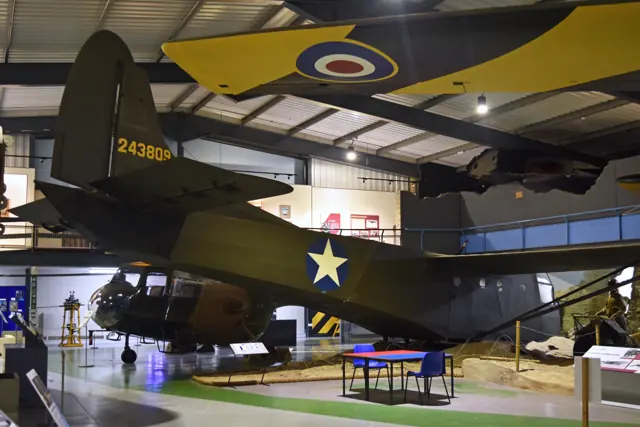
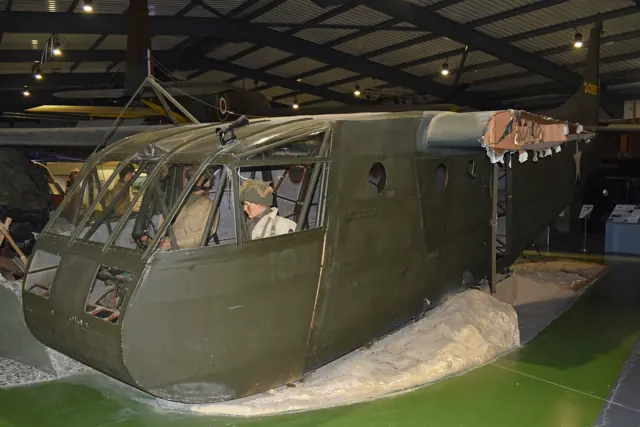
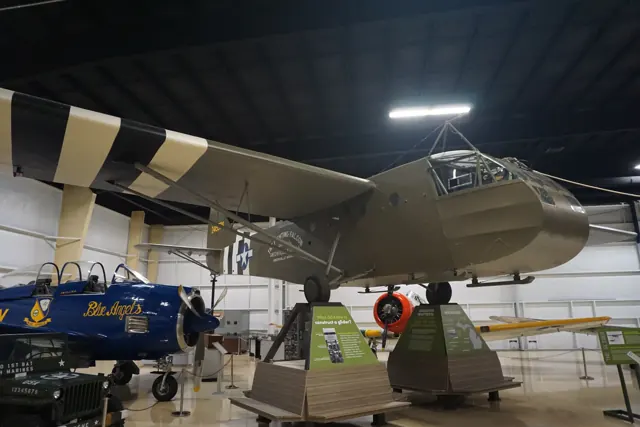
The CG-4A used a fabric-covered high-wing structure and a cargo cabin with a nose that swung upward for loading. Allied forces used the unpowered glider in Second World War airborne operations, commonly behind a C-47 tug.
Aircraft background
Microsoft / aircraft developers · Read more ↗The journey home could be as memorable as the landing
MacRae recalled a Normandy flight in which the tow aircraft lost an engine and its pilot considered releasing the glider over the Channel. After a tense exchange, the tow continued until land was visible. MacRae landed well short of the intended area, and his troops went off to find a fighting unit. He eventually returned to England without learning what had happened to those men or the tow crew.
37th Troop Carrier Squadron veteran, recalling Normandy and the Netherlands. His memories are reported retrospectively by ASME.
American Society of Mechanical Engineers · Read more ↗The cargo glider has its own cockpit
The linked June 2024 guide documents the MSFS 2020 glider. It provides cockpit background; this older manual does not establish unchanged MSFS 2024 controls.
Waco CG-4A · Microsoft Flight Simulator · MSFS 2024
Microsoft / aircraft developers · Read more ↗Into the cockpit
 YouTube
 National Museum of the U.S. Air Force · 1 min ·
Waco CG-4A Hadrian
The National Museum of the US Air Force introduces its CG-4A troop glider.
Real aircraft · Waco CG-4A Hadrian
Watch on YouTube ↗Preview images are served by AirframeDB. Videos open on YouTube only when you choose to watch.
Meet Waco CG-4A Hadrian
The CG-4A used a fabric-covered high-wing structure and a cargo cabin with a nose that swung upward for loading. Allied forces used the unpowered glider in Second World War airborne operations, commonly behind a C-47 tug.
The simulator models the glider's own trim, tow-release and landing-gear-cradle controls, including in the combined C-47 package.
Waco CG-4A Hadrian
Aircraft type designators
Use the code for the model you are flying. The linked authority lists the applicable aircraft.
Waco CG-4A Hadrian — unpowered glider; ICAO special designator
ICAO — special designators ↗Checked 2026-09-14History & design
The nose opened to make the glider a cargo carrier
The National Soaring Museum describes a fabric-covered steel-tube fuselage and wooden wings. Raising the hinged cockpit exposed a compartment for bulky loads such as a jeep or field gun. Benches could instead accommodate troops. Production drew on firms with woodworking experience, including furniture and piano manufacturers.
National Soaring Museum · Waco / CG-4A ↗Museum design history; no universal handling judgment adopted
Pilot accounts
The journey home could be as memorable as the landing
MacRae recalled a Normandy flight in which the tow aircraft lost an engine and its pilot considered releasing the glider over the Channel. After a tense exchange, the tow continued until land was visible. MacRae landed well short of the intended area, and his troops went off to find a fighting unit. He eventually returned to England without learning what had happened to those men or the tow crew.
A later return journey after the Netherlands operation depended on more ordinary transport. He found a battered bicycle, then traded it to another soldier for rations when food and strength ran low. With something to eat, he continued towards Brussels on foot.
37th Troop Carrier Squadron veteran, recalling Normandy and the Netherlands. His memories are reported retrospectively by ASME.
Read the full account · American Society of Mechanical Engineers ↗Supply flights change how the troops see their glider pilots
Lyons entered the service at nineteen and was flying operational CG-4As by twenty. Speaking years later, he remembered an early lack of recognition: other troops did not understand what the glider pilots contributed. Supply flights after D-Day began to change that relationship.
He described bringing a howitzer and jeep, with ammunition carried in another glider. Those arrivals gave lightly equipped airborne troops heavier weapons to use against armour and artillery. His fondness for the Waco was tied to that contribution. The men on the ground came to recognise the pilots through the equipment and supplies they delivered behind the lines.
Retrospective interview recorded by Budd Davisson. CG-4A supply work after D-Day; the same article contains Penner’s separate recollections.
Read the full account · Budd Davisson / EAA Sport Aviation ↗A difficult landing is only one part of the mission
Penner remembered a loaded flight carrying men and ammunition that barely got airborne. On the approach, tracer fire came towards the glider while its weight left little room for manoeuvring. He needed more speed than usual and warned the man beside him to raise his feet before using a fence to stop.
Getting down did not always mean returning to flying. After another mission, he and fellow glider pilots were waiting for transport when a colonel assigned them as infantry replacements.
Retrospective interview recorded by Budd Davisson. The loaded approach and the later infantry assignment are separate episodes.
Read the full account · Budd Davisson / EAA Sport Aviation ↗The hinged cockpit becomes part of an extraordinary landing
Merryman recalled releasing the tow over the landing area and descending through smoke and antiaircraft fire. Shortly after he deployed the tail parachute, a hit near the rear of the cargo compartment sent the loaded jeep forward. In his account, the movement broke its restraints and released the hinged nose, lifting the cockpit while the glider was still airborne.
He and Heffner remained strapped into their seats with their feet pointing upwards. Merryman described the jeep leaving the glider with its driver aboard and landing upright, followed by the pilots’ cockpit coming down nose first. His striking memory concerns this particular damaged aircraft and landing. Heffner shared the flight, but the article does not supply a separate recollection in his voice.
Written recollection reproduced by Kevin L. Cook. Operation Varsity, March 1945; CG-4A flown with copilot John W. Heffner, carrying a medic and medical supplies.
Read the full account · Invention & Technology ↗In your simulator
Systems, equipment and documentation for each developer’s aircraft.
Compare simulator versions →MSFS 2024Waco CG-4A
Microsoft Flight Simulator · Released
Waco CG-4A
Microsoft Flight Simulator · Released
MSFS 2020Waco CG-4A
Microsoft Flight Simulator · Released
Waco CG-4A
Microsoft Flight Simulator · Released
Manuals & resources
Find your next read
Choose a topic for a short introduction and a link to the original source. Simulator references identify the developer and edition they cover.
Simulator documentation
The cargo glider has its own cockpitWaco CG-4A · Microsoft Flight Simulator · MSFS 2024
The linked June 2024 guide documents the MSFS 2020 glider. It provides cockpit background; this older manual does not establish unchanged MSFS 2024 controls.
Legacy guide; MSFS 2024 interface remains unverified
Microsoft / aircraft developers · Read the source ↗Identify the two overhead release leversWaco CG-4A · Microsoft Flight Simulator · MSFS 2020
The larger overhead lever releases the tow cable; the smaller one behind it releases the landing-gear cradle. Three nearby controls provide trim.
MSFS 2020 guide · PDF page 4, visually checked
Microsoft / aircraft developers · Read the source ↗Speedbrakes have a lever on each sideWaco CG-4A · Microsoft Flight Simulator · MSFS 2020
The guide identifies the tall vertical levers beside the seats as controls for the wing-mounted speedbrakes.
MSFS 2020 guide · PDF page 4, visually checked
Microsoft / aircraft developers · Read the source ↗Open the cockpit nose after landingWaco CG-4A · Microsoft Flight Simulator · MSFS 2020
After stopping, the floor lever between the seats opens the hinged cockpit. The exterior scene shows troops and a jeep disembarking.
MSFS 2020 guide · PDF pages 4 and 7
Microsoft / aircraft developers · Read the source ↗Choose the C-47 as the tow aircraftWaco CG-4A · Microsoft Flight Simulator · MSFS 2020
Install the companion C-47 package, then select its tow aircraft under the glider launch options. The illustrated setup belongs to the MSFS 2020 release.
June 2024 guide · PDF page 5, visually checked
Microsoft / aircraft developers · Read the source ↗The rudder gives the signal to begin towingWaco CG-4A · Microsoft Flight Simulator · MSFS 2020
The manual uses a rudder waggle to signal readiness. The tow aircraft then increases power and begins the takeoff.
MSFS 2020 guide · PDF page 5, visually checked
Microsoft / aircraft developers · Read the source ↗Pilot account
The journey home could be as memorable as the landing37th Troop Carrier Squadron veteran, recalling Normandy and the Netherlands. His memories are reported retrospectively by ASME.
MacRae recalled a Normandy flight in which the tow aircraft lost an engine and its pilot considered releasing the glider over the Channel. After a tense exchange, the tow continued until land was visible. MacRae landed well short of the intended area, and his troops went off to find a fighting unit. He eventually returned to England without learning what had happened to those men or the tow crew. A later return journey after the Netherlands operation depended on more ordinary transport.
Donald MacRae
American Society of Mechanical Engineers · Read the source ↗Supply flights change how the troops see their glider pilotsRetrospective interview recorded by Budd Davisson. CG-4A supply work after D-Day; the same article contains Penner’s separate recollections.
Lyons entered the service at nineteen and was flying operational CG-4As by twenty. Speaking years later, he remembered an early lack of recognition: other troops did not understand what the glider pilots contributed. Supply flights after D-Day began to change that relationship. He described bringing a howitzer and jeep, with ammunition carried in another glider. Those arrivals gave lightly equipped airborne troops heavier weapons to use against armour and artillery.
Otto Lyons
Budd Davisson / EAA Sport Aviation · Read the source ↗Read the original documentation from the people who created it. Manuals open on their publisher’s website.
Manual
Microsoft Flight Simulator aircraft manualsMicrosoft / aircraft developersAircraft background
Waco CG-4A ManualMicrosoft / aircraft developers · Aircraft background · PDF pp.1–2 Waco / CG-4ANational Soaring Museum · Museum’s design and development descriptionResource
MSFS 2024 FAQ and edition aircraft inventoryMicrosoftDeveloper documentation
Microsoft Flight Simulator Releases Famous Flyer 09: Douglas C-47D Skytrain & Waco CG-4AMicrosoft Flight Simulator Team · 2024-06-06 · release and package scopeType designator
ICAO — special designatorsInternational Civil Aviation Organization · Glider and motorglider categories; checked 2026-09-14Built-in force-feedback profiles
Read the documentary basis, editable starting settings and remaining questions for the aircraft you fly. Each explanation refers to the exact profile revision shown.
Catalogue programme-20261022-v1 · 1 profile choice
Waco CG-4A Hadrian
Free and Pro · Revision 1 · Partial review
MSFS 2024 · MSFS 2020
Waco CG-4A Hadrian: The selected resistance supplies unpowered transport-glider loading.
Waco CG-4A Hadrian
Waco CG-4A Hadrian: The selected resistance supplies unpowered transport-glider loading.
Aircraft and simulator scope
- Waco CG-4A Hadrian · MSFS 2024 · family starting point
- Waco CG-4A Hadrian · MSFS 2020 · family starting point
Waco CG-4A Hadrian · Family sources identify only the variants and product versions described above.
The simulator model and controls
The CG-4A used a fabric-covered high-wing structure and a cargo cabin with a nose that swung upward for loading. Allied forces used the unpowered glider in Second World War airborne operations, commonly behind a C-47 tug.
This starting point selects Waco CG-4A Hadrian. Its aircraft-level settings do not select a particular developer’s custom systems.
How this profile feels
The selected resistance supplies unpowered transport-glider loading. Spring resistance builds with the selected airspeed response. A separate aerodynamic term adds speed-dependent control load.
Pitch relief is independent of the tow release and landing cradle. Valid trim provides the configured pressure relief. Autopilot following is off.
Controls and trim
The CG4A’s cargo cabin, fabric structure and loading nose served wartime airborne operations behind a tug. Its own trim, tow-release and landing-cradle controls form a glider cockpit separate from the C47 tow aircraft.
About the values
The gains are normalized profile settings. They describe the chosen effect balance; hand force depends on the device and its output limits. IAS references are tuning values rather than operating limits. Physical acceptance of this revision remains pending.
What the documentation establishes
Microsoft identifies the Waco CG-4A cargo glider.
The flight-controls page identifies aileron, rudder and pitch trim; relief strengths remain estimated.
The guide identifies airbrakes, tow release and a jettisonable gear cradle; this is not normal retractable gear.
Documentary review and sources
These decisions describe the documentary basis and remaining gaps for this revision. Aircraft documentation and a starting setting describe different kinds of evidence.
Aircraft and variant
ReviewedThis starting point selects Waco CG-4A Hadrian. Its aircraft-level settings do not select a particular developer’s custom systems.
Flight controls
Not yet reviewedThe CG4A’s cargo cabin, fabric structure and loading nose served wartime airborne operations behind a tug. Its own trim, tow-release and landing-cradle controls form a glider cockpit separate from the C47 tow aircraft.
Trim
ReviewedPitch relief is independent of the tow release and landing cradle. Pitch authority 0.3 provides load relief and permitted centre movement; roll authority is 0.1.
Autopilot and stability
Not yet reviewedAutopilot following is off; the configured spring and load retain the hardware feel.
Equipment
ReviewedGear, flap and ground cues follow the selected settings and available simulator-reported states.
Speeds and limits
Not yet reviewedThe indicated-speed references set the profile response scale; they are separate from aircraft operating limits.
Simulator integration
Not yet reviewedThe profile targets msfs2024, msfs2020. Add-on-specific controls use only the supported references configured by this profile.
Force-feedback settings
Not yet reviewedThe settings define the profile’s effect balance. Device output limits affect physical hand force.
Starting settings and their rationale
These configured values are starting estimates. The explanations describe what each setting controls; physical validation appears separately below.
| Setting | Starting value | What it controls and why |
|---|---|---|
| Spring strength | Starting value0.64 | What it controls and whyThe selected resistance supplies unpowered transport-glider loading. The baseline spring is 0.64. Its low-speed blend reaches baseline strength at 30 KIAS. |
| Master force gain | Starting value0.85 | What it controls and whyScales overall profile strength while preserving effect balance, subject to device and output limits. |
| Profile force gain | Starting value1 | What it controls and whyThe aerodynamic-load gain is 1 with an indicated-speed reference of 60 KIAS. This supplies speed-dependent loading alongside the spring. |
| Force tuning speed/reference | Starting value60.0 kt | What it controls and whySets the IAS reference for aerodynamic loading. It is an estimate, not published cruise TAS or a flight limit. |
| Spring response reference speed | Starting value30.0 kt | What it controls and whySets the IAS where the low-speed blend reaches baseline strength; high-speed stiffening also uses it. |
| Aileron force scale | Starting value0.6 | What it controls and whyRoll and pitch aerodynamic scales are 0.6 and 0.78, respectively. They set the aerodynamic axis balance. No custom spring-travel curve is enabled. |
| Elevator force scale | Starting value0.78 | What it controls and whyScales pitch aerodynamic loading; pitch spring travel and trim responses are separate settings. |
| Trim feel | Starting valueEnabled | What it controls and whyRetained for compatibility and group membership. Trim relief, rather than this flag, controls centre movement. |
| Trim relief | Starting valueEnabled | What it controls and whyAllows trim relief with supported control law and valid telemetry. Axis authorities set its amount. |
| Autopilot follow | Starting valueDisabled | What it controls and whyAutopilot following is off; the configured spring and load retain the hardware feel. |
| Autopilot neutral hold | Starting valueDisabled | What it controls and whyPermits centering hold during a supported AP state, separate from following a moving target. |
| Output force limit | Starting value0.55 | What it controls and whyCaps directed-force output. Native spring effects and device limits remain separate. |
All 44 starting settings and their rationale
The settings define the profile’s effect balance. Device output limits affect physical hand force.
| Setting | Starting value | What it controls and why |
|---|---|---|
| Spring strength | Starting value0.64 | What it controls and whyThe selected resistance supplies unpowered transport-glider loading. The baseline spring is 0.64. Its low-speed blend reaches baseline strength at 30 KIAS. |
| Spring deadband | Starting value0.04 | What it controls and whySets travel around the centre before the baseline spring resists. Smaller values engage it sooner. |
| Profile force gain | Starting value1 | What it controls and whyThe aerodynamic-load gain is 1 with an indicated-speed reference of 60 KIAS. This supplies speed-dependent loading alongside the spring. |
| Master force gain | Starting value0.85 | What it controls and whyScales overall profile strength while preserving effect balance, subject to device and output limits. |
| QBlend Enabled | Starting valueEnabled | What it controls and whyAllows baseline spring strength to rise with indicated airspeed where the control law permits it. |
| QSpring Minimum Factor | Starting value0.4 | What it controls and whySets low-speed spring strength as a fraction of baseline when blending is enabled. One keeps full strength. |
| QSpring Start Knots | Starting value8.4 kt | What it controls and whySets the IAS where the low-speed spring blend starts rising. This is a feel threshold, not a flight limit. |
| Spring response reference speed | Starting value30.0 kt | What it controls and whySets the IAS where the low-speed blend reaches baseline strength; high-speed stiffening also uses it. |
| Force tuning speed/reference | Starting value60.0 kt | What it controls and whySets the IAS reference for aerodynamic loading. It is an estimate, not published cruise TAS or a flight limit. |
| Airspeed spring stiffening gain | Starting value0.3 | What it controls and whyThe high-speed spring-stiffening gain is 0.3. It strengthens the permitted spring response above 30 KIAS, with the squared-speed ratio capped at 5. |
| Airspeed spring stiffening limit | Starting value5 | What it controls and whyLimits the squared airspeed ratio used for high-speed spring stiffening; it is not a device-force cap. |
| Aileron force scale | Starting value0.6 | What it controls and whyRoll and pitch aerodynamic scales are 0.6 and 0.78, respectively. They set the aerodynamic axis balance. No custom spring-travel curve is enabled. |
| Elevator force scale | Starting value0.78 | What it controls and whyScales pitch aerodynamic loading; pitch spring travel and trim responses are separate settings. |
| Output force limit | Starting value0.55 | What it controls and whyCaps directed-force output. Native spring effects and device limits remain separate. |
| Trim feel | Starting valueEnabled | What it controls and whyRetained for compatibility and group membership. Trim relief, rather than this flag, controls centre movement. |
| Trim relief | Starting valueEnabled | What it controls and whyAllows trim relief with supported control law and valid telemetry. Axis authorities set its amount. |
| Elevator Authority | Starting value0.3 | What it controls and whyPitch relief is independent of the tow release and landing cradle. Pitch authority 0.3 provides load relief and permitted centre movement; roll authority is 0.1. |
| Aileron Authority | Starting value0.1 | What it controls and whyScales supported roll-trim relief and permitted centre movement. Zero removes roll response. |
| Force Trim Enabled | Starting valueDisabled | What it controls and whyEnables local force trim, separate from aircraft-owned trim and add-on integration qualification. |
| GLoad Enabled | Starting valueEnabled | What it controls and whyAllows load-factor changes to modify permitted spring laws. Passive fly-by-wire feel can suppress it. |
| Rate Damping Enabled | Starting valueEnabled | What it controls and whyEnables rate damping with the configured coefficients and control law. |
| Autopilot follow | Starting valueDisabled | What it controls and whyAutopilot following is off; the configured spring and load retain the hardware feel. |
| Autopilot follow authority | Starting value0.05 | What it controls and whySets admitted AP-follow gain, not a percentage of travel. Runtime ownership and input limits still apply. |
| Autopilot neutral hold | Starting valueDisabled | What it controls and whyPermits centering hold during a supported AP state, separate from following a moving target. |
| Autopilot neutral hold strength | Starting value0.6 | What it controls and whySets admitted AP neutral-hold strength; inactive while neutral hold is disabled. |
| Enabled | Starting valueEnabled | What it controls and whyEnables aerodynamic cues; each still needs nonzero strength and its simulator conditions. |
| Gain | Starting value0.4 | What it controls and whySets stall-buffet strength. Zero removes the cue without changing simulator stalls or warnings. |
| Gain | Starting value0 | What it controls and whySets high-Mach buffet strength; onset and full-strength thresholds are separate. |
| Gain | Starting value0 | What it controls and whySets flap buffet at the configured position and speed gates. Flap movement texture is separate. |
| Maximum flap index | Starting value1 | What it controls and whySets the final flap index for detent normalization. UP plus three detents uses maximum index3. |
| Minimum flap index | Starting value1 | What it controls and whySets the first flap detent that admits buffet; this is a handle index, not degrees. |
| Gain | Starting value0 | What it controls and whySets gear aerodynamic buffet; movement and ground-contact cues are separate. |
| Shaker Enabled | Starting valueDisabled | What it controls and whyPermits shaker at supported warning conditions; the switch does not establish aircraft equipment. |
| Stick shaker amplitude | Starting value0.5 | What it controls and whySets triggered shaker strength; inactive while the shaker feature is disabled. |
| Enabled | Starting valueEnabled | What it controls and whyEnables ground effects; each still needs its own strength and contact or motion telemetry. |
| Gain | Starting value0 | What it controls and whySets rolling texture strength, modified by speed, surface and undercarriage configuration. |
| Gain | Starting value0 | What it controls and whySets gear-bump texture during ground motion, separate from touchdown impact. |
| Gain | Starting value0.5 | What it controls and whySets landing-impact strength; landing telemetry and response shape determine the pulse. |
| Gain | Starting value0 | What it controls and whySets reverse-thrust vibration with valid reverser and engine conditions. Zero removes the cue. |
| Enabled | Starting valueDisabled | What it controls and whyEnables engine cues with nonzero settings and valid running-engine telemetry. |
| Gain | Starting value0 | What it controls and whySets estimated engine vibration using configured telemetry and response, not measured cockpit vibration. |
| Enabled | Starting valueEnabled | What it controls and whyEnables accessory cues with configured strengths and observed accessory movement. |
| Gain | Starting value0 | What it controls and whySets texture from observed flap movement; a command without movement does not establish the cue. |
| Gain | Starting value0 | What it controls and whySets texture from observed gear movement, separate from aerodynamic and touchdown effects. |
Limits and open questions
- The guide identifies controls but does not calibrate their gearing.
- Follow is off; no fitted servo system was established.
- The quoted tow speed is not indicated-airspeed force calibration.
- Tow and gear-cradle states require actual signals; no gear-cycle model is invented.
- Modern sailplane analogies do not calibrate cargo-glider forces; engine cues remain off.
Physical validation
No physical force validation is recorded in this public catalogue for this revision. Documentary review and software checks do not establish how a particular device feels.
Discuss this aircraft (0)
Questions, observations and useful sources from the community.
No published discussions yet. Bring a question or share a useful source.
Open aircraft discussions →Content expanded · What’s new
Something missing or a source that needs attention?
Suggest a correction ↗