Find aircraft background, systems descriptions and manuals for the aircraft you are researching. Each note keeps its source and version context close by.
Simulator manuals describe the developer’s implementation. Aircraft background is research-based; pilot accounts describe an individual’s experience. Coverage here is limited to the selected notes and linked resources, not the full contents of every manual.
Cirrus SR22 · TorqueSim · TorqueSim · X-Plane 12
Panel generation and simulator version matter
TorqueSim's SR22 history records changes to trim authority and autopilot/control behaviour. Version 2.1 moved the G1000 aircraft to the X-Plane 12.1 X1000 and excludes older simulator versions; 2.1.1 removed the Gizmo dependency. The developer documents G1000 and Entegra products separately, with their release histories.
SR22 G1000 v2.1.1 · v2.0.0, v2.0.2, v2.1.0-2.1.1
Cirrus SR22
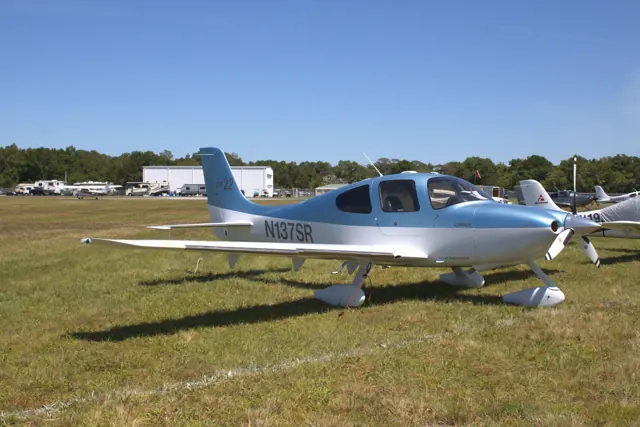
The SR22 entered production in 2001 as a more powerful development of Cirrus's SR20. A low wing, fixed tricycle gear and side-yoke controls define the basic layout. The Cirrus Airframe Parachute System is a prominent part of the aircraft's design.
The SR22 family spans normally aspirated and turbocharged versions as well as different panel generations. The side controls use mechanical connections. Simulator implementations range from bundled aircraft to detailed add-ons with their own engine, maintenance and avionics models.
Aircraft / family
Learning to Fly in a Cirrus SR22
Jessica Ambats · 1 November 2006
Cirrus SR22 GTS: The Perfect Plane?
Marc C. Lee · 24 April 2012
The pros and the cons: Cirrus SR22
John Zimmerman · 13 January 2025
Vision SF50 (VisionJet) · Microsoft Flight Simulator · MSFS 2024
Ice-protection indications in a documented revision
Sim Update 2 identifies Vision Jet package 0.5.11 and Working Title’s changes. These include stall-speed offsets when wing/stabiliser ice protection is selected, an IPS Stall Offset Reset control, revised flap logic and cabin-pressure calculations. The notes also document checklist-wheel behaviour. The changes date to May 2025.
Official MSFS 2024 SU2 notes · 1.4.20.0
Cirrus Vision SF50 · Laminar Research · X-Plane 12
Loading appears on the cockpit display
Laminar’s guide describes a weight-and-balance display that plots the aircraft’s loading against an envelope and updates as fuel is consumed. Initial loading comes from X-Plane’s weight, balance and fuel controls. A separate systems display shows the main door, parking brake and landing gear.
Archived Laminar SF50 manual · PDF p.18
Cirrus Vision SF50 · Laminar Research · X-Plane 12
An ILS approach still requires manual speed control
The manual’s autopilot-assisted ILS follows the localiser and glideslope, while the pilot manages speed with the throttle and completes the flare and braking manually. This is the documented X-Plane procedure; later real-aircraft autothrottle and Safe Return accounts describe different equipment.
Archived Laminar SF50 manual · PDF p.35; no installed revision observed
Cirrus Vision SF50 · Laminar Research · X-Plane 12
The Vision Jet's documented configuration
Laminar's SF50 guide covers flight controls, autopilot and trim/configuration indications. It covers the bundled Vision Jet's equipment; later real-aircraft upgrades and other developers' packages have separate references.
Archived simulator manual; installed package revision not observed · PDF pp.7,46-47
Cirrus Vision SF50 · Laminar Research · X-Plane 11
Loading appears on the cockpit display
Laminar’s guide describes a weight-and-balance display that plots the aircraft’s loading against an envelope and updates as fuel is consumed. Initial loading comes from X-Plane’s weight, balance and fuel controls. A separate systems display shows the main door, parking brake and landing gear.
Archived Laminar SF50 manual · PDF p.18
Cirrus Vision SF50 · Laminar Research · X-Plane 11
An ILS approach still requires manual speed control
The manual’s autopilot-assisted ILS follows the localiser and glideslope, while the pilot manages speed with the throttle and completes the flare and braking manually. This is the documented X-Plane procedure; later real-aircraft autothrottle and Safe Return accounts describe different equipment.
Archived Laminar SF50 manual · PDF p.35; no installed revision observed
Cirrus Vision SF50 · Laminar Research · X-Plane 11
The Vision Jet's documented configuration
Laminar's SF50 guide covers flight controls, autopilot and trim/configuration indications. It covers the bundled Vision Jet's equipment; later real-aircraft upgrades and other developers' packages have separate references.
Archived simulator manual; installed package revision not observed · PDF pp.7,46-47