Find aircraft background, systems descriptions and manuals for the aircraft you are researching. Each note keeps its source and version context close by.
Simulator manuals describe the developer’s implementation. Aircraft background is research-based; pilot accounts describe an individual’s experience. Coverage here is limited to the selected notes and linked resources, not the full contents of every manual.
A22-LS · VSKYLABS · X-Plane 11 · X-Plane 12
Released product and variants
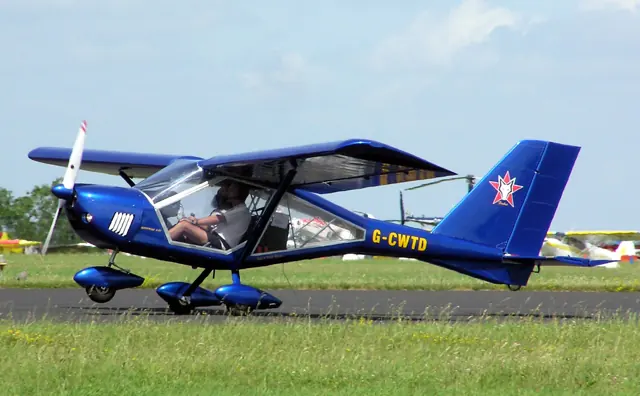
VSKYLABS models an A22-LS with a Rotax 912 ULS engine, analog instruments and an optional simulated autopilot. The developer supplies separate native products for X-Plane 11 and 12.
Official developer / designated-store reference · checked 2026-09-14
Aeroprakt A22
The A22-LS is a Ukrainian light sport aircraft from Aeroprakt. Its high wing, wide cabin glazing and tricycle landing gear suit recreational flying and instruction, while the represented version uses a Rotax 912 ULS engine.
VSKYLABS supplies an analog cockpit and an optional simulated autopilot. Its documentation describes separate native X-Plane 11 and 12 products and an independent development approved by, but not affiliated with, Aeroprakt.
A-22LS; manufacturer published specification
Aerostar 600 · A2A Simulations · MSFS 2020 · MSFS 2024
A choice of navigation and engine displays
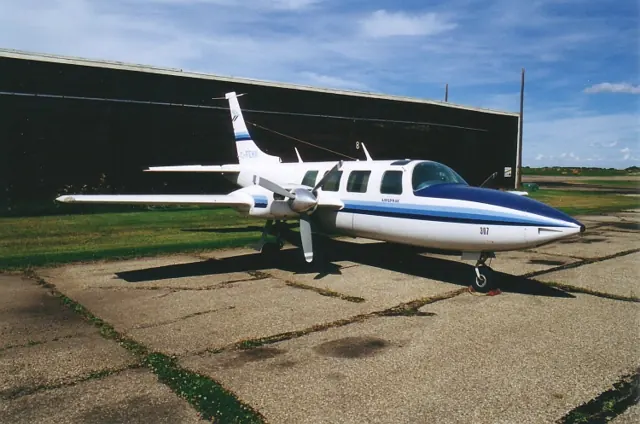
The product documentation lists a Collins Microline radio installation, a Century IV autopilot and selectable JPI engine monitors. It also identifies supported optional GPS integrations, with the relevant add-ons installed. A2A distinguishes its native MSFS 2024 walkaround and dirt features from the MSFS 2020 version.
A2A official Aerostar 600 product page, checked 12 September 2026; developer-documented features.
AW109 SP 2.0 · X-Trident · X-Plane 12
Four-axis automation and twin-engine management
X-Trident's AW109SP 2.0 documentation lists SAS, attitude and upper autopilot modes, together with automatic hover and take-off functions. FADEC and engine load-sharing are part of the twin-engine model. The developer documents flight-model differences between X-Plane 11 and 12.
AW109SP2.0 XP11/XP12 · Autopilot; Flight model
Airbus A300-600R · iniBuilds · iniBuilds · MSFS 2024 · MSFS 2020
Trim and hydraulics in the A300 cockpit
The iniBuilds A300 guide identifies paired pitch-trim wheels, rudder-trim controls and hydraulic controls, and describes the flight-phase use of the autopilot.
document snapshot; exact installed package not observed · PDF pp14-15,39; pedestal, overhead, climb checklist
A320neo v2 (iniBuilds) · Microsoft Flight Simulator · MSFS 2024
Managed and selected guidance
The iniBuilds guide distinguishes guidance along the planned route and computed profiles from targets chosen on the flight-control panel. The flight-management side handles navigation, planning and predictions; the flight-guidance side commands the autopilot, flight directors and autothrust. That division helps explain the relationship between the MCDU and glareshield controls.
iniBuilds A320neo v2 manual v1.0.4, 5 December 2023; documented simulator behaviour · PDF p.29
A320neo v2 (iniBuilds) · Microsoft Flight Simulator · MSFS 2024
The later bundled A320neo has its own systems guide
The iniBuilds guide explains load-factor-based fly-by-wire control and automatic trim, and separates autopilot, flight-director and autothrust indications. It describes the later A320neo implementation. Its equipment differs from the original Asobo aircraft and independent A320 add-ons.
Archived simulator manual; installed package revision not observed · PDF pp.3,18 (printed17), visually rendered
Airbus A320neo V2 · Microsoft Flight Simulator · MSFS 2020
Managed and selected guidance
The iniBuilds guide distinguishes guidance along the planned route and computed profiles from targets chosen on the flight-control panel. The flight-management side handles navigation, planning and predictions; the flight-guidance side commands the autopilot, flight directors and autothrust. That division helps explain the relationship between the MCDU and glareshield controls.
iniBuilds A320neo v2 manual v1.0.4, 5 December 2023; documented simulator behaviour · PDF p.29
Airbus A320neo V2 · Microsoft Flight Simulator · MSFS 2020
The later bundled A320neo has its own systems guide
The iniBuilds guide explains load-factor-based fly-by-wire control and automatic trim, and separates autopilot, flight-director and autothrust indications. It describes the later A320neo implementation. Its equipment differs from the original Asobo aircraft and independent A320 add-ons.
Archived simulator manual; installed package revision not observed · PDF pp.3,18 (printed17), visually rendered
A380X · FlyByWire · MSFS 2020 · MSFS 2024
Fuel trim and flight controls are different systems
FlyByWire's A380X documentation separates trim-tank fuel management from the flight-control checks performed with the sidestick. It also identifies autopilot engagement and hydraulic shutdown procedures. Fuel transfer manages balance, while the sidestick checks concern the flight controls.
SOP snapshot; dated pages; installed aircraft build not observed · PDF pp13,29,40,83; after-start control check and climb
H125 · CowanSim · MSFS 2020 · MSFS 2024
Stability assistance and upper modes do different jobs
Cowan's HeloSAS uses small cyclic corrections to stabilise the helicopter. The manual distinguishes force-trim behaviour with SAS engaged and disengaged, and explains the difference between spring-centred and non-centring controls. Its upper autopilot modes become selectable above 44 knots in the documented implementation. Stability assistance, rotor-speed governing and route-following modes are separate systems.
Archived document; installed package version not observed · PDF pp.1-2
H125 · CowanSim · X-Plane 11 · X-Plane 12
Disconnecting an upper mode can leave SAS active
The X-Plane SAS guide distinguishes trim release, upper-mode disconnection and the underlying stability system. Its published force-trim-release and autopilot-disconnect commands have different effects: disconnecting the upper modes can preserve SAS. The documented 44-knot threshold applies to mode availability, not to a universal helicopter operating limit.
Archived X-Plane SAS/AP manual · PDF pp.1-4