

Start here
A few places to begin, from the aircraft’s story to the people who fly it.
Meet the aircraft
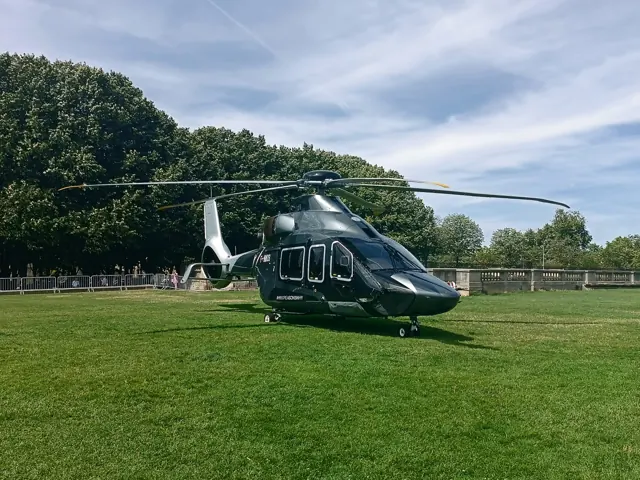
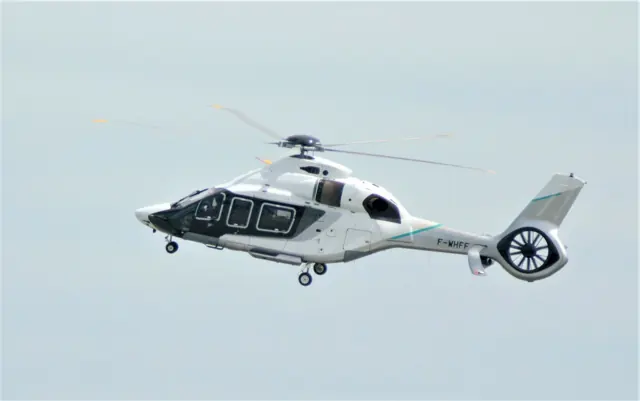
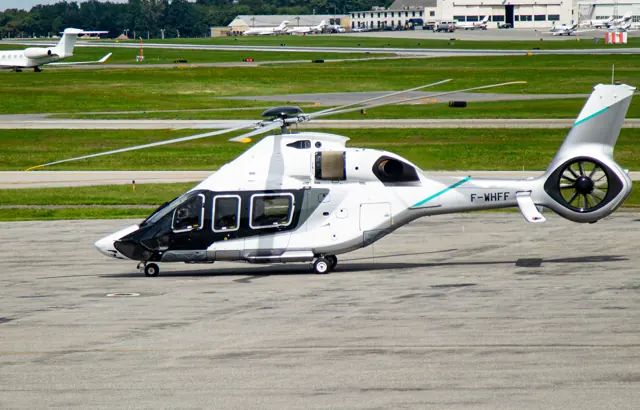
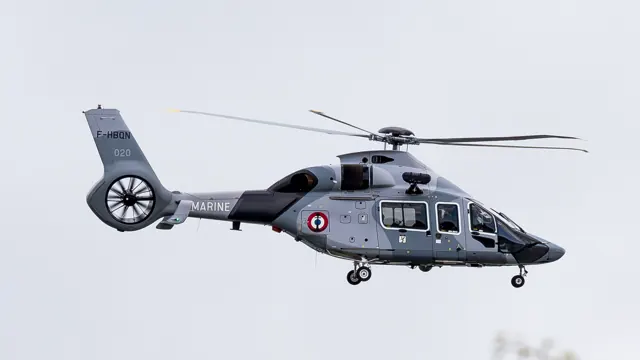
Airbus launched the H160 programme publicly in 2015, with the first flight that year. The design combines a composite-intensive airframe with distinctive swept main-rotor tips and an enclosed tail rotor. Its roles include passenger transport and public-service work. HPG's simulator implementation places particular emphasis on its automatic flight-control system.
Aircraft background
Wikipedia contributors · Read more ↗Snow nearly cancels a Las Vegas demonstration
A winter snow shower was an unexpected obstacle to Bourke’s Las Vegas flight. The camera helicopter was stranded at another airport, and the H160 had to enter the exhibition hall the following morning. While waiting, he talked with the engineers and test crew working from a modest rented hangar. A break in the weather finally made the flight possible.
Vertical · April 2018. Two-hour evaluation on 23 February with Olivier Gensse in prototype F-WWPL, before Heli-Expo; production equipment was still evolving.
Vertical · Read more ↗Four-axis automation with a separate backup layer
HPG's H160 has a four-axis automatic flight-control system, two main computers and backup SAS. Cyclic trim release temporarily gives the pilot an input window, while beep trim changes meaning according to the active upper mode. The guide gives autopilot-off, upper-mode-off and backup-cut actions different functions.
H160 · Hype Performance Group · MSFS 2020 · MSFS 2024
HPG · Read more ↗Into the cockpit
 YouTube
 Aviation International News · 6 min ·
Airbus Helicopters H160: The Pilot’s Perspective – AIN
An Airbus test pilot introduces the prototype H160 cockpit at Heli-Expo.
Real aircraft · H160 prototype
Watch on YouTube ↗ YouTube
 Nick Murray · 55 min ·
Airbus ACH160 Helicopter full flight with detailed cockpit tour
A detailed ACH160 tour covering the cabin, flight deck, engine start and flight.
Real aircraft · ACH160 executive variant
Watch on YouTube ↗Preview images are served by AirframeDB. Videos open on YouTube only when you choose to watch.
Meet Airbus H160
Airbus launched the H160 programme publicly in 2015, with the first flight that year. The design combines a composite-intensive airframe with distinctive swept main-rotor tips and an enclosed tail rotor. Its roles include passenger transport and public-service work.
HPG's simulator implementation places particular emphasis on its automatic flight-control system. Its four-axis AFCS and backup stability functions manage flight control; the developer manual describes their modes.
Airbus H160
Aircraft type designators
Use the code for the model you are flying. The linked authority lists the applicable aircraft.
History & design
A prototype travels with its working team
Bourke’s visit finds the H160 programme far from its home base, with engineers, test equipment and a tightly scheduled exhibition appearance.
Vertical · Inside the H160, middleweight contender ↗Prototype US demonstration tour, 2018
Passenger experience was part of the development brief
Gensse describes windows, noise, vibration and cabin temperature as deliberate priorities alongside cockpit workload. His interview adds the test team’s explanation of the H160’s design choices, while remaining a manufacturer’s account of its own programme.
Airbus · A conversation with experimental test pilot Olivier Gensse ↗Programme interview before entry into service
Development milestones
First flight: 13 June 2015
Wikipedia contributors · Airbus Helicopters H160 ↗Airbus Helicopters H160 · family/variant named by the source · Wikipedia revision 1374236182
Pilot accounts
Snow nearly cancels a Las Vegas demonstration
A winter snow shower was an unexpected obstacle to Bourke’s Las Vegas flight. The camera helicopter was stranded at another airport, and the H160 had to enter the exhibition hall the following morning. While waiting, he talked with the engineers and test crew working from a modest rented hangar. A break in the weather finally made the flight possible.
The changing light sent the two helicopters searching for suitable photographic backgrounds around the mountains. Gensse flew the close formation while Bourke handled radios and lookout. Later, Bourke tried the controls himself, landing at a ridge site and exploring the aircraft before returning for supervised circuit work. Visibility and responsive handling made the helicopter feel smaller than its size suggested. The day combined a demanding promotional schedule with a memorable opportunity to learn from its test pilot.
Vertical · April 2018. Two-hour evaluation on 23 February with Olivier Gensse in prototype F-WWPL, before Heli-Expo; production equipment was still evolving.
Read the full account · Vertical ↗The test pilot wants complexity to do useful work
Having worked on the H160 from its beginnings, Gensse admitted that his enthusiasm was personal. Customer demonstrations gave him a particular reward: watching experienced pilots and passengers react after a flight. He saw those reactions as an encouraging response to years spent developing the aircraft.
His account repeatedly returns to the pilot’s attention. More equipment would have little value, he argued, if it merely created more buttons and monitoring work. The cockpit needed to present relevant information and make the automation useful enough that pilots would actually choose it. Passenger comfort also shaped the work, from windows to cabin temperature. He expressed pride in the result and acknowledged his attachment to the programme.
Airbus interview · April 2019. Programme test pilot discussing development and customer demonstrations before entry into service; manufacturer-published perspective.
Read the full account · Airbus ↗Experiencing the cabin before taking the controls
Mabille began his H160 introduction in the passenger cabin. Wide windows and a quiet environment made an immediate impression, even with the prototype’s test equipment and temporary interior. After watching demonstrations in flight, he landed with the crew at Berre La Fare and moved into the cockpit for his own evaluation.
His naval flying background made visibility during hoisting work a particular interest. He explored the view from a hover and tried supervised handling and simulated emergencies, then let Gensse demonstrate more demanding manoeuvres. On the return to Marignane, the approach and electric brakes supplied further impressions. Afterward, Mabille realised how much time he had spent looking outside instead of being drawn into the displays. The account describes a prototype demonstration, including equipment and expectations that still belonged to the development programme.
Helicopter Industry · October 2018. Early-May visit to Marignane with Olivier Gensse and Nicolas Certain in prototype PT1, F-WWOG; one hour and twenty minutes overall.
Read the full account · Helicopter Industry ↗In your simulator
Systems, equipment and documentation for each developer’s aircraft.
Compare simulator versions →MSFS 2020 · MSFS 2024H160
Hype Performance Group · Released
H160
Hype Performance Group · Released
MSFS 2020 · MSFS 2024H160
HPG · Released
H160
HPG · Released
Aircraft specifications
Published figures for the named real-aircraft variant. Simulator equipment and performance can differ.
| Specification | Published value |
|---|---|
| Length | 13.96 m (45 ft 10 in) |
| Height | 4.91 m (16 ft 1 in) |
| Empty weight | 4,050 kg (8,929 lb) |
| Max takeoff weight | 6,050 kg (13,338 lb) |
| Powerplant | 2 × Safran Arrano 1A turboshaft engines, 955 kW (1,280 shp) each |
| Main rotor diameter | 13.40 m (43.96 ft) |
| Main rotor area | 141 m² (1,520 sq ft) |
| Cruise speed | 255 km/h (158 mph, 138 kn) |
| Range | 880 km (550 mi, 475 nmi) |
| Service ceiling | 6,096 m (20,000 ft) , 9,300 ft (2,835 m) hover ceiling IGE |
Manuals & resources
Find your next read
Choose a topic for a short introduction and a link to the original source. Simulator references identify the developer and edition they cover.
Simulator documentation
Four-axis automation with a separate backup layerH160 · Hype Performance Group · MSFS 2020 · MSFS 2024
HPG's H160 has a four-axis automatic flight-control system, two main computers and backup SAS. Cyclic trim release temporarily gives the pilot an input window, while beep trim changes meaning according to the active upper mode. The guide gives autopilot-off, upper-mode-off and backup-cut actions different functions.
Content Creator Preview · 20 October 2023 · PDF pp.3–4,26–27
HPG · Read the source ↗The preview guide does not require a separate throttle axisH160 · Hype Performance Group · MSFS 2020 · MSFS 2024
HPG maps collective to either THROTTLE AXIS or COLLECTIVE AXIS, with only one chosen. The simulated FADEC handles engine fuel control. This differs from packages that require separate collective and twist-throttle assignments.
HPG H160 preview · 20 October 2023 · PDF p.3
HPG · Read the source ↗Map layers, cameras and navigation have documented scopeH160 · Hype Performance Group · MSFS 2020 · MSFS 2024
The guide describes selectable map layers for helipads, hospitals and airports, plus a tail-camera view. Its FMS choices are PMS or TDS GTN750; CMA9000 was listed as forthcoming. The description covers the October 2023 preview.
HPG H160 preview · PDF pp.22–25
HPG · Read the source ↗Pilot account
Snow nearly cancels a Las Vegas demonstrationVertical · April 2018. Two-hour evaluation on 23 February with Olivier Gensse in prototype F-WWPL, before Heli-Expo; production equipment was still evolving.
A winter snow shower was an unexpected obstacle to Bourke’s Las Vegas flight. The camera helicopter was stranded at another airport, and the H160 had to enter the exhibition hall the following morning. While waiting, he talked with the engineers and test crew working from a modest rented hangar. A break in the weather finally made the flight possible. The changing light sent the two helicopters searching for suitable photographic backgrounds around the mountains.
Jon Bourke
Vertical · Read the source ↗The test pilot wants complexity to do useful workAirbus interview · April 2019. Programme test pilot discussing development and customer demonstrations before entry into service; manufacturer-published perspective.
Having worked on the H160 from its beginnings, Gensse admitted that his enthusiasm was personal. Customer demonstrations gave him a particular reward: watching experienced pilots and passengers react after a flight. He saw those reactions as an encouraging response to years spent developing the aircraft. His account repeatedly returns to the pilot’s attention. More equipment would have little value, he argued, if it merely created more buttons and monitoring work.
Olivier Gensse
Airbus · Read the source ↗Developer documentation
H160 — product listingH160 · MSFS 2020 · MSFS 2024
Product listing captured 2026-09-30; edition scope from the reviewed catalogue
www.hypeperformancegroup.com · Read the source ↗Read the original documentation from the people who created it. Manuals open on their publisher’s website.
Manual
H160 quick-startHPG Microsoft Flight Simulator aircraft manualsMicrosoft / aircraft developersAircraft background
Airbus Helicopters H160Wikipedia contributors · Research background · Wikipedia revision 1374236182 · retrieved 2026-09-12Resource
HPG productsHype Performance GroupProduct
H160Hype Performance Group · Official developer / designated store catalogue · checked 2026-09-12Type designator
ICAO Doc 8643 — aircraft type designatorsInternational Civil Aviation Organization · Public search data retrieved 2026-09-14; authority update 2026-09-03Built-in force-feedback profiles
Read the documentary basis, editable starting settings and remaining questions for the aircraft you fly. Each explanation refers to the exact profile revision shown.
Catalogue programme-20261022-v1 · 2 profile choices
HPG H160
Hype Performance Group · Free and Pro · Revision 2 · Inherited starting point
MSFS 2020 · MSFS 2024
HPG H160: Nominal cyclic spring and damping provide the chosen baseline while the add-on manages AFCS and automatic trim.
Airbus H160
Free and Pro · Revision 1 · Partial review
MSFS 2024 · MSFS 2020
Airbus H160: Nominal cyclic spring and damping provide the chosen baseline while the add-on manages AFCS and automatic trim.
HPG H160
HPG H160: Nominal cyclic spring and damping provide the chosen baseline while the add-on manages AFCS and automatic trim.
Aircraft and simulator scope
- HPG H160 · Hype Performance Group · MSFS 2020 · Add-on starting point
- HPG H160 · Hype Performance Group · MSFS 2024 · Add-on starting point
The simulator model and controls
Airbus launched the H160 programme publicly in 2015, with the first flight that year. The design combines a composite-intensive airframe with distinctive swept main-rotor tips and an enclosed tail rotor. Its roles include passenger transport and public-service work.
This profile selects HPG H160 for MSFS 2020, MSFS 2024.
How this profile feels
The spring stays independent of airspeed. Directed aerodynamic loading is omitted.
Local force trim is off. Autopilot following is off.
Cyclic damping is on. Its configured gain is 0.35; it resists hardware motion separately from the spring and aircraft stabilization.
Controls and trim
HPG's H160 guide connects automatic trim with dual autopilots and backup stabilization. Rotor trim reset pauses AFCS logic for manual cyclic input, and beep trim depends on the active context. FADEC manages the engine throttles. EASA type data separately describes retractable hydraulic tricycle gear. None of these systems is reduced to a single moving hardware-spring centre.
The selected implementation
HPG separates civil/luxury fits and luxury emergency floats. Its documented 2024 activation path applies to the earlier product and its own AFCS/trim-reset logic.
About the values
The gains are normalized profile settings. They describe the chosen effect balance; hand force depends on the device and its output limits. IAS references are tuning values rather than operating limits. Physical acceptance of this revision remains pending.
Documentary review and sources
These decisions describe the documentary basis and remaining gaps for this revision. Aircraft documentation and a starting setting describe different kinds of evidence.
Aircraft and variant
InheritedThis profile selects HPG H160 for MSFS 2020, MSFS 2024.
Flight controls
InheritedHPG's H160 guide connects automatic trim with dual autopilots and backup stabilization. Rotor trim reset pauses AFCS logic for manual cyclic input, and beep trim depends on the active context. FADEC manages the engine throttles. EASA type data separately describes retractable hydraulic tricycle gear. None of these systems is reduced to a single moving hardware-spring centre.
Trim
InheritedCyclic damping is on. Its configured gain is 0.35; it resists hardware motion separately from the spring and aircraft stabilization.
Autopilot and stability
InheritedAutopilot following is off; the configured spring and load retain the hardware feel.
Equipment
InheritedHPG separates civil/luxury fits and luxury emergency floats. Its documented 2024 activation path applies to the earlier product and its own AFCS/trim-reset logic.
Speeds and limits
InheritedThe indicated-speed references set the profile response scale; they are separate from aircraft operating limits.
Simulator integration
InheritedThe profile targets msfs2020, msfs2024. Add-on-specific controls use only the supported references configured by this profile.
Force-feedback settings
InheritedThe settings define the profile’s effect balance. Device output limits affect physical hand force.
Starting settings and their rationale
These configured values are starting estimates. The explanations describe what each setting controls; physical validation appears separately below.
| Setting | Starting value | What it controls and why |
|---|---|---|
| Spring strength | Starting value0.16 | What it controls and whyNominal cyclic spring and damping provide the chosen baseline while the add-on manages AFCS and automatic trim. The baseline spring is 0.16. Low-speed spring blending is off. |
| Master force gain | Starting value0.65 | What it controls and whyScales overall profile strength while preserving effect balance, subject to device and output limits. |
| Profile force gain | Starting value0 | What it controls and whyThe 0 gain omits sustained directed airspeed loading. Spring resistance remains independent. |
| Force tuning speed/reference | Starting value140 kt | What it controls and whySets the IAS reference for aerodynamic loading. It is an estimate, not published cruise TAS or a flight limit. |
| Spring response reference speed | Starting value65 kt | What it controls and whySets the IAS where the low-speed blend reaches baseline strength; high-speed stiffening also uses it. |
| Aileron force scale | Starting value0.72 | What it controls and whyRoll and pitch aerodynamic scales are 0.72 and 1, respectively. These stored weights do not create directed aerodynamic loading while that term is inactive. No custom spring-travel curve is enabled. |
| Elevator force scale | Starting value1 | What it controls and whyScales pitch aerodynamic loading; pitch spring travel and trim responses are separate settings. |
| Trim feel | Starting valueDisabled | What it controls and whyRetained for compatibility and group membership. Trim relief, rather than this flag, controls centre movement. |
| Trim relief | Starting valueDisabled | What it controls and whyAllows trim relief with supported control law and valid telemetry. Axis authorities set its amount. |
| Autopilot follow | Starting valueDisabled | What it controls and whyAutopilot following is off; the configured spring and load retain the hardware feel. |
| Autopilot neutral hold | Starting valueDisabled | What it controls and whyPermits centering hold during a supported AP state, separate from following a moving target. |
| Output force limit | Starting value0.55 | What it controls and whyCaps directed-force output. Native spring effects and device limits remain separate. |
All 44 starting settings and their rationale
The settings define the profile’s effect balance. Device output limits affect physical hand force.
| Setting | Starting value | What it controls and why |
|---|---|---|
| Spring strength | Starting value0.16 | What it controls and whyNominal cyclic spring and damping provide the chosen baseline while the add-on manages AFCS and automatic trim. The baseline spring is 0.16. Low-speed spring blending is off. |
| Spring deadband | Starting value0.02 | What it controls and whySets travel around the centre before the baseline spring resists. Smaller values engage it sooner. |
| Profile force gain | Starting value0 | What it controls and whyThe 0 gain omits sustained directed airspeed loading. Spring resistance remains independent. |
| Master force gain | Starting value0.65 | What it controls and whyScales overall profile strength while preserving effect balance, subject to device and output limits. |
| QBlend Enabled | Starting valueDisabled | What it controls and whyAllows baseline spring strength to rise with indicated airspeed where the control law permits it. |
| QSpring Minimum Factor | Starting value1 | What it controls and whySets low-speed spring strength as a fraction of baseline when blending is enabled. One keeps full strength. |
| QSpring Start Knots | Starting value8 kt | What it controls and whySets the IAS where the low-speed spring blend starts rising. This is a feel threshold, not a flight limit. |
| Spring response reference speed | Starting value65 kt | What it controls and whySets the IAS where the low-speed blend reaches baseline strength; high-speed stiffening also uses it. |
| Force tuning speed/reference | Starting value140 kt | What it controls and whySets the IAS reference for aerodynamic loading. It is an estimate, not published cruise TAS or a flight limit. |
| Airspeed spring stiffening gain | Starting value0 | What it controls and whyAdds permitted spring resistance above the full-blend speed. Zero removes this high-speed increase. |
| Airspeed spring stiffening limit | Starting value5 | What it controls and whyLimits the squared airspeed ratio used for high-speed spring stiffening; it is not a device-force cap. |
| Aileron force scale | Starting value0.72 | What it controls and whyRoll and pitch aerodynamic scales are 0.72 and 1, respectively. These stored weights do not create directed aerodynamic loading while that term is inactive. No custom spring-travel curve is enabled. |
| Elevator force scale | Starting value1 | What it controls and whyScales pitch aerodynamic loading; pitch spring travel and trim responses are separate settings. |
| Output force limit | Starting value0.55 | What it controls and whyCaps directed-force output. Native spring effects and device limits remain separate. |
| Trim feel | Starting valueDisabled | What it controls and whyRetained for compatibility and group membership. Trim relief, rather than this flag, controls centre movement. |
| Trim relief | Starting valueDisabled | What it controls and whyAllows trim relief with supported control law and valid telemetry. Axis authorities set its amount. |
| Elevator Authority | Starting value0 | What it controls and whyScales supported pitch-trim relief and permitted centre movement. Zero removes pitch response. |
| Aileron Authority | Starting value0 | What it controls and whyScales supported roll-trim relief and permitted centre movement. Zero removes roll response. |
| Force Trim Enabled | Starting valueDisabled | What it controls and whyLocal force trim is a limited hardware-neutral function; it does not recreate AFCS pause, upper modes or backup stabilization. Local force trim is off. The stored latch parameters are inactive; the profile does not supply a local hold-where-left neutral. |
| GLoad Enabled | Starting valueDisabled | What it controls and whyAllows load-factor changes to modify permitted spring laws. Passive fly-by-wire feel can suppress it. |
| Rate Damping Enabled | Starting valueDisabled | What it controls and whyEnables rate damping with the configured coefficients and control law. |
| Autopilot follow | Starting valueDisabled | What it controls and whyAutopilot following is off; the configured spring and load retain the hardware feel. |
| Autopilot follow authority | Starting value0.05 | What it controls and whySets admitted AP-follow gain, not a percentage of travel. Runtime ownership and input limits still apply. |
| Autopilot neutral hold | Starting valueDisabled | What it controls and whyPermits centering hold during a supported AP state, separate from following a moving target. |
| Autopilot neutral hold strength | Starting value0.6 | What it controls and whySets admitted AP neutral-hold strength; inactive while neutral hold is disabled. |
| Enabled | Starting valueEnabled | What it controls and whyEnables aerodynamic cues; each still needs nonzero strength and its simulator conditions. |
| Gain | Starting value0 | What it controls and whySets stall-buffet strength. Zero removes the cue without changing simulator stalls or warnings. |
| Gain | Starting value0 | What it controls and whySets high-Mach buffet strength; onset and full-strength thresholds are separate. |
| Gain | Starting value0 | What it controls and whySets flap buffet at the configured position and speed gates. Flap movement texture is separate. |
| Maximum flap index | Starting value1 | What it controls and whySets the final flap index for detent normalization. UP plus three detents uses maximum index3. |
| Minimum flap index | Starting value1 | What it controls and whySets the first flap detent that admits buffet; this is a handle index, not degrees. |
| Gain | Starting value0 | What it controls and whySets gear aerodynamic buffet; movement and ground-contact cues are separate. |
| Shaker Enabled | Starting valueDisabled | What it controls and whyPermits shaker at supported warning conditions; the switch does not establish aircraft equipment. |
| Stick shaker amplitude | Starting value0.5 | What it controls and whySets triggered shaker strength; inactive while the shaker feature is disabled. |
| Enabled | Starting valueEnabled | What it controls and whyEnables ground effects; each still needs its own strength and contact or motion telemetry. |
| Gain | Starting value0.15 | What it controls and whySets rolling texture strength, modified by speed, surface and undercarriage configuration. |
| Gain | Starting value0 | What it controls and whySets gear-bump texture during ground motion, separate from touchdown impact. |
| Gain | Starting value0.5 | What it controls and whySets landing-impact strength; landing telemetry and response shape determine the pulse. |
| Gain | Starting value0 | What it controls and whySets reverse-thrust vibration with valid reverser and engine conditions. Zero removes the cue. |
| Enabled | Starting valueEnabled | What it controls and whyEnables engine cues with nonzero settings and valid running-engine telemetry. |
| Gain | Starting value0 | What it controls and whySets estimated engine vibration using configured telemetry and response, not measured cockpit vibration. |
| Enabled | Starting valueEnabled | What it controls and whyEnables accessory cues with configured strengths and observed accessory movement. |
| Gain | Starting value0 | What it controls and whySets texture from observed flap movement; a command without movement does not establish the cue. |
| Gain | Starting value0.025 | What it controls and whySets texture from observed gear movement, separate from aerodynamic and touchdown effects. |
Limits and open questions
- HPG H160; msfs2020, msfs2024. Previously observed titles and implementation identifiers are retained; installed matching remains deferred.
- Powered rotorcraft cyclic with estimated support and no direct fixed-wing aerodynamic back-drive.
- Cyclic trim release is AFCS interaction. Keep aircraft software reference ownership; the H145 build450-specific LVar is not assumed to qualify H160 without its own contract.
- Custom AFCS uses cyclic release and separate collective guidance. No silent conversion of selected attitude into a physical cyclic target. AP servo-follow and neutral hold remain disabled; engagement indicators are not force-demand signals.
- Twin turbine, five-blade Blue Edge main rotor, Fenestron and retractable wheels. Emergency flotation does not change the normal ground preset.
- 140 KIAS is an estimated feel reference, not cruise TAS or a certified limit. No invented Mach, VNE or weight scheduling.
- Read-only native telemetry for aircraft motion and accessory positions. Custom switches, display animations and mode lamps are not calibrated servo targets. No unverified LVars/datarefs or simulator writes.
- Spring 0.16; lateral scale 0.72; trim authorities 0/0; per-axis output cap .55. Editable engineering estimates, not measured hand forces. No body-rate torque, surface following or fabricated hydraulic-failure loads.
- New physical and installed-product checks deferred by owner. Existing separately recorded acceptance retains its original device, simulator, add-on and version limits. Source review does not broaden custom telemetry acceptance.
- Only actual accessory position changes drive movement texture; static drag and command-triggered kicks are disabled. Select and save an aircraft default when telemetry lacks a discriminating developer/configuration identity.
Physical validation
No physical force validation is recorded in this public catalogue for this revision. Documentary review and software checks do not establish how a particular device feels.
Discuss this aircraft (0)
Questions, observations and useful sources from the community.
No published discussions yet. Bring a question or share a useful source.
Open aircraft discussions →Content expanded · What’s new
Something missing or a source that needs attention?
Suggest a correction ↗