
Start here
A few places to begin, from the aircraft’s story to the people who fly it.
Meet the aircraft
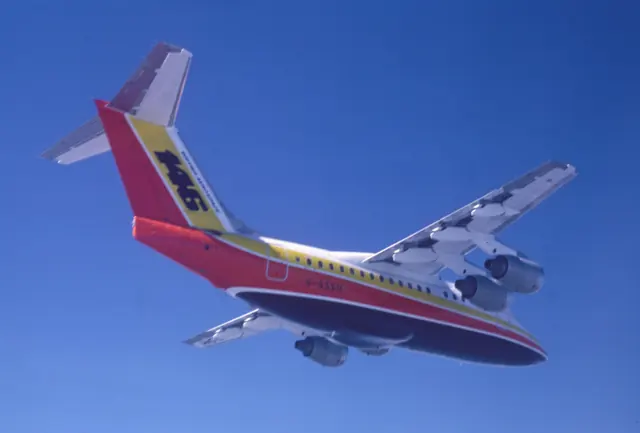
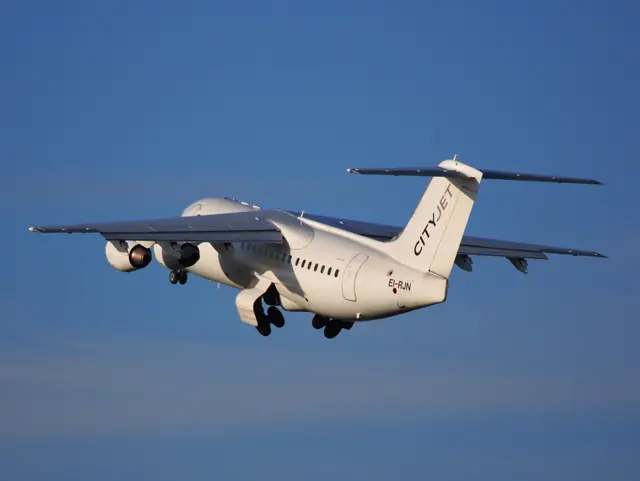
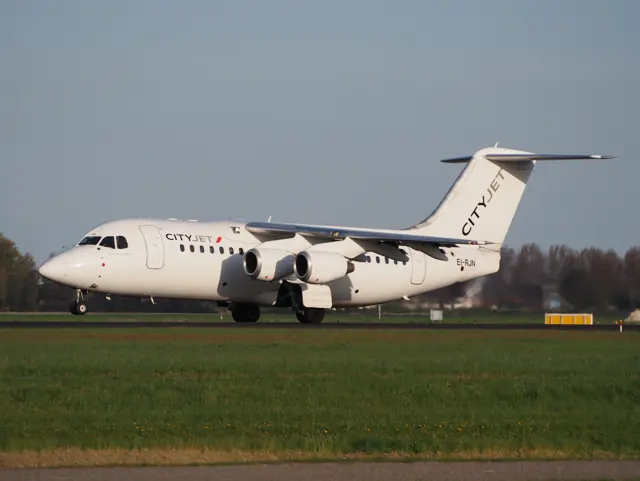
The BAe 146 was developed for short-haul airline service, with -100, -200 and -300 fuselage lengths. Its high wing and T-tail make it readily recognisable. The Avro RJ continued the family with revised engines, avionics and other systems. The 146 and RJ are especially rewarding to compare in simulation because similar-looking airframes can conceal different flight-guidance and cockpit arrangements.
Aircraft background
Wikipedia contributors · Read more ↗Trading airline schedules for a flying laboratory
Brennan’s research flying took a familiar regional airliner into unusual places. A favourite trip followed Greenland’s glaciers towards the coast in 2015. During satellite-calibration work, the 146 flew low over the ocean while a NASA ER-2 worked far above it. Scientists and their instruments gave the flight a purpose very different from carrying passengers between cities.
Pilot Career News interview · March 2021. Airtask BAe 146-300 operating for FAAM; the headline spells his first name Finnbarre, while the article uses Finbarre.
Pilot Career News · Read more ↗An older regional jet's flight-control architecture
The 146 manual describes autopilot movement of the control columns and elevator servo tabs, automatic pitch trim and flap-dependent trim speed. It also explains the SYNC function and distinguishes stick shakers from the nose-down stall-identification force.
BAe 146 / Avro RJ · Just Flight · Just Flight · MSFS 2020 · MSFS 2024
Just Flight · Read more ↗Into the cockpit
 YouTube
 thonain · 13 min ·
FLIGHT LYON-ZURICH AVRO RJ100 SWISSAIR COCKPIT BAE 146 TAKE OFF LANDING DECOLLAGE ATTERRISSAGE
A Swissair Avro RJ100 journey between Lyon and Zurich, including cockpit views.
Related variant · Avro RJ100, in the BAe 146/RJ family
Watch on YouTube ↗Preview images are served by AirframeDB. Videos open on YouTube only when you choose to watch.
Meet BAe 146 / Avro RJ
The BAe 146 was developed for short-haul airline service, with -100, -200 and -300 fuselage lengths. Its high wing and T-tail make it readily recognisable. The Avro RJ continued the family with revised engines, avionics and other systems.
The 146 and RJ have different flight-guidance systems and cockpit arrangements. Just Flight documents them in separate manuals and a differences guide.
BAe 146 / Avro RJ
Aircraft type designators
Use the code for the model you are flying. The linked authority lists the applicable aircraft.
History & design
A royal transport finds a museum home
RAF BAe 146 ZE700 made its final service flight to St Athan in March 2022 for preservation at the South Wales Aviation Museum. Former technician Barry Kelly joined the farewell after more than three decades working on the aircraft, connecting its royal-transport history with the people who maintained it.
Royal Air Force · Royal jet flies in for retirement at South Wales museum ↗ZE700; RAF report dated 17 March 2022
Development milestones
First flight: 3 September 1981
Wikipedia contributors · British Aerospace 146 ↗British Aerospace 146 · family/variant named by the source · Wikipedia revision 1373098377
Pilot accounts
Trading airline schedules for a flying laboratory
Brennan’s research flying took a familiar regional airliner into unusual places. A favourite trip followed Greenland’s glaciers towards the coast in 2015. During satellite-calibration work, the 146 flew low over the ocean while a NASA ER-2 worked far above it. Scientists and their instruments gave the flight a purpose very different from carrying passengers between cities.
The job also required a different relationship with planning. Clearances might take weeks to arrange, while the weather or phenomenon being studied could change quickly. Brennan found that reading the researchers’ work helped him understand where they needed the aircraft. His airline experience remained useful, but the flying laboratory added flexibility, collaboration and the pleasure of learning what was happening outside the cockpit.
Pilot Career News interview · March 2021. Airtask BAe 146-300 operating for FAAM; the headline spells his first name Finnbarre, while the article uses Finbarre.
Read the full account · Pilot Career News ↗A busy short-haul day with time above the clouds
Anderson enjoyed the rhythm of short flights across Europe, sometimes flying four sectors in a day. Frequent departures and arrivals gave her plenty of hands-on flying, with colleagues helping make each day different. Climbing out of cloud into sunshine and completing a good landing after a gusty approach were among the pleasures she singled out.
On the ground, the same job could become an exercise in watching the clock. Fuel, catering, cleaning and a tow truck all had to come together; some delays remained beyond the crew’s control. Time away from home brought another challenge for a wife and mother, although she valued being able to leave most of the work behind when she returned to her family.
Pilot Career News · June 2016. CityJet captain based in Dublin, flying the later Avro RJ85 on CityJet and Air France services.
Read the full account · Pilot Career News ↗Enjoying the work more than the aeroplane
Wilson moved into command on the 146 within months of joining Ansett. He valued the people he worked with and the variety of flying out of Perth, but the aircraft itself never became a favourite. In his recollection, limited power and complicated systems added to the demands of remote airports, where heat, obstacles and runway length made preparation particularly important.
One engine failure also required prompt attention to the passengers. The noise from the engine beneath the high wing made the problem impossible to keep discreet, so an announcement became part of dealing with the event. Despite his criticisms of the machine, Wilson looked back warmly on this stage of his career, before moving on to the Boeing 767.
Downunder Aviation News career interview. BAe 146 command at Ansett in Western Australia; exact variant and dates are not supplied.
Read the full account · Downunder Aviation News ↗Light controls and a busy flight deck
The pilot posting as pilotmike remembered responsive controls and a forgiving undercarriage, qualities that made the 146 enjoyable to fly. Visits to London City brought close views of the capital and approaches that remained interesting even with experience. The strong impression was of an aircraft that rewarded the person actually handling it.
The affection came with reservations. The contributor described frequent minor faults, a busy cockpit and the need to understand what the thrust-management and autopilot systems were doing. Flap movement initially seemed dramatic, although familiarity made it routine. A remembered three-engine ferry flight illustrated another side of operating the type. These are one pilot’s retrospective impressions, including criticism as well as enjoyment.
PPRuNe post 3 · 2 December 2019. Self-reported BAe 146 experience under a forum handle; identity, employer and exact variant are not verified.
Read the full account · PPRuNe ↗In your simulator
Systems, equipment and documentation for each developer’s aircraft.
Compare simulator versions →MSFS 2020 · MSFS 2024BAe 146 / Avro RJ · Just Flight
Just Flight · Released
BAe 146 / Avro RJ · Just Flight
Just Flight · Released
MSFS 2020 · MSFS 2024RJ Professional
Just Flight · Released
RJ Professional
Just Flight · Released
X-Plane 12 · X-Plane 11BAe 146 / Avro RJ · Just Flight
Just Flight · Released
BAe 146 / Avro RJ · Just Flight
Just Flight · Released
Manuals & resources
Find your next read
Choose a topic for a short introduction and a link to the original source. Simulator references identify the developer and edition they cover.
Simulator documentation
An older regional jet's flight-control architectureBAe 146 / Avro RJ · Just Flight · Just Flight · MSFS 2020 · MSFS 2024
The 146 manual describes autopilot movement of the control columns and elevator servo tabs, automatic pitch trim and flap-dependent trim speed. It also explains the SYNC function and distinguishes stick shakers from the nose-down stall-identification force.
146 manual v2.4 · PDF pp.35,82; pitch controls and automatic trim
Just Flight · Read the source ↗Thrust control and pressurisation change in the RJRJ Professional · Just Flight · MSFS 2020 · MSFS 2024
Just Flight's comparison explains how the RJ's digital engine control, thrust-rating panel and autothrottle work together. Its simulated pressurisation system is fully automatic after the landing altitude is set, whereas the 146 Professional uses a semi-automatic arrangement. Automatic lift-spoiler deployment is another difference described for landing and rejected takeoff.
Just Flight 146/RJ differences booklet, archived 10 September 2026; product comparison · PDF p.4
Just Flight · Read the source ↗Vertical guidance remains advisoryRJ Professional · Just Flight · MSFS 2020 · MSFS 2024
RJ Professional models the GNLU-910A flight-management system, including climb, cruise and descent predictions. The comparison booklet explicitly says its VNAV is not coupled to the autopilot. For a non-precision approach, the simulated VNAV APPROACH function uses waypoint altitudes to generate an advisory path indication on the navigation display. The displayed vertical path is advisory.
Just Flight 146/RJ differences booklet, archived 10 September 2026; product comparison · PDF p.5
Just Flight · Read the source ↗The RJ is a systems development of the 146RJ Professional · Just Flight · MSFS 2020 · MSFS 2024
The RJ documentation covers its flight-guidance computers and autoland modes and annunciations. Just Flight also provides a dedicated differences booklet. The booklet compares the RJ and 146 flight decks and systems.
MSFS2024 RJ operations manual · Autoflight; Flight controls; autoland annunciators
Just Flight · Read the source ↗Cockpit controls expose assignments for hardwareBAe 146 / Avro RJ · Just Flight · Just Flight · X-Plane 12 · X-Plane 11
The listing describes command information in clickspot tooltips and configurable control parameters in Manifest.json. It also retains standard commands for features such as lights and wipers, providing documented starting points for a hardware setup.
X-Plane 12 product description; not evidence of a particular peripheral’s compatibility
Just Flight · Read the source ↗The navigation installation has several optionsBAe 146 / Avro RJ · Just Flight · Just Flight · X-Plane 12 · X-Plane 11
Just Flight lists a custom UFMC, the default X-Plane FMC and optional Reality XP GTN750 compatibility. Its tablet supports AviTab and controls aircraft doors and call-outs. These options describe the X-Plane 12 edition.
X-Plane 12 product description · captured September 2026
Just Flight · Read the source ↗Pilot account
Trading airline schedules for a flying laboratoryPilot Career News interview · March 2021. Airtask BAe 146-300 operating for FAAM; the headline spells his first name Finnbarre, while the article uses Finbarre.
Brennan’s research flying took a familiar regional airliner into unusual places. A favourite trip followed Greenland’s glaciers towards the coast in 2015. During satellite-calibration work, the 146 flew low over the ocean while a NASA ER-2 worked far above it. Scientists and their instruments gave the flight a purpose very different from carrying passengers between cities. The job also required a different relationship with planning.
Finbarre Brennan
Pilot Career News · Read the source ↗A busy short-haul day with time above the cloudsPilot Career News · June 2016. CityJet captain based in Dublin, flying the later Avro RJ85 on CityJet and Air France services.
Anderson enjoyed the rhythm of short flights across Europe, sometimes flying four sectors in a day. Frequent departures and arrivals gave her plenty of hands-on flying, with colleagues helping make each day different. Climbing out of cloud into sunshine and completing a good landing after a gusty approach were among the pleasures she singled out. On the ground, the same job could become an exercise in watching the clock.
Sheena Anderson
Pilot Career News · Read the source ↗Read the original documentation from the people who created it. Manuals open on their publisher’s website.
Manual
Microsoft Flight Simulator aircraft manualsMicrosoft / aircraft developers Operations ManualJust Flight Operations ManualJust Flight hereJust Flight · Just Flight 146/RJ differences booklet, archived 10 September 2026; product comparisonAircraft background
British Aerospace 146Wikipedia contributors · Research background · Wikipedia revision 1373098377 · retrieved 2026-09-12 Royal jet flies in for retirement at South Wales museumRoyal Air Force · 17 March 2022 · ZE700 farewellResource
146 and RJ ProfessionalJust FlightProduct
146 Professional (X-Plane 12)Just Flight · Official developer / designated store catalogue · checked 2026-09-12 RJ ProfessionalJust Flight · Official developer / designated store catalogue · checked 2026-09-12 146 Professional (MSFS)Just Flight · Official developer / designated store catalogue · checked 2026-09-12 146 Professional (X-Plane 11)Just Flight · Official developer / designated store catalogue · checked 2026-09-12Type designator
ICAO Doc 8643 — aircraft type designatorsInternational Civil Aviation Organization · Public search data retrieved 2026-09-14; authority update 2026-09-03Developer documentation
EFB manualJust Flight · Gathered developer documentationBuilt-in force-feedback profiles
Read the documentary basis, editable starting settings and remaining questions for the aircraft you fly. Each explanation refers to the exact profile revision shown.
Catalogue programme-20261022-v1 · 25 profile choices
Just Flight BAe 146-100
Just Flight · Free and Pro · Revision 6 · Inherited starting point
MSFS 2020 · MSFS 2024
Just Flight BAe 146-100: Servo-tab primary controls motivate reversible loading even though roll spoilers and rudder are powered.
Just Flight BAe 146-200
Just Flight · Free and Pro · Revision 5 · Inherited starting point
MSFS 2020 · MSFS 2024
Just Flight BAe 146-200: Servo-tab primary controls motivate reversible loading even though roll spoilers and rudder are powered.
Just Flight BAe 146-200QC
Just Flight · Free and Pro · Revision 5 · Inherited starting point
MSFS 2020 · MSFS 2024
Just Flight BAe 146-200QC: Servo-tab primary controls motivate reversible loading even though roll spoilers and rudder are powered.
Just Flight BAe 146-200QT
Just Flight · Free and Pro · Revision 5 · Inherited starting point
MSFS 2020 · MSFS 2024
Just Flight BAe 146-200QT: Servo-tab primary controls motivate reversible loading even though roll spoilers and rudder are powered.
Just Flight BAe 146-300
Just Flight · Free and Pro · Revision 5 · Inherited starting point
MSFS 2020 · MSFS 2024
Just Flight BAe 146-300: Servo-tab primary controls motivate reversible loading even though roll spoilers and rudder are powered.
Just Flight BAe 146-300QT
Just Flight · Free and Pro · Revision 5 · Inherited starting point
MSFS 2020 · MSFS 2024
Just Flight BAe 146-300QT: Servo-tab primary controls motivate reversible loading even though roll spoilers and rudder are powered.
Just Flight BAe 146 C.Mk3
Just Flight · Free and Pro · Revision 5 · Inherited starting point
MSFS 2020 · MSFS 2024
Just Flight BAe 146 C.Mk3: Servo-tab primary controls motivate reversible loading even though roll spoilers and rudder are powered.
Just Flight BAe 146 CC.Mk2
Just Flight · Free and Pro · Revision 5 · Inherited starting point
MSFS 2020 · MSFS 2024
Just Flight BAe 146 CC.Mk2: Servo-tab primary controls motivate reversible loading even though roll spoilers and rudder are powered.
Just Flight BAe 146-100
Just Flight · Free and Pro · Revision 4 · Inherited starting point
X-Plane 12
Just Flight BAe 146-100: Servo-tab primary controls motivate reversible loading even though roll spoilers and rudder are powered.
Just Flight BAe 146-200
Just Flight · Free and Pro · Revision 3 · Inherited starting point
X-Plane 12
Just Flight BAe 146-200: Servo-tab primary controls motivate reversible loading even though roll spoilers and rudder are powered.
Just Flight BAe 146-200QC
Just Flight · Free and Pro · Revision 3 · Inherited starting point
X-Plane 12
Just Flight BAe 146-200QC: Servo-tab primary controls motivate reversible loading even though roll spoilers and rudder are powered.
Just Flight BAe 146-200QT
Just Flight · Free and Pro · Revision 3 · Inherited starting point
X-Plane 12
Just Flight BAe 146-200QT: Servo-tab primary controls motivate reversible loading even though roll spoilers and rudder are powered.
Just Flight BAe 146-300
Just Flight · Free and Pro · Revision 3 · Inherited starting point
X-Plane 12
Just Flight BAe 146-300: Servo-tab primary controls motivate reversible loading even though roll spoilers and rudder are powered.
Just Flight BAe 146-300QT
Just Flight · Free and Pro · Revision 3 · Inherited starting point
X-Plane 12
Just Flight BAe 146-300QT: Servo-tab primary controls motivate reversible loading even though roll spoilers and rudder are powered.
Just Flight BAe 146 C.Mk3
Just Flight · Free and Pro · Revision 3 · Inherited starting point
X-Plane 12
Just Flight BAe 146 C.Mk3: Servo-tab primary controls motivate reversible loading even though roll spoilers and rudder are powered.
Just Flight BAe 146 CC.Mk2
Just Flight · Free and Pro · Revision 3 · Inherited starting point
X-Plane 12
Just Flight BAe 146 CC.Mk2: Servo-tab primary controls motivate reversible loading even though roll spoilers and rudder are powered.
Just Flight RJ70
Just Flight · Free and Pro · Revision 6 · Inherited starting point
MSFS 2020 · MSFS 2024
Just Flight RJ70: Servo-tab primary controls motivate reversible loading even though roll spoilers and rudder are powered.
Just Flight RJ100
Just Flight · Free and Pro · Revision 5 · Inherited starting point
MSFS 2020 · MSFS 2024
Just Flight RJ100: Servo-tab primary controls motivate reversible loading even though roll spoilers and rudder are powered.
Just Flight RJ85
Just Flight · Free and Pro · Revision 5 · Inherited starting point
MSFS 2020 · MSFS 2024
Just Flight RJ85: Servo-tab primary controls motivate reversible loading even though roll spoilers and rudder are powered.
BAe 146-100
Free and Pro · Revision 3 · Partial review
MSFS 2020 · MSFS 2024 · X-Plane 11 · X-Plane 12
BAe 146-100: Servo-tab primary controls motivate reversible loading even though roll spoilers and rudder are powered.
Avro RJ100
Free and Pro · Revision 1 · Partial review
MSFS 2020 · MSFS 2024 · X-Plane 11 · X-Plane 12
Avro RJ100: Servo-tab primary controls motivate reversible loading even though roll spoilers and rudder are powered.
Avro RJ70
Free and Pro · Revision 1 · Partial review
MSFS 2020 · MSFS 2024 · X-Plane 11 · X-Plane 12
Avro RJ70: Servo-tab primary controls motivate reversible loading even though roll spoilers and rudder are powered.
Avro RJ85
Free and Pro · Revision 1 · Partial review
MSFS 2020 · MSFS 2024 · X-Plane 11 · X-Plane 12
Avro RJ85: Servo-tab primary controls motivate reversible loading even though roll spoilers and rudder are powered.
BAe 146-200
Free and Pro · Revision 1 · Partial review
MSFS 2020 · MSFS 2024 · X-Plane 11 · X-Plane 12
BAe 146-200: Servo-tab primary controls motivate reversible loading even though roll spoilers and rudder are powered.
BAe 146-300
Free and Pro · Revision 1 · Partial review
MSFS 2020 · MSFS 2024 · X-Plane 11 · X-Plane 12
BAe 146-300: Servo-tab primary controls motivate reversible loading even though roll spoilers and rudder are powered.
Just Flight BAe 146 C.Mk3
Just Flight BAe 146 C.Mk3: Servo-tab primary controls motivate reversible loading even though roll spoilers and rudder are powered.
Aircraft and simulator scope
- Just Flight BAe 146 C.Mk3 · Just Flight · MSFS 2020 · Add-on starting point
- Just Flight BAe 146 C.Mk3 · Just Flight · MSFS 2024 · Add-on starting point
The simulator model and controls
The BAe 146 was developed for short-haul airline service, with -100, -200 and -300 fuselage lengths. Its high wing and T-tail make it readily recognisable. The Avro RJ continued the family with revised engines, avionics and other systems.
This profile selects Just Flight BAe 146 C.Mk3 for MSFS 2020, MSFS 2024.
How this profile feels
Spring resistance builds with the selected airspeed response. A separate aerodynamic term adds speed-dependent control load.
Valid trim provides the configured pressure relief. Autopilot following is off.
Controls and trim
The 146 and RJ use cables and rods to operate elevator and aileron servo tabs, while hydraulic systems power the rudder and roll spoilers. Roll has a spring-feel contribution as well as tab forces. Fowler flaps, ground lift spoilers and tail-petal air brakes are separate systems. Just Flight's RJ guide also shows autopilot servos connected to the aileron-tab circuits, moving the handwheels; its digital guidance and autothrottle differ from the original 146.
The selected implementation
Just Flight separates -100/-200/-300, QT/QC cargo and C.Mk3/CC.Mk2 military roles; their configuration identity remains separate from RJ guidance.
About the values
The gains are normalized profile settings. They describe the chosen effect balance; hand force depends on the device and its output limits. IAS references are tuning values rather than operating limits. Physical acceptance of this revision remains pending.
Documentary review and sources
These decisions describe the documentary basis and remaining gaps for this revision. Aircraft documentation and a starting setting describe different kinds of evidence.
Aircraft and variant
InheritedThis profile selects Just Flight BAe 146 C.Mk3 for MSFS 2020, MSFS 2024.
Flight controls
InheritedThe 146 and RJ use cables and rods to operate elevator and aileron servo tabs, while hydraulic systems power the rudder and roll spoilers. Roll has a spring-feel contribution as well as tab forces. Fowler flaps, ground lift spoilers and tail-petal air brakes are separate systems. Just Flight's RJ guide also shows autopilot servos connected to the aileron-tab circuits, moving the handwheels; its digital guidance and autothrottle differ from the original 146.
Trim
InheritedManual three-axis trim and electric elevator trim are documented; profile relief is an estimate of control-load reduction, not a full tab-and-servo simulation. Pitch authority 0.3 provides load relief and permitted centre movement; roll authority is 0.12.
Autopilot and stability
InheritedAutopilot following is off; the configured spring and load retain the hardware feel.
Equipment
InheritedJust Flight separates -100/-200/-300, QT/QC cargo and C.Mk3/CC.Mk2 military roles; their configuration identity remains separate from RJ guidance.
Speeds and limits
InheritedThe indicated-speed references set the profile response scale; they are separate from aircraft operating limits.
Simulator integration
InheritedThe profile targets msfs2020, msfs2024. Add-on-specific controls use only the supported references configured by this profile.
Force-feedback settings
InheritedThe settings define the profile’s effect balance. Device output limits affect physical hand force.
Starting settings and their rationale
These configured values are starting estimates. The explanations describe what each setting controls; physical validation appears separately below.
| Setting | Starting value | What it controls and why |
|---|---|---|
| Spring strength | Starting value0.7 | What it controls and whyServo-tab primary controls motivate reversible loading even though roll spoilers and rudder are powered. A separate spring contribution also shapes roll feel. The baseline spring is 0.7. Its low-speed blend reaches baseline strength at 65 KIAS. |
| Master force gain | Starting value0.85 | What it controls and whyScales overall profile strength while preserving effect balance, subject to device and output limits. |
| Profile force gain | Starting value0.4 | What it controls and whyThe aerodynamic-load gain is 0.4 with an indicated-speed reference of 210 KIAS. This supplies speed-dependent loading alongside the spring. |
| Force tuning speed/reference | Starting value210 kt | What it controls and whySets the IAS reference for aerodynamic loading. It is an estimate, not published cruise TAS or a flight limit. |
| Spring response reference speed | Starting value65 kt | What it controls and whySets the IAS where the low-speed blend reaches baseline strength; high-speed stiffening also uses it. |
| Aileron force scale | Starting value0.8 | What it controls and whyRoll and pitch aerodynamic scales are 0.8 and 1, respectively. They set the aerodynamic axis balance. No custom spring-travel curve is enabled. |
| Elevator force scale | Starting value1 | What it controls and whyScales pitch aerodynamic loading; pitch spring travel and trim responses are separate settings. |
| Trim feel | Starting valueDisabled | What it controls and whyRetained for compatibility and group membership. Trim relief, rather than this flag, controls centre movement. |
| Trim relief | Starting valueEnabled | What it controls and whyAllows trim relief with supported control law and valid telemetry. Axis authorities set its amount. |
| Autopilot follow | Starting valueDisabled | What it controls and whyAutopilot following is off; the configured spring and load retain the hardware feel. |
| Autopilot neutral hold | Starting valueDisabled | What it controls and whyPermits centering hold during a supported AP state, separate from following a moving target. |
| Output force limit | Starting value0.55 | What it controls and whyCaps directed-force output. Native spring effects and device limits remain separate. |
All 44 starting settings and their rationale
The settings define the profile’s effect balance. Device output limits affect physical hand force.
| Setting | Starting value | What it controls and why |
|---|---|---|
| Spring strength | Starting value0.7 | What it controls and whyServo-tab primary controls motivate reversible loading even though roll spoilers and rudder are powered. A separate spring contribution also shapes roll feel. The baseline spring is 0.7. Its low-speed blend reaches baseline strength at 65 KIAS. |
| Spring deadband | Starting value0.035 | What it controls and whySets travel around the centre before the baseline spring resists. Smaller values engage it sooner. |
| Profile force gain | Starting value0.4 | What it controls and whyThe aerodynamic-load gain is 0.4 with an indicated-speed reference of 210 KIAS. This supplies speed-dependent loading alongside the spring. |
| Master force gain | Starting value0.85 | What it controls and whyScales overall profile strength while preserving effect balance, subject to device and output limits. |
| QBlend Enabled | Starting valueEnabled | What it controls and whyAllows baseline spring strength to rise with indicated airspeed where the control law permits it. |
| QSpring Minimum Factor | Starting value0.55 | What it controls and whySets low-speed spring strength as a fraction of baseline when blending is enabled. One keeps full strength. |
| QSpring Start Knots | Starting value8 kt | What it controls and whySets the IAS where the low-speed spring blend starts rising. This is a feel threshold, not a flight limit. |
| Spring response reference speed | Starting value65 kt | What it controls and whySets the IAS where the low-speed blend reaches baseline strength; high-speed stiffening also uses it. |
| Force tuning speed/reference | Starting value210 kt | What it controls and whySets the IAS reference for aerodynamic loading. It is an estimate, not published cruise TAS or a flight limit. |
| Airspeed spring stiffening gain | Starting value0.15 | What it controls and whyThe high-speed spring-stiffening gain is 0.15. It strengthens the permitted spring response above 65 KIAS, with the squared-speed ratio capped at 5. |
| Airspeed spring stiffening limit | Starting value5 | What it controls and whyLimits the squared airspeed ratio used for high-speed spring stiffening; it is not a device-force cap. |
| Aileron force scale | Starting value0.8 | What it controls and whyRoll and pitch aerodynamic scales are 0.8 and 1, respectively. They set the aerodynamic axis balance. No custom spring-travel curve is enabled. |
| Elevator force scale | Starting value1 | What it controls and whyScales pitch aerodynamic loading; pitch spring travel and trim responses are separate settings. |
| Output force limit | Starting value0.55 | What it controls and whyCaps directed-force output. Native spring effects and device limits remain separate. |
| Trim feel | Starting valueDisabled | What it controls and whyRetained for compatibility and group membership. Trim relief, rather than this flag, controls centre movement. |
| Trim relief | Starting valueEnabled | What it controls and whyAllows trim relief with supported control law and valid telemetry. Axis authorities set its amount. |
| Elevator Authority | Starting value0.3 | What it controls and whyManual three-axis trim and electric elevator trim are documented; profile relief is an estimate of control-load reduction, not a full tab-and-servo simulation. Pitch authority 0.3 provides load relief and permitted centre movement; roll authority is 0.12. |
| Aileron Authority | Starting value0.12 | What it controls and whyScales supported roll-trim relief and permitted centre movement. Zero removes roll response. |
| Force Trim Enabled | Starting valueDisabled | What it controls and whyEnables local force trim, separate from aircraft-owned trim and add-on integration qualification. |
| GLoad Enabled | Starting valueEnabled | What it controls and whyAllows load-factor changes to modify permitted spring laws. Passive fly-by-wire feel can suppress it. |
| Rate Damping Enabled | Starting valueEnabled | What it controls and whyEnables rate damping with the configured coefficients and control law. |
| Autopilot follow | Starting valueDisabled | What it controls and whyAutopilot following is off; the configured spring and load retain the hardware feel. |
| Autopilot follow authority | Starting value0.1 | What it controls and whySets admitted AP-follow gain, not a percentage of travel. Runtime ownership and input limits still apply. |
| Autopilot neutral hold | Starting valueDisabled | What it controls and whyPermits centering hold during a supported AP state, separate from following a moving target. |
| Autopilot neutral hold strength | Starting value0.6 | What it controls and whySets admitted AP neutral-hold strength; inactive while neutral hold is disabled. |
| Enabled | Starting valueEnabled | What it controls and whyEnables aerodynamic cues; each still needs nonzero strength and its simulator conditions. |
| Gain | Starting value0.3 | What it controls and whySets stall-buffet strength. Zero removes the cue without changing simulator stalls or warnings. |
| Gain | Starting value0 | What it controls and whySets high-Mach buffet strength; onset and full-strength thresholds are separate. |
| Gain | Starting value0 | What it controls and whySets flap buffet at the configured position and speed gates. Flap movement texture is separate. |
| Maximum flap index | Starting value3 | What it controls and whySets the final flap index for detent normalization. UP plus three detents uses maximum index3. |
| Minimum flap index | Starting value2 | What it controls and whySets the first flap detent that admits buffet; this is a handle index, not degrees. |
| Gain | Starting value0 | What it controls and whySets gear aerodynamic buffet; movement and ground-contact cues are separate. |
| Shaker Enabled | Starting valueDisabled | What it controls and whyPermits shaker at supported warning conditions; the switch does not establish aircraft equipment. |
| Stick shaker amplitude | Starting value0.9 | What it controls and whySets triggered shaker strength; inactive while the shaker feature is disabled. |
| Enabled | Starting valueEnabled | What it controls and whyEnables ground effects; each still needs its own strength and contact or motion telemetry. |
| Gain | Starting value0.4 | What it controls and whySets rolling texture strength, modified by speed, surface and undercarriage configuration. |
| Gain | Starting value0.32 | What it controls and whySets gear-bump texture during ground motion, separate from touchdown impact. |
| Gain | Starting value0.9 | What it controls and whySets landing-impact strength; landing telemetry and response shape determine the pulse. |
| Gain | Starting value0 | What it controls and whySets reverse-thrust vibration with valid reverser and engine conditions. Zero removes the cue. |
| Enabled | Starting valueEnabled | What it controls and whyEnables engine cues with nonzero settings and valid running-engine telemetry. |
| Gain | Starting value0.06 | What it controls and whySets estimated engine vibration using configured telemetry and response, not measured cockpit vibration. |
| Enabled | Starting valueEnabled | What it controls and whyEnables accessory cues with configured strengths and observed accessory movement. |
| Gain | Starting value0.12 | What it controls and whySets texture from observed flap movement; a command without movement does not establish the cue. |
| Gain | Starting value0.12 | What it controls and whySets texture from observed gear movement, separate from aerodynamic and touchdown effects. |
Limits and open questions
- Just Flight BAe 146 C.Mk3; msfs2020, msfs2024. Previously observed titles and implementation identifiers are retained; installed matching remains deferred.
- Manual servo-tab yoke with estimated IAS loading. Powered roll spoilers/rudder do not justify a fixed-feel hydraulic yoke. Blowback and jam-disconnect forces remain uncalibrated.
- Estimated pitch/roll relief for the documented trim-tab circuits. Rudder trim is not mapped onto roll; electric pitch trim remains an input, not an AP target.
- Analogue146 AFCS and its exact edition integration remain aircraft-owned. The RJ digital flight-guidance/autothrottle implementation is not used as146 interface evidence. AP servo-follow and neutral hold remain disabled; engagement indicators are not force-demand signals.
- Four ALF502 jets, retractable wheels, Fowler flaps, tail-petal airbrake and separate roll/lift spoilers. Static accessory drag and command kicks remain off. C.Mk3 military transport/cargo configuration; mission equipment is not a force-system change.
- 210 KIAS is an estimated feel reference, not cruise TAS or a certified limit. No invented Mach, VNE or weight scheduling.
- Read-only native telemetry for aircraft motion and accessory positions. Custom switches, display animations and mode lamps are not calibrated servo targets. No unverified LVars/datarefs or simulator writes.
- Spring 0.7; lateral scale 0.8; trim authorities 0.3/0.12; per-axis output cap 0.55. Editable engineering estimates, not measured hand forces. No body-rate torque, surface following or fabricated hydraulic-failure loads.
- New physical and installed-product checks deferred by owner. Existing separately recorded acceptance retains its original device, simulator, add-on and version limits. Source review does not broaden custom telemetry acceptance.
- Only actual accessory position changes drive movement texture; static drag and command-triggered kicks are disabled. Select and save an aircraft default when telemetry lacks a discriminating developer/configuration identity.
Physical validation
No physical force validation is recorded in this public catalogue for this revision. Documentary review and software checks do not establish how a particular device feels.
Discuss this aircraft (0)
Questions, observations and useful sources from the community.
No published discussions yet. Bring a question or share a useful source.
Open aircraft discussions →Content expanded · What’s new
Something missing or a source that needs attention?
Suggest a correction ↗