

Start here
A few places to begin, from the aircraft’s story to the people who fly it.
Meet the aircraft
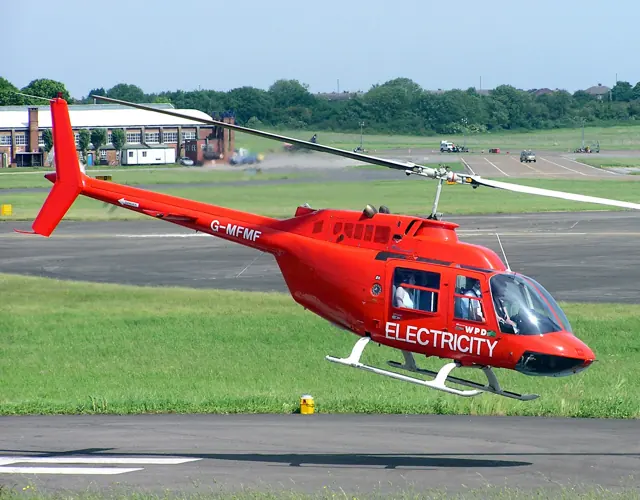
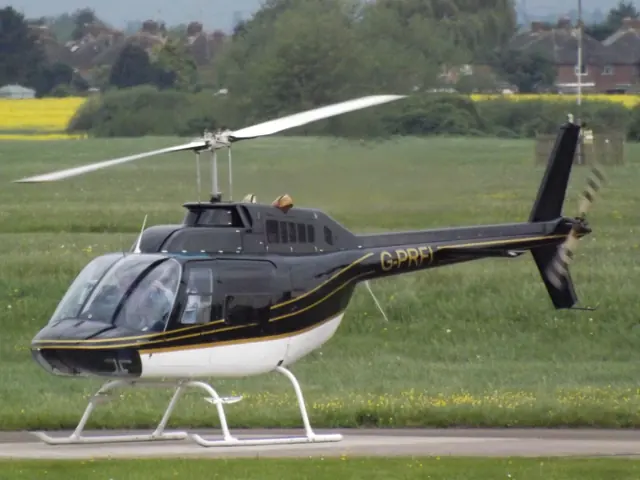
Bell reworked an unsuccessful military observation-helicopter proposal into the commercial JetRanger. The resulting 206 family became widely used for passenger transport, observation and utility work. The familiar single-engine versions use a two-bladed main rotor. The 206B JetRanger and stretched 206L LongRanger are separate branches of that story. Their cabins, engines and equipment are not identical.
Aircraft background
Wikipedia contributors · Read more ↗A childhood airshow ride becomes a training goal
An eight-minute JetRanger ride at Farnborough when he was nine stayed with Berry for years. A later trial lesson renewed that enthusiasm, but adding the type to his licence meant a difficult choice about a limited training budget. He decided that learning the turbine helicopter was worth the additional commitment. The course challenged the confidence he had built in the R22.
Elstree Helicopters · May 2021. JetRanger type-rating account after predominantly R22 experience; the course was an extra commitment during commercial-pilot training.
Elstree Helicopters · Read more ↗The LongRanger searchlight has separate on/off and aim controls
The 206L3 guide maps searchlight power to TOGGLE TAXI LIGHTS. Directional landing-light bindings aim it, and the HOME binding restores the default position. The documented four-way cockpit switch supplies another way to move the light.
Bell 206 family · CowanSim · MSFS 2020 · MSFS 2024
CowanSim · Read more ↗Into the cockpit
 YouTube
 BC Helicopter
Bell 206 startup described and demonstrated in detail
BC Helicopters explains and demonstrates a Bell 206 start.
Real Bell 206; flight-school demonstration
Watch on YouTube ↗Preview images are served by AirframeDB. Videos open on YouTube only when you choose to watch.
Meet Bell 206 family
Bell reworked an unsuccessful military observation-helicopter proposal into the commercial JetRanger. The resulting 206 family became widely used for passenger transport, observation and utility work. The familiar single-engine versions use a two-bladed main rotor.
The 206B JetRanger and stretched 206L LongRanger are separate branches of that story. Their cabins, engines and equipment are not identical. Cowan documents each model's trim, autopilot and stability-assistance features separately.
Bell 206
Bell 206 family
Wikipedia contributors · Bell 206 ↗Aircraft type designators
Use the code for the model you are flying. The linked authority lists the applicable aircraft.
History & design
A JetRanger completes a solo journey around the world
Bell’s anniversary account records Smith’s departure from Fort Worth on 5 August 1982 and return the following year. The journey brought a helicopter normally associated with local transport into the history of long-distance solo aviation.
Bell · Forty years since the first solo helicopter circumnavigation ↗Manufacturer retrospective; distance totals differ between sources and are omitted
The expedition aircraft carried equipment beyond a normal cabin
Powerhouse records additional fuel capacity, navigation equipment, an autopilot and camera installations in VH-DIK. Its description also identifies survival equipment and later North Pole additions, showing why this individual expedition aircraft should not be treated as an ordinary passenger JetRanger.
Powerhouse Collection · Dick Smith Australian Explorer, VH-DIK ↗Museum documentation of its own donated airframe
Development milestones
First flight: December 8, 1962 (206) January 10, 1966 (206A)
Developed from: Bell YOH-4
Wikipedia contributors · Bell 206 ↗Bell 206 · family/variant named by the source · Wikipedia revision 1373277311
Pilot accounts
A childhood airshow ride becomes a training goal
An eight-minute JetRanger ride at Farnborough when he was nine stayed with Berry for years. A later trial lesson renewed that enthusiasm, but adding the type to his licence meant a difficult choice about a limited training budget. He decided that learning the turbine helicopter was worth the additional commitment.
The course challenged the confidence he had built in the R22. Unfamiliar hydraulic controls, greater weight and a new cockpit made previously comfortable tasks demanding again. Berry especially valued instructor Paul White’s calm approach and emphasis on understanding the aircraft. His account is openly affectionate, including the pleasure of the turbine’s sound, but its strongest theme is the mental adjustment from feeling competent in one helicopter to becoming a learner in another.
Elstree Helicopters · May 2021. JetRanger type-rating account after predominantly R22 experience; the course was an extra commitment during commercial-pilot training.
Read the full account · Elstree Helicopters ↗A winter demonstration of the developing JetRanger
Middlebrook introduced the reporting team to a JetRanger II from Atlantic Aviation at Teterboro. The aircraft’s cabin helped explain its appeal beyond traditional utility work: entry was straightforward, the windows were generous and the reviewers found useful room in the occupied seats. The middle rear position was less accommodating, a detail retained alongside the favourable first impression.
Flying on a cool winter day, the team found quick control response that could encourage overcorrection at first. The approach also required adjustment to the helicopter’s ability to retain speed. They measured cabin noise and described the vibration rather than relying only on appearance. Their report preserves a contemporary introduction to the developing turbine transport, while distinguishing the conditions they experienced from comments other pilots supplied about turbulence.
Demonstration described by an uncredited May 1973 flight-report author, reproduced by Redback Aviation. Atlantic Aviation JetRanger II at Teterboro; Middlebrook is the named demonstrator.
Read the full account · Redback Aviation ↗Filming the world while flying around it alone
Smith’s journey required him to fly, navigate, communicate and record the view for a documentary. The museum’s account describes the exhaustion of the first Atlantic leg, after which he considered abandoning the attempt. Family reunions and periods of maintenance punctuated a trip completed in three stages, with substantial help from people arranging matters on the ground.
Crossing the North Pacific brought another unusual logistical task: finding a cargo ship able to provide a refuelling stop along the route. The successful return to Texas in July 1983 completed the circumnavigation. Smith continued using the helicopter for further adventures before flying it to the Powerhouse Museum in 1990. The donated aircraft and film preserve both the record and the personal work involved in making the journey visible to others.
1982–83 journey in modified Bell 206B JetRanger III VH-DIK, documented by Powerhouse curator Margaret Simpson using the donated aircraft, film and published accounts.
Read the full account · Powerhouse Collection ↗In your simulator
Systems, equipment and documentation for each developer’s aircraft.
Compare simulator versions →MSFS 2020 · MSFS 2024Bell 206 family · CowanSim
CowanSim · Released
Bell 206 family · CowanSim
CowanSim · Released
MSFS 2020B-206
FlyInside · Released
B-206
FlyInside · Released
X-Plane 11 · X-Plane 12Bell 206 family · CowanSim
CowanSim · Released
Bell 206 family · CowanSim
CowanSim · Released
X-Plane 12B206
DreamFoil Creations · Released
B206
DreamFoil Creations · Released
Aircraft specifications
Published figures for the named real-aircraft variant. Simulator equipment and performance can differ.
| Specification | Published value |
|---|---|
| Length | 38 ft 9.5 in (11.824 m) including rotors |
| Height | 9 ft 6.5 in (2.908 m) |
| Empty weight | 1,455 lb (660 kg) |
| Max takeoff weight | 3,200 lb (1,451 kg) |
| Powerplant | 1 × Allison 250-C20 turboshaft engine, 400 hp (298 kW) |
| Main rotor diameter | 33 ft 4 in (10.16 m) |
| Main rotor area | 873 sq ft (81.1 m² ) |
| Maximum speed | 122 kn (140 mph, 226 km/h) at MTOW (sea level) |
| Cruise speed | 120 kn (140 mph, 220 km/h) at MTOW, 5,000 feet |
| Range | 337 nmi (388 mi, 624 km) at MTOW, 5,000 feet, cruise speed, no reserves |
| Service ceiling | 20,000 ft (6,100 m) at MTOW |
| Rate of climb | 1,350 ft/min (6.9 m/s) |
Manuals & resources
Find your next read
Choose a topic for a short introduction and a link to the original source. Simulator references identify the developer and edition they cover.
Simulator documentation
Stability assistance and upper modes do different jobsBell 206 family · CowanSim · CowanSim · MSFS 2020 · MSFS 2024
Cowan's HeloSAS uses small cyclic corrections to stabilise the helicopter. The manual distinguishes force-trim behaviour with SAS engaged and disengaged, and explains the difference between spring-centred and non-centring controls. Its upper autopilot modes become selectable above 44 knots in the documented implementation. Stability assistance, rotor-speed governing and route-following modes are separate systems.
Archived document; installed package version not observed · PDF pp.1-2
CowanSim · Read the source ↗Choose the flight model through FlyInside Heli ManagerB-206 · FlyInside · MSFS 2020
FlyInside’s guide represents a 1982 206B-3 with a 250-C20B engine. The Heli Manager offers Easy, Medium and Realistic modes, with further controls for cyclic sensitivity, stability and engine failures. Those settings change the package's control response and assistance.
Gathered FlyInside guide · PDF pp.3,12–13
FlyInside · Read the source ↗The X-Plane 206 uses Wing Sweep for the twist throttleBell 206 family · CowanSim · CowanSim · X-Plane 11 · X-Plane 12
Cowan’s XP12 206B3 manual explicitly maps a hardware twist throttle to Wing Sweep. Its configuration menu also offers an automatic starter-button hold, allowing the pilot to manipulate the throttle during starting. These are simulator interface choices rather than real-aircraft control names.
Gathered Cowan XP12 206B3 guide · PDF pp.2–3,6
CowanSim · Read the source ↗Camera controls and AviTab extend the working cockpitBell 206 family · CowanSim · CowanSim · X-Plane 11 · X-Plane 12
The Cineflex camera can be operated from the rear cabin or mapped to separate controls. Optional AviTab integration supports maps and PDF documents, including in VR. X-Plane’s Show Instrument Click Regions view exposes the model’s interaction points for easier cockpit exploration.
Gathered Cowan XP12 206B3 guide · PDF pp.4,9
CowanSim · Read the source ↗Disconnecting an upper mode can leave SAS activeBell 206 family · CowanSim · CowanSim · X-Plane 11 · X-Plane 12
The X-Plane SAS guide distinguishes trim release, upper-mode disconnection and the underlying stability system. Its published force-trim-release and autopilot-disconnect commands have different effects: disconnecting the upper modes can preserve SAS. The documented 44-knot threshold applies to mode availability, not to a universal helicopter operating limit.
Archived X-Plane SAS/AP manual · PDF pp.1-4
CowanSim · Read the source ↗Pilot account
A childhood airshow ride becomes a training goalElstree Helicopters · May 2021. JetRanger type-rating account after predominantly R22 experience; the course was an extra commitment during commercial-pilot training.
An eight-minute JetRanger ride at Farnborough when he was nine stayed with Berry for years. A later trial lesson renewed that enthusiasm, but adding the type to his licence meant a difficult choice about a limited training budget. He decided that learning the turbine helicopter was worth the additional commitment. The course challenged the confidence he had built in the R22. Unfamiliar hydraulic controls, greater weight and a new cockpit made previously comfortable tasks demanding again.
James Berry
Elstree Helicopters · Read the source ↗A winter demonstration of the developing JetRangerDemonstration described by an uncredited May 1973 flight-report author, reproduced by Redback Aviation. Atlantic Aviation JetRanger II at Teterboro; Middlebrook is the named demonstrator.
Middlebrook introduced the reporting team to a JetRanger II from Atlantic Aviation at Teterboro. The aircraft’s cabin helped explain its appeal beyond traditional utility work: entry was straightforward, the windows were generous and the reviewers found useful room in the occupied seats. The middle rear position was less accommodating, a detail retained alongside the favourable first impression.
Tuck Middlebrook
Redback Aviation · Read the source ↗Developer documentation
B206 — product listingB206 · X-Plane 12
Product listing captured 2026-09-24; edition scope from the reviewed catalogue
DreamFoil Creations · Read the source ↗Read the original documentation from the people who created it. Manuals open on their publisher’s website.
Manual
CowanSim 206B3 user manual · MSFSCowanSim CowanSim 206L3 user manual · MSFSCowanSim CowanSim manualsCowanSim Microsoft Flight Simulator aircraft manualsMicrosoft / aircraft developers SAS Autopilot ManualCowanSim B206 releases and manualFlyInside User Manual for Microsoft Flight SimulatorFlyInside SAS ManualCowanSim User ManualCowanSim X-Plane aircraft and avionics manualsLaminar ResearchAircraft background
Bell 206Wikipedia contributors · Research background · Wikipedia revision 1373277311 · retrieved 2026-09-12 Forty years since the first solo helicopter circumnavigationBell · Manufacturer retrospective · 2023Product
206B3 for MSFSCowanSim · Official developer / designated store catalogue · checked 2026-09-12 206L3 for MSFSCowanSim · Official developer / designated store catalogue · checked 2026-09-12 206B3 for X-PlaneCowanSim · Official developer / designated store catalogue · checked 2026-09-12 206L3 for X-PlaneCowanSim · Official developer / designated store catalogue · checked 2026-09-12 B-206FlyInside · Official developer / designated store catalogue · checked 2026-09-12 B206 catalogue sourceDreamFoil Creations · Product listing captured 2026-09-24; edition scope from the reviewed catalogueType designator
ICAO Doc 8643 — aircraft type designatorsInternational Civil Aviation Organization · Public search data retrieved 2026-09-14; authority update 2026-09-03Built-in force-feedback profiles
Read the documentary basis, editable starting settings and remaining questions for the aircraft you fly. Each explanation refers to the exact profile revision shown.
Catalogue programme-20261022-v1 · 10 profile choices
CowanSim 206B3 JetRanger
CowanSim · Free and Pro · Revision 4 · Inherited starting point
MSFS 2020 · MSFS 2024
CowanSim 206B3 JetRanger: Magnetic brakes and force-gradient springs provide mechanism context for cyclic centering; longer cabin or rotor audio does not establish a heavier cyclic.
CowanSim 206B3 JetRanger
CowanSim · Free and Pro · Revision 2 · Inherited starting point
X-Plane 12
CowanSim 206B3 JetRanger: Magnetic brakes and force-gradient springs provide mechanism context for cyclic centering; longer cabin or rotor audio does not establish a heavier cyclic.
CowanSim 206L3 LongRanger
CowanSim · Free and Pro · Revision 4 · Inherited starting point
MSFS 2020 · MSFS 2024
CowanSim 206L3 LongRanger: Magnetic brakes and force-gradient springs provide mechanism context for cyclic centering; longer cabin or rotor audio does not establish a heavier cyclic.
CowanSim 206L3 LongRanger
CowanSim · Free and Pro · Revision 2 · Inherited starting point
X-Plane 12
CowanSim 206L3 LongRanger: Magnetic brakes and force-gradient springs provide mechanism context for cyclic centering; longer cabin or rotor audio does not establish a heavier cyclic.
DreamFoil Creations Bell 206B3 JetRanger (XP12)
DreamFoil Creations · Free and Pro · Revision 3 · Inherited starting point
X-Plane 12
DreamFoil Creations Bell 206B3 JetRanger (XP12): Magnetic brakes and force-gradient springs provide mechanism context for cyclic centering; longer cabin or rotor audio does not establish a heavier cyclic.
FlyInside Bell 206 Skids
FlyInside · Free and Pro · Revision 3 · Inherited starting point
MSFS 2020 · MSFS 2024
FlyInside Bell 206 Skids: Magnetic brakes and force-gradient springs provide mechanism context for cyclic centering; longer cabin or rotor audio does not establish a heavier cyclic.
FlyInside Bell 206 Floats
FlyInside · Free and Pro · Revision 3 · Inherited starting point
MSFS 2020 · MSFS 2024
FlyInside Bell 206 Floats: Magnetic brakes and force-gradient springs provide mechanism context for cyclic centering; longer cabin or rotor audio does not establish a heavier cyclic.
Bell 206B3 JetRanger
Free and Pro · Revision 2 · Inherited starting point
MSFS 2020 · MSFS 2024 · X-Plane 11 · X-Plane 12
Bell 206B3 JetRanger: Magnetic brakes and force-gradient springs provide mechanism context for cyclic centering; longer cabin or rotor audio does not establish a heavier cyclic.
Bell 206L3 LongRanger
Free and Pro · Revision 1 · Partial review
MSFS 2020 · MSFS 2024 · X-Plane 11 · X-Plane 12
Bell 206L3 LongRanger: Magnetic brakes and force-gradient springs provide mechanism context for cyclic centering; longer cabin or rotor audio does not establish a heavier cyclic.
Bell 206 JetRanger
Free and Pro · Revision 4 · Partial review
MSFS 2024 · MSFS 2020 · X-Plane 12 · X-Plane 11
Hydraulically assisted cyclic controls with selected friction and trim behaviour, plus two-blade rotor cues.
Bell 206 JetRanger
Hydraulically assisted cyclic controls with selected friction and trim behaviour, plus two-blade rotor cues.
Aircraft and simulator scope
- Bell 206 JetRanger · MSFS 2024 · family starting point
- Bell 206 JetRanger · MSFS 2020 · family starting point
- Bell 206 JetRanger · X-Plane 12 · family starting point
- Bell 206 JetRanger · X-Plane 11 · family starting point
Compiled factory starter revision 4; documentary sources do not qualify every simulator add-on.
The simulator model and controls
Bell reworked an unsuccessful military observation-helicopter proposal into the commercial JetRanger. The resulting 206 family became widely used for passenger transport, observation and utility work. The familiar single-engine versions use a two-bladed main rotor.
The factory starting point selects Bell 206 JetRanger across MSFS 2024, MSFS 2020, X-Plane 12, X-Plane 11.
How this profile feels
Spring resistance builds with the selected airspeed response. A separate aerodynamic term adds speed-dependent control load.
Local force trim holds the selected hardware centre. Autopilot following is off.
Cyclic damping is on. Its configured gain is 0.35; it resists hardware motion separately from the spring and aircraft stabilization.
Controls and trim
The Bell 206B-3 flight manual describes adjustable cyclic and collective friction, together with magnetic brakes and force-gradient springs in its cyclic force-trim system. CowanSim's 206B3 and longer-cabin 206L3 have separate manuals and optional HeliSAS procedures. FlyInside and DreamFoil implement different dynamics and stability options. A software trim-release command, sound or stability setting does not provide a continuous physical cyclic-neutral position.
About the values
The gains are normalized profile settings. They describe the chosen effect balance; hand force depends on the device and its output limits. IAS references are tuning values rather than operating limits. Physical acceptance of this revision remains pending.
What the documentation establishes
The Bell 206B-3 flight manual describes adjustable cyclic and collective friction, with magnetic brakes and force-gradient springs in the cyclic force-trim system.
The cited helicopter-trim article describes a release-and-recenter force-trim mechanism. This is general mechanism context rather than verification of a specific Bell 206 add-on.
The FAA helicopter handbook provides general rotorcraft vibration context. It does not establish a Bell 206-specific cyclic-vibration magnitude or a measured onset for this profile.
FAA helicopter guidance describes translational-lift effects. The starting point’s cue thresholds are estimates rather than Bell 206 flight-test measurements.
FAA helicopter guidance discusses vibration and reduced control effectiveness in settling-with-power conditions. This is general rotorcraft context, not Bell 206-specific force calibration.
Documentary review and sources
These decisions describe the documentary basis and remaining gaps for this revision. Aircraft documentation and a starting setting describe different kinds of evidence.
Aircraft and variant
ReviewedThe factory starting point selects Bell 206 JetRanger across MSFS 2024, MSFS 2020, X-Plane 12, X-Plane 11.
Flight controls
ReviewedThe Bell 206B-3 flight manual describes adjustable cyclic and collective friction, together with magnetic brakes and force-gradient springs in its cyclic force-trim system. CowanSim's 206B3 and longer-cabin 206L3 have separate manuals and optional HeliSAS procedures. FlyInside and DreamFoil implement different dynamics and stability options. A software trim-release command, sound or stability setting does not provide a continuous physical cyclic-neutral position.
Trim
ReviewedCyclic damping is on. Its configured gain is 0.35; it resists hardware motion separately from the spring and aircraft stabilization.
Autopilot and stability
Not yet reviewedAutopilot following is off; the configured spring and load retain the hardware feel.
Equipment
ReviewedGear, flap and ground cues follow the selected settings and available simulator-reported states.
Speeds and limits
Not yet reviewedThe indicated-speed references set the profile response scale; they are separate from aircraft operating limits.
Simulator integration
Not yet reviewedThe profile targets msfs2024, msfs2020, xplane12, xplane11. Add-on-specific controls use only the supported references configured by this profile.
Force-feedback settings
Not yet reviewedThe settings define the profile’s effect balance. Device output limits affect physical hand force.
Starting settings and their rationale
These configured values are starting estimates. The explanations describe what each setting controls; physical validation appears separately below.
| Setting | Starting value | What it controls and why |
|---|---|---|
| Spring strength | Starting value0 | What it controls and whyMagnetic brakes and force-gradient springs provide mechanism context for cyclic centering; longer cabin or rotor audio does not establish a heavier cyclic. The baseline spring is 0. Its low-speed blend reaches baseline strength at 55 KIAS. |
| Master force gain | Starting value0.85 | What it controls and whyScales overall profile strength while preserving effect balance, subject to device and output limits. |
| Profile force gain | Starting value0.35 | What it controls and whyThe aerodynamic-load gain is 0.35 with an indicated-speed reference of 100 KIAS. This supplies speed-dependent loading alongside the spring. |
| Force tuning speed/reference | Starting value100 kt | What it controls and whySets the IAS reference for aerodynamic loading. It is an estimate, not published cruise TAS or a flight limit. |
| Spring response reference speed | Starting value55 kt | What it controls and whySets the IAS where the low-speed blend reaches baseline strength; high-speed stiffening also uses it. |
| Aileron force scale | Starting value1 | What it controls and whyRoll and pitch aerodynamic scales are 1 and 1, respectively. They set the aerodynamic axis balance. No custom spring-travel curve is enabled. |
| Elevator force scale | Starting value1 | What it controls and whyScales pitch aerodynamic loading; pitch spring travel and trim responses are separate settings. |
| Trim feel | Starting valueDisabled | What it controls and whyRetained for compatibility and group membership. Trim relief, rather than this flag, controls centre movement. |
| Trim relief | Starting valueDisabled | What it controls and whyAllows trim relief with supported control law and valid telemetry. Axis authorities set its amount. |
| Autopilot follow | Starting valueDisabled | What it controls and whyAutopilot following is off; the configured spring and load retain the hardware feel. |
| Autopilot neutral hold | Starting valueDisabled | What it controls and whyPermits centering hold during a supported AP state, separate from following a moving target. |
| Output force limit | Starting value0.55 | What it controls and whyCaps directed-force output. Native spring effects and device limits remain separate. |
All 44 starting settings and their rationale
The settings define the profile’s effect balance. Device output limits affect physical hand force.
| Setting | Starting value | What it controls and why |
|---|---|---|
| Spring strength | Starting value0 | What it controls and whyMagnetic brakes and force-gradient springs provide mechanism context for cyclic centering; longer cabin or rotor audio does not establish a heavier cyclic. The baseline spring is 0. Its low-speed blend reaches baseline strength at 55 KIAS. |
| Spring deadband | Starting value0.02 | What it controls and whySets travel around the centre before the baseline spring resists. Smaller values engage it sooner. |
| Profile force gain | Starting value0.35 | What it controls and whyThe aerodynamic-load gain is 0.35 with an indicated-speed reference of 100 KIAS. This supplies speed-dependent loading alongside the spring. |
| Master force gain | Starting value0.85 | What it controls and whyScales overall profile strength while preserving effect balance, subject to device and output limits. |
| Spring response reference speed | Starting value55 kt | What it controls and whySets the IAS where the low-speed blend reaches baseline strength; high-speed stiffening also uses it. |
| Airspeed spring stiffening gain | Starting value0 | What it controls and whyAdds permitted spring resistance above the full-blend speed. Zero removes this high-speed increase. |
| Airspeed spring stiffening limit | Starting value5 | What it controls and whyLimits the squared airspeed ratio used for high-speed spring stiffening; it is not a device-force cap. |
| Aileron force scale | Starting value1 | What it controls and whyRoll and pitch aerodynamic scales are 1 and 1, respectively. They set the aerodynamic axis balance. No custom spring-travel curve is enabled. |
| Elevator force scale | Starting value1 | What it controls and whyScales pitch aerodynamic loading; pitch spring travel and trim responses are separate settings. |
| Output force limit | Starting value0.55 | What it controls and whyCaps directed-force output. Native spring effects and device limits remain separate. |
| Autopilot follow | Starting valueDisabled | What it controls and whyAutopilot following is off; the configured spring and load retain the hardware feel. |
| Autopilot follow authority | Starting value0.05 | What it controls and whySets admitted AP-follow gain, not a percentage of travel. Runtime ownership and input limits still apply. |
| Autopilot neutral hold | Starting valueDisabled | What it controls and whyPermits centering hold during a supported AP state, separate from following a moving target. |
| Autopilot neutral hold strength | Starting value0.6 | What it controls and whySets admitted AP neutral-hold strength; inactive while neutral hold is disabled. |
| Trim feel | Starting valueDisabled | What it controls and whyRetained for compatibility and group membership. Trim relief, rather than this flag, controls centre movement. |
| Trim relief | Starting valueDisabled | What it controls and whyAllows trim relief with supported control law and valid telemetry. Axis authorities set its amount. |
| Maximum flap index | Starting value4 | What it controls and whySets the final flap index for detent normalization. UP plus three detents uses maximum index3. |
| Minimum flap index | Starting value1 | What it controls and whySets the first flap detent that admits buffet; this is a handle index, not degrees. |
| Stick shaker amplitude | Starting value0.5 | What it controls and whySets triggered shaker strength; inactive while the shaker feature is disabled. |
Exact configured values with software explanations. Force magnitudes remain editable estimates; disabled features retain inactive values.
| Setting | Starting value | What it controls and why |
|---|---|---|
| QBlend Enabled | Starting valueEnabled | What it controls and whyAllows baseline spring strength to rise with indicated airspeed where the control law permits it. |
| QSpring Minimum Factor | Starting value1 | What it controls and whySets low-speed spring strength as a fraction of baseline when blending is enabled. One keeps full strength. |
| QSpring Start Knots | Starting value15 kt | What it controls and whySets the IAS where the low-speed spring blend starts rising. This is a feel threshold, not a flight limit. |
| Force tuning speed/reference | Starting value100 kt | What it controls and whySets the IAS reference for aerodynamic loading. It is an estimate, not published cruise TAS or a flight limit. |
| Elevator Authority | Starting value0.3 | What it controls and whyScales supported pitch-trim relief and permitted centre movement. Zero removes pitch response. |
| Aileron Authority | Starting value0.3 | What it controls and whyScales supported roll-trim relief and permitted centre movement. Zero removes roll response. |
| Force Trim Enabled | Starting valueEnabled | What it controls and whyAn enabled local latch approximates holding a hardware neutral. CowanSim's SAS-dependent software trim and the aircraft's magnetic-brake system remain separate scope. Local force trim is on. It holds a selected spring centre with strength 0.55. |
| GLoad Enabled | Starting valueEnabled | What it controls and whyAllows load-factor changes to modify permitted spring laws. Passive fly-by-wire feel can suppress it. |
| Rate Damping Enabled | Starting valueEnabled | What it controls and whyEnables rate damping with the configured coefficients and control law. |
| Enabled | Starting valueEnabled | What it controls and whyEnables aerodynamic cues; each still needs nonzero strength and its simulator conditions. |
| Gain | Starting value0 | What it controls and whySets stall-buffet strength. Zero removes the cue without changing simulator stalls or warnings. |
| Gain | Starting value0 | What it controls and whySets high-Mach buffet strength; onset and full-strength thresholds are separate. |
| Gain | Starting value0 | What it controls and whySets flap buffet at the configured position and speed gates. Flap movement texture is separate. |
| Gain | Starting value0 | What it controls and whySets gear aerodynamic buffet; movement and ground-contact cues are separate. |
| Shaker Enabled | Starting valueDisabled | What it controls and whyPermits shaker at supported warning conditions; the switch does not establish aircraft equipment. |
| Enabled | Starting valueEnabled | What it controls and whyEnables ground effects; each still needs its own strength and contact or motion telemetry. |
| Gain | Starting value0.15 | What it controls and whySets rolling texture strength, modified by speed, surface and undercarriage configuration. |
| Gain | Starting value0 | What it controls and whySets gear-bump texture during ground motion, separate from touchdown impact. |
| Gain | Starting value0.5 | What it controls and whySets landing-impact strength; landing telemetry and response shape determine the pulse. |
| Gain | Starting value0 | What it controls and whySets reverse-thrust vibration with valid reverser and engine conditions. Zero removes the cue. |
| Enabled | Starting valueEnabled | What it controls and whyEnables engine cues with nonzero settings and valid running-engine telemetry. |
| Gain | Starting value0.12 | What it controls and whySets estimated engine vibration using configured telemetry and response, not measured cockpit vibration. |
| Enabled | Starting valueEnabled | What it controls and whyEnables accessory cues with configured strengths and observed accessory movement. |
| Gain | Starting value0 | What it controls and whySets texture from observed flap movement; a command without movement does not establish the cue. |
| Gain | Starting value0 | What it controls and whySets texture from observed gear movement, separate from aerodynamic and touchdown effects. |
Limits and open questions
- Physical force validation is not established for the current revision by documentary review.
- Generic simulator telemetry and configured control responses require the stated aircraft and device scope.
Physical validation
No physical force validation is recorded in this public catalogue for this revision. Documentary review and software checks do not establish how a particular device feels.
Documented interfaces
Source-documented identifiers. Documentation does not prove that every add-on populates a value correctly.
SAS/force_trim_release
Hold/release FTR; SAS engagement gesture described separately.
- Units
- none
- Access
- execute command
shared Cowan XP SAS manual; installed package must supply command
CowanSim · PDF p4; shared SAS command list ↗SAS/autopilot_disconnect
Disconnect upper modes; SAS behavior follows the manual.
- Units
- none
- Access
- execute command
shared Cowan XP SAS manual; installed package must supply command
CowanSim · PDF p4; shared SAS command list ↗Discuss this aircraft (0)
Questions, observations and useful sources from the community.
No published discussions yet. Bring a question or share a useful source.
Open aircraft discussions →Content expanded · What’s new
Something missing or a source that needs attention?
Suggest a correction ↗