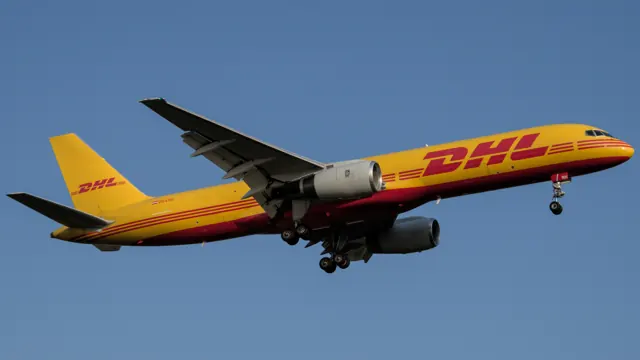

Start here
A few places to begin, from the aircraft’s story to the people who fly it.
Meet the aircraft
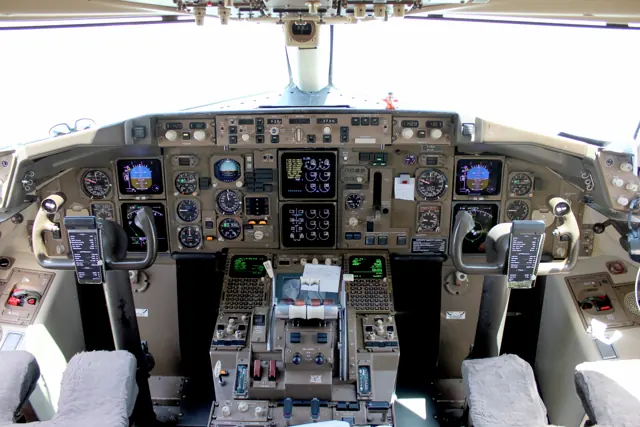
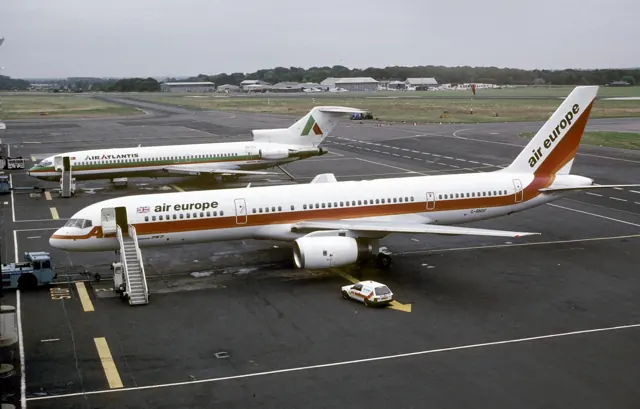
The 757 first flew in 1982 and entered service in 1983. It paired a new wing and large underwing engines with a two-pilot electronic-instrument cockpit. The -200 became the main production version, joined later by the stretched -300 and dedicated freight developments. Its cockpit shares substantial design thinking with the wider 767, but the airframes and systems remain distinct.
Aircraft background
Wikipedia contributors · Read more ↗An all-rounder with a few cockpit irritations
The author values the 757 as an aircraft that gets varied work done without demanding constant attention to its systems. The controls feel somewhat heavy, which the writer prefers to the lighter touch of the A300 previously flown. The cockpit is confined but comfortable once seated, with a good view ahead. Less welcome are the overhead fuel indications and the many separate lighting dimmers.
Daily Kos Community · October 2013. Self-reported operating impressions; airline and exact fleet configuration not independently established.
Daily Kos Community · Read more ↗Checklists that recognise actions or provide assistance
Interactive checklists detect completed actions. An optional helper can perform actions while the user checks them, and a tutorial mode supplies visual prompts. These provide several ways to approach cockpit preparation within the same add-on.
Boeing 757 · FlightFactor · FlightFactor · X-Plane 11 · X-Plane 12
FlightFactor via authorized store · Read more ↗Into the cockpit
 YouTube
 Just Planes · 22 min ·
Piloting the BOEING 757 into Seattle | Cockpit Views
An Icelandair 757-200 approaches and lands at Seattle-Tacoma.
Real aircraft · Boeing 757
Watch on YouTube ↗Preview images are served by AirframeDB. Videos open on YouTube only when you choose to watch.
Meet Boeing 757
The 757 first flew in 1982 and entered service in 1983. It paired a new wing and large underwing engines with a two-pilot electronic-instrument cockpit. The -200 became the main production version, joined later by the stretched -300 and dedicated freight developments.
Its cockpit shares substantial design thinking with the wider 767, but the airframes and systems remain distinct. FlightFactor's simulator products offer specific engine, passenger and cargo configurations.
Boeing 757
Aircraft type designators
Use the code for the model you are flying. The linked authority lists the applicable aircraft.
History & design
Development milestones
First flight: February 19, 1982 ( 1982-02-19 )
Wikipedia contributors · Boeing 757 ↗Boeing 757 · family/variant named by the source · Wikipedia revision 1372303891
Pilot accounts
An all-rounder with a few cockpit irritations
The author values the 757 as an aircraft that gets varied work done without demanding constant attention to its systems. The controls feel somewhat heavy, which the writer prefers to the lighter touch of the A300 previously flown. The cockpit is confined but comfortable once seated, with a good view ahead. Less welcome are the overhead fuel indications and the many separate lighting dimmers.
The favourable overall impression comes with practical frustrations. The author found the flight-management computer slow to respond to a succession of changes and considered descent planning particularly important because losing height and speed together could be difficult. Landings were usually satisfying, and the option to put aside automation and hand-fly remained part of the aircraft’s appeal. These are an individual pilot’s impressions of the fleet described in 2013, rather than a measured comparison of aircraft performance.
Daily Kos Community · October 2013. Self-reported operating impressions; airline and exact fleet configuration not independently established.
Read the full account · Daily Kos Community ↗Making a touring aircraft part of the band’s working life
Dickinson’s interview describes a flying career built alongside music, through lessons, ratings, instructing and early commercial work. He enjoyed the sense that planning and conducting a flight was a subject he could never completely exhaust. After moving into airline flying, the 757 became his favourite jet, retaining an appeal beyond the practical business of getting from one engagement to another.
Using an Astraeus aircraft to carry Iron Maiden and its equipment also solved a touring problem. A passenger-and-cargo arrangement could move the band across continents without the usual combination of coaches and trucks, while the aircraft’s conspicuous band markings became publicity in their own right. The profile also shows his continued affection for small aircraft and teaching. For Dickinson, flying was a separate and absorbing craft, even when the people in the cabin were his own bandmates.
Pilot magazine · archival profile of the Iron Maiden singer and commercial pilot. Recollections include Astraeus 757-200 touring operations.
Read the full account · Pilot magazine ↗Giving a new first officer the credit for a difficult arrival
Durbin recalls supervising a new airline first officer on a dark, snowy arrival at Boston. The other pilot already had substantial C-5 experience, but this would be only his third actual airliner landing. Near the airport, traffic in the harbour prompted a late choice between changing to the parallel runway and making another approach. Durbin asked what his colleague wanted to do and watched him complete the runway change and landing smoothly.
Once parked, Durbin sent the first officer to stand at the cabin door while he finished the shutdown work. The passengers thanked the younger pilot as they left, an acknowledgement Durbin wanted him to hear personally. Later, the first officer was late meeting him in the hotel lobby because he had called his wife to tell her about the landing. The delay was entirely understandable to his check captain.
The Aviation Geek Club · August 2026 retrospective. United 757 check-pilot experience; date and exact variant of the Boston flight are not stated.
Read the full account · The Aviation Geek Club ↗In your simulator
Systems, equipment and documentation for each developer’s aircraft.
X-Plane 11 · X-Plane 12Boeing 757 · FlightFactor
FlightFactor · Released
Boeing 757 · FlightFactor
FlightFactor · Released
Aircraft specifications
Published figures for the named real-aircraft variant. Simulator equipment and performance can differ.
| Specification | Published value |
|---|---|
| Length | 155 ft 3 in (47.3 m) |
| Wingspan | 124 ft 10 in (38.0 m) |
| Height | 44 ft 6 in (13.6 m) |
| Wing area | 1,994.0 sq ft (185.25 m² ) |
| Empty weight | 130,440 lb (59,160 kg) |
| Max takeoff weight | 255,000 lb (115,660 kg) |
| Powerplant | 2 × Pratt & Whitney PW2040 high-bypass turbofan engines, 40,100 lbf (178 kN) thrust each |
| Maximum speed | Mach 0.86 |
| Range | 4,500 mi (7,250 km, 3,915 nmi) |
| Service ceiling | 42,000 ft (13,000 m) |
Manuals & resources
Find your next read
Choose a topic for a short introduction and a link to the original source. Simulator references identify the developer and edition they cover.
Simulator documentation
Checklists that recognise actions or provide assistanceBoeing 757 · FlightFactor · FlightFactor · X-Plane 11 · X-Plane 12
Interactive checklists detect completed actions. An optional helper can perform actions while the user checks them, and a tutorial mode supplies visual prompts. These provide several ways to approach cockpit preparation within the same add-on.
757 v2 · Interactive Checklists, Procedures, and auto-helper
FlightFactor via authorized store · Read the source ↗Failures and maintenance can persistBoeing 757 · FlightFactor · FlightFactor · X-Plane 11 · X-Plane 12
The published description says wear and misuse carry over to the next flight. A tablet-style menu provides maintenance and failure monitoring alongside fuel, passenger and cargo loading, so a saved aircraft need not begin every flight in fresh condition.
757 v2 · Custom Systems and Failure model; On Screen menus
FlightFactor via authorized store · Read the source ↗Pilot account
An all-rounder with a few cockpit irritationsDaily Kos Community · October 2013. Self-reported operating impressions; airline and exact fleet configuration not independently established.
The author values the 757 as an aircraft that gets varied work done without demanding constant attention to its systems. The controls feel somewhat heavy, which the writer prefers to the lighter touch of the A300 previously flown. The cockpit is confined but comfortable once seated, with a good view ahead. Less welcome are the overhead fuel indications and the many separate lighting dimmers. The favourable overall impression comes with practical frustrations.
Major Kong (published handle)
Daily Kos Community · Read the source ↗Making a touring aircraft part of the band’s working lifePilot magazine · archival profile of the Iron Maiden singer and commercial pilot. Recollections include Astraeus 757-200 touring operations.
Dickinson’s interview describes a flying career built alongside music, through lessons, ratings, instructing and early commercial work. He enjoyed the sense that planning and conducting a flight was a subject he could never completely exhaust. After moving into airline flying, the 757 became his favourite jet, retaining an appeal beyond the practical business of getting from one engagement to another.
Bruce Dickinson
Pilot magazine · Read the source ↗Read the original documentation from the people who created it. Manuals open on their publisher’s website.
Manual
X-Plane aircraft and avionics manualsLaminar ResearchAircraft background
Boeing 757Wikipedia contributors · Research background · Wikipedia revision 1372303891 · retrieved 2026-09-12Resource
FlightFactor 757 v2 published specificationFlightFactor via authorized store FlightFactor productsFlightFactorProduct
757 v2 ProfessionalFlightFactor · Official developer / designated store catalogue · checked 2026-09-12 757 v2 Avionics UpgradeFlightFactor · Official developer / designated store catalogue · checked 2026-09-12 757 v2 Professional Extended upgradeFlightFactor · Official developer / designated store catalogue · checked 2026-09-12 757 v2 Professional Modern AvionicsFlightFactor / X-Plane.org Store · Official catalogue reviewed 15 September 2026Type designator
ICAO Doc 8643 — aircraft type designatorsInternational Civil Aviation Organization · Public search data retrieved 2026-09-14; authority update 2026-09-03Built-in force-feedback profiles
Read the documentary basis, editable starting settings and remaining questions for the aircraft you fly. Each explanation refers to the exact profile revision shown.
Catalogue programme-20261022-v1 · 6 profile choices
FlightFactor 757-200
FlightFactor · Free and Pro · Revision 5 · Inherited starting point
X-Plane 12
FlightFactor 757-200: The selected powered-control approximation gives yoke resistance independently of which engine or passenger/freighter configuration is selected.
FlightFactor 757-200SF
FlightFactor · Free and Pro · Revision 3 · Inherited starting point
X-Plane 12
FlightFactor 757-200SF: The selected powered-control approximation gives yoke resistance independently of which engine or passenger/freighter configuration is selected.
FlightFactor 757-300
FlightFactor · Free and Pro · Revision 3 · Inherited starting point
X-Plane 12
FlightFactor 757-300: The selected powered-control approximation gives yoke resistance independently of which engine or passenger/freighter configuration is selected.
Boeing 757-200
Free and Pro · Revision 3 · Partial review
X-Plane 11 · X-Plane 12
Boeing 757-200: The selected powered-control approximation gives yoke resistance independently of which engine or passenger/freighter configuration is selected.
Boeing 757-200SF
Free and Pro · Revision 1 · Partial review
X-Plane 11 · X-Plane 12
Boeing 757-200SF: The selected powered-control approximation gives yoke resistance independently of which engine or passenger/freighter configuration is selected.
Boeing 757-300
Free and Pro · Revision 1 · Partial review
X-Plane 11 · X-Plane 12
Boeing 757-300: The selected powered-control approximation gives yoke resistance independently of which engine or passenger/freighter configuration is selected.
Boeing 757-200
Boeing 757-200: The selected powered-control approximation gives yoke resistance independently of which engine or passenger/freighter configuration is selected.
Aircraft and simulator scope
- Boeing 757-200 · X-Plane 11 · Variant starting point
- Boeing 757-200 · X-Plane 12 · Variant starting point
FlightFactor 757 package feature page; 757-200, -300 and freighter choices need version-specific applicability. · Selected choice: Boeing 757-200. Documentary scope does not establish every variant, add-on revision or simulator binding.
The simulator model and controls
The 757 first flew in 1982 and entered service in 1983. It paired a new wing and large underwing engines with a two-pilot electronic-instrument cockpit. The -200 became the main production version, joined later by the stretched -300 and dedicated freight developments.
This starting point selects Boeing 757-200. Its aircraft-level settings do not select a particular developer’s custom systems.
How this profile feels
Spring resistance builds with the selected airspeed response. A separate aerodynamic term adds speed-dependent control load.
Valid trim provides the configured pressure relief. Autopilot following is enabled for supported control references.
Controls and trim
FlightFactor documents custom hydraulic failures and a triple-channel autopilot for its 757. The -200, stretched -300 and 200SF freighter retain their own configuration and package scope, with engine choices in the extended product. Degraded autoland behavior is an aircraft guidance function rather than a published control-force output.
About the values
The gains are normalized profile settings. They describe the chosen effect balance; hand force depends on the device and its output limits. IAS references are tuning values rather than operating limits. Physical acceptance of this revision remains pending.
What the documentation establishes
The FlightFactor page identifies the 757 implementation and its modeled autopilot/hydraulic features.
Triple-channel autopilot and degraded autoland behavior are advertised; generic following is not interface validation.
Custom hydraulic failures are advertised; numerical mechanical/force cues remain separate approximations.
Documentary review and sources
These decisions describe the documentary basis and remaining gaps for this revision. Aircraft documentation and a starting setting describe different kinds of evidence.
Aircraft and variant
ReviewedThis starting point selects Boeing 757-200. Its aircraft-level settings do not select a particular developer’s custom systems.
Flight controls
Not yet reviewedFlightFactor documents custom hydraulic failures and a triple-channel autopilot for its 757. The -200, stretched -300 and 200SF freighter retain their own configuration and package scope, with engine choices in the extended product. Degraded autoland behavior is an aircraft guidance function rather than a published control-force output.
Trim
Not yet reviewedPitch relief is a selected software response; the product's hydraulic and autoland features do not provide a calibrated hardware-neutral relationship. Pitch authority 0.3 relieves permitted loading; hydraulic centre movement is off. Roll authority is 0.09.
Autopilot and stability
ReviewedFollowing is on at 0.1 authority when a supported, valid autopilot control reference is available.
Equipment
ReviewedGear, flap and ground cues follow the selected settings and available simulator-reported states.
Speeds and limits
Not yet reviewedThe indicated-speed references set the profile response scale; they are separate from aircraft operating limits.
Simulator integration
Not yet reviewedThe profile targets xplane11, xplane12. Add-on-specific controls use only the supported references configured by this profile.
Force-feedback settings
Not yet reviewedThe settings define the profile’s effect balance. Device output limits affect physical hand force.
Starting settings and their rationale
These configured values are starting estimates. The explanations describe what each setting controls; physical validation appears separately below.
| Setting | Starting value | What it controls and why |
|---|---|---|
| Spring strength | Starting value0.8 | What it controls and whyThe selected powered-control approximation gives yoke resistance independently of which engine or passenger/freighter configuration is selected. The baseline spring is 0.8. Its low-speed blend reaches baseline strength at 90 KIAS. |
| Master force gain | Starting value0.85 | What it controls and whyScales overall profile strength while preserving effect balance, subject to device and output limits. |
| Profile force gain | Starting value0.25 | What it controls and whyThe aerodynamic-load gain is 0.25 with an indicated-speed reference of 270 KIAS. The hydraulic-load factor of 0.35 scales that modeled term; it is a selected artificial-feel approximation. |
| Force tuning speed/reference | Starting value270.0 kt | What it controls and whySets the IAS reference for aerodynamic loading. It is an estimate, not published cruise TAS or a flight limit. |
| Spring response reference speed | Starting value90 kt | What it controls and whySets the IAS where the low-speed blend reaches baseline strength; high-speed stiffening also uses it. |
| Aileron force scale | Starting value0.65 | What it controls and whyRoll and pitch aerodynamic scales are 0.65 and 0.65, respectively. They set the aerodynamic axis balance. No custom spring-travel curve is enabled. |
| Elevator force scale | Starting value0.65 | What it controls and whyScales pitch aerodynamic loading; pitch spring travel and trim responses are separate settings. |
| Trim feel | Starting valueEnabled | What it controls and whyRetained for compatibility and group membership. Trim relief, rather than this flag, controls centre movement. |
| Trim relief | Starting valueEnabled | What it controls and whyAllows trim relief with supported control law and valid telemetry. Axis authorities set its amount. |
| Autopilot follow | Starting valueEnabled | What it controls and whyFollowing is on at 0.1 authority when a supported, valid autopilot control reference is available. |
| Autopilot neutral hold | Starting valueDisabled | What it controls and whyPermits centering hold during a supported AP state, separate from following a moving target. |
| Output force limit | Starting value0.55 | What it controls and whyCaps directed-force output. Native spring effects and device limits remain separate. |
All 44 starting settings and their rationale
The settings define the profile’s effect balance. Device output limits affect physical hand force.
| Setting | Starting value | What it controls and why |
|---|---|---|
| Spring strength | Starting value0.8 | What it controls and whyThe selected powered-control approximation gives yoke resistance independently of which engine or passenger/freighter configuration is selected. The baseline spring is 0.8. Its low-speed blend reaches baseline strength at 90 KIAS. |
| Spring deadband | Starting value0.035 | What it controls and whySets travel around the centre before the baseline spring resists. Smaller values engage it sooner. |
| Profile force gain | Starting value0.25 | What it controls and whyThe aerodynamic-load gain is 0.25 with an indicated-speed reference of 270 KIAS. The hydraulic-load factor of 0.35 scales that modeled term; it is a selected artificial-feel approximation. |
| Master force gain | Starting value0.85 | What it controls and whyScales overall profile strength while preserving effect balance, subject to device and output limits. |
| QBlend Enabled | Starting valueEnabled | What it controls and whyAllows baseline spring strength to rise with indicated airspeed where the control law permits it. |
| QSpring Minimum Factor | Starting value0.55 | What it controls and whySets low-speed spring strength as a fraction of baseline when blending is enabled. One keeps full strength. |
| QSpring Start Knots | Starting value20 kt | What it controls and whySets the IAS where the low-speed spring blend starts rising. This is a feel threshold, not a flight limit. |
| Spring response reference speed | Starting value90 kt | What it controls and whySets the IAS where the low-speed blend reaches baseline strength; high-speed stiffening also uses it. |
| Force tuning speed/reference | Starting value270.0 kt | What it controls and whySets the IAS reference for aerodynamic loading. It is an estimate, not published cruise TAS or a flight limit. |
| Airspeed spring stiffening gain | Starting value0 | What it controls and whyThe high-speed spring-stiffening gain is 0. No additional speed-driven stiffening is added; this does not disable independent aerodynamic loading. |
| Airspeed spring stiffening limit | Starting value5 | What it controls and whyLimits the squared airspeed ratio used for high-speed spring stiffening; it is not a device-force cap. |
| Aileron force scale | Starting value0.65 | What it controls and whyRoll and pitch aerodynamic scales are 0.65 and 0.65, respectively. They set the aerodynamic axis balance. No custom spring-travel curve is enabled. |
| Elevator force scale | Starting value0.65 | What it controls and whyScales pitch aerodynamic loading; pitch spring travel and trim responses are separate settings. |
| Output force limit | Starting value0.55 | What it controls and whyCaps directed-force output. Native spring effects and device limits remain separate. |
| Trim feel | Starting valueEnabled | What it controls and whyRetained for compatibility and group membership. Trim relief, rather than this flag, controls centre movement. |
| Trim relief | Starting valueEnabled | What it controls and whyAllows trim relief with supported control law and valid telemetry. Axis authorities set its amount. |
| Elevator Authority | Starting value0.3 | What it controls and whyPitch relief is a selected software response; the product's hydraulic and autoland features do not provide a calibrated hardware-neutral relationship. Pitch authority 0.3 relieves permitted loading; hydraulic centre movement is off. Roll authority is 0.09. |
| Aileron Authority | Starting value0.09 | What it controls and whyScales supported roll-trim relief and permitted centre movement. Zero removes roll response. |
| Force Trim Enabled | Starting valueDisabled | What it controls and whyEnables local force trim, separate from aircraft-owned trim and add-on integration qualification. |
| GLoad Enabled | Starting valueEnabled | What it controls and whyAllows load-factor changes to modify permitted spring laws. Passive fly-by-wire feel can suppress it. |
| Rate Damping Enabled | Starting valueEnabled | What it controls and whyEnables rate damping with the configured coefficients and control law. |
| Autopilot follow | Starting valueEnabled | What it controls and whyFollowing is on at 0.1 authority when a supported, valid autopilot control reference is available. |
| Autopilot follow authority | Starting value0.1 | What it controls and whySets admitted AP-follow gain, not a percentage of travel. Runtime ownership and input limits still apply. |
| Autopilot neutral hold | Starting valueDisabled | What it controls and whyPermits centering hold during a supported AP state, separate from following a moving target. |
| Autopilot neutral hold strength | Starting value0.6 | What it controls and whySets admitted AP neutral-hold strength; inactive while neutral hold is disabled. |
| Enabled | Starting valueEnabled | What it controls and whyEnables aerodynamic cues; each still needs nonzero strength and its simulator conditions. |
| Gain | Starting value0.3 | What it controls and whySets stall-buffet strength. Zero removes the cue without changing simulator stalls or warnings. |
| Gain | Starting value0.22 | What it controls and whySets high-Mach buffet strength; onset and full-strength thresholds are separate. |
| Gain | Starting value0.14 | What it controls and whySets flap buffet at the configured position and speed gates. Flap movement texture is separate. |
| Maximum flap index | Starting value6 | What it controls and whySets the final flap index for detent normalization. UP plus three detents uses maximum index3. |
| Minimum flap index | Starting value2 | What it controls and whySets the first flap detent that admits buffet; this is a handle index, not degrees. |
| Gain | Starting value0.1 | What it controls and whySets gear aerodynamic buffet; movement and ground-contact cues are separate. |
| Shaker Enabled | Starting valueEnabled | What it controls and whyPermits shaker at supported warning conditions; the switch does not establish aircraft equipment. |
| Stick shaker amplitude | Starting value0.9 | What it controls and whySets triggered shaker strength; inactive while the shaker feature is disabled. |
| Enabled | Starting valueEnabled | What it controls and whyEnables ground effects; each still needs its own strength and contact or motion telemetry. |
| Gain | Starting value0.4 | What it controls and whySets rolling texture strength, modified by speed, surface and undercarriage configuration. |
| Gain | Starting value0.32 | What it controls and whySets gear-bump texture during ground motion, separate from touchdown impact. |
| Gain | Starting value0.9 | What it controls and whySets landing-impact strength; landing telemetry and response shape determine the pulse. |
| Gain | Starting value0.5 | What it controls and whySets reverse-thrust vibration with valid reverser and engine conditions. Zero removes the cue. |
| Enabled | Starting valueEnabled | What it controls and whyEnables engine cues with nonzero settings and valid running-engine telemetry. |
| Gain | Starting value0.06 | What it controls and whySets estimated engine vibration using configured telemetry and response, not measured cockpit vibration. |
| Enabled | Starting valueEnabled | What it controls and whyEnables accessory cues with configured strengths and observed accessory movement. |
| Gain | Starting value0.12 | What it controls and whySets texture from observed flap movement; a command without movement does not establish the cue. |
| Gain | Starting value0.12 | What it controls and whySets texture from observed gear movement, separate from aerodynamic and touchdown effects. |
Limits and open questions
- Custom hydraulic failure modeling does not establish cockpit force transmission or an artificial-feel schedule.
- The feature list does not establish trim mechanism, travel or external trim ownership for the three 757 choices.
- The feature description does not derive a configuration-specific indicated-speed force reference.
- Custom autopilot/hydraulic features require implementation-specific telemetry checks; no external force contract is published here.
- Hydraulic failure realism does not calibrate the chosen spring force, aerodynamic gain or pitch-to-roll ratio.
Physical validation
No physical force validation is recorded in this public catalogue for this revision. Documentary review and software checks do not establish how a particular device feels.
Discuss this aircraft (0)
Questions, observations and useful sources from the community.
No published discussions yet. Bring a question or share a useful source.
Open aircraft discussions →Content expanded · What’s new
Something missing or a source that needs attention?
Suggest a correction ↗