
Start here
A few places to begin, from the aircraft’s story to the people who fly it.
Meet the aircraft
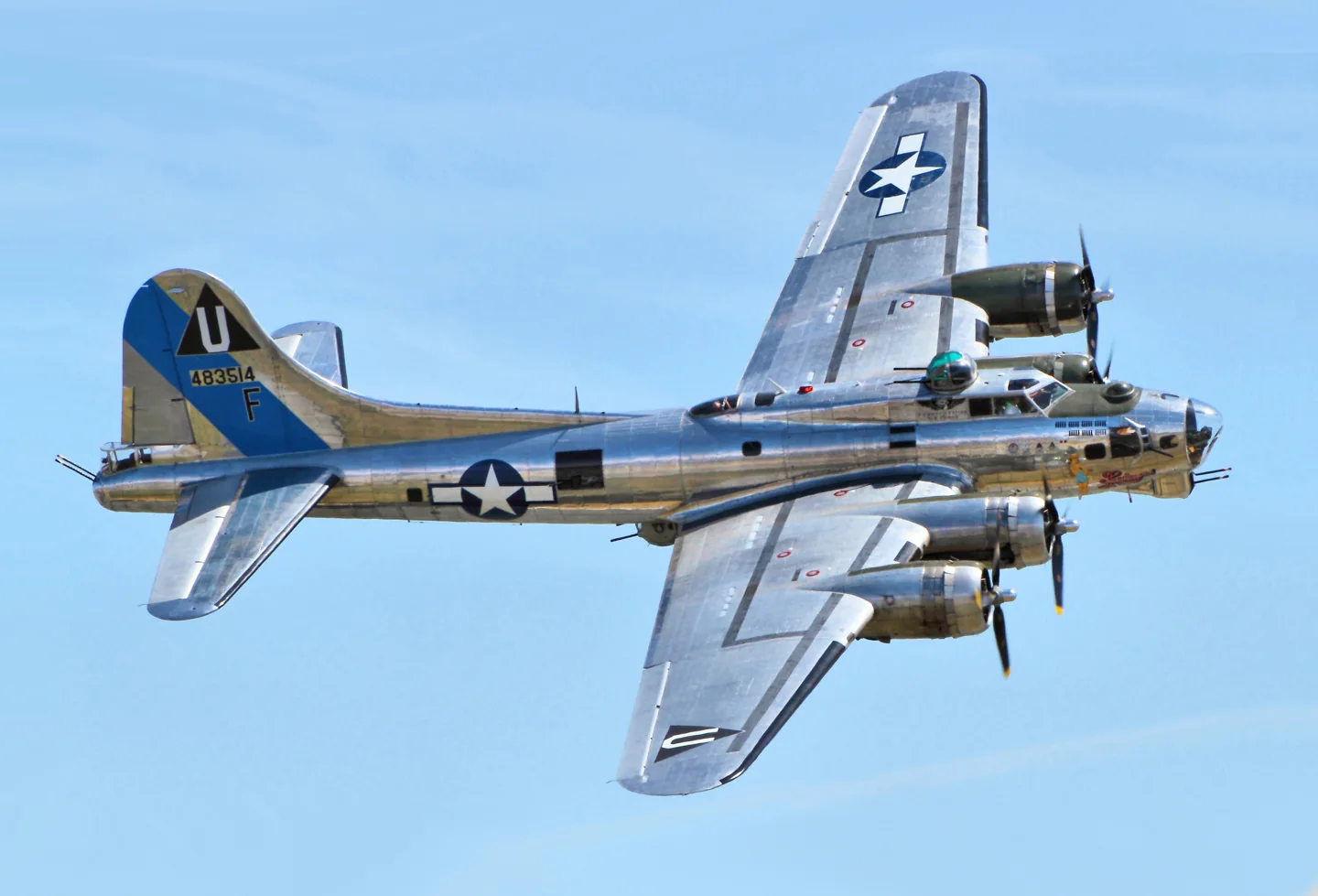
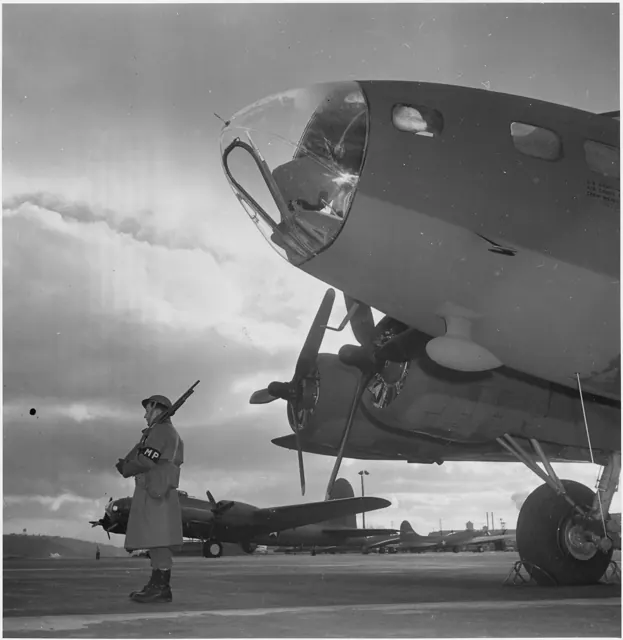
Boeing developed the B-17 during the 1930s for the United States Army Air Corps. It became closely associated with the European air war, but the aircraft also served in transport, maritime patrol and rescue work. The simulator product represents the B-17G production version.
Aircraft background
Wikipedia contributors · Read more ↗A retirement dream becomes a copilot checkout
Bjorkman used money she had intended for retirement to buy a B-17 copilot checkout at an EAA auction. She already had considerable tailwheel experience, but the largest aircraft she had flown was a Piper Aztec. Additional light-twin practice helped her prepare, while the sight of the Fortress in its hangar made the scale of the next step unmistakable.
Air & Space · July 2015. A second-in-command checkout in EAA’s Aluminum Overcast with Bob Davis.
Air & Space / Smithsonian · Read more ↗Into the cockpit
 YouTube
 Nick Murray · 18 min ·
Boeing B-17 Flying Fortress flight with cockpit view and ATC
Engine start through landing in a preserved B-17G, with cockpit views and radio traffic.
Real aircraft · Boeing B-17 Flying Fortress
Watch on YouTube ↗ YouTube
 ZenosWarbirds · 28 min ·
How to Fly the Boeing B-17 "Flying Fortress" - Flight Operations (Restored 1943)
A restored wartime training film offers a period view of B-17 operation.
Real aircraft · Boeing B-17 Flying Fortress
Watch on YouTube ↗Preview images are served by AirframeDB. Videos open on YouTube only when you choose to watch.
Meet Boeing B-17 Flying Fortress
Boeing developed the B-17 during the 1930s for the United States Army Air Corps. It became closely associated with the European air war, but the aircraft also served in transport, maritime patrol and rescue work. The simulator product represents the B-17G production version.
Boeing B-17 Flying Fortress
Boeing → · Explore the family →
Boeing B-17 Flying Fortress
Wikipedia contributors · Boeing B-17 Flying Fortress ↗Aircraft type designators
Use the code for the model you are flying. The linked authority lists the applicable aircraft.
History & design
From Model 299 to wartime formations
The Fortress began as Boeing’s Model 299, first flown in 1935, and developed through successive wartime versions to the B-17G. It became closely associated with the Eighth Air Force’s bombing campaign over Germany and occupied Europe. Boeing, Douglas and Vega built the aircraft; crews continued using some survivors for civil work after the war.
The Museum of Flight · Boeing B-17F Flying Fortress ↗Museum of Flight · family history
One survivor’s changing jobs
The museum’s B-17F, 42-29782, was built in Seattle in 1943 and served principally in training. Its later life included a park war memorial, aerial spraying, firefighting and appearances in Tora! Tora! Tora! and Memphis Belle. Restoration returned it to military appearance as Boeing Bee. Its screen roles and restored equipment are part of that individual aircraft’s later history.
The Museum of Flight · Boeing B-17F Flying Fortress ↗Museum of Flight · 42-29782 / Boeing Bee
Development milestones
First flight: 28 July 1935
Wikipedia contributors · Boeing B-17 Flying Fortress ↗Boeing B-17 Flying Fortress · family/variant named by the source · Wikipedia revision 1373944925
Pilot accounts
A retirement dream becomes a copilot checkout
Bjorkman used money she had intended for retirement to buy a B-17 copilot checkout at an EAA auction. She already had considerable tailwheel experience, but the largest aircraft she had flown was a Piper Aztec. Additional light-twin practice helped her prepare, while the sight of the Fortress in its hangar made the scale of the next step unmistakable. Starting it also introduced her to the coordinated work of the instructor and ground crew.
Once airborne, she found the controls unexpectedly light and the aircraft comfortable to manoeuvre. The weather made landing a different experience: Davis coached her through a demanding crosswind and helped with asymmetric power. She finished that first landing tired, then returned the next day for more practice. The achievement was specific and personal: a second-in-command endorsement in an aircraft she had long wanted to fly.
Air & Space · July 2015. A second-in-command checkout in EAA’s Aluminum Overcast with Bob Davis.
Read the full account · Air & Space / Smithsonian ↗Fear, crew humour and the loss of a friend
Nelms remembered the shock of an encounter with antiaircraft fire. A burst beneath the aircraft made him frightened, followed by embarrassment at his own reaction. He describes gathering himself and checking on the crew. Their responses, including a radio operator joking that nobody had asked about him yet, gave that frightening moment an unexpectedly ordinary human exchange.
Another memory was much harder to carry. He had eaten breakfast with a friend before a mission, then watched that friend’s aircraft suffer a hit and descend out of control. In the museum interview, the contrast between their familiar morning conversation and the loss later that day remains vivid. His recollections give the Fortress a crew’s perspective: fear, concern for the people aboard and the sudden absence of someone who had been part of everyday life.
The Museum of Flight · June 2019. Interview recollections of wartime B-17 missions; his aircraft variant is not established in this interview.
Read the full account · The Museum of Flight ↗Learning the bomber, and meeting Marie
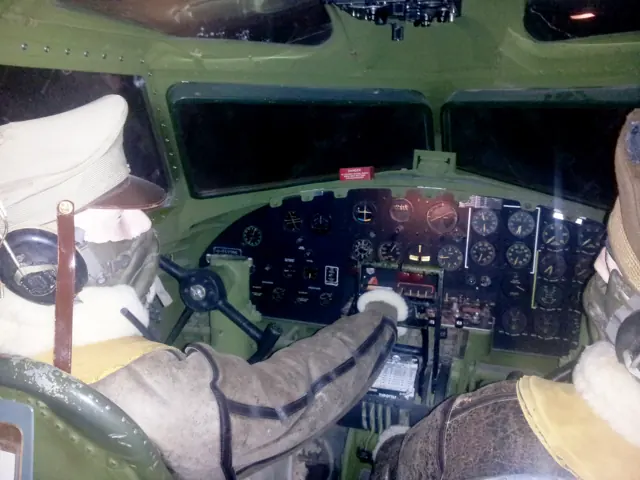
Clark arrived at Las Vegas Army Airfield in 1944 after training in a small twin. The B-17 cockpit seemed enormous and crowded with unfamiliar instruments, and he learned its work through gunnery-training flights before joining a crew bound for England. That same posting introduced him to Marie Mountain, a WASP pilot. An invitation to listen to Debussy at the library began the relationship that led to their marriage.
With the 100th Bomb Group, he discovered how much formation flying demanded physically. Departure and assembly could take place in poor weather, followed by long periods wearing an oxygen mask and cold-weather equipment. An electrically heated suit solved one problem and created another: perspiration fogged his goggles. These practical discomforts sit beside the larger events in his account, showing how much effort simply occupying the copilot’s seat could require.
100th Air Refueling Wing interview · May 2022. B-17 copilot training and wartime service beginning in 1944.
Read the full account · U.S. Department of Defense / 100th Air Refueling Wing ↗In your simulator
Systems, equipment and documentation for each developer’s aircraft.
MSFS 2024B-17G Flying Fortress
MicroProse · Released
B-17G Flying Fortress
MicroProse · Released
Aircraft specifications
Published figures for the named real-aircraft variant. Simulator equipment and performance can differ.
| Specification | Published value |
|---|---|
| Wingspan | 103 ft 9 in (31.62 m) |
| Height | 19 ft 1 in (5.82 m) |
| Wing area | 1,420 sq ft (131.92 m² ) |
| Empty weight | 36,135 lb (16,391 kg) |
| Gross weight | 54,000 lb (24,500 kg) |
| Max takeoff weight | 65,500 lb (29,700 kg) |
| Powerplant | 4 × Wright R-1820 -97 "Cyclone" turbosupercharged radial engines , 1,200 hp (895 kW) each |
| Propellers | 3-bladed Hamilton-Standard constant-speed propeller |
| Maximum speed | 295 mph (472 km/h, 256.34 kn) (At 25,000 Feet) |
| Cruise speed | 182 mph (293 km/h, 158 kn) |
| Range | 2,000 mi (3,219 km, 1,738 nmi) with 6,000 lb ( 2,700 kg ) bombload |
| Service ceiling | 35,600 ft (10,850 m) |
| Rate of climb | 900 ft/min (4.6 m/s) |
Manuals & resources
Find your next read
Choose a topic for a short introduction and a link to the original source. Simulator references identify the developer and edition they cover.
Pilot account
A retirement dream becomes a copilot checkoutAir & Space · July 2015. A second-in-command checkout in EAA’s Aluminum Overcast with Bob Davis.
Bjorkman used money she had intended for retirement to buy a B-17 copilot checkout at an EAA auction. She already had considerable tailwheel experience, but the largest aircraft she had flown was a Piper Aztec. Additional light-twin practice helped her prepare, while the sight of the Fortress in its hangar made the scale of the next step unmistakable. Starting it also introduced her to the coordinated work of the instructor and ground crew.
Eileen Bjorkman
Air & Space / Smithsonian · Read the source ↗Fear, crew humour and the loss of a friendThe Museum of Flight · June 2019. Interview recollections of wartime B-17 missions; his aircraft variant is not established in this interview.
Nelms remembered the shock of an encounter with antiaircraft fire. A burst beneath the aircraft made him frightened, followed by embarrassment at his own reaction. He describes gathering himself and checking on the crew. Their responses, including a radio operator joking that nobody had asked about him yet, gave that frightening moment an unexpectedly ordinary human exchange. Another memory was much harder to carry.
Dick Nelms
The Museum of Flight · Read the source ↗Developer documentation
B-17G Flying Fortress — product listingB-17G Flying Fortress · MSFS 2024
Product listing captured 2026-09-30; edition scope from the reviewed catalogue
Contrail · Read the source ↗Read the original documentation from the people who created it. Manuals open on their publisher’s website.
Aircraft background
Boeing B-17 Flying FortressWikipedia contributors · Research background · retrieved 2026-09-12 Boeing B-17F Flying FortressThe Museum of Flight · Family history and the museum’s 42-29782Product
B-17G Flying FortressKhamsin · Official developer / designated store catalogue · checked 2026-09-12 B-17G Flying Fortress MSFS24 by MicroProse | Contrail ShopContrail · Product listing captured 2026-09-30; edition scope from the reviewed catalogueType designator
ICAO Doc 8643 — aircraft type designatorsInternational Civil Aviation Organization · Public search data retrieved 2026-09-14; authority update 2026-09-03Built-in force-feedback profiles
Read the documentary basis, editable starting settings and remaining questions for the aircraft you fly. Each explanation refers to the exact profile revision shown.
Catalogue programme-20261022-v1 · 2 profile choices
MicroProse B-17G Flying Fortress
MicroProse · Free and Pro · Revision 3 · Inherited starting point
MSFS 2024
MicroProse B-17G Flying Fortress: The selected mechanical-control loading belongs to the named B-17G reference; four engine cues do not establish a multiple of yoke hand force.
Boeing B-17 Flying Fortress
Free and Pro · Revision 1 · Partial review
Aircraft reference · Manual starting point
Boeing B-17 Flying Fortress: The selected mechanical-control loading belongs to the named B-17G reference; four engine cues do not establish a multiple of yoke hand force.
MicroProse B-17G Flying Fortress
MicroProse B-17G Flying Fortress: The selected mechanical-control loading belongs to the named B-17G reference; four engine cues do not establish a multiple of yoke hand force.
Aircraft and simulator scope
- MicroProse B-17G Flying Fortress · MicroProse · MSFS 2024 · Add-on starting point
The simulator model and controls
Boeing developed the B-17 during the 1930s for the United States Army Air Corps. It became closely associated with the European air war, but the aircraft also served in transport, maritime patrol and rescue work. The B-17G represented in the simulator catalogue is a particular production version, not a label for every Flying Fortress configuration.
This profile selects MicroProse B-17G Flying Fortress for MSFS 2024.
How this profile feels
Spring resistance builds with the selected airspeed response. A separate aerodynamic term adds speed-dependent control load.
Valid trim provides the configured pressure relief. Autopilot following is off.
Controls and trim
MicroProse's B-17G manual describes four R-1820 engines, constant-speed propellers and trim tabs on all three axes. Its later change log records flight-model, trim, flap and centre-of-gravity corrections, so early feature descriptions and cockpit-autopilot operation remain version-sensitive. Khamsin's separate X-Plane B-17G listing marks work in progress; that reference must not be presented as a released implementation.
The selected implementation
MicroProse's MSFS 2024 B-17G has version-sensitive trim/flap/CG/autopilot changes. Advertised post-launch crew/maintenance features are not assumed complete.
About the values
The gains are normalized profile settings. They describe the chosen effect balance; hand force depends on the device and its output limits. IAS references are tuning values rather than operating limits. Physical acceptance of this revision remains pending.
Documentary review and sources
These decisions describe the documentary basis and remaining gaps for this revision. Aircraft documentation and a starting setting describe different kinds of evidence.
Aircraft and variant
InheritedThis profile selects MicroProse B-17G Flying Fortress for MSFS 2024.
Flight controls
InheritedMicroProse's B-17G manual describes four R-1820 engines, constant-speed propellers and trim tabs on all three axes. Its later change log records flight-model, trim, flap and centre-of-gravity corrections, so early feature descriptions and cockpit-autopilot operation remain version-sensitive. Khamsin's separate X-Plane B-17G listing marks work in progress; that reference must not be presented as a released implementation.
Trim
InheritedThree-axis trim tabs support separate pitch and roll pressure relief, with developer revision differences kept visible. Pitch authority 0.3 provides load relief and permitted centre movement; roll authority is 0.13.
Autopilot and stability
InheritedAutopilot following is off; the configured spring and load retain the hardware feel.
Equipment
InheritedMicroProse's MSFS 2024 B-17G has version-sensitive trim/flap/CG/autopilot changes. Advertised post-launch crew/maintenance features are not assumed complete.
Speeds and limits
InheritedThe indicated-speed references set the profile response scale; they are separate from aircraft operating limits.
Simulator integration
InheritedThe profile targets msfs2024. Add-on-specific controls use only the supported references configured by this profile.
Force-feedback settings
InheritedThe settings define the profile’s effect balance. Device output limits affect physical hand force.
Starting settings and their rationale
These configured values are starting estimates. The explanations describe what each setting controls; physical validation appears separately below.
| Setting | Starting value | What it controls and why |
|---|---|---|
| Spring strength | Starting value0.74 | What it controls and whyThe selected mechanical-control loading belongs to the named B-17G reference; four engine cues do not establish a multiple of yoke hand force. The baseline spring is 0.74. Its low-speed blend reaches baseline strength at 70 KIAS. |
| Master force gain | Starting value0.85 | What it controls and whyScales overall profile strength while preserving effect balance, subject to device and output limits. |
| Profile force gain | Starting value0.46 | What it controls and whyThe aerodynamic-load gain is 0.46 with an indicated-speed reference of 150 KIAS. This supplies speed-dependent loading alongside the spring. |
| Force tuning speed/reference | Starting value150 kt | What it controls and whySets the IAS reference for aerodynamic loading. It is an estimate, not published cruise TAS or a flight limit. |
| Spring response reference speed | Starting value70 kt | What it controls and whySets the IAS where the low-speed blend reaches baseline strength; high-speed stiffening also uses it. |
| Aileron force scale | Starting value0.65 | What it controls and whyRoll and pitch aerodynamic scales are 0.65 and 0.86, respectively. They set the aerodynamic axis balance. No custom spring-travel curve is enabled. |
| Elevator force scale | Starting value0.86 | What it controls and whyScales pitch aerodynamic loading; pitch spring travel and trim responses are separate settings. |
| Trim feel | Starting valueDisabled | What it controls and whyRetained for compatibility and group membership. Trim relief, rather than this flag, controls centre movement. |
| Trim relief | Starting valueEnabled | What it controls and whyAllows trim relief with supported control law and valid telemetry. Axis authorities set its amount. |
| Autopilot follow | Starting valueDisabled | What it controls and whyAutopilot following is off; the configured spring and load retain the hardware feel. |
| Autopilot neutral hold | Starting valueDisabled | What it controls and whyPermits centering hold during a supported AP state, separate from following a moving target. |
| Output force limit | Starting value0.55 | What it controls and whyCaps directed-force output. Native spring effects and device limits remain separate. |
All 44 starting settings and their rationale
The settings define the profile’s effect balance. Device output limits affect physical hand force.
| Setting | Starting value | What it controls and why |
|---|---|---|
| Spring strength | Starting value0.74 | What it controls and whyThe selected mechanical-control loading belongs to the named B-17G reference; four engine cues do not establish a multiple of yoke hand force. The baseline spring is 0.74. Its low-speed blend reaches baseline strength at 70 KIAS. |
| Spring deadband | Starting value0.04 | What it controls and whySets travel around the centre before the baseline spring resists. Smaller values engage it sooner. |
| Profile force gain | Starting value0.46 | What it controls and whyThe aerodynamic-load gain is 0.46 with an indicated-speed reference of 150 KIAS. This supplies speed-dependent loading alongside the spring. |
| Master force gain | Starting value0.85 | What it controls and whyScales overall profile strength while preserving effect balance, subject to device and output limits. |
| QBlend Enabled | Starting valueEnabled | What it controls and whyAllows baseline spring strength to rise with indicated airspeed where the control law permits it. |
| QSpring Minimum Factor | Starting value0.55 | What it controls and whySets low-speed spring strength as a fraction of baseline when blending is enabled. One keeps full strength. |
| QSpring Start Knots | Starting value20 kt | What it controls and whySets the IAS where the low-speed spring blend starts rising. This is a feel threshold, not a flight limit. |
| Spring response reference speed | Starting value70 kt | What it controls and whySets the IAS where the low-speed blend reaches baseline strength; high-speed stiffening also uses it. |
| Force tuning speed/reference | Starting value150 kt | What it controls and whySets the IAS reference for aerodynamic loading. It is an estimate, not published cruise TAS or a flight limit. |
| Airspeed spring stiffening gain | Starting value0.1 | What it controls and whyThe high-speed spring-stiffening gain is 0.1. It strengthens the permitted spring response above 70 KIAS, with the squared-speed ratio capped at 5. |
| Airspeed spring stiffening limit | Starting value5 | What it controls and whyLimits the squared airspeed ratio used for high-speed spring stiffening; it is not a device-force cap. |
| Aileron force scale | Starting value0.65 | What it controls and whyRoll and pitch aerodynamic scales are 0.65 and 0.86, respectively. They set the aerodynamic axis balance. No custom spring-travel curve is enabled. |
| Elevator force scale | Starting value0.86 | What it controls and whyScales pitch aerodynamic loading; pitch spring travel and trim responses are separate settings. |
| Output force limit | Starting value0.55 | What it controls and whyCaps directed-force output. Native spring effects and device limits remain separate. |
| Trim feel | Starting valueDisabled | What it controls and whyRetained for compatibility and group membership. Trim relief, rather than this flag, controls centre movement. |
| Trim relief | Starting valueEnabled | What it controls and whyAllows trim relief with supported control law and valid telemetry. Axis authorities set its amount. |
| Elevator Authority | Starting value0.3 | What it controls and whyThree-axis trim tabs support separate pitch and roll pressure relief, with developer revision differences kept visible. Pitch authority 0.3 provides load relief and permitted centre movement; roll authority is 0.13. |
| Aileron Authority | Starting value0.13 | What it controls and whyScales supported roll-trim relief and permitted centre movement. Zero removes roll response. |
| Force Trim Enabled | Starting valueDisabled | What it controls and whyEnables local force trim, separate from aircraft-owned trim and add-on integration qualification. |
| GLoad Enabled | Starting valueEnabled | What it controls and whyAllows load-factor changes to modify permitted spring laws. Passive fly-by-wire feel can suppress it. |
| Rate Damping Enabled | Starting valueEnabled | What it controls and whyEnables rate damping with the configured coefficients and control law. |
| Autopilot follow | Starting valueDisabled | What it controls and whyAutopilot following is off; the configured spring and load retain the hardware feel. |
| Autopilot follow authority | Starting value0.05 | What it controls and whySets admitted AP-follow gain, not a percentage of travel. Runtime ownership and input limits still apply. |
| Autopilot neutral hold | Starting valueDisabled | What it controls and whyPermits centering hold during a supported AP state, separate from following a moving target. |
| Autopilot neutral hold strength | Starting value0.6 | What it controls and whySets admitted AP neutral-hold strength; inactive while neutral hold is disabled. |
| Enabled | Starting valueEnabled | What it controls and whyEnables aerodynamic cues; each still needs nonzero strength and its simulator conditions. |
| Gain | Starting value0.35 | What it controls and whySets stall-buffet strength. Zero removes the cue without changing simulator stalls or warnings. |
| Gain | Starting value0 | What it controls and whySets high-Mach buffet strength; onset and full-strength thresholds are separate. |
| Gain | Starting value0 | What it controls and whySets flap buffet at the configured position and speed gates. Flap movement texture is separate. |
| Maximum flap index | Starting value3 | What it controls and whySets the final flap index for detent normalization. UP plus three detents uses maximum index3. |
| Minimum flap index | Starting value2 | What it controls and whySets the first flap detent that admits buffet; this is a handle index, not degrees. |
| Gain | Starting value0 | What it controls and whySets gear aerodynamic buffet; movement and ground-contact cues are separate. |
| Shaker Enabled | Starting valueDisabled | What it controls and whyPermits shaker at supported warning conditions; the switch does not establish aircraft equipment. |
| Stick shaker amplitude | Starting value0.5 | What it controls and whySets triggered shaker strength; inactive while the shaker feature is disabled. |
| Enabled | Starting valueEnabled | What it controls and whyEnables ground effects; each still needs its own strength and contact or motion telemetry. |
| Gain | Starting value0.42 | What it controls and whySets rolling texture strength, modified by speed, surface and undercarriage configuration. |
| Gain | Starting value0.3 | What it controls and whySets gear-bump texture during ground motion, separate from touchdown impact. |
| Gain | Starting value0.75 | What it controls and whySets landing-impact strength; landing telemetry and response shape determine the pulse. |
| Gain | Starting value0 | What it controls and whySets reverse-thrust vibration with valid reverser and engine conditions. Zero removes the cue. |
| Enabled | Starting valueEnabled | What it controls and whyEnables engine cues with nonzero settings and valid running-engine telemetry. |
| Gain | Starting value0.12 | What it controls and whySets estimated engine vibration using configured telemetry and response, not measured cockpit vibration. |
| Enabled | Starting valueEnabled | What it controls and whyEnables accessory cues with configured strengths and observed accessory movement. |
| Gain | Starting value0.12 | What it controls and whySets texture from observed flap movement; a command without movement does not establish the cue. |
| Gain | Starting value0.12 | What it controls and whySets texture from observed gear movement, separate from aerodynamic and touchdown effects. |
Limits and open questions
- Force amplitudes, gradients, damping and cue onset are editable engineering estimates, not measured hand forces. Documentary and synthetic review do not establish installed or physical acceptance.
- No autopilot follow/hold, local force-trim release, surface-follow, hydraulic-failure load or simulator-axis injection. A cockpit switch or flight-director bar is not a calibrated inceptor demand.
- Actual flap and landing-gear position changes drive accessory textures. Commands, indicators, custom audio and visual vibration do not establish force telemetry.
- Documentary identities need a developer or distinctive package identifier. If the aircraft omits it, select the correct profile and save it as the aircraft default. No other developer is matched from ICAO alone.
- Conventionalmanualyoke startingpointwithrestrainedaerodynamicloading. Simulatedheaviness orreducedeffectivenessdoesnotmeasureactualgripforce.
- Pitch .26/roll .13 estimatedtabrelief. Ruddertrimdoesnotshiftlateralneutral; cowlflapsnotwingflaps.
- Version-dependentAPcapability; nofollow/hold. Futurecockpitcontrols notdeclaredimplemented byBridge.
- 150KIAStuningreference. Manualmphvaluesconvertedonlyforcontext; nofixedVNE/stallthresholdfromrawmarketingmaxspeed.
- MSFS2024only. Contrail1.4.0labelversusJustFlight1.0.4andearlyaccessmanualconflictretained. Profiledoesnotclaimcompletionofalladd-onsystems.
Physical validation
No physical force validation is recorded in this public catalogue for this revision. Documentary review and software checks do not establish how a particular device feels.
Discuss this aircraft (0)
Questions, observations and useful sources from the community.
No published discussions yet. Bring a question or share a useful source.
Open aircraft discussions →Content expanded · What’s new
Something missing or a source that needs attention?
Suggest a correction ↗