

Start here
A few places to begin, from the aircraft’s story to the people who fly it.
Meet the aircraft
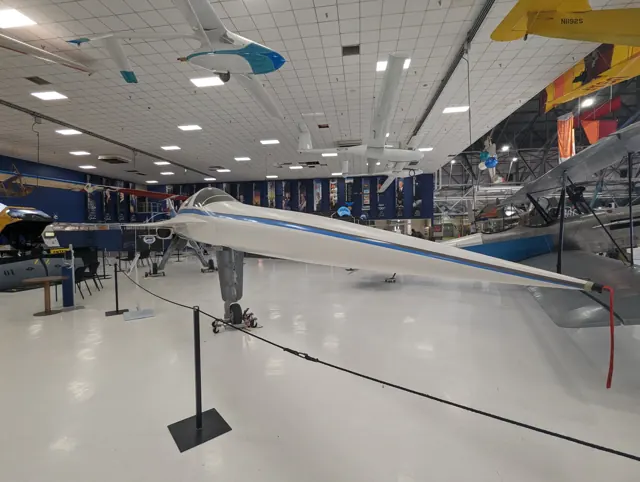
Boom's XB-1 is an experimental demonstrator for the Overture programme. Its slender fuselage and highly swept wing are paired with three General Electric J85 engines. The demonstrator first flew in March 2024 and reached supersonic flight during its 2025 test programme. Its value in a simulator is the chance to examine a specialised experimental cockpit and an unusual flight envelope.
Aircraft background
Wikipedia contributors · Read more ↗The first flight requires a sceptic to become ready to go
Shoemaker described a change in outlook as XB-1 approached its first flight. During development, he had to question assumptions and encourage the team to imagine how the aircraft might behave. Lined up on the runway, he needed confidence that those concerns had been addressed and that the people supporting him were ready. That confidence still allowed for surprises.
Boom interview · April 2024, after XB-1’s first flight. Shoemaker flew the demonstrator; Brandenburg flew the T-38 chase aircraft on that occasion.
Boom Supersonic · Read more ↗Fuel quantities also need cockpit entry
Cold starts need initial and Bingo fuel in thousands of pounds on OVR or ENS; runway starts prepopulate them.
Boom XB-1 · Microsoft Flight Simulator · MSFS 2024
Microsoft / aircraft developers · Read more ↗Into the cockpit
 YouTube
 Boom Supersonic · 25 min ·
Inside the Cockpit of Boom Supersonic's XB-1
Boom's flight-test engineer narrates the XB-1's tenth test flight.
Real aircraft · Boom XB-1
Watch on YouTube ↗ YouTube
 Boom Supersonic · 21 min ·
Go Inside the Cockpit: XB-1 Flight 4 Full Video Narrated by Nick Sheryka—Chief Flight Test Engineer
Flight-test commentary and crew communications from the XB-1's fourth flight.
Real aircraft · Boom XB-1
Watch on YouTube ↗Preview images are served by AirframeDB. Videos open on YouTube only when you choose to watch.
Meet Boom XB-1
Boom's XB-1 is an experimental demonstrator for the Overture programme. Its slender fuselage and highly swept wing are paired with three General Electric J85 engines. The demonstrator first flew in March 2024 and reached supersonic flight during its 2025 test programme.
The developer's guide describes its conventional flight controls, including the pitch-feel and roll mechanisms.
Boom XB-1
Aircraft type designators
Use the code for the model you are flying. The linked authority lists the applicable aircraft.
History & design
The supersonic flight feels smooth from the cockpit
Speaking to CNN after the 28 January 2025 flight, Brandenburg described the XB-1 as smooth at supersonic speed. He explained that the Mach indication, rather than hearing a sonic boom inside the cockpit, marked the change for him.
CNN · The Lead: interview with XB-1 pilot Tristan Brandenburg ↗Pilot’s broadcast interview; future airliner plans are separate
Development milestones
First flight: March 22, 2024
Wikipedia contributors · Boom XB-1 ↗Boom XB-1 · family/variant named by the source · Wikipedia revision 1367159153
Pilot accounts
The first flight requires a sceptic to become ready to go
Shoemaker described a change in outlook as XB-1 approached its first flight. During development, he had to question assumptions and encourage the team to imagine how the aircraft might behave. Lined up on the runway, he needed confidence that those concerns had been addressed and that the people supporting him were ready.
That confidence still allowed for surprises. He expected the real aircraft to reveal things that hundreds of simulator hours could not, and felt a strong responsibility not to let his own flying undermine the team’s preparation. The first outing deliberately kept its ambitions limited, including leaving the landing gear extended. His recollection centres on that balance between trust in the work already done and attentiveness to an unfamiliar aircraft.
Boom interview · April 2024, after XB-1’s first flight. Shoemaker flew the demonstrator; Brandenburg flew the T-38 chase aircraft on that occasion.
Read the full account · Boom Supersonic ↗Preparation helps the nerves settle after liftoff
Brandenburg could see his own nerves when he watched the cockpit recording of his first XB-1 flight. His breathing changed just before brake release, but the apprehension faded once the wheels left the ground. Time in the simulator had made the transition to the real aircraft feel unexpectedly familiar.
Preparing each briefing was another way of building confidence. Writing down the plan and explaining it to colleagues forced him to think through the flight. He also described the value of a consistent routine and a prayer at the foot of the ladder, acknowledging the people and opportunities that had brought him there. He still felt nervous before test flights, but regarded that awareness as part of taking the work seriously.
Boom interview · January 2025. His first XB-1 flight was the programme’s second flight; these recollections precede the first supersonic sortie.
Read the full account · Boom Supersonic ↗In your simulator
Systems, equipment and documentation for each developer’s aircraft.
Compare simulator versions →MSFS 2024Boom XB-1
Microsoft Flight Simulator · Released
Boom XB-1
Microsoft Flight Simulator · Released
MSFS 2024Boom XB-1
FlightFX · Released
Boom XB-1
FlightFX · Released
Aircraft specifications
Published figures for the named real-aircraft variant. Simulator equipment and performance can differ.
| Specification | Published value |
|---|---|
| Length | 68 ft (21 m) |
| Wingspan | 21 ft (6.4 m) |
| Height | 17 ft (5.2 m) |
| Max takeoff weight | 13,500 lb (6,123 kg) |
| Powerplant | 3 × GE J85-15 afterburning turbojet , 2,925 lbf (13.01 kN) thrust each dry, 4,300 lbf (19 kN) with afterburner |
| Maximum speed | Mach 1.1 |
| Range | 1,000 nmi (1,200 mi, 1,900 km) (unconfirmed) |
Manuals & resources
Find your next read
Choose a topic for a short introduction and a link to the original source. Simulator references identify the developer and edition they cover.
Simulator documentation
Fuel quantities also need cockpit entryBoom XB-1 · Microsoft Flight Simulator · MSFS 2024
Cold starts need initial and Bingo fuel in thousands of pounds on OVR or ENS; runway starts prepopulate them.
Manual page 31
Microsoft / aircraft developers · Read the source ↗Some flight-control assignments are customBoom XB-1 · Microsoft Flight Simulator · MSFS 2024
The manual requires custom pitch/yaw trim assignments, with no stock keys for Q-feel, dampers or roll deflection.
Developer-documented scope · page 95
Microsoft / aircraft developers · Read the source ↗Several test and environmental systems are omittedBoom XB-1 · Microsoft Flight Simulator · MSFS 2024
FES, oxygen, failures and cabin altitude are not simulated; a representative altitude may appear.
Manual pages 25 and 95
Microsoft / aircraft developers · Read the source ↗Pitch feel and roll response are different mechanismsBoom XB-1 · Microsoft Flight Simulator · MSFS 2024
The XB-1 guide explicitly states that the aircraft has neither an autopilot nor fly-by-wire. It distinguishes pitch Q-feel scheduling from a roll-ratio changer: the latter changes control-surface response without changing feel.
MSFS2024 XB1 manual1.0 · PDF pp.6,27-28
Microsoft / aircraft developers · Read the source ↗The forward view uses synthetic visionBoom XB-1 · Microsoft Flight Simulator · MSFS 2024
FLVS uses synthetic vision. Select FLV on the MFD with the gear extended; it is unavailable otherwise.
Manual 1.0 · pages 39–40
Microsoft / aircraft developers · Read the source ↗Tank loading and total fuel differBoom XB-1 · Microsoft Flight Simulator · MSFS 2024
The tablet permits individual tank loading; entering only a total distributes fuel evenly.
Manual page 95
Microsoft / aircraft developers · Read the source ↗Pilot account
The first flight requires a sceptic to become ready to goBoom interview · April 2024, after XB-1’s first flight. Shoemaker flew the demonstrator; Brandenburg flew the T-38 chase aircraft on that occasion.
Shoemaker described a change in outlook as XB-1 approached its first flight. During development, he had to question assumptions and encourage the team to imagine how the aircraft might behave. Lined up on the runway, he needed confidence that those concerns had been addressed and that the people supporting him were ready. That confidence still allowed for surprises.
Bill “Doc” Shoemaker
Boom Supersonic · Read the source ↗Preparation helps the nerves settle after liftoffBoom interview · January 2025. His first XB-1 flight was the programme’s second flight; these recollections precede the first supersonic sortie.
Brandenburg could see his own nerves when he watched the cockpit recording of his first XB-1 flight. His breathing changed just before brake release, but the apprehension faded once the wheels left the ground. Time in the simulator had made the transition to the real aircraft feel unexpectedly familiar. Preparing each briefing was another way of building confidence. Writing down the plan and explaining it to colleagues forced him to think through the flight.
Tristan “Geppetto” Brandenburg
Boom Supersonic · Read the source ↗Developer documentation
Boom XB-1 — product listingBoom XB-1 · MSFS 2024
Product listing captured 2026-09-24; edition scope from the reviewed catalogue
FlightFX · Read the source ↗Read the original documentation from the people who created it. Manuals open on their publisher’s website.
Manual
MSFS2024 – Microsoft – Boom XB-1 – User Manual – 1.0Microsoft / aircraft developers Microsoft Flight Simulator aircraft manualsMicrosoft / aircraft developersAircraft background
Boom XB-1Wikipedia contributors · Research background · Wikipedia revision 1367159153 · retrieved 2026-09-12 The Lead: interview with XB-1 pilot Tristan BrandenburgCNN · Broadcast transcript · 28 January 2025Resource
XB1 and UH1H free additionsMicrosoftType designator
ICAO Doc 8643 — aircraft type designatorsInternational Civil Aviation Organization · Public search data retrieved 2026-09-14; authority update 2026-09-03Product
Boom XB-1FlightFX · Product listing captured 2026-09-24; edition scope from the reviewed catalogueBuilt-in force-feedback profiles
Read the documentary basis, editable starting settings and remaining questions for the aircraft you fly. Each explanation refers to the exact profile revision shown.
Catalogue programme-20261022-v1 · 2 profile choices
FlightFX Boom XB-1
FlightFX · Free and Pro · Revision 3 · Inherited starting point
MSFS 2024
FlightFX Boom XB-1: The powered-control spring approximates artificial pitch feel; the actual Mach/altitude Q-feel schedule and roll-ratio mechanism are not reproduced by one IAS reference.
Boom XB-1
Free and Pro · Revision 1 · Partial review
MSFS 2024
Boom XB-1: The powered-control spring approximates artificial pitch feel; the actual Mach/altitude Q-feel schedule and roll-ratio mechanism are not reproduced by one IAS reference.
Discuss this aircraft (0)
Questions, observations and useful sources from the community.
No published discussions yet. Bring a question or share a useful source.
Open aircraft discussions →Content expanded · What’s new
Something missing or a source that needs attention?
Suggest a correction ↗