

Start here
A few places to begin, from the aircraft’s story to the people who fly it.
Meet the aircraft
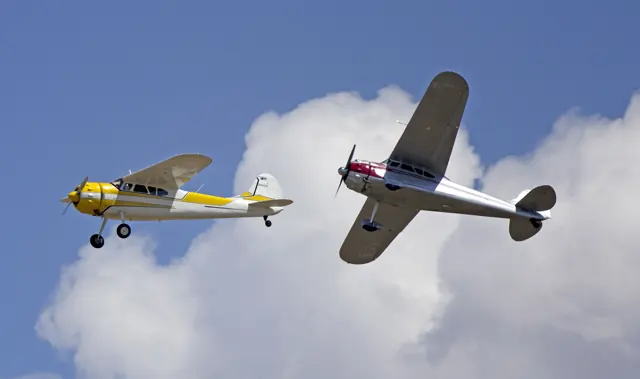
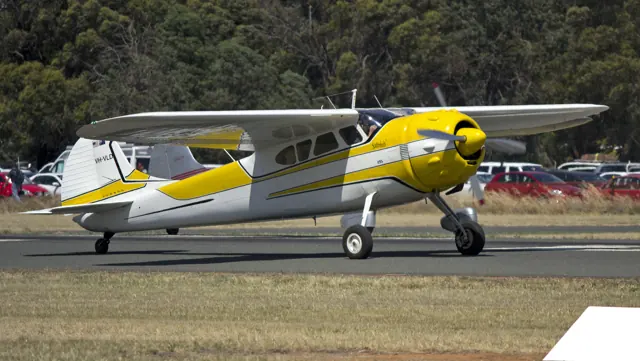
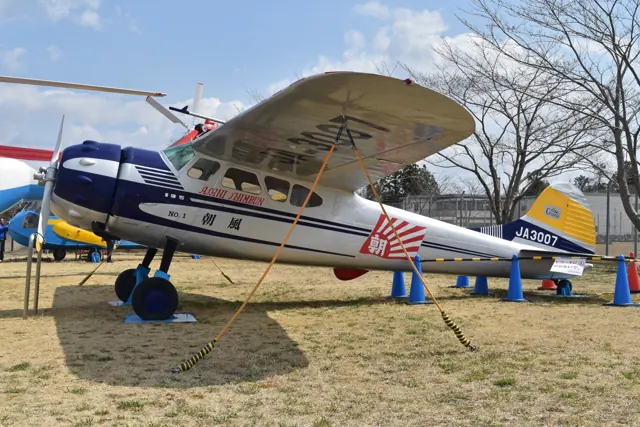
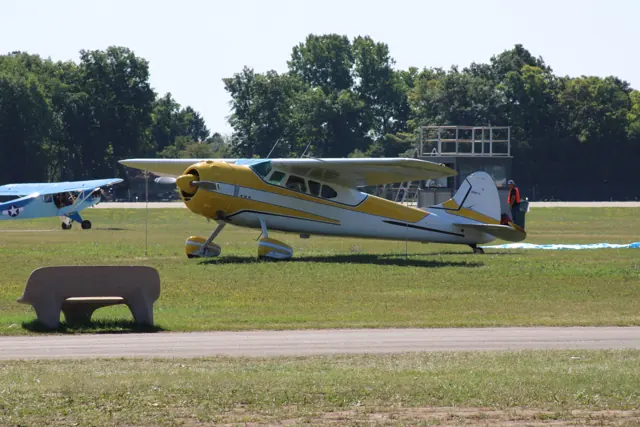
The Cessna 190 and 195 were developed as enclosed-cabin general aviation aircraft after the Second World War. Their radial engines and rounded cowlings set them apart from the later flat-engine Cessna singles. The high wing and conventional landing gear complete a distinctly period outline. The Businessliner name reflects the intended role as practical personal and company transport.
Aircraft background
Wikipedia contributors · Read more ↗Trading a fast twin for a classic single
Farrow surprised his friends by exchanging a Beech E55 Baron for a classic Cessna. He still used the aircraft for his work with Snap-On Tools, including visits to a factory in Iowa where airline connections were inconvenient. It also carried him on weekend outings, Bahamas holidays and trips to airshows. The slower pace did not trouble him; he enjoyed the time spent flying it. Comfort mattered to the family as well.
Cessna Owner Organization interview · July 2015. Farrow’s aircraft began as a Continental-powered 190 and was converted to Jacobs power.
Cessna Owner Organization · Read more ↗The original Local Legend release
Microsoft introduced Carenado’s Cessna 195 as Local Legend VII alongside the Canada world update in September 2022. The original package offered eight classic liveries plus Xbox and Aviator’s Club schemes. The MSFS 2024 edition listing records its later inclusion.
195 Businessliner · Microsoft Flight Simulator · MSFS 2024
Microsoft Flight Simulator · Read more ↗Into the cockpit
 YouTube
 EAA · 4 min ·
The Businessliner
EAA visits a Cessna 195 anniversary fly-in and its community of owners.
Real aircraft · Cessna 195 Businessliner
Watch on YouTube ↗ YouTube
 Microsoft Flight Simulator · 2 min ·
Microsoft Flight Simulator | Local Legend 7: Cessna 195 Businessliner
Microsoft's release film introduces the Cessna 195 Businessliner for MSFS.
Simulator · Microsoft Cessna 195 · MSFS
Watch on YouTube ↗Preview images are served by AirframeDB. Videos open on YouTube only when you choose to watch.
Meet Cessna 195 Businessliner
The Cessna 190 and 195 were developed as enclosed-cabin general aviation aircraft after the Second World War. Their radial engines and rounded cowlings set them apart from the later flat-engine Cessna singles. The high wing and conventional landing gear complete a distinctly period outline.
The Businessliner name reflects the intended role as practical personal and company transport. Its combination of a substantial cabin and a single radial engine places it between the smaller club aeroplanes and the twin-engine executive transports of the same era.
Cessna 195 Businessliner
Cessna → · Explore the family →
Cessna 195 Businessliner
Wikipedia contributors · Cessna 195 ↗Microsoft Flight Simulator · MSFS 2024 →Microsoft Flight Simulator · MSFS 2020 →Aircraft type designators
Use the code for the model you are flying. The linked authority lists the applicable aircraft.
History & design
An all-metal successor to the Airmaster
The 190 and 195 grew from Cessna’s prewar Airmaster family, replacing its mixed construction with an all-metal airframe. Introduced in 1947, the Businessliner retained the radial engine and tailwheel layout. Continental power identified the 190, while Jacobs engines powered the 195; later conversions can complicate that distinction.
AOPA Pilot · Cessna 195: In a Class of Its Own ↗AOPA Pilot · August 1997 · family development
Development milestones
First flight: 1945
Developed from: Cessna 165
Wikipedia contributors · Cessna 195 ↗Cessna 195 · family/variant named by the source · Wikipedia revision 1374354398
Pilot accounts
Trading a fast twin for a classic single
Farrow surprised his friends by exchanging a Beech E55 Baron for a classic Cessna. He still used the aircraft for his work with Snap-On Tools, including visits to a factory in Iowa where airline connections were inconvenient. It also carried him on weekend outings, Bahamas holidays and trips to airshows. The slower pace did not trouble him; he enjoyed the time spent flying it.
Comfort mattered to the family as well. His wife Jeanie had travelled in several of his aircraft and especially liked the Cessna’s smooth ride. Farrow describes a machine that attracted attention wherever it stopped and gave him an unusual combination of nostalgia and useful transport. He acknowledged that it could not suit every mission, but felt it fitted his own life particularly well.
Cessna Owner Organization interview · July 2015. Farrow’s aircraft began as a Continental-powered 190 and was converted to Jacobs power.
Read the full account · Cessna Owner Organization ↗Keeping the family’s favourite aircraft alive
Barron grew up around the family’s restoration business and eventually chose it over an airline career. Working with older aircraft offered the life he wanted, including the chance to research how they had originally been built. Restoring N4312N involved searching old parts, documents and surviving materials, with the pleasure of discovery becoming part of the work.
Flying the finished aircraft supplied another reward. He describes the distinctive rumble and the unusual sight picture from a cockpit perched high behind a radial engine. Once airborne, he found the aircraft familiar and docile, drawing comparisons with the Cessna 182 while acknowledging the different flaps and view. His preference for wheel landings was personal. For Barron and his father, the 195 combined practical travel with the pleasure of preserving something they loved.
AOPA Pilot interview by Kollin Stagnito · October 2024. Flying and restoring the 1948 Cessna 195 N4312N with his father, Mike.
Read the full account · AOPA Pilot ↗The small rituals of owning a Businessliner
Bellotte flew Boeing 747s for work, but his restored Cessna provided a very different reason to go to the airport. Bringing it back to condition had occupied much of five years, including replacing damaged skins and reproducing the original paint scheme from Cessna drawings. He joked that the project was never quite finished even after most of the work was done.
The aircraft then took him to fly-ins and airshows, where recognition for the restoration was especially satisfying. Routine ownership also meant attending to the radial engine and cleaning away oil, bugs and fingerprints after a flight. Those chores were part of the appeal for him. He valued the sound and character of the engine and felt the aircraft’s usefulness remained competitive, while knowing that its ground handling deserved attention.
AOPA Pilot interview by Peter A. Bedell · August 1997. Bellotte’s 195B, N2105C, restored with Alphin Aircraft in Hagerstown.
Read the full account · AOPA Pilot ↗In your simulator
Systems, equipment and documentation for each developer’s aircraft.
Compare simulator versions →MSFS 2024195 Businessliner
Microsoft Flight Simulator · Released
195 Businessliner
Microsoft Flight Simulator · Released
MSFS 2020195 Businessliner
Microsoft Flight Simulator · Released
195 Businessliner
Microsoft Flight Simulator · Released
Aircraft specifications
Published figures for the named real-aircraft variant. Simulator equipment and performance can differ.
| Specification | Published value |
|---|---|
| Length | 27 ft 4 in (8.33 m) |
| Wingspan | 36 ft 2 in (11.02 m) |
| Height | 7 ft 2 in (2.18 m) |
| Empty weight | 2,100 lb (953 kg) |
| Gross weight | 3,350 lb (1,520 kg) |
| Powerplant | 1 × Jacobs R-755 radial engine , 300 hp (220 kW) |
| Propellers | 2-bladed Hamilton Standard constant speed propeller |
| Maximum speed | 178 mph (286 km/h, 155 kn) |
| Cruise speed | 170 mph (270 km/h, 150 kn) at 70% power |
| Stall speed | 62 mph (100 km/h, 54 kn) power off, flaps 45° |
| Range | 800 mi (1,300 km, 700 nmi) at 70% power |
| Service ceiling | 18,300 ft (5,600 m) |
| Rate of climb | 1,200 ft/min (6.1 m/s) |
Manuals & resources
Find your next read
Choose a topic for a short introduction and a link to the original source. Simulator references identify the developer and edition they cover.
Simulator documentation
The original Local Legend release195 Businessliner · Microsoft Flight Simulator · MSFS 2024
Microsoft introduced Carenado’s Cessna 195 as Local Legend VII alongside the Canada world update in September 2022. The original package offered eight classic liveries plus Xbox and Aviator’s Club schemes. The MSFS 2024 edition listing records its later inclusion.
Official September 2022 release; MSFS 2024 edition inventory linked separately
Microsoft Flight Simulator · Read the source ↗The original MSFS 2020 release195 Businessliner · Microsoft Flight Simulator · MSFS 2020
Local Legend VII introduced the 195 Businessliner in September 2022 alongside World Update XI: Canada. The original Marketplace package includes ten liveries.
2022-09-29 · release and package scope
Microsoft Flight Simulator · Read the source ↗Pilot account
Trading a fast twin for a classic singleCessna Owner Organization interview · July 2015. Farrow’s aircraft began as a Continental-powered 190 and was converted to Jacobs power.
Farrow surprised his friends by exchanging a Beech E55 Baron for a classic Cessna. He still used the aircraft for his work with Snap-On Tools, including visits to a factory in Iowa where airline connections were inconvenient. It also carried him on weekend outings, Bahamas holidays and trips to airshows. The slower pace did not trouble him; he enjoyed the time spent flying it. Comfort mattered to the family as well.
Rick Farrow
Cessna Owner Organization · Read the source ↗Keeping the family’s favourite aircraft aliveAOPA Pilot interview by Kollin Stagnito · October 2024. Flying and restoring the 1948 Cessna 195 N4312N with his father, Mike.
Barron grew up around the family’s restoration business and eventually chose it over an airline career. Working with older aircraft offered the life he wanted, including the chance to research how they had originally been built. Restoring N4312N involved searching old parts, documents and surviving materials, with the pleasure of discovery becoming part of the work. Flying the finished aircraft supplied another reward.
Dillon Barron
AOPA Pilot · Read the source ↗Read the original documentation from the people who created it. Manuals open on their publisher’s website.
Manual
Microsoft Flight Simulator aircraft manualsMicrosoft / aircraft developersAircraft background
Cessna 195Wikipedia contributors · Research background · Wikipedia revision 1374354398 · retrieved 2026-09-12Resource
MSFS 2024 FAQ and edition aircraft inventoryMicrosoftDeveloper documentation
Local Legend VII: Cessna 195 BusinesslinerMicrosoft Flight Simulator · 29 September 2022 · original Marketplace releaseType designator
ICAO Doc 8643 — aircraft type designatorsInternational Civil Aviation Organization · Public search data retrieved 2026-09-14; authority update 2026-09-03Built-in force-feedback profiles
Read the documentary basis, editable starting settings and remaining questions for the aircraft you fly. Each explanation refers to the exact profile revision shown.
Catalogue programme-20261022-v1 · 1 profile choice
Cessna 195 Businessliner
Free and Pro · Revision 2 · Partial review
MSFS 2024 · MSFS 2020
Cessna 195 Businessliner: The selected manual-control response remains nominal; radial-engine rumble and yoke resistance are separate profile effects.
Cessna 195 Businessliner
Cessna 195 Businessliner: The selected manual-control response remains nominal; radial-engine rumble and yoke resistance are separate profile effects.
Aircraft and simulator scope
- Cessna 195 Businessliner · MSFS 2024 · family starting point
- Cessna 195 Businessliner · MSFS 2020 · family starting point
Microsoft Local Legend Businessliner announcement; aircraft system details are limited. · Selected choice: Cessna 195 Businessliner. Documentary scope does not establish every variant, add-on revision or simulator binding.
The simulator model and controls
The Cessna 190 and 195 were developed as enclosed-cabin general aviation aircraft after the Second World War. Their radial engines and rounded cowlings set them apart from the later flat-engine Cessna singles. The high wing and conventional landing gear complete a distinctly period outline.
This starting point selects Cessna 195 Businessliner. Its aircraft-level settings do not select a particular developer’s custom systems.
How this profile feels
Spring resistance builds with the selected airspeed response. A separate aerodynamic term adds speed-dependent control load.
Valid trim provides the configured pressure relief. Autopilot following is off.
Controls and trim
Microsoft's Businessliner announcement describes fixed conventional gear, a Jacobs radial engine and a two-blade constant-speed propeller. The period radial installation gives the aircraft different engine context from later flat-engine Cessnas. Its stated cruise speed uses mph, and the announcement does not set out a measured yoke force or trim-pressure curve.
About the values
The gains are normalized profile settings. They describe the chosen effect balance; hand force depends on the device and its output limits. IAS references are tuning values rather than operating limits. Physical acceptance of this revision remains pending.
What the documentation establishes
The announcement identifies the radial-engine C195 Businessliner and fixed tailwheel configuration.
Fixed conventional gear, Jacobs radial engine and a two-blade constant-speed propeller are documented.
Cruise is stated in mph; this does not derive the selected indicated-speed force reference.
Documentary review and sources
These decisions describe the documentary basis and remaining gaps for this revision. Aircraft documentation and a starting setting describe different kinds of evidence.
Aircraft and variant
ReviewedThis starting point selects Cessna 195 Businessliner. Its aircraft-level settings do not select a particular developer’s custom systems.
Flight controls
Not yet reviewedMicrosoft's Businessliner announcement describes fixed conventional gear, a Jacobs radial engine and a two-blade constant-speed propeller. The period radial installation gives the aircraft different engine context from later flat-engine Cessnas. Its stated cruise speed uses mph, and the announcement does not set out a measured yoke force or trim-pressure curve.
Trim
Not yet reviewedPitch relief is a chosen response, with no exact trim-to-yoke loading coefficient established by the announcement. Pitch authority 0.3 provides load relief and permitted centre movement; roll authority is 0.
Autopilot and stability
Not yet reviewedAutopilot following is off; the configured spring and load retain the hardware feel.
Equipment
ReviewedGear, flap and ground cues follow the selected settings and available simulator-reported states.
Speeds and limits
ReviewedThe indicated-speed references set the profile response scale; they are separate from aircraft operating limits.
Simulator integration
Not yet reviewedThe profile targets msfs2024, msfs2020. Add-on-specific controls use only the supported references configured by this profile.
Force-feedback settings
Not yet reviewedThe settings define the profile’s effect balance. Device output limits affect physical hand force.
Starting settings and their rationale
These configured values are starting estimates. The explanations describe what each setting controls; physical validation appears separately below.
| Setting | Starting value | What it controls and why |
|---|---|---|
| Spring strength | Starting value0.74 | What it controls and whyThe selected manual-control response remains nominal; radial-engine rumble and yoke resistance are separate profile effects. The baseline spring is 0.74. Its low-speed blend reaches baseline strength at 70 KIAS. |
| Master force gain | Starting value0.85 | What it controls and whyScales overall profile strength while preserving effect balance, subject to device and output limits. |
| Profile force gain | Starting value0.8 | What it controls and whyThe aerodynamic-load gain is 0.8 with an indicated-speed reference of 140 KIAS. This supplies speed-dependent loading alongside the spring. |
| Force tuning speed/reference | Starting value140.0 kt | What it controls and whySets the IAS reference for aerodynamic loading. It is an estimate, not published cruise TAS or a flight limit. |
| Spring response reference speed | Starting value70.0 kt | What it controls and whySets the IAS where the low-speed blend reaches baseline strength; high-speed stiffening also uses it. |
| Aileron force scale | Starting value0.72 | What it controls and whyRoll and pitch aerodynamic scales are 0.72 and 1, respectively. They set the aerodynamic axis balance. No custom spring-travel curve is enabled. |
| Elevator force scale | Starting value1.0 | What it controls and whyScales pitch aerodynamic loading; pitch spring travel and trim responses are separate settings. |
| Trim feel | Starting valueEnabled | What it controls and whyRetained for compatibility and group membership. Trim relief, rather than this flag, controls centre movement. |
| Trim relief | Starting valueEnabled | What it controls and whyAllows trim relief with supported control law and valid telemetry. Axis authorities set its amount. |
| Autopilot follow | Starting valueDisabled | What it controls and whyAutopilot following is off; the configured spring and load retain the hardware feel. |
| Autopilot neutral hold | Starting valueDisabled | What it controls and whyPermits centering hold during a supported AP state, separate from following a moving target. |
| Output force limit | Starting value0.55 | What it controls and whyCaps directed-force output. Native spring effects and device limits remain separate. |
All 44 starting settings and their rationale
The settings define the profile’s effect balance. Device output limits affect physical hand force.
| Setting | Starting value | What it controls and why |
|---|---|---|
| Spring strength | Starting value0.74 | What it controls and whyThe selected manual-control response remains nominal; radial-engine rumble and yoke resistance are separate profile effects. The baseline spring is 0.74. Its low-speed blend reaches baseline strength at 70 KIAS. |
| Spring deadband | Starting value0.045 | What it controls and whySets travel around the centre before the baseline spring resists. Smaller values engage it sooner. |
| Profile force gain | Starting value0.8 | What it controls and whyThe aerodynamic-load gain is 0.8 with an indicated-speed reference of 140 KIAS. This supplies speed-dependent loading alongside the spring. |
| Master force gain | Starting value0.85 | What it controls and whyScales overall profile strength while preserving effect balance, subject to device and output limits. |
| QBlend Enabled | Starting valueEnabled | What it controls and whyAllows baseline spring strength to rise with indicated airspeed where the control law permits it. |
| QSpring Minimum Factor | Starting value0.5 | What it controls and whySets low-speed spring strength as a fraction of baseline when blending is enabled. One keeps full strength. |
| QSpring Start Knots | Starting value19.6 kt | What it controls and whySets the IAS where the low-speed spring blend starts rising. This is a feel threshold, not a flight limit. |
| Spring response reference speed | Starting value70.0 kt | What it controls and whySets the IAS where the low-speed blend reaches baseline strength; high-speed stiffening also uses it. |
| Force tuning speed/reference | Starting value140.0 kt | What it controls and whySets the IAS reference for aerodynamic loading. It is an estimate, not published cruise TAS or a flight limit. |
| Airspeed spring stiffening gain | Starting value0.15 | What it controls and whyThe high-speed spring-stiffening gain is 0.15. It strengthens the permitted spring response above 70 KIAS, with the squared-speed ratio capped at 5. |
| Airspeed spring stiffening limit | Starting value5 | What it controls and whyLimits the squared airspeed ratio used for high-speed spring stiffening; it is not a device-force cap. |
| Aileron force scale | Starting value0.72 | What it controls and whyRoll and pitch aerodynamic scales are 0.72 and 1, respectively. They set the aerodynamic axis balance. No custom spring-travel curve is enabled. |
| Elevator force scale | Starting value1.0 | What it controls and whyScales pitch aerodynamic loading; pitch spring travel and trim responses are separate settings. |
| Output force limit | Starting value0.55 | What it controls and whyCaps directed-force output. Native spring effects and device limits remain separate. |
| Trim feel | Starting valueEnabled | What it controls and whyRetained for compatibility and group membership. Trim relief, rather than this flag, controls centre movement. |
| Trim relief | Starting valueEnabled | What it controls and whyAllows trim relief with supported control law and valid telemetry. Axis authorities set its amount. |
| Elevator Authority | Starting value0.3 | What it controls and whyPitch relief is a chosen response, with no exact trim-to-yoke loading coefficient established by the announcement. Pitch authority 0.3 provides load relief and permitted centre movement; roll authority is 0. |
| Aileron Authority | Starting value0 | What it controls and whyScales supported roll-trim relief and permitted centre movement. Zero removes roll response. |
| Force Trim Enabled | Starting valueDisabled | What it controls and whyEnables local force trim, separate from aircraft-owned trim and add-on integration qualification. |
| GLoad Enabled | Starting valueEnabled | What it controls and whyAllows load-factor changes to modify permitted spring laws. Passive fly-by-wire feel can suppress it. |
| Rate Damping Enabled | Starting valueEnabled | What it controls and whyEnables rate damping with the configured coefficients and control law. |
| Autopilot follow | Starting valueDisabled | What it controls and whyAutopilot following is off; the configured spring and load retain the hardware feel. |
| Autopilot follow authority | Starting value0.1 | What it controls and whySets admitted AP-follow gain, not a percentage of travel. Runtime ownership and input limits still apply. |
| Autopilot neutral hold | Starting valueDisabled | What it controls and whyPermits centering hold during a supported AP state, separate from following a moving target. |
| Autopilot neutral hold strength | Starting value0.6 | What it controls and whySets admitted AP neutral-hold strength; inactive while neutral hold is disabled. |
| Enabled | Starting valueEnabled | What it controls and whyEnables aerodynamic cues; each still needs nonzero strength and its simulator conditions. |
| Gain | Starting value0.35 | What it controls and whySets stall-buffet strength. Zero removes the cue without changing simulator stalls or warnings. |
| Gain | Starting value0 | What it controls and whySets high-Mach buffet strength; onset and full-strength thresholds are separate. |
| Gain | Starting value0.14 | What it controls and whySets flap buffet at the configured position and speed gates. Flap movement texture is separate. |
| Maximum flap index | Starting value3 | What it controls and whySets the final flap index for detent normalization. UP plus three detents uses maximum index3. |
| Minimum flap index | Starting value2 | What it controls and whySets the first flap detent that admits buffet; this is a handle index, not degrees. |
| Gain | Starting value0 | What it controls and whySets gear aerodynamic buffet; movement and ground-contact cues are separate. |
| Shaker Enabled | Starting valueDisabled | What it controls and whyPermits shaker at supported warning conditions; the switch does not establish aircraft equipment. |
| Stick shaker amplitude | Starting value0.5 | What it controls and whySets triggered shaker strength; inactive while the shaker feature is disabled. |
| Enabled | Starting valueEnabled | What it controls and whyEnables ground effects; each still needs its own strength and contact or motion telemetry. |
| Gain | Starting value0.4 | What it controls and whySets rolling texture strength, modified by speed, surface and undercarriage configuration. |
| Gain | Starting value0.25 | What it controls and whySets gear-bump texture during ground motion, separate from touchdown impact. |
| Gain | Starting value0.65 | What it controls and whySets landing-impact strength; landing telemetry and response shape determine the pulse. |
| Gain | Starting value0 | What it controls and whySets reverse-thrust vibration with valid reverser and engine conditions. Zero removes the cue. |
| Enabled | Starting valueEnabled | What it controls and whyEnables engine cues with nonzero settings and valid running-engine telemetry. |
| Gain | Starting value0.12 | What it controls and whySets estimated engine vibration using configured telemetry and response, not measured cockpit vibration. |
| Enabled | Starting valueEnabled | What it controls and whyEnables accessory cues with configured strengths and observed accessory movement. |
| Gain | Starting value0.12 | What it controls and whySets texture from observed flap movement; a command without movement does not establish the cue. |
| Gain | Starting value0 | What it controls and whySets texture from observed gear movement, separate from aerodynamic and touchdown effects. |
Limits and open questions
- The announcement does not describe primary-control linkage or cockpit aerodynamic force transmission.
- No Businessliner trim mechanism or authority is established in the preserved description.
- The announcement does not identify an autopilot or external servo-following interface.
- Aircraft identity and equipment summary do not establish simulator control telemetry.
- Radial-engine identity and cruise figures do not calibrate spring force, idle roughness or axis ratio.
Physical validation
No physical force validation is recorded in this public catalogue for this revision. Documentary review and software checks do not establish how a particular device feels.
Discuss this aircraft (0)
Questions, observations and useful sources from the community.
No published discussions yet. Bring a question or share a useful source.
Open aircraft discussions →Content expanded · What’s new
Something missing or a source that needs attention?
Suggest a correction ↗

