



Start here
A few places to begin, from the aircraft’s story to the people who fly it.
Meet the aircraft
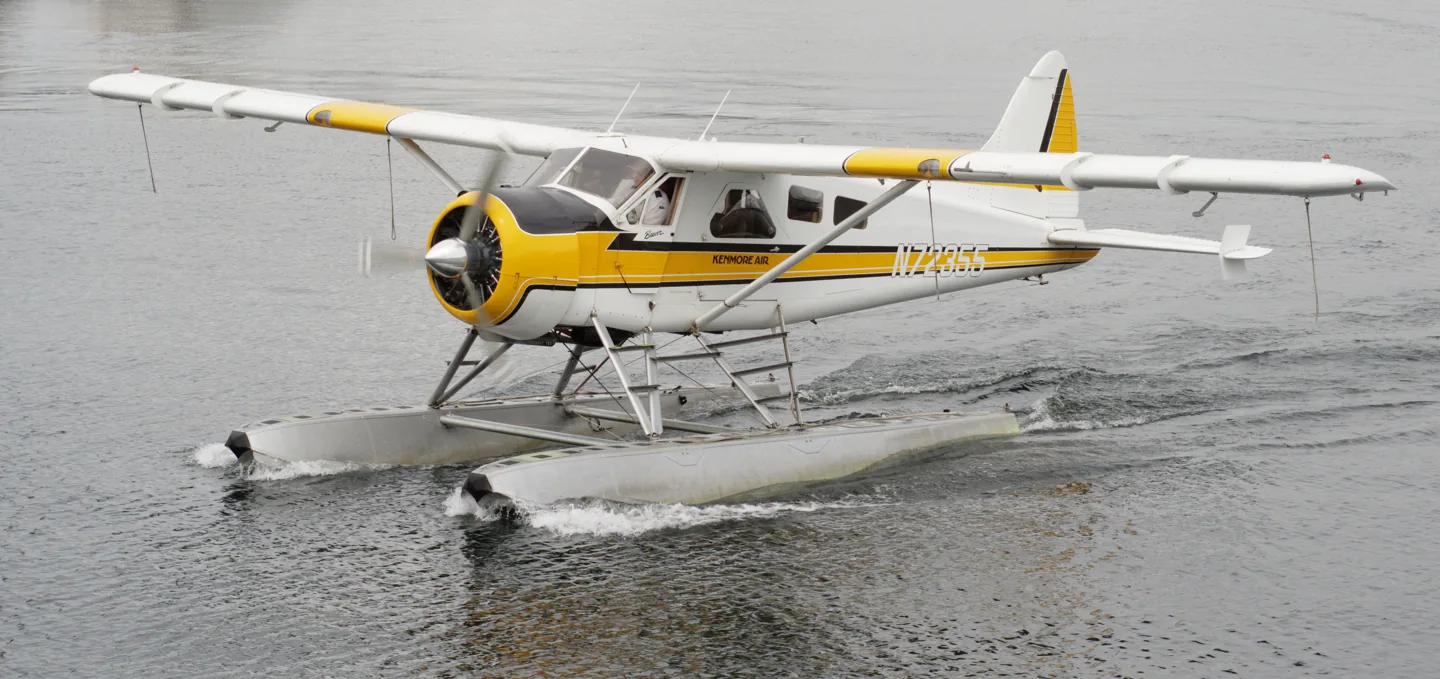
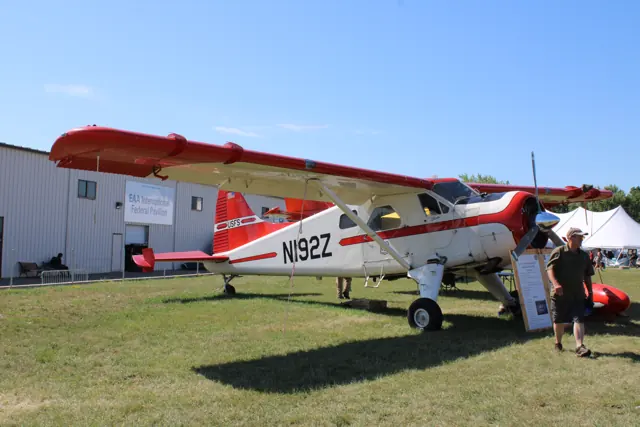
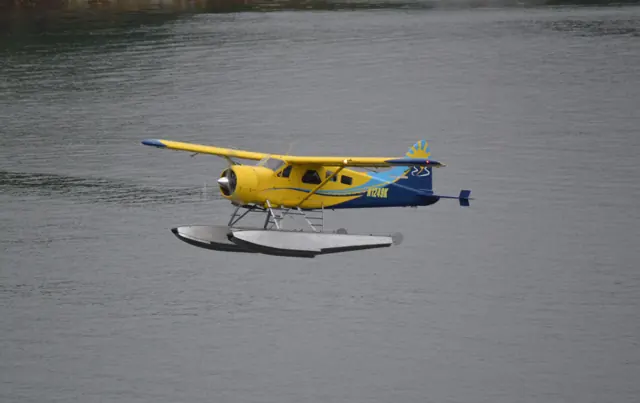
The Beaver was developed around carrying practical loads into places with limited infrastructure. Its high wing and substantial doors suit passenger and cargo work, while wheels, skis and floats allow different operating environments. The familiar DHC-2 uses a nose-mounted radial engine. Its reputation grew from working service rather than a single specialised mission.
Aircraft background
Wikipedia contributors · Read more ↗A first water landing leaves him wanting more
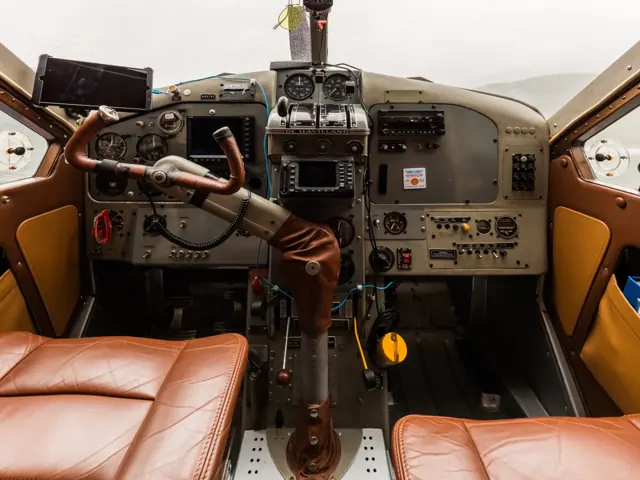
Hirschman’s first Beaver landing was on a Florida lake, with Wacker alongside and the radial engine rumbling ahead. The aircraft settled onto the water gently, and he immediately wanted another go. Its size had initially been the striking feature: reaching the cockpit took a climb, the door was narrow and the view from the high seat needed getting used to. Once airborne, he was surprised by how light and responsive it felt.
AOPA Pilot · June 2013. Checkout with Tripp Wacker in the restored 1953 N450RA, fitted with amphibious floats and other modifications.
AOPA Pilot · Read more ↗Choose the equipment and build a panel
Thranda’s X-Plane 12 Beaver offers conventional and tundra tyres, skis, straight floats and amphibious floats, with a canoe option for water operations. Its DGS panel editor lets users move instruments, save layouts and switch between presets. Loading controls include passenger weights, the optional belly tank and a balance chart.
De Havilland Canada DHC-2 Beaver · Thranda · Thranda · X-Plane 12 · X-Plane 11
Thranda · Read more ↗Into the cockpit
 YouTube
 Ed Whisenant Aviation · 21 min ·
De Havilland Beaver DHC-2 Seaplane Cockpit Video - Takeoff/Landing San Francisco CA. N5220G GoPro
A cockpit view of a Beaver floatplane flight near San Francisco.
Real aircraft · De Havilland Canada DHC-2 Beaver
Watch on YouTube ↗Preview images are served by AirframeDB. Videos open on YouTube only when you choose to watch.
Meet De Havilland Canada DHC-2 Beaver
The Beaver was developed around carrying practical loads into places with limited infrastructure. Its high wing and substantial doors suit passenger and cargo work, while wheels, skis and floats allow different operating environments. The familiar DHC-2 uses a nose-mounted radial engine.
Floatplane, wheeled and turbine-conversion Beavers have different equipment. Simulator documentation identifies the included configurations and any modern navigation or assistance systems.
De Havilland Canada DHC-2 Beaver
Aircraft type designators
Use the code for the model you are flying. The linked authority lists the applicable aircraft.
History & design
Designed around Canada’s working airfields
De Havilland Canada developed the Beaver as a bush aircraft for wheels, skis and floats. Its first flight took place at Downsview on 16 August 1947. That choice of landing equipment became central to its work connecting places reached by water, snow or small airstrips.
De Havilland Canada · Our History ↗Manufacturer’s historical timeline · postwar development
The radial Beaver and the longer Turbo Beaver
Production of the original Beaver ended in 1967. De Havilland also built a turbine-powered version, the Turbo Beaver, with a longer cabin and increased payload. Pilot accounts of the radial aircraft should therefore keep their engine and airframe configuration attached when compared with later versions.
De Havilland Canada · Legacy Aircraft ↗Manufacturer’s DHC-2 and DHC-2T descriptions
Development milestones
First flight: 16 August 1947
Wikipedia contributors · De Havilland Canada DHC-2 Beaver ↗De Havilland Canada DHC-2 Beaver · family/variant named by the source · Wikipedia revision 1369640364
Pilot accounts
A first water landing leaves him wanting more
Hirschman’s first Beaver landing was on a Florida lake, with Wacker alongside and the radial engine rumbling ahead. The aircraft settled onto the water gently, and he immediately wanted another go. Its size had initially been the striking feature: reaching the cockpit took a climb, the door was narrow and the view from the high seat needed getting used to.
Once airborne, he was surprised by how light and responsive it felt. Repeated lake landings led into a long photography flight over the Atlantic, during which the time seemed to disappear. The amphibious equipment added its own study and cockpit checks. His enthusiasm came from discovering the finesse inside a large working aircraft, in a particular Beaver whose restoration and extensive modifications were part of the experience.
AOPA Pilot · June 2013. Checkout with Tripp Wacker in the restored 1953 N450RA, fitted with amphibious floats and other modifications.
Read the full account · AOPA Pilot ↗Reading the landscape from his working cockpit
Feeney describes a working day built around remembering the shape of the land. Before GPS guidance, fence posts, troughs, patches of scrub and distant landmarks helped him keep track of fertiliser runs. Moving from smaller aircraft to the Beaver made planning more demanding because each load covered more ground. Wind, slopes and the shape of a farm continually changed the task.
Although the flying was repetitive, he remembers fatigue more readily than boredom. From the cockpit he watched farmers, school buses and stock trucks go about their day while he learned the aircraft’s sounds and small changes in feel. He found the controls light and the cockpit comfortable. The affection comes with hindsight: he also acknowledged the narrow margins of those operations and the limits of his memory.
DHC-2.com · February 2011. Personal recollections of New Zealand aerial topdressing, written more than twenty years after his last Beaver agricultural work.
Read the full account · Mike Feeney / DHC-2.com ↗Four friends bring their Beaver home across the Atlantic
Aeberli and three fellow pilots chose to fly their newly restored Beaver home instead of shipping it in a container. They prepared during the rebuild, attended a transatlantic seminar and travelled with experienced instructor Werner Röschlau. Aeberli flew the first ocean leg, leaving Labrador behind with a cabin ferry tank and conventional radio navigation equipment.
The journey included an unsettling encounter with ice, several days waiting for better winds in Greenland and long hours watching the ocean pass below. Meals, music and conversations with helpful airline crews became part of the memory. Arrival in Iceland brought evening colours and rainbows; arrival at their Swiss base brought family, friends and champagne. He remembers both the scale of the crossing and the bond it created among the four travellers.
Canadian Bushplane Heritage Centre · published August 2022. Recollection of the August 1990 ferry of the 1958 Beaver N930AJ from Seattle to Switzerland.
Read the full account · Canadian Bushplane Heritage Centre ↗In your simulator
Systems, equipment and documentation for each developer’s aircraft.
Compare simulator versions →MSFS 2024DHC-2 Beaver
Microsoft Flight Simulator · Released
DHC-2 Beaver
Microsoft Flight Simulator · Released
MSFS 2020DHC-2 Beaver
Microsoft Flight Simulator · Released
DHC-2 Beaver
Microsoft Flight Simulator · Released
X-Plane 12 · X-Plane 11De Havilland Canada DHC-2 Beaver · Thranda
Thranda · Released
De Havilland Canada DHC-2 Beaver · Thranda
Thranda · Released
X-Plane 12 Enhancement De Havilland Canada DHC-2 Beaver
SimCoders · Released
De Havilland Canada DHC-2 Beaver
SimCoders · Released
X-Plane 11 · X-Plane 12 Enhancement REP for Thranda DHC-2 Beaver XP11 edition
SimCoders · Released
REP for Thranda DHC-2 Beaver XP11 edition
SimCoders · Released
Aircraft specifications
Published figures for the named real-aircraft variant. Simulator equipment and performance can differ.
| Specification | Published value |
|---|---|
| Length | 30 ft 3 in (9.22 m) |
| Wingspan | 48 ft 0 in (14.63 m) |
| Height | 9 ft 0 in (2.74 m) |
| Wing area | 250 sq ft (23 m² ) |
| Empty weight | 3,000 lb (1,361 kg) |
| Gross weight | 5,100 lb (2,313 kg) |
| Powerplant | 1 × Pratt & Whitney R-985 Wasp Jr. 9 cylinder radial engine , 450 hp (340 kW) |
| Propellers | 2-bladed Hamilton-Standard controllable-pitch propeller, 8 ft 6 in (2.59 m) diameter |
| Maximum speed | 158 mph (255 km/h, 137 kn) |
| Cruise speed | 143 mph (230 km/h, 124 kn) at 5,000 ft (1,500 m) |
| Range | 455 mi (732 km, 395 nmi) |
| Service ceiling | 18,000 ft (5,500 m) |
| Rate of climb | 1,020 ft/min (5.2 m/s) |
Manuals & resources
Find your next read
Choose a topic for a short introduction and a link to the original source. Simulator references identify the developer and edition they cover.
Simulator documentation
Choose the equipment and build a panelDe Havilland Canada DHC-2 Beaver · Thranda · Thranda · X-Plane 12 · X-Plane 11
Thranda’s X-Plane 12 Beaver offers conventional and tundra tyres, skis, straight floats and amphibious floats, with a canoe option for water operations. Its DGS panel editor lets users move instruments, save layouts and switch between presets. Loading controls include passenger weights, the optional belly tank and a balance chart.
Gathered designated store listing · XP12 version 1.0, October 2023
Thranda · Read the source ↗A radial engine with visible startup feedbackDe Havilland Canada DHC-2 Beaver · Thranda · Thranda · X-Plane 12 · X-Plane 11
The package includes a radial-engine visualisation, primer and preheat feedback, and selectable simplified engine operation. The manually pumped flaps, direction valve, wobble pump and ratcheting carburettor-heat lever are among the documented cockpit features.
Thranda’s designated store · X-Plane 12 package
Thranda · Read the source ↗An aircraft whose condition carries between sessionsDe Havilland Canada DHC-2 Beaver · SimCoders · X-Plane 12
SimCoders’ REP adds persistent temperatures, switch positions, battery condition and maintenance needs to Thranda’s X-Plane 12 Beaver. Its hangar interface covers the engine, electrical system and landing gear. An optional economy mode attaches virtual earnings and costs to flying, fuel and repairs. The page explicitly excludes the older XP11 Beaver.
SimCoders product page · X-Plane 12 compatibility; dynamic version field was unresolved
SimCoders · Read the source ↗Explore the engine and inspect the aircraftDe Havilland Canada DHC-2 Beaver · SimCoders · X-Plane 12
REP describes a replacement engine model with selectable conventional or pressure carburettors, oil-system detail, priming and a booster coil. Its interactive walkaround includes surfaces, tyres, tie-downs and pitot checks. The kneeboard and maintenance tools are also available in VR, with optional in-flight tips.
SimCoders’ documented feature scope; no real-world training or fidelity guarantee inferred
SimCoders · Read the source ↗The Beaver’s anniversary-edition arrivalDHC-2 Beaver · Microsoft Flight Simulator · MSFS 2024 / MSFS 2020
The Beaver joined Microsoft Flight Simulator in the November 2022 40th Anniversary Edition, delivered as a free update to existing players. It appeared among the historical aircraft celebrating the series. This establishes its MSFS 2020 arrival; the separately linked edition inventory documents its later MSFS 2024 inclusion.
Official Sim Update 11 release notes · November 2022
Microsoft Flight Simulator · Read the source ↗Released product and variantsREP for Thranda DHC-2 Beaver XP11 edition · SimCoders · X-Plane 11 · X-Plane 12
This REP requires Thranda’s original XP11 Beaver. The store documents XP12 compatibility from REP 4.7.0, but explicitly says it does not work with the separate native Thranda Beaver XP12 aircraft.
Official developer / designated-store reference · checked 2026-09-14
SimCoders · Read the source ↗Pilot account
A first water landing leaves him wanting moreAOPA Pilot · June 2013. Checkout with Tripp Wacker in the restored 1953 N450RA, fitted with amphibious floats and other modifications.
Hirschman’s first Beaver landing was on a Florida lake, with Wacker alongside and the radial engine rumbling ahead. The aircraft settled onto the water gently, and he immediately wanted another go. Its size had initially been the striking feature: reaching the cockpit took a climb, the door was narrow and the view from the high seat needed getting used to. Once airborne, he was surprised by how light and responsive it felt.
Dave Hirschman
AOPA Pilot · Read the source ↗Reading the landscape from his working cockpitDHC-2.com · February 2011. Personal recollections of New Zealand aerial topdressing, written more than twenty years after his last Beaver agricultural work.
Feeney describes a working day built around remembering the shape of the land. Before GPS guidance, fence posts, troughs, patches of scrub and distant landmarks helped him keep track of fertiliser runs. Moving from smaller aircraft to the Beaver made planning more demanding because each load covered more ground. Wind, slopes and the shape of a farm continually changed the task. Although the flying was repetitive, he remembers fatigue more readily than boredom.
Mike Feeney
Mike Feeney / DHC-2.com · Read the source ↗Read the original documentation from the people who created it. Manuals open on their publisher’s website.
Manual
Microsoft Flight Simulator aircraft manualsMicrosoft / aircraft developersAircraft background
De Havilland Canada DHC-2 BeaverWikipedia contributors · Research background · Wikipedia revision 1369640364 · retrieved 2026-09-12 Our HistoryDe Havilland Canada · Manufacturer’s historical timeline · retrieved September 2026 Legacy AircraftDe Havilland Canada · Manufacturer’s legacy-aircraft descriptions · retrieved September 2026Resource
MSFS 2024 FAQ and edition aircraft inventoryMicrosoft MSFS 2020 FAQ and edition aircraft inventoryMicrosoftProduct
DHC-2 Beaver - DGS Series XP12Thranda · Official developer / designated store catalogue · checked 2026-09-12 DHC-2 Beaver - DGS Series XP11Thranda · Official developer / designated store catalogue · checked 2026-09-12 Reality Expansion Pack · Thranda DHC-2 BeaverSimCoders · Official developer / designated store catalogue · checked 2026-09-12Developer documentation
Release Notes for 40th Anniversary Edition / Sim Update 11Microsoft Flight Simulator · November 2022 release · 1.29.28.0 Reality Expansion Pack for DHC-2 Beaver XP11-Simcoders-REP-DSimCoders · Official developer / designated-store reference · checked 2026-09-14Type designator
ICAO Doc 8643 — aircraft type designatorsInternational Civil Aviation Organization · Public search data retrieved 2026-09-14; authority update 2026-09-03Built-in force-feedback profiles
Read the documentary basis, editable starting settings and remaining questions for the aircraft you fly. Each explanation refers to the exact profile revision shown.
Catalogue programme-20261022-v1 · 16 profile choices
Got Friends DHC-2 Beaver Amphibian Runway
Got Friends · Free and Pro · Revision 3 · Inherited starting point
MSFS 2020
Got Friends DHC-2 Beaver Amphibian Runway: Reversible yoke loading supplies the chosen bush-aircraft resistance.
Got Friends DHC-2 Beaver Amphibian Water
Got Friends · Free and Pro · Revision 3 · Inherited starting point
MSFS 2020
Got Friends DHC-2 Beaver Amphibian Water: Reversible yoke loading supplies the chosen bush-aircraft resistance.
Got Friends DHC-2 Beaver Bush
Got Friends · Free and Pro · Revision 3 · Inherited starting point
MSFS 2020
Got Friends DHC-2 Beaver Bush: Reversible yoke loading supplies the chosen bush-aircraft resistance.
Got Friends DHC-2 Beaver Skis
Got Friends · Free and Pro · Revision 3 · Inherited starting point
MSFS 2020
Got Friends DHC-2 Beaver Skis: Reversible yoke loading supplies the chosen bush-aircraft resistance.
SimCoders REP / Thranda Beaver
SimCoders · Free and Pro · Revision 3 · Inherited starting point
X-Plane 12
SimCoders REP / Thranda Beaver: Reversible yoke loading supplies the chosen bush-aircraft resistance.
SimCoders REP / Thranda Beaver Amphibian Water Operations
SimCoders · Free and Pro · Revision 2 · Inherited starting point
X-Plane 12
SimCoders REP / Thranda Beaver Amphibian Water Operations: Reversible yoke loading supplies the chosen bush-aircraft resistance.
SimCoders REP / Thranda Beaver Straight Floats
SimCoders · Free and Pro · Revision 2 · Inherited starting point
X-Plane 12
SimCoders REP / Thranda Beaver Straight Floats: Reversible yoke loading supplies the chosen bush-aircraft resistance.
SimCoders REP / Thranda Beaver Skis
SimCoders · Free and Pro · Revision 2 · Inherited starting point
X-Plane 12
SimCoders REP / Thranda Beaver Skis: Reversible yoke loading supplies the chosen bush-aircraft resistance.
Thranda DHC-2 Beaver
Thranda · Free and Pro · Revision 3 · Inherited starting point
X-Plane 12
Thranda DHC-2 Beaver: Reversible yoke loading supplies the chosen bush-aircraft resistance.
Thranda DHC-2 Beaver Amphibian Water Operations
Thranda · Free and Pro · Revision 2 · Inherited starting point
X-Plane 12
Thranda DHC-2 Beaver Amphibian Water Operations: Reversible yoke loading supplies the chosen bush-aircraft resistance.
Thranda DHC-2 Beaver Straight Floats
Thranda · Free and Pro · Revision 2 · Inherited starting point
X-Plane 12
Thranda DHC-2 Beaver Straight Floats: Reversible yoke loading supplies the chosen bush-aircraft resistance.
Thranda DHC-2 Beaver Skis
Thranda · Free and Pro · Revision 2 · Inherited starting point
X-Plane 12
Thranda DHC-2 Beaver Skis: Reversible yoke loading supplies the chosen bush-aircraft resistance.
De Havilland Canada DHC-2 Beaver
Free and Pro · Revision 2 · Partial review
MSFS 2024 · MSFS 2020 · X-Plane 12 · X-Plane 11
De Havilland Canada DHC-2 Beaver: Reversible yoke loading supplies the chosen bush-aircraft resistance.
de Havilland DHC-2 Beaver (straight floats)
Free and Pro · Revision 1 · Partial review
MSFS 2024 · MSFS 2020 · X-Plane 12 · X-Plane 11
de Havilland DHC-2 Beaver (straight floats): Reversible yoke loading supplies the chosen bush-aircraft resistance.
de Havilland Canada DHC-2 Beaver Amphibian
Free and Pro · Revision 1 · Partial review
MSFS 2020 · MSFS 2024 · X-Plane 12
A radial-engined utility aircraft closely associated with bush flying and float operations.
de Havilland Canada DHC-2 Beaver Skis
Free and Pro · Revision 1 · Partial review
MSFS 2020 · MSFS 2024 · X-Plane 12
A radial-engined utility aircraft closely associated with bush flying and float operations.
de Havilland DHC-2 Beaver (straight floats)
de Havilland DHC-2 Beaver (straight floats): Reversible yoke loading supplies the chosen bush-aircraft resistance.
Aircraft and simulator scope
- de Havilland DHC-2 Beaver (straight floats) · MSFS 2024 · Variant starting point
- de Havilland DHC-2 Beaver (straight floats) · MSFS 2020 · Variant starting point
- de Havilland DHC-2 Beaver (straight floats) · X-Plane 12 · Variant starting point
- de Havilland DHC-2 Beaver (straight floats) · X-Plane 11 · Variant starting point
de Havilland DHC-2 Beaver (straight floats) · The selected straight-float Beaver must remain distinct from Thranda's amphibious option. Exact float-contact behavior is not documented. The sources are Thranda DGS Beaver listings for XP11 and XP12. XP11 changelog details cannot automatically be assigned to the XP12 edition.
The simulator model and controls
The Beaver was developed around carrying practical loads into places with limited infrastructure. Its high wing and substantial doors suit passenger and cargo work, while wheels, skis and floats allow different operating environments. The familiar DHC-2 uses a nose-mounted radial engine.
This starting point selects de Havilland DHC-2 Beaver (straight floats). Its aircraft-level settings do not select a particular developer’s custom systems.
How this profile feels
Reversible yoke loading supplies the chosen bush-aircraft resistance. Spring resistance builds with the selected airspeed response. A separate aerodynamic term adds speed-dependent control load.
Pitch pressure relief follows the selected trim response; a surface kit does not define trim gearing. Valid trim provides the configured pressure relief. Autopilot following is off.
Controls and trim
The Beaver combines a radial engine, high wing and several surface kits. The reviewed products separately list standard or tundra wheels, skis, straight floats and amphibious floats, with cockpit and fuel-system differences. Those contact configurations give the same utility family different landing and surface behaviour.
About the values
The gains are normalized profile settings. They describe the chosen effect balance; hand force depends on the device and its output limits. IAS references are tuning values rather than operating limits. Physical acceptance of this revision remains pending.
What the documentation establishes
The selected straight-float Beaver must remain distinct from Thranda's amphibious option. Exact float-contact behavior is not documented. The sources are Thranda DGS Beaver listings for XP11 and XP12. XP11 changelog details cannot automatically be assigned to the XP12 edition.
The XP11 changelog mentions an autopilot heading fix and a yoke disconnect button. This is evidence of that edition's autopilot, not all Beaver equipment fits.
Thranda documents a manually pumped flap system and wheel, ski, float/amphibian options. Exact wing-flap detents remain unresolved.
Documentary review and sources
These decisions describe the documentary basis and remaining gaps for this revision. Aircraft documentation and a starting setting describe different kinds of evidence.
Aircraft and variant
ReviewedThis starting point selects de Havilland DHC-2 Beaver (straight floats). Its aircraft-level settings do not select a particular developer’s custom systems.
Flight controls
Not yet reviewedThe Beaver combines a radial engine, high wing and several surface kits. The reviewed products separately list standard or tundra wheels, skis, straight floats and amphibious floats, with cockpit and fuel-system differences. Those contact configurations give the same utility family different landing and surface behaviour.
Trim
Not yet reviewedPitch pressure relief follows the selected trim response; a surface kit does not define trim gearing. Pitch authority 0.3 provides load relief and permitted centre movement; roll authority is 0.
Autopilot and stability
ReviewedAutopilot following is off; the configured spring and load retain the hardware feel.
Equipment
ReviewedGear, flap and ground cues follow the selected settings and available simulator-reported states.
Speeds and limits
Not yet reviewedThe indicated-speed references set the profile response scale; they are separate from aircraft operating limits.
Simulator integration
Not yet reviewedThe profile targets msfs2024, msfs2020, xplane12, xplane11. Add-on-specific controls use only the supported references configured by this profile.
Force-feedback settings
Not yet reviewedThe settings define the profile’s effect balance. Device output limits affect physical hand force.
Starting settings and their rationale
These configured values are starting estimates. The explanations describe what each setting controls; physical validation appears separately below.
| Setting | Starting value | What it controls and why |
|---|---|---|
| Spring strength | Starting value0.74 | What it controls and whyReversible yoke loading supplies the chosen bush-aircraft resistance. The baseline spring is 0.74. Its low-speed blend reaches baseline strength at 52.5 KIAS. |
| Master force gain | Starting value0.85 | What it controls and whyScales overall profile strength while preserving effect balance, subject to device and output limits. |
| Profile force gain | Starting value0.8 | What it controls and whyThe aerodynamic-load gain is 0.8 with an indicated-speed reference of 105 KIAS. This supplies speed-dependent loading alongside the spring. |
| Force tuning speed/reference | Starting value105.0 kt | What it controls and whySets the IAS reference for aerodynamic loading. It is an estimate, not published cruise TAS or a flight limit. |
| Spring response reference speed | Starting value52.5 kt | What it controls and whySets the IAS where the low-speed blend reaches baseline strength; high-speed stiffening also uses it. |
| Aileron force scale | Starting value0.72 | What it controls and whyRoll and pitch aerodynamic scales are 0.72 and 1, respectively. They set the aerodynamic axis balance. No custom spring-travel curve is enabled. |
| Elevator force scale | Starting value1.0 | What it controls and whyScales pitch aerodynamic loading; pitch spring travel and trim responses are separate settings. |
| Trim feel | Starting valueEnabled | What it controls and whyRetained for compatibility and group membership. Trim relief, rather than this flag, controls centre movement. |
| Trim relief | Starting valueEnabled | What it controls and whyAllows trim relief with supported control law and valid telemetry. Axis authorities set its amount. |
| Autopilot follow | Starting valueDisabled | What it controls and whyAutopilot following is off; the configured spring and load retain the hardware feel. |
| Autopilot neutral hold | Starting valueDisabled | What it controls and whyPermits centering hold during a supported AP state, separate from following a moving target. |
| Output force limit | Starting value0.55 | What it controls and whyCaps directed-force output. Native spring effects and device limits remain separate. |
All 44 starting settings and their rationale
The settings define the profile’s effect balance. Device output limits affect physical hand force.
| Setting | Starting value | What it controls and why |
|---|---|---|
| Spring strength | Starting value0.74 | What it controls and whyReversible yoke loading supplies the chosen bush-aircraft resistance. The baseline spring is 0.74. Its low-speed blend reaches baseline strength at 52.5 KIAS. |
| Spring deadband | Starting value0.045 | What it controls and whySets travel around the centre before the baseline spring resists. Smaller values engage it sooner. |
| Profile force gain | Starting value0.8 | What it controls and whyThe aerodynamic-load gain is 0.8 with an indicated-speed reference of 105 KIAS. This supplies speed-dependent loading alongside the spring. |
| Master force gain | Starting value0.85 | What it controls and whyScales overall profile strength while preserving effect balance, subject to device and output limits. |
| QBlend Enabled | Starting valueEnabled | What it controls and whyAllows baseline spring strength to rise with indicated airspeed where the control law permits it. |
| QSpring Minimum Factor | Starting value0.5 | What it controls and whySets low-speed spring strength as a fraction of baseline when blending is enabled. One keeps full strength. |
| QSpring Start Knots | Starting value14.7 kt | What it controls and whySets the IAS where the low-speed spring blend starts rising. This is a feel threshold, not a flight limit. |
| Spring response reference speed | Starting value52.5 kt | What it controls and whySets the IAS where the low-speed blend reaches baseline strength; high-speed stiffening also uses it. |
| Force tuning speed/reference | Starting value105.0 kt | What it controls and whySets the IAS reference for aerodynamic loading. It is an estimate, not published cruise TAS or a flight limit. |
| Airspeed spring stiffening gain | Starting value0.15 | What it controls and whyThe high-speed spring-stiffening gain is 0.15. It strengthens the permitted spring response above 52.5 KIAS, with the squared-speed ratio capped at 5. |
| Airspeed spring stiffening limit | Starting value5 | What it controls and whyLimits the squared airspeed ratio used for high-speed spring stiffening; it is not a device-force cap. |
| Aileron force scale | Starting value0.72 | What it controls and whyRoll and pitch aerodynamic scales are 0.72 and 1, respectively. They set the aerodynamic axis balance. No custom spring-travel curve is enabled. |
| Elevator force scale | Starting value1.0 | What it controls and whyScales pitch aerodynamic loading; pitch spring travel and trim responses are separate settings. |
| Output force limit | Starting value0.55 | What it controls and whyCaps directed-force output. Native spring effects and device limits remain separate. |
| Trim feel | Starting valueEnabled | What it controls and whyRetained for compatibility and group membership. Trim relief, rather than this flag, controls centre movement. |
| Trim relief | Starting valueEnabled | What it controls and whyAllows trim relief with supported control law and valid telemetry. Axis authorities set its amount. |
| Elevator Authority | Starting value0.3 | What it controls and whyPitch pressure relief follows the selected trim response; a surface kit does not define trim gearing. Pitch authority 0.3 provides load relief and permitted centre movement; roll authority is 0. |
| Aileron Authority | Starting value0 | What it controls and whyScales supported roll-trim relief and permitted centre movement. Zero removes roll response. |
| Force Trim Enabled | Starting valueDisabled | What it controls and whyEnables local force trim, separate from aircraft-owned trim and add-on integration qualification. |
| GLoad Enabled | Starting valueEnabled | What it controls and whyAllows load-factor changes to modify permitted spring laws. Passive fly-by-wire feel can suppress it. |
| Rate Damping Enabled | Starting valueEnabled | What it controls and whyEnables rate damping with the configured coefficients and control law. |
| Autopilot follow | Starting valueDisabled | What it controls and whyAutopilot following is off; the configured spring and load retain the hardware feel. |
| Autopilot follow authority | Starting value0.1 | What it controls and whySets admitted AP-follow gain, not a percentage of travel. Runtime ownership and input limits still apply. |
| Autopilot neutral hold | Starting valueDisabled | What it controls and whyPermits centering hold during a supported AP state, separate from following a moving target. |
| Autopilot neutral hold strength | Starting value0.6 | What it controls and whySets admitted AP neutral-hold strength; inactive while neutral hold is disabled. |
| Enabled | Starting valueEnabled | What it controls and whyEnables aerodynamic cues; each still needs nonzero strength and its simulator conditions. |
| Gain | Starting value0.35 | What it controls and whySets stall-buffet strength. Zero removes the cue without changing simulator stalls or warnings. |
| Gain | Starting value0 | What it controls and whySets high-Mach buffet strength; onset and full-strength thresholds are separate. |
| Gain | Starting value0.14 | What it controls and whySets flap buffet at the configured position and speed gates. Flap movement texture is separate. |
| Maximum flap index | Starting value4 | What it controls and whySets the final flap index for detent normalization. UP plus three detents uses maximum index3. |
| Minimum flap index | Starting value2 | What it controls and whySets the first flap detent that admits buffet; this is a handle index, not degrees. |
| Gain | Starting value0 | What it controls and whySets gear aerodynamic buffet; movement and ground-contact cues are separate. |
| Shaker Enabled | Starting valueDisabled | What it controls and whyPermits shaker at supported warning conditions; the switch does not establish aircraft equipment. |
| Stick shaker amplitude | Starting value0.5 | What it controls and whySets triggered shaker strength; inactive while the shaker feature is disabled. |
| Enabled | Starting valueEnabled | What it controls and whyEnables ground effects; each still needs its own strength and contact or motion telemetry. |
| Gain | Starting value0.4 | What it controls and whySets rolling texture strength, modified by speed, surface and undercarriage configuration. |
| Gain | Starting value0.25 | What it controls and whySets gear-bump texture during ground motion, separate from touchdown impact. |
| Gain | Starting value0.65 | What it controls and whySets landing-impact strength; landing telemetry and response shape determine the pulse. |
| Gain | Starting value0 | What it controls and whySets reverse-thrust vibration with valid reverser and engine conditions. Zero removes the cue. |
| Enabled | Starting valueEnabled | What it controls and whyEnables engine cues with nonzero settings and valid running-engine telemetry. |
| Gain | Starting value0.12 | What it controls and whySets estimated engine vibration using configured telemetry and response, not measured cockpit vibration. |
| Enabled | Starting valueEnabled | What it controls and whyEnables accessory cues with configured strengths and observed accessory movement. |
| Gain | Starting value0.12 | What it controls and whySets texture from observed flap movement; a command without movement does not establish the cue. |
| Gain | Starting value0 | What it controls and whySets texture from observed gear movement, separate from aerodynamic and touchdown effects. |
Limits and open questions
- The listings describe flight dynamics without documenting the primary-control linkage or a quantitative loading mechanism.
- Neither listing establishes the Beaver trim linkage or relief gradient.
- The listings do not establish either the wheel or float starting point's indicated-airspeed reference.
- Mention of panel customization and autopilot fixes does not publish external trim or control telemetry semantics.
- Procedural engine sound and qualitative flap sensitivity do not quantify forces or vibration at the yoke.
- de Havilland DHC-2 Beaver (straight floats) documentary evidence does not establish force-feedback hardware acceptance.
Physical validation
No physical force validation is recorded in this public catalogue for this revision. Documentary review and software checks do not establish how a particular device feels.
Discuss this aircraft (0)
Questions, observations and useful sources from the community.
No published discussions yet. Bring a question or share a useful source.
Open aircraft discussions →Content expanded · What’s new
Something missing or a source that needs attention?
Suggest a correction ↗