



Start here
A few places to begin, from the aircraft’s story to the people who fly it.
Meet the aircraft
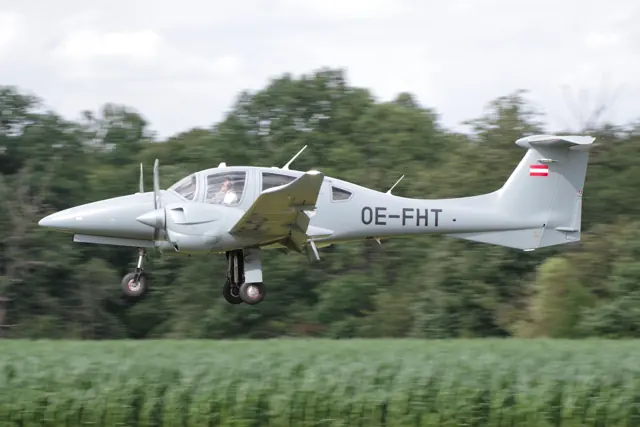
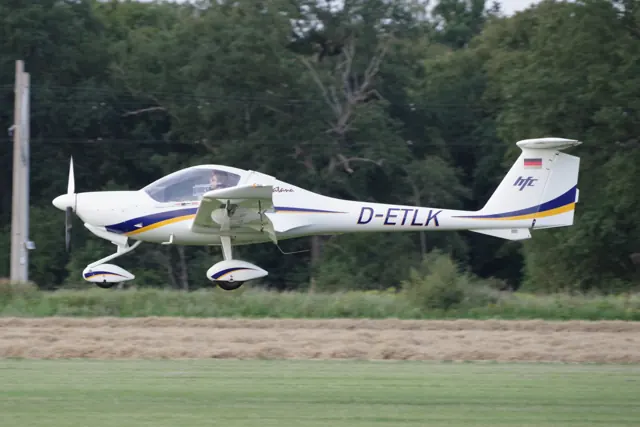
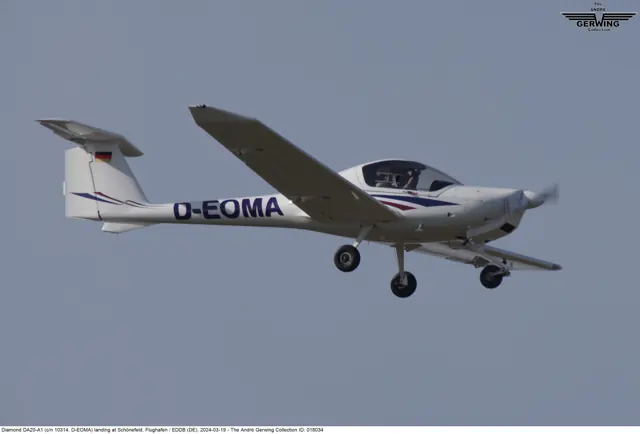
The Katana began as an Austrian Diamond design and developed into the DV20 and DA20 families. The compact side-by-side cockpit, fixed landing gear and T-tail make a recognisable training-aircraft layout. Different developments use different engines and associated equipment. The DA20 should therefore be distinguished from both the four-seat DA40 and earlier Katana variants.
Aircraft background
Wikipedia contributors · Read more ↗The view that made training memorable
Greenspun remembers the Katana’s canopy as its greatest attraction: the low wing and wide view made him feel immersed in the sky. His training aircraft could also be pleasantly quiet with the propeller turning more slowly. On the ground, steering with differential braking took practice, and the small cockpit left him close enough to his instructor for their harness routines to collide. Longer flights revealed compromises.
Author’s March 2002 review. Nearly ninety hours training in the 80 hp Rotax-powered DA20-A1; later C1 comments are separate.
Philip Greenspun · Read more ↗A Continental Eclipse with a SkyView cockpit
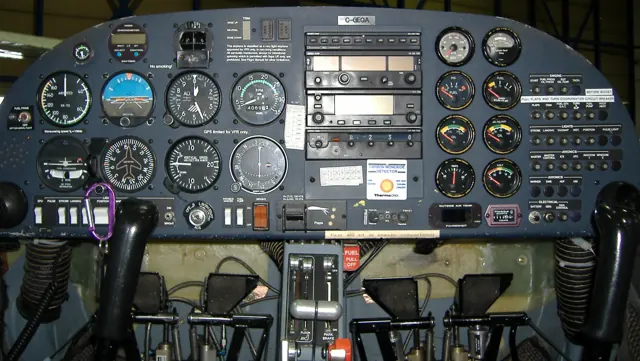
Aerobask’s X-Plane 12 package represents the DA20-C1 with a 125 hp Continental IO-240. Its custom SkyView includes synthetic vision, touchscreen controls, autopilot and Navigraph charts. Instruments offer popup and separate-window views, with additional options for their presentation.
Diamond DA20 / DV20 · Aerobask · X-Plane 12
Aerobask · Read more ↗Into the cockpit
 YouTube
 GreatFlyer · 10 min ·
Diamond DA20 | Startup, Takeoff & VFR Departure from Budapest (Tököl) | Cockpit View & ATC Comms
Startup and departure from Tököl in a DA20, including radio communications.
Real aircraft · Diamond DA20 / DV20
Watch on YouTube ↗Preview images are served by AirframeDB. Videos open on YouTube only when you choose to watch.
Meet Diamond DA20 / DV20
The Katana began as an Austrian Diamond design and developed into the DV20 and DA20 families. The compact side-by-side cockpit, fixed landing gear and T-tail make a recognisable training-aircraft layout. Different developments use different engines and associated equipment.
The DA20 differs from the four-seat DA40 and earlier Katana variants. Model suffixes identify the engine installations described in the manuals.
Diamond DA20 / DV20
Aircraft type designators
Use the code for the model you are flying. The linked authority lists the applicable aircraft.
History & design
A trainer with motorglider roots
Diamond’s early aircraft family grew from the composite HK36 Super Dimona motorglider. Its timeline places the DV20 Katana’s maiden flight in 1991, bringing that design background into a compact two-seat aeroplane.
Diamond Aircraft · History: Unwavering Commitment to Innovation ↗Manufacturer’s timeline · early development
Austria and Canada in the same family
Diamond established its Canadian operation in London, Ontario, in 1992 and introduced the DA20 to the market. The Austrian DV20 and Canadian DA20 names belong to this shared development story; engine and equipment differences still matter when reading individual pilot accounts.
Diamond Aircraft · History: Unwavering Commitment to Innovation ↗Manufacturer’s timeline · Canadian expansion
Pilot accounts
The view that made training memorable
Greenspun remembers the Katana’s canopy as its greatest attraction: the low wing and wide view made him feel immersed in the sky. His training aircraft could also be pleasantly quiet with the propeller turning more slowly. On the ground, steering with differential braking took practice, and the small cockpit left him close enough to his instructor for their harness routines to collide.
Longer flights revealed compromises. The reclined seat encouraged him to crane forward, leaving his neck uncomfortable, and he found some instruments difficult to read at night. Although he enjoyed training in the Katana, he eventually bought a DA40 for its additional capabilities and rear seats. Making room for his dog Alex was part of that decision.
Author’s March 2002 review. Nearly ninety hours training in the 80 hp Rotax-powered DA20-A1; later C1 comments are separate.
Read the full account · Philip Greenspun ↗A glider instructor meets a familiar-looking wing
Kasprzyk came to the Katana through a gliding connection. Long wanted a refresher after limited recent flying, and the two began with a detailed inspection of the newly serviced aircraft. Kasprzyk liked the shoulder and legroom, although his large feet felt cramped near the pedals. Keeping straight while taxiing with differential braking was initially humbling.
Long flew the first circuit before Kasprzyk took the controls. In gusty conditions he found that small stick movements were enough to correct the aircraft, and the canopy helped him follow traffic around Arlington’s busy runways. A long final gave him time to settle the approach before a soft-field landing. He left enthusiastic about the handling and curious to try the aircraft’s glider-like wing in thermals on another flight.
FlightLog · March 2021. Flying Nick Long’s Canadian-built DA20-A1 at Arlington after its annual inspection.
Read the full account · Stan Kasprzyk / FlightLog ↗A visiting reporter gets a student’s checkride
Marsh approached his visit as a chance to experience the pressure placed on an Air Force screening student. He studied the procedures and memorised nearly all the aircraft figures he was given. Early manoeuvres went well, including steep turns and a landing that benefited from watching D’Amico’s demonstration. The instructor’s occasional compliments made the exercise feel encouraging.
Returning to Pueblo exposed how quickly the task could unravel. Marsh lined up with the wrong parallel runway, then misjudged a simulated forced landing and needed the instructor to intervene as speed increased. His eventual touchdown was smooth, but that did not erase the earlier mistakes. He finished with a self-deprecating keepsake for D’Amico and a memorable lesson in the difference between handling an aircraft and managing the whole flight.
AOPA Pilot · October 2008. Doss Aviation’s USAF screening DA20-C1, configured for a student in the right seat, flown with Pete D’Amico at Pueblo and Fowler.
Read the full account · AOPA Pilot ↗In your simulator
Systems, equipment and documentation for each developer’s aircraft.
Compare simulator versions →MSFS 2024DV20
Microsoft Flight Simulator · Released
DV20
Microsoft Flight Simulator · Released
MSFS 2020DV20
Microsoft Flight Simulator · Released
DV20
Microsoft Flight Simulator · Released
X-Plane 12Diamond DA20 / DV20
Aerobask · Released
Diamond DA20 / DV20
Aerobask · Released
MSFS 2020DA20-C1
SimSolutions · Released
DA20-C1
SimSolutions · Released
X-Plane 12DA20-C1
SimSolutions · Released
DA20-C1
SimSolutions · Released
X-Plane 12Diamond Katana DA20 C1
X-Hangar · Released
Diamond Katana DA20 C1
X-Hangar · Released
Manuals & resources
Find your next read
Choose a topic for a short introduction and a link to the original source. Simulator references identify the developer and edition they cover.
Simulator documentation
A Continental Eclipse with a SkyView cockpitDiamond DA20 / DV20 · Aerobask · X-Plane 12
Aerobask’s X-Plane 12 package represents the DA20-C1 with a 125 hp Continental IO-240. Its custom SkyView includes synthetic vision, touchscreen controls, autopilot and Navigraph charts. Instruments offer popup and separate-window views, with additional options for their presentation.
Gathered Aerobask page · DA20-C1; package revision not stated
Aerobask · Read the source ↗The DV20’s Sim Update 2 revisionDV20 · Microsoft Flight Simulator · MSFS 2024
The May 2025 release notes identify iniBuilds’ DV20 package version 0.0.11. Its changes address engine-cover interaction, propeller animation, electrical indications and missing EFB takeoff/landing performance data. These changes apply to the documented 0.0.11 revision.
Official MSFS 2024 SU2 notes · 1.4.20.0
Microsoft Flight Simulator · Read the source ↗Small-aircraft detail that continues between flightsDiamond DA20 / DV20 · Aerobask · X-Plane 12
The developer describes working breaker-switches with configurable reliability, saved parameters, selectable passengers and a simulated headset. Rain, frost and reflections appear on the windshield, and the FMOD environment is credited to Daniela Rodriguez Careri. The listing also names native support for RXP and TDS GTN750 options.
Developer-documented features · no independent fidelity claim
Aerobask · Read the source ↗Pilot account
The view that made training memorableAuthor’s March 2002 review. Nearly ninety hours training in the 80 hp Rotax-powered DA20-A1; later C1 comments are separate.
Greenspun remembers the Katana’s canopy as its greatest attraction: the low wing and wide view made him feel immersed in the sky. His training aircraft could also be pleasantly quiet with the propeller turning more slowly. On the ground, steering with differential braking took practice, and the small cockpit left him close enough to his instructor for their harness routines to collide. Longer flights revealed compromises.
Philip Greenspun
Philip Greenspun · Read the source ↗A glider instructor meets a familiar-looking wingFlightLog · March 2021. Flying Nick Long’s Canadian-built DA20-A1 at Arlington after its annual inspection.
Kasprzyk came to the Katana through a gliding connection. Long wanted a refresher after limited recent flying, and the two began with a detailed inspection of the newly serviced aircraft. Kasprzyk liked the shoulder and legroom, although his large feet felt cramped near the pedals. Keeping straight while taxiing with differential braking was initially humbling. Long flew the first circuit before Kasprzyk took the controls.
Stan Kasprzyk
Stan Kasprzyk / FlightLog · Read the source ↗Developer documentation
DA20-C1 — product listingDA20-C1 · MSFS 2020
Product listing captured 2026-09-30; edition scope from the reviewed catalogue
iniBuilds Store · Read the source ↗DA20-C1 — product listingDA20-C1 · X-Plane 12
Product listing captured 2026-09-23; edition scope from the reviewed catalogue
store.x-plane.org · Read the source ↗Diamond Katana DA20 C1 — product listingDiamond Katana DA20 C1 · X-Plane 12
Product listing captured 2026-09-23; edition scope from the reviewed catalogue
store.x-plane.org · Read the source ↗Read the original documentation from the people who created it. Manuals open on their publisher’s website.
Manual
Microsoft Flight Simulator aircraft manualsMicrosoft / aircraft developersAircraft background
Diamond DA20 KatanaWikipedia contributors · Research background · Wikipedia revision 954579312 · retrieved 2026-09-12 History: Unwavering Commitment to InnovationDiamond Aircraft · Manufacturer’s historical timeline · retrieved September 2026Resource
MSFS 2024 FAQ and edition aircraft inventoryMicrosoft MSFS 2020 FAQ and edition aircraft inventoryMicrosoftProduct
DA20-C1 EclipseAerobask · Official developer / designated store catalogue · checked 2026-09-12 SimSolutions DA20-C1 for MSFS-2020 – iniBuilds StoreiniBuilds Store · Product listing captured 2026-09-30; edition scope from the reviewed catalogue DA20-C1 Eclipse-SimSolutions-DA20Cstore.x-plane.org · Product listing captured 2026-09-23; edition scope from the reviewed catalogue Diamond Katana DA20 C1-xhangar-DA20store.x-plane.org · Product listing captured 2026-09-23; edition scope from the reviewed catalogueDeveloper documentation
Release Notes — Sim Update 2 [1.4.20.0]Microsoft Flight Simulator · 15 May 2025 · aircraft-specific package revisionsType designator
ICAO Doc 8643 — aircraft type designatorsInternational Civil Aviation Organization · Public search data retrieved 2026-09-14; authority update 2026-09-03Built-in force-feedback profiles
Read the documentary basis, editable starting settings and remaining questions for the aircraft you fly. Each explanation refers to the exact profile revision shown.
Catalogue programme-20261022-v1 · 6 profile choices
Aerobask DA20 SV
Aerobask · Free and Pro · Revision 3 · Inherited starting point
X-Plane 12
Aerobask DA20 SV: The spring-preload trim mechanism accompanies reversible primary controls.
SimSolutions Diamond DA20-C1 Eclipse
SimSolutions · Free and Pro · Revision 2 · Inherited starting point
X-Plane 12
SimSolutions Diamond DA20-C1 Eclipse: The spring-preload trim mechanism accompanies reversible primary controls.
SimSolutions Diamond DA20-C1
SimSolutions · Free and Pro · Revision 3 · Inherited starting point
MSFS 2020
SimSolutions Diamond DA20-C1: The spring-preload trim mechanism accompanies reversible primary controls.
X-Hangar Diamond DA20-C1
X-Hangar · Free and Pro · Revision 3 · Inherited starting point
X-Plane 12
X-Hangar Diamond DA20-C1: The spring-preload trim mechanism accompanies reversible primary controls.
Diamond DV20 Katana
Free and Pro · Revision 3 · Review pending
MSFS 2020 · MSFS 2024 · X-Plane 12
Diamond DV20 Katana: The spring-preload trim mechanism accompanies reversible primary controls.
Diamond DA20-C1 Eclipse
Free and Pro · Revision 1 · Partial review
MSFS 2020 · MSFS 2024 · X-Plane 12
Diamond DA20-C1 Eclipse: The spring-preload trim mechanism accompanies reversible primary controls.
Diamond DA20-C1 Eclipse
Diamond DA20-C1 Eclipse: The spring-preload trim mechanism accompanies reversible primary controls.
Aircraft and simulator scope
- Diamond DA20-C1 Eclipse · MSFS 2020 · Variant starting point
- Diamond DA20-C1 Eclipse · MSFS 2024 · Variant starting point
- Diamond DA20-C1 Eclipse · X-Plane 12 · Variant starting point
Diamond DA20-C1 Eclipse · The selected DA20-C1 matches Aerobask's Continental-powered model, while the MSFS editions need their own systems evidence. Aerobask specifically identifies the DA20-C1 engine; the generic DA20 and C1 choices must distinguish that exact scope.
The simulator model and controls
The Katana began as an Austrian Diamond design and developed into the DV20 and DA20 families. The compact side-by-side cockpit, fixed landing gear and T-tail make a recognisable training-aircraft layout. Different developments use different engines and associated equipment.
This starting point selects Diamond DA20-C1 Eclipse. Its aircraft-level settings do not select a particular developer’s custom systems.
How this profile feels
The spring-preload trim mechanism accompanies reversible primary controls. Spring resistance builds with the selected airspeed response. A separate aerodynamic term adds speed-dependent control load.
DA20 pitch trim changes spring preload on the elevator linkage. Valid trim provides the configured pressure relief. Autopilot following is off.
Controls and trim
The DA20-C1 uses elevator and aileron pushrods with a cable-operated rudder. Electric pitch trim loads a spring assembly on the elevator pushrod, rather than driving an external trim tab. The C1’s Continental engine and cockpit options are separate from the Rotax-powered A1.
About the values
The gains are normalized profile settings. They describe the chosen effect balance; hand force depends on the device and its output limits. IAS references are tuning values rather than operating limits. Physical acceptance of this revision remains pending.
What the documentation establishes
The selected DA20-C1 matches Aerobask's Continental-powered model, while the MSFS editions need their own systems evidence. Aerobask specifically identifies the DA20-C1 engine; the generic DA20 and C1 choices must distinguish that exact scope.
Aerobask documents SkyView autopilot functions and a dedicated SV-AP-PANEL.
The page identifies a Continental IO240 rated at 125 horsepower. It does not establish flap detents or wheel-contact equipment.
Documentary review and sources
These decisions describe the documentary basis and remaining gaps for this revision. Aircraft documentation and a starting setting describe different kinds of evidence.
Aircraft and variant
ReviewedThis starting point selects Diamond DA20-C1 Eclipse. Its aircraft-level settings do not select a particular developer’s custom systems.
Flight controls
Not yet reviewedThe DA20-C1 uses elevator and aileron pushrods with a cable-operated rudder. Electric pitch trim loads a spring assembly on the elevator pushrod, rather than driving an external trim tab. The C1’s Continental engine and cockpit options are separate from the Rotax-powered A1.
Trim
Not yet reviewedDA20 pitch trim changes spring preload on the elevator linkage. Pitch authority 0.3 provides load relief and permitted centre movement; roll authority is 0.
Autopilot and stability
ReviewedAutopilot following is off; the configured spring and load retain the hardware feel.
Equipment
ReviewedGear, flap and ground cues follow the selected settings and available simulator-reported states.
Speeds and limits
Not yet reviewedThe indicated-speed references set the profile response scale; they are separate from aircraft operating limits.
Simulator integration
Not yet reviewedThe profile targets msfs2020, msfs2024, xplane12. Add-on-specific controls use only the supported references configured by this profile.
Force-feedback settings
Not yet reviewedThe settings define the profile’s effect balance. Device output limits affect physical hand force.
Starting settings and their rationale
These configured values are starting estimates. The explanations describe what each setting controls; physical validation appears separately below.
| Setting | Starting value | What it controls and why |
|---|---|---|
| Spring strength | Starting value0.74 | What it controls and whyThe spring-preload trim mechanism accompanies reversible primary controls. The baseline spring is 0.74. Its low-speed blend reaches baseline strength at 55 KIAS. |
| Master force gain | Starting value0.85 | What it controls and whyScales overall profile strength while preserving effect balance, subject to device and output limits. |
| Profile force gain | Starting value0.8 | What it controls and whyThe aerodynamic-load gain is 0.8 with an indicated-speed reference of 110 KIAS. This supplies speed-dependent loading alongside the spring. |
| Force tuning speed/reference | Starting value110.0 kt | What it controls and whySets the IAS reference for aerodynamic loading. It is an estimate, not published cruise TAS or a flight limit. |
| Spring response reference speed | Starting value55.0 kt | What it controls and whySets the IAS where the low-speed blend reaches baseline strength; high-speed stiffening also uses it. |
| Aileron force scale | Starting value0.72 | What it controls and whyRoll and pitch aerodynamic scales are 0.72 and 1, respectively. They set the aerodynamic axis balance. No custom spring-travel curve is enabled. |
| Elevator force scale | Starting value1.0 | What it controls and whyScales pitch aerodynamic loading; pitch spring travel and trim responses are separate settings. |
| Trim feel | Starting valueEnabled | What it controls and whyRetained for compatibility and group membership. Trim relief, rather than this flag, controls centre movement. |
| Trim relief | Starting valueEnabled | What it controls and whyAllows trim relief with supported control law and valid telemetry. Axis authorities set its amount. |
| Autopilot follow | Starting valueDisabled | What it controls and whyAutopilot following is off; the configured spring and load retain the hardware feel. |
| Autopilot neutral hold | Starting valueDisabled | What it controls and whyPermits centering hold during a supported AP state, separate from following a moving target. |
| Output force limit | Starting value0.55 | What it controls and whyCaps directed-force output. Native spring effects and device limits remain separate. |
All 44 starting settings and their rationale
The settings define the profile’s effect balance. Device output limits affect physical hand force.
| Setting | Starting value | What it controls and why |
|---|---|---|
| Spring strength | Starting value0.74 | What it controls and whyThe spring-preload trim mechanism accompanies reversible primary controls. The baseline spring is 0.74. Its low-speed blend reaches baseline strength at 55 KIAS. |
| Spring deadband | Starting value0.045 | What it controls and whySets travel around the centre before the baseline spring resists. Smaller values engage it sooner. |
| Profile force gain | Starting value0.8 | What it controls and whyThe aerodynamic-load gain is 0.8 with an indicated-speed reference of 110 KIAS. This supplies speed-dependent loading alongside the spring. |
| Master force gain | Starting value0.85 | What it controls and whyScales overall profile strength while preserving effect balance, subject to device and output limits. |
| QBlend Enabled | Starting valueEnabled | What it controls and whyAllows baseline spring strength to rise with indicated airspeed where the control law permits it. |
| QSpring Minimum Factor | Starting value0.5 | What it controls and whySets low-speed spring strength as a fraction of baseline when blending is enabled. One keeps full strength. |
| QSpring Start Knots | Starting value15.4 kt | What it controls and whySets the IAS where the low-speed spring blend starts rising. This is a feel threshold, not a flight limit. |
| Spring response reference speed | Starting value55.0 kt | What it controls and whySets the IAS where the low-speed blend reaches baseline strength; high-speed stiffening also uses it. |
| Force tuning speed/reference | Starting value110.0 kt | What it controls and whySets the IAS reference for aerodynamic loading. It is an estimate, not published cruise TAS or a flight limit. |
| Airspeed spring stiffening gain | Starting value0.15 | What it controls and whyThe high-speed spring-stiffening gain is 0.15. It strengthens the permitted spring response above 55 KIAS, with the squared-speed ratio capped at 5. |
| Airspeed spring stiffening limit | Starting value5 | What it controls and whyLimits the squared airspeed ratio used for high-speed spring stiffening; it is not a device-force cap. |
| Aileron force scale | Starting value0.72 | What it controls and whyRoll and pitch aerodynamic scales are 0.72 and 1, respectively. They set the aerodynamic axis balance. No custom spring-travel curve is enabled. |
| Elevator force scale | Starting value1.0 | What it controls and whyScales pitch aerodynamic loading; pitch spring travel and trim responses are separate settings. |
| Output force limit | Starting value0.55 | What it controls and whyCaps directed-force output. Native spring effects and device limits remain separate. |
| Trim feel | Starting valueEnabled | What it controls and whyRetained for compatibility and group membership. Trim relief, rather than this flag, controls centre movement. |
| Trim relief | Starting valueEnabled | What it controls and whyAllows trim relief with supported control law and valid telemetry. Axis authorities set its amount. |
| Elevator Authority | Starting value0.3 | What it controls and whyDA20 pitch trim changes spring preload on the elevator linkage. Pitch authority 0.3 provides load relief and permitted centre movement; roll authority is 0. |
| Aileron Authority | Starting value0 | What it controls and whyScales supported roll-trim relief and permitted centre movement. Zero removes roll response. |
| Force Trim Enabled | Starting valueDisabled | What it controls and whyEnables local force trim, separate from aircraft-owned trim and add-on integration qualification. |
| GLoad Enabled | Starting valueEnabled | What it controls and whyAllows load-factor changes to modify permitted spring laws. Passive fly-by-wire feel can suppress it. |
| Rate Damping Enabled | Starting valueEnabled | What it controls and whyEnables rate damping with the configured coefficients and control law. |
| Autopilot follow | Starting valueDisabled | What it controls and whyAutopilot following is off; the configured spring and load retain the hardware feel. |
| Autopilot follow authority | Starting value0.1 | What it controls and whySets admitted AP-follow gain, not a percentage of travel. Runtime ownership and input limits still apply. |
| Autopilot neutral hold | Starting valueDisabled | What it controls and whyPermits centering hold during a supported AP state, separate from following a moving target. |
| Autopilot neutral hold strength | Starting value0.6 | What it controls and whySets admitted AP neutral-hold strength; inactive while neutral hold is disabled. |
| Enabled | Starting valueEnabled | What it controls and whyEnables aerodynamic cues; each still needs nonzero strength and its simulator conditions. |
| Gain | Starting value0.35 | What it controls and whySets stall-buffet strength. Zero removes the cue without changing simulator stalls or warnings. |
| Gain | Starting value0 | What it controls and whySets high-Mach buffet strength; onset and full-strength thresholds are separate. |
| Gain | Starting value0.14 | What it controls and whySets flap buffet at the configured position and speed gates. Flap movement texture is separate. |
| Maximum flap index | Starting value2 | What it controls and whySets the final flap index for detent normalization. UP plus three detents uses maximum index3. |
| Minimum flap index | Starting value2 | What it controls and whySets the first flap detent that admits buffet; this is a handle index, not degrees. |
| Gain | Starting value0 | What it controls and whySets gear aerodynamic buffet; movement and ground-contact cues are separate. |
| Shaker Enabled | Starting valueDisabled | What it controls and whyPermits shaker at supported warning conditions; the switch does not establish aircraft equipment. |
| Stick shaker amplitude | Starting value0.5 | What it controls and whySets triggered shaker strength; inactive while the shaker feature is disabled. |
| Enabled | Starting valueEnabled | What it controls and whyEnables ground effects; each still needs its own strength and contact or motion telemetry. |
| Gain | Starting value0.4 | What it controls and whySets rolling texture strength, modified by speed, surface and undercarriage configuration. |
| Gain | Starting value0.25 | What it controls and whySets gear-bump texture during ground motion, separate from touchdown impact. |
| Gain | Starting value0.65 | What it controls and whySets landing-impact strength; landing telemetry and response shape determine the pulse. |
| Gain | Starting value0 | What it controls and whySets reverse-thrust vibration with valid reverser and engine conditions. Zero removes the cue. |
| Enabled | Starting valueEnabled | What it controls and whyEnables engine cues with nonzero settings and valid running-engine telemetry. |
| Gain | Starting value0.12 | What it controls and whySets estimated engine vibration using configured telemetry and response, not measured cockpit vibration. |
| Enabled | Starting valueEnabled | What it controls and whyEnables accessory cues with configured strengths and observed accessory movement. |
| Gain | Starting value0.12 | What it controls and whySets texture from observed flap movement; a command without movement does not establish the cue. |
| Gain | Starting value0 | What it controls and whySets texture from observed gear movement, separate from aerodynamic and touchdown effects. |
Limits and open questions
- The product page credits aerodynamic modeling without explaining the DA20 control linkage.
- No DA20 trim mechanism is described in the retained Aerobask page.
- Neither the Aerobask feature list nor the retained generic update supplies applicable indicated-speed limits.
- GTN compatibility claims and cockpit popouts do not define force-control telemetry.
- Aerodynamic and FMOD feature claims supply no DA20 stick-force measurements.
- Diamond DA20-C1 Eclipse documentary evidence does not establish force-feedback hardware acceptance.
Physical validation
No physical force validation is recorded in this public catalogue for this revision. Documentary review and software checks do not establish how a particular device feels.
Discuss this aircraft (0)
Questions, observations and useful sources from the community.
No published discussions yet. Bring a question or share a useful source.
Open aircraft discussions →Content expanded · What’s new
Something missing or a source that needs attention?
Suggest a correction ↗