


Start here
A few places to begin, from the aircraft’s story to the people who fly it.
Meet the aircraft
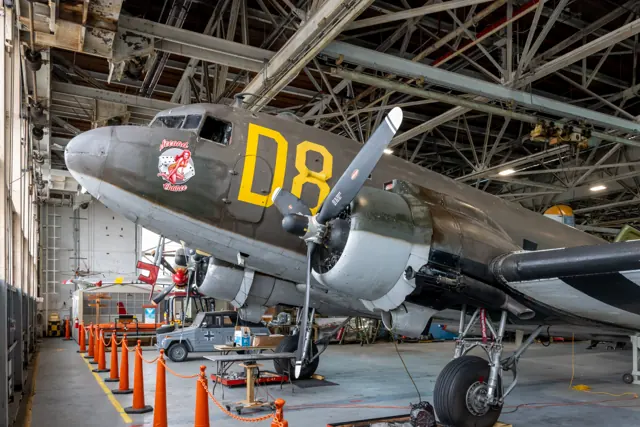
The C-47 adapted the DC-3 airliner to military work, retaining the low wing, two radial engines and tailwheel configuration. Cargo handling and military equipment changed the aircraft's role. It became one of the major Allied transport types of the Second World War. The Dakota name is familiar in British and Commonwealth service. A Waco cargo glider was often its partner, but remains a separate aircraft with its own controls.
Aircraft background
Wikipedia contributors · Read more ↗The son becomes captain and invites his father along
Alred had introduced his son Jason to flying in a Cessna two decades earlier. Now Jason was the captain of a working freight transport, inviting his father to join a day carrying automotive parts. The reversed roles gave the flight its emotional centre: the father was learning a much larger aircraft from the child he had once taught.
Civil freight flight in N12907, a converted military transport operated as a DC-3C. Alred flew under his son Jason’s supervision; the professional crew handled the loaded leg.
DouglasDC3.com · Read more ↗Cockpit shortcuts prepare the aircraft and reveal its controls
The overhead panel provides Quick Start, Cold Dark Start and Ground Power selections. Clicking the red warning panel toggles the yokes. The manual separately labels the jump control for parachutists on the lead ship, keeping its purpose distinct from general cockpit setup.
C-47D Skytrain · Microsoft Flight Simulator · MSFS 2024
Microsoft / aircraft developers · Read more ↗Into the cockpit
 YouTube
 Military Aviation History · 24 min ·
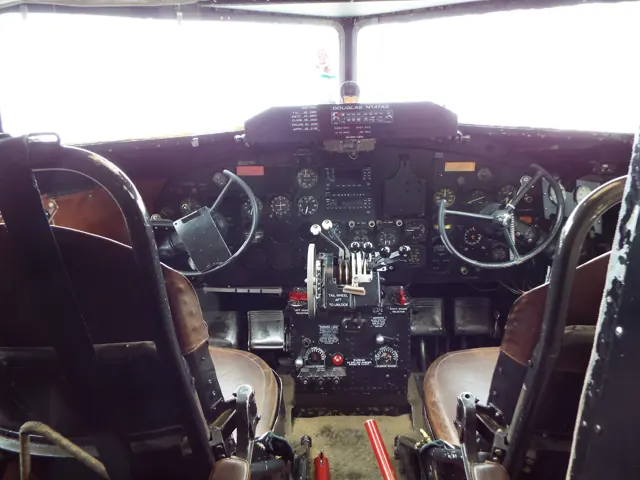
Inside The Cockpit - C-47 Skytrain/ Dakota/ DC-3 | D-Day Airborne
A museum cockpit visit explores the C-47 and its transport history.
Real aircraft · Douglas C-47 Skytrain
Watch on YouTube ↗Preview images are served by AirframeDB. Videos open on YouTube only when you choose to watch.
Meet Douglas C-47 Skytrain
The C-47 adapted the DC-3 airliner to military work, retaining the low wing, two radial engines and tailwheel configuration. Cargo handling and military equipment changed the aircraft's role. It became one of the major Allied transport types of the Second World War.
The Dakota name is familiar in British and Commonwealth service. A Waco cargo glider was often its partner, but remains a separate aircraft with its own controls. Some simulator packages include both the C-47 tug and Waco glider, each represented as a separate aircraft.
Douglas C-47 Skytrain
Aircraft type designators
Use the code for the model you are flying. The linked authority lists the applicable aircraft.
History & design
Glider operations also depended on the transport’s crew chief
Roland Rogers describes glider-towing training at Sedalia Army Air Base from his position as a C-47 crew chief. He stood between the pilots rather than occupying a dedicated flight-engineer seat. His recollection adds the supporting crew’s experience to the better-known pilots’ view of transport operations.
DouglasDC3.com · Stories from a C-47 crew chief ↗Wartime recollection; Rogers is not counted as a pilot account
Transport work continued beyond the fighting
Daniels’s recollection links wartime troop-carrier work in Italy with postwar flying and his eventual return to the United States. It offers one pilot’s view of how C-47 employment extended from military supply tasks into the movement of people after the war.
U.S. Air Force · WWII veteran reunites with former aircraft ↗Veteran’s attributed recollection, published in 2015
Development milestones
First flight: 23 December 1941 ( 1941-12-23 )
Developed from: Douglas DC-3
Wikipedia contributors · Douglas C-47 Skytrain ↗Douglas C-47 Skytrain · family/variant named by the source · Wikipedia revision 1373925007
Pilot accounts
The son becomes captain and invites his father along
Alred had introduced his son Jason to flying in a Cessna two decades earlier. Now Jason was the captain of a working freight transport, inviting his father to join a day carrying automotive parts. The reversed roles gave the flight its emotional centre: the father was learning a much larger aircraft from the child he had once taught.
The DC-3’s controls and trim required attention, and copilot Sam supplied a memorable joke by walking aft and changing the aircraft’s balance. When the cargo went aboard, Alred watched the professional crew from behind their seats. On the empty return at night he again flew under Jason’s guidance.
Civil freight flight in N12907, a converted military transport operated as a DC-3C. Alred flew under his son Jason’s supervision; the professional crew handled the loaded leg.
Read the full account · DouglasDC3.com ↗A night freight flight interrupted by lightning
Wright recalls carrying urgent aircraft parts from Mobile towards Indianapolis at night. The urgency of the freight set the background, but the most vivid memories came from the weather: visible storms, glowing propellers and an electrical display around the cockpit. A lightning strike then left both pilots temporarily unable to see clearly.
At first they thought the cockpit lights had failed. Flashlights did not resolve the problem, and they had to wait for their vision to recover before the instruments became properly visible again. Wright describes another strike later in the flight and an eventual arrival at Indianapolis. It is his recollection of the crew’s experience, without an independent technical investigation of the lightning or its effects.
Published personal account of DC-3/C-47 family freight flying. The registration and exact variant for this particular flight are not stated; Sam Wright is the page’s author.
Read the full account · DouglasDC3.com ↗A family wish brings a veteran back to the cockpit
A family card game gave Daniels the chance to mention a wish: he wanted to sit in a C-47 again. His son-in-law helped arrange a visit to Fairchild, where staff welcomed the veteran into the cockpit. The return brought back memories of an aircraft he had particularly enjoyed among the types he had flown during his career.
Daniels recalled troop-carrier training and wartime transport work in Italy, including moving supplies and fuel. He also described postwar flying before returning to the United States. These memories gave the static aircraft a personal connection beyond its museum role. His family made the cockpit reunion possible.
U.S. Air Force interview, April 2015. Daniels visited a static C-47D at Fairchild on 7 April; this was not a new flight or proof that the displayed airframe was his wartime aircraft.
Read the full account · U.S. Air Force ↗In your simulator
Systems, equipment and documentation for each developer’s aircraft.
Compare simulator versions →MSFS 2024C-47D Skytrain
Microsoft Flight Simulator · Released
C-47D Skytrain
Microsoft Flight Simulator · Released
MSFS 2020C-47D Skytrain
Microsoft Flight Simulator · Released
C-47D Skytrain
Microsoft Flight Simulator · Released
X-Plane 12C-47B Skytrain
VSKYLABS · Released
C-47B Skytrain
VSKYLABS · Released
Aircraft specifications
Published figures for the named real-aircraft variant. Simulator equipment and performance can differ.
| Specification | Published value |
|---|---|
| Length | 63 ft 9 in (19.43 m) |
| Wingspan | 95 ft 6 in (29.11 m) |
| Height | 17 ft 0 in (5.18 m) |
| Wing area | 987 sq ft (91.7 m² ) |
| Empty weight | 18,135 lb (8,226 kg) |
| Gross weight | 26,000 lb (11,793 kg) |
| Max takeoff weight | 31,000 lb (14,061 kg) |
| Powerplant | 2 × Pratt & Whitney R-1830-90C Twin Wasp 14-cylinder air-cooled radial piston engines 1,200 hp (890 kW) takeoff rating 1,000 hp (750 kW) normal rating at 14,500 ft (4,400 m) |
| Propellers | 3-bladed constant-speed propellers |
| Maximum speed | 224 mph (360 km/h, 195 kn) at 10,000 ft (3,000 m) |
| Cruise speed | 160 mph (260 km/h, 140 kn) |
| Range | 1,600 mi (2,600 km, 1,400 nmi) normal range |
| Service ceiling | 26,400 ft (8,000 m) |
Manuals & resources
Find your next read
Choose a topic for a short introduction and a link to the original source. Simulator references identify the developer and edition they cover.
Simulator documentation
Cockpit shortcuts prepare the aircraft and reveal its controlsC-47D Skytrain · Microsoft Flight Simulator · MSFS 2024
The overhead panel provides Quick Start, Cold Dark Start and Ground Power selections. Clicking the red warning panel toggles the yokes. The manual separately labels the jump control for parachutists on the lead ship, keeping its purpose distinct from general cockpit setup.
Gathered C-47 manual · PDF pp.7–8
Microsoft / aircraft developers · Read the source ↗A period Gyropilot and hydraulic systemC-47D Skytrain · Microsoft Flight Simulator · MSFS 2024
The C-47 has separate trim controls and a Sperry Gyropilot for maintaining a selected attitude and direction. Its hydraulic system also serves landing gear, flaps and other auxiliaries. The manual explains the pump and selector arrangement, providing context for a cockpit that predates modern route-following autopilots.
Archived simulator manual; installed package revision not observed · PDF pp.5,10,28
Microsoft / aircraft developers · Read the source ↗The manual identifies its chosen engine and fuel installationC-47D Skytrain · Microsoft Flight Simulator · MSFS 2024
The simulated installation uses the twin-blower engine arrangement described in the manual. Additional cabin ferry-fuel tanks are excluded. These details apply to the package's twin-blower configuration.
Gathered C-47 manual · PDF p.4
Microsoft / aircraft developers · Read the source ↗The original MSFS 2020 releaseC-47D Skytrain · Microsoft Flight Simulator · MSFS 2020
Famous Flyer 09 was released as a combined C-47D and Waco CG-4A package in June 2024. The C-47D has U.S. Navy and fictional Olive Drab “M5” liveries.
2024-06-06 · release and package scope
Microsoft Flight Simulator Team · Read the source ↗Released product and variantsC-47B Skytrain · VSKYLABS · X-Plane 12
The C-47B product represents the wartime military aircraft, with passenger/cargo configuration, optional GNS530 navigation and skis. It is a separate product from the modernised DC-3C.
Official developer / designated-store reference · checked 2026-09-14
VSKYLABS · Read the source ↗Pilot account
The son becomes captain and invites his father alongCivil freight flight in N12907, a converted military transport operated as a DC-3C. Alred flew under his son Jason’s supervision; the professional crew handled the loaded leg.
Alred had introduced his son Jason to flying in a Cessna two decades earlier. Now Jason was the captain of a working freight transport, inviting his father to join a day carrying automotive parts. The reversed roles gave the flight its emotional centre: the father was learning a much larger aircraft from the child he had once taught. The DC-3’s controls and trim required attention, and copilot Sam supplied a memorable joke by walking aft and changing the aircraft’s balance.
Steve Alred
DouglasDC3.com · Read the source ↗A night freight flight interrupted by lightningPublished personal account of DC-3/C-47 family freight flying. The registration and exact variant for this particular flight are not stated; Sam Wright is the page’s author.
Wright recalls carrying urgent aircraft parts from Mobile towards Indianapolis at night. The urgency of the freight set the background, but the most vivid memories came from the weather: visible storms, glowing propellers and an electrical display around the cockpit. A lightning strike then left both pilots temporarily unable to see clearly. At first they thought the cockpit lights had failed.
Sam Wright
DouglasDC3.com · Read the source ↗Read the original documentation from the people who created it. Manuals open on their publisher’s website.
Manual
Douglas C-47D ManualMicrosoft / aircraft developers Microsoft Flight Simulator aircraft manualsMicrosoft / aircraft developersAircraft background
Douglas C-47 SkytrainWikipedia contributors · Research background · Wikipedia revision 1373925007 · retrieved 2026-09-12 Stories from a C-47 crew chiefDouglasDC3.com · Roland Rogers · wartime crew accountResource
MSFS 2024 FAQ and edition aircraft inventoryMicrosoftDeveloper documentation
Microsoft Flight Simulator Releases Famous Flyer 09: Douglas C-47D Skytrain & Waco CG-4AMicrosoft Flight Simulator Team · 2024-06-06 · release and package scope VSKYLABS C-47B Skytrain. Highly-Engineered C-47B simulation add-on for X-Plane.VSKYLABS · Official developer / designated-store reference · checked 2026-09-14 VSKYLABS Aerospace Simulations Aircraft Center: VSKYLABS C-47B Skytrain Flying LabVSKYLABS · Official developer / designated-store reference · checked 2026-09-14Type designator
ICAO Doc 8643 — aircraft type designatorsInternational Civil Aviation Organization · Public search data retrieved 2026-09-14; authority update 2026-09-03Built-in force-feedback profiles
Read the documentary basis, editable starting settings and remaining questions for the aircraft you fly. Each explanation refers to the exact profile revision shown.
Catalogue programme-20261022-v1 · 4 profile choices
VSKYLABS C-47 Skytrain NXG
VSKYLABS · Free and Pro · Revision 5 · Inherited starting point
X-Plane 12
VSKYLABS C-47 Skytrain NXG: Manual primary controls motivate airspeed-dependent yoke resistance.
VSKYLABS XC-47C Amphibian
VSKYLABS · Free and Pro · Revision 3 · Inherited starting point
X-Plane 12
VSKYLABS XC-47C Amphibian: Manual primary controls motivate airspeed-dependent yoke resistance.
VSKYLABS C-47 Skytrain NXG Skis
VSKYLABS · Free and Pro · Revision 3 · Inherited starting point
X-Plane 12
VSKYLABS C-47 Skytrain NXG Skis: Manual primary controls motivate airspeed-dependent yoke resistance.
Douglas C-47 Skytrain
Free and Pro · Revision 2 · Partial review
MSFS 2024 · MSFS 2020 · X-Plane 12
Douglas C-47 Skytrain: Manual primary controls motivate airspeed-dependent yoke resistance.
VSKYLABS C-47 Skytrain NXG Skis
VSKYLABS C-47 Skytrain NXG Skis: Manual primary controls motivate airspeed-dependent yoke resistance.
Aircraft and simulator scope
- VSKYLABS C-47 Skytrain NXG Skis · VSKYLABS · X-Plane 12 · Add-on starting point
The simulator model and controls
The C-47 adapted the DC-3 airliner to military work, retaining the low wing, two radial engines and tailwheel configuration. Cargo handling and military equipment changed the aircraft's role. It became one of the major Allied transport types of the Second World War.
This profile selects VSKYLABS C-47 Skytrain NXG Skis for X-Plane 12.
How this profile feels
Manual primary controls motivate airspeed-dependent yoke resistance. Spring resistance builds with the selected airspeed response. A separate aerodynamic term adds speed-dependent control load.
Pitch and roll tabs support separate aerodynamic trim relief. Valid trim provides the configured pressure relief. Autopilot following is off.
Controls and trim
The C-47’s fabric-covered primary controls are manually operated, with elevator, aileron and rudder trim tabs. Hydraulic services operate gear, flaps and the autopilot. Its continuous flap lever has UP, NEUTRAL and DOWN positions, allowing intermediate extension. Floats and skis add their own surface equipment.
The selected implementation
C47 wheel, ski and amphibious fits use their own contact equipment while retaining the documented tab/control architecture.
About the values
The gains are normalized profile settings. They describe the chosen effect balance; hand force depends on the device and its output limits. IAS references are tuning values rather than operating limits. Physical acceptance of this revision remains pending.
Documentary review and sources
These decisions describe the documentary basis and remaining gaps for this revision. Aircraft documentation and a starting setting describe different kinds of evidence.
Aircraft and variant
InheritedThis profile selects VSKYLABS C-47 Skytrain NXG Skis for X-Plane 12.
Flight controls
InheritedThe C-47’s fabric-covered primary controls are manually operated, with elevator, aileron and rudder trim tabs. Hydraulic services operate gear, flaps and the autopilot. Its continuous flap lever has UP, NEUTRAL and DOWN positions, allowing intermediate extension. Floats and skis add their own surface equipment.
Trim
InheritedPitch and roll tabs support separate aerodynamic trim relief. Pitch authority 0.3 provides load relief and permitted centre movement; roll authority is 0.17.
Autopilot and stability
InheritedAutopilot following is off; the configured spring and load retain the hardware feel.
Equipment
InheritedC47 wheel, ski and amphibious fits use their own contact equipment while retaining the documented tab/control architecture.
Speeds and limits
InheritedThe indicated-speed references set the profile response scale; they are separate from aircraft operating limits.
Simulator integration
InheritedThe profile targets xplane12. Add-on-specific controls use only the supported references configured by this profile.
Force-feedback settings
InheritedThe settings define the profile’s effect balance. Device output limits affect physical hand force.
Starting settings and their rationale
These configured values are starting estimates. The explanations describe what each setting controls; physical validation appears separately below.
| Setting | Starting value | What it controls and why |
|---|---|---|
| Spring strength | Starting value0.74 | What it controls and whyManual primary controls motivate airspeed-dependent yoke resistance. The baseline spring is 0.74. Its low-speed blend reaches baseline strength at 45 KIAS. |
| Master force gain | Starting value0.85 | What it controls and whyScales overall profile strength while preserving effect balance, subject to device and output limits. |
| Profile force gain | Starting value0.8 | What it controls and whyThe aerodynamic-load gain is 0.8 with an indicated-speed reference of 150 KIAS. This supplies speed-dependent loading alongside the spring. |
| Force tuning speed/reference | Starting value150 kt | What it controls and whySets the IAS reference for aerodynamic loading. It is an estimate, not published cruise TAS or a flight limit. |
| Spring response reference speed | Starting value45 kt | What it controls and whySets the IAS where the low-speed blend reaches baseline strength; high-speed stiffening also uses it. |
| Aileron force scale | Starting value0.72 | What it controls and whyRoll and pitch aerodynamic scales are 0.72 and 1, respectively. They set the aerodynamic axis balance. No custom spring-travel curve is enabled. |
| Elevator force scale | Starting value1.0 | What it controls and whyScales pitch aerodynamic loading; pitch spring travel and trim responses are separate settings. |
| Trim feel | Starting valueDisabled | What it controls and whyRetained for compatibility and group membership. Trim relief, rather than this flag, controls centre movement. |
| Trim relief | Starting valueEnabled | What it controls and whyAllows trim relief with supported control law and valid telemetry. Axis authorities set its amount. |
| Autopilot follow | Starting valueDisabled | What it controls and whyAutopilot following is off; the configured spring and load retain the hardware feel. |
| Autopilot neutral hold | Starting valueDisabled | What it controls and whyPermits centering hold during a supported AP state, separate from following a moving target. |
| Output force limit | Starting value0.55 | What it controls and whyCaps directed-force output. Native spring effects and device limits remain separate. |
All 44 starting settings and their rationale
The settings define the profile’s effect balance. Device output limits affect physical hand force.
| Setting | Starting value | What it controls and why |
|---|---|---|
| Spring strength | Starting value0.74 | What it controls and whyManual primary controls motivate airspeed-dependent yoke resistance. The baseline spring is 0.74. Its low-speed blend reaches baseline strength at 45 KIAS. |
| Spring deadband | Starting value0.04 | What it controls and whySets travel around the centre before the baseline spring resists. Smaller values engage it sooner. |
| Profile force gain | Starting value0.8 | What it controls and whyThe aerodynamic-load gain is 0.8 with an indicated-speed reference of 150 KIAS. This supplies speed-dependent loading alongside the spring. |
| Master force gain | Starting value0.85 | What it controls and whyScales overall profile strength while preserving effect balance, subject to device and output limits. |
| QBlend Enabled | Starting valueEnabled | What it controls and whyAllows baseline spring strength to rise with indicated airspeed where the control law permits it. |
| QSpring Minimum Factor | Starting value0.55 | What it controls and whySets low-speed spring strength as a fraction of baseline when blending is enabled. One keeps full strength. |
| QSpring Start Knots | Starting value10 kt | What it controls and whySets the IAS where the low-speed spring blend starts rising. This is a feel threshold, not a flight limit. |
| Spring response reference speed | Starting value45 kt | What it controls and whySets the IAS where the low-speed blend reaches baseline strength; high-speed stiffening also uses it. |
| Force tuning speed/reference | Starting value150 kt | What it controls and whySets the IAS reference for aerodynamic loading. It is an estimate, not published cruise TAS or a flight limit. |
| Airspeed spring stiffening gain | Starting value0.15 | What it controls and whyThe high-speed spring-stiffening gain is 0.15. It strengthens the permitted spring response above 45 KIAS, with the squared-speed ratio capped at 5. |
| Airspeed spring stiffening limit | Starting value5 | What it controls and whyLimits the squared airspeed ratio used for high-speed spring stiffening; it is not a device-force cap. |
| Aileron force scale | Starting value0.72 | What it controls and whyRoll and pitch aerodynamic scales are 0.72 and 1, respectively. They set the aerodynamic axis balance. No custom spring-travel curve is enabled. |
| Elevator force scale | Starting value1.0 | What it controls and whyScales pitch aerodynamic loading; pitch spring travel and trim responses are separate settings. |
| Output force limit | Starting value0.55 | What it controls and whyCaps directed-force output. Native spring effects and device limits remain separate. |
| Trim feel | Starting valueDisabled | What it controls and whyRetained for compatibility and group membership. Trim relief, rather than this flag, controls centre movement. |
| Trim relief | Starting valueEnabled | What it controls and whyAllows trim relief with supported control law and valid telemetry. Axis authorities set its amount. |
| Elevator Authority | Starting value0.3 | What it controls and whyPitch and roll tabs support separate aerodynamic trim relief. Pitch authority 0.3 provides load relief and permitted centre movement; roll authority is 0.17. |
| Aileron Authority | Starting value0.17 | What it controls and whyScales supported roll-trim relief and permitted centre movement. Zero removes roll response. |
| Force Trim Enabled | Starting valueDisabled | What it controls and whyEnables local force trim, separate from aircraft-owned trim and add-on integration qualification. |
| GLoad Enabled | Starting valueEnabled | What it controls and whyAllows load-factor changes to modify permitted spring laws. Passive fly-by-wire feel can suppress it. |
| Rate Damping Enabled | Starting valueEnabled | What it controls and whyEnables rate damping with the configured coefficients and control law. |
| Autopilot follow | Starting valueDisabled | What it controls and whyAutopilot following is off; the configured spring and load retain the hardware feel. |
| Autopilot follow authority | Starting value0.1 | What it controls and whySets admitted AP-follow gain, not a percentage of travel. Runtime ownership and input limits still apply. |
| Autopilot neutral hold | Starting valueDisabled | What it controls and whyPermits centering hold during a supported AP state, separate from following a moving target. |
| Autopilot neutral hold strength | Starting value0.6 | What it controls and whySets admitted AP neutral-hold strength; inactive while neutral hold is disabled. |
| Enabled | Starting valueEnabled | What it controls and whyEnables aerodynamic cues; each still needs nonzero strength and its simulator conditions. |
| Gain | Starting value0.35 | What it controls and whySets stall-buffet strength. Zero removes the cue without changing simulator stalls or warnings. |
| Gain | Starting value0 | What it controls and whySets high-Mach buffet strength; onset and full-strength thresholds are separate. |
| Gain | Starting value0 | What it controls and whySets flap buffet at the configured position and speed gates. Flap movement texture is separate. |
| Maximum flap index | Starting value3 | What it controls and whySets the final flap index for detent normalization. UP plus three detents uses maximum index3. |
| Minimum flap index | Starting value2 | What it controls and whySets the first flap detent that admits buffet; this is a handle index, not degrees. |
| Gain | Starting value0 | What it controls and whySets gear aerodynamic buffet; movement and ground-contact cues are separate. |
| Shaker Enabled | Starting valueDisabled | What it controls and whyPermits shaker at supported warning conditions; the switch does not establish aircraft equipment. |
| Stick shaker amplitude | Starting value0.5 | What it controls and whySets triggered shaker strength; inactive while the shaker feature is disabled. |
| Enabled | Starting valueEnabled | What it controls and whyEnables ground effects; each still needs its own strength and contact or motion telemetry. |
| Gain | Starting value0.24 | What it controls and whySets rolling texture strength, modified by speed, surface and undercarriage configuration. |
| Gain | Starting value0.18 | What it controls and whySets gear-bump texture during ground motion, separate from touchdown impact. |
| Gain | Starting value0.32 | What it controls and whySets landing-impact strength; landing telemetry and response shape determine the pulse. |
| Gain | Starting value0 | What it controls and whySets reverse-thrust vibration with valid reverser and engine conditions. Zero removes the cue. |
| Enabled | Starting valueEnabled | What it controls and whyEnables engine cues with nonzero settings and valid running-engine telemetry. |
| Gain | Starting value0.12 | What it controls and whySets estimated engine vibration using configured telemetry and response, not measured cockpit vibration. |
| Enabled | Starting valueEnabled | What it controls and whyEnables accessory cues with configured strengths and observed accessory movement. |
| Gain | Starting value0.12 | What it controls and whySets texture from observed flap movement; a command without movement does not establish the cue. |
| Gain | Starting value0.025 | What it controls and whySets texture from observed gear movement, separate from aerodynamic and touchdown effects. |
Limits and open questions
- Sperry/optional STEC AP needs its hydraulic valve but no qualified servo-demand channel exists. Ski/float selection can retain the same title, requiring manual profile selection. MPH takeoff figures are not knots.
- Physical and installed-aircraft acceptance deferred. Gains, damping, frequency envelopes and airspeed references are estimates.
- No unqualified AP following, trim actuator demand, failure behavior or dynamic equipment detection.
Physical validation
No physical force validation is recorded in this public catalogue for this revision. Documentary review and software checks do not establish how a particular device feels.
Discuss this aircraft (0)
Questions, observations and useful sources from the community.
No published discussions yet. Bring a question or share a useful source.
Open aircraft discussions →Content expanded · What’s new
Something missing or a source that needs attention?
Suggest a correction ↗

