
Start here
A few places to begin, from the aircraft’s story to the people who fly it.
Meet the aircraft
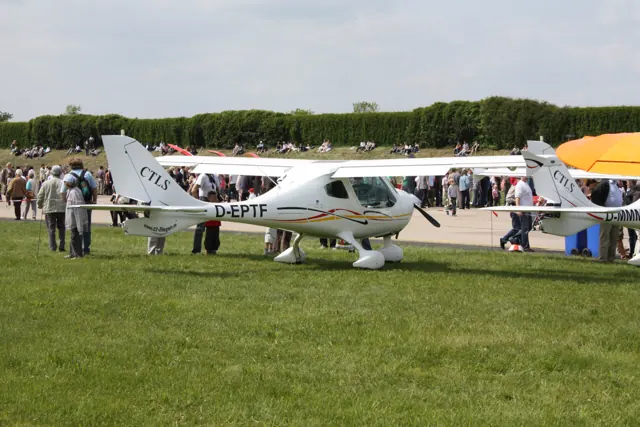
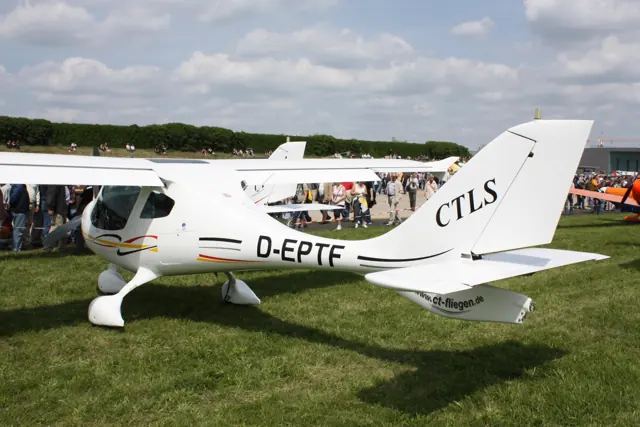
Flight Design developed the CT series in Germany around lightweight recreational and touring use. Fixed tricycle landing gear and a high wing make the basic configuration straightforward, while the rounded composite fuselage gives it a distinctive appearance. CT2K, CTSW, CTLS and CTSL refer to developments within the family. Their dimensions and equipment are not interchangeable.
Aircraft background
Wikipedia contributors · Read more ↗A larger-aircraft pilot learns a smaller cockpit’s sight picture
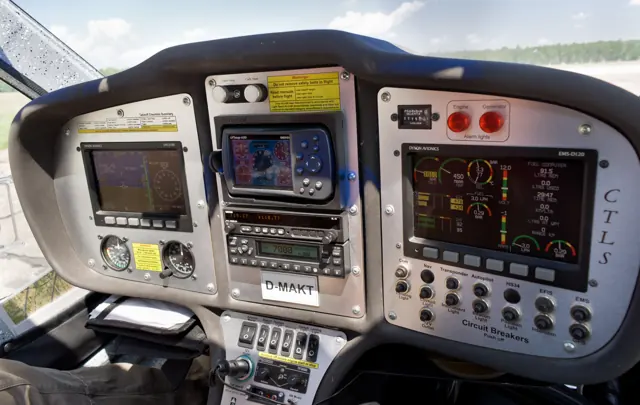
Horne found more equipment inside the small CT than its size had led him to expect. On a hot day at Ellington, he and importer Tom Peghiny flew with full fuel, giving him an introduction to an aircraft that combined a compact shape with an ambitious instrument panel. The controls needed a sensitive touch and attention to coordination. Landings revealed how much his habits came from larger singles.
AOPA · October 2005. Early U.S. Flight Design CT demonstration at Ellington, Connecticut, with importer Tom Peghiny. Related CT-family experience; not a CTSL flight test.
AOPA · Read more ↗Into the cockpit
 YouTube
 Retz13 · 11 min ·
Flight Design CTSL Startup Tutorial w/ Checklists [MSFS2020]
A startup guide to the Flight Design CTSL in MSFS 2020.
Simulator · Flight Design CTSL · MSFS 2020
Watch on YouTube ↗Preview images are served by AirframeDB. Videos open on YouTube only when you choose to watch.
Meet Flight Design CTSL
Flight Design developed the CT series in Germany around lightweight recreational and touring use. Fixed tricycle landing gear and a high wing make the basic configuration straightforward, while the rounded composite fuselage gives it a distinctive appearance.
CT2K, CTSW, CTLS and CTSL refer to developments within the family. Their dimensions and equipment are not interchangeable. The MSFS aircraft represents the CTSL, with its package features described separately from the broader CT-family history.
Flight Design CT family
Aircraft type designators
Use the code for the model you are flying. The linked authority lists the applicable aircraft.
History & design
The CT family changes through successive versions
Wolter’s historical introduction traces the CT from its 1997 debut through the CT2K and the shorter-wing CTSW. The accounts selected here concern early CT, CTSW and CTLS aircraft. They provide family background; none is presented as a direct flight test of the simulator’s CTSL.
fliegermagazin · UL-Pilot-Report: Flight Design CTSW (2006) ↗Variant boundaries retained from the source material
Development milestones
Designer: Matthias Betsch
First flight: March 1996
Wikipedia contributors · Flight Design CT ↗Flight Design CT · family/variant named by the source · Wikipedia revision 1366088830
Pilot accounts
A larger-aircraft pilot learns a smaller cockpit’s sight picture
Horne found more equipment inside the small CT than its size had led him to expect. On a hot day at Ellington, he and importer Tom Peghiny flew with full fuel, giving him an introduction to an aircraft that combined a compact shape with an ambitious instrument panel. The controls needed a sensitive touch and attention to coordination.
Landings revealed how much his habits came from larger singles. The CT’s view and its reluctance to slow down left him adjusting his familiar approach picture, with some smooth touchdowns and some less graceful ones. The experience belongs to an early CT, providing family context for the later CTSL listed on this page.
AOPA · October 2005. Early U.S. Flight Design CT demonstration at Ellington, Connecticut, with importer Tom Peghiny. Related CT-family experience; not a CTSL flight test.
Read the full account · AOPA ↗A capable aircraft does not quite win the writer’s heart
Wolter’s encounter with the CTSW began with unfamiliar glass displays and a joke from Uwe Post about how much electronics the aircraft contained. The wide seating area and generous view soon made a better impression than the initial need to learn the panel. In flight, Wolter found an agile aircraft that felt less nervous than he had expected.
The landing brought another adjustment: he began the flare too early, although the undercarriage softened the arrival. His overall judgement remained more complicated than simple enthusiasm. He recognised the aircraft’s technical qualities and useful handling, but its appearance did little for him emotionally.
fliegermagazin · October 2006. CTSW 2006 flight with German distributor Uwe Post at Kamen; English summary. Related family variant, not a CTSL evaluation.
Read the full account · fliegermagazin ↗Finding a comfortable seat in a light aircraft
Godlewski was pleased to discover that the CTLS could accommodate her shorter stature without an extra cushion. Seat adjustment, cabin comfort and the quiet surroundings helped her settle in before the demonstration with Ken Godin. The externally accessed baggage area was another detail that made her think about how the aircraft would work on a trip.
Once airborne, she needed a few minutes to learn what level flight looked like over the curved panel. The clear view became particularly useful around busy Sebring, where other aircraft made looking outside an immediate priority. Turns and coordination exercises helped her become familiar with the controls.
General Aviation News · December 2009. CTLS demonstration at the U.S. Sport Aviation Expo in Sebring with Ken Godin. CTLS experience, not a CTSL-specific report.
Read the full account · General Aviation News ↗In your simulator
Systems, equipment and documentation for each developer’s aircraft.
Compare simulator versions →MSFS 2024Flight Design CTSL
Microsoft Flight Simulator · Released
Flight Design CTSL
Microsoft Flight Simulator · Released
MSFS 2020Flight Design CTSL
Microsoft Flight Simulator · Released
Flight Design CTSL
Microsoft Flight Simulator · Released
Aircraft specifications
Published figures for the named real-aircraft variant. Simulator equipment and performance can differ.
| Specification | Published value |
|---|---|
| Length | 6.22 m (20 ft 5 in) |
| Wingspan | 8.50 m (27 ft 11 in) |
| Height | 2.15 m (7 ft 1 in) |
| Wing area | 9.94 m² (107.0 sq ft) |
| Empty weight | 318 kg (701 lb) |
| Gross weight | 472.5 kg (1,042 lb) |
| Max takeoff weight | 600 kg (1,323 lb) |
| Powerplant | 1 × Rotax 912S 4-cylinder, 4-stroke liquid/air-cooled engine, 75 kW (101 hp) |
| Maximum speed | 230 km/h (140 mph, 120 kn) |
| Cruise speed | 207 km/h (129 mph, 112 kn) |
| Stall speed | 65 km/h (40 mph, 35 kn) |
| Range | 2,000 km (1,200 mi, 1,100 nmi) |
| Service ceiling | 7,620 m (25,000 ft) planned increase to 9,140 m (30,000 ft) |
| Rate of climb | 4.9 m/s (960 ft/min) |
Manuals & resources
Find your next read
Choose a topic for a short introduction and a link to the original source. Simulator references identify the developer and edition they cover.
Pilot account
A larger-aircraft pilot learns a smaller cockpit’s sight pictureAOPA · October 2005. Early U.S. Flight Design CT demonstration at Ellington, Connecticut, with importer Tom Peghiny. Related CT-family experience; not a CTSL flight test.
Horne found more equipment inside the small CT than its size had led him to expect. On a hot day at Ellington, he and importer Tom Peghiny flew with full fuel, giving him an introduction to an aircraft that combined a compact shape with an ambitious instrument panel. The controls needed a sensitive touch and attention to coordination. Landings revealed how much his habits came from larger singles.
Thomas A. Horne
AOPA · Read the source ↗A capable aircraft does not quite win the writer’s heartfliegermagazin · October 2006. CTSW 2006 flight with German distributor Uwe Post at Kamen; English summary. Related family variant, not a CTSL evaluation.
Wolter’s encounter with the CTSW began with unfamiliar glass displays and a joke from Uwe Post about how much electronics the aircraft contained. The wide seating area and generous view soon made a better impression than the initial need to learn the panel. In flight, Wolter found an agile aircraft that felt less nervous than he had expected. The landing brought another adjustment: he began the flare too early, although the undercarriage softened the arrival.
Peter Wolter
fliegermagazin · Read the source ↗Read the original documentation from the people who created it. Manuals open on their publisher’s website.
Manual
Microsoft Flight Simulator aircraft manualsMicrosoft / aircraft developersAircraft background
Flight Design CTWikipedia contributors · Research background · Wikipedia revision 1366088830 · retrieved 2026-09-12Resource
MSFS 2024 FAQ and edition aircraft inventoryMicrosoft MSFS 2020 FAQ and edition aircraft inventoryMicrosoftType designator
ICAO Doc 8643 — aircraft type designatorsInternational Civil Aviation Organization · Public search data retrieved 2026-09-14; authority update 2026-09-03Built-in force-feedback profiles
Read the documentary basis, editable starting settings and remaining questions for the aircraft you fly. Each explanation refers to the exact profile revision shown.
Catalogue programme-20261022-v1 · 1 profile choice
Flight Design CTSL
Free and Pro · Revision 2 · Partial review
MSFS 2024 · MSFS 2020
Flight Design CTSL: The selected spring and airspeed loading accompany the light-aircraft controls.
Flight Design CTSL
Flight Design CTSL: The selected spring and airspeed loading accompany the light-aircraft controls.
Aircraft and simulator scope
- Flight Design CTSL · MSFS 2024 · family starting point
- Flight Design CTSL · MSFS 2020 · family starting point
Flight Design CTSL · The 2020 Flight Design brochure covers the CT Super Series; exact applicability to the selected CTSL remains a family-scope limitation.
The simulator model and controls
Flight Design developed the CT series in Germany around lightweight recreational and touring use. Fixed tricycle landing gear and a high wing make the basic configuration straightforward, while the rounded composite fuselage gives it a distinctive appearance.
This starting point selects Flight Design CTSL. Its aircraft-level settings do not select a particular developer’s custom systems.
How this profile feels
The selected spring and airspeed loading accompany the light-aircraft controls. Spring resistance builds with the selected airspeed response. A separate aerodynamic term adds speed-dependent control load.
Configured trim relief stays with the CTSL profile’s selected authority. Valid trim provides the configured pressure relief. Autopilot following is off.
Controls and trim
The CTSL belongs to Flight Design’s lightweight composite high-wing line. Its dimensions and equipment are distinct from CT2K, CTSW and CTLS configurations, with the simulator package identifying the represented engine and cockpit.
About the values
The gains are normalized profile settings. They describe the chosen effect balance; hand force depends on the device and its output limits. IAS references are tuning values rather than operating limits. Physical acceptance of this revision remains pending.
What the documentation establishes
The 2020 Flight Design brochure covers the CT Super Series; exact applicability to the selected CTSL remains a family-scope limitation.
The brochure describes electric adjustment of the stabilizer trim tab with improved gearing. Exact CTSL installation and force relief remain unresolved.
Electric preselected flaps with LED indication and composite fixed main gear with a steerable nosewheel are described. A complete flap-detent schedule is not established.
The brochure separates demonstrated 300 km/h VNE from national and ballistic-parachute limits, and lists 240 km/h maximum level speed. These are configuration-sensitive values.
Documentary review and sources
These decisions describe the documentary basis and remaining gaps for this revision. Aircraft documentation and a starting setting describe different kinds of evidence.
Aircraft and variant
ReviewedThis starting point selects Flight Design CTSL. Its aircraft-level settings do not select a particular developer’s custom systems.
Flight controls
Not yet reviewedThe CTSL belongs to Flight Design’s lightweight composite high-wing line. Its dimensions and equipment are distinct from CT2K, CTSW and CTLS configurations, with the simulator package identifying the represented engine and cockpit.
Trim
ReviewedConfigured trim relief stays with the CTSL profile’s selected authority. Pitch authority 0.3 provides load relief and permitted centre movement; roll authority is 0.
Autopilot and stability
Not yet reviewedAutopilot following is off; the configured spring and load retain the hardware feel.
Equipment
ReviewedGear, flap and ground cues follow the selected settings and available simulator-reported states.
Speeds and limits
ReviewedThe indicated-speed references set the profile response scale; they are separate from aircraft operating limits.
Simulator integration
Not yet reviewedThe profile targets msfs2024, msfs2020. Add-on-specific controls use only the supported references configured by this profile.
Force-feedback settings
Not yet reviewedThe settings define the profile’s effect balance. Device output limits affect physical hand force.
Starting settings and their rationale
These configured values are starting estimates. The explanations describe what each setting controls; physical validation appears separately below.
| Setting | Starting value | What it controls and why |
|---|---|---|
| Spring strength | Starting value0.74 | What it controls and whyThe selected spring and airspeed loading accompany the light-aircraft controls. The baseline spring is 0.74. Its low-speed blend reaches baseline strength at 50 KIAS. |
| Master force gain | Starting value0.85 | What it controls and whyScales overall profile strength while preserving effect balance, subject to device and output limits. |
| Profile force gain | Starting value0.8 | What it controls and whyThe aerodynamic-load gain is 0.8 with an indicated-speed reference of 100 KIAS. This supplies speed-dependent loading alongside the spring. |
| Force tuning speed/reference | Starting value100.0 kt | What it controls and whySets the IAS reference for aerodynamic loading. It is an estimate, not published cruise TAS or a flight limit. |
| Spring response reference speed | Starting value50.0 kt | What it controls and whySets the IAS where the low-speed blend reaches baseline strength; high-speed stiffening also uses it. |
| Aileron force scale | Starting value0.72 | What it controls and whyRoll and pitch aerodynamic scales are 0.72 and 1, respectively. They set the aerodynamic axis balance. No custom spring-travel curve is enabled. |
| Elevator force scale | Starting value1.0 | What it controls and whyScales pitch aerodynamic loading; pitch spring travel and trim responses are separate settings. |
| Trim feel | Starting valueEnabled | What it controls and whyRetained for compatibility and group membership. Trim relief, rather than this flag, controls centre movement. |
| Trim relief | Starting valueEnabled | What it controls and whyAllows trim relief with supported control law and valid telemetry. Axis authorities set its amount. |
| Autopilot follow | Starting valueDisabled | What it controls and whyAutopilot following is off; the configured spring and load retain the hardware feel. |
| Autopilot neutral hold | Starting valueDisabled | What it controls and whyPermits centering hold during a supported AP state, separate from following a moving target. |
| Output force limit | Starting value0.55 | What it controls and whyCaps directed-force output. Native spring effects and device limits remain separate. |
All 44 starting settings and their rationale
The settings define the profile’s effect balance. Device output limits affect physical hand force.
| Setting | Starting value | What it controls and why |
|---|---|---|
| Spring strength | Starting value0.74 | What it controls and whyThe selected spring and airspeed loading accompany the light-aircraft controls. The baseline spring is 0.74. Its low-speed blend reaches baseline strength at 50 KIAS. |
| Spring deadband | Starting value0.045 | What it controls and whySets travel around the centre before the baseline spring resists. Smaller values engage it sooner. |
| Profile force gain | Starting value0.8 | What it controls and whyThe aerodynamic-load gain is 0.8 with an indicated-speed reference of 100 KIAS. This supplies speed-dependent loading alongside the spring. |
| Master force gain | Starting value0.85 | What it controls and whyScales overall profile strength while preserving effect balance, subject to device and output limits. |
| QBlend Enabled | Starting valueEnabled | What it controls and whyAllows baseline spring strength to rise with indicated airspeed where the control law permits it. |
| QSpring Minimum Factor | Starting value0.5 | What it controls and whySets low-speed spring strength as a fraction of baseline when blending is enabled. One keeps full strength. |
| QSpring Start Knots | Starting value14.0 kt | What it controls and whySets the IAS where the low-speed spring blend starts rising. This is a feel threshold, not a flight limit. |
| Spring response reference speed | Starting value50.0 kt | What it controls and whySets the IAS where the low-speed blend reaches baseline strength; high-speed stiffening also uses it. |
| Force tuning speed/reference | Starting value100.0 kt | What it controls and whySets the IAS reference for aerodynamic loading. It is an estimate, not published cruise TAS or a flight limit. |
| Airspeed spring stiffening gain | Starting value0.15 | What it controls and whyThe high-speed spring-stiffening gain is 0.15. It strengthens the permitted spring response above 50 KIAS, with the squared-speed ratio capped at 5. |
| Airspeed spring stiffening limit | Starting value5 | What it controls and whyLimits the squared airspeed ratio used for high-speed spring stiffening; it is not a device-force cap. |
| Aileron force scale | Starting value0.72 | What it controls and whyRoll and pitch aerodynamic scales are 0.72 and 1, respectively. They set the aerodynamic axis balance. No custom spring-travel curve is enabled. |
| Elevator force scale | Starting value1.0 | What it controls and whyScales pitch aerodynamic loading; pitch spring travel and trim responses are separate settings. |
| Output force limit | Starting value0.55 | What it controls and whyCaps directed-force output. Native spring effects and device limits remain separate. |
| Trim feel | Starting valueEnabled | What it controls and whyRetained for compatibility and group membership. Trim relief, rather than this flag, controls centre movement. |
| Trim relief | Starting valueEnabled | What it controls and whyAllows trim relief with supported control law and valid telemetry. Axis authorities set its amount. |
| Elevator Authority | Starting value0.3 | What it controls and whyConfigured trim relief stays with the CTSL profile’s selected authority. Pitch authority 0.3 provides load relief and permitted centre movement; roll authority is 0. |
| Aileron Authority | Starting value0 | What it controls and whyScales supported roll-trim relief and permitted centre movement. Zero removes roll response. |
| Force Trim Enabled | Starting valueDisabled | What it controls and whyEnables local force trim, separate from aircraft-owned trim and add-on integration qualification. |
| GLoad Enabled | Starting valueEnabled | What it controls and whyAllows load-factor changes to modify permitted spring laws. Passive fly-by-wire feel can suppress it. |
| Rate Damping Enabled | Starting valueEnabled | What it controls and whyEnables rate damping with the configured coefficients and control law. |
| Autopilot follow | Starting valueDisabled | What it controls and whyAutopilot following is off; the configured spring and load retain the hardware feel. |
| Autopilot follow authority | Starting value0.1 | What it controls and whySets admitted AP-follow gain, not a percentage of travel. Runtime ownership and input limits still apply. |
| Autopilot neutral hold | Starting valueDisabled | What it controls and whyPermits centering hold during a supported AP state, separate from following a moving target. |
| Autopilot neutral hold strength | Starting value0.6 | What it controls and whySets admitted AP neutral-hold strength; inactive while neutral hold is disabled. |
| Enabled | Starting valueEnabled | What it controls and whyEnables aerodynamic cues; each still needs nonzero strength and its simulator conditions. |
| Gain | Starting value0.35 | What it controls and whySets stall-buffet strength. Zero removes the cue without changing simulator stalls or warnings. |
| Gain | Starting value0 | What it controls and whySets high-Mach buffet strength; onset and full-strength thresholds are separate. |
| Gain | Starting value0.14 | What it controls and whySets flap buffet at the configured position and speed gates. Flap movement texture is separate. |
| Maximum flap index | Starting value4 | What it controls and whySets the final flap index for detent normalization. UP plus three detents uses maximum index3. |
| Minimum flap index | Starting value2 | What it controls and whySets the first flap detent that admits buffet; this is a handle index, not degrees. |
| Gain | Starting value0 | What it controls and whySets gear aerodynamic buffet; movement and ground-contact cues are separate. |
| Shaker Enabled | Starting valueDisabled | What it controls and whyPermits shaker at supported warning conditions; the switch does not establish aircraft equipment. |
| Stick shaker amplitude | Starting value0.5 | What it controls and whySets triggered shaker strength; inactive while the shaker feature is disabled. |
| Enabled | Starting valueEnabled | What it controls and whyEnables ground effects; each still needs its own strength and contact or motion telemetry. |
| Gain | Starting value0.4 | What it controls and whySets rolling texture strength, modified by speed, surface and undercarriage configuration. |
| Gain | Starting value0.25 | What it controls and whySets gear-bump texture during ground motion, separate from touchdown impact. |
| Gain | Starting value0.65 | What it controls and whySets landing-impact strength; landing telemetry and response shape determine the pulse. |
| Gain | Starting value0 | What it controls and whySets reverse-thrust vibration with valid reverser and engine conditions. Zero removes the cue. |
| Enabled | Starting valueEnabled | What it controls and whyEnables engine cues with nonzero settings and valid running-engine telemetry. |
| Gain | Starting value0.12 | What it controls and whySets estimated engine vibration using configured telemetry and response, not measured cockpit vibration. |
| Enabled | Starting valueEnabled | What it controls and whyEnables accessory cues with configured strengths and observed accessory movement. |
| Gain | Starting value0.12 | What it controls and whySets texture from observed flap movement; a command without movement does not establish the cue. |
| Gain | Starting value0 | What it controls and whySets texture from observed gear movement, separate from aerodynamic and touchdown effects. |
Limits and open questions
- Improved trim gearing does not establish the complete primary-control linkage or loading mechanism.
- No applicable installed autopilot is identified in the retained brochure.
- Manufacturer brochure descriptions supply no simulator telemetry definitions.
- The brochure's gearing and gear-spring descriptions do not measure stick force or simulator cue strength.
- Flight Design CTSL documentary evidence does not establish force-feedback hardware acceptance.
Physical validation
No physical force validation is recorded in this public catalogue for this revision. Documentary review and software checks do not establish how a particular device feels.
Discuss this aircraft (0)
Questions, observations and useful sources from the community.
No published discussions yet. Bring a question or share a useful source.
Open aircraft discussions →Content expanded · What’s new
Something missing or a source that needs attention?
Suggest a correction ↗