

Start here
A few places to begin, from the aircraft’s story to the people who fly it.
Meet the aircraft
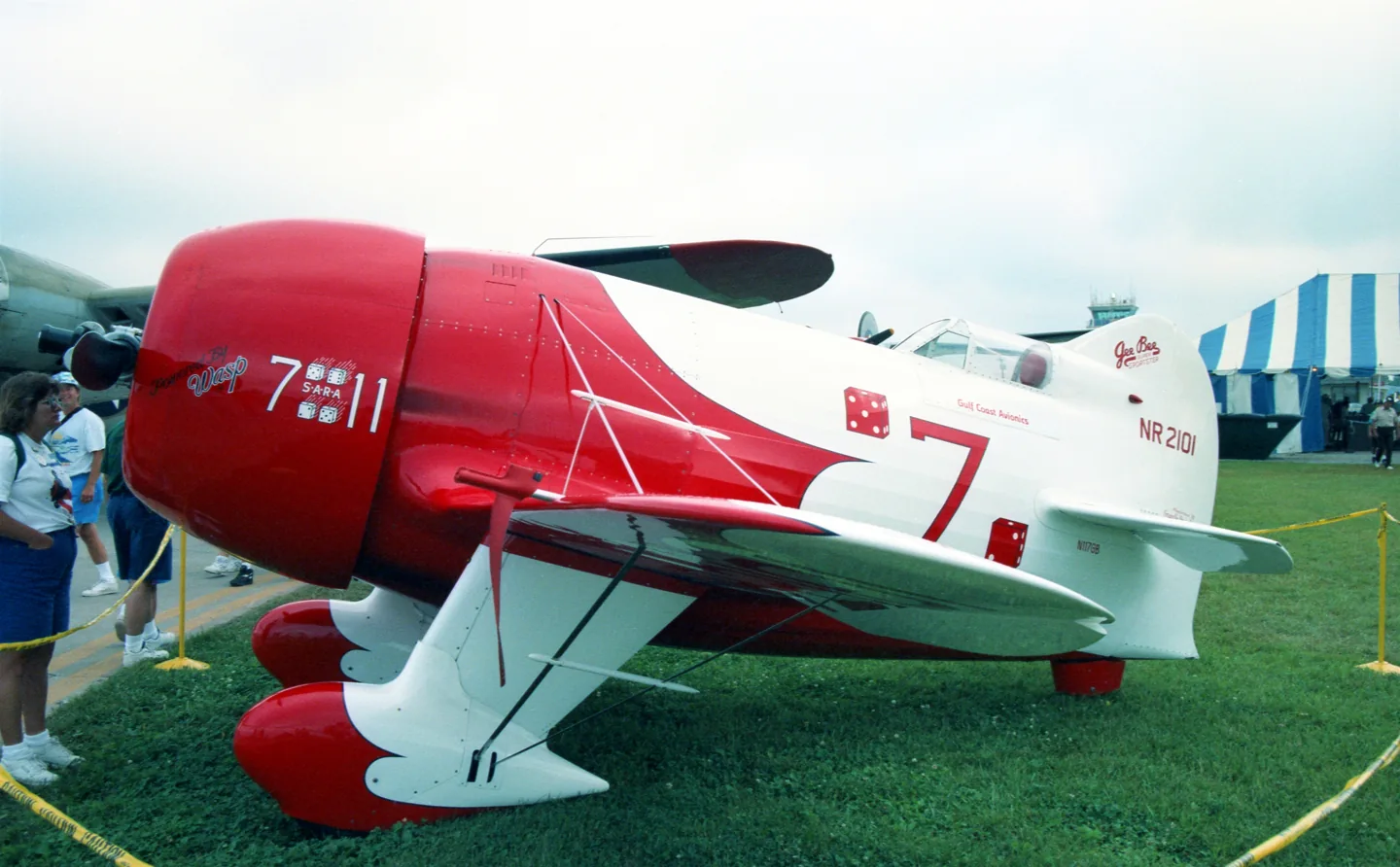
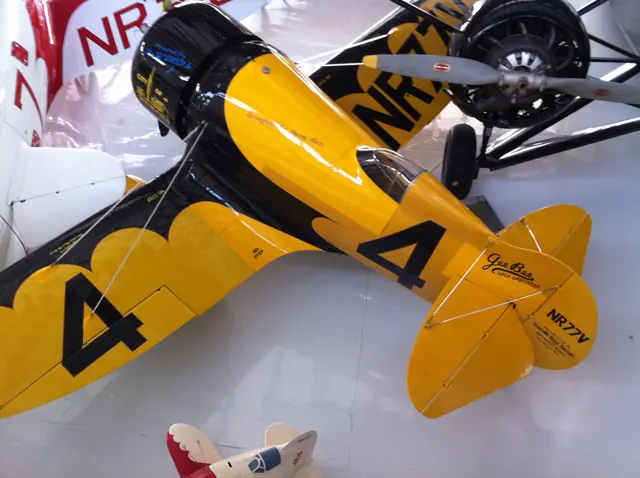
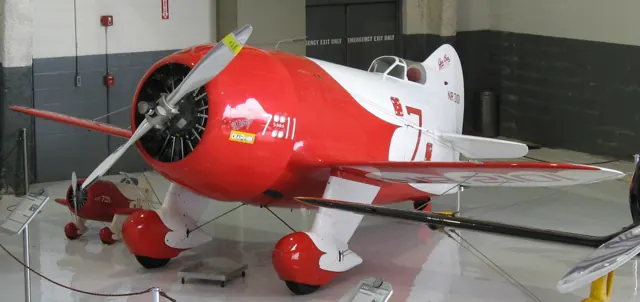
Granville Brothers built the Gee Bee racers for speed competition. The Model R placed a large radial engine ahead of small wings and a cockpit set far aft in a short fuselage. Gee Bee takes its name from the initials of Granville Brothers.
Aircraft background
Wikipedia contributors · Read more ↗Praise for the R-2 coexists with a difficult race
Gehlbach’s cross-country race became a struggle to see through leaking oil. After an oil line failed, he reached Illinois and concluded that the problem could not be repaired there. He continued towards Cleveland with the canopy removed, enduring oil in his face, and finished fourth behind the leading Wedell-Williams aircraft.
Don Hollway’s retrospective account with quoted pilot recollections. Original R-2, race number 7, in the 1932 Bendix race; Jimmy Doolittle’s R-1 is a different aircraft.
Don Hollway / Aviation History · Read more ↗The original MSFS 2020 release
The April 2022 Famous Flyer II release combines the Model Z and R-2, with historic cockpit layouts and three liveries. The announcement offers both for PC and Xbox.
Gee Bee Model Z / R-2 · Microsoft Flight Simulator · MSFS 2020
Microsoft Flight Simulator Team · Read more ↗Into the cockpit
 YouTube
 Military History and Aviation · 6 min ·
Great cockpit footage of Gee Bee R2 Aerobatic Demo
Delmar Benjamin displays a Gee Bee R2 recreation, with cockpit and ground footage.
Modern recreation · Delmar Benjamin’s Gee Bee R2
Watch on YouTube ↗Preview images are served by AirframeDB. Videos open on YouTube only when you choose to watch.
Meet Granville Gee Bee R2 / Z
Granville Brothers built the Gee Bee racers for speed competition. The Model R placed a large radial engine ahead of small wings and a cockpit set far aft in a short fuselage. Gee Bee takes its name from the initials of Granville Brothers.
The Model Z, R-1 and R-2 were separate racing designs. Modern replicas also differ from original racers; the photographs and simulator model labels identify the aircraft represented.
Granville Gee Bee R2 / Z
Aircraft type designators
A model-specific ICAO or FAA designator has not been confirmed in the references reviewed for this aircraft.
History & design
The Z and R-2 were built for different racing seasons
Microsoft’s historical release account places the Model Z’s Thompson Trophy victory in 1931 and the R-2’s Bendix and Thompson appearances in 1932. The R-2's race history is separate from the other Gee Bee designs.
Microsoft Flight Simulator Team · Famous Flyer II - Gee Bee ↗Historical background in the April 2022 release
Pilot accounts
Praise for the R-2 coexists with a difficult race
Gehlbach’s cross-country race became a struggle to see through leaking oil. After an oil line failed, he reached Illinois and concluded that the problem could not be repaired there. He continued towards Cleveland with the canopy removed, enduring oil in his face, and finished fourth behind the leading Wedell-Williams aircraft.
His public assessment of the R-2 was enthusiastic, praising its handling despite the disappointing result. Hollway also records a much more guarded private recollection: Gehlbach and Doolittle regarded their respective Gee Bees as exceptionally demanding machines. The contrast belongs to the pilot’s reported views at different moments.
Don Hollway’s retrospective account with quoted pilot recollections. Original R-2, race number 7, in the 1932 Bendix race; Jimmy Doolittle’s R-1 is a different aircraft.
Read the full account · Don Hollway / Aviation History ↗A replica brings an airshow pilot together with its original builders’ families
Benjamin’s airshow displays gave audiences a moving view of an aircraft more often remembered through old racing photographs. The report describes climbs, rolls and inverted passes in the replica. His preference for lively aerobatic aircraft comes through in a remark relayed by builder Steve Wolf: a placid machine would have held less interest for him.
An East Coast tour also brought a more personal encounter with the design’s history. At Concord, Benjamin and Wolf met members of the Granville family and engineer Pete Miller, who had worked on the original racers. Benjamin held a surviving piece of original R-2 fabric beside the replica. That reunion connected his modern display flying with people and material from the aircraft’s first life.
EAA report, July 1995. R-2 replica built with Steve Wolf and his team; the article’s closing R-1 label conflicts with its repeated R-2 identification and photographs.
Read the full account · EAA Vintage Airplane ↗The first landing makes the restricted view unforgettable
Turner told Haffke that his replica was a good aircraft in the air, but its restricted view made ground handling and landing a different matter. After his first landing, he joked that he had expected the runway to disappear from view, without anticipating that the entire airport would disappear with it.
Taking the aircraft back to Springfield gave him another strong memory. Local visitors came repeatedly to see it, and their response moved him. Some remembered the original racer and the community that had supported it. By the time of Haffke’s account, Turner wanted the replica to become a museum exhibit, ideally in Springfield. The pleasure of flying it had become linked with the possibility of returning its story to that community.
Remarks recorded by Henry Haffke in Model Aviation, October 1984. Turner’s full-size Model Z replica with a tailwheel; Haffke’s separate radio-controlled model flights are not Turner’s experiences.
Read the full account · Model Aviation / Academy of Model Aeronautics ↗In your simulator
Systems, equipment and documentation for each developer’s aircraft.
Compare simulator versions →MSFS 2024Gee Bee R2 / Z
Microsoft Flight Simulator · Released
Gee Bee R2 / Z
Microsoft Flight Simulator · Released
MSFS 2020Gee Bee Model Z / R-2
Microsoft Flight Simulator · Released
Gee Bee Model Z / R-2
Microsoft Flight Simulator · Released
Manuals & resources
Find your next read
Choose a topic for a short introduction and a link to the original source. Simulator references identify the developer and edition they cover.
Simulator documentation
The original MSFS 2020 releaseGee Bee Model Z / R-2 · Microsoft Flight Simulator · MSFS 2020
The April 2022 Famous Flyer II release combines the Model Z and R-2, with historic cockpit layouts and three liveries. The announcement offers both for PC and Xbox.
2022-04-26 · release and package scope
Microsoft Flight Simulator Team · Read the source ↗A museum replica helped shape the simulator’s Model ZGee Bee Model Z / R-2 · Microsoft Flight Simulator · MSFS 2020
Microsoft says its team studied and scanned the Model Z replica at Seattle’s Museum of Flight. This identifies a development reference for the Carenado recreation.
April 2022 announcement; source model does not establish physical fidelity
Microsoft Flight Simulator Team · Read the source ↗The announced Z uses a fixed-pitch propellerGee Bee Model Z / R-2 · Microsoft Flight Simulator · MSFS 2020
The release describes the Z with a Wasp Junior radial and a fixed-pitch two-blade propeller. The larger engine used in later historical record attempts is a different configuration.
April 2022 description; no undocumented propeller control inferred
Microsoft Flight Simulator Team · Read the source ↗Pilot account
Praise for the R-2 coexists with a difficult raceDon Hollway’s retrospective account with quoted pilot recollections. Original R-2, race number 7, in the 1932 Bendix race; Jimmy Doolittle’s R-1 is a different aircraft.
Gehlbach’s cross-country race became a struggle to see through leaking oil. After an oil line failed, he reached Illinois and concluded that the problem could not be repaired there. He continued towards Cleveland with the canopy removed, enduring oil in his face, and finished fourth behind the leading Wedell-Williams aircraft. His public assessment of the R-2 was enthusiastic, praising its handling despite the disappointing result.
Lee Gehlbach
Don Hollway / Aviation History · Read the source ↗A replica brings an airshow pilot together with its original builders’ familiesEAA report, July 1995. R-2 replica built with Steve Wolf and his team; the article’s closing R-1 label conflicts with its repeated R-2 identification and photographs.
Benjamin’s airshow displays gave audiences a moving view of an aircraft more often remembered through old racing photographs. The report describes climbs, rolls and inverted passes in the replica. His preference for lively aerobatic aircraft comes through in a remark relayed by builder Steve Wolf: a placid machine would have held less interest for him. An East Coast tour also brought a more personal encounter with the design’s history.
Delmar Benjamin
EAA Vintage Airplane · Read the source ↗Read the original documentation from the people who created it. Manuals open on their publisher’s website.
Manual
Microsoft Flight Simulator aircraft manualsMicrosoft / aircraft developersAircraft background
Granville Gee Bee Model R Super SportsterWikipedia contributors · Research background · Wikipedia revision 950023370 · retrieved 2026-09-12Resource
MSFS 2024 FAQ and edition aircraft inventoryMicrosoftDeveloper documentation
Famous Flyer II - Gee BeeMicrosoft Flight Simulator Team · 2022-04-26 · release and package scopeBuilt-in force-feedback profiles
Read the documentary basis, editable starting settings and remaining questions for the aircraft you fly. Each explanation refers to the exact profile revision shown.
Catalogue programme-20261022-v1 · 2 profile choices
Granville Gee Bee R-2
Free and Pro · Revision 2 · Partial review
MSFS 2020 · MSFS 2024
Granville Gee Bee R-2: The profile supplies the selected racer’s stick balance.
Granville Gee Bee Model Z
Free and Pro · Revision 1 · Partial review
MSFS 2020 · MSFS 2024
Granville Gee Bee Model Z: The profile supplies the selected racer’s stick balance.
Granville Gee Bee R-2
Granville Gee Bee R-2: The profile supplies the selected racer’s stick balance.
Aircraft and simulator scope
- Granville Gee Bee R-2 · MSFS 2020 · Variant starting point
- Granville Gee Bee R-2 · MSFS 2024 · Variant starting point
Granville Gee Bee R-2 · The selected R-2 uses its own 1932 race account; Model Z record speeds are separate conditions. The release identifies both Model Z and R-2, with different airframe dimensions and racing history.
The simulator model and controls
Granville Brothers built the Gee Bee racers for speed competition. The Model R placed a large radial engine ahead of small wings and a cockpit set far aft in a short fuselage. Gee Bee takes its name from the initials of Granville Brothers.
This starting point selects Granville Gee Bee R-2. Its aircraft-level settings do not select a particular developer’s custom systems.
How this profile feels
The profile supplies the selected racer’s stick balance. Spring resistance builds with the selected airspeed response. A separate aerodynamic term adds speed-dependent control load.
Trim response remains scoped to the named model and rendition. Valid trim provides the configured pressure relief. Autopilot following is off.
Controls and trim
Granville’s Gee Bee racers put a large engine, small wing and aft cockpit around the speed-racing mission. Model Z, R-1 and R-2 are related aircraft with separate configurations, and later replicas can differ from originals.
About the values
The gains are normalized profile settings. They describe the chosen effect balance; hand force depends on the device and its output limits. IAS references are tuning values rather than operating limits. Physical acceptance of this revision remains pending.
What the documentation establishes
The selected R-2 uses its own 1932 race account; Model Z record speeds are separate conditions. The release identifies both Model Z and R-2, with different airframe dimensions and racing history.
Fixed gear with wheel fairings and the original R-985 installation are described; later Model Z engine modifications must remain distinct.
Quoted race speeds include Model Z's 267.342 mph and R-2's 247.339 mph results. They are historic race measurements, not IAS cruise or stall limits.
Documentary review and sources
These decisions describe the documentary basis and remaining gaps for this revision. Aircraft documentation and a starting setting describe different kinds of evidence.
Aircraft and variant
ReviewedThis starting point selects Granville Gee Bee R-2. Its aircraft-level settings do not select a particular developer’s custom systems.
Flight controls
Not yet reviewedGranville’s Gee Bee racers put a large engine, small wing and aft cockpit around the speed-racing mission. Model Z, R-1 and R-2 are related aircraft with separate configurations, and later replicas can differ from originals.
Trim
Not yet reviewedTrim response remains scoped to the named model and rendition. Pitch authority 0.3 provides load relief and permitted centre movement; roll authority is 0.
Autopilot and stability
Not yet reviewedAutopilot following is off; the configured spring and load retain the hardware feel.
Equipment
ReviewedGear, flap and ground cues follow the selected settings and available simulator-reported states.
Speeds and limits
ReviewedThe indicated-speed references set the profile response scale; they are separate from aircraft operating limits.
Simulator integration
Not yet reviewedThe profile targets msfs2020, msfs2024. Add-on-specific controls use only the supported references configured by this profile.
Force-feedback settings
Not yet reviewedThe settings define the profile’s effect balance. Device output limits affect physical hand force.
Starting settings and their rationale
These configured values are starting estimates. The explanations describe what each setting controls; physical validation appears separately below.
| Setting | Starting value | What it controls and why |
|---|---|---|
| Spring strength | Starting value0.74 | What it controls and whyThe profile supplies the selected racer’s stick balance. The baseline spring is 0.74. Its low-speed blend reaches baseline strength at 85 KIAS. |
| Master force gain | Starting value0.85 | What it controls and whyScales overall profile strength while preserving effect balance, subject to device and output limits. |
| Profile force gain | Starting value0.4 | What it controls and whyThe aerodynamic-load gain is 0.4 with an indicated-speed reference of 170 KIAS. This supplies speed-dependent loading alongside the spring. |
| Force tuning speed/reference | Starting value170.0 kt | What it controls and whySets the IAS reference for aerodynamic loading. It is an estimate, not published cruise TAS or a flight limit. |
| Spring response reference speed | Starting value85.0 kt | What it controls and whySets the IAS where the low-speed blend reaches baseline strength; high-speed stiffening also uses it. |
| Aileron force scale | Starting value0.72 | What it controls and whyRoll and pitch aerodynamic scales are 0.72 and 1, respectively. They set the aerodynamic axis balance. No custom spring-travel curve is enabled. |
| Elevator force scale | Starting value1.0 | What it controls and whyScales pitch aerodynamic loading; pitch spring travel and trim responses are separate settings. |
| Trim feel | Starting valueEnabled | What it controls and whyRetained for compatibility and group membership. Trim relief, rather than this flag, controls centre movement. |
| Trim relief | Starting valueEnabled | What it controls and whyAllows trim relief with supported control law and valid telemetry. Axis authorities set its amount. |
| Autopilot follow | Starting valueDisabled | What it controls and whyAutopilot following is off; the configured spring and load retain the hardware feel. |
| Autopilot neutral hold | Starting valueDisabled | What it controls and whyPermits centering hold during a supported AP state, separate from following a moving target. |
| Output force limit | Starting value0.55 | What it controls and whyCaps directed-force output. Native spring effects and device limits remain separate. |
All 44 starting settings and their rationale
The settings define the profile’s effect balance. Device output limits affect physical hand force.
| Setting | Starting value | What it controls and why |
|---|---|---|
| Spring strength | Starting value0.74 | What it controls and whyThe profile supplies the selected racer’s stick balance. The baseline spring is 0.74. Its low-speed blend reaches baseline strength at 85 KIAS. |
| Spring deadband | Starting value0.03 | What it controls and whySets travel around the centre before the baseline spring resists. Smaller values engage it sooner. |
| Profile force gain | Starting value0.4 | What it controls and whyThe aerodynamic-load gain is 0.4 with an indicated-speed reference of 170 KIAS. This supplies speed-dependent loading alongside the spring. |
| Master force gain | Starting value0.85 | What it controls and whyScales overall profile strength while preserving effect balance, subject to device and output limits. |
| QBlend Enabled | Starting valueEnabled | What it controls and whyAllows baseline spring strength to rise with indicated airspeed where the control law permits it. |
| QSpring Minimum Factor | Starting value0.5 | What it controls and whySets low-speed spring strength as a fraction of baseline when blending is enabled. One keeps full strength. |
| QSpring Start Knots | Starting value20 kt | What it controls and whySets the IAS where the low-speed spring blend starts rising. This is a feel threshold, not a flight limit. |
| Spring response reference speed | Starting value85.0 kt | What it controls and whySets the IAS where the low-speed blend reaches baseline strength; high-speed stiffening also uses it. |
| Force tuning speed/reference | Starting value170.0 kt | What it controls and whySets the IAS reference for aerodynamic loading. It is an estimate, not published cruise TAS or a flight limit. |
| Airspeed spring stiffening gain | Starting value0 | What it controls and whyThe high-speed spring-stiffening gain is 0. No additional speed-driven stiffening is added; this does not disable independent aerodynamic loading. |
| Airspeed spring stiffening limit | Starting value5 | What it controls and whyLimits the squared airspeed ratio used for high-speed spring stiffening; it is not a device-force cap. |
| Aileron force scale | Starting value0.72 | What it controls and whyRoll and pitch aerodynamic scales are 0.72 and 1, respectively. They set the aerodynamic axis balance. No custom spring-travel curve is enabled. |
| Elevator force scale | Starting value1.0 | What it controls and whyScales pitch aerodynamic loading; pitch spring travel and trim responses are separate settings. |
| Output force limit | Starting value0.55 | What it controls and whyCaps directed-force output. Native spring effects and device limits remain separate. |
| Trim feel | Starting valueEnabled | What it controls and whyRetained for compatibility and group membership. Trim relief, rather than this flag, controls centre movement. |
| Trim relief | Starting valueEnabled | What it controls and whyAllows trim relief with supported control law and valid telemetry. Axis authorities set its amount. |
| Elevator Authority | Starting value0.3 | What it controls and whyTrim response remains scoped to the named model and rendition. Pitch authority 0.3 provides load relief and permitted centre movement; roll authority is 0. |
| Aileron Authority | Starting value0 | What it controls and whyScales supported roll-trim relief and permitted centre movement. Zero removes roll response. |
| Force Trim Enabled | Starting valueDisabled | What it controls and whyEnables local force trim, separate from aircraft-owned trim and add-on integration qualification. |
| GLoad Enabled | Starting valueEnabled | What it controls and whyAllows load-factor changes to modify permitted spring laws. Passive fly-by-wire feel can suppress it. |
| Rate Damping Enabled | Starting valueEnabled | What it controls and whyEnables rate damping with the configured coefficients and control law. |
| Autopilot follow | Starting valueDisabled | What it controls and whyAutopilot following is off; the configured spring and load retain the hardware feel. |
| Autopilot follow authority | Starting value0.05 | What it controls and whySets admitted AP-follow gain, not a percentage of travel. Runtime ownership and input limits still apply. |
| Autopilot neutral hold | Starting valueDisabled | What it controls and whyPermits centering hold during a supported AP state, separate from following a moving target. |
| Autopilot neutral hold strength | Starting value0.6 | What it controls and whySets admitted AP neutral-hold strength; inactive while neutral hold is disabled. |
| Enabled | Starting valueEnabled | What it controls and whyEnables aerodynamic cues; each still needs nonzero strength and its simulator conditions. |
| Gain | Starting value0.3 | What it controls and whySets stall-buffet strength. Zero removes the cue without changing simulator stalls or warnings. |
| Gain | Starting value0 | What it controls and whySets high-Mach buffet strength; onset and full-strength thresholds are separate. |
| Gain | Starting value0 | What it controls and whySets flap buffet at the configured position and speed gates. Flap movement texture is separate. |
| Maximum flap index | Starting value1 | What it controls and whySets the final flap index for detent normalization. UP plus three detents uses maximum index3. |
| Minimum flap index | Starting value1 | What it controls and whySets the first flap detent that admits buffet; this is a handle index, not degrees. |
| Gain | Starting value0 | What it controls and whySets gear aerodynamic buffet; movement and ground-contact cues are separate. |
| Shaker Enabled | Starting valueDisabled | What it controls and whyPermits shaker at supported warning conditions; the switch does not establish aircraft equipment. |
| Stick shaker amplitude | Starting value0.5 | What it controls and whySets triggered shaker strength; inactive while the shaker feature is disabled. |
| Enabled | Starting valueEnabled | What it controls and whyEnables ground effects; each still needs its own strength and contact or motion telemetry. |
| Gain | Starting value0.4 | What it controls and whySets rolling texture strength, modified by speed, surface and undercarriage configuration. |
| Gain | Starting value0.3 | What it controls and whySets gear-bump texture during ground motion, separate from touchdown impact. |
| Gain | Starting value0.6 | What it controls and whySets landing-impact strength; landing telemetry and response shape determine the pulse. |
| Gain | Starting value0 | What it controls and whySets reverse-thrust vibration with valid reverser and engine conditions. Zero removes the cue. |
| Enabled | Starting valueEnabled | What it controls and whyEnables engine cues with nonzero settings and valid running-engine telemetry. |
| Gain | Starting value0.12 | What it controls and whySets estimated engine vibration using configured telemetry and response, not measured cockpit vibration. |
| Enabled | Starting valueEnabled | What it controls and whyEnables accessory cues with configured strengths and observed accessory movement. |
| Gain | Starting value0 | What it controls and whySets texture from observed flap movement; a command without movement does not establish the cue. |
| Gain | Starting value0 | What it controls and whySets texture from observed gear movement, separate from aerodynamic and touchdown effects. |
Limits and open questions
- Race-aircraft history does not document control linkage or pilot force gearing.
- No trim installation or mechanism is described.
- No automatic-flight equipment is established.
- The release publishes no simulator integration signals.
- Race speed and aerobatic handling reputation do not provide a measured force curve.
- Granville Gee Bee R-2 documentary evidence does not establish force-feedback hardware acceptance.
Physical validation
No physical force validation is recorded in this public catalogue for this revision. Documentary review and software checks do not establish how a particular device feels.
Discuss this aircraft (0)
Questions, observations and useful sources from the community.
No published discussions yet. Bring a question or share a useful source.
Open aircraft discussions →Content expanded · What’s new
Something missing or a source that needs attention?
Suggest a correction ↗