
Start here
A few places to begin, from the aircraft’s story to the people who fly it.
Meet the aircraft
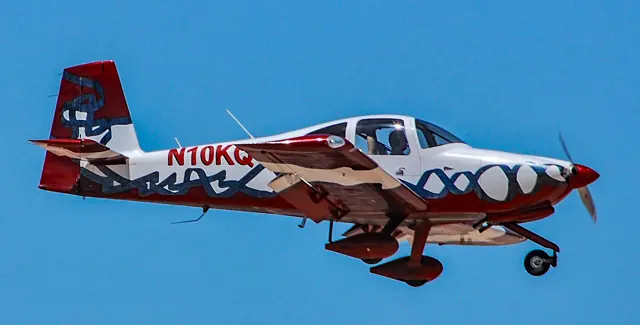
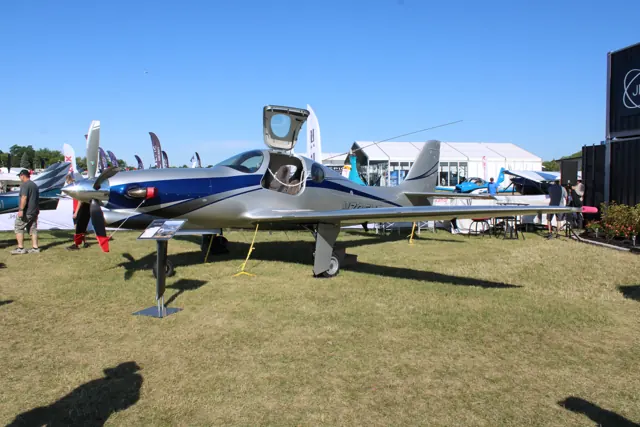
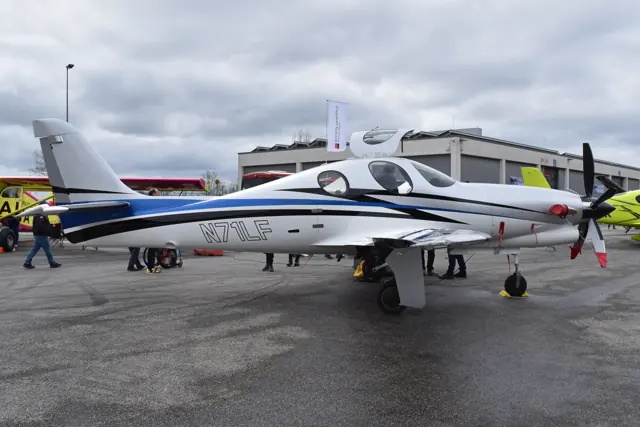
Lancair developed the Evolution as a pressurised, four-seat amateur-built aircraft; the programme continued through Evolution Aircraft. Its composite low-wing airframe and retractable landing gear were designed for high-performance personal travel. Both turbine and piston versions appeared.
Aircraft background
Wikipedia contributors · Read more ↗Formation flying while controllers learn the name
Even the controllers were getting used to the Evolution, sometimes calling it a Revolution. Hirschman’s introduction included a dusk photography flight beside a Bonanza, where the new turboprop’s power had to be used modestly to stay with the camera aircraft. The sidestick gave him the precise control needed for formation work, and the climb supplied a striking change from more familiar piston singles.
AOPA Pilot · August 2012. A 750 shp Evolution demonstration with Doug Walker, including a Cincinnati Lunken photography flight.
AOPA Pilot · Read more ↗The manual maps out the Evolution’s systems panels
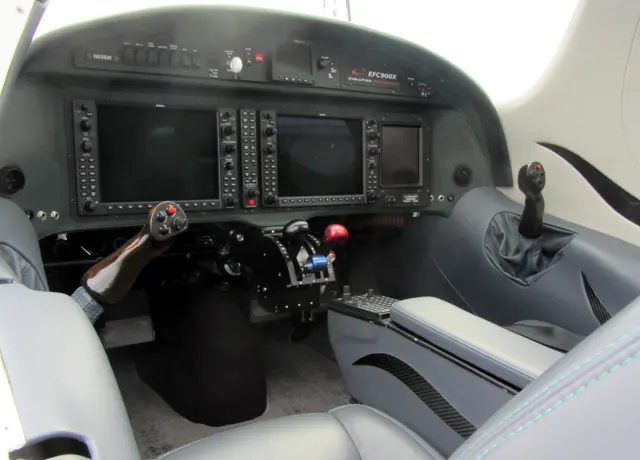
Laminar’s manual describes separate battery, generator and backup-alternator controls, plus a ground-power selection. The systems panel includes inflatable door-seal and bleed-air controls for cabin pressurisation, while a separate display presents cabin altitude and differential pressure. These details describe the installation represented by the simulator manual.
Lancair Evolution · Laminar Research · X-Plane 12
Laminar Research · Read more ↗Into the cockpit
 YouTube
 Mark Brooks · 4 min ·
Flying the Lancair Evolution
A guest joins a demonstration flight in the turbine-powered Lancair Evolution.
Real aircraft · Lancair Evolution
Watch on YouTube ↗Preview images are served by AirframeDB. Videos open on YouTube only when you choose to watch.
Meet Lancair Evolution
Lancair developed the Evolution as a pressurised, four-seat amateur-built aircraft; the programme continued through Evolution Aircraft. Its composite low-wing airframe and retractable landing gear were designed for high-performance personal travel. Both turbine and piston versions appeared.
Individual builders choose their equipment. Laminar's X-Plane model is based on N844X, including the cockpit and trim arrangement described in its manual.
Lancair Evolution
Lancair → · Explore the family →
Lancair Evolution
Wikipedia contributors · Lancair Evolution ↗Laminar Research · X-Plane 12 →Aircraft type designators
Use the code for the model you are flying. The linked authority lists the applicable aircraft.
History & design
A turbine kit programme takes shape
The contemporary 2012 report dates the Evolution’s first flight to 2008 and kit deliveries to 2009. It describes a programme built around a relatively standardised engine and avionics installation, with an initial factory-assisted construction period followed by further work to complete the aircraft.
AOPA Pilot · You say you want an evolution ↗AOPA’s description of the programme at that time
One family, individually completed aircraft
Greeff’s South African example was completed with help from local aviation specialists after the initial factory work. His intended use included four-seat, pressurised travel for work, illustrating how the kit programme could serve a regular transport mission as well as a construction project.
SA Flyer / Evolution Aircraft · Lancair Evolution ↗Owner and build history reported by SA Flyer
Development milestones
First flight: 21 March 2008
Wikipedia contributors · Lancair Evolution ↗Lancair Evolution · family/variant named by the source · Wikipedia revision 1364486698
Pilot accounts
Formation flying while controllers learn the name
Even the controllers were getting used to the Evolution, sometimes calling it a Revolution. Hirschman’s introduction included a dusk photography flight beside a Bonanza, where the new turboprop’s power had to be used modestly to stay with the camera aircraft. The sidestick gave him the precise control needed for formation work, and the climb supplied a striking change from more familiar piston singles.
Getting into the cabin required some agility, but once seated he appreciated the upright position and view. His evaluation also caught changes in feel as speed increased, with heavier roll forces during faster flight. The landing brought another favourable impression of the undercarriage’s cushioning.
AOPA Pilot · August 2012. A 750 shp Evolution demonstration with Doug Walker, including a Cincinnati Lunken photography flight.
Read the full account · AOPA Pilot ↗From the camera aircraft into a South African Evolution
Leitch first saw this Evolution in flight from the accompanying Saratoga during a coastal photography mission. He subsequently moved into the turboprop itself, joining owner Frikkie Greeff for a flight from the right seat. Crossing the centre controls to board was awkward, but the seat then offered useful room and a clear view. The substantial power available demanded attention as he became familiar with the aircraft.
During manoeuvring, an unintended climb showed how much he was still learning about balancing power and attitude. He liked the firm, authoritative controls. On return, strong wind and unfamiliar local radio work accompanied a further distraction when the cockpit began misting. Greeff handled the landing.
SA Flyer, manufacturer-hosted PDF. ZU-EVO with owner Frikkie Greeff; Leitch flew from the right seat, and Greeff made the windy return landing.
Read the full account · SA Flyer / Evolution Aircraft ↗Eight hundred hours of pleasure, repairs and changes
Meyer wanted a pressurised aircraft that could carry four people on longer journeys. He enjoyed the Evolution’s turbine smoothness, power and reach, but his account also describes a more demanding ownership experience than a short demonstration could reveal. An early flight required attention to stability and trim, and subsequent use brought faults that interrupted travel.
He reports a landing-gear collapse on the ground, avionics and sensor problems, and periods waiting for repair. He also describes changes to his own aircraft and an extensive further upgrade that was still in progress when he wrote. Despite those frustrations, he remained enthusiastic about its travelling capability.
Owner’s published account of N844X, fitted with the 850 hp PT6A-42. Describes this particular aircraft and modifications completed or planned at the time of writing.
Read the full account · Austin Meyer ↗In your simulator
Systems, equipment and documentation for each developer’s aircraft.
X-Plane 12Lancair Evolution
Laminar Research · Released
Lancair Evolution
Laminar Research · Released
Aircraft specifications
Published figures for the named real-aircraft variant. Simulator equipment and performance can differ.
| Specification | Published value |
|---|---|
| Length | 30 ft (9.1 m) |
| Wingspan | 37 ft (11 m) |
| Height | 10 ft (3.0 m) |
| Empty weight | 2,650 lb (1,202 kg) |
| Gross weight | 4,550 lb (2,064 kg) |
| Powerplant | 1 × Pratt & Whitney PT6A-135A turboprop aircraft engine , 750 hp (560 kW) |
| Propellers | 4-bladed Hartzell Propeller |
| Maximum speed | 256 kn (295 mph, 474 km/h) maximum cruise speed ( true airspeed ) |
| Stall speed | 61 kn (70 mph, 113 km/h) flaps down, indicated airspeed |
| Range | 1,027 nmi (1,182 mi, 1,902 km) no reserve |
| Service ceiling | 28,000 ft (8,500 m) limited by RVSM |
| Rate of climb | 4,000 ft/min (20 m/s) |
Manuals & resources
Find your next read
Choose a topic for a short introduction and a link to the original source. Simulator references identify the developer and edition they cover.
Simulator documentation
The manual maps out the Evolution’s systems panelsLancair Evolution · Laminar Research · X-Plane 12
Laminar’s manual describes separate battery, generator and backup-alternator controls, plus a ground-power selection. The systems panel includes inflatable door-seal and bleed-air controls for cabin pressurisation, while a separate display presents cabin altitude and differential pressure. These details describe the installation represented by the simulator manual.
Gathered Laminar simulator manual · PDF pp.20,24
Laminar Research · Read the source ↗Lighting and protection controls are part of the cockpitLancair Evolution · Laminar Research · X-Plane 12
The overhead lights can change colour and direction. A separate panel groups the particle separator, pitot heat, propeller heat and inlet heat. The manual shows their locations alongside the landing-gear indication and cockpit-light dimmers.
Gathered simulator manual · PDF pp.19,21,23
Laminar Research · Read the source ↗One real aircraft's equipment choicesLancair Evolution · Laminar Research · X-Plane 12
Laminar models the Evolution after N844X, with that aircraft's particular cockpit and autopilot. There is no trim wheel in the represented panel: mapped commands operate pitch trim and the multifunction display shows its position. That is a specific installation within a kit-built aircraft family.
Archived simulator manual; installed package revision not observed · PDF pp.6,51
Laminar Research · Read the source ↗Pilot account
Formation flying while controllers learn the nameAOPA Pilot · August 2012. A 750 shp Evolution demonstration with Doug Walker, including a Cincinnati Lunken photography flight.
Even the controllers were getting used to the Evolution, sometimes calling it a Revolution. Hirschman’s introduction included a dusk photography flight beside a Bonanza, where the new turboprop’s power had to be used modestly to stay with the camera aircraft. The sidestick gave him the precise control needed for formation work, and the climb supplied a striking change from more familiar piston singles.
Dave Hirschman
AOPA Pilot · Read the source ↗From the camera aircraft into a South African EvolutionSA Flyer, manufacturer-hosted PDF. ZU-EVO with owner Frikkie Greeff; Leitch flew from the right seat, and Greeff made the windy return landing.
Leitch first saw this Evolution in flight from the accompanying Saratoga during a coastal photography mission. He subsequently moved into the turboprop itself, joining owner Frikkie Greeff for a flight from the right seat. Crossing the centre controls to board was awkward, but the seat then offered useful room and a clear view. The substantial power available demanded attention as he became familiar with the aircraft.
Guy Leitch
SA Flyer / Evolution Aircraft · Read the source ↗Read the original documentation from the people who created it. Manuals open on their publisher’s website.
Manual
Lancair Evolution POHLaminar Research X-Plane 12 Desktop ManualLaminar Research X-Plane aircraft and avionics manualsLaminar ResearchAircraft background
Lancair EvolutionWikipedia contributors · Research background · Wikipedia revision 1364486698 · retrieved 2026-09-12Type designator
ICAO Doc 8643 — aircraft type designatorsInternational Civil Aviation Organization · Public search data retrieved 2026-09-14; authority update 2026-09-03Built-in force-feedback profiles
Read the documentary basis, editable starting settings and remaining questions for the aircraft you fly. Each explanation refers to the exact profile revision shown.
Catalogue programme-20261022-v1 · 1 profile choice
Lancair Evolution
Free and Pro · Revision 1 · Partial review
X-Plane 12
Lancair Evolution: The chosen resistance accompanies the selected Evolution airframe.
Lancair Evolution
Lancair Evolution: The chosen resistance accompanies the selected Evolution airframe.
Aircraft and simulator scope
- Lancair Evolution · X-Plane 12 · family starting point
Lancair Evolution · The X-Plane manual models Austin Meyer's turbine Evolution cockpit, with PT6 engine context; piston Evolutions are outside this configuration.
The simulator model and controls
Lancair developed the Evolution as a pressurised, four-seat amateur-built aircraft; the programme continued through Evolution Aircraft. Its composite low-wing airframe and retractable landing gear were designed for high-performance personal travel. Both turbine and piston versions appeared.
This starting point selects Lancair Evolution. Its aircraft-level settings do not select a particular developer’s custom systems.
How this profile feels
The chosen resistance accompanies the selected Evolution airframe. Spring resistance builds with the selected airspeed response. A separate aerodynamic term adds speed-dependent control load.
Trim relief is scoped to the represented cockpit rather than every builder’s installation. Valid trim provides the configured pressure relief. Autopilot following is enabled for supported control references.
Controls and trim
The Evolution is an amateur-built personal aircraft with both turbine and piston programme branches. Laminar bases its rendition on N844X. That named aircraft’s cockpit and trim fit are a specific installation within the builder-configured family.
About the values
The gains are normalized profile settings. They describe the chosen effect balance; hand force depends on the device and its output limits. IAS references are tuning values rather than operating limits. Physical acceptance of this revision remains pending.
What the documentation establishes
The X-Plane manual models Austin Meyer's turbine Evolution cockpit, with PT6 engine context; piston Evolutions are outside this configuration.
Elevator trim is commanded by mapped up/down inputs and indicated on the MFD; the aircraft has no trim wheel. The actuator and aerodynamic trim arrangement are unspecified.
Automatic flight includes lateral and vertical modes and ILS tracking while airspeed is managed separately.
Retractable tricycle gear and slotted flaps are documented, including 25-degree takeoff and 50-degree landing selections.
Maximum cruise is 300 KTAS, VNE 256 KIAS, full-configuration stall 61 KIAS, and flap limits 160/140 KIAS. These do not make the retained 240-knot reference a measured cruise IAS.
The manual documents X-Plane control axes, flap/gear assignments and trim commands. External trim following still requires installed-product verification.
Documentary review and sources
These decisions describe the documentary basis and remaining gaps for this revision. Aircraft documentation and a starting setting describe different kinds of evidence.
Aircraft and variant
ReviewedThis starting point selects Lancair Evolution. Its aircraft-level settings do not select a particular developer’s custom systems.
Flight controls
Not yet reviewedThe Evolution is an amateur-built personal aircraft with both turbine and piston programme branches. Laminar bases its rendition on N844X. That named aircraft’s cockpit and trim fit are a specific installation within the builder-configured family.
Trim
ReviewedTrim relief is scoped to the represented cockpit rather than every builder’s installation. Pitch authority 0.3 provides load relief and permitted centre movement; roll authority is 0.14.
Autopilot and stability
ReviewedFollowing is on at 0.1 authority when a supported, valid autopilot control reference is available.
Equipment
ReviewedGear, flap and ground cues follow the selected settings and available simulator-reported states.
Speeds and limits
ReviewedThe indicated-speed references set the profile response scale; they are separate from aircraft operating limits.
Simulator integration
ReviewedThe profile targets xplane12. Add-on-specific controls use only the supported references configured by this profile.
Force-feedback settings
Not yet reviewedThe settings define the profile’s effect balance. Device output limits affect physical hand force.
Starting settings and their rationale
These configured values are starting estimates. The explanations describe what each setting controls; physical validation appears separately below.
| Setting | Starting value | What it controls and why |
|---|---|---|
| Spring strength | Starting value0.74 | What it controls and whyThe chosen resistance accompanies the selected Evolution airframe. The baseline spring is 0.74. Its low-speed blend reaches baseline strength at 90 KIAS. |
| Master force gain | Starting value0.85 | What it controls and whyScales overall profile strength while preserving effect balance, subject to device and output limits. |
| Profile force gain | Starting value0.68 | What it controls and whyThe aerodynamic-load gain is 0.68 with an indicated-speed reference of 240 KIAS. This supplies speed-dependent loading alongside the spring. |
| Force tuning speed/reference | Starting value240.0 kt | What it controls and whySets the IAS reference for aerodynamic loading. It is an estimate, not published cruise TAS or a flight limit. |
| Spring response reference speed | Starting value90 kt | What it controls and whySets the IAS where the low-speed blend reaches baseline strength; high-speed stiffening also uses it. |
| Aileron force scale | Starting value0.72 | What it controls and whyRoll and pitch aerodynamic scales are 0.72 and 1, respectively. They set the aerodynamic axis balance. No custom spring-travel curve is enabled. |
| Elevator force scale | Starting value1.0 | What it controls and whyScales pitch aerodynamic loading; pitch spring travel and trim responses are separate settings. |
| Trim feel | Starting valueEnabled | What it controls and whyRetained for compatibility and group membership. Trim relief, rather than this flag, controls centre movement. |
| Trim relief | Starting valueEnabled | What it controls and whyAllows trim relief with supported control law and valid telemetry. Axis authorities set its amount. |
| Autopilot follow | Starting valueEnabled | What it controls and whyFollowing is on at 0.1 authority when a supported, valid autopilot control reference is available. |
| Autopilot neutral hold | Starting valueDisabled | What it controls and whyPermits centering hold during a supported AP state, separate from following a moving target. |
| Output force limit | Starting value0.55 | What it controls and whyCaps directed-force output. Native spring effects and device limits remain separate. |
All 44 starting settings and their rationale
The settings define the profile’s effect balance. Device output limits affect physical hand force.
| Setting | Starting value | What it controls and why |
|---|---|---|
| Spring strength | Starting value0.74 | What it controls and whyThe chosen resistance accompanies the selected Evolution airframe. The baseline spring is 0.74. Its low-speed blend reaches baseline strength at 90 KIAS. |
| Spring deadband | Starting value0.05 | What it controls and whySets travel around the centre before the baseline spring resists. Smaller values engage it sooner. |
| Profile force gain | Starting value0.68 | What it controls and whyThe aerodynamic-load gain is 0.68 with an indicated-speed reference of 240 KIAS. This supplies speed-dependent loading alongside the spring. |
| Master force gain | Starting value0.85 | What it controls and whyScales overall profile strength while preserving effect balance, subject to device and output limits. |
| QBlend Enabled | Starting valueEnabled | What it controls and whyAllows baseline spring strength to rise with indicated airspeed where the control law permits it. |
| QSpring Minimum Factor | Starting value0.55 | What it controls and whySets low-speed spring strength as a fraction of baseline when blending is enabled. One keeps full strength. |
| QSpring Start Knots | Starting value20 kt | What it controls and whySets the IAS where the low-speed spring blend starts rising. This is a feel threshold, not a flight limit. |
| Spring response reference speed | Starting value90 kt | What it controls and whySets the IAS where the low-speed blend reaches baseline strength; high-speed stiffening also uses it. |
| Force tuning speed/reference | Starting value240.0 kt | What it controls and whySets the IAS reference for aerodynamic loading. It is an estimate, not published cruise TAS or a flight limit. |
| Airspeed spring stiffening gain | Starting value0.1 | What it controls and whyThe high-speed spring-stiffening gain is 0.1. It strengthens the permitted spring response above 90 KIAS, with the squared-speed ratio capped at 5. |
| Airspeed spring stiffening limit | Starting value5 | What it controls and whyLimits the squared airspeed ratio used for high-speed spring stiffening; it is not a device-force cap. |
| Aileron force scale | Starting value0.72 | What it controls and whyRoll and pitch aerodynamic scales are 0.72 and 1, respectively. They set the aerodynamic axis balance. No custom spring-travel curve is enabled. |
| Elevator force scale | Starting value1.0 | What it controls and whyScales pitch aerodynamic loading; pitch spring travel and trim responses are separate settings. |
| Output force limit | Starting value0.55 | What it controls and whyCaps directed-force output. Native spring effects and device limits remain separate. |
| Trim feel | Starting valueEnabled | What it controls and whyRetained for compatibility and group membership. Trim relief, rather than this flag, controls centre movement. |
| Trim relief | Starting valueEnabled | What it controls and whyAllows trim relief with supported control law and valid telemetry. Axis authorities set its amount. |
| Elevator Authority | Starting value0.3 | What it controls and whyTrim relief is scoped to the represented cockpit rather than every builder’s installation. Pitch authority 0.3 provides load relief and permitted centre movement; roll authority is 0.14. |
| Aileron Authority | Starting value0.14 | What it controls and whyScales supported roll-trim relief and permitted centre movement. Zero removes roll response. |
| Force Trim Enabled | Starting valueDisabled | What it controls and whyEnables local force trim, separate from aircraft-owned trim and add-on integration qualification. |
| GLoad Enabled | Starting valueEnabled | What it controls and whyAllows load-factor changes to modify permitted spring laws. Passive fly-by-wire feel can suppress it. |
| Rate Damping Enabled | Starting valueEnabled | What it controls and whyEnables rate damping with the configured coefficients and control law. |
| Autopilot follow | Starting valueEnabled | What it controls and whyFollowing is on at 0.1 authority when a supported, valid autopilot control reference is available. |
| Autopilot follow authority | Starting value0.1 | What it controls and whySets admitted AP-follow gain, not a percentage of travel. Runtime ownership and input limits still apply. |
| Autopilot neutral hold | Starting valueDisabled | What it controls and whyPermits centering hold during a supported AP state, separate from following a moving target. |
| Autopilot neutral hold strength | Starting value0.6 | What it controls and whySets admitted AP neutral-hold strength; inactive while neutral hold is disabled. |
| Enabled | Starting valueEnabled | What it controls and whyEnables aerodynamic cues; each still needs nonzero strength and its simulator conditions. |
| Gain | Starting value0.28 | What it controls and whySets stall-buffet strength. Zero removes the cue without changing simulator stalls or warnings. |
| Gain | Starting value0 | What it controls and whySets high-Mach buffet strength; onset and full-strength thresholds are separate. |
| Gain | Starting value0.14 | What it controls and whySets flap buffet at the configured position and speed gates. Flap movement texture is separate. |
| Maximum flap index | Starting value3 | What it controls and whySets the final flap index for detent normalization. UP plus three detents uses maximum index3. |
| Minimum flap index | Starting value2 | What it controls and whySets the first flap detent that admits buffet; this is a handle index, not degrees. |
| Gain | Starting value0.1 | What it controls and whySets gear aerodynamic buffet; movement and ground-contact cues are separate. |
| Shaker Enabled | Starting valueDisabled | What it controls and whyPermits shaker at supported warning conditions; the switch does not establish aircraft equipment. |
| Stick shaker amplitude | Starting value0.5 | What it controls and whySets triggered shaker strength; inactive while the shaker feature is disabled. |
| Enabled | Starting valueEnabled | What it controls and whyEnables ground effects; each still needs its own strength and contact or motion telemetry. |
| Gain | Starting value0.42 | What it controls and whySets rolling texture strength, modified by speed, surface and undercarriage configuration. |
| Gain | Starting value0.32 | What it controls and whySets gear-bump texture during ground motion, separate from touchdown impact. |
| Gain | Starting value0.82 | What it controls and whySets landing-impact strength; landing telemetry and response shape determine the pulse. |
| Gain | Starting value0.48 | What it controls and whySets reverse-thrust vibration with valid reverser and engine conditions. Zero removes the cue. |
| Enabled | Starting valueEnabled | What it controls and whyEnables engine cues with nonzero settings and valid running-engine telemetry. |
| Gain | Starting value0.06 | What it controls and whySets estimated engine vibration using configured telemetry and response, not measured cockpit vibration. |
| Enabled | Starting valueEnabled | What it controls and whyEnables accessory cues with configured strengths and observed accessory movement. |
| Gain | Starting value0.12 | What it controls and whySets texture from observed flap movement; a command without movement does not establish the cue. |
| Gain | Starting value0.12 | What it controls and whySets texture from observed gear movement, separate from aerodynamic and touchdown effects. |
Limits and open questions
- The guide lists cockpit controls and aerodynamic effects but does not explain primary linkage or pilot-force gearing.
- Torque and slipstream descriptions do not supply measured yoke forces, trim-relief strength or vibration amplitude.
- Lancair Evolution documentary evidence does not establish force-feedback hardware acceptance.
Physical validation
No physical force validation is recorded in this public catalogue for this revision. Documentary review and software checks do not establish how a particular device feels.
Discuss this aircraft (0)
Questions, observations and useful sources from the community.
No published discussions yet. Bring a question or share a useful source.
Open aircraft discussions →Content expanded · What’s new
Something missing or a source that needs attention?
Suggest a correction ↗