



Start here
A few places to begin, from the aircraft’s story to the people who fly it.
Meet the aircraft
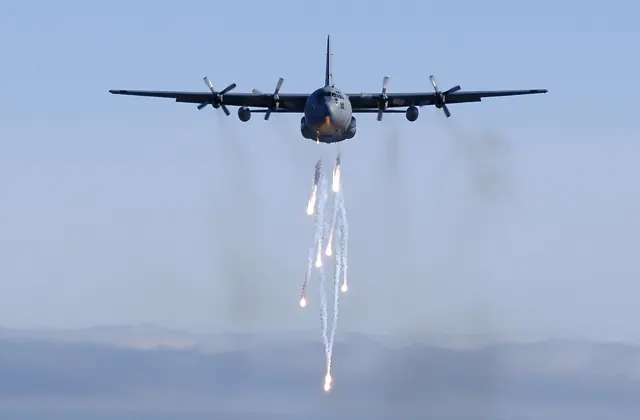
Lockheed designed the Hercules for troops, freight and medical evacuation, with a high wing, four turboprops, a large cargo compartment and rear loading ramp. The airframe also supported tanker, weather, scientific and other specialist missions.
Aircraft background
Wikipedia contributors · Read more ↗A ski-aircraft check ride ends with an unexpected overnight stay
Furlong’s exchange posting brought him from RAF transport flying to the specialised work of operating Hercules aircraft on Greenland’s ice cap. Training included supervised flights before a check ride, with more experienced crews helping newcomers learn the conditions. His own check ride ended badly when a ski encountered a hole in the snow. The aircraft was damaged, but nobody was injured.
C-130.net retrospective. RAF exchange pilot with the USAF 17th squadron in Alaska, 1968–1970; selected incident concerns ski-equipped C-130D 57-0492 in Greenland.
C-130.net · Read more ↗Into the cockpit
 YouTube
 Lockheed Martin · 9 min ·
INTO THE COCKPIT: Experience the C-130J Super Hercules Like Never Before
Lockheed Martin introduces the C-130J's cockpit and mission equipment.
Related variant · C-130J Super Hercules
Watch on YouTube ↗Preview images are served by AirframeDB. Videos open on YouTube only when you choose to watch.
Meet Lockheed C-130 Hercules
Lockheed designed the Hercules for troops, freight and medical evacuation, with a high wing, four turboprops, a large cargo compartment and rear loading ramp. The airframe also supported tanker, weather, scientific and other specialist missions.
The family spans several engine and cockpit generations. Classic Hercules and C-130J aircraft use different propulsion and crew arrangements, with further changes for specialist equipment.
Lockheed C-130 Hercules
Lockheed → · Explore the family →
Lockheed C-130 Hercules
Wikipedia contributors · Lockheed C-130 Hercules ↗Laminar Research · X-Plane 11 →Aircraft type designators
Use the code for the model you are flying. The linked authority lists the applicable aircraft.
History & design
Ski-equipped transports keep remote stations supplied
Furlong’s interview describes C-130D ski aircraft supporting radar sites on Greenland’s ice cap. Crews rotated through Sondrestrom, carrying supplies and, during an intensive seasonal effort, fuel. The account records a specialised transport role distinct from the conventional wheeled Hercules.
C-130.net · Interview with Squadron Leader Charles G. Furlong ↗1968–1970 exchange-service recollection; not a capability assertion for every simulated variant
Development milestones
First flight: August 23, 1954 ( 1954-08-23 )
Wikipedia contributors · Lockheed C-130 Hercules ↗Lockheed C-130 Hercules · family/variant named by the source · Wikipedia revision 1372392083
Pilot accounts
A ski-aircraft check ride ends with an unexpected overnight stay
Furlong’s exchange posting brought him from RAF transport flying to the specialised work of operating Hercules aircraft on Greenland’s ice cap. Training included supervised flights before a check ride, with more experienced crews helping newcomers learn the conditions. His own check ride ended badly when a ski encountered a hole in the snow.
The aircraft was damaged, but nobody was injured. A snowcat took the crew to the radar site for the night, and another Hercules collected them the next day. Furlong remembered the embarrassment alongside admiration for the engineers who repaired the aircraft in difficult weather.
C-130.net retrospective. RAF exchange pilot with the USAF 17th squadron in Alaska, 1968–1970; selected incident concerns ski-equipped C-130D 57-0492 in Greenland.
Read the full account · C-130.net ↗The loadmaster moves forward and finds a remarkable view
Bateman first knew the Hercules from its cargo compartment, where he worked as an air loadmaster. The aircraft seemed enormous when he joined the unit, and its noise and sparse comforts were hard to forget. Becoming a pilot later gave him a different relationship with the same family of aircraft.
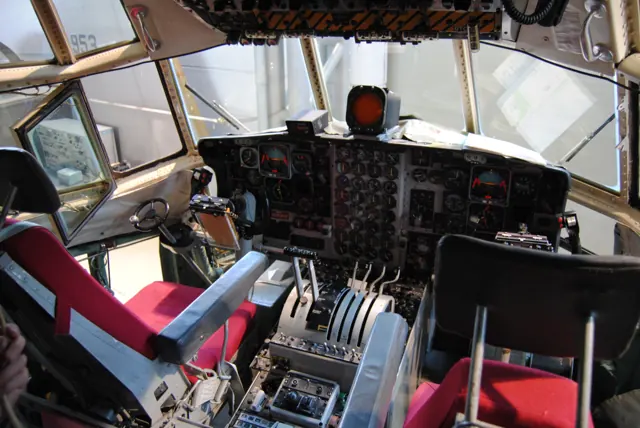
From the flight deck, the many windows were a lasting pleasure. He valued being able to see above, beside and below the cockpit while manoeuvring. He also experienced the transition from the older K model to the J, with its different displays, automation and crew arrangement.
The War Zone interview · May 2024. RAF Hercules career spanning C-130K and C-130J; initially a loadmaster, selected for pilot training in 1997.
Read the full account · The War Zone ↗Command means looking after the people as well as the aircraft
Perini grew up visiting a flying club with his father, a leisure pilot, and eventually reached the Hercules after military training in Italy and the United States. By the Ostrava interview he was an aircraft commander, with duties extending beyond planning and flying the next sector. He described keeping a crew confident and settled during long periods away.
Supplying the Italian Antarctic base was a particularly happy memory. The crew operated from New Zealand and landed on sea ice in a landscape he found unlike anywhere else. At the airshow, meeting visitors brought another pleasure, even when the number wanting to see inside exceeded what the crew could manage.
NATO Days interview published December 2025. Italian Air Force C-130 commander; the article does not explicitly identify the precise variant.
Read the full account · NATO Days in Ostrava ↗In your simulator
Systems, equipment and documentation for each developer’s aircraft.
Compare simulator versions →X-Plane 11Lockheed C-130 Hercules
Laminar Research · Released
Lockheed C-130 Hercules
Laminar Research · Released
MSFS 2024C-130J ADV
Blackbird Simulations · Released
C-130J ADV
Blackbird Simulations · Released
X-Plane 12C-130H / L-100-30 Hercules
X-Hangar · Released
C-130H / L-100-30 Hercules
X-Hangar · Released
X-Plane 12C-130H Hercules
X-Hangar · Released
C-130H Hercules
X-Hangar · Released
Aircraft specifications
Published figures for the named real-aircraft variant. Simulator equipment and performance can differ.
| Specification | Published value |
|---|---|
| Length | 97 ft 9 in (29.79 m) |
| Wingspan | 132 ft 7 in (40.41 m) |
| Height | 38 ft 3 in (11.66 m) |
| Wing area | 1,745 sq ft (162.1 m² ) |
| Empty weight | 75,800 lb (34,382 kg) |
| Max takeoff weight | 155,000 lb (70,307 kg) |
| Powerplant | 4 × Allison T56 -A-15 turboprop engines, 4,590 shp (3,420 kW) each |
| Propellers | 4-bladed Hamilton Standard 54H60 constant-speed fully feathering reversible propellers, 13 ft 6 in (4.11 m) diameter |
| Maximum speed | 320 kn (370 mph, 590 km/h) at 20,000 ft (6,100 m) |
| Cruise speed | 292 kn (336 mph, 541 km/h) |
| Range | 2,050 nmi (2,360 mi, 3,800 km) |
| Service ceiling | 33,000 ft (10,000 m) empty |
| Rate of climb | 1,830 ft/min (9.3 m/s) |
Manuals & resources
Find your next read
Choose a topic for a short introduction and a link to the original source. Simulator references identify the developer and edition they cover.
Pilot account
A ski-aircraft check ride ends with an unexpected overnight stayC-130.net retrospective. RAF exchange pilot with the USAF 17th squadron in Alaska, 1968–1970; selected incident concerns ski-equipped C-130D 57-0492 in Greenland.
Furlong’s exchange posting brought him from RAF transport flying to the specialised work of operating Hercules aircraft on Greenland’s ice cap. Training included supervised flights before a check ride, with more experienced crews helping newcomers learn the conditions. His own check ride ended badly when a ski encountered a hole in the snow. The aircraft was damaged, but nobody was injured. A snowcat took the crew to the radar site for the night, and another Hercules collected them the next day.
Charles G. Furlong
C-130.net · Read the source ↗The loadmaster moves forward and finds a remarkable viewThe War Zone interview · May 2024. RAF Hercules career spanning C-130K and C-130J; initially a loadmaster, selected for pilot training in 1997.
Bateman first knew the Hercules from its cargo compartment, where he worked as an air loadmaster. The aircraft seemed enormous when he joined the unit, and its noise and sparse comforts were hard to forget. Becoming a pilot later gave him a different relationship with the same family of aircraft. From the flight deck, the many windows were a lasting pleasure. He valued being able to see above, beside and below the cockpit while manoeuvring.
Scott Bateman
The War Zone · Read the source ↗Developer documentation
C-130J ADV — product listingC-130J ADV · MSFS 2024
Product listing captured 2026-09-23; edition scope from the reviewed catalogue
blackbirdsims.com · Read the source ↗C-130H / L-100-30 Hercules — product listingC-130H / L-100-30 Hercules · X-Plane 12
Product listing captured 2026-09-30; edition scope from the reviewed catalogue
store.x-plane.org · Read the source ↗C-130H Hercules — product listingC-130H Hercules · X-Plane 12
Product listing captured 2026-09-30; edition scope from the reviewed catalogue
store.x-plane.org · Read the source ↗Read the original documentation from the people who created it. Manuals open on their publisher’s website.
Manual
X-Plane 11 Desktop ManualLaminar Research X-Plane aircraft and avionics manualsLaminar ResearchAircraft background
Lockheed C-130 HerculesWikipedia contributors · Research background · Wikipedia revision 1372392083 · retrieved 2026-09-12Type designator
ICAO Doc 8643 — aircraft type designatorsInternational Civil Aviation Organization · Public search data retrieved 2026-09-14; authority update 2026-09-03Product
C-130J ADV for MSFS2024blackbirdsims.com · Product listing captured 2026-09-23; edition scope from the reviewed catalogue C-130H Hercules-xhangar-c130Hstore.x-plane.org · Product listing captured 2026-09-30; edition scope from the reviewed catalogueBuilt-in force-feedback profiles
Read the documentary basis, editable starting settings and remaining questions for the aircraft you fly. Each explanation refers to the exact profile revision shown.
Catalogue programme-20261022-v1 · 5 profile choices
Blackbird C-130J ADV Short
Blackbird Simulations · Free and Pro · Revision 2 · Inherited starting point
MSFS 2024
Blackbird C-130J ADV Short: Hydraulic boost motivates a powered-control approximation.
Blackbird C-130J ADV Long
Blackbird Simulations · Free and Pro · Revision 2 · Inherited starting point
MSFS 2024
Blackbird C-130J ADV Long: Hydraulic boost motivates a powered-control approximation.
X-Hangar C-130H Hercules
X-Hangar · Free and Pro · Revision 3 · Inherited starting point
X-Plane 12
X-Hangar C-130H Hercules: Hydraulic boost motivates a powered-control approximation.
X-Hangar L-100-30 Hercules
X-Hangar · Free and Pro · Revision 3 · Inherited starting point
X-Plane 12
X-Hangar L-100-30 Hercules: Hydraulic boost motivates a powered-control approximation.
Lockheed C-130 Hercules
Free and Pro · Revision 1 · Partial review
X-Plane 11
Lockheed C-130 Hercules: Hydraulic boost motivates a powered-control approximation.
Blackbird C-130J ADV Short
Blackbird C-130J ADV Short: Hydraulic boost motivates a powered-control approximation.
Aircraft and simulator scope
- Blackbird C-130J ADV Short · Blackbird Simulations · MSFS 2024 · Add-on starting point
The simulator model and controls
Lockheed designed the Hercules for troops, freight and medical evacuation, with a high wing, four turboprops, a large cargo compartment and rear loading ramp. The airframe also supported tanker, weather, scientific and other specialist missions.
This profile selects Blackbird C-130J ADV Short for MSFS 2024.
How this profile feels
Hydraulic boost motivates a powered-control approximation. Spring resistance builds with the selected airspeed response. A separate aerodynamic term adds speed-dependent control load.
Aircraft trim is separate from cargo hydraulics and automatic-flight commands. Pitch-trim relief is off. Autopilot following is off.
Controls and trim
The Hercules uses boosted primary controls, distinct from auxiliary cargo hydraulics. Blackbird’s ADV describes custom boost, trim and warning systems; X-Hangar separately represents military C-130H and civil stretched L-100-30 cockpits. Their propeller, avionics and mission fits remain separate.
The selected implementation
Blackbird’s ADV has short/long fuselage choices, six-blade propellers and its own boost/input/system implementation.
About the values
The gains are normalized profile settings. They describe the chosen effect balance; hand force depends on the device and its output limits. IAS references are tuning values rather than operating limits. Physical acceptance of this revision remains pending.
Documentary review and sources
These decisions describe the documentary basis and remaining gaps for this revision. Aircraft documentation and a starting setting describe different kinds of evidence.
Aircraft and variant
InheritedThis profile selects Blackbird C-130J ADV Short for MSFS 2024.
Flight controls
InheritedThe Hercules uses boosted primary controls, distinct from auxiliary cargo hydraulics. Blackbird’s ADV describes custom boost, trim and warning systems; X-Hangar separately represents military C-130H and civil stretched L-100-30 cockpits. Their propeller, avionics and mission fits remain separate.
Trim
InheritedAircraft trim is separate from cargo hydraulics and automatic-flight commands. Pitch relief is off, with stored authority 0; roll authority is 0.
Autopilot and stability
InheritedAutopilot following is off; the configured spring and load retain the hardware feel.
Equipment
InheritedBlackbird’s ADV has short/long fuselage choices, six-blade propellers and its own boost/input/system implementation.
Speeds and limits
InheritedThe indicated-speed references set the profile response scale; they are separate from aircraft operating limits.
Simulator integration
InheritedThe profile targets msfs2024. Add-on-specific controls use only the supported references configured by this profile.
Force-feedback settings
InheritedThe settings define the profile’s effect balance. Device output limits affect physical hand force.
Starting settings and their rationale
These configured values are starting estimates. The explanations describe what each setting controls; physical validation appears separately below.
| Setting | Starting value | What it controls and why |
|---|---|---|
| Spring strength | Starting value0.8 | What it controls and whyHydraulic boost motivates a powered-control approximation. The baseline spring is 0.8. Its low-speed blend reaches baseline strength at 100 KIAS. |
| Master force gain | Starting value0.85 | What it controls and whyScales overall profile strength while preserving effect balance, subject to device and output limits. |
| Profile force gain | Starting value0.25 | What it controls and whyThe aerodynamic-load gain is 0.25 with an indicated-speed reference of 200 KIAS. The hydraulic-load factor of 0.35 scales that modeled term; it is a selected artificial-feel approximation. |
| Force tuning speed/reference | Starting value200 kt | What it controls and whySets the IAS reference for aerodynamic loading. It is an estimate, not published cruise TAS or a flight limit. |
| Spring response reference speed | Starting value100 kt | What it controls and whySets the IAS where the low-speed blend reaches baseline strength; high-speed stiffening also uses it. |
| Aileron force scale | Starting value0.75 | What it controls and whyRoll and pitch aerodynamic scales are 0.75 and 0.9, respectively. They set the aerodynamic axis balance. No custom spring-travel curve is enabled. |
| Elevator force scale | Starting value0.9 | What it controls and whyScales pitch aerodynamic loading; pitch spring travel and trim responses are separate settings. |
| Trim feel | Starting valueDisabled | What it controls and whyRetained for compatibility and group membership. Trim relief, rather than this flag, controls centre movement. |
| Trim relief | Starting valueDisabled | What it controls and whyAllows trim relief with supported control law and valid telemetry. Axis authorities set its amount. |
| Autopilot follow | Starting valueDisabled | What it controls and whyAutopilot following is off; the configured spring and load retain the hardware feel. |
| Autopilot neutral hold | Starting valueDisabled | What it controls and whyPermits centering hold during a supported AP state, separate from following a moving target. |
| Output force limit | Starting value0.55 | What it controls and whyCaps directed-force output. Native spring effects and device limits remain separate. |
All 44 starting settings and their rationale
The settings define the profile’s effect balance. Device output limits affect physical hand force.
| Setting | Starting value | What it controls and why |
|---|---|---|
| Spring strength | Starting value0.8 | What it controls and whyHydraulic boost motivates a powered-control approximation. The baseline spring is 0.8. Its low-speed blend reaches baseline strength at 100 KIAS. |
| Spring deadband | Starting value0.035 | What it controls and whySets travel around the centre before the baseline spring resists. Smaller values engage it sooner. |
| Profile force gain | Starting value0.25 | What it controls and whyThe aerodynamic-load gain is 0.25 with an indicated-speed reference of 200 KIAS. The hydraulic-load factor of 0.35 scales that modeled term; it is a selected artificial-feel approximation. |
| Master force gain | Starting value0.85 | What it controls and whyScales overall profile strength while preserving effect balance, subject to device and output limits. |
| QBlend Enabled | Starting valueEnabled | What it controls and whyAllows baseline spring strength to rise with indicated airspeed where the control law permits it. |
| QSpring Minimum Factor | Starting value0.55 | What it controls and whySets low-speed spring strength as a fraction of baseline when blending is enabled. One keeps full strength. |
| QSpring Start Knots | Starting value35 kt | What it controls and whySets the IAS where the low-speed spring blend starts rising. This is a feel threshold, not a flight limit. |
| Spring response reference speed | Starting value100 kt | What it controls and whySets the IAS where the low-speed blend reaches baseline strength; high-speed stiffening also uses it. |
| Force tuning speed/reference | Starting value200 kt | What it controls and whySets the IAS reference for aerodynamic loading. It is an estimate, not published cruise TAS or a flight limit. |
| Airspeed spring stiffening gain | Starting value0 | What it controls and whyThe high-speed spring-stiffening gain is 0. No additional speed-driven stiffening is added; this does not disable independent aerodynamic loading. |
| Airspeed spring stiffening limit | Starting value5 | What it controls and whyLimits the squared airspeed ratio used for high-speed spring stiffening; it is not a device-force cap. |
| Aileron force scale | Starting value0.75 | What it controls and whyRoll and pitch aerodynamic scales are 0.75 and 0.9, respectively. They set the aerodynamic axis balance. No custom spring-travel curve is enabled. |
| Elevator force scale | Starting value0.9 | What it controls and whyScales pitch aerodynamic loading; pitch spring travel and trim responses are separate settings. |
| Output force limit | Starting value0.55 | What it controls and whyCaps directed-force output. Native spring effects and device limits remain separate. |
| Trim feel | Starting valueDisabled | What it controls and whyRetained for compatibility and group membership. Trim relief, rather than this flag, controls centre movement. |
| Trim relief | Starting valueDisabled | What it controls and whyAllows trim relief with supported control law and valid telemetry. Axis authorities set its amount. |
| Elevator Authority | Starting value0 | What it controls and whyAircraft trim is separate from cargo hydraulics and automatic-flight commands. Pitch relief is off, with stored authority 0; roll authority is 0. |
| Aileron Authority | Starting value0 | What it controls and whyScales supported roll-trim relief and permitted centre movement. Zero removes roll response. |
| Force Trim Enabled | Starting valueDisabled | What it controls and whyEnables local force trim, separate from aircraft-owned trim and add-on integration qualification. |
| GLoad Enabled | Starting valueEnabled | What it controls and whyAllows load-factor changes to modify permitted spring laws. Passive fly-by-wire feel can suppress it. |
| Rate Damping Enabled | Starting valueEnabled | What it controls and whyEnables rate damping with the configured coefficients and control law. |
| Autopilot follow | Starting valueDisabled | What it controls and whyAutopilot following is off; the configured spring and load retain the hardware feel. |
| Autopilot follow authority | Starting value0.1 | What it controls and whySets admitted AP-follow gain, not a percentage of travel. Runtime ownership and input limits still apply. |
| Autopilot neutral hold | Starting valueDisabled | What it controls and whyPermits centering hold during a supported AP state, separate from following a moving target. |
| Autopilot neutral hold strength | Starting value0.6 | What it controls and whySets admitted AP neutral-hold strength; inactive while neutral hold is disabled. |
| Enabled | Starting valueEnabled | What it controls and whyEnables aerodynamic cues; each still needs nonzero strength and its simulator conditions. |
| Gain | Starting value0.3 | What it controls and whySets stall-buffet strength. Zero removes the cue without changing simulator stalls or warnings. |
| Gain | Starting value0 | What it controls and whySets high-Mach buffet strength; onset and full-strength thresholds are separate. |
| Gain | Starting value0 | What it controls and whySets flap buffet at the configured position and speed gates. Flap movement texture is separate. |
| Maximum flap index | Starting value4 | What it controls and whySets the final flap index for detent normalization. UP plus three detents uses maximum index3. |
| Minimum flap index | Starting value2 | What it controls and whySets the first flap detent that admits buffet; this is a handle index, not degrees. |
| Gain | Starting value0 | What it controls and whySets gear aerodynamic buffet; movement and ground-contact cues are separate. |
| Shaker Enabled | Starting valueDisabled | What it controls and whyPermits shaker at supported warning conditions; the switch does not establish aircraft equipment. |
| Stick shaker amplitude | Starting value0.9 | What it controls and whySets triggered shaker strength; inactive while the shaker feature is disabled. |
| Enabled | Starting valueEnabled | What it controls and whyEnables ground effects; each still needs its own strength and contact or motion telemetry. |
| Gain | Starting value0.4 | What it controls and whySets rolling texture strength, modified by speed, surface and undercarriage configuration. |
| Gain | Starting value0.32 | What it controls and whySets gear-bump texture during ground motion, separate from touchdown impact. |
| Gain | Starting value0.9 | What it controls and whySets landing-impact strength; landing telemetry and response shape determine the pulse. |
| Gain | Starting value0.5 | What it controls and whySets reverse-thrust vibration with valid reverser and engine conditions. Zero removes the cue. |
| Enabled | Starting valueEnabled | What it controls and whyEnables engine cues with nonzero settings and valid running-engine telemetry. |
| Gain | Starting value0.06 | What it controls and whySets estimated engine vibration using configured telemetry and response, not measured cockpit vibration. |
| Enabled | Starting valueEnabled | What it controls and whyEnables accessory cues with configured strengths and observed accessory movement. |
| Gain | Starting value0.12 | What it controls and whySets texture from observed flap movement; a command without movement does not establish the cue. |
| Gain | Starting value0.12 | What it controls and whySets texture from observed gear movement, separate from aerodynamic and touchdown effects. |
Limits and open questions
- Forces and speed response are engineering estimates. Installed-product and physical qualification remain deferred.
- Custom trim-centre/relief, AP servo following, hydraulic-failure loading and pusher forces are disabled pending trustworthy current interfaces. Real aircraft functions still exist.
- Public developer manual/SDK links return403; acquisition failures and changelog evidence are retained. No unread manual claim or old event-index assumption.
- Long/short use identical column settings; payload/CG/performance differences belong to simulator state. No fabricated fuselage-specific force calibration.
- Generic warning/motion channels require installed-product acceptance; custom V-speeds/boost-pressure schedules and per-engine propeller phases are not inferred.
Physical validation
No physical force validation is recorded in this public catalogue for this revision. Documentary review and software checks do not establish how a particular device feels.
Discuss this aircraft (0)
Questions, observations and useful sources from the community.
No published discussions yet. Bring a question or share a useful source.
Open aircraft discussions →Content expanded · What’s new
Something missing or a source that needs attention?
Suggest a correction ↗


