


Start here
A few places to begin, from the aircraft’s story to the people who fly it.
Meet the aircraft
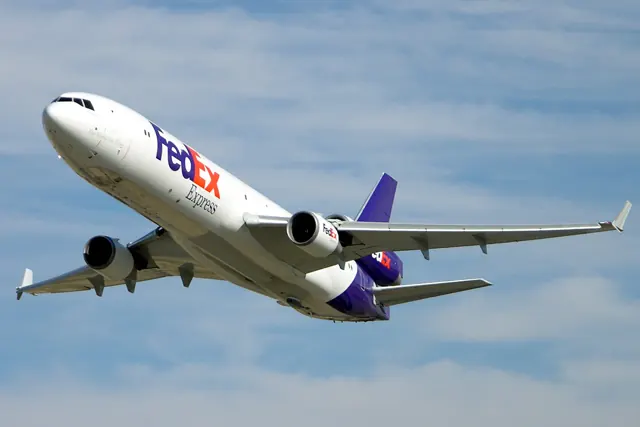
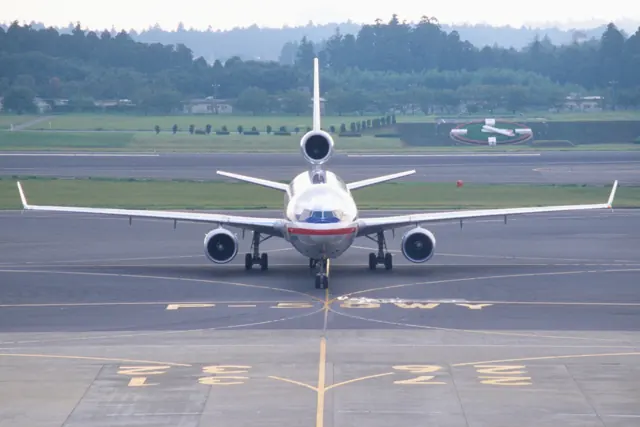
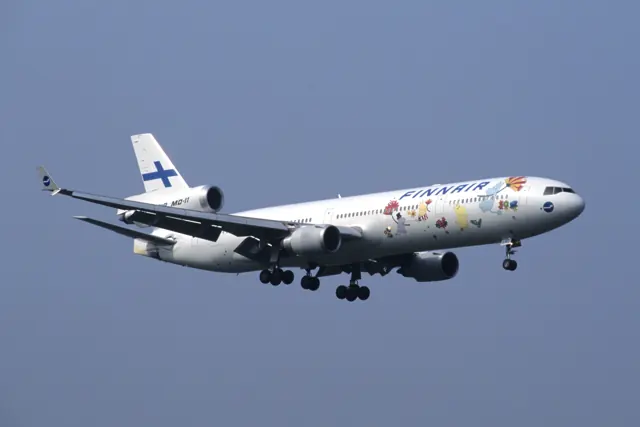
The MD-11 developed the DC-10 with a longer fuselage, winglets and a two-pilot electronic flight deck. It retained the trijet arrangement, including the centre engine at the base of the fin. Passenger and freighter versions served different markets.
Aircraft background
Wikipedia contributors · Read more ↗Flying the aircraft that had been part of his childhood
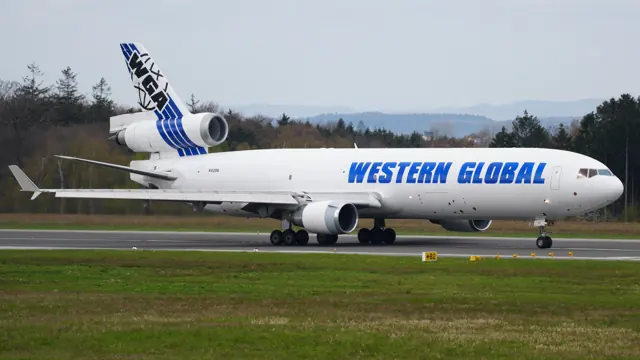
Schouten had grown up around the MD-11 because his father flew it. Reaching the same aircraft after jobs in smaller island transports and the MD-80 fulfilled a long-held ambition. By the time of the interview, the freighter was taking him around the world with Western Global Airlines. The work did not follow a predictable airline pattern.
Up in the Sky interview · September 2020. Captain at Western Global Airlines, flying the MD-11 since joining in 2016; earlier MD-80 work is a separate career stage.
Up in the Sky · Read more ↗The freighter has independent cockpit equipment
Rotate lists separate pilot and copilot displays, instrument-source selection and two independent flight-management computers. The freighter’s component-based systems also support custom failures and warnings.
McDonnell Douglas MD-11 · Rotate · Rotate · X-Plane 11 · X-Plane 12
Rotate · Read more ↗Into the cockpit
 YouTube
 The Pilot Channel · 13 min ·
Martinair MD-11 Take-Off Amsterdam Schiphol - Cockpit View
A Martinair MD-11 departure from Amsterdam, filmed from the flight deck.
Real aircraft · McDonnell Douglas MD-11
Watch on YouTube ↗Preview images are served by AirframeDB. Videos open on YouTube only when you choose to watch.
Meet McDonnell Douglas MD-11
The MD-11 developed the DC-10 with a longer fuselage, winglets and a two-pilot electronic flight deck. It retained the trijet arrangement, including the centre engine at the base of the fin. Passenger and freighter versions served different markets.
Automated systems and fuel management formed part of the new design. Each simulator developer documents the systems, failures and variants included in its implementation.
McDonnell Douglas MD-11
McDonnell Douglas → · Explore the family →
McDonnell Douglas MD-11
Wikipedia contributors · McDonnell Douglas MD-11 ↗Rotate · X-Plane 11 · X-Plane 12 →Aircraft type designators
Use the code for the model you are flying. The linked authority lists the applicable aircraft.
History & design
The final scheduled passenger service had a separate farewell
KLM’s final scheduled MD-11 passenger flight arrived in Amsterdam from Montreal on 26 October 2014. Three special sightseeing flights over the Netherlands were planned for 11 November. Keeping those events separate explains why accounts of the aircraft’s passenger-service farewell give different dates.
KLM · KLM operates last MD-11 passenger flight ↗KLM announcement of 26 October 2014; special flights were still prospective
A research aircraft lands using engine thrust for control
NASA’s history records Gordon Fullerton’s first MD-11 propulsion-controlled landing at Edwards on 29 August 1995. Special software translated commands into engine-thrust changes while the usual control surfaces remained still. It was an experimental backup-control programme, distinct from an ordinary airline flight or a real emergency.
NASA History Office · Touchdown: The Development of Propulsion Controlled Aircraft at NASA Dryden ↗NASA historical account · PDF p.32; specially equipped research MD-11
Development milestones
First flight: January 10, 1990
Developed from: McDonnell Douglas DC-10
Wikipedia contributors · McDonnell Douglas MD-11 ↗McDonnell Douglas MD-11 · family/variant named by the source · Wikipedia revision 1372184859
Pilot accounts
Flying the aircraft that had been part of his childhood
Schouten had grown up around the MD-11 because his father flew it. Reaching the same aircraft after jobs in smaller island transports and the MD-80 fulfilled a long-held ambition. By the time of the interview, the freighter was taking him around the world with Western Global Airlines.
The work did not follow a predictable airline pattern. Within a normal stretch of seventeen working days, destinations and schedules could change daily. He found it demanding, but valued visiting places outside the usual scheduled network. During the pandemic, busy cargo flying brought a complicated sense of good fortune: his part of aviation still needed crews while many other pilots faced unemployment.
Up in the Sky interview · September 2020. Captain at Western Global Airlines, flying the MD-11 since joining in 2016; earlier MD-80 work is a separate career stage.
Read the full account · Up in the Sky ↗Putting the MD-11’s reputation in the context of experience
Asked whether the MD-11’s approach speeds made it difficult, Bokomoko drew on earlier experience flying the 737 into high-altitude La Paz. That work had already made fast ground speeds familiar. The contributor regarded the MD-11’s speed as manageable and spoke positively about its braking and reverse thrust, while noting that conditions and equipment still mattered.
Other answers stressed the planning behind what passengers saw. Fuel remaining at arrival varied with the route and airline decisions, while takeoff flap selection followed prepared performance data. The replies offered a working pilot’s context for features that could seem unusual to an enthusiast, without treating every flight or operator as identical.
PPRuNe replies · 27–28 October 2003. Self-reported airline flying under a forum handle; identity and employer are not verified. Exact operating figures are not adopted as guidance.
Read the full account · PPRuNe ↗A safety pilot becomes an advocate for an unusual experiment
Miller’s view of propulsion-controlled flight changed when he saw the experimental MD-11 system working in the air. On its first attempt, its steady behaviour convinced him that the engineering team had achieved something significant. He subsequently pressed management to allow the programme to progress towards actual landings and further exploration of the test envelope.
That support mattered when the team considered switching off the hydraulic systems during a later experiment. Holding control surfaces still for a test was different from allowing them to move after hydraulic power disappeared. Miller helped obtain permission to investigate that uncertainty.
Interviewed by Tom Tucker for NASA’s 1999 history. McDonnell Douglas safety pilot in the 1995 MD-11 propulsion-controlled-aircraft research programme; experimental equipment, not standard MD-11 capability.
Read the full account · NASA History Office ↗In your simulator
Systems, equipment and documentation for each developer’s aircraft.
Compare simulator versions →X-Plane 11 · X-Plane 12McDonnell Douglas MD-11 · Rotate
Rotate · Released
McDonnell Douglas MD-11 · Rotate
Rotate · Released
MSFS 2020MD-11 Version 3 Passenger and Freighter
Sky Simulations · Released
MD-11 Version 3 Passenger and Freighter
Sky Simulations · Released
MSFS 2020 · MSFS 2024MD-11 passenger/freighter
TFDi Design · Released
MD-11 passenger/freighter
TFDi Design · Released
Manuals & resources
Find your next read
Choose a topic for a short introduction and a link to the original source. Simulator references identify the developer and edition they cover.
Simulator documentation
The freighter has independent cockpit equipmentMcDonnell Douglas MD-11 · Rotate · Rotate · X-Plane 11 · X-Plane 12
Rotate lists separate pilot and copilot displays, instrument-source selection and two independent flight-management computers. The freighter’s component-based systems also support custom failures and warnings.
Rotate MD-11F developer listing · captured September 2026
Rotate · Read the source ↗Fuel management includes the tail tankMcDonnell Douglas MD-11 · Rotate · Rotate · X-Plane 11 · X-Plane 12
The listed simulation includes automatic fuel scheduling, transfer, crossfeed, dumping, tail-fuel management and ballast-fuel control. These are features of Rotate’s MD-11F package, with their indications available through the simulated system display.
MD-11F developer feature list; not a claim about every MD-11 product
Rotate · Read the source ↗Passenger and freight variants with a substantial systems updateMcDonnell Douglas MD-11 · Rotate · Rotate · X-Plane 11 · X-Plane 12
Rotate's MD-11 v1.20 release covers both passenger and freighter versions. It adds SimBrief requests through ACARS/AOC pages, forecast winds, flight-plan import options and an alternative tape-style engine display. The release also revises manual handling, LSAS and control-wheel-steering behaviour. Some changes are explicitly X-Plane 12-only, so the simulator version remains part of the feature's scope.
Rotate MD-11 v1.20 · Developer release announcement and change list
Rotate · Read the source ↗Pilot account
Flying the aircraft that had been part of his childhoodUp in the Sky interview · September 2020. Captain at Western Global Airlines, flying the MD-11 since joining in 2016; earlier MD-80 work is a separate career stage.
Schouten had grown up around the MD-11 because his father flew it. Reaching the same aircraft after jobs in smaller island transports and the MD-80 fulfilled a long-held ambition. By the time of the interview, the freighter was taking him around the world with Western Global Airlines. The work did not follow a predictable airline pattern. Within a normal stretch of seventeen working days, destinations and schedules could change daily.
Briën Schouten
Up in the Sky · Read the source ↗Putting the MD-11’s reputation in the context of experiencePPRuNe replies · 27–28 October 2003. Self-reported airline flying under a forum handle; identity and employer are not verified. Exact operating figures are not adopted as guidance.
Asked whether the MD-11’s approach speeds made it difficult, Bokomoko drew on earlier experience flying the 737 into high-altitude La Paz. That work had already made fast ground speeds familiar. The contributor regarded the MD-11’s speed as manageable and spoke positively about its braking and reverse thrust, while noting that conditions and equipment still mattered. Other answers stressed the planning behind what passengers saw.
Bokomoko
PPRuNe · Read the source ↗Developer documentation
MD-11 passenger/freighter — product listingMD-11 passenger/freighter · MSFS 2020 · MSFS 2024
Product listing captured 2026-09-30; edition scope from the reviewed catalogue
Contrail · Read the source ↗Read the original documentation from the people who created it. Manuals open on their publisher’s website.
Manual
X-Plane aircraft and avionics manualsLaminar ResearchAircraft background
McDonnell Douglas MD-11Wikipedia contributors · Research background · Wikipedia revision 1372184859 · retrieved 2026-09-12 KLM operates last MD-11 passenger flightKLM · 26 October 2014 · scheduled-service farewellResource
MD11 v1.20 releaseRotateProduct
MD-11 FreighterRotate · Official developer / designated store catalogue · checked 2026-09-12 MD-11 PassengerRotate · Official developer / designated store catalogue · checked 2026-09-12 MD-11 Passenger & Freighter MSFS20/24 by TFDi Design | Contrail ShopContrail · Product listing captured 2026-09-30; edition scope from the reviewed catalogueType designator
ICAO Doc 8643 — aircraft type designatorsInternational Civil Aviation Organization · Public search data retrieved 2026-09-14; authority update 2026-09-03Developer documentation
Sky Simulations MD-11 Version 3Sky Simulations · Developer listing captured 28 September 2026; MSFS 2020Built-in force-feedback profiles
Read the documentary basis, editable starting settings and remaining questions for the aircraft you fly. Each explanation refers to the exact profile revision shown.
Catalogue programme-20261022-v1 · 6 profile choices
Rotate MD-11
Rotate · Free and Pro · Revision 4 · Inherited starting point
X-Plane 12
Rotate MD-11: Artificial feel accompanies the hydraulically powered controls.
Rotate MD-11F
Rotate · Free and Pro · Revision 3 · Inherited starting point
X-Plane 12
Rotate MD-11F: Artificial feel accompanies the hydraulically powered controls.
Sky Simulations MD-11 v3
Sky Simulations · Free and Pro · Revision 2 · Inherited starting point
MSFS 2020
Sky Simulations MD-11 v3: Artificial feel accompanies the hydraulically powered controls.
TFDi Design MD-11
TFDi Design · Free and Pro · Revision 4 · Inherited starting point
MSFS 2020 · MSFS 2024
TFDi Design MD-11: Artificial feel accompanies the hydraulically powered controls.
TFDi Design MD-11F
TFDi Design · Free and Pro · Revision 3 · Inherited starting point
MSFS 2020 · MSFS 2024
TFDi Design MD-11F: Artificial feel accompanies the hydraulically powered controls.
McDonnell Douglas MD-11
Free and Pro · Revision 1 · Partial review
X-Plane 12 · X-Plane 11
McDonnell Douglas MD-11: Artificial feel accompanies the hydraulically powered controls.
Sky Simulations MD-11 v3
Sky Simulations MD-11 v3: Artificial feel accompanies the hydraulically powered controls.
Aircraft and simulator scope
- Sky Simulations MD-11 v3 · Sky Simulations · MSFS 2020 · Add-on starting point
The simulator model and controls
The MD-11 developed the DC-10 with a longer fuselage, winglets and a two-pilot electronic flight deck. It retained the trijet arrangement, including the centre engine at the base of the fin. Passenger and freighter versions served different markets.
This profile selects Sky Simulations MD-11 v3 for MSFS 2020.
How this profile feels
Artificial feel accompanies the hydraulically powered controls. The spring stays independent of airspeed. Directed aerodynamic loading is omitted.
Automatic pitch trim and CWS are separate from a fixed hardware-centre choice. Pitch-trim relief is off. Autopilot following is off.
Controls and trim
The MD-11 documentation describes automatic pitch trim, CWS/RCWS and multiple hydraulic systems. Passenger/freighter and GE/PW fits retain their own configuration, while dial-a-flap and autoflight are specific cockpit mechanisms.
The selected implementation
Sky Simulations v3 groups GE/PW passenger and freighter models with its own hydraulic/automatic-flight system.
About the values
The gains are normalized profile settings. They describe the chosen effect balance; hand force depends on the device and its output limits. IAS references are tuning values rather than operating limits. Physical acceptance of this revision remains pending.
Documentary review and sources
These decisions describe the documentary basis and remaining gaps for this revision. Aircraft documentation and a starting setting describe different kinds of evidence.
Aircraft and variant
InheritedThis profile selects Sky Simulations MD-11 v3 for MSFS 2020.
Flight controls
InheritedThe MD-11 documentation describes automatic pitch trim, CWS/RCWS and multiple hydraulic systems. Passenger/freighter and GE/PW fits retain their own configuration, while dial-a-flap and autoflight are specific cockpit mechanisms.
Trim
InheritedAutomatic pitch trim and CWS are separate from a fixed hardware-centre choice. Pitch relief is off, with stored authority 0; roll authority is 0.
Autopilot and stability
InheritedAutopilot following is off; the configured spring and load retain the hardware feel.
Equipment
InheritedSky Simulations v3 groups GE/PW passenger and freighter models with its own hydraulic/automatic-flight system.
Speeds and limits
InheritedThe indicated-speed references set the profile response scale; they are separate from aircraft operating limits.
Simulator integration
InheritedThe profile targets msfs2020. Add-on-specific controls use only the supported references configured by this profile.
Force-feedback settings
InheritedThe settings define the profile’s effect balance. Device output limits affect physical hand force.
Starting settings and their rationale
These configured values are starting estimates. The explanations describe what each setting controls; physical validation appears separately below.
| Setting | Starting value | What it controls and why |
|---|---|---|
| Spring strength | Starting value0.6 | What it controls and whyArtificial feel accompanies the hydraulically powered controls. The baseline spring is 0.6. Low-speed spring blending is off. |
| Master force gain | Starting value0.85 | What it controls and whyScales overall profile strength while preserving effect balance, subject to device and output limits. |
| Profile force gain | Starting value0 | What it controls and whyThe stored 0 aerodynamic-load gain is inactive under the zero hydraulic-load factor. |
| Force tuning speed/reference | Starting value270 kt | What it controls and whySets the IAS reference for aerodynamic loading. It is an estimate, not published cruise TAS or a flight limit. |
| Spring response reference speed | Starting value65 kt | What it controls and whySets the IAS where the low-speed blend reaches baseline strength; high-speed stiffening also uses it. |
| Aileron force scale | Starting value0.8 | What it controls and whyRoll and pitch aerodynamic scales are 0.8 and 1, respectively. These stored weights do not create directed aerodynamic loading while that term is inactive. No custom spring-travel curve is enabled. |
| Elevator force scale | Starting value1 | What it controls and whyScales pitch aerodynamic loading; pitch spring travel and trim responses are separate settings. |
| Trim feel | Starting valueDisabled | What it controls and whyRetained for compatibility and group membership. Trim relief, rather than this flag, controls centre movement. |
| Trim relief | Starting valueDisabled | What it controls and whyAllows trim relief with supported control law and valid telemetry. Axis authorities set its amount. |
| Autopilot follow | Starting valueDisabled | What it controls and whyAutopilot following is off; the configured spring and load retain the hardware feel. |
| Autopilot neutral hold | Starting valueDisabled | What it controls and whyPermits centering hold during a supported AP state, separate from following a moving target. |
| Output force limit | Starting value0.55 | What it controls and whyCaps directed-force output. Native spring effects and device limits remain separate. |
All 44 starting settings and their rationale
The settings define the profile’s effect balance. Device output limits affect physical hand force.
| Setting | Starting value | What it controls and why |
|---|---|---|
| Spring strength | Starting value0.6 | What it controls and whyArtificial feel accompanies the hydraulically powered controls. The baseline spring is 0.6. Low-speed spring blending is off. |
| Spring deadband | Starting value0.035 | What it controls and whySets travel around the centre before the baseline spring resists. Smaller values engage it sooner. |
| Profile force gain | Starting value0 | What it controls and whyThe stored 0 aerodynamic-load gain is inactive under the zero hydraulic-load factor. |
| Master force gain | Starting value0.85 | What it controls and whyScales overall profile strength while preserving effect balance, subject to device and output limits. |
| QBlend Enabled | Starting valueDisabled | What it controls and whyAllows baseline spring strength to rise with indicated airspeed where the control law permits it. |
| QSpring Minimum Factor | Starting value0.55 | What it controls and whySets low-speed spring strength as a fraction of baseline when blending is enabled. One keeps full strength. |
| QSpring Start Knots | Starting value8 kt | What it controls and whySets the IAS where the low-speed spring blend starts rising. This is a feel threshold, not a flight limit. |
| Spring response reference speed | Starting value65 kt | What it controls and whySets the IAS where the low-speed blend reaches baseline strength; high-speed stiffening also uses it. |
| Force tuning speed/reference | Starting value270 kt | What it controls and whySets the IAS reference for aerodynamic loading. It is an estimate, not published cruise TAS or a flight limit. |
| Airspeed spring stiffening gain | Starting value0 | What it controls and whyThe high-speed spring-stiffening gain is 0. No additional speed-driven stiffening is added; this does not disable independent aerodynamic loading. |
| Airspeed spring stiffening limit | Starting value5 | What it controls and whyLimits the squared airspeed ratio used for high-speed spring stiffening; it is not a device-force cap. |
| Aileron force scale | Starting value0.8 | What it controls and whyRoll and pitch aerodynamic scales are 0.8 and 1, respectively. These stored weights do not create directed aerodynamic loading while that term is inactive. No custom spring-travel curve is enabled. |
| Elevator force scale | Starting value1 | What it controls and whyScales pitch aerodynamic loading; pitch spring travel and trim responses are separate settings. |
| Output force limit | Starting value0.55 | What it controls and whyCaps directed-force output. Native spring effects and device limits remain separate. |
| Trim feel | Starting valueDisabled | What it controls and whyRetained for compatibility and group membership. Trim relief, rather than this flag, controls centre movement. |
| Trim relief | Starting valueDisabled | What it controls and whyAllows trim relief with supported control law and valid telemetry. Axis authorities set its amount. |
| Elevator Authority | Starting value0 | What it controls and whyAutomatic pitch trim and CWS are separate from a fixed hardware-centre choice. Pitch relief is off, with stored authority 0; roll authority is 0. |
| Aileron Authority | Starting value0 | What it controls and whyScales supported roll-trim relief and permitted centre movement. Zero removes roll response. |
| Force Trim Enabled | Starting valueDisabled | What it controls and whyEnables local force trim, separate from aircraft-owned trim and add-on integration qualification. |
| GLoad Enabled | Starting valueDisabled | What it controls and whyAllows load-factor changes to modify permitted spring laws. Passive fly-by-wire feel can suppress it. |
| Rate Damping Enabled | Starting valueDisabled | What it controls and whyEnables rate damping with the configured coefficients and control law. |
| Autopilot follow | Starting valueDisabled | What it controls and whyAutopilot following is off; the configured spring and load retain the hardware feel. |
| Autopilot follow authority | Starting value0.1 | What it controls and whySets admitted AP-follow gain, not a percentage of travel. Runtime ownership and input limits still apply. |
| Autopilot neutral hold | Starting valueDisabled | What it controls and whyPermits centering hold during a supported AP state, separate from following a moving target. |
| Autopilot neutral hold strength | Starting value0.6 | What it controls and whySets admitted AP neutral-hold strength; inactive while neutral hold is disabled. |
| Enabled | Starting valueEnabled | What it controls and whyEnables aerodynamic cues; each still needs nonzero strength and its simulator conditions. |
| Gain | Starting value0 | What it controls and whySets stall-buffet strength. Zero removes the cue without changing simulator stalls or warnings. |
| Gain | Starting value0 | What it controls and whySets high-Mach buffet strength; onset and full-strength thresholds are separate. |
| Gain | Starting value0 | What it controls and whySets flap buffet at the configured position and speed gates. Flap movement texture is separate. |
| Maximum flap index | Starting value0 | What it controls and whySets the final flap index for detent normalization. UP plus three detents uses maximum index3. |
| Minimum flap index | Starting value2 | What it controls and whySets the first flap detent that admits buffet; this is a handle index, not degrees. |
| Gain | Starting value0 | What it controls and whySets gear aerodynamic buffet; movement and ground-contact cues are separate. |
| Shaker Enabled | Starting valueDisabled | What it controls and whyPermits shaker at supported warning conditions; the switch does not establish aircraft equipment. |
| Stick shaker amplitude | Starting value0.9 | What it controls and whySets triggered shaker strength; inactive while the shaker feature is disabled. |
| Enabled | Starting valueEnabled | What it controls and whyEnables ground effects; each still needs its own strength and contact or motion telemetry. |
| Gain | Starting value0.4 | What it controls and whySets rolling texture strength, modified by speed, surface and undercarriage configuration. |
| Gain | Starting value0.32 | What it controls and whySets gear-bump texture during ground motion, separate from touchdown impact. |
| Gain | Starting value0.9 | What it controls and whySets landing-impact strength; landing telemetry and response shape determine the pulse. |
| Gain | Starting value0 | What it controls and whySets reverse-thrust vibration with valid reverser and engine conditions. Zero removes the cue. |
| Enabled | Starting valueEnabled | What it controls and whyEnables engine cues with nonzero settings and valid running-engine telemetry. |
| Gain | Starting value0.06 | What it controls and whySets estimated engine vibration using configured telemetry and response, not measured cockpit vibration. |
| Enabled | Starting valueEnabled | What it controls and whyEnables accessory cues with configured strengths and observed accessory movement. |
| Gain | Starting value0.12 | What it controls and whySets texture from observed flap movement; a command without movement does not establish the cue. |
| Gain | Starting value0.12 | What it controls and whySets texture from observed gear movement, separate from aerodynamic and touchdown effects. |
Limits and open questions
- Documentary starting point; installed-title capture and physical force acceptance are pending.
- Force amplitudes, damping and speed response are editable engineering estimates, not measured hand forces.
- No verified custom servo-target, trim geometry or hydraulic-failure interface. Autopilot follow, neutral hold, trim relief and hydraulic-loss forces remain off.
- Developer-qualified matching is based on documented product names. Save an aircraft default if live telemetry omits the developer.
- Only MSFS 2020 is admitted by the current developer requirements; MSFS 2024 compatibility is unverified.
- No Sky Simulations LSAS/RCWS or yoke servo target was documented. The TFDi parent supplies only reviewed settings, not its runtime adapter identity.
- Inherited force magnitudes remain editable estimates; aircraft-specific settings for speed response, controls, trim, autopilot and enabled effects are retained. New physical feel acceptance is pending.
Physical validation
No physical force validation is recorded in this public catalogue for this revision. Documentary review and software checks do not establish how a particular device feels.
Discuss this aircraft (0)
Questions, observations and useful sources from the community.
No published discussions yet. Bring a question or share a useful source.
Open aircraft discussions →Content expanded · What’s new
Something missing or a source that needs attention?
Suggest a correction ↗