


Start here
A few places to begin, from the aircraft’s story to the people who fly it.
Meet the aircraft
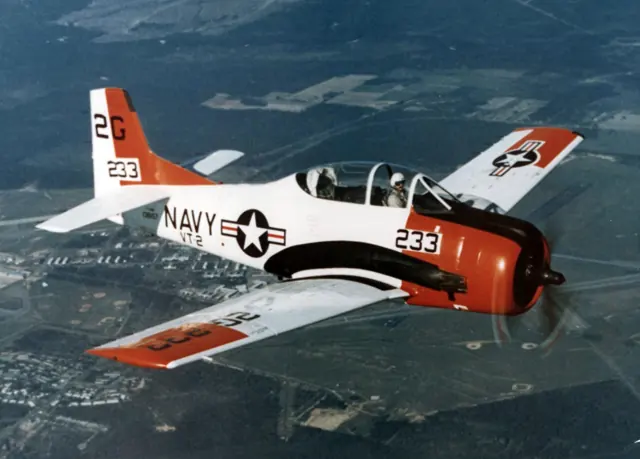
The T-6 family combined a radial engine, low wing and tandem cockpits for advanced pilot training. British Commonwealth forces knew it as the Harvard, while US Navy service used the SNJ designation.
Aircraft background
Wikipedia contributors · Read more ↗Old cockpit smells and a summer photographic flight
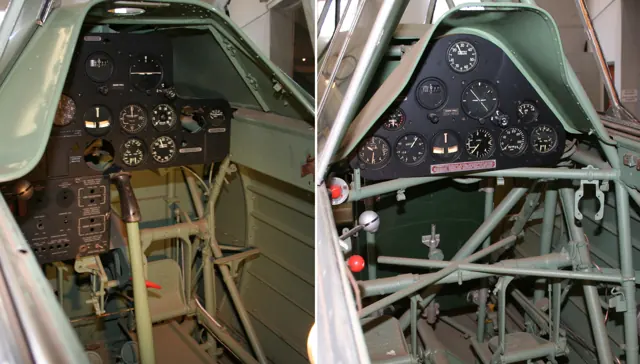
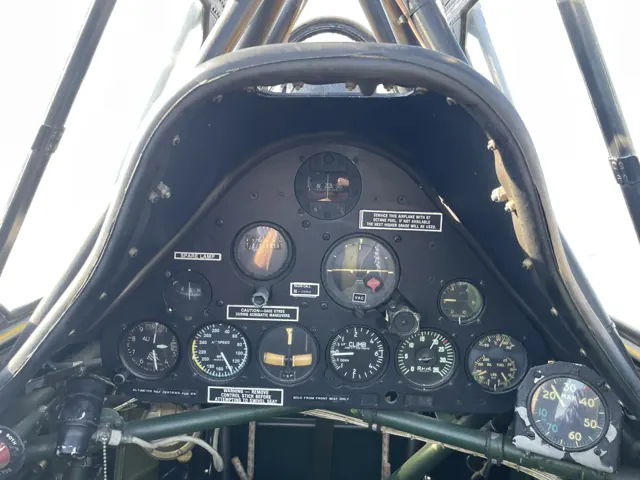
Davey found plenty of character before the aircraft even moved: the old cockpit had Portuguese placards, a worn appearance and a smell he wished could be bottled. A thorough briefing preceded the flight, with Nigel Willson sitting behind him. Airborne, the Harvard’s light, coordinated controls helped him settle into an aircraft with decades of history around its occupants.
Pilot · April 2020. G-TSIX, a 1942 Harvard owned by Kevin Barber, at Earls Colne with instructor Nigel Willson in the rear seat.
Pilot · Read more ↗Khamsin’s T-6G is explicitly an X-Plane 12 product
The official page identifies version 1.3, dated 14 June 2024, for X-Plane 12 and explicitly excludes X-Plane 11. This is the T-6G implementation.
North American T-6 Texan · Khamsin · X-Plane 12
Khamsin · Read more ↗Into the cockpit
 YouTube
 Bay Area Warbirds · 4 min ·
[360 degree cockpit view] Flying the North American T-6 Texan
A 360-degree T-6 circuit from engine start to shutdown.
Real aircraft · North American T-6 Texan
Watch on YouTube ↗Preview images are served by AirframeDB. Videos open on YouTube only when you choose to watch.
Meet North American T-6 Texan
The T-6 family combined a radial engine, low wing and tandem cockpits for advanced pilot training. British Commonwealth forces knew it as the Harvard, while US Navy service used the SNJ designation.
Civilian warbird flying and air racing followed its military career. National production variants and restored aircraft can differ in equipment, including modern cockpit additions.
North American T-6 Texan
North American → · Explore the family →
North American T-6 Texan
Wikipedia contributors · North American T-6 Texan ↗Microsoft Flight Simulator · MSFS 2024 →Khamsin · X-Plane 12 →Aircraft type designators
Use the code for the model you are flying. The linked authority lists the applicable aircraft.
History & design
An old trainer keeps traces of its travels
Davey’s account identifies G-TSIX as a 1942 aircraft and notes Portuguese placards surviving in its cockpit. Those small details make the preserved Harvard’s earlier working life visible alongside its later British display and instructional flying.
Pilot · Flight Test: North American Aviation T-6 Harvard ↗Specific airframe described in the 2020 report
Development milestones
First flight: 1 April 1935
Developed from: North American NA-16
Wikipedia contributors · North American T-6 Texan ↗North American T-6 Texan · family/variant named by the source · Wikipedia revision 1368719233
Pilot accounts
Old cockpit smells and a summer photographic flight
Davey found plenty of character before the aircraft even moved: the old cockpit had Portuguese placards, a worn appearance and a smell he wished could be bottled. A thorough briefing preceded the flight, with Nigel Willson sitting behind him. Airborne, the Harvard’s light, coordinated controls helped him settle into an aircraft with decades of history around its occupants.
The summer photographic flight added a more relaxed pleasure. Opening the canopy brought a breeze while the accompanying Cessna 182 worked to keep pace. Returning to the narrow strip supplied one last lesson: the wheels touched earlier than Davey expected, and Willson explained how the extended landing-gear struts affected that sight picture.
Pilot · April 2020. G-TSIX, a 1942 Harvard owned by Kevin Barber, at Earls Colne with instructor Nigel Willson in the rear seat.
Read the full account · Pilot ↗The hardest ten hours become the most memorable
Davisson could no longer be certain where his first T-6 flight had taken place. The time that taught him most was much easier to remember: ten demanding hours with Junior Burchinal in Texas. Later outings were more enjoyable, but he credited those intensive lessons with giving him an unusually substantial amount to take away.
His subsequent experience included both receiving instruction and teaching Texan owners, much of it from the rear cockpit. He presented himself as a fortunate civilian pilot with roughly a hundred hours on the aircraft, rather than claiming exhaustive authority.
Flight Journal · republished January 2020. Civilian T-6 flying, including training with Junior Burchinal at Paris, Texas, in the early 1970s; original article date is not established.
Read the full account · Flight Journal ↗Learning to teach from the back seat
Mark Evans had more total flying experience than Hirschman, but the T-6 brought unfamiliar tailwheel habits into their cockpit. A straight departure prompted a joke about dancing shoes. In the warm Florida air, the open front canopy and aerobatic flying gave the checkout some of the pleasure that had drawn both pilots to the aircraft.
For Hirschman, teaching from behind meant learning as well. The restricted forward view came with a useful sensitivity to yaw, while judging how long to let a student work through a mistake required care. They made two flights together before Evans continued with Steve Larmore. The account follows the beginning of that checkout without claiming Hirschman completed the training himself.
AOPA · August 2015. After a 1,200-nautical-mile T-6 ferry, Hirschman began Mark Evans’s checkout in Florida; Evans subsequently completed it with Steve Larmore at Stallion 51.
Read the full account · AOPA ↗In your simulator
Systems, equipment and documentation for each developer’s aircraft.
Compare simulator versions →MSFS 2024T-6 Texan
Microsoft Flight Simulator · Released
T-6 Texan
Microsoft Flight Simulator · Released
X-Plane 12North American T-6 Texan
Khamsin · Released
North American T-6 Texan
Khamsin · Released
X-Plane 12North American T-6G Texan
KhamsinStudio · Released
North American T-6G Texan
KhamsinStudio · Released
Aircraft specifications
Published figures for the named real-aircraft variant. Simulator equipment and performance can differ.
| Specification | Published value |
|---|---|
| Length | 29 ft (8.8 m) |
| Wingspan | 42 ft (13 m) |
| Height | 11 ft 8 in (3.56 m) |
| Wing area | 253.7 sq ft (23.57 m² ) |
| Empty weight | 4,158 lb (1,886 kg) |
| Gross weight | 5,617 lb (2,548 kg) |
| Powerplant | 1 × Pratt & Whitney R-1340 -AN-1 Wasp radial engine , 600 hp (450 kW) |
| Maximum speed | 208 mph (335 km/h, 181 kn) at 5,000 ft (1,500 m) |
| Cruise speed | 145 mph (233 km/h, 126 kn) |
| Range | 730 mi (1,170 km, 630 nmi) |
| Service ceiling | 24,200 ft (7,400 m) |
| Rate of climb | 1,200 ft/min (6.1 m/s) |
Manuals & resources
Find your next read
Choose a topic for a short introduction and a link to the original source. Simulator references identify the developer and edition they cover.
Simulator documentation
Khamsin’s T-6G is explicitly an X-Plane 12 productNorth American T-6 Texan · Khamsin · X-Plane 12
The official page identifies version 1.3, dated 14 June 2024, for X-Plane 12 and explicitly excludes X-Plane 11. This is the T-6G implementation.
Official Khamsin product page, retrieved September 2026
Khamsin · Read the source ↗Two contributors share the aircraft’s developmentNorth American T-6 Texan · Khamsin · X-Plane 12
Khamsin credits its modelling and textures to Khamsin, and the flight model, XLUA plugin and FMOD sound pack to Philip Ubben.
Developer credits on the T-6G page
Khamsin · Read the source ↗Pilot account
Old cockpit smells and a summer photographic flightPilot · April 2020. G-TSIX, a 1942 Harvard owned by Kevin Barber, at Earls Colne with instructor Nigel Willson in the rear seat.
Davey found plenty of character before the aircraft even moved: the old cockpit had Portuguese placards, a worn appearance and a smell he wished could be bottled. A thorough briefing preceded the flight, with Nigel Willson sitting behind him. Airborne, the Harvard’s light, coordinated controls helped him settle into an aircraft with decades of history around its occupants. The summer photographic flight added a more relaxed pleasure.
Bob Davey
Pilot · Read the source ↗The hardest ten hours become the most memorableFlight Journal · republished January 2020. Civilian T-6 flying, including training with Junior Burchinal at Paris, Texas, in the early 1970s; original article date is not established.
Davisson could no longer be certain where his first T-6 flight had taken place. The time that taught him most was much easier to remember: ten demanding hours with Junior Burchinal in Texas. Later outings were more enjoyable, but he credited those intensive lessons with giving him an unusually substantial amount to take away. His subsequent experience included both receiving instruction and teaching Texan owners, much of it from the rear cockpit.
Budd Davisson
Flight Journal · Read the source ↗Developer documentation
North American T-6G Texan — product listingNorth American T-6G Texan · X-Plane 12
Product listing captured 2026-09-24; edition scope from the reviewed catalogue
KhamsinStudio · Read the source ↗Read the original documentation from the people who created it. Manuals open on their publisher’s website.
Manual
Microsoft Flight Simulator aircraft manualsMicrosoft / aircraft developersAircraft background
North American T-6 TexanWikipedia contributors · Research background · Wikipedia revision 1368719233 · retrieved 2026-09-12Resource
MSFS 2024 FAQ and edition aircraft inventoryMicrosoftProduct
T-6G TexanKhamsin · Official developer / designated store catalogue · checked 2026-09-12 North American T-6G TexanKhamsinStudio · Product listing captured 2026-09-24; edition scope from the reviewed catalogueType designator
ICAO Doc 8643 — aircraft type designatorsInternational Civil Aviation Organization · Public search data retrieved 2026-09-14; authority update 2026-09-03Built-in force-feedback profiles
Read the documentary basis, editable starting settings and remaining questions for the aircraft you fly. Each explanation refers to the exact profile revision shown.
Catalogue programme-20261022-v1 · 2 profile choices
KhamsinStudio North American T-6G Texan
KhamsinStudio · Free and Pro · Revision 3 · Inherited starting point
X-Plane 12
KhamsinStudio North American T-6G Texan: The selected response supplies the piston trainer’s stick balance.
North American T-6 Texan
Free and Pro · Revision 1 · Partial review
MSFS 2024 · X-Plane 12
North American T-6 Texan: The selected response supplies the piston trainer’s stick balance.
KhamsinStudio North American T-6G Texan
KhamsinStudio North American T-6G Texan: The selected response supplies the piston trainer’s stick balance.
Aircraft and simulator scope
- KhamsinStudio North American T-6G Texan · KhamsinStudio · X-Plane 12 · Add-on starting point
The simulator model and controls
The T-6 family combined a radial engine, low wing and tandem cockpits for advanced pilot training. British Commonwealth forces knew it as the Harvard, while US Navy service used the SNJ designation.
This profile selects KhamsinStudio North American T-6G Texan for X-Plane 12.
How this profile feels
The selected response supplies the piston trainer’s stick balance. Spring resistance builds with the selected airspeed response. A separate aerodynamic term adds speed-dependent control load.
Pitch relief accompanies the documented trim-tab configuration. Valid trim provides the configured pressure relief. Autopilot following is off.
Controls and trim
The piston-powered T-6G is the Texan training-aircraft generation represented by Khamsin. Its XP12 system and trim-tab updates belong to that product; the turbine Texan II is a separate aircraft.
The selected implementation
Khamsin’s XP12 T6G has its own xLua systems and trim-tab fixes, separate from the turboprop Texan II.
About the values
The gains are normalized profile settings. They describe the chosen effect balance; hand force depends on the device and its output limits. IAS references are tuning values rather than operating limits. Physical acceptance of this revision remains pending.
Documentary review and sources
These decisions describe the documentary basis and remaining gaps for this revision. Aircraft documentation and a starting setting describe different kinds of evidence.
Aircraft and variant
InheritedThis profile selects KhamsinStudio North American T-6G Texan for X-Plane 12.
Flight controls
InheritedThe piston-powered T-6G is the Texan training-aircraft generation represented by Khamsin. Its XP12 system and trim-tab updates belong to that product; the turbine Texan II is a separate aircraft.
Trim
InheritedPitch relief accompanies the documented trim-tab configuration. Pitch authority 0.3 provides load relief and permitted centre movement; roll authority is 0.
Autopilot and stability
InheritedAutopilot following is off; the configured spring and load retain the hardware feel.
Equipment
InheritedKhamsin’s XP12 T6G has its own xLua systems and trim-tab fixes, separate from the turboprop Texan II.
Speeds and limits
InheritedThe indicated-speed references set the profile response scale; they are separate from aircraft operating limits.
Simulator integration
InheritedThe profile targets xplane12. Add-on-specific controls use only the supported references configured by this profile.
Force-feedback settings
InheritedThe settings define the profile’s effect balance. Device output limits affect physical hand force.
Starting settings and their rationale
These configured values are starting estimates. The explanations describe what each setting controls; physical validation appears separately below.
| Setting | Starting value | What it controls and why |
|---|---|---|
| Spring strength | Starting value0.74 | What it controls and whyThe selected response supplies the piston trainer’s stick balance. The baseline spring is 0.74. Its low-speed blend reaches baseline strength at 65 KIAS. |
| Master force gain | Starting value0.85 | What it controls and whyScales overall profile strength while preserving effect balance, subject to device and output limits. |
| Profile force gain | Starting value0.8 | What it controls and whyThe aerodynamic-load gain is 0.8 with an indicated-speed reference of 140 KIAS. This supplies speed-dependent loading alongside the spring. |
| Force tuning speed/reference | Starting value140 kt | What it controls and whySets the IAS reference for aerodynamic loading. It is an estimate, not published cruise TAS or a flight limit. |
| Spring response reference speed | Starting value65 kt | What it controls and whySets the IAS where the low-speed blend reaches baseline strength; high-speed stiffening also uses it. |
| Aileron force scale | Starting value0.72 | What it controls and whyRoll and pitch aerodynamic scales are 0.72 and 1, respectively. They set the aerodynamic axis balance. No custom spring-travel curve is enabled. |
| Elevator force scale | Starting value1.0 | What it controls and whyScales pitch aerodynamic loading; pitch spring travel and trim responses are separate settings. |
| Trim feel | Starting valueDisabled | What it controls and whyRetained for compatibility and group membership. Trim relief, rather than this flag, controls centre movement. |
| Trim relief | Starting valueEnabled | What it controls and whyAllows trim relief with supported control law and valid telemetry. Axis authorities set its amount. |
| Autopilot follow | Starting valueDisabled | What it controls and whyAutopilot following is off; the configured spring and load retain the hardware feel. |
| Autopilot neutral hold | Starting valueDisabled | What it controls and whyPermits centering hold during a supported AP state, separate from following a moving target. |
| Output force limit | Starting value0.55 | What it controls and whyCaps directed-force output. Native spring effects and device limits remain separate. |
All 44 starting settings and their rationale
The settings define the profile’s effect balance. Device output limits affect physical hand force.
| Setting | Starting value | What it controls and why |
|---|---|---|
| Spring strength | Starting value0.74 | What it controls and whyThe selected response supplies the piston trainer’s stick balance. The baseline spring is 0.74. Its low-speed blend reaches baseline strength at 65 KIAS. |
| Spring deadband | Starting value0.04 | What it controls and whySets travel around the centre before the baseline spring resists. Smaller values engage it sooner. |
| Profile force gain | Starting value0.8 | What it controls and whyThe aerodynamic-load gain is 0.8 with an indicated-speed reference of 140 KIAS. This supplies speed-dependent loading alongside the spring. |
| Master force gain | Starting value0.85 | What it controls and whyScales overall profile strength while preserving effect balance, subject to device and output limits. |
| QBlend Enabled | Starting valueEnabled | What it controls and whyAllows baseline spring strength to rise with indicated airspeed where the control law permits it. |
| QSpring Minimum Factor | Starting value0.55 | What it controls and whySets low-speed spring strength as a fraction of baseline when blending is enabled. One keeps full strength. |
| QSpring Start Knots | Starting value8 kt | What it controls and whySets the IAS where the low-speed spring blend starts rising. This is a feel threshold, not a flight limit. |
| Spring response reference speed | Starting value65 kt | What it controls and whySets the IAS where the low-speed blend reaches baseline strength; high-speed stiffening also uses it. |
| Force tuning speed/reference | Starting value140 kt | What it controls and whySets the IAS reference for aerodynamic loading. It is an estimate, not published cruise TAS or a flight limit. |
| Airspeed spring stiffening gain | Starting value0.15 | What it controls and whyThe high-speed spring-stiffening gain is 0.15. It strengthens the permitted spring response above 65 KIAS, with the squared-speed ratio capped at 5. |
| Airspeed spring stiffening limit | Starting value5 | What it controls and whyLimits the squared airspeed ratio used for high-speed spring stiffening; it is not a device-force cap. |
| Aileron force scale | Starting value0.72 | What it controls and whyRoll and pitch aerodynamic scales are 0.72 and 1, respectively. They set the aerodynamic axis balance. No custom spring-travel curve is enabled. |
| Elevator force scale | Starting value1.0 | What it controls and whyScales pitch aerodynamic loading; pitch spring travel and trim responses are separate settings. |
| Output force limit | Starting value0.55 | What it controls and whyCaps directed-force output. Native spring effects and device limits remain separate. |
| Trim feel | Starting valueDisabled | What it controls and whyRetained for compatibility and group membership. Trim relief, rather than this flag, controls centre movement. |
| Trim relief | Starting valueEnabled | What it controls and whyAllows trim relief with supported control law and valid telemetry. Axis authorities set its amount. |
| Elevator Authority | Starting value0.3 | What it controls and whyPitch relief accompanies the documented trim-tab configuration. Pitch authority 0.3 provides load relief and permitted centre movement; roll authority is 0. |
| Aileron Authority | Starting value0 | What it controls and whyScales supported roll-trim relief and permitted centre movement. Zero removes roll response. |
| Force Trim Enabled | Starting valueDisabled | What it controls and whyEnables local force trim, separate from aircraft-owned trim and add-on integration qualification. |
| GLoad Enabled | Starting valueEnabled | What it controls and whyAllows load-factor changes to modify permitted spring laws. Passive fly-by-wire feel can suppress it. |
| Rate Damping Enabled | Starting valueEnabled | What it controls and whyEnables rate damping with the configured coefficients and control law. |
| Autopilot follow | Starting valueDisabled | What it controls and whyAutopilot following is off; the configured spring and load retain the hardware feel. |
| Autopilot follow authority | Starting value0.1 | What it controls and whySets admitted AP-follow gain, not a percentage of travel. Runtime ownership and input limits still apply. |
| Autopilot neutral hold | Starting valueDisabled | What it controls and whyPermits centering hold during a supported AP state, separate from following a moving target. |
| Autopilot neutral hold strength | Starting value0.6 | What it controls and whySets admitted AP neutral-hold strength; inactive while neutral hold is disabled. |
| Enabled | Starting valueEnabled | What it controls and whyEnables aerodynamic cues; each still needs nonzero strength and its simulator conditions. |
| Gain | Starting value0.35 | What it controls and whySets stall-buffet strength. Zero removes the cue without changing simulator stalls or warnings. |
| Gain | Starting value0 | What it controls and whySets high-Mach buffet strength; onset and full-strength thresholds are separate. |
| Gain | Starting value0 | What it controls and whySets flap buffet at the configured position and speed gates. Flap movement texture is separate. |
| Maximum flap index | Starting value3 | What it controls and whySets the final flap index for detent normalization. UP plus three detents uses maximum index3. |
| Minimum flap index | Starting value2 | What it controls and whySets the first flap detent that admits buffet; this is a handle index, not degrees. |
| Gain | Starting value0 | What it controls and whySets gear aerodynamic buffet; movement and ground-contact cues are separate. |
| Shaker Enabled | Starting valueDisabled | What it controls and whyPermits shaker at supported warning conditions; the switch does not establish aircraft equipment. |
| Stick shaker amplitude | Starting value0.5 | What it controls and whySets triggered shaker strength; inactive while the shaker feature is disabled. |
| Enabled | Starting valueEnabled | What it controls and whyEnables ground effects; each still needs its own strength and contact or motion telemetry. |
| Gain | Starting value0.4 | What it controls and whySets rolling texture strength, modified by speed, surface and undercarriage configuration. |
| Gain | Starting value0.25 | What it controls and whySets gear-bump texture during ground motion, separate from touchdown impact. |
| Gain | Starting value0.65 | What it controls and whySets landing-impact strength; landing telemetry and response shape determine the pulse. |
| Gain | Starting value0 | What it controls and whySets reverse-thrust vibration with valid reverser and engine conditions. Zero removes the cue. |
| Enabled | Starting valueEnabled | What it controls and whyEnables engine cues with nonzero settings and valid running-engine telemetry. |
| Gain | Starting value0.12 | What it controls and whySets estimated engine vibration using configured telemetry and response, not measured cockpit vibration. |
| Enabled | Starting valueEnabled | What it controls and whyEnables accessory cues with configured strengths and observed accessory movement. |
| Gain | Starting value0.12 | What it controls and whySets texture from observed flap movement; a command without movement does not establish the cue. |
| Gain | Starting value0.025 | What it controls and whySets texture from observed gear movement, separate from aerodynamic and touchdown effects. |
Limits and open questions
- Conventional manual trainer controls; moderate q-dependent load.
- Pitch-tab animation correction documented; pitch-only estimated relief, no roll trim inferred.
- No calibrated autopilot servo or inceptor-demand output established. AP follow and neutral hold are disabled.
- 140 KIAS is an estimated tuning reference, not a certified operating limit or cruise TAS.
- Native read-only aircraft telemetry only. No custom interface names, units or freshness contract invented; switches and animated controls are not servo demands.
- Spring 0.74, lateral scale 0.7, pitch/roll relief 0.22/0; editable estimates. No measured hand-force calibration, unsupported failure loads, surface-follow or body-rate torque.
- Installed-aircraft and physical checks are deferred. If telemetry omits the developer or configuration, select this profile and save it as the aircraft default.
- Only actual accessory-position changes drive movement textures. No release or installed-product acceptance is inferred.
Physical validation
No physical force validation is recorded in this public catalogue for this revision. Documentary review and software checks do not establish how a particular device feels.
Discuss this aircraft (0)
Questions, observations and useful sources from the community.
No published discussions yet. Bring a question or share a useful source.
Open aircraft discussions →Content expanded · What’s new
Something missing or a source that needs attention?
Suggest a correction ↗