

Start here
A few places to begin, from the aircraft’s story to the people who fly it.
Meet the aircraft
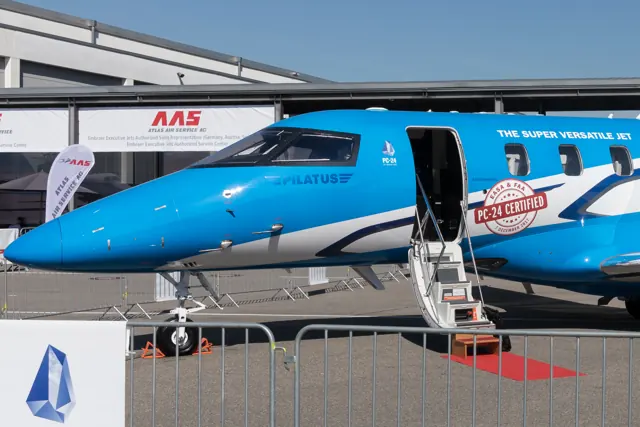
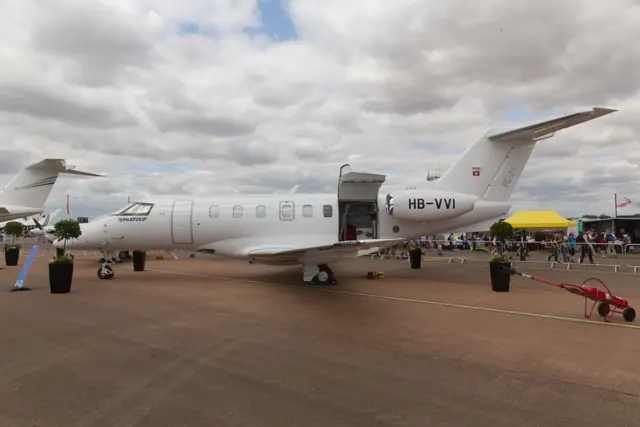
Pilatus designed the PC-24 to combine a business-jet cabin with access to shorter and less conventional airfields. Rear-mounted Williams engines leave the wing clear, and a large cargo door supports several cabin roles. It first flew in 2015.
Aircraft background
Wikipedia contributors · Read more ↗Familiar avionics, a new jet and a flight over Provence
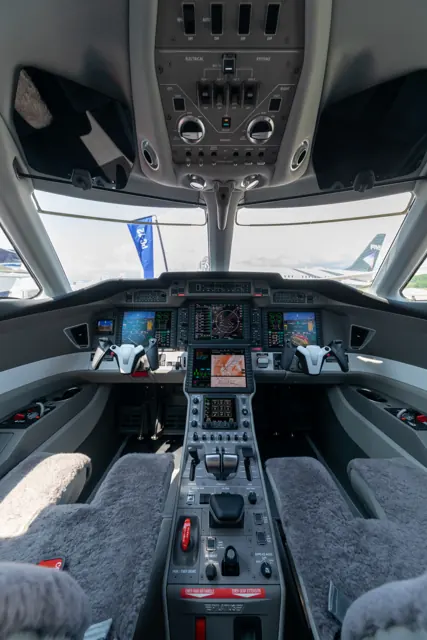
Ceretti brought both Falcon and recent PC-12 experience to Jetfly’s new aircraft. The PC-24’s cockpit looked clear and uncluttered to him, with good forward visibility and familiar ideas carried over from the PC-12’s avionics. He welcomed weather datalink information, while also seeing room to improve the electronic checklists in this early configuration.
Jetfly pilot interviewed by Pilatus after about 50 hours in the PC-24. The operator’s first delivery was in September 2018.
Pilatus Aircraft · Read more ↗A documented revision to the PC-24’s systems
Microsoft’s May 2025 Sim Update 2 notes identify Carenado PC-24 version 1.0.9 and list work on electrical setup, pressurisation, fuel and environmental displays, checklists and takeoff/landing data. This records a specific package update; it does not establish the state of a later installed version.
PC-24 · Microsoft Flight Simulator · MSFS 2024
Microsoft Flight Simulator · Read more ↗Into the cockpit
 YouTube
 Pilatus Aircraft Ltd · 10 min ·
PC-24 Tour Part II – Cockpit with Test Pilot “Fish”
A Pilatus test pilot introduces the PC-24's Advanced Cockpit Environment.
Real aircraft · Pilatus PC-24
Watch on YouTube ↗Preview images are served by AirframeDB. Videos open on YouTube only when you choose to watch.
Meet Pilatus PC-24
Pilatus designed the PC-24 to combine a business-jet cabin with access to shorter and less conventional airfields. Rear-mounted Williams engines leave the wing clear, and a large cargo door supports several cabin roles. It first flew in 2015.
The PC-24 shares the PC-12's utility emphasis through a separate jet airframe, propulsion system and flight deck. Simulator documentation describes the represented avionics, ground and cargo features.
Pilatus PC-24
Aircraft type designators
Use the code for the model you are flying. The linked authority lists the applicable aircraft.
History & design
Developing a jet for varied runway surfaces
Mulcahy’s programme recollection describes testing on several unpaved surfaces as well as wet ground. His comments show how the PC-24’s utility role influenced development alongside its business-jet mission.
Pilatus Aircraft · Pilot’s interview: pilot for PC-24 and Catalina ↗Attributed recollection by a participating test pilot
Development milestones
First flight: 11 May 2015
Wikipedia contributors · Pilatus PC-24 ↗Pilatus PC-24 · family/variant named by the source · Wikipedia revision 1371757439
Pilot accounts
Familiar avionics, a new jet and a flight over Provence
Ceretti brought both Falcon and recent PC-12 experience to Jetfly’s new aircraft. The PC-24’s cockpit looked clear and uncluttered to him, with good forward visibility and familiar ideas carried over from the PC-12’s avionics. He welcomed weather datalink information, while also seeing room to improve the electronic checklists in this early configuration.
His most memorable flight was a formation photography mission over Provence after delivery, alongside an unusual group that included an OV-10, L-39, PC-7 and PC-12. The scenery and company made it stand out from routine operation. With only about fifty hours in the jet, he was still learning its details; the interview preserves that early enthusiasm and experience level rather than presenting a long-term fleet verdict.
Jetfly pilot interviewed by Pilatus after about 50 hours in the PC-24. The operator’s first delivery was in September 2018.
Read the full account · Pilatus Aircraft ↗From the PC-12 into a first jet
Fredricks came to the PC-24 through PC-12 charter and instruction, making it her first jet type. Familiarity with the turboprop’s avionics helped the transition, but the greater speed required thinking further ahead. Training and study remained an important part of becoming comfortable in the new aircraft, despite those recognisable cockpit features.
One journey took her from the mountain-valley airfield at Valemount, British Columbia, to San Jose, California. She enjoyed bringing the jet into smaller airports where it attracted curious onlookers. Regular clients moving from the PC-12 also made the work feel familiar: the aircraft changed, but the people aboard remained central to the job.
Western Aircraft chief pilot, interviewed by Pilatus after roughly 100 PC-24 hours. Manufacturer-hosted operator perspective.
Read the full account · Pilatus Aircraft ↗Testing a new jet while still flying a Catalina
Mulcahy joined Pilatus in 2014, bringing experience with twin-engine business jets from his work for the UK Civil Aviation Authority. Helping take the PC-24 through its early development offered a rare chance to follow an aircraft from the drawing board into flight. Away from the jet, he also flew a Catalina, providing a very different reference for cockpit workload and handling.
He described the PC-24 as well balanced and less demanding than the older flying boat. Its development testing took him onto dirt, gravel, frozen gravel, grass and compacted sand, including wet surfaces. He also identified limits when water and mud became too deep. That combination of enthusiasm and qualification makes his recollection useful: varied runway work was a test programme with boundaries, not a claim that every surface would be suitable.
Pilatus test pilot and later freelancer, interviewed by the manufacturer. The account discusses the PC-24 development programme and anticipates the 2021 display season.
Read the full account · Pilatus Aircraft ↗In your simulator
Systems, equipment and documentation for each developer’s aircraft.
Compare simulator versions →MSFS 2024PC-24
Microsoft Flight Simulator · Released
PC-24
Microsoft Flight Simulator · Released
X-Plane 12Pilatus PC-24
Michael Sgier · Released
Pilatus PC-24
Michael Sgier · Released
Aircraft specifications
Published figures for the named real-aircraft variant. Simulator equipment and performance can differ.
| Specification | Published value |
|---|---|
| Length | 16.85 m (55 ft 3 in) |
| Wingspan | 17.0 m (55 ft 9 in) |
| Height | 5.4 m (17 ft 4 in) |
| Wing area | 30.91 m² (332.6 sq ft) |
| Empty weight | 5,244 kg (11,561 lb) |
| Max takeoff weight | 8,500 kg (18,739 lb) Max ramp weight: 8,545 kg (18,839 lb) |
| Powerplant | 2 × Williams FJ44-4A turbofans , 15 kN (3,400 lbf) thrust each |
| Cruise speed | 810 km/h (510 mph, 440 kn) |
| Stall speed | 154 km/h (96 mph, 83 kn) |
| Range | 3,700 km (2,300 mi, 2,000 nmi) , 6 passengers (1,200 lb payload) |
| Service ceiling | 14,000 m (45,000 ft) |
| Rate of climb | 20.1 m/s (3,960 ft/min) MTOW, at Sea level |
Manuals & resources
Find your next read
Choose a topic for a short introduction and a link to the original source. Simulator references identify the developer and edition they cover.
Simulator documentation
A documented revision to the PC-24’s systemsPC-24 · Microsoft Flight Simulator · MSFS 2024
Microsoft’s May 2025 Sim Update 2 notes identify Carenado PC-24 version 1.0.9 and list work on electrical setup, pressurisation, fuel and environmental displays, checklists and takeoff/landing data. This records a specific package update; it does not establish the state of a later installed version.
Official SU2 1.4.20.0 notes · 15 May 2025
Microsoft Flight Simulator · Read the source ↗Pilot account
Familiar avionics, a new jet and a flight over ProvenceJetfly pilot interviewed by Pilatus after about 50 hours in the PC-24. The operator’s first delivery was in September 2018.
Ceretti brought both Falcon and recent PC-12 experience to Jetfly’s new aircraft. The PC-24’s cockpit looked clear and uncluttered to him, with good forward visibility and familiar ideas carried over from the PC-12’s avionics. He welcomed weather datalink information, while also seeing room to improve the electronic checklists in this early configuration.
Philippe Ceretti
Pilatus Aircraft · Read the source ↗From the PC-12 into a first jetWestern Aircraft chief pilot, interviewed by Pilatus after roughly 100 PC-24 hours. Manufacturer-hosted operator perspective.
Fredricks came to the PC-24 through PC-12 charter and instruction, making it her first jet type. Familiarity with the turboprop’s avionics helped the transition, but the greater speed required thinking further ahead. Training and study remained an important part of becoming comfortable in the new aircraft, despite those recognisable cockpit features. One journey took her from the mountain-valley airfield at Valemount, British Columbia, to San Jose, California.
Ashley Fredricks
Pilatus Aircraft · Read the source ↗Developer documentation
Pilatus PC-24 — product listingPilatus PC-24 · X-Plane 12
Product listing captured 2026-09-23; edition scope from the reviewed catalogue
store.x-plane.org · Read the source ↗Read the original documentation from the people who created it. Manuals open on their publisher’s website.
Manual
Microsoft Flight Simulator aircraft manualsMicrosoft / aircraft developersAircraft background
Pilatus PC-24Wikipedia contributors · Research background · Wikipedia revision 1371757439 · retrieved 2026-09-12Resource
MSFS 2024 FAQ and edition aircraft inventoryMicrosoftType designator
ICAO Doc 8643 — aircraft type designatorsInternational Civil Aviation Organization · Public search data retrieved 2026-09-14; authority update 2026-09-03Developer documentation
Release Notes — Sim Update 2 [1.4.20.0]Microsoft Flight Simulator · 15 May 2025 · PC-24 version 1.0.9Product
Pilatus PC-24 XP12-MSGIER-PC24store.x-plane.org · Product listing captured 2026-09-23; edition scope from the reviewed catalogueBuilt-in force-feedback profiles
Read the documentary basis, editable starting settings and remaining questions for the aircraft you fly. Each explanation refers to the exact profile revision shown.
Catalogue programme-20261022-v1 · 2 profile choices
Michael Sgier PC-24
Michael Sgier · Free and Pro · Revision 3 · Inherited starting point
X-Plane 12
Michael Sgier PC-24: The mechanical/tab-assisted system motivates sustained yoke resistance.
Pilatus PC-24
Free and Pro · Revision 2 · Partial review
MSFS 2024
Pilatus PC-24: The mechanical/tab-assisted system motivates sustained yoke resistance.
Michael Sgier PC-24
Michael Sgier PC-24: The mechanical/tab-assisted system motivates sustained yoke resistance.
Aircraft and simulator scope
- Michael Sgier PC-24 · Michael Sgier · X-Plane 12 · Add-on starting point
The simulator model and controls
Pilatus designed the PC-24 to combine a business-jet cabin with access to shorter and less conventional airfields. Rear-mounted Williams engines leave the wing clear, and a large cargo door supports several cabin roles. It first flew in 2015.
This profile selects Michael Sgier PC-24 for X-Plane 12.
How this profile feels
The mechanical/tab-assisted system motivates sustained yoke resistance. Spring resistance builds with the selected airspeed response. A separate aerodynamic term adds speed-dependent control load.
A trimmable stabilizer and aileron tab provide independent pitch and roll context. Valid trim provides the configured pressure relief. Autopilot following is off.
Controls and trim
The PC-24 documentation describes cables, pushrods and torque tubes with tension regulation. Balance tabs, a left-aileron trim tab and a trimmable stabilizer support the primary-control system, while secondary controls use electrical actuation.
The selected implementation
The PC-24 package offers executive, cargo and rescue equipment with a custom instrument plugin and an updated X-Plane 12 model.
About the values
The gains are normalized profile settings. They describe the chosen effect balance; hand force depends on the device and its output limits. IAS references are tuning values rather than operating limits. Physical acceptance of this revision remains pending.
Documentary review and sources
These decisions describe the documentary basis and remaining gaps for this revision. Aircraft documentation and a starting setting describe different kinds of evidence.
Aircraft and variant
InheritedThis profile selects Michael Sgier PC-24 for X-Plane 12.
Flight controls
InheritedThe PC-24 documentation describes cables, pushrods and torque tubes with tension regulation. Balance tabs, a left-aileron trim tab and a trimmable stabilizer support the primary-control system, while secondary controls use electrical actuation.
Trim
InheritedA trimmable stabilizer and aileron tab provide independent pitch and roll context. Pitch authority 0.3 provides load relief and permitted centre movement; roll authority is 0.12.
Autopilot and stability
InheritedAutopilot following is off; the configured spring and load retain the hardware feel.
Equipment
InheritedThe PC-24 package offers executive, cargo and rescue equipment with a custom instrument plugin and an updated X-Plane 12 model.
Speeds and limits
InheritedThe indicated-speed references set the profile response scale; they are separate from aircraft operating limits.
Simulator integration
InheritedThe profile targets xplane12. Add-on-specific controls use only the supported references configured by this profile.
Force-feedback settings
InheritedThe settings define the profile’s effect balance. Device output limits affect physical hand force.
Starting settings and their rationale
These configured values are starting estimates. The explanations describe what each setting controls; physical validation appears separately below.
| Setting | Starting value | What it controls and why |
|---|---|---|
| Spring strength | Starting value0.74 | What it controls and whyThe mechanical/tab-assisted system motivates sustained yoke resistance. The baseline spring is 0.74. Its low-speed blend reaches baseline strength at 65 KIAS. |
| Master force gain | Starting value0.85 | What it controls and whyScales overall profile strength while preserving effect balance, subject to device and output limits. |
| Profile force gain | Starting value0.8 | What it controls and whyThe aerodynamic-load gain is 0.8 with an indicated-speed reference of 220 KIAS. This supplies speed-dependent loading alongside the spring. |
| Force tuning speed/reference | Starting value220 kt | What it controls and whySets the IAS reference for aerodynamic loading. It is an estimate, not published cruise TAS or a flight limit. |
| Spring response reference speed | Starting value65 kt | What it controls and whySets the IAS where the low-speed blend reaches baseline strength; high-speed stiffening also uses it. |
| Aileron force scale | Starting value0.76 | What it controls and whyRoll and pitch aerodynamic scales are 0.76 and 1, respectively. They set the aerodynamic axis balance. No custom spring-travel curve is enabled. |
| Elevator force scale | Starting value1 | What it controls and whyScales pitch aerodynamic loading; pitch spring travel and trim responses are separate settings. |
| Trim feel | Starting valueDisabled | What it controls and whyRetained for compatibility and group membership. Trim relief, rather than this flag, controls centre movement. |
| Trim relief | Starting valueEnabled | What it controls and whyAllows trim relief with supported control law and valid telemetry. Axis authorities set its amount. |
| Autopilot follow | Starting valueDisabled | What it controls and whyAutopilot following is off; the configured spring and load retain the hardware feel. |
| Autopilot neutral hold | Starting valueDisabled | What it controls and whyPermits centering hold during a supported AP state, separate from following a moving target. |
| Output force limit | Starting value0.55 | What it controls and whyCaps directed-force output. Native spring effects and device limits remain separate. |
All 44 starting settings and their rationale
The settings define the profile’s effect balance. Device output limits affect physical hand force.
| Setting | Starting value | What it controls and why |
|---|---|---|
| Spring strength | Starting value0.74 | What it controls and whyThe mechanical/tab-assisted system motivates sustained yoke resistance. The baseline spring is 0.74. Its low-speed blend reaches baseline strength at 65 KIAS. |
| Spring deadband | Starting value0.04 | What it controls and whySets travel around the centre before the baseline spring resists. Smaller values engage it sooner. |
| Profile force gain | Starting value0.8 | What it controls and whyThe aerodynamic-load gain is 0.8 with an indicated-speed reference of 220 KIAS. This supplies speed-dependent loading alongside the spring. |
| Master force gain | Starting value0.85 | What it controls and whyScales overall profile strength while preserving effect balance, subject to device and output limits. |
| QBlend Enabled | Starting valueEnabled | What it controls and whyAllows baseline spring strength to rise with indicated airspeed where the control law permits it. |
| QSpring Minimum Factor | Starting value0.55 | What it controls and whySets low-speed spring strength as a fraction of baseline when blending is enabled. One keeps full strength. |
| QSpring Start Knots | Starting value8 kt | What it controls and whySets the IAS where the low-speed spring blend starts rising. This is a feel threshold, not a flight limit. |
| Spring response reference speed | Starting value65 kt | What it controls and whySets the IAS where the low-speed blend reaches baseline strength; high-speed stiffening also uses it. |
| Force tuning speed/reference | Starting value220 kt | What it controls and whySets the IAS reference for aerodynamic loading. It is an estimate, not published cruise TAS or a flight limit. |
| Airspeed spring stiffening gain | Starting value0.15 | What it controls and whyThe high-speed spring-stiffening gain is 0.15. It strengthens the permitted spring response above 65 KIAS, with the squared-speed ratio capped at 5. |
| Airspeed spring stiffening limit | Starting value5 | What it controls and whyLimits the squared airspeed ratio used for high-speed spring stiffening; it is not a device-force cap. |
| Aileron force scale | Starting value0.76 | What it controls and whyRoll and pitch aerodynamic scales are 0.76 and 1, respectively. They set the aerodynamic axis balance. No custom spring-travel curve is enabled. |
| Elevator force scale | Starting value1 | What it controls and whyScales pitch aerodynamic loading; pitch spring travel and trim responses are separate settings. |
| Output force limit | Starting value0.55 | What it controls and whyCaps directed-force output. Native spring effects and device limits remain separate. |
| Trim feel | Starting valueDisabled | What it controls and whyRetained for compatibility and group membership. Trim relief, rather than this flag, controls centre movement. |
| Trim relief | Starting valueEnabled | What it controls and whyAllows trim relief with supported control law and valid telemetry. Axis authorities set its amount. |
| Elevator Authority | Starting value0.3 | What it controls and whyA trimmable stabilizer and aileron tab provide independent pitch and roll context. Pitch authority 0.3 provides load relief and permitted centre movement; roll authority is 0.12. |
| Aileron Authority | Starting value0.12 | What it controls and whyScales supported roll-trim relief and permitted centre movement. Zero removes roll response. |
| Force Trim Enabled | Starting valueDisabled | What it controls and whyEnables local force trim, separate from aircraft-owned trim and add-on integration qualification. |
| GLoad Enabled | Starting valueEnabled | What it controls and whyAllows load-factor changes to modify permitted spring laws. Passive fly-by-wire feel can suppress it. |
| Rate Damping Enabled | Starting valueEnabled | What it controls and whyEnables rate damping with the configured coefficients and control law. |
| Autopilot follow | Starting valueDisabled | What it controls and whyAutopilot following is off; the configured spring and load retain the hardware feel. |
| Autopilot follow authority | Starting value0.1 | What it controls and whySets admitted AP-follow gain, not a percentage of travel. Runtime ownership and input limits still apply. |
| Autopilot neutral hold | Starting valueDisabled | What it controls and whyPermits centering hold during a supported AP state, separate from following a moving target. |
| Autopilot neutral hold strength | Starting value0.6 | What it controls and whySets admitted AP neutral-hold strength; inactive while neutral hold is disabled. |
| Enabled | Starting valueEnabled | What it controls and whyEnables aerodynamic cues; each still needs nonzero strength and its simulator conditions. |
| Gain | Starting value0.35 | What it controls and whySets stall-buffet strength. Zero removes the cue without changing simulator stalls or warnings. |
| Gain | Starting value0 | What it controls and whySets high-Mach buffet strength; onset and full-strength thresholds are separate. |
| Gain | Starting value0 | What it controls and whySets flap buffet at the configured position and speed gates. Flap movement texture is separate. |
| Maximum flap index | Starting value3 | What it controls and whySets the final flap index for detent normalization. UP plus three detents uses maximum index3. |
| Minimum flap index | Starting value2 | What it controls and whySets the first flap detent that admits buffet; this is a handle index, not degrees. |
| Gain | Starting value0 | What it controls and whySets gear aerodynamic buffet; movement and ground-contact cues are separate. |
| Shaker Enabled | Starting valueDisabled | What it controls and whyPermits shaker at supported warning conditions; the switch does not establish aircraft equipment. |
| Stick shaker amplitude | Starting value0.5 | What it controls and whySets triggered shaker strength; inactive while the shaker feature is disabled. |
| Enabled | Starting valueEnabled | What it controls and whyEnables ground effects; each still needs its own strength and contact or motion telemetry. |
| Gain | Starting value0.4 | What it controls and whySets rolling texture strength, modified by speed, surface and undercarriage configuration. |
| Gain | Starting value0.25 | What it controls and whySets gear-bump texture during ground motion, separate from touchdown impact. |
| Gain | Starting value0.65 | What it controls and whySets landing-impact strength; landing telemetry and response shape determine the pulse. |
| Gain | Starting value0 | What it controls and whySets reverse-thrust vibration with valid reverser and engine conditions. Zero removes the cue. |
| Enabled | Starting valueDisabled | What it controls and whyEnables engine cues with nonzero settings and valid running-engine telemetry. |
| Gain | Starting value0 | What it controls and whySets estimated engine vibration using configured telemetry and response, not measured cockpit vibration. |
| Enabled | Starting valueEnabled | What it controls and whyEnables accessory cues with configured strengths and observed accessory movement. |
| Gain | Starting value0.12 | What it controls and whySets texture from observed flap movement; a command without movement does not establish the cue. |
| Gain | Starting value0.025 | What it controls and whySets texture from observed gear movement, separate from aerodynamic and touchdown effects. |
Limits and open questions
- Manual mechanically linked jet yoke; moderate q-dependent resistance with tab assistance. Hydraulics are not assumed to power pitch/roll.
- Estimated pitch stabilizer and roll-tab relief; exactSgier magnitude unmeasured. AutomaticMach trim is not an independent hardware demand.
- Custom avionics datarefs are not calibrated servo targets. Follow/hold remain off.
- Physical shaker/pusher withheld without exact fresh trigger signals. No guessed meanings assigned to the advertised custom instrument datarefs.
- 220 KIAS is an estimated control-feel reference, not cruise TAS, V-speeds or an operating limit.
- Spring 0.74, lateral scale 0.76, trim relief 0.22/0.12; editable estimates, not measured hand forces.
- Physical and installed-aircraft checks are deferred. Save this profile as the aircraft default if telemetry omits its developer or configuration.
- Only actual accessory-position changes drive movement textures. No pressure-dependent failures, guessed servo outputs or input compensation.
Physical validation
No physical force validation is recorded in this public catalogue for this revision. Documentary review and software checks do not establish how a particular device feels.
Discuss this aircraft (0)
Questions, observations and useful sources from the community.
No published discussions yet. Bring a question or share a useful source.
Open aircraft discussions →Content expanded · What’s new
Something missing or a source that needs attention?
Suggest a correction ↗