

Start here
A few places to begin, from the aircraft’s story to the people who fly it.
Meet the aircraft
The Super Cub joined Piper's range in 1949, developing earlier Cub designs with more power and equipment. It retained the braced high wing, tandem cabin and tailwheel layout. Its working roles include glider towing, banner towing and remote-area transport.
Aircraft background
Wikipedia contributors · Read more ↗A factory-fresh working Cub in 1975
Garvey borrowed a new 150-horsepower Super Cub at the factory before its owner, Piper dealer Jim Porter, took it home. His report places it in an interesting period: Piper was promoting its newer designs while customers who needed a Cub already knew where to find one.
AOPA Pilot, July 1975; republished in AOPA’s Super Cub fact sheet. New PA-18-150 loaned by Jim Porter.
AOPA Pilot · Read more ↗Finding the controls in Laminar’s PA-18-150
Laminar identifies its model as a PA-18-150. The cockpit guide places the throttle, carburettor-heat control and rotary trim handle on the left side, with a separate three-position flap lever. It describes brake pedals distinct from the rudder pedals, overhead fuel sight gauges and an electrical switch panel. The sight gauges provide approximate indications, with reduced accuracy at low fuel levels.
Piper PA-18 Super Cub · Laminar Research · X-Plane 12
Laminar Research · Read more ↗Into the cockpit
 YouTube
 Fishing Flying & Outdoor Adventures! · 1 min ·
✈️ Desert Takeoffs & Landings | PA-18 Super Cub Bush Flying 🏜️
A Super Cub pilot practices desert takeoffs and landings.
Real aircraft · Piper PA-18 Super Cub
Watch on YouTube ↗Preview images are served by AirframeDB. Videos open on YouTube only when you choose to watch.
Meet Piper PA-18 Super Cub
The Super Cub joined Piper's range in 1949, developing earlier Cub designs with more power and equipment. It retained the braced high wing, tandem cabin and tailwheel layout. Its working roles include glider towing, banner towing and remote-area transport.
Many individual aircraft are modified with different engines, wheels and equipment. Each simulator package identifies its represented variant and cockpit.
Piper PA-18 Super Cub
Piper → · Explore the family →
Piper PA-18 Super Cub
Wikipedia contributors · Piper PA-18 Super Cub ↗Laminar Research · X-Plane 12 →SimCoders · X-Plane 12 →Aircraft type designators
Use the code for the model you are flying. The linked authority lists the applicable aircraft.
History & design
Development milestones
First flight: 1949
Developed from: Piper PA-11 Cub Special
Wikipedia contributors · Piper PA-18 Super Cub ↗Piper PA-18 Super Cub · family/variant named by the source · Wikipedia revision 1331579518
Systems & details
A Cub adapted to working from rough ground
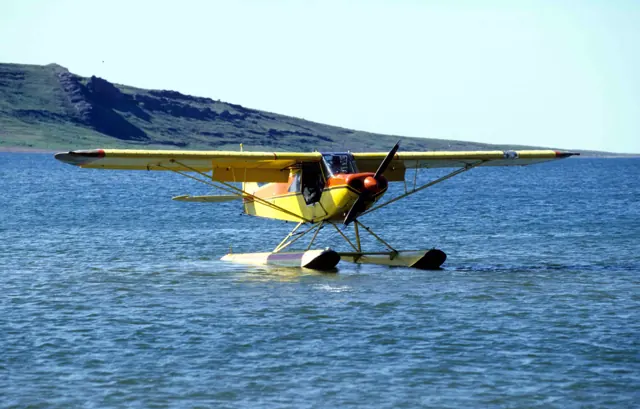
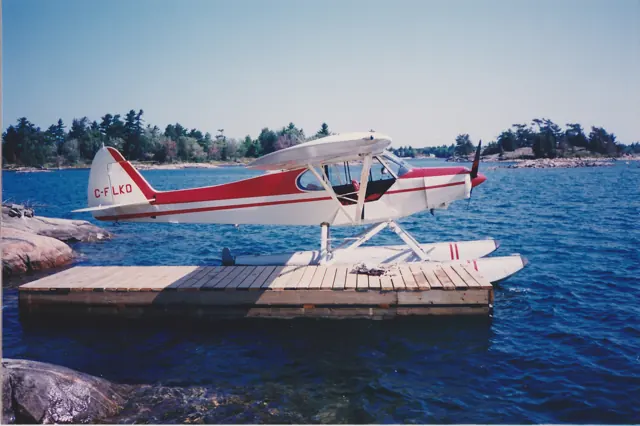
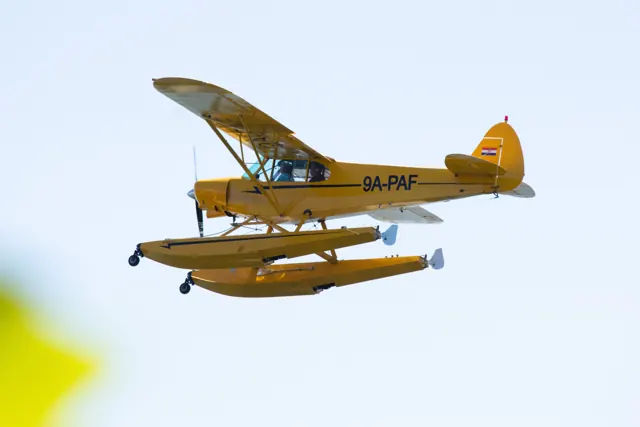
Laminar’s background chapter describes a fabric-covered steel-tube fuselage, a braced high wing and the extra power, flaps and wing tanks that distinguish the Super Cub from the earliest Cub designs. It also describes the broad modification culture around the type, including large low-pressure tyres, cargo racks and additional storage. Those visible changes help explain why two PA-18 photographs can show quite different working equipment.
Pilot accounts
A factory-fresh working Cub in 1975
Garvey borrowed a new 150-horsepower Super Cub at the factory before its owner, Piper dealer Jim Porter, took it home. His report places it in an interesting period: Piper was promoting its newer designs while customers who needed a Cub already knew where to find one. The aeroplane's fabric covering, tandem seats and simple starting controls made its older lineage immediately apparent, even with the extra power and flaps of the Super Cub.
For the flight, two people and full tanks left the aircraft below its permitted maximum weight. Garvey reported a strong climb that continued at 4,000 feet. He tried stalls with and without power and flap, describing mild breaks and prompt recovery in each case. A half-flap arrival then showed the compact landing performance that helped explain the aircraft's working reputation. His brief evaluation conveys a practical, capable machine encountered during production, with the results tied to that flight's loading rather than an assumed performance standard for today's many modified Cubs.
AOPA Pilot, July 1975; republished in AOPA’s Super Cub fact sheet. New PA-18-150 loaned by Jim Porter.
Read the full account · AOPA Pilot ↗Rediscovering the Super Cub, one landing at a time
Davisson returned to the PA-18 after roughly fifteen years away, flying Tom Hampton's restored 150-horsepower Super Cub on the same afternoon as an older J-2. Its larger tyres, comfortable seats and stronger climb made the family resemblance feel distinctly more capable. He liked the control response and could see ahead well enough on the ground without the weaving taxi he might have expected from a tailwheel aircraft. His comparison concerns these particular Cubs, not every version carrying the name.
The landings provided a candid account of relearning the aeroplane. His first clean approach floated and ended with a bounce on the large tyres. Half flap made the next descent easier to manage and reduced the float. For the final attempt, he used full flap but let the speed decay too early, leaving little elevator authority for the flare and another untidy arrival. He did not perform stalls on this flight.
Budd Davisson flight report, reproduced by Pilotfriend with Airbum credit; undated. Restored PA-18 flown alongside a J-2 comparison.
Read the full account · Pilotfriend / Budd Davisson ↗From a Cessna 210 to an Alaskan float Cub
Worthy first flew a Super Cub in 2013 at Alaska Float Ratings in Moose Pass. Most of her previous experience had been in a Cessna 210, so she expected the stick and left-hand throttle to require adjustment. Instead, both felt natural almost immediately. She flew two 160-horsepower examples with different floats and panels, learning the unfamiliar work of manoeuvring on water and choosing a takeoff direction without a marked runway.
From the front seat, the view to either side became a large part of the attraction: the flights passed turquoise lakes and glacier-covered mountains. She found the float Cub much more responsive than the heavier Cessna she knew, while still feeling steady in the canyon winds she encountered. Simulated power-loss exercises also made the extra drag of the floats memorable. Her account is a recollection of supervised seaplane training, and her strongest impression was the simple pleasure of it; she remembers finishing flights with her face aching from smiling.
22 January 2016 article by R. K. Dick Williams with Crista Worthy, republished by High Sierra Pilots. Worthy’s separate first-person section recalls 2013 float training.
Read the full account · High Sierra Pilots / Disciples of Flight ↗In your simulator
Systems, equipment and documentation for each developer’s aircraft.
Compare simulator versions →X-Plane 12Piper PA-18 Super Cub
Laminar Research · Released
Piper PA-18 Super Cub
Laminar Research · Released
X-Plane 12 Enhancement Piper PA-18 Super Cub
SimCoders · Released
Piper PA-18 Super Cub
SimCoders · Released
Aircraft specifications
Published figures for the named real-aircraft variant. Simulator equipment and performance can differ.
| Specification | Published value |
|---|---|
| Length | 22 ft 7 in (6.88 m) |
| Wingspan | 35 ft 2 + 1 ⁄ 2 in (10.732 m) |
| Height | 6 ft 8 + 1 ⁄ 2 in (2.045 m) |
| Wing area | 178.5 sq ft (16.58 m² ) |
| Empty weight | 930 lb (422 kg) |
| Max takeoff weight | 1,750 lb (794 kg) |
| Powerplant | 1 × Lycoming O-320 air-cooled flat four engine, 150 hp (110 kW) |
| Maximum speed | 130 mph (209 km/h, 113 kn) |
| Cruise speed | 115 mph (185 km/h, 100 kn) (75% power) |
| Stall speed | 43 mph (69 km/h, 37 kn) (flaps down) |
| Range | 460 mi (740 km, 400 nmi) |
| Service ceiling | 19,000 ft (5,800 m) |
| Rate of climb | 960 ft/min (4.9 m/s) |
Manuals & resources
Find your next read
Choose a topic for a short introduction and a link to the original source. Simulator references identify the developer and edition they cover.
Simulator documentation
Finding the controls in Laminar’s PA-18-150Piper PA-18 Super Cub · Laminar Research · X-Plane 12
Laminar identifies its model as a PA-18-150. The cockpit guide places the throttle, carburettor-heat control and rotary trim handle on the left side, with a separate three-position flap lever. It describes brake pedals distinct from the rudder pedals, overhead fuel sight gauges and an electrical switch panel. The sight gauges provide approximate indications, with reduced accuracy at low fuel levels. The guide maps this particular simulated cockpit, including its installed equipment.
Laminar Research PA-18 manual · PDF pp.6,15–18 · simulator cockpit guide
Laminar Research · Read the source ↗The represented Super Cub cockpitPiper PA-18 Super Cub · Laminar Research · X-Plane 12
Laminar's Super Cub guide identifies pitch trim, stick controls and the installed instruments. It documents this particular aircraft's panel rather than proving that every Super Cub has the same navigation or automatic-flight equipment.
Archived simulator manual; installed package revision not observed · PDF pp.7-8,20
Laminar Research · Read the source ↗Pilot account
A factory-fresh working Cub in 1975AOPA Pilot, July 1975; republished in AOPA’s Super Cub fact sheet. New PA-18-150 loaned by Jim Porter.
Garvey borrowed a new 150-horsepower Super Cub at the factory before its owner, Piper dealer Jim Porter, took it home. His report places it in an interesting period: Piper was promoting its newer designs while customers who needed a Cub already knew where to find one. The aeroplane's fabric covering, tandem seats and simple starting controls made its older lineage immediately apparent, even with the extra power and flaps of the Super Cub.
William Garvey
AOPA Pilot · Read the source ↗Rediscovering the Super Cub, one landing at a timeBudd Davisson flight report, reproduced by Pilotfriend with Airbum credit; undated. Restored PA-18 flown alongside a J-2 comparison.
Davisson returned to the PA-18 after roughly fifteen years away, flying Tom Hampton's restored 150-horsepower Super Cub on the same afternoon as an older J-2. Its larger tyres, comfortable seats and stronger climb made the family resemblance feel distinctly more capable. He liked the control response and could see ahead well enough on the ground without the weaving taxi he might have expected from a tailwheel aircraft.
Budd Davisson
Pilotfriend / Budd Davisson · Read the source ↗Read the original documentation from the people who created it. Manuals open on their publisher’s website.
Manual
Piper PA-18 Super Cub POHLaminar Research X-Plane 12 Desktop ManualLaminar Research X-Plane aircraft and avionics manualsLaminar ResearchAircraft background
Piper PA-18 Super CubWikipedia contributors · Research background · Wikipedia revision 1331579518 · retrieved 2026-09-12Product
Reality Expansion Pack · Default XP12 Piper Super CubSimCoders · Official developer / designated store catalogue · checked 2026-09-12Type designator
ICAO Doc 8643 — aircraft type designatorsInternational Civil Aviation Organization · Public search data retrieved 2026-09-14; authority update 2026-09-03Built-in force-feedback profiles
Read the documentary basis, editable starting settings and remaining questions for the aircraft you fly. Each explanation refers to the exact profile revision shown.
Catalogue programme-20261022-v1 · 4 profile choices
SimCoders REP Super Cub
SimCoders · Free and Pro · Revision 3 · Inherited starting point
X-Plane 12
SimCoders REP Super Cub: Manual stick control motivates aerodynamic resistance.
SimCoders REP Super Cub Floats
SimCoders · Free and Pro · Revision 2 · Inherited starting point
X-Plane 12
SimCoders REP Super Cub Floats: Manual stick control motivates aerodynamic resistance.
Piper PA-18 Super Cub
Free and Pro · Revision 1 · Partial review
X-Plane 12
Piper PA-18 Super Cub: Manual stick control motivates aerodynamic resistance.
Piper PA-18 Super Cub Straight Floats
Free and Pro · Revision 1 · Partial review
MSFS 2020 · MSFS 2024 · X-Plane 12
A tandem-seat utility aircraft whose light structure and high wing suit bush, towing and recreational work.
Piper PA-18 Super Cub
Piper PA-18 Super Cub: Manual stick control motivates aerodynamic resistance.
Aircraft and simulator scope
- Piper PA-18 Super Cub · X-Plane 12 · family starting point
Piper PA-18 Super Cub · Family sources identify only the variants and product versions described above.
The simulator model and controls
The Super Cub joined Piper's range in 1949, developing earlier Cub designs with more power and equipment. It retained the braced high wing, tandem cabin and tailwheel layout. Its working roles include glider towing, banner towing and remote-area transport.
This starting point selects Piper PA-18 Super Cub. Its aircraft-level settings do not select a particular developer’s custom systems.
How this profile feels
Manual stick control motivates aerodynamic resistance. Spring resistance builds with the selected airspeed response. A separate aerodynamic term adds speed-dependent control load.
The adjustable stabilizer supplies pitch-trim context. Valid trim provides the configured pressure relief. Autopilot following is off.
Controls and trim
The Super Cub uses a manual stick, flap lever and pitch-trim handle. Its adjustable horizontal stabilizer supplies the aircraft’s longitudinal trim arrangement. Engine, wheel and float choices identify different utility configurations.
About the values
The gains are normalized profile settings. They describe the chosen effect balance; hand force depends on the device and its output limits. IAS references are tuning values rather than operating limits. Physical acceptance of this revision remains pending.
What the documentation establishes
Laminar identifies PA18 Super Cub wheel product.
Guide identifies the rotary pitch-trim handle; relief strength is estimated.
Guide identifies flap equipment and landplane bush-wheel modifications.
Documentary review and sources
These decisions describe the documentary basis and remaining gaps for this revision. Aircraft documentation and a starting setting describe different kinds of evidence.
Aircraft and variant
ReviewedThis starting point selects Piper PA-18 Super Cub. Its aircraft-level settings do not select a particular developer’s custom systems.
Flight controls
Not yet reviewedThe Super Cub uses a manual stick, flap lever and pitch-trim handle. Its adjustable horizontal stabilizer supplies the aircraft’s longitudinal trim arrangement. Engine, wheel and float choices identify different utility configurations.
Trim
ReviewedThe adjustable stabilizer supplies pitch-trim context. Pitch authority 0.3 provides load relief and permitted centre movement; roll authority is 0.
Autopilot and stability
Not yet reviewedAutopilot following is off; the configured spring and load retain the hardware feel.
Equipment
ReviewedGear, flap and ground cues follow the selected settings and available simulator-reported states.
Speeds and limits
Not yet reviewedThe indicated-speed references set the profile response scale; they are separate from aircraft operating limits.
Simulator integration
Not yet reviewedThe profile targets xplane12. Add-on-specific controls use only the supported references configured by this profile.
Force-feedback settings
Not yet reviewedThe settings define the profile’s effect balance. Device output limits affect physical hand force.
Starting settings and their rationale
These configured values are starting estimates. The explanations describe what each setting controls; physical validation appears separately below.
| Setting | Starting value | What it controls and why |
|---|---|---|
| Spring strength | Starting value0.74 | What it controls and whyManual stick control motivates aerodynamic resistance. The baseline spring is 0.74. Its low-speed blend reaches baseline strength at 42.5 KIAS. |
| Master force gain | Starting value0.85 | What it controls and whyScales overall profile strength while preserving effect balance, subject to device and output limits. |
| Profile force gain | Starting value0.8 | What it controls and whyThe aerodynamic-load gain is 0.8 with an indicated-speed reference of 85 KIAS. This supplies speed-dependent loading alongside the spring. |
| Force tuning speed/reference | Starting value85.0 kt | What it controls and whySets the IAS reference for aerodynamic loading. It is an estimate, not published cruise TAS or a flight limit. |
| Spring response reference speed | Starting value42.5 kt | What it controls and whySets the IAS where the low-speed blend reaches baseline strength; high-speed stiffening also uses it. |
| Aileron force scale | Starting value0.6 | What it controls and whyRoll and pitch aerodynamic scales are 0.6 and 0.78, respectively. They set the aerodynamic axis balance. No custom spring-travel curve is enabled. |
| Elevator force scale | Starting value0.78 | What it controls and whyScales pitch aerodynamic loading; pitch spring travel and trim responses are separate settings. |
| Trim feel | Starting valueEnabled | What it controls and whyRetained for compatibility and group membership. Trim relief, rather than this flag, controls centre movement. |
| Trim relief | Starting valueEnabled | What it controls and whyAllows trim relief with supported control law and valid telemetry. Axis authorities set its amount. |
| Autopilot follow | Starting valueDisabled | What it controls and whyAutopilot following is off; the configured spring and load retain the hardware feel. |
| Autopilot neutral hold | Starting valueDisabled | What it controls and whyPermits centering hold during a supported AP state, separate from following a moving target. |
| Output force limit | Starting value0.55 | What it controls and whyCaps directed-force output. Native spring effects and device limits remain separate. |
All 44 starting settings and their rationale
The settings define the profile’s effect balance. Device output limits affect physical hand force.
| Setting | Starting value | What it controls and why |
|---|---|---|
| Spring strength | Starting value0.74 | What it controls and whyManual stick control motivates aerodynamic resistance. The baseline spring is 0.74. Its low-speed blend reaches baseline strength at 42.5 KIAS. |
| Spring deadband | Starting value0.045 | What it controls and whySets travel around the centre before the baseline spring resists. Smaller values engage it sooner. |
| Profile force gain | Starting value0.8 | What it controls and whyThe aerodynamic-load gain is 0.8 with an indicated-speed reference of 85 KIAS. This supplies speed-dependent loading alongside the spring. |
| Master force gain | Starting value0.85 | What it controls and whyScales overall profile strength while preserving effect balance, subject to device and output limits. |
| QBlend Enabled | Starting valueEnabled | What it controls and whyAllows baseline spring strength to rise with indicated airspeed where the control law permits it. |
| QSpring Minimum Factor | Starting value0.5 | What it controls and whySets low-speed spring strength as a fraction of baseline when blending is enabled. One keeps full strength. |
| QSpring Start Knots | Starting value11.9 kt | What it controls and whySets the IAS where the low-speed spring blend starts rising. This is a feel threshold, not a flight limit. |
| Spring response reference speed | Starting value42.5 kt | What it controls and whySets the IAS where the low-speed blend reaches baseline strength; high-speed stiffening also uses it. |
| Force tuning speed/reference | Starting value85.0 kt | What it controls and whySets the IAS reference for aerodynamic loading. It is an estimate, not published cruise TAS or a flight limit. |
| Airspeed spring stiffening gain | Starting value0.15 | What it controls and whyThe high-speed spring-stiffening gain is 0.15. It strengthens the permitted spring response above 42.5 KIAS, with the squared-speed ratio capped at 5. |
| Airspeed spring stiffening limit | Starting value5 | What it controls and whyLimits the squared airspeed ratio used for high-speed spring stiffening; it is not a device-force cap. |
| Aileron force scale | Starting value0.6 | What it controls and whyRoll and pitch aerodynamic scales are 0.6 and 0.78, respectively. They set the aerodynamic axis balance. No custom spring-travel curve is enabled. |
| Elevator force scale | Starting value0.78 | What it controls and whyScales pitch aerodynamic loading; pitch spring travel and trim responses are separate settings. |
| Output force limit | Starting value0.55 | What it controls and whyCaps directed-force output. Native spring effects and device limits remain separate. |
| Trim feel | Starting valueEnabled | What it controls and whyRetained for compatibility and group membership. Trim relief, rather than this flag, controls centre movement. |
| Trim relief | Starting valueEnabled | What it controls and whyAllows trim relief with supported control law and valid telemetry. Axis authorities set its amount. |
| Elevator Authority | Starting value0.3 | What it controls and whyThe adjustable stabilizer supplies pitch-trim context. Pitch authority 0.3 provides load relief and permitted centre movement; roll authority is 0. |
| Aileron Authority | Starting value0 | What it controls and whyScales supported roll-trim relief and permitted centre movement. Zero removes roll response. |
| Force Trim Enabled | Starting valueDisabled | What it controls and whyEnables local force trim, separate from aircraft-owned trim and add-on integration qualification. |
| GLoad Enabled | Starting valueEnabled | What it controls and whyAllows load-factor changes to modify permitted spring laws. Passive fly-by-wire feel can suppress it. |
| Rate Damping Enabled | Starting valueEnabled | What it controls and whyEnables rate damping with the configured coefficients and control law. |
| Autopilot follow | Starting valueDisabled | What it controls and whyAutopilot following is off; the configured spring and load retain the hardware feel. |
| Autopilot follow authority | Starting value0.1 | What it controls and whySets admitted AP-follow gain, not a percentage of travel. Runtime ownership and input limits still apply. |
| Autopilot neutral hold | Starting valueDisabled | What it controls and whyPermits centering hold during a supported AP state, separate from following a moving target. |
| Autopilot neutral hold strength | Starting value0.6 | What it controls and whySets admitted AP neutral-hold strength; inactive while neutral hold is disabled. |
| Enabled | Starting valueEnabled | What it controls and whyEnables aerodynamic cues; each still needs nonzero strength and its simulator conditions. |
| Gain | Starting value0.35 | What it controls and whySets stall-buffet strength. Zero removes the cue without changing simulator stalls or warnings. |
| Gain | Starting value0 | What it controls and whySets high-Mach buffet strength; onset and full-strength thresholds are separate. |
| Gain | Starting value0.14 | What it controls and whySets flap buffet at the configured position and speed gates. Flap movement texture is separate. |
| Maximum flap index | Starting value3 | What it controls and whySets the final flap index for detent normalization. UP plus three detents uses maximum index3. |
| Minimum flap index | Starting value2 | What it controls and whySets the first flap detent that admits buffet; this is a handle index, not degrees. |
| Gain | Starting value0 | What it controls and whySets gear aerodynamic buffet; movement and ground-contact cues are separate. |
| Shaker Enabled | Starting valueDisabled | What it controls and whyPermits shaker at supported warning conditions; the switch does not establish aircraft equipment. |
| Stick shaker amplitude | Starting value0.5 | What it controls and whySets triggered shaker strength; inactive while the shaker feature is disabled. |
| Enabled | Starting valueEnabled | What it controls and whyEnables ground effects; each still needs its own strength and contact or motion telemetry. |
| Gain | Starting value0.4 | What it controls and whySets rolling texture strength, modified by speed, surface and undercarriage configuration. |
| Gain | Starting value0.25 | What it controls and whySets gear-bump texture during ground motion, separate from touchdown impact. |
| Gain | Starting value0.65 | What it controls and whySets landing-impact strength; landing telemetry and response shape determine the pulse. |
| Gain | Starting value0 | What it controls and whySets reverse-thrust vibration with valid reverser and engine conditions. Zero removes the cue. |
| Enabled | Starting valueEnabled | What it controls and whyEnables engine cues with nonzero settings and valid running-engine telemetry. |
| Gain | Starting value0.12 | What it controls and whySets estimated engine vibration using configured telemetry and response, not measured cockpit vibration. |
| Enabled | Starting valueEnabled | What it controls and whyEnables accessory cues with configured strengths and observed accessory movement. |
| Gain | Starting value0.12 | What it controls and whySets texture from observed flap movement; a command without movement does not establish the cue. |
| Gain | Starting value0 | What it controls and whySets texture from observed gear movement, separate from aerodynamic and touchdown effects. |
Limits and open questions
- The cockpit guide does not establish cable force gradients.
- Follow is off; no fitted servo system was established.
- Guide labels cruise96/stall33/VNE120 KIAS; these are simulator figures, not force calibration.
- Laminar guide does not qualify other Super Cub add-ons or float/ski installations.
- Bush wheels and low-speed propwash do not set measured pitch/roll harmony.
Physical validation
No physical force validation is recorded in this public catalogue for this revision. Documentary review and software checks do not establish how a particular device feels.
Discuss this aircraft (0)
Questions, observations and useful sources from the community.
No published discussions yet. Bring a question or share a useful source.
Open aircraft discussions →Content expanded · What’s new
Something missing or a source that needs attention?
Suggest a correction ↗