
Start here
A few places to begin, from the aircraft’s story to the people who fly it.
Meet the aircraft
Curtis Pitts's biplane first flew in 1944 and became established in competition aerobatics. Its short fuselage and closely stacked wings were developed through versions with different engines, seating and airframe details.
Aircraft background
Wikipedia contributors · Read more ↗A familiar Pitts feeling survives a very unfamiliar fitting
Davisson’s introduction to the Super Stinker included a telephone warning from Curtis Pitts about its quick, sensitive controls. A more immediate problem appeared in the cockpit: his footwear did not fit the brake arrangement properly. He handed his boots and socks out to Pat Ledford and made the flight barefoot, an unusual detail of this particular evaluation.
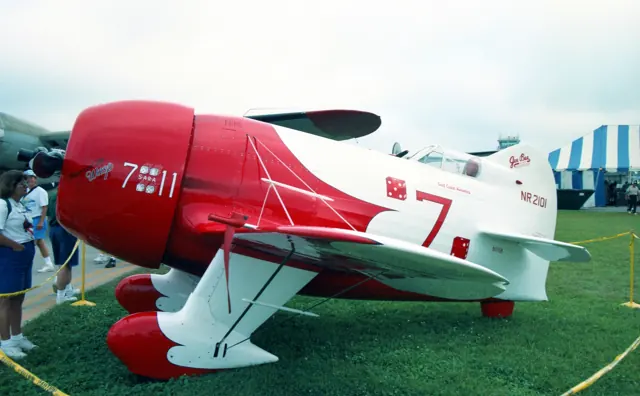
Sport Aviation / Airbum · May 1994. Original Super Stinker S-1-11 at Homestead; an experimental development aircraft, distinct from the stock simulator’s S-1S and S-2S.
Airbum / Sport Aviation · Read more ↗Into the cockpit
 YouTube
 RetroAcro3 · 4 min ·
Pitts Cockpit View
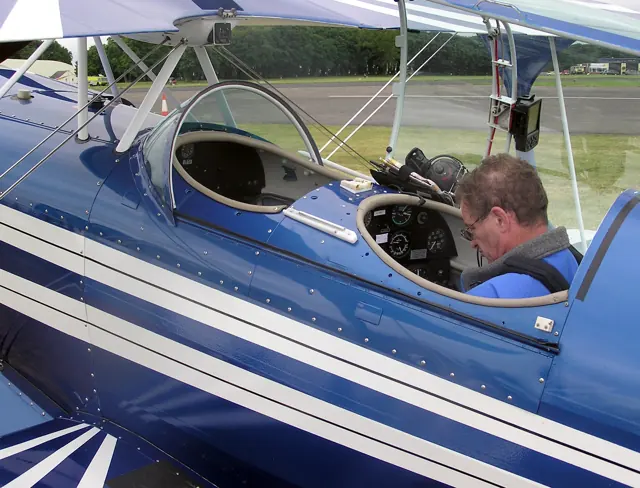
Cockpit footage from the single-seat Pitts S-1S.
Related variant · single-seat Pitts S-1S
Watch on YouTube ↗Preview images are served by AirframeDB. Videos open on YouTube only when you choose to watch.
Meet Pitts Special
Curtis Pitts's biplane first flew in 1944 and became established in competition aerobatics. Its short fuselage and closely stacked wings were developed through versions with different engines, seating and airframe details.
The S-1 is single-seat; the larger S-2 has tandem seats. Cockpit views, proportions and equipment differ between the two branches.
Pitts Special
Pitts → · Explore the family →
Pitts S-1
Wikipedia contributors · Pitts Special ↗Pitts S-1S
Wikipedia contributors · Pitts Special ↗Microsoft Flight Simulator · MSFS 2024 →Pitts S-2
Wikipedia contributors · Pitts Special ↗Pitts S-2S
Wikipedia contributors · Pitts Special ↗Microsoft Flight Simulator · MSFS 2024 →Microsoft Flight Simulator · MSFS 2020 →Aircraft type designators
Use the code for the model you are flying. The linked authority lists the applicable aircraft.
History & design
Betty Skelton helps establish the little biplane’s reputation
AOPA’s anniversary history recalls Betty Skelton winning three consecutive U.S. women’s aerobatic titles in her Pitts, from 1948 to 1950. The design subsequently spread through homebuilding plans and factory-built variants, with both single-seat competition and two-seat training roles.
AOPA · Airplanes we love: The Pitts Special at 75 ↗Historical overview published for the design’s seventy-fifth anniversary
Development milestones
Designer: Curtis Pitts
First flight: September 1944
Wikipedia contributors · Pitts Special ↗Pitts Special · family/variant named by the source · Wikipedia revision 1288828118
Pilot accounts
A familiar Pitts feeling survives a very unfamiliar fitting
Davisson’s introduction to the Super Stinker included a telephone warning from Curtis Pitts about its quick, sensitive controls. A more immediate problem appeared in the cockpit: his footwear did not fit the brake arrangement properly. He handed his boots and socks out to Pat Ledford and made the flight barefoot, an unusual detail of this particular evaluation.
After takeoff, the aircraft soon supplied a recognisable Pitts feeling, with precision and responsiveness that he greatly enjoyed. Landing required more adjustment as he learned its approach and firm landing gear. Two short flights left him enthusiastic, but the report retains those moments of unfamiliarity alongside the praise. Better-fitting shoes subsequently resolved the practical problem that had made the first departure so memorable.
Sport Aviation / Airbum · May 1994. Original Super Stinker S-1-11 at Homestead; an experimental development aircraft, distinct from the stock simulator’s S-1S and S-2S.
Read the full account · Airbum / Sport Aviation ↗An aerobatic lesson ends with a greeting to the designer
Marsh found that fitting himself and the straps into the Pitts cockpit was part of the lesson before departure. With Ed Saurenman in front, he began getting used to the restricted forward view and the aircraft’s responses. Aerobatic demonstrations supplied more dramatic sensations, including his first experience of a tumbling lomcovák.
The landings were less uniformly polished: an initially soft arrival was followed by bouncier attempts as he continued learning. A later photographic flight over the Florida Keys added a quieter pleasure to the evaluation. They also flew past Curtis Pitts’s home, where flashing house lights acknowledged the visitors. That small exchange connected a day of flying a new development with the designer whose name it carried.
AOPA · April 1998. February evaluation of the then-uncertified Pitts S-2C with engineer Ed Saurenman at Homestead, Florida; not an S-2S test.
Read the full account · AOPA ↗A working mechanic takes an ageing Pitts into competition
Armstrong began with a homebuilt S-1C powered by a relatively modest engine, an aircraft already behind newer designs in international competition. Working as a mechanic, he kept improving what he had, eventually fitting more power and altering the airframe to make servicing easier. Appearance received less attention than getting the machine to do the job.
That well-used Pitts carried him far enough to join the U.S. team in 1992. Its looks also prompted a memorable exchange with fellow competitors: Christian Schweizer struggled to find a polite description, and Phil Knight supplied the nickname Road Kill.
Interview in Alton K. Marsh’s AOPA article · July 1996. Recollections of Armstrong’s homebuilt S-1C and 1992 U.S. team selection; later Streaker and Super Stinker developments are separate aircraft.
Read the full account · AOPA ↗In your simulator
Systems, equipment and documentation for each developer’s aircraft.
Compare simulator versions →MSFS 2024Pitts Special S1S
Microsoft Flight Simulator · Released
Pitts Special S1S
Microsoft Flight Simulator · Released
MSFS 2024Pitts Special S2S
Microsoft Flight Simulator · Released
Pitts Special S2S
Microsoft Flight Simulator · Released
MSFS 2020Pitts Special S2S
Microsoft Flight Simulator · Released
Pitts Special S2S
Microsoft Flight Simulator · Released
Manuals & resources
Find your next read
Choose a topic for a short introduction and a link to the original source. Simulator references identify the developer and edition they cover.
Pilot account
A familiar Pitts feeling survives a very unfamiliar fittingSport Aviation / Airbum · May 1994. Original Super Stinker S-1-11 at Homestead; an experimental development aircraft, distinct from the stock simulator’s S-1S and S-2S.
Davisson’s introduction to the Super Stinker included a telephone warning from Curtis Pitts about its quick, sensitive controls. A more immediate problem appeared in the cockpit: his footwear did not fit the brake arrangement properly. He handed his boots and socks out to Pat Ledford and made the flight barefoot, an unusual detail of this particular evaluation. After takeoff, the aircraft soon supplied a recognisable Pitts feeling, with precision and responsiveness that he greatly enjoyed.
Budd Davisson
Airbum / Sport Aviation · Read the source ↗An aerobatic lesson ends with a greeting to the designerAOPA · April 1998. February evaluation of the then-uncertified Pitts S-2C with engineer Ed Saurenman at Homestead, Florida; not an S-2S test.
Marsh found that fitting himself and the straps into the Pitts cockpit was part of the lesson before departure. With Ed Saurenman in front, he began getting used to the restricted forward view and the aircraft’s responses. Aerobatic demonstrations supplied more dramatic sensations, including his first experience of a tumbling lomcovák. The landings were less uniformly polished: an initially soft arrival was followed by bouncier attempts as he continued learning.
Alton K. Marsh
AOPA · Read the source ↗Read the original documentation from the people who created it. Manuals open on their publisher’s website.
Manual
Microsoft Flight Simulator aircraft manualsMicrosoft / aircraft developersAircraft background
Pitts SpecialWikipedia contributors · Research background · Wikipedia revision 1288828118 · retrieved 2026-09-12 Airplanes we love: The Pitts Special at 75AOPA · July 2020 historical overviewResource
MSFS 2024 FAQ and edition aircraft inventoryMicrosoft MSFS 2020 FAQ and edition aircraft inventoryMicrosoftType designator
ICAO Doc 8643 — aircraft type designatorsInternational Civil Aviation Organization · Public search data retrieved 2026-09-14; authority update 2026-09-03Built-in force-feedback profiles
Read the documentary basis, editable starting settings and remaining questions for the aircraft you fly. Each explanation refers to the exact profile revision shown.
Catalogue programme-20261022-v1 · 3 profile choices
Pitts S-1S
Free and Pro · Revision 2 · Review pending
MSFS 2020 · MSFS 2024
Pitts S-1S: The spring and load supply the selected aerobatic axis balance.
Pitts S-2S
Free and Pro · Revision 1 · Review pending
MSFS 2020 · MSFS 2024
Pitts S-2S: The spring and load supply the selected aerobatic axis balance.
Orbx Paul Bennet Wolf Pitts Pro
Orbx · Free and Pro · Revision 1 · Partial review
MSFS 2020
A compact aerobatic biplane family with both single-seat and tandem-seat branches.
Pitts S-2S
Pitts S-2S: The spring and load supply the selected aerobatic axis balance.
Aircraft and simulator scope
- Pitts S-2S · MSFS 2020 · Variant starting point
- Pitts S-2S · MSFS 2024 · Variant starting point
Pitts S-2S · Family sources identify only the variants and product versions described above.
The simulator model and controls
Curtis Pitts's biplane first flew in 1944 and became established in competition aerobatics. Its short fuselage and closely stacked wings were developed through versions with different engines, seating and airframe details.
This starting point selects Pitts S-2S. Its aircraft-level settings do not select a particular developer’s custom systems.
How this profile feels
The spring and load supply the selected aerobatic axis balance. Spring resistance builds with the selected airspeed response. A separate aerodynamic term adds speed-dependent control load.
Trim relief is scoped to the named Pitts configuration. Valid trim provides the configured pressure relief. Autopilot following is off.
Controls and trim
The Pitts family includes single-seat S-1 and larger two-seat S-2 aerobatic biplanes. Their short fuselages, stacked wings and differing engines/seating remain separate model configurations within the competition-aircraft lineage.
About the values
The gains are normalized profile settings. They describe the chosen effect balance; hand force depends on the device and its output limits. IAS references are tuning values rather than operating limits. Physical acceptance of this revision remains pending.
Documentary review and sources
These decisions describe the documentary basis and remaining gaps for this revision. Aircraft documentation and a starting setting describe different kinds of evidence.
Aircraft and variant
Not yet reviewedThis starting point selects Pitts S-2S. Its aircraft-level settings do not select a particular developer’s custom systems.
Flight controls
Not yet reviewedThe Pitts family includes single-seat S-1 and larger two-seat S-2 aerobatic biplanes. Their short fuselages, stacked wings and differing engines/seating remain separate model configurations within the competition-aircraft lineage.
Trim
Not yet reviewedTrim relief is scoped to the named Pitts configuration. Pitch authority 0.3 provides load relief and permitted centre movement; roll authority is 0.
Autopilot and stability
Not yet reviewedAutopilot following is off; the configured spring and load retain the hardware feel.
Equipment
Not yet reviewedGear, flap and ground cues follow the selected settings and available simulator-reported states.
Speeds and limits
Not yet reviewedThe indicated-speed references set the profile response scale; they are separate from aircraft operating limits.
Simulator integration
Not yet reviewedThe profile targets msfs2020, msfs2024. Add-on-specific controls use only the supported references configured by this profile.
Force-feedback settings
Not yet reviewedThe settings define the profile’s effect balance. Device output limits affect physical hand force.
Starting settings and their rationale
These configured values are starting estimates. The explanations describe what each setting controls; physical validation appears separately below.
| Setting | Starting value | What it controls and why |
|---|---|---|
| Spring strength | Starting value0.74 | What it controls and whyThe spring and load supply the selected aerobatic axis balance. The baseline spring is 0.74. Its low-speed blend reaches baseline strength at 65 KIAS. |
| Master force gain | Starting value0.85 | What it controls and whyScales overall profile strength while preserving effect balance, subject to device and output limits. |
| Profile force gain | Starting value0.4 | What it controls and whyThe aerodynamic-load gain is 0.4 with an indicated-speed reference of 130 KIAS. This supplies speed-dependent loading alongside the spring. |
| Force tuning speed/reference | Starting value130.0 kt | What it controls and whySets the IAS reference for aerodynamic loading. It is an estimate, not published cruise TAS or a flight limit. |
| Spring response reference speed | Starting value65.0 kt | What it controls and whySets the IAS where the low-speed blend reaches baseline strength; high-speed stiffening also uses it. |
| Aileron force scale | Starting value0.72 | What it controls and whyRoll and pitch aerodynamic scales are 0.72 and 1, respectively. They set the aerodynamic axis balance. No custom spring-travel curve is enabled. |
| Elevator force scale | Starting value1.0 | What it controls and whyScales pitch aerodynamic loading; pitch spring travel and trim responses are separate settings. |
| Trim feel | Starting valueEnabled | What it controls and whyRetained for compatibility and group membership. Trim relief, rather than this flag, controls centre movement. |
| Trim relief | Starting valueEnabled | What it controls and whyAllows trim relief with supported control law and valid telemetry. Axis authorities set its amount. |
| Autopilot follow | Starting valueDisabled | What it controls and whyAutopilot following is off; the configured spring and load retain the hardware feel. |
| Autopilot neutral hold | Starting valueDisabled | What it controls and whyPermits centering hold during a supported AP state, separate from following a moving target. |
| Output force limit | Starting value0.55 | What it controls and whyCaps directed-force output. Native spring effects and device limits remain separate. |
All 44 starting settings and their rationale
The settings define the profile’s effect balance. Device output limits affect physical hand force.
| Setting | Starting value | What it controls and why |
|---|---|---|
| Spring strength | Starting value0.74 | What it controls and whyThe spring and load supply the selected aerobatic axis balance. The baseline spring is 0.74. Its low-speed blend reaches baseline strength at 65 KIAS. |
| Spring deadband | Starting value0.03 | What it controls and whySets travel around the centre before the baseline spring resists. Smaller values engage it sooner. |
| Profile force gain | Starting value0.4 | What it controls and whyThe aerodynamic-load gain is 0.4 with an indicated-speed reference of 130 KIAS. This supplies speed-dependent loading alongside the spring. |
| Master force gain | Starting value0.85 | What it controls and whyScales overall profile strength while preserving effect balance, subject to device and output limits. |
| QBlend Enabled | Starting valueEnabled | What it controls and whyAllows baseline spring strength to rise with indicated airspeed where the control law permits it. |
| QSpring Minimum Factor | Starting value0.5 | What it controls and whySets low-speed spring strength as a fraction of baseline when blending is enabled. One keeps full strength. |
| QSpring Start Knots | Starting value18.2 kt | What it controls and whySets the IAS where the low-speed spring blend starts rising. This is a feel threshold, not a flight limit. |
| Spring response reference speed | Starting value65.0 kt | What it controls and whySets the IAS where the low-speed blend reaches baseline strength; high-speed stiffening also uses it. |
| Force tuning speed/reference | Starting value130.0 kt | What it controls and whySets the IAS reference for aerodynamic loading. It is an estimate, not published cruise TAS or a flight limit. |
| Airspeed spring stiffening gain | Starting value0 | What it controls and whyThe high-speed spring-stiffening gain is 0. No additional speed-driven stiffening is added; this does not disable independent aerodynamic loading. |
| Airspeed spring stiffening limit | Starting value5 | What it controls and whyLimits the squared airspeed ratio used for high-speed spring stiffening; it is not a device-force cap. |
| Aileron force scale | Starting value0.72 | What it controls and whyRoll and pitch aerodynamic scales are 0.72 and 1, respectively. They set the aerodynamic axis balance. No custom spring-travel curve is enabled. |
| Elevator force scale | Starting value1.0 | What it controls and whyScales pitch aerodynamic loading; pitch spring travel and trim responses are separate settings. |
| Output force limit | Starting value0.55 | What it controls and whyCaps directed-force output. Native spring effects and device limits remain separate. |
| Trim feel | Starting valueEnabled | What it controls and whyRetained for compatibility and group membership. Trim relief, rather than this flag, controls centre movement. |
| Trim relief | Starting valueEnabled | What it controls and whyAllows trim relief with supported control law and valid telemetry. Axis authorities set its amount. |
| Elevator Authority | Starting value0.3 | What it controls and whyTrim relief is scoped to the named Pitts configuration. Pitch authority 0.3 provides load relief and permitted centre movement; roll authority is 0. |
| Aileron Authority | Starting value0 | What it controls and whyScales supported roll-trim relief and permitted centre movement. Zero removes roll response. |
| Force Trim Enabled | Starting valueDisabled | What it controls and whyEnables local force trim, separate from aircraft-owned trim and add-on integration qualification. |
| GLoad Enabled | Starting valueEnabled | What it controls and whyAllows load-factor changes to modify permitted spring laws. Passive fly-by-wire feel can suppress it. |
| Rate Damping Enabled | Starting valueEnabled | What it controls and whyEnables rate damping with the configured coefficients and control law. |
| Autopilot follow | Starting valueDisabled | What it controls and whyAutopilot following is off; the configured spring and load retain the hardware feel. |
| Autopilot follow authority | Starting value0.05 | What it controls and whySets admitted AP-follow gain, not a percentage of travel. Runtime ownership and input limits still apply. |
| Autopilot neutral hold | Starting valueDisabled | What it controls and whyPermits centering hold during a supported AP state, separate from following a moving target. |
| Autopilot neutral hold strength | Starting value0.6 | What it controls and whySets admitted AP neutral-hold strength; inactive while neutral hold is disabled. |
| Enabled | Starting valueEnabled | What it controls and whyEnables aerodynamic cues; each still needs nonzero strength and its simulator conditions. |
| Gain | Starting value0.3 | What it controls and whySets stall-buffet strength. Zero removes the cue without changing simulator stalls or warnings. |
| Gain | Starting value0 | What it controls and whySets high-Mach buffet strength; onset and full-strength thresholds are separate. |
| Gain | Starting value0 | What it controls and whySets flap buffet at the configured position and speed gates. Flap movement texture is separate. |
| Maximum flap index | Starting value1 | What it controls and whySets the final flap index for detent normalization. UP plus three detents uses maximum index3. |
| Minimum flap index | Starting value1 | What it controls and whySets the first flap detent that admits buffet; this is a handle index, not degrees. |
| Gain | Starting value0 | What it controls and whySets gear aerodynamic buffet; movement and ground-contact cues are separate. |
| Shaker Enabled | Starting valueDisabled | What it controls and whyPermits shaker at supported warning conditions; the switch does not establish aircraft equipment. |
| Stick shaker amplitude | Starting value0.5 | What it controls and whySets triggered shaker strength; inactive while the shaker feature is disabled. |
| Enabled | Starting valueEnabled | What it controls and whyEnables ground effects; each still needs its own strength and contact or motion telemetry. |
| Gain | Starting value0.4 | What it controls and whySets rolling texture strength, modified by speed, surface and undercarriage configuration. |
| Gain | Starting value0.3 | What it controls and whySets gear-bump texture during ground motion, separate from touchdown impact. |
| Gain | Starting value0.6 | What it controls and whySets landing-impact strength; landing telemetry and response shape determine the pulse. |
| Gain | Starting value0 | What it controls and whySets reverse-thrust vibration with valid reverser and engine conditions. Zero removes the cue. |
| Enabled | Starting valueEnabled | What it controls and whyEnables engine cues with nonzero settings and valid running-engine telemetry. |
| Gain | Starting value0.12 | What it controls and whySets estimated engine vibration using configured telemetry and response, not measured cockpit vibration. |
| Enabled | Starting valueEnabled | What it controls and whyEnables accessory cues with configured strengths and observed accessory movement. |
| Gain | Starting value0 | What it controls and whySets texture from observed flap movement; a command without movement does not establish the cue. |
| Gain | Starting value0 | What it controls and whySets texture from observed gear movement, separate from aerodynamic and touchdown effects. |
Limits and open questions
- Aviat source covers S-2C; current S-1S/S-2S choices receive family background only.
- S-2C stick-centering description does not establish S-1S/S-2S gearing.
- Trim mechanism for named variants remains unresolved.
- Follow is off; no variant installation was established.
- Flapless/fixed-tailwheel settings need matched variant equipment.
- S-2C cruise KTAS and limits KIAS are not copied to S-1S/S-2S.
- Variant identity is separate from installed-product signals.
- A shared aerobatic estimate does not establish measured force equivalence.
Physical validation
No physical force validation is recorded in this public catalogue for this revision. Documentary review and software checks do not establish how a particular device feels.
Discuss this aircraft (0)
Questions, observations and useful sources from the community.
No published discussions yet. Bring a question or share a useful source.
Open aircraft discussions →Content expanded · What’s new
Something missing or a source that needs attention?
Suggest a correction ↗