
Start here
A few places to begin, from the aircraft’s story to the people who fly it.
Meet the aircraft
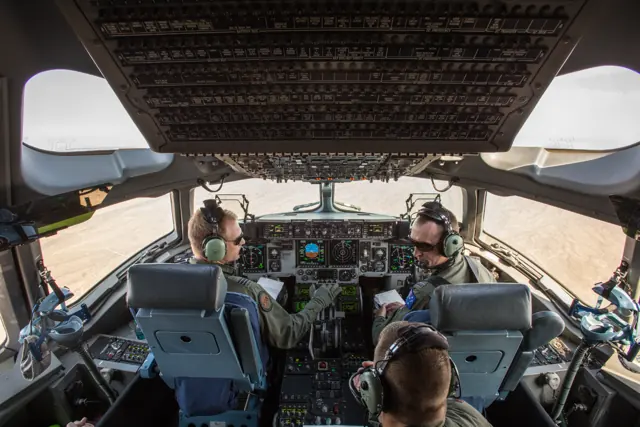
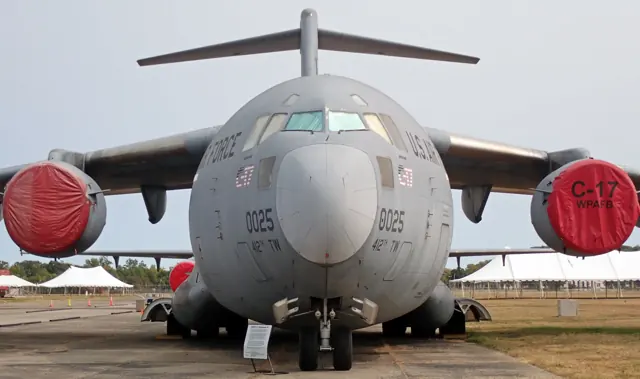
McDonnell Douglas developed the C-17 for the US Air Force, with its first flight in 1991. Four turbofans, a high wing and a rear cargo ramp support the heavy-transport role. Its landing gear and high-lift design also address operations from relatively constrained airfields. The Globemaster III can move very large equipment while retaining a modern two-pilot flight deck.
Aircraft background
Wikipedia contributors · Read more ↗A first flight in the type marks the final Air Force delivery
For Jackson, taking the final new Air Force C-17 away from Long Beach was also his first flight in the type. Simulator preparation and instruction from experienced crews helped him feel ready. Boeing employees waved below as the aircraft departed, linking the delivery with the people who had spent years building the fleet. Clarke later flew the arrival at Charleston, also describing it as his first time flying a C-17.
Air Mobility Command report · September 2013. Shared account of the final U.S. Air Force delivery flight, P-223, with experienced C-17 aircrew supporting the visiting senior pilots.
Air Mobility Command · Read more ↗Cargo controls have documented simulation limits
Hydraulic and electrical power are required for cargo-door and ramp operation. The guide marks the chute/rail, aerial-delivery, ramp-blowdown and smoke-detection panels as inactive in this version.
C-17 Globemaster III · Microsoft Flight Simulator · MSFS 2024
Microsoft / aircraft developers · Read more ↗Into the cockpit
 YouTube
 MOTORIZADO · 11 min ·
U.S. Air Force C-17 Globemaster III Take Off, Cockpit View • Joint Base Charleston
A C-17 departure from Joint Base Charleston, filmed from the flight deck.
Real aircraft · Boeing C-17 Globemaster III
Watch on YouTube ↗Preview images are served by AirframeDB. Videos open on YouTube only when you choose to watch.
Meet Boeing C-17 Globemaster III
McDonnell Douglas developed the C-17 for the US Air Force, with its first flight in 1991. Four turbofans, a high wing and a rear cargo ramp support the heavy-transport role. Its landing gear and high-lift design also address operations from relatively constrained airfields.
The Globemaster III can move very large equipment while retaining a modern two-pilot flight deck. The Miltech manual describes the simulator's flight-control and autopilot features, including functions that were not implemented in the documented version.
Boeing C-17 Globemaster III
Boeing → · Explore the family →
Boeing C-17 Globemaster III
Wikipedia contributors · Boeing C-17 Globemaster III ↗Microsoft Flight Simulator · MSFS 2024 →Aircraft type designators
Use the code for the model you are flying. The linked authority lists the applicable aircraft.
History & design
Reserve crews remember the early relief airdrops
The 315th Airlift Wing’s 2008 retrospective records a Reserve C-17 crew joining a four-aircraft humanitarian-ration drop in October 2001. Its loadmaster’s recollection describes hurried travel, crew briefings and several further missions, adding the cargo crew’s experience alongside the pilots’ accounts.
315th Airlift Wing · Anniversary passes for Reserve C-17s in Afghanistan ↗Loadmaster-led retrospective; not another independent pilot interview
Development milestones
First flight: 15 September 1991
Developed from: McDonnell Douglas YC-15
Wikipedia contributors · Boeing C-17 Globemaster III ↗Boeing C-17 Globemaster III · family/variant named by the source · Wikipedia revision 1374113908
Pilot accounts
A first flight in the type marks the final Air Force delivery
For Jackson, taking the final new Air Force C-17 away from Long Beach was also his first flight in the type. Simulator preparation and instruction from experienced crews helped him feel ready. Boeing employees waved below as the aircraft departed, linking the delivery with the people who had spent years building the fleet.
Clarke later flew the arrival at Charleston, also describing it as his first time flying a C-17. He wanted the landing to be especially good for the crowd waiting there and joked about its size compared with fighters. The report follows a crew drawn from active duty, Reserve and Guard organisations, sharing one journey to mark the end of Air Force production deliveries.
Air Mobility Command report · September 2013. Shared account of the final U.S. Air Force delivery flight, P-223, with experienced C-17 aircrew supporting the visiting senior pilots.
Read the full account · Air Mobility Command ↗A familiar voice on the intercom changes the flight
Buckingham recognised concern in the loadmasters’ voices when they reported a fuel smell shortly after takeoff. He went into the cargo compartment while the other two pilots managed the flight deck. A helicopter was leaking fuel, and the soldiers travelling home had lifted themselves away from the spreading liquid.
The crew returned to Mosul and evacuated the passengers after landing. Buckingham remembered that some soldiers seemed more worried about going back than about the emergency itself. Once the leak had been repaired and the aircraft attended to, the journey resumed. His strongest praise was for the young loadmasters and the crew’s preparation: people with different responsibilities had recognised the problem, shared the workload and brought everyone back to the ground.
Air Mobility Command report · February 2004. C-17 aircraft commander recalling a fuel leak from helicopter cargo after departure from Mosul; three pilots and two loadmasters worked together.
Read the full account · Air Mobility Command ↗Three flags carry a father’s thanks around the world
Eberhart’s final flight from Afghanistan prompted memories of returning to the country over many years. He recalled the contrast between the early airfields he had used in 2001 and the infrastructure visible by 2013. The C-17 had also taken him on embassy-support flights and assignments around the world.
Three flags had travelled with him in the aircraft since 2006, including trips to the South Pole and humanitarian missions. He planned to give one to each son when he retired, as thanks for the time the family had spent without him. The interview also describes his interest in teaching judgment to other crews. Flying, mentoring and the cost of time away from home all form part of his recollection.
U.S. Air Forces Central interview · August 2013. C-17 pilot reflecting on his final Afghanistan flight that July before moving to a non-flying assignment.
Read the full account · U.S. Air Forces Central ↗In your simulator
Systems, equipment and documentation for each developer’s aircraft.
MSFS 2024C-17 Globemaster III
Microsoft Flight Simulator · Released
C-17 Globemaster III
Microsoft Flight Simulator · Released
Aircraft specifications
Published figures for the named real-aircraft variant. Simulator equipment and performance can differ.
| Specification | Published value |
|---|---|
| Length | 174 ft (53 m) |
| Wingspan | 169 ft 9.6 in (51.755 m) |
| Height | 55 ft 1 in (16.79 m) |
| Wing area | 3,800 sq ft (350 m² ) |
| Empty weight | 282,500 lb (128,140 kg) |
| Max takeoff weight | 585,000 lb (265,352 kg) |
| Powerplant | 4 × Pratt & Whitney PW2000 turbofan engines, 40,440 lbf (179.9 kN) thrust each (U.S. military designation: F117-PW-100) |
| Cruise speed | 450 kn (520 mph, 830 km/h) (Mach 0.74–0.79) |
| Range | 2,420 nmi (2,780 mi, 4,480 km) with 157,000 lb (71,214 kg) payload |
| Service ceiling | 45,000 ft (14,000 m) |
Manuals & resources
Find your next read
Choose a topic for a short introduction and a link to the original source. Simulator references identify the developer and edition they cover.
Simulator documentation
Cargo controls have documented simulation limitsC-17 Globemaster III · Microsoft Flight Simulator · MSFS 2024
Hydraulic and electrical power are required for cargo-door and ramp operation. The guide marks the chute/rail, aerial-delivery, ramp-blowdown and smoke-detection panels as inactive in this version.
C-17 manual · PDF p.74; page visually checked
Microsoft / aircraft developers · Read the source ↗Animated communication panels do not all control radiosC-17 Globemaster III · Microsoft Flight Simulator · MSFS 2024
The overhead standby radio is inactive. The guide also distinguishes animated intercom and microphone-selection modules from functioning radio controls.
C-17 manual · PDF p.50; archived version, not a current package test
Microsoft / aircraft developers · Read the source ↗Modern transport controls with an explicit feature boundaryC-17 Globemaster III · Microsoft Flight Simulator · MSFS 2024
Miltech's C-17 guide describes fly-by-wire stabilisation and trim, selectable autopilot modes and stall-test controls. It explicitly marks VNAV, TURB and several other controls as unsupported in that version.
Archived simulator manual; installed package revision not observed · PDF pp.6,8,45,58
Microsoft / aircraft developers · Read the source ↗The loadmaster has a second view of the EFBC-17 Globemaster III · Microsoft Flight Simulator · MSFS 2024
The EFB appears as a tablet beside the pilot and as a laptop at the loadmaster station. Both interfaces provide access to attachments, doors and payloads.
Miltech C-17 MSFS 2024 manual · PDF pp.72–75
Microsoft / aircraft developers · Read the source ↗The fuel page displays quantities rather than editing themC-17 Globemaster III · Microsoft Flight Simulator · MSFS 2024
The manual labels the EFB fuel page as a visual display. The payload page separately shows aircraft weights and a centre-of-gravity diagram alongside load selection.
C-17 manual · PDF p.73
Microsoft / aircraft developers · Read the source ↗Pilot account
A first flight in the type marks the final Air Force deliveryAir Mobility Command report · September 2013. Shared account of the final U.S. Air Force delivery flight, P-223, with experienced C-17 aircrew supporting the visiting senior pilots.
For Jackson, taking the final new Air Force C-17 away from Long Beach was also his first flight in the type. Simulator preparation and instruction from experienced crews helped him feel ready. Boeing employees waved below as the aircraft departed, linking the delivery with the people who had spent years building the fleet. Clarke later flew the arrival at Charleston, also describing it as his first time flying a C-17.
James Jackson and Stanley Clarke
Air Mobility Command · Read the source ↗A familiar voice on the intercom changes the flightAir Mobility Command report · February 2004. C-17 aircraft commander recalling a fuel leak from helicopter cargo after departure from Mosul; three pilots and two loadmasters worked together.
Buckingham recognised concern in the loadmasters’ voices when they reported a fuel smell shortly after takeoff. He went into the cargo compartment while the other two pilots managed the flight deck. A helicopter was leaking fuel, and the soldiers travelling home had lifted themselves away from the spreading liquid. The crew returned to Mosul and evacuated the passengers after landing. Buckingham remembered that some soldiers seemed more worried about going back than about the emergency itself.
Bill Buckingham
Air Mobility Command · Read the source ↗Read the original documentation from the people who created it. Manuals open on their publisher’s website.
Manual
Boeing C-17 Globemaster IIIMicrosoft / aircraft developers Microsoft Flight Simulator aircraft manualsMicrosoft / aircraft developersAircraft background
Boeing C-17 Globemaster IIIWikipedia contributors · Research background · Wikipedia revision 1374113908 · retrieved 2026-09-12 Anniversary passes for Reserve C-17s in Afghanistan315th Airlift Wing · Tech. Sgt. Jeff Kelly · 14 October 2008Resource
MSFS 2024 FAQ and edition aircraft inventoryMicrosoftType designator
ICAO Doc 8643 — aircraft type designatorsInternational Civil Aviation Organization · Public search data retrieved 2026-09-14; authority update 2026-09-03Built-in force-feedback profiles
Read the documentary basis, editable starting settings and remaining questions for the aircraft you fly. Each explanation refers to the exact profile revision shown.
Catalogue programme-20261022-v1 · 1 profile choice
Boeing C-17 Globemaster III
Free and Pro · Revision 1 · Partial review
MSFS 2024
Boeing C-17 Globemaster III: The selected control law supplies heavy-transport yoke resistance.
Boeing C-17 Globemaster III
Boeing C-17 Globemaster III: The selected control law supplies heavy-transport yoke resistance.
Aircraft and simulator scope
- Boeing C-17 Globemaster III · MSFS 2024 · family starting point
Boeing C-17 Globemaster III · Family sources identify only the variants and product versions described above.
The simulator model and controls
McDonnell Douglas developed the C-17 for the US Air Force, with its first flight in 1991. Four turbofans, a high wing and a rear cargo ramp support the heavy-transport role. Its landing gear and high-lift design also address operations from relatively constrained airfields.
This starting point selects Boeing C-17 Globemaster III. Its aircraft-level settings do not select a particular developer’s custom systems.
How this profile feels
The selected control law supplies heavy-transport yoke resistance. Spring resistance builds with the selected airspeed response. A separate aerodynamic term adds speed-dependent control load.
Trim response is independent of cargo-ramp and mission operations. Valid trim provides the configured pressure relief. Autopilot following is enabled for supported control references.
Controls and trim
The C17’s high wing, four turbofans and cargo ramp support heavy transport from constrained airfields. Its first flight was in 1991. The modern two-pilot cockpit and developer-specific automatic-flight functions remain separate from mission and loading equipment.
About the values
The gains are normalized profile settings. They describe the chosen effect balance; hand force depends on the device and its output limits. IAS references are tuning values rather than operating limits. Physical acceptance of this revision remains pending.
What the documentation establishes
Microsoft's manual identifies the C-17 simulator product for MSFS 2024.
The manual identifies blown flaps and marks some flap-index functions as unfinished; that version limitation remains visible.
Documentary review and sources
These decisions describe the documentary basis and remaining gaps for this revision. Aircraft documentation and a starting setting describe different kinds of evidence.
Aircraft and variant
ReviewedThis starting point selects Boeing C-17 Globemaster III. Its aircraft-level settings do not select a particular developer’s custom systems.
Flight controls
Not yet reviewedThe C17’s high wing, four turbofans and cargo ramp support heavy transport from constrained airfields. Its first flight was in 1991. The modern two-pilot cockpit and developer-specific automatic-flight functions remain separate from mission and loading equipment.
Trim
Not yet reviewedTrim response is independent of cargo-ramp and mission operations. Pitch authority 0.3 relieves permitted loading; hydraulic centre movement is off. Roll authority is 0.09.
Autopilot and stability
Not yet reviewedFollowing is on at 0.1 authority when a supported, valid autopilot control reference is available.
Equipment
ReviewedGear, flap and ground cues follow the selected settings and available simulator-reported states.
Speeds and limits
Not yet reviewedThe indicated-speed references set the profile response scale; they are separate from aircraft operating limits.
Simulator integration
Not yet reviewedThe profile targets msfs2024. Add-on-specific controls use only the supported references configured by this profile.
Force-feedback settings
Not yet reviewedThe settings define the profile’s effect balance. Device output limits affect physical hand force.
Starting settings and their rationale
These configured values are starting estimates. The explanations describe what each setting controls; physical validation appears separately below.
| Setting | Starting value | What it controls and why |
|---|---|---|
| Spring strength | Starting value0.8 | What it controls and whyThe selected control law supplies heavy-transport yoke resistance. The baseline spring is 0.8. Its low-speed blend reaches baseline strength at 90 KIAS. |
| Master force gain | Starting value0.85 | What it controls and whyScales overall profile strength while preserving effect balance, subject to device and output limits. |
| Profile force gain | Starting value0.25 | What it controls and whyThe aerodynamic-load gain is 0.25 with an indicated-speed reference of 260 KIAS. The hydraulic-load factor of 0.35 scales that modeled term; it is a selected artificial-feel approximation. |
| Force tuning speed/reference | Starting value260.0 kt | What it controls and whySets the IAS reference for aerodynamic loading. It is an estimate, not published cruise TAS or a flight limit. |
| Spring response reference speed | Starting value90 kt | What it controls and whySets the IAS where the low-speed blend reaches baseline strength; high-speed stiffening also uses it. |
| Aileron force scale | Starting value0.65 | What it controls and whyRoll and pitch aerodynamic scales are 0.65 and 0.65, respectively. They set the aerodynamic axis balance. No custom spring-travel curve is enabled. |
| Elevator force scale | Starting value0.65 | What it controls and whyScales pitch aerodynamic loading; pitch spring travel and trim responses are separate settings. |
| Trim feel | Starting valueEnabled | What it controls and whyRetained for compatibility and group membership. Trim relief, rather than this flag, controls centre movement. |
| Trim relief | Starting valueEnabled | What it controls and whyAllows trim relief with supported control law and valid telemetry. Axis authorities set its amount. |
| Autopilot follow | Starting valueEnabled | What it controls and whyFollowing is on at 0.1 authority when a supported, valid autopilot control reference is available. |
| Autopilot neutral hold | Starting valueDisabled | What it controls and whyPermits centering hold during a supported AP state, separate from following a moving target. |
| Output force limit | Starting value0.55 | What it controls and whyCaps directed-force output. Native spring effects and device limits remain separate. |
All 44 starting settings and their rationale
The settings define the profile’s effect balance. Device output limits affect physical hand force.
| Setting | Starting value | What it controls and why |
|---|---|---|
| Spring strength | Starting value0.8 | What it controls and whyThe selected control law supplies heavy-transport yoke resistance. The baseline spring is 0.8. Its low-speed blend reaches baseline strength at 90 KIAS. |
| Spring deadband | Starting value0.035 | What it controls and whySets travel around the centre before the baseline spring resists. Smaller values engage it sooner. |
| Profile force gain | Starting value0.25 | What it controls and whyThe aerodynamic-load gain is 0.25 with an indicated-speed reference of 260 KIAS. The hydraulic-load factor of 0.35 scales that modeled term; it is a selected artificial-feel approximation. |
| Master force gain | Starting value0.85 | What it controls and whyScales overall profile strength while preserving effect balance, subject to device and output limits. |
| QBlend Enabled | Starting valueEnabled | What it controls and whyAllows baseline spring strength to rise with indicated airspeed where the control law permits it. |
| QSpring Minimum Factor | Starting value0.55 | What it controls and whySets low-speed spring strength as a fraction of baseline when blending is enabled. One keeps full strength. |
| QSpring Start Knots | Starting value20 kt | What it controls and whySets the IAS where the low-speed spring blend starts rising. This is a feel threshold, not a flight limit. |
| Spring response reference speed | Starting value90 kt | What it controls and whySets the IAS where the low-speed blend reaches baseline strength; high-speed stiffening also uses it. |
| Force tuning speed/reference | Starting value260.0 kt | What it controls and whySets the IAS reference for aerodynamic loading. It is an estimate, not published cruise TAS or a flight limit. |
| Airspeed spring stiffening gain | Starting value0 | What it controls and whyThe high-speed spring-stiffening gain is 0. No additional speed-driven stiffening is added; this does not disable independent aerodynamic loading. |
| Airspeed spring stiffening limit | Starting value5 | What it controls and whyLimits the squared airspeed ratio used for high-speed spring stiffening; it is not a device-force cap. |
| Aileron force scale | Starting value0.65 | What it controls and whyRoll and pitch aerodynamic scales are 0.65 and 0.65, respectively. They set the aerodynamic axis balance. No custom spring-travel curve is enabled. |
| Elevator force scale | Starting value0.65 | What it controls and whyScales pitch aerodynamic loading; pitch spring travel and trim responses are separate settings. |
| Output force limit | Starting value0.55 | What it controls and whyCaps directed-force output. Native spring effects and device limits remain separate. |
| Trim feel | Starting valueEnabled | What it controls and whyRetained for compatibility and group membership. Trim relief, rather than this flag, controls centre movement. |
| Trim relief | Starting valueEnabled | What it controls and whyAllows trim relief with supported control law and valid telemetry. Axis authorities set its amount. |
| Elevator Authority | Starting value0.3 | What it controls and whyTrim response is independent of cargo-ramp and mission operations. Pitch authority 0.3 relieves permitted loading; hydraulic centre movement is off. Roll authority is 0.09. |
| Aileron Authority | Starting value0.09 | What it controls and whyScales supported roll-trim relief and permitted centre movement. Zero removes roll response. |
| Force Trim Enabled | Starting valueDisabled | What it controls and whyEnables local force trim, separate from aircraft-owned trim and add-on integration qualification. |
| GLoad Enabled | Starting valueEnabled | What it controls and whyAllows load-factor changes to modify permitted spring laws. Passive fly-by-wire feel can suppress it. |
| Rate Damping Enabled | Starting valueEnabled | What it controls and whyEnables rate damping with the configured coefficients and control law. |
| Autopilot follow | Starting valueEnabled | What it controls and whyFollowing is on at 0.1 authority when a supported, valid autopilot control reference is available. |
| Autopilot follow authority | Starting value0.1 | What it controls and whySets admitted AP-follow gain, not a percentage of travel. Runtime ownership and input limits still apply. |
| Autopilot neutral hold | Starting valueDisabled | What it controls and whyPermits centering hold during a supported AP state, separate from following a moving target. |
| Autopilot neutral hold strength | Starting value0.6 | What it controls and whySets admitted AP neutral-hold strength; inactive while neutral hold is disabled. |
| Enabled | Starting valueEnabled | What it controls and whyEnables aerodynamic cues; each still needs nonzero strength and its simulator conditions. |
| Gain | Starting value0.3 | What it controls and whySets stall-buffet strength. Zero removes the cue without changing simulator stalls or warnings. |
| Gain | Starting value0.22 | What it controls and whySets high-Mach buffet strength; onset and full-strength thresholds are separate. |
| Gain | Starting value0.14 | What it controls and whySets flap buffet at the configured position and speed gates. Flap movement texture is separate. |
| Maximum flap index | Starting value3 | What it controls and whySets the final flap index for detent normalization. UP plus three detents uses maximum index3. |
| Minimum flap index | Starting value2 | What it controls and whySets the first flap detent that admits buffet; this is a handle index, not degrees. |
| Gain | Starting value0.1 | What it controls and whySets gear aerodynamic buffet; movement and ground-contact cues are separate. |
| Shaker Enabled | Starting valueEnabled | What it controls and whyPermits shaker at supported warning conditions; the switch does not establish aircraft equipment. |
| Stick shaker amplitude | Starting value0.9 | What it controls and whySets triggered shaker strength; inactive while the shaker feature is disabled. |
| Enabled | Starting valueEnabled | What it controls and whyEnables ground effects; each still needs its own strength and contact or motion telemetry. |
| Gain | Starting value0.4 | What it controls and whySets rolling texture strength, modified by speed, surface and undercarriage configuration. |
| Gain | Starting value0.32 | What it controls and whySets gear-bump texture during ground motion, separate from touchdown impact. |
| Gain | Starting value0.9 | What it controls and whySets landing-impact strength; landing telemetry and response shape determine the pulse. |
| Gain | Starting value0.5 | What it controls and whySets reverse-thrust vibration with valid reverser and engine conditions. Zero removes the cue. |
| Enabled | Starting valueEnabled | What it controls and whyEnables engine cues with nonzero settings and valid running-engine telemetry. |
| Gain | Starting value0.06 | What it controls and whySets estimated engine vibration using configured telemetry and response, not measured cockpit vibration. |
| Enabled | Starting valueEnabled | What it controls and whyEnables accessory cues with configured strengths and observed accessory movement. |
| Gain | Starting value0.12 | What it controls and whySets texture from observed flap movement; a command without movement does not establish the cue. |
| Gain | Starting value0.12 | What it controls and whySets texture from observed gear movement, separate from aerodynamic and touchdown effects. |
Limits and open questions
- The inspected manual does not establish fly-by-wire inceptor gearing.
- Trim-force behavior remains unresolved.
- Generic follow does not qualify military autopilot demands.
- No C-17 indicated-airspeed or Mach force curve was established.
- The implementation matrix contains unfinished systems; direct-lift and control-law compatibility remain unverified.
- Transport and artificial-feel strengths are estimates, not calibrated military control laws.
Physical validation
No physical force validation is recorded in this public catalogue for this revision. Documentary review and software checks do not establish how a particular device feels.
Discuss this aircraft (0)
Questions, observations and useful sources from the community.
No published discussions yet. Bring a question or share a useful source.
Open aircraft discussions →Content expanded · What’s new
Something missing or a source that needs attention?
Suggest a correction ↗