

Start here
A few places to begin, from the aircraft’s story to the people who fly it.
Meet the aircraft
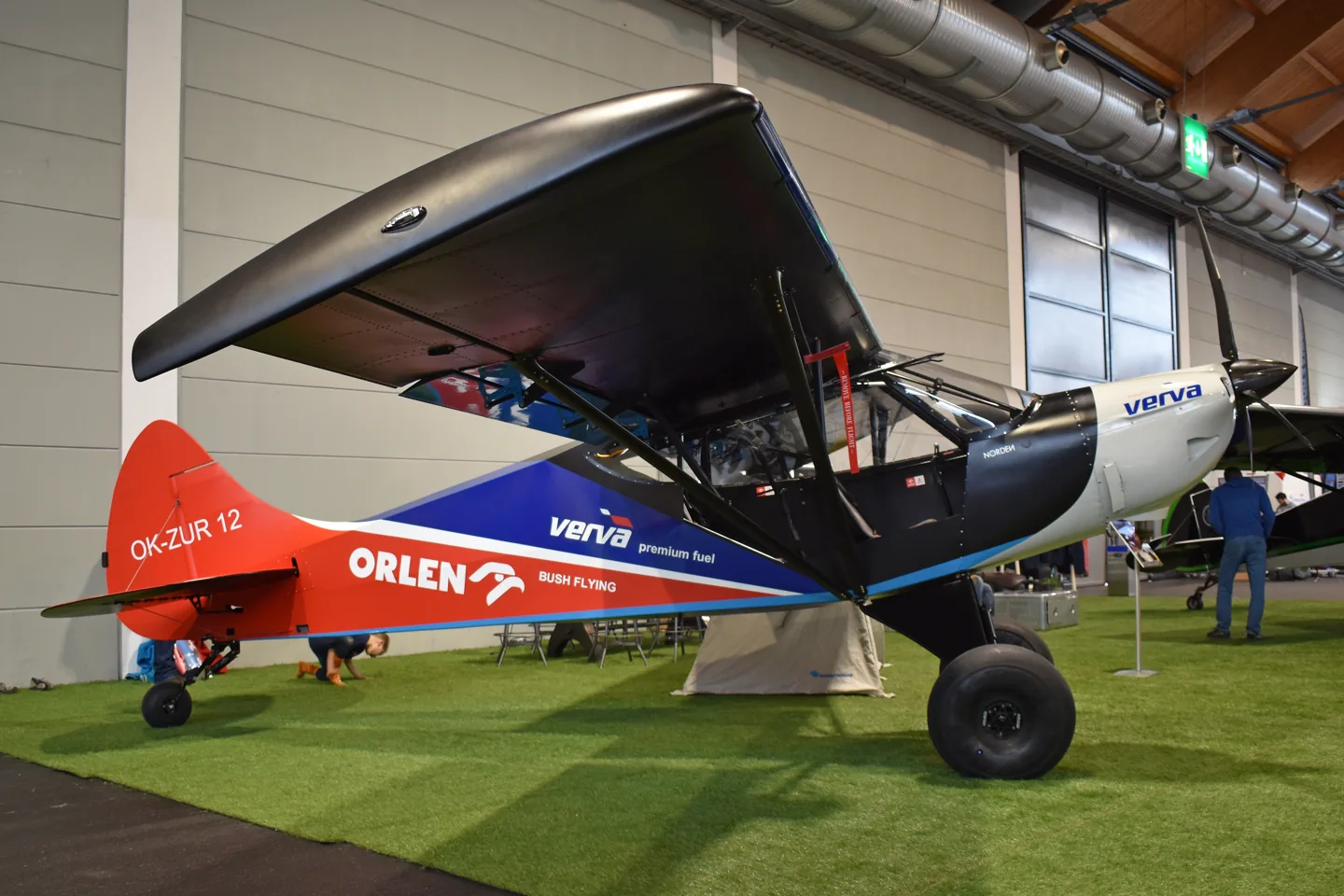
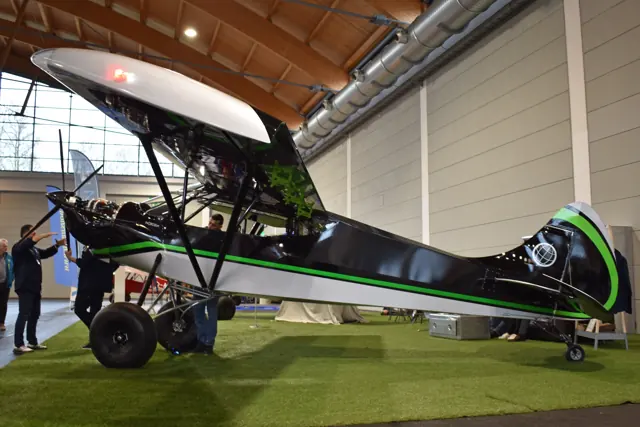
The Norden develops the Savage family's high-wing, tandem-seat layout for short-field work. Leading-edge slats and substantial landing gear distinguish it from the simpler Savage Cub.
Aircraft background
Wikipedia contributors · Read more ↗A cold factory visit ends with a little time alone in the aircraft
Iannelli’s visit to try the Norden began with introductions and espresso on a cold day near Prague. With Radim in the rear seat, he found the acceleration striking and enjoyed the visibility and response of the controls. The prototype interested him as an aircraft that might combine backcountry flying with the longer trips he hoped to make with family and friends.
December 2021 factory visit to Sazená, Czech Republic. Prototype Norden with Rotax 915 iS and fixed-pitch four-blade propeller; not the later simulated 916 iS configuration.
Savage Aircraft Sales / Jack Iannelli · Read more ↗Smoke also has a keyboard assignment
The Logo Lights hotkey controls smoke, which requires a running engine.
Savage Norden · Microsoft Flight Simulator · MSFS 2024
Microsoft / aircraft developers · Read more ↗Into the cockpit
 YouTube
 Experimental Aircraft Channel · 19 min ·
New! Zlin Savage Norden BUSHPLANE Ready to FLY!
A distributor interview introduces the Savage Norden and its equipment.
Real aircraft · Zlin Aviation Savage Norden
Watch on YouTube ↗Preview images are served by AirframeDB. Videos open on YouTube only when you choose to watch.
Meet Zlin Aviation Savage Norden
The Norden develops the Savage family's high-wing, tandem-seat layout for short-field work. Leading-edge slats and substantial landing gear distinguish it from the simpler Savage Cub.
Got Friends documents electric slat controls, autopilot arming and a banner-towing configuration in its MSFS 2024 implementation.
Savage
Zlin Aviation → · Explore the family →
Zlin Aviation Savage Norden
Wikipedia contributors · Zlin Savage ↗Microsoft Flight Simulator · MSFS 2024 →Aircraft type designators
A model-specific ICAO or FAA designator has not been confirmed in the references reviewed for this aircraft.
History & design
Combining backcountry flying with touring
Got Friends describes a design combining short-field and touring capabilities, first flown in April 2020 and introduced in 2021.
Microsoft / aircraft developers · Savage Norden Manual ↗Manual v3 · developer’s history
Pilot accounts
A cold factory visit ends with a little time alone in the aircraft
Iannelli’s visit to try the Norden began with introductions and espresso on a cold day near Prague. With Radim in the rear seat, he found the acceleration striking and enjoyed the visibility and response of the controls. The prototype interested him as an aircraft that might combine backcountry flying with the longer trips he hoped to make with family and friends.
His enthusiasm still left room for practical criticisms, including the toe-brake angle and the presentation of flap position. After trying several landing configurations, he returned so his companions could have their turns before the weather closed in. A short solo flight afterwards gave him a more personal conclusion to the day: time to enjoy the aircraft on his own.
December 2021 factory visit to Sazená, Czech Republic. Prototype Norden with Rotax 915 iS and fixed-pitch four-blade propeller; not the later simulated 916 iS configuration.
Read the full account · Savage Aircraft Sales / Jack Iannelli ↗Thirty-five minutes offer an encouraging first look
Campbell used an opportunity at the Midwest LSA Expo to spend about thirty-five minutes in the Norden with Bill Canino. It was enough for an initial impression of the aircraft, although he was careful to distinguish the outing from the fuller flight test he wanted to conduct later.
What stood out was how manageable the aircraft felt with its short-field equipment deployed. He described responsive controls and a workload that left him comfortable exploring the aeroplane during the available time. The brief flight made him keen to return for a more demanding assessment.
Aero-News Network · September 2022. Rotax 915 iS Norden at the Midwest LSA Expo, flown with Bill Canino; explicitly a short evaluation before a proposed fuller test.
Read the full account · Aero-News Network ↗An owner compares three propellers on the same morning
Busenitz approached a propeller choice by comparing three installations on his Norden during the same hot morning. His report considered static thrust, the flight results he observed and the weight of the equipment. It gives an owner’s view of trying alternatives on one aircraft rather than treating the propeller as a detail settled by the engine choice.
The results involved tradeoffs. The Catto led his reported static-thrust comparison, while the E-PROPS installation offered advantages he valued elsewhere, including weight and cruise performance. E-PROPS later reproduced his account on its own site. That commercial setting matters when reading the favourable conclusion: these remain Busenitz’s reported observations from his particular comparison, rather than independently established performance for every Norden.
E-PROPS republishes a customer comparison · August 2026. Rotax 916 iS Norden; supplier-selected account of DUC, Catto and E-PROPS constant-speed propellers, without independent test verification.
Read the full account · E-PROPS ↗In your simulator
Systems, equipment and documentation for each developer’s aircraft.
MSFS 2024Savage Norden
Microsoft Flight Simulator · Released
Savage Norden
Microsoft Flight Simulator · Released
Aircraft specifications
Published figures for the named real-aircraft variant. Simulator equipment and performance can differ.
| Specification | Published value |
|---|---|
| Length | 6.39 m (21 ft 0 in) |
| Wingspan | 9.31 m (30 ft 7 in) |
| Height | 2.03 m (6 ft 8 in) |
| Wing area | 14.2 m² (153 sq ft) |
| Empty weight | 288 kg (635 lb) |
| Gross weight | 560 kg (1,235 lb) |
| Powerplant | 1 × Rotax 912UL Four cylinder horizontally opposed piston, 60 kW (80 hp) |
| Maximum speed | 188 km/h (117 mph, 102 kn) |
| Cruise speed | 170 km/h (110 mph, 92 kn) |
| Stall speed | 62 km/h (39 mph, 33 kn) |
| Range | 720 km (450 mi, 390 nmi) |
| Service ceiling | 4,400 m (14,400 ft) |
| Rate of climb | 4.8 m/s (940 ft/min) |
Manuals & resources
Find your next read
Choose a topic for a short introduction and a link to the original source. Simulator references identify the developer and edition they cover.
Simulator documentation
Smoke also has a keyboard assignmentSavage Norden · Microsoft Flight Simulator · MSFS 2024
The Logo Lights hotkey controls smoke, which requires a running engine.
Developer-documented assignment
Microsoft / aircraft developers · Read the source ↗Slats and flaps have distinct controlsSavage Norden · Microsoft Flight Simulator · MSFS 2024
Electric slats accompany a separate flap lever, whose high-sink position must be held.
Manual cockpit guide and specification
Microsoft / aircraft developers · Read the source ↗Slats, autopilot arming and a towing configurationSavage Norden · Microsoft Flight Simulator · MSFS 2024
The Norden guide identifies electrically operated slats and a separate autopilot arming switch and breaker. It also describes a banner-towing variant specific to MSFS 2024. These features are documented for the Got Friends Norden.
Archived simulator manual; installed package revision not observed · PDF pp.5,7
Microsoft / aircraft developers · Read the source ↗A 916 iS configuration with a glass panelSavage Norden · Microsoft Flight Simulator · MSFS 2024
The documented configuration combines a Rotax 916 iS, five-blade constant-speed propeller and Working Title G3X Touch.
Manual v3 · MSFS 2024
Microsoft / aircraft developers · Read the source ↗The notepad changes cabin and visual optionsSavage Norden · Microsoft Flight Simulator · MSFS 2024
Notepad settings cover vibration, headphone sound, sleeping equipment, cowling, liveries and front-seatbelt visibility.
Manual options page
Microsoft / aircraft developers · Read the source ↗The EFB handles checklists and copilot visibilitySavage Norden · Microsoft Flight Simulator · MSFS 2024
MSFS 2024 uses the EFB for interactive checklists and copilot visibility. The older simulator has different interfaces.
Manual v3
Microsoft / aircraft developers · Read the source ↗Pilot account
A cold factory visit ends with a little time alone in the aircraftDecember 2021 factory visit to Sazená, Czech Republic. Prototype Norden with Rotax 915 iS and fixed-pitch four-blade propeller; not the later simulated 916 iS configuration.
Iannelli’s visit to try the Norden began with introductions and espresso on a cold day near Prague. With Radim in the rear seat, he found the acceleration striking and enjoyed the visibility and response of the controls. The prototype interested him as an aircraft that might combine backcountry flying with the longer trips he hoped to make with family and friends. His enthusiasm still left room for practical criticisms, including the toe-brake angle and the presentation of flap position.
Jack Iannelli
Savage Aircraft Sales / Jack Iannelli · Read the source ↗Thirty-five minutes offer an encouraging first lookAero-News Network · September 2022. Rotax 915 iS Norden at the Midwest LSA Expo, flown with Bill Canino; explicitly a short evaluation before a proposed fuller test.
Campbell used an opportunity at the Midwest LSA Expo to spend about thirty-five minutes in the Norden with Bill Canino. It was enough for an initial impression of the aircraft, although he was careful to distinguish the outing from the fuller flight test he wanted to conduct later. What stood out was how manageable the aircraft felt with its short-field equipment deployed. He described responsive controls and a workload that left him comfortable exploring the aeroplane during the available time.
Jim Campbell
Aero-News Network · Read the source ↗Read the original documentation from the people who created it. Manuals open on their publisher’s website.
Manual
Microsoft Flight Simulator aircraft manualsMicrosoft / aircraft developers Savage Norden ManualMicrosoft / aircraft developersAircraft background
Zlin SavageWikipedia contributors · Research background · Wikipedia revision 1322580419 · retrieved 2026-09-12Resource
MSFS 2024 FAQ and edition aircraft inventoryMicrosoftBuilt-in force-feedback profiles
Read the documentary basis, editable starting settings and remaining questions for the aircraft you fly. Each explanation refers to the exact profile revision shown.
Catalogue programme-20261022-v1 · 1 profile choice
Zlin Aviation Savage Norden
Free and Pro · Revision 1 · Partial review
MSFS 2024
Zlin Aviation Savage Norden: The profile supplies the short-field aircraft’s selected stick response.
Zlin Aviation Savage Norden
Zlin Aviation Savage Norden: The profile supplies the short-field aircraft’s selected stick response.
Aircraft and simulator scope
- Zlin Aviation Savage Norden · MSFS 2024 · family starting point
Zlin Aviation Savage Norden · Family sources identify only the variants and product versions described above.
The simulator model and controls
The Norden develops the Savage family's high-wing, tandem-seat layout for short-field work. Leading-edge slats and substantial landing gear distinguish it from the simpler Savage Cub.
This starting point selects Zlin Aviation Savage Norden. Its aircraft-level settings do not select a particular developer’s custom systems.
How this profile feels
The profile supplies the short-field aircraft’s selected stick response. Spring resistance builds with the selected airspeed response. A separate aerodynamic term adds speed-dependent control load.
Pitch relief is independent of slat actuation and banner equipment. Valid trim provides the configured pressure relief. Autopilot following is off.
Controls and trim
The Norden adds leading-edge slats to the Savage high-wing tandem formula. Got Friends documents electrical slat operation, autopilot arming and MSFS 2024 banner equipment in its rendition.
About the values
The gains are normalized profile settings. They describe the chosen effect balance; hand force depends on the device and its output limits. IAS references are tuning values rather than operating limits. Physical acceptance of this revision remains pending.
What the documentation establishes
Microsoft identifies the Savage Norden with a Rotax 916iS.
Manual page 4 lists 70-degree Fowler flaps and electrically actuated slats; slat physics remains add-on owned.
Documentary review and sources
These decisions describe the documentary basis and remaining gaps for this revision. Aircraft documentation and a starting setting describe different kinds of evidence.
Aircraft and variant
ReviewedThis starting point selects Zlin Aviation Savage Norden. Its aircraft-level settings do not select a particular developer’s custom systems.
Flight controls
Not yet reviewedThe Norden adds leading-edge slats to the Savage high-wing tandem formula. Got Friends documents electrical slat operation, autopilot arming and MSFS 2024 banner equipment in its rendition.
Trim
Not yet reviewedPitch relief is independent of slat actuation and banner equipment. Pitch authority 0.3 provides load relief and permitted centre movement; roll authority is 0.
Autopilot and stability
Not yet reviewedAutopilot following is off; the configured spring and load retain the hardware feel.
Equipment
ReviewedGear, flap and ground cues follow the selected settings and available simulator-reported states.
Speeds and limits
Not yet reviewedThe indicated-speed references set the profile response scale; they are separate from aircraft operating limits.
Simulator integration
Not yet reviewedThe profile targets msfs2024. Add-on-specific controls use only the supported references configured by this profile.
Force-feedback settings
Not yet reviewedThe settings define the profile’s effect balance. Device output limits affect physical hand force.
Starting settings and their rationale
These configured values are starting estimates. The explanations describe what each setting controls; physical validation appears separately below.
| Setting | Starting value | What it controls and why |
|---|---|---|
| Spring strength | Starting value0.74 | What it controls and whyThe profile supplies the short-field aircraft’s selected stick response. The baseline spring is 0.74. Its low-speed blend reaches baseline strength at 47.5 KIAS. |
| Master force gain | Starting value0.85 | What it controls and whyScales overall profile strength while preserving effect balance, subject to device and output limits. |
| Profile force gain | Starting value0.8 | What it controls and whyThe aerodynamic-load gain is 0.8 with an indicated-speed reference of 95 KIAS. This supplies speed-dependent loading alongside the spring. |
| Force tuning speed/reference | Starting value95.0 kt | What it controls and whySets the IAS reference for aerodynamic loading. It is an estimate, not published cruise TAS or a flight limit. |
| Spring response reference speed | Starting value47.5 kt | What it controls and whySets the IAS where the low-speed blend reaches baseline strength; high-speed stiffening also uses it. |
| Aileron force scale | Starting value0.6 | What it controls and whyRoll and pitch aerodynamic scales are 0.6 and 0.78, respectively. They set the aerodynamic axis balance. No custom spring-travel curve is enabled. |
| Elevator force scale | Starting value0.78 | What it controls and whyScales pitch aerodynamic loading; pitch spring travel and trim responses are separate settings. |
| Trim feel | Starting valueEnabled | What it controls and whyRetained for compatibility and group membership. Trim relief, rather than this flag, controls centre movement. |
| Trim relief | Starting valueEnabled | What it controls and whyAllows trim relief with supported control law and valid telemetry. Axis authorities set its amount. |
| Autopilot follow | Starting valueDisabled | What it controls and whyAutopilot following is off; the configured spring and load retain the hardware feel. |
| Autopilot neutral hold | Starting valueDisabled | What it controls and whyPermits centering hold during a supported AP state, separate from following a moving target. |
| Output force limit | Starting value0.55 | What it controls and whyCaps directed-force output. Native spring effects and device limits remain separate. |
All 44 starting settings and their rationale
The settings define the profile’s effect balance. Device output limits affect physical hand force.
| Setting | Starting value | What it controls and why |
|---|---|---|
| Spring strength | Starting value0.74 | What it controls and whyThe profile supplies the short-field aircraft’s selected stick response. The baseline spring is 0.74. Its low-speed blend reaches baseline strength at 47.5 KIAS. |
| Spring deadband | Starting value0.045 | What it controls and whySets travel around the centre before the baseline spring resists. Smaller values engage it sooner. |
| Profile force gain | Starting value0.8 | What it controls and whyThe aerodynamic-load gain is 0.8 with an indicated-speed reference of 95 KIAS. This supplies speed-dependent loading alongside the spring. |
| Master force gain | Starting value0.85 | What it controls and whyScales overall profile strength while preserving effect balance, subject to device and output limits. |
| QBlend Enabled | Starting valueEnabled | What it controls and whyAllows baseline spring strength to rise with indicated airspeed where the control law permits it. |
| QSpring Minimum Factor | Starting value0.5 | What it controls and whySets low-speed spring strength as a fraction of baseline when blending is enabled. One keeps full strength. |
| QSpring Start Knots | Starting value13.3 kt | What it controls and whySets the IAS where the low-speed spring blend starts rising. This is a feel threshold, not a flight limit. |
| Spring response reference speed | Starting value47.5 kt | What it controls and whySets the IAS where the low-speed blend reaches baseline strength; high-speed stiffening also uses it. |
| Force tuning speed/reference | Starting value95.0 kt | What it controls and whySets the IAS reference for aerodynamic loading. It is an estimate, not published cruise TAS or a flight limit. |
| Airspeed spring stiffening gain | Starting value0.15 | What it controls and whyThe high-speed spring-stiffening gain is 0.15. It strengthens the permitted spring response above 47.5 KIAS, with the squared-speed ratio capped at 5. |
| Airspeed spring stiffening limit | Starting value5 | What it controls and whyLimits the squared airspeed ratio used for high-speed spring stiffening; it is not a device-force cap. |
| Aileron force scale | Starting value0.6 | What it controls and whyRoll and pitch aerodynamic scales are 0.6 and 0.78, respectively. They set the aerodynamic axis balance. No custom spring-travel curve is enabled. |
| Elevator force scale | Starting value0.78 | What it controls and whyScales pitch aerodynamic loading; pitch spring travel and trim responses are separate settings. |
| Output force limit | Starting value0.55 | What it controls and whyCaps directed-force output. Native spring effects and device limits remain separate. |
| Trim feel | Starting valueEnabled | What it controls and whyRetained for compatibility and group membership. Trim relief, rather than this flag, controls centre movement. |
| Trim relief | Starting valueEnabled | What it controls and whyAllows trim relief with supported control law and valid telemetry. Axis authorities set its amount. |
| Elevator Authority | Starting value0.3 | What it controls and whyPitch relief is independent of slat actuation and banner equipment. Pitch authority 0.3 provides load relief and permitted centre movement; roll authority is 0. |
| Aileron Authority | Starting value0 | What it controls and whyScales supported roll-trim relief and permitted centre movement. Zero removes roll response. |
| Force Trim Enabled | Starting valueDisabled | What it controls and whyEnables local force trim, separate from aircraft-owned trim and add-on integration qualification. |
| GLoad Enabled | Starting valueEnabled | What it controls and whyAllows load-factor changes to modify permitted spring laws. Passive fly-by-wire feel can suppress it. |
| Rate Damping Enabled | Starting valueEnabled | What it controls and whyEnables rate damping with the configured coefficients and control law. |
| Autopilot follow | Starting valueDisabled | What it controls and whyAutopilot following is off; the configured spring and load retain the hardware feel. |
| Autopilot follow authority | Starting value0.1 | What it controls and whySets admitted AP-follow gain, not a percentage of travel. Runtime ownership and input limits still apply. |
| Autopilot neutral hold | Starting valueDisabled | What it controls and whyPermits centering hold during a supported AP state, separate from following a moving target. |
| Autopilot neutral hold strength | Starting value0.6 | What it controls and whySets admitted AP neutral-hold strength; inactive while neutral hold is disabled. |
| Enabled | Starting valueEnabled | What it controls and whyEnables aerodynamic cues; each still needs nonzero strength and its simulator conditions. |
| Gain | Starting value0.35 | What it controls and whySets stall-buffet strength. Zero removes the cue without changing simulator stalls or warnings. |
| Gain | Starting value0 | What it controls and whySets high-Mach buffet strength; onset and full-strength thresholds are separate. |
| Gain | Starting value0.14 | What it controls and whySets flap buffet at the configured position and speed gates. Flap movement texture is separate. |
| Maximum flap index | Starting value3 | What it controls and whySets the final flap index for detent normalization. UP plus three detents uses maximum index3. |
| Minimum flap index | Starting value2 | What it controls and whySets the first flap detent that admits buffet; this is a handle index, not degrees. |
| Gain | Starting value0 | What it controls and whySets gear aerodynamic buffet; movement and ground-contact cues are separate. |
| Shaker Enabled | Starting valueDisabled | What it controls and whyPermits shaker at supported warning conditions; the switch does not establish aircraft equipment. |
| Stick shaker amplitude | Starting value0.5 | What it controls and whySets triggered shaker strength; inactive while the shaker feature is disabled. |
| Enabled | Starting valueEnabled | What it controls and whyEnables ground effects; each still needs its own strength and contact or motion telemetry. |
| Gain | Starting value0.4 | What it controls and whySets rolling texture strength, modified by speed, surface and undercarriage configuration. |
| Gain | Starting value0.25 | What it controls and whySets gear-bump texture during ground motion, separate from touchdown impact. |
| Gain | Starting value0.65 | What it controls and whySets landing-impact strength; landing telemetry and response shape determine the pulse. |
| Gain | Starting value0 | What it controls and whySets reverse-thrust vibration with valid reverser and engine conditions. Zero removes the cue. |
| Enabled | Starting valueEnabled | What it controls and whyEnables engine cues with nonzero settings and valid running-engine telemetry. |
| Gain | Starting value0.12 | What it controls and whySets estimated engine vibration using configured telemetry and response, not measured cockpit vibration. |
| Enabled | Starting valueEnabled | What it controls and whyEnables accessory cues with configured strengths and observed accessory movement. |
| Gain | Starting value0.12 | What it controls and whySets texture from observed flap movement; a command without movement does not establish the cue. |
| Gain | Starting value0 | What it controls and whySets texture from observed gear movement, separate from aerodynamic and touchdown effects. |
Limits and open questions
- The slat and flap design does not establish force gearing or harmony.
- A trim gauge is documented; trim authority remains unresolved.
- Follow is off; no servo-force interface was established.
- The manual's speed figures do not establish an indicated-airspeed force anchor.
- Slat, flap and custom ground behavior need actual product signals.
- Low-speed short-field performance is not a measured hand-force curve; gains are preserved.
Physical validation
No physical force validation is recorded in this public catalogue for this revision. Documentary review and software checks do not establish how a particular device feels.
Discuss this aircraft (0)
Questions, observations and useful sources from the community.
No published discussions yet. Bring a question or share a useful source.
Open aircraft discussions →Content expanded · What’s new
Something missing or a source that needs attention?
Suggest a correction ↗