Start here
A few places to begin, from the aircraft’s story to the people who fly it.
Meet the aircraft
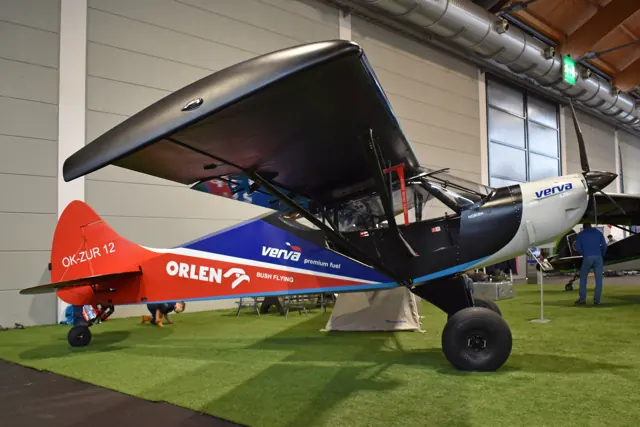
The Shock Ultra is a specialised lightweight short-field aircraft in Zlin Aviation's range. It retains the tandem cabin and braced high wing, with a different wing and prominent shock-absorbing landing gear. Its equipment and controls differ from the Savage Cub and Norden.
Aircraft background
Wikipedia contributors · Read more ↗A brief low-speed impression stays with the reviewer
Johnson’s written report gives a short but vivid impression of flying the Shock Ultra slowly. He remembered the airspeed indication falling towards the bottom of the scale while the aircraft was close to gross weight, and described the experience as remarkable. That is his personal observation from the flight, rather than a measured stall-speed result.
Plane & Pilot · October 2019. Shock Ultra report following his Midwest LSA Expo flight; the linked video was not used for this summary.
Plane & Pilot · Read more ↗Into the cockpit
 YouTube
 Dan Johnson · 5 min ·
Zlin Shock Ultra—0919
Dan Johnson presents the Shock Ultra's bush-aircraft design.
Real aircraft · Zlin Aviation Shock Ultra
Watch on YouTube ↗Preview images are served by AirframeDB. Videos open on YouTube only when you choose to watch.
Meet Zlin Aviation Shock Ultra
The Shock Ultra is a specialised lightweight short-field aircraft in Zlin Aviation's range. It retains the tandem cabin and braced high wing, with a different wing and prominent shock-absorbing landing gear. Its equipment and controls differ from the Savage Cub and Norden.
Savage
Zlin Aviation → · Explore the family →
Zlin Aviation Shock Ultra
Wikipedia contributors · Zlin Savage ↗Microsoft Flight Simulator · MSFS 2024 →Microsoft Flight Simulator · MSFS 2020 →Aircraft type designators
A model-specific ICAO or FAA designator has not been confirmed in the references reviewed for this aircraft.
History & design
The Ultra follows a deliberate effort to reduce weight
Johnson’s 2020 report relays designer Pasquale Russo’s and distributor Bill Canino’s explanation of the Ultra’s development from the earlier Shock Outback. The work focused on reducing weight and drag to suit a lighter aircraft, rather than simply installing more power. Their comments describe design priorities, not a second pilot flight account.
Plane & Pilot · What’s Enough Power? Bill Canino Explains Zlin’s Shock Ultra ↗Designer and distributor explanations reported in 2020
Pilot accounts
A brief low-speed impression stays with the reviewer
Johnson’s written report gives a short but vivid impression of flying the Shock Ultra slowly. He remembered the airspeed indication falling towards the bottom of the scale while the aircraft was close to gross weight, and described the experience as remarkable. That is his personal observation from the flight, rather than a measured stall-speed result.
The rest of his review examines the design choices surrounding that experience. He discusses the wing’s slats and substantial flaps, together with landing gear intended to absorb uneven arrivals, and relays the manufacturer’s emphasis on reducing weight. The article therefore combines a brief firsthand reaction with a broader explanation of the aircraft; it does not provide a long, instrumented flight-test narrative.
Plane & Pilot · October 2019. Shock Ultra report following his Midwest LSA Expo flight; the linked video was not used for this summary.
Read the full account · Plane & Pilot ↗An owner prefers the earlier aircraft’s rugged character
This Shock Cub owner described being very happy with an aircraft whose strength and rugged character suited the flying he wanted to do. Slow approaches and the ability to arrive gently were central to its appeal. His post reads as the view of someone who had found a satisfying fit between an aircraft and a particular kind of use.
He also drew a distinction between his machine and the lighter Shock Ultra being discussed in the thread. In his view, they served different requirements, and he preferred the earlier aircraft for his own purposes. That comparison was an owner’s preference, not a report of flying both. The account offers background on the Shock family while keeping his actual ownership separate from the Ultra.
Public SuperCub.org handle · February 2019. Owner of an earlier Shock Cub / Outback Shock, not a claimed Shock Ultra pilot; included as a clearly identified family account.
Read the full account · SuperCub.org ↗Enjoying the aircraft while working through early ownership problems
4Holer’s posts combine enthusiasm for his Shock Cub with the work of getting it sorted. Cooling concerns led to changes around the cowling and plumbing, with help from Zlin and its agent. A subsequent flight in hot conditions left him satisfied that this particular problem had been resolved.
Other items remained unfinished when he wrote, including work involving the rear control stick, flap testing and replacement brake pads. He also corrected an earlier estimate of the aircraft’s empty weight rather than leaving the mistaken figure in place. The discussion follows an owner learning and improving his individual aircraft over several days. His preference for its configuration was personal; he made clear that he had not tried the lighter Ultra.
Public SuperCub.org handle · May 2019. Rotax 914-powered Shock Cub, an earlier family aircraft; the author explicitly had not flown the Shock Ultra.
Read the full account · SuperCub.org ↗In your simulator
Systems, equipment and documentation for each developer’s aircraft.
Compare simulator versions →MSFS 2024Shock Ultra
Microsoft Flight Simulator · Released
Shock Ultra
Microsoft Flight Simulator · Released
MSFS 2020Shock Ultra
Microsoft Flight Simulator · Released
Shock Ultra
Microsoft Flight Simulator · Released
Aircraft specifications
Published figures for the named real-aircraft variant. Simulator equipment and performance can differ.
| Specification | Published value |
|---|---|
| Length | 6.39 m (21 ft 0 in) |
| Wingspan | 9.31 m (30 ft 7 in) |
| Height | 2.03 m (6 ft 8 in) |
| Wing area | 14.2 m² (153 sq ft) |
| Empty weight | 288 kg (635 lb) |
| Gross weight | 560 kg (1,235 lb) |
| Powerplant | 1 × Rotax 912UL Four cylinder horizontally opposed piston, 60 kW (80 hp) |
| Maximum speed | 188 km/h (117 mph, 102 kn) |
| Cruise speed | 170 km/h (110 mph, 92 kn) |
| Stall speed | 62 km/h (39 mph, 33 kn) |
| Range | 720 km (450 mi, 390 nmi) |
| Service ceiling | 4,400 m (14,400 ft) |
| Rate of climb | 4.8 m/s (940 ft/min) |
Manuals & resources
Find your next read
Choose a topic for a short introduction and a link to the original source. Simulator references identify the developer and edition they cover.
Pilot account
A brief low-speed impression stays with the reviewerPlane & Pilot · October 2019. Shock Ultra report following his Midwest LSA Expo flight; the linked video was not used for this summary.
Johnson’s written report gives a short but vivid impression of flying the Shock Ultra slowly. He remembered the airspeed indication falling towards the bottom of the scale while the aircraft was close to gross weight, and described the experience as remarkable. That is his personal observation from the flight, rather than a measured stall-speed result. The rest of his review examines the design choices surrounding that experience.
Dan Johnson
Plane & Pilot · Read the source ↗An owner prefers the earlier aircraft’s rugged characterPublic SuperCub.org handle · February 2019. Owner of an earlier Shock Cub / Outback Shock, not a claimed Shock Ultra pilot; included as a clearly identified family account.
This Shock Cub owner described being very happy with an aircraft whose strength and rugged character suited the flying he wanted to do. Slow approaches and the ability to arrive gently were central to its appeal. His post reads as the view of someone who had found a satisfying fit between an aircraft and a particular kind of use. He also drew a distinction between his machine and the lighter Shock Ultra being discussed in the thread.
damiens
SuperCub.org · Read the source ↗Read the original documentation from the people who created it. Manuals open on their publisher’s website.
Manual
Microsoft Flight Simulator aircraft manualsMicrosoft / aircraft developersAircraft background
Zlin SavageWikipedia contributors · Research background · Wikipedia revision 1322580419 · retrieved 2026-09-12 What’s Enough Power? Bill Canino Explains Zlin’s Shock UltraPlane & Pilot · Dan Johnson · 2020Resource
MSFS 2024 FAQ and edition aircraft inventoryMicrosoft MSFS 2020 FAQ and edition aircraft inventoryMicrosoftBuilt-in force-feedback profiles
Read the documentary basis, editable starting settings and remaining questions for the aircraft you fly. Each explanation refers to the exact profile revision shown.
Catalogue programme-20261022-v1 · 3 profile choices
Zlin Aviation Shock Ultra (wheels)
Free and Pro · Revision 2 · Partial review
MSFS 2020 · MSFS 2024
Zlin Aviation Shock Ultra (wheels): The chosen response supplies the short-field aircraft’s control resistance.
Zlin Aviation Shock Ultra (floats)
Free and Pro · Revision 1 · Partial review
MSFS 2020 · MSFS 2024
Zlin Aviation Shock Ultra (floats): The chosen response supplies the short-field aircraft’s control resistance.
Zlin Aviation Shock Ultra (skis)
Free and Pro · Revision 1 · Partial review
MSFS 2020 · MSFS 2024
Zlin Aviation Shock Ultra (skis): The chosen response supplies the short-field aircraft’s control resistance.
Zlin Aviation Shock Ultra (floats)
Zlin Aviation Shock Ultra (floats): The chosen response supplies the short-field aircraft’s control resistance.
Aircraft and simulator scope
- Zlin Aviation Shock Ultra (floats) · MSFS 2020 · Variant starting point
- Zlin Aviation Shock Ultra (floats) · MSFS 2024 · Variant starting point
Zlin Aviation Shock Ultra (floats) · Family sources identify only the variants and product versions described above.
The simulator model and controls
The Shock Ultra is a specialised lightweight short-field aircraft in Zlin Aviation's range. It retains the tandem cabin and braced high wing, with a different wing and prominent shock-absorbing landing gear. Its equipment and controls differ from the Savage Cub and Norden.
This starting point selects Zlin Aviation Shock Ultra (floats). Its aircraft-level settings do not select a particular developer’s custom systems.
How this profile feels
The chosen response supplies the short-field aircraft’s control resistance. Spring resistance builds with the selected airspeed response. A separate aerodynamic term adds speed-dependent control load.
Pitch relief retains the represented Shock Ultra trim scope. Valid trim provides the configured pressure relief. Autopilot following is off.
Controls and trim
The Shock Ultra is a small tandem utility aircraft with a short-field wing and substantial landing gear. Its configuration is separately identified from the Savage Cub and Norden, with its own simulator equipment.
About the values
The gains are normalized profile settings. They describe the chosen effect balance; hand force depends on the device and its output limits. IAS references are tuning values rather than operating limits. Physical acceptance of this revision remains pending.
What the documentation establishes
Zlin's brochure and configurator identify the Shock Ultra family; wheel, float and ski installations have distinct scope.
Documentary review and sources
These decisions describe the documentary basis and remaining gaps for this revision. Aircraft documentation and a starting setting describe different kinds of evidence.
Aircraft and variant
ReviewedThis starting point selects Zlin Aviation Shock Ultra (floats). Its aircraft-level settings do not select a particular developer’s custom systems.
Flight controls
Not yet reviewedThe Shock Ultra is a small tandem utility aircraft with a short-field wing and substantial landing gear. Its configuration is separately identified from the Savage Cub and Norden, with its own simulator equipment.
Trim
Not yet reviewedPitch relief retains the represented Shock Ultra trim scope. Pitch authority 0.3 provides load relief and permitted centre movement; roll authority is 0.
Autopilot and stability
Not yet reviewedAutopilot following is off; the configured spring and load retain the hardware feel.
Equipment
Not yet reviewedGear, flap and ground cues follow the selected settings and available simulator-reported states.
Speeds and limits
Not yet reviewedThe indicated-speed references set the profile response scale; they are separate from aircraft operating limits.
Simulator integration
Not yet reviewedThe profile targets msfs2020, msfs2024. Add-on-specific controls use only the supported references configured by this profile.
Force-feedback settings
Not yet reviewedThe settings define the profile’s effect balance. Device output limits affect physical hand force.
Starting settings and their rationale
These configured values are starting estimates. The explanations describe what each setting controls; physical validation appears separately below.
| Setting | Starting value | What it controls and why |
|---|---|---|
| Spring strength | Starting value0.64 | What it controls and whyThe chosen response supplies the short-field aircraft’s control resistance. The baseline spring is 0.64. Its low-speed blend reaches baseline strength at 32.5 KIAS. |
| Master force gain | Starting value0.85 | What it controls and whyScales overall profile strength while preserving effect balance, subject to device and output limits. |
| Profile force gain | Starting value0.8 | What it controls and whyThe aerodynamic-load gain is 0.8 with an indicated-speed reference of 65 KIAS. This supplies speed-dependent loading alongside the spring. |
| Force tuning speed/reference | Starting value65.0 kt | What it controls and whySets the IAS reference for aerodynamic loading. It is an estimate, not published cruise TAS or a flight limit. |
| Spring response reference speed | Starting value32.5 kt | What it controls and whySets the IAS where the low-speed blend reaches baseline strength; high-speed stiffening also uses it. |
| Aileron force scale | Starting value0.6 | What it controls and whyRoll and pitch aerodynamic scales are 0.6 and 0.78, respectively. They set the aerodynamic axis balance. No custom spring-travel curve is enabled. |
| Elevator force scale | Starting value0.78 | What it controls and whyScales pitch aerodynamic loading; pitch spring travel and trim responses are separate settings. |
| Trim feel | Starting valueEnabled | What it controls and whyRetained for compatibility and group membership. Trim relief, rather than this flag, controls centre movement. |
| Trim relief | Starting valueEnabled | What it controls and whyAllows trim relief with supported control law and valid telemetry. Axis authorities set its amount. |
| Autopilot follow | Starting valueDisabled | What it controls and whyAutopilot following is off; the configured spring and load retain the hardware feel. |
| Autopilot neutral hold | Starting valueDisabled | What it controls and whyPermits centering hold during a supported AP state, separate from following a moving target. |
| Output force limit | Starting value0.55 | What it controls and whyCaps directed-force output. Native spring effects and device limits remain separate. |
All 44 starting settings and their rationale
The settings define the profile’s effect balance. Device output limits affect physical hand force.
| Setting | Starting value | What it controls and why |
|---|---|---|
| Spring strength | Starting value0.64 | What it controls and whyThe chosen response supplies the short-field aircraft’s control resistance. The baseline spring is 0.64. Its low-speed blend reaches baseline strength at 32.5 KIAS. |
| Spring deadband | Starting value0.045 | What it controls and whySets travel around the centre before the baseline spring resists. Smaller values engage it sooner. |
| Profile force gain | Starting value0.8 | What it controls and whyThe aerodynamic-load gain is 0.8 with an indicated-speed reference of 65 KIAS. This supplies speed-dependent loading alongside the spring. |
| Master force gain | Starting value0.85 | What it controls and whyScales overall profile strength while preserving effect balance, subject to device and output limits. |
| QBlend Enabled | Starting valueEnabled | What it controls and whyAllows baseline spring strength to rise with indicated airspeed where the control law permits it. |
| QSpring Minimum Factor | Starting value0.5 | What it controls and whySets low-speed spring strength as a fraction of baseline when blending is enabled. One keeps full strength. |
| QSpring Start Knots | Starting value9.1 kt | What it controls and whySets the IAS where the low-speed spring blend starts rising. This is a feel threshold, not a flight limit. |
| Spring response reference speed | Starting value32.5 kt | What it controls and whySets the IAS where the low-speed blend reaches baseline strength; high-speed stiffening also uses it. |
| Force tuning speed/reference | Starting value65.0 kt | What it controls and whySets the IAS reference for aerodynamic loading. It is an estimate, not published cruise TAS or a flight limit. |
| Airspeed spring stiffening gain | Starting value0.15 | What it controls and whyThe high-speed spring-stiffening gain is 0.15. It strengthens the permitted spring response above 32.5 KIAS, with the squared-speed ratio capped at 5. |
| Airspeed spring stiffening limit | Starting value5 | What it controls and whyLimits the squared airspeed ratio used for high-speed spring stiffening; it is not a device-force cap. |
| Aileron force scale | Starting value0.6 | What it controls and whyRoll and pitch aerodynamic scales are 0.6 and 0.78, respectively. They set the aerodynamic axis balance. No custom spring-travel curve is enabled. |
| Elevator force scale | Starting value0.78 | What it controls and whyScales pitch aerodynamic loading; pitch spring travel and trim responses are separate settings. |
| Output force limit | Starting value0.55 | What it controls and whyCaps directed-force output. Native spring effects and device limits remain separate. |
| Trim feel | Starting valueEnabled | What it controls and whyRetained for compatibility and group membership. Trim relief, rather than this flag, controls centre movement. |
| Trim relief | Starting valueEnabled | What it controls and whyAllows trim relief with supported control law and valid telemetry. Axis authorities set its amount. |
| Elevator Authority | Starting value0.3 | What it controls and whyPitch relief retains the represented Shock Ultra trim scope. Pitch authority 0.3 provides load relief and permitted centre movement; roll authority is 0. |
| Aileron Authority | Starting value0 | What it controls and whyScales supported roll-trim relief and permitted centre movement. Zero removes roll response. |
| Force Trim Enabled | Starting valueDisabled | What it controls and whyEnables local force trim, separate from aircraft-owned trim and add-on integration qualification. |
| GLoad Enabled | Starting valueEnabled | What it controls and whyAllows load-factor changes to modify permitted spring laws. Passive fly-by-wire feel can suppress it. |
| Rate Damping Enabled | Starting valueEnabled | What it controls and whyEnables rate damping with the configured coefficients and control law. |
| Autopilot follow | Starting valueDisabled | What it controls and whyAutopilot following is off; the configured spring and load retain the hardware feel. |
| Autopilot follow authority | Starting value0.1 | What it controls and whySets admitted AP-follow gain, not a percentage of travel. Runtime ownership and input limits still apply. |
| Autopilot neutral hold | Starting valueDisabled | What it controls and whyPermits centering hold during a supported AP state, separate from following a moving target. |
| Autopilot neutral hold strength | Starting value0.6 | What it controls and whySets admitted AP neutral-hold strength; inactive while neutral hold is disabled. |
| Enabled | Starting valueEnabled | What it controls and whyEnables aerodynamic cues; each still needs nonzero strength and its simulator conditions. |
| Gain | Starting value0.35 | What it controls and whySets stall-buffet strength. Zero removes the cue without changing simulator stalls or warnings. |
| Gain | Starting value0 | What it controls and whySets high-Mach buffet strength; onset and full-strength thresholds are separate. |
| Gain | Starting value0.14 | What it controls and whySets flap buffet at the configured position and speed gates. Flap movement texture is separate. |
| Maximum flap index | Starting value3 | What it controls and whySets the final flap index for detent normalization. UP plus three detents uses maximum index3. |
| Minimum flap index | Starting value2 | What it controls and whySets the first flap detent that admits buffet; this is a handle index, not degrees. |
| Gain | Starting value0 | What it controls and whySets gear aerodynamic buffet; movement and ground-contact cues are separate. |
| Shaker Enabled | Starting valueDisabled | What it controls and whyPermits shaker at supported warning conditions; the switch does not establish aircraft equipment. |
| Stick shaker amplitude | Starting value0.5 | What it controls and whySets triggered shaker strength; inactive while the shaker feature is disabled. |
| Enabled | Starting valueEnabled | What it controls and whyEnables ground effects; each still needs its own strength and contact or motion telemetry. |
| Gain | Starting value0.4 | What it controls and whySets rolling texture strength, modified by speed, surface and undercarriage configuration. |
| Gain | Starting value0.25 | What it controls and whySets gear-bump texture during ground motion, separate from touchdown impact. |
| Gain | Starting value0.65 | What it controls and whySets landing-impact strength; landing telemetry and response shape determine the pulse. |
| Gain | Starting value0 | What it controls and whySets reverse-thrust vibration with valid reverser and engine conditions. Zero removes the cue. |
| Enabled | Starting valueEnabled | What it controls and whyEnables engine cues with nonzero settings and valid running-engine telemetry. |
| Gain | Starting value0.12 | What it controls and whySets estimated engine vibration using configured telemetry and response, not measured cockpit vibration. |
| Enabled | Starting valueEnabled | What it controls and whyEnables accessory cues with configured strengths and observed accessory movement. |
| Gain | Starting value0.12 | What it controls and whySets texture from observed flap movement; a command without movement does not establish the cue. |
| Gain | Starting value0 | What it controls and whySets texture from observed gear movement, separate from aerodynamic and touchdown effects. |
Limits and open questions
- The flap and aileron description does not establish gearing forces.
- Trim authority remains configuration-specific and unreviewed.
- Follow is off; no fitted servo system was established.
- Zlin Aviation Shock Ultra (floats) uses family control evidence. An exact float or ski supplement, contact geometry and installation equipment were not reviewed.
- No exact wheel, float or ski indicated-airspeed force calibration was established.
- Loaded engine, slat and contact options need signal checks.
- Low-speed manual-control strengths do not measure equivalence across installations.
Physical validation
No physical force validation is recorded in this public catalogue for this revision. Documentary review and software checks do not establish how a particular device feels.
Discuss this aircraft (0)
Questions, observations and useful sources from the community.
No published discussions yet. Bring a question or share a useful source.
Open aircraft discussions →Content expanded · What’s new
Something missing or a source that needs attention?
Suggest a correction ↗