FOR AIRCRAFT DEVELOPERS
Research aircraft and systems
Find aircraft background, systems descriptions and manuals for the aircraft you are researching. Each note keeps its source and version context close by.
Simulator manuals describe the developer’s implementation. Aircraft background is research-based; pilot accounts describe an individual’s experience. Coverage here is limited to the selected notes and linked resources, not the full contents of every manual.
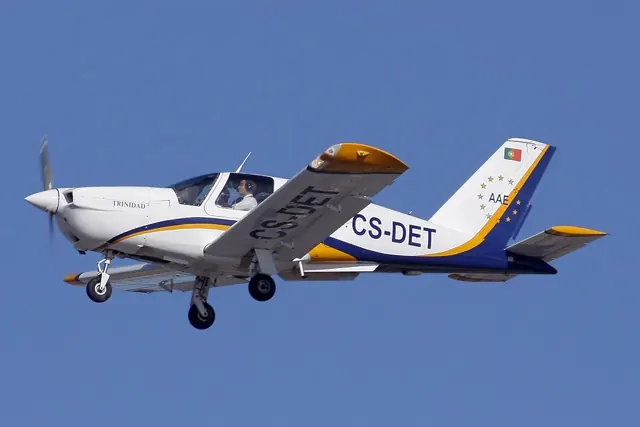
SOCATA TB10 Tobago / TB20 Trinidad
SOCATA's TB family took its designation from Tarbes, the French city associated with production. Models received Caribbean island names, including Tobago and Trinidad. Landing gear and equipment differ across the family; the simulator package includes the TB10 and TB20, and the specification tables identify their model scope.
Socata TB20 Trinidad: owner experience
Owner’s continuing account of TB20GT operation since 2002; publication date not stated
Flight Test: Refurbished Socata TB-10 Tobago
Dave Unwin · 9 November 2016; photographs by Keith Wilson
Socata Trinidad GT
Bill Cox · 1 August 2004
17 B · Microsoft Flight Simulator · MSFS 2024
Trim and undercarriage controls
The 2023 B 17A guide labels trim and normal/emergency gear controls. This older MSFS 2020 manual does not establish unchanged MSFS 2024 operation.
Legacy guide 1.0.2 · PDF page 27; 2024 roster label is 17 B, original release is B 17A
Saab B 17A · Microsoft Flight Simulator · MSFS 2020
Change the cockpit language and measurement system
The EFB Settings page switches Swedish/metric gauges and labels to English/imperial.
B 17A guide 1.0.2, 14 November 2023 · MSFS 2020, PDF pages 11–13
Saab B 17A · Microsoft Flight Simulator · MSFS 2020
Use the EFB for the route and airport weather
Its map displays a World Map route; the Home page shows departure and arrival METARs.
MSFS 2020 guide · PDF page 11
Saab B 17A · Microsoft Flight Simulator · MSFS 2020
Show or hide the tablet from the instrument panel
Click the button on the right side of the front panel.
MSFS 2020 guide · PDF page 14
Saab B 17A · Microsoft Flight Simulator · MSFS 2020
Find a checklist item directly in the cockpit
The checklist’s blue eye moves the view to the relevant control. It also provides an Auto Complete option.
MSFS 2020 guide · PDF page 8
Saab B 17A · Microsoft Flight Simulator · MSFS 2020
Modern radios support simulator ATC
The right-side radio and transponder accept manual settings or automatic changes through the simulator ATC window.
MSFS 2020 guide · PDF pages 15–17
Saab B 17A · Microsoft Flight Simulator · MSFS 2020
The clock has two separate timers
The right button operates the stopwatch; the left operates the flight timer. Each cycles through start, stop and reset.
MSFS 2020 guide · PDF pages 19–20
Saab B 17A · Microsoft Flight Simulator · MSFS 2020
Open the canopies or clear the control stick from view
Cockpit levers open the canopies and side window. Clicking the bracket below the stick hides or restores it.
MSFS 2020 guide · PDF pages 20–22