
Start here
A few places to begin, from the aircraft’s story to the people who fly it.
Meet the aircraft
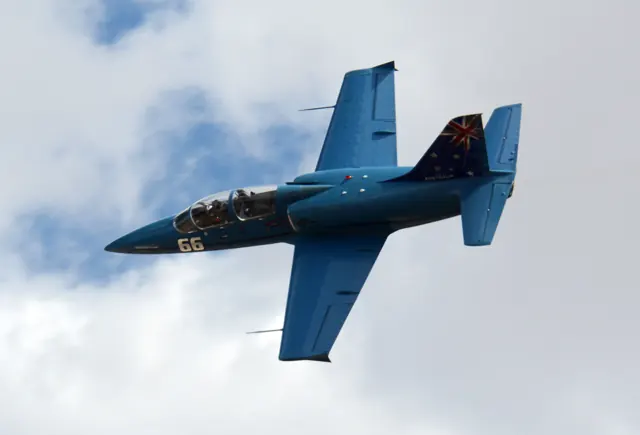
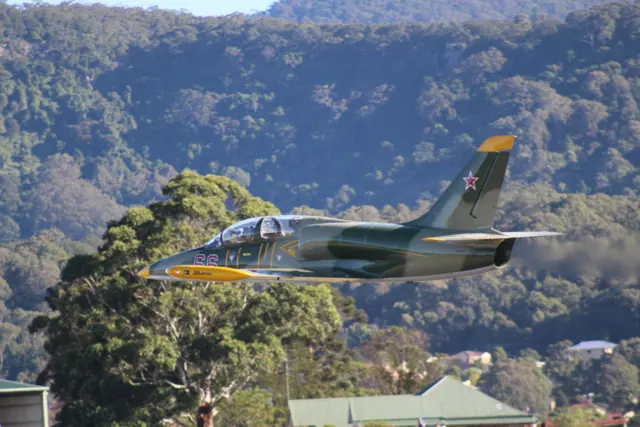
Designed by Aero Vodochody, the L-39 Albatros was built around the training role. Instructor and student sit in tandem under separate canopy sections, with a single jet engine in the fuselage. It was widely adopted by military operators, and armed versions also served in light-attack roles. An L-39 trainer, an armed derivative and a privately operated racer can share a recognisable airframe while carrying different equipment.
Aircraft background
Wikipedia contributors · Read more ↗A corporate pilot learns a different sort of jet flying
Mark already flew corporate jets when he began an L-39 checkout with Greg Morris at Gauntlet Warbirds near Chicago. The narrow cockpit, parachute and unfamiliar markings required adjustment, but the most awkward early lesson was steering with rudder pedals and a hand-operated brake. Once airborne, he found the controls light and responsive.
AOPA Pilot, April 2012. Checkout with Greg Morris in an AI-25-powered L-39; individual training experience.
AOPA Pilot · Read more ↗Into the cockpit
 YouTube
 Max_Afterburner · 15 min ·
L-39 "Albatros" Jet Flight Footage
Cockpit and exterior footage of two L-39 Albatros jets, including aerobatic sequences.
Real aircraft · Aero Vodochody L-39
Watch on YouTube ↗Preview images are served by AirframeDB. Videos open on YouTube only when you choose to watch.
Meet Aero Vodochody L-39
Designed by Aero Vodochody, the L-39 Albatros was built around the training role. Instructor and student sit in tandem under separate canopy sections, with a single jet engine in the fuselage. It was widely adopted by military operators, and armed versions also served in light-attack roles.
Trainer, armed and civilian racing versions carry different equipment within the same airframe lineage. The simulator products identify their represented versions.
Aero Vodochody L-39
Aero Vodochody → · Explore the family →
Aero Vodochody L-39
Wikipedia contributors · Aero L-39 Albatros ↗Microsoft Flight Simulator · MSFS 2024 →Aircraft type designators
Use the code for the model you are flying. The linked authority lists the applicable aircraft.
History & design
Development milestones
Designer: Jan Vlček
First flight: 4 November 1968
Developed from: Aero L-29 Delfín
Wikipedia contributors · Aero L-39 Albatros ↗Aero L-39 Albatros · family/variant named by the source · Wikipedia revision 1372785053
Pilot accounts
A corporate pilot learns a different sort of jet flying
Mark already flew corporate jets when he began an L-39 checkout with Greg Morris at Gauntlet Warbirds near Chicago. The narrow cockpit, parachute and unfamiliar markings required adjustment, but the most awkward early lesson was steering with rudder pedals and a hand-operated brake. Once airborne, he found the controls light and responsive. Steep turns and a roll were exhilarating, although the pitch sensitivity made small attitude errors grow quickly.
Repeated visual circuits proved unexpectedly tiring for someone accustomed to business-jet approaches and go-arounds. Mark initially struggled to control the acceleration while turning downwind, then improved as Morris coached the timing and power changes. The engine's slow response from idle remained a central consideration throughout the training. Practice approaches simulating a flameout also made the classroom discussion of energy management more concrete. By the time he was preparing for the checkride, the once-unfamiliar cockpit felt increasingly comfortable, even if the pleasure of flying the Albatros had hardly become routine.
AOPA Pilot, April 2012. Checkout with Greg Morris in an AI-25-powered L-39; individual training experience.
Read the full account · AOPA Pilot ↗A former student introduces his instructor to a transformed Albatros
Hirschman had once taught Jimmy Hayes tailwheel and aerobatic flying. Years later, their roles reversed when Hayes introduced him to N395MK, an extensively rebuilt L-39 with a Garrett engine and Garmin avionics. From the raised rear cockpit, Hirschman enjoyed the visibility and balanced pitch and roll response. The speeds and altitudes involved in their aerobatics were much larger than those of the piston aircraft he usually flew.
The sustained loading during turns and over-the-top figures made the flight a physical workout. Hirschman noted that the pull force became lighter as the G loading increased, while Hayes coached him through the manoeuvres and watched their altitude. Hayes then handled the overhead approach and return to Sarasota. This account belongs to that particular L-39X conversion: its different engine, fuel arrangement and avionics are central to the experience. Hirschman enjoyed seeing his former student become the pilot introducing him to a new aircraft.
AOPA Pilot, September 2024. N395MK L-39X with a Garrett TFE731 conversion; performance and handling are not presented as those of an unmodified L-39.
Read the full account · AOPA Pilot ↗From simulator practice to the rear cockpit of OK-JET
Hančar prepared for an invited flight in OK-JET by studying the airfield and practising in a simulator. On the day, low cloud near Plzeň initially threatened the plan, but he was soon strapped into the rear cockpit with test pilot Vladimír Kvarda in front. The briefing included emergency actions and how they would communicate. Kvarda flew the departure and aerobatics, giving Hančar a vivid impression of the longer, sustained loading compared with his previous light-aircraft experiences.
Kvarda then handed over the controls for circuits. Hančar found the elevated rear-seat view excellent and the aircraft responsive, with enough time to check both instruments and the scene outside. Kvarda continued managing the gear and flaps and coaching the flight path. The landing view differed from what the simulator had prepared him for, and the first touchdown required guidance. A second circuit felt more relaxed. His Czech-language account distinguishes that supervised introduction from independent qualification, while conveying the excitement of finally experiencing a familiar simulated aircraft in the air.
Aeroweb.cz, 14 January 2009; flight in October 2006. English summary of a Czech first-person account; supervised handling in OK-JET, with Kvarda retaining responsibility and managing configuration.
Read the full account · Aeroweb.cz ↗In your simulator
Systems, equipment and documentation for each developer’s aircraft.
MSFS 2024L-39
Microsoft Flight Simulator · Released
L-39
Microsoft Flight Simulator · Released
Aircraft specifications
Published figures for the named real-aircraft variant. Simulator equipment and performance can differ.
| Specification | Published value |
|---|---|
| Length | 12.13 m (39 ft 10 in) |
| Wingspan | 9.46 m (31 ft 0 in) |
| Height | 4.77 m (15 ft 8 in) |
| Wing area | 18.8 m² (202 sq ft) |
| Empty weight | 3,455 kg (7,617 lb) |
| Max takeoff weight | 4,700 kg (10,362 lb) |
| Powerplant | 1 × Ivchenko AI-25TL turbofan engine, 16.87 kN (3,790 lbf) thrust |
| Maximum speed | 750 km/h (470 mph, 400 kn) at 5,000 m (16,000 ft) |
| Range | 1,100 km (680 mi, 590 nmi)(internal fuel) |
| Service ceiling | 11,000 m (36,000 ft) |
| Rate of climb | 21 m/s (4,100 ft/min) |
Manuals & resources
Find your next read
Choose a topic for a short introduction and a link to the original source. Simulator references identify the developer and edition they cover.
Pilot account
A corporate pilot learns a different sort of jet flyingAOPA Pilot, April 2012. Checkout with Greg Morris in an AI-25-powered L-39; individual training experience.
Mark already flew corporate jets when he began an L-39 checkout with Greg Morris at Gauntlet Warbirds near Chicago. The narrow cockpit, parachute and unfamiliar markings required adjustment, but the most awkward early lesson was steering with rudder pedals and a hand-operated brake. Once airborne, he found the controls light and responsive. Steep turns and a roll were exhilarating, although the pitch sensitivity made small attitude errors grow quickly.
Robert Mark
AOPA Pilot · Read the source ↗A former student introduces his instructor to a transformed AlbatrosAOPA Pilot, September 2024. N395MK L-39X with a Garrett TFE731 conversion; performance and handling are not presented as those of an unmodified L-39.
Hirschman had once taught Jimmy Hayes tailwheel and aerobatic flying. Years later, their roles reversed when Hayes introduced him to N395MK, an extensively rebuilt L-39 with a Garrett engine and Garmin avionics. From the raised rear cockpit, Hirschman enjoyed the visibility and balanced pitch and roll response. The speeds and altitudes involved in their aerobatics were much larger than those of the piston aircraft he usually flew.
Dave Hirschman
AOPA Pilot · Read the source ↗Read the original documentation from the people who created it. Manuals open on their publisher’s website.
Manual
Microsoft Flight Simulator aircraft manualsMicrosoft / aircraft developersAircraft background
Aero L-39 AlbatrosWikipedia contributors · Research background · Wikipedia revision 1372785053 · retrieved 2026-09-12Resource
MSFS 2024 FAQ and edition aircraft inventoryMicrosoftType designator
ICAO Doc 8643 — aircraft type designatorsInternational Civil Aviation Organization · Public search data retrieved 2026-09-14; authority update 2026-09-03Built-in force-feedback profiles
Read the documentary basis, editable starting settings and remaining questions for the aircraft you fly. Each explanation refers to the exact profile revision shown.
Catalogue programme-20261022-v1 · 1 profile choice
Aero Vodochody L-39
Free and Pro · Revision 1 · Partial review
MSFS 2024
Aero Vodochody L-39: Mechanical rods, levers and balancing devices motivate speed-dependent resistance, without recreating the elevator bungee's exact travel law.
Aero Vodochody L-39
Aero Vodochody L-39: Mechanical rods, levers and balancing devices motivate speed-dependent resistance, without recreating the elevator bungee's exact travel law.
Aircraft and simulator scope
- Aero Vodochody L-39 · MSFS 2024 · family starting point
Real L-39C flight manual, not an add-on interface specification; other L-39 versions need separate applicability. · Selected choice: Aero Vodochody L-39. Documentary scope does not establish every variant, add-on revision or simulator binding.
The simulator model and controls
Designed by Aero Vodochody, the L-39 Albatros was built around the training role. Instructor and student sit in tandem under separate canopy sections, with a single jet engine in the fuselage. It was widely adopted by military operators, and armed versions also served in light-attack roles.
This starting point selects Aero Vodochody L-39. Its aircraft-level settings do not select a particular developer’s custom systems.
How this profile feels
Spring resistance builds with the selected airspeed response. A separate aerodynamic term adds speed-dependent control load.
Valid trim provides the configured pressure relief. Autopilot following is off.
Controls and trim
The L-39C manual describes primary controls operated through rods and levers. Balance tabs and an elevator bungee alter the effort at larger deflections. Electric pitch and left-aileron trim are separate from the flap-linked elevator tab. Hydraulic Fowler flaps and speed brakes therefore coexist with mechanically operated primary controls; their automatic speed functions do not make the stick hydraulically powered.
About the values
The gains are normalized profile settings. They describe the chosen effect balance; hand force depends on the device and its output limits. IAS references are tuning values rather than operating limits. Physical acceptance of this revision remains pending.
What the documentation establishes
The preserved L-39C manual identifies linked dual controls and the trainer's pitch and lateral control arrangements.
Rods and levers operate the primary controls. An elevator bungee assists larger deflections; balance tabs also affect feel.
Electric pitch trim and left-aileron trim are documented. A flap-linked elevator tab is separate from pilot-selected pitch trim.
Hydraulic Fowler flaps and speed brakes have documented positions and automatic speed/Mach functions; this does not make the primary controls hydraulically powered.
Automatic flap retraction and speed-brake extension use aircraft thresholds in km/h and Mach; the preset's airspeed reference is separate.
Documentary review and sources
These decisions describe the documentary basis and remaining gaps for this revision. Aircraft documentation and a starting setting describe different kinds of evidence.
Aircraft and variant
ReviewedThis starting point selects Aero Vodochody L-39. Its aircraft-level settings do not select a particular developer’s custom systems.
Flight controls
ReviewedThe L-39C manual describes primary controls operated through rods and levers. Balance tabs and an elevator bungee alter the effort at larger deflections. Electric pitch and left-aileron trim are separate from the flap-linked elevator tab. Hydraulic Fowler flaps and speed brakes therefore coexist with mechanically operated primary controls; their automatic speed functions do not make the stick hydraulically powered.
Trim
ReviewedElectric elevator trim provides the pitch-trim mechanism. The documented left-aileron trim is distinct from rudder trim and from the flap-linked tab. Pitch authority 0.3 provides load relief and permitted centre movement; roll authority is 0.
Autopilot and stability
Not yet reviewedAutopilot following is off; the configured spring and load retain the hardware feel.
Equipment
ReviewedGear, flap and ground cues follow the selected settings and available simulator-reported states.
Speeds and limits
ReviewedThe indicated-speed references set the profile response scale; they are separate from aircraft operating limits.
Simulator integration
Not yet reviewedThe profile targets msfs2024. Add-on-specific controls use only the supported references configured by this profile.
Force-feedback settings
Not yet reviewedThe settings define the profile’s effect balance. Device output limits affect physical hand force.
Starting settings and their rationale
These configured values are starting estimates. The explanations describe what each setting controls; physical validation appears separately below.
| Setting | Starting value | What it controls and why |
|---|---|---|
| Spring strength | Starting value0.74 | What it controls and whyMechanical rods, levers and balancing devices motivate speed-dependent resistance, without recreating the elevator bungee's exact travel law. The baseline spring is 0.74. Its low-speed blend reaches baseline strength at 90 KIAS. |
| Master force gain | Starting value0.85 | What it controls and whyScales overall profile strength while preserving effect balance, subject to device and output limits. |
| Profile force gain | Starting value0.8 | What it controls and whyThe aerodynamic-load gain is 0.8 with an indicated-speed reference of 250 KIAS. This supplies speed-dependent loading alongside the spring. |
| Force tuning speed/reference | Starting value250.0 kt | What it controls and whySets the IAS reference for aerodynamic loading. It is an estimate, not published cruise TAS or a flight limit. |
| Spring response reference speed | Starting value90 kt | What it controls and whySets the IAS where the low-speed blend reaches baseline strength; high-speed stiffening also uses it. |
| Aileron force scale | Starting value0.72 | What it controls and whyRoll and pitch aerodynamic scales are 0.72 and 1, respectively. They set the aerodynamic axis balance. No custom spring-travel curve is enabled. |
| Elevator force scale | Starting value1.0 | What it controls and whyScales pitch aerodynamic loading; pitch spring travel and trim responses are separate settings. |
| Trim feel | Starting valueEnabled | What it controls and whyRetained for compatibility and group membership. Trim relief, rather than this flag, controls centre movement. |
| Trim relief | Starting valueEnabled | What it controls and whyAllows trim relief with supported control law and valid telemetry. Axis authorities set its amount. |
| Autopilot follow | Starting valueDisabled | What it controls and whyAutopilot following is off; the configured spring and load retain the hardware feel. |
| Autopilot neutral hold | Starting valueDisabled | What it controls and whyPermits centering hold during a supported AP state, separate from following a moving target. |
| Output force limit | Starting value0.55 | What it controls and whyCaps directed-force output. Native spring effects and device limits remain separate. |
All 44 starting settings and their rationale
The settings define the profile’s effect balance. Device output limits affect physical hand force.
| Setting | Starting value | What it controls and why |
|---|---|---|
| Spring strength | Starting value0.74 | What it controls and whyMechanical rods, levers and balancing devices motivate speed-dependent resistance, without recreating the elevator bungee's exact travel law. The baseline spring is 0.74. Its low-speed blend reaches baseline strength at 90 KIAS. |
| Spring deadband | Starting value0.045 | What it controls and whySets travel around the centre before the baseline spring resists. Smaller values engage it sooner. |
| Profile force gain | Starting value0.8 | What it controls and whyThe aerodynamic-load gain is 0.8 with an indicated-speed reference of 250 KIAS. This supplies speed-dependent loading alongside the spring. |
| Master force gain | Starting value0.85 | What it controls and whyScales overall profile strength while preserving effect balance, subject to device and output limits. |
| QBlend Enabled | Starting valueEnabled | What it controls and whyAllows baseline spring strength to rise with indicated airspeed where the control law permits it. |
| QSpring Minimum Factor | Starting value0.5 | What it controls and whySets low-speed spring strength as a fraction of baseline when blending is enabled. One keeps full strength. |
| QSpring Start Knots | Starting value20 kt | What it controls and whySets the IAS where the low-speed spring blend starts rising. This is a feel threshold, not a flight limit. |
| Spring response reference speed | Starting value90 kt | What it controls and whySets the IAS where the low-speed blend reaches baseline strength; high-speed stiffening also uses it. |
| Force tuning speed/reference | Starting value250.0 kt | What it controls and whySets the IAS reference for aerodynamic loading. It is an estimate, not published cruise TAS or a flight limit. |
| Airspeed spring stiffening gain | Starting value0.15 | What it controls and whyThe high-speed spring-stiffening gain is 0.15. It strengthens the permitted spring response above 90 KIAS, with the squared-speed ratio capped at 5. |
| Airspeed spring stiffening limit | Starting value5 | What it controls and whyLimits the squared airspeed ratio used for high-speed spring stiffening; it is not a device-force cap. |
| Aileron force scale | Starting value0.72 | What it controls and whyRoll and pitch aerodynamic scales are 0.72 and 1, respectively. They set the aerodynamic axis balance. No custom spring-travel curve is enabled. |
| Elevator force scale | Starting value1.0 | What it controls and whyScales pitch aerodynamic loading; pitch spring travel and trim responses are separate settings. |
| Output force limit | Starting value0.55 | What it controls and whyCaps directed-force output. Native spring effects and device limits remain separate. |
| Trim feel | Starting valueEnabled | What it controls and whyRetained for compatibility and group membership. Trim relief, rather than this flag, controls centre movement. |
| Trim relief | Starting valueEnabled | What it controls and whyAllows trim relief with supported control law and valid telemetry. Axis authorities set its amount. |
| Elevator Authority | Starting value0.3 | What it controls and whyElectric elevator trim provides the pitch-trim mechanism. The documented left-aileron trim is distinct from rudder trim and from the flap-linked tab. Pitch authority 0.3 provides load relief and permitted centre movement; roll authority is 0. |
| Aileron Authority | Starting value0 | What it controls and whyScales supported roll-trim relief and permitted centre movement. Zero removes roll response. |
| Force Trim Enabled | Starting valueDisabled | What it controls and whyEnables local force trim, separate from aircraft-owned trim and add-on integration qualification. |
| GLoad Enabled | Starting valueEnabled | What it controls and whyAllows load-factor changes to modify permitted spring laws. Passive fly-by-wire feel can suppress it. |
| Rate Damping Enabled | Starting valueEnabled | What it controls and whyEnables rate damping with the configured coefficients and control law. |
| Autopilot follow | Starting valueDisabled | What it controls and whyAutopilot following is off; the configured spring and load retain the hardware feel. |
| Autopilot follow authority | Starting value0.1 | What it controls and whySets admitted AP-follow gain, not a percentage of travel. Runtime ownership and input limits still apply. |
| Autopilot neutral hold | Starting valueDisabled | What it controls and whyPermits centering hold during a supported AP state, separate from following a moving target. |
| Autopilot neutral hold strength | Starting value0.6 | What it controls and whySets admitted AP neutral-hold strength; inactive while neutral hold is disabled. |
| Enabled | Starting valueEnabled | What it controls and whyEnables aerodynamic cues; each still needs nonzero strength and its simulator conditions. |
| Gain | Starting value0.35 | What it controls and whySets stall-buffet strength. Zero removes the cue without changing simulator stalls or warnings. |
| Gain | Starting value0 | What it controls and whySets high-Mach buffet strength; onset and full-strength thresholds are separate. |
| Gain | Starting value0.14 | What it controls and whySets flap buffet at the configured position and speed gates. Flap movement texture is separate. |
| Maximum flap index | Starting value2 | What it controls and whySets the final flap index for detent normalization. UP plus three detents uses maximum index3. |
| Minimum flap index | Starting value2 | What it controls and whySets the first flap detent that admits buffet; this is a handle index, not degrees. |
| Gain | Starting value0.1 | What it controls and whySets gear aerodynamic buffet; movement and ground-contact cues are separate. |
| Shaker Enabled | Starting valueDisabled | What it controls and whyPermits shaker at supported warning conditions; the switch does not establish aircraft equipment. |
| Stick shaker amplitude | Starting value0.5 | What it controls and whySets triggered shaker strength; inactive while the shaker feature is disabled. |
| Enabled | Starting valueEnabled | What it controls and whyEnables ground effects; each still needs its own strength and contact or motion telemetry. |
| Gain | Starting value0.4 | What it controls and whySets rolling texture strength, modified by speed, surface and undercarriage configuration. |
| Gain | Starting value0.25 | What it controls and whySets gear-bump texture during ground motion, separate from touchdown impact. |
| Gain | Starting value0.65 | What it controls and whySets landing-impact strength; landing telemetry and response shape determine the pulse. |
| Gain | Starting value0 | What it controls and whySets reverse-thrust vibration with valid reverser and engine conditions. Zero removes the cue. |
| Enabled | Starting valueEnabled | What it controls and whyEnables engine cues with nonzero settings and valid running-engine telemetry. |
| Gain | Starting value0.06 | What it controls and whySets estimated engine vibration using configured telemetry and response, not measured cockpit vibration. |
| Enabled | Starting valueEnabled | What it controls and whyEnables accessory cues with configured strengths and observed accessory movement. |
| Gain | Starting value0.12 | What it controls and whySets texture from observed flap movement; a command without movement does not establish the cue. |
| Gain | Starting value0.12 | What it controls and whySets texture from observed gear movement, separate from aerodynamic and touchdown effects. |
Limits and open questions
- The examined control-system section provides no simulator autopilot or servo-following contract.
- Real flap and speed-brake automation does not establish simulator events or telemetry for those functions.
- The bungee and balance-tab description supports a qualitative feel distinction, but not the preset's numeric force scales or axis ratio.
Physical validation
No physical force validation is recorded in this public catalogue for this revision. Documentary review and software checks do not establish how a particular device feels.
Discuss this aircraft (0)
Questions, observations and useful sources from the community.
No published discussions yet. Bring a question or share a useful source.
Open aircraft discussions →Content expanded · What’s new
Something missing or a source that needs attention?
Suggest a correction ↗