



Start here
A few places to begin, from the aircraft’s story to the people who fly it.
Meet the aircraft
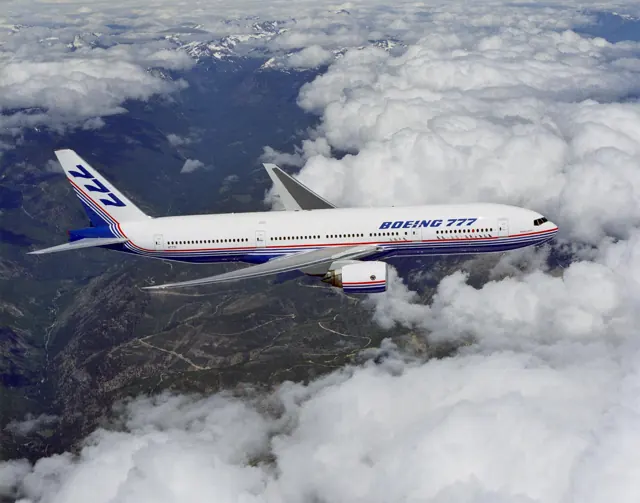
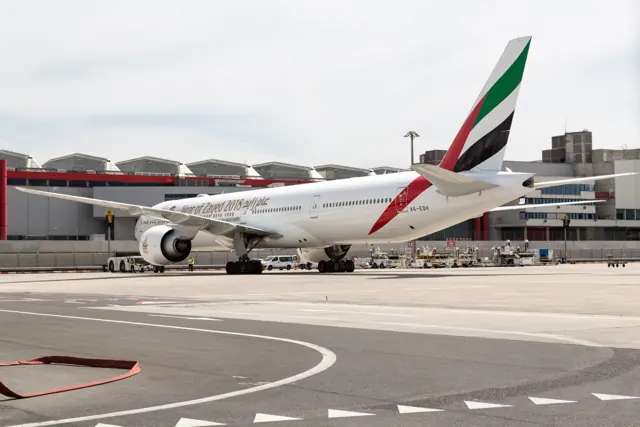
The 777 entered service in 1995 after development with input from major airline customers. Its broad cabin and two very large engines filled a space between the 767 and 747. The programme expanded through different fuselage lengths, range developments and engine choices. The 777-200ER offers several engine options, while the 777-300ER has its own airframe and equipment.
Aircraft background
Wikipedia contributors · Read more ↗Circuits in the first 777 ever built
Among Clark’s favourite flying memories is base training in a 777: taking a large airliner to a quieter airport and practising circuits and touch-and-go landings. The aircraft happened to be the first 777 built, a former Boeing test machine, which added a sense of history to the experience. For a pilot whose enthusiasm had been confirmed by an Air Cadets flight as a teenager, it was a particularly satisfying milestone.
Mega Aviation interview · 23 February 2017. Cathay Pacific pilot recalling base training in the former prototype and airline flying.
Mega Aviation / Pilot Stories · Read more ↗The 777's flight-control logic is modelled explicitly
PMDG describes custom C*U flight-control logic with normal and direct modes, path and speed management, and artificial-feel modelling. The reviewed 777-200ER product also offers different engine families with their own indications and thrust behaviour. These features apply to PMDG's documented aircraft.
Boeing 777 · PMDG · MSFS 2020 · MSFS 2024
PMDG · Read more ↗Into the cockpit
 YouTube
 FlightFactor
FlightFactor B777 v2 | Full Flight Tutorial | Part 1 | Preliminary Preflight Procedures
FlightFactor walks through electrical power, loading and preliminary preflight checks.
FlightFactor 777 v2; X-Plane; developer tutorial
Watch on YouTube ↗Preview images are served by AirframeDB. Videos open on YouTube only when you choose to watch.
Meet Boeing 777
The 777 entered service in 1995 after development with input from major airline customers. Its broad cabin and two very large engines filled a space between the 767 and 747. The programme expanded through different fuselage lengths, range developments and engine choices.
The 777-200ER offers several engine options, while the 777-300ER has its own airframe and equipment. PMDG and FlightFactor provide separate systems documentation for their simulated versions.
Boeing 777
Aircraft type designators
Use the code for the model you are flying. The linked authority lists the applicable aircraft.
History & design
Development milestones
First flight: June 12, 1994 ( 1994-06-12 )
Wikipedia contributors · Boeing 777 ↗Boeing 777 · family/variant named by the source · Wikipedia revision 1373989467
Pilot accounts
Circuits in the first 777 ever built
Among Clark’s favourite flying memories is base training in a 777: taking a large airliner to a quieter airport and practising circuits and touch-and-go landings. The aircraft happened to be the first 777 built, a former Boeing test machine, which added a sense of history to the experience. For a pilot whose enthusiasm had been confirmed by an Air Cadets flight as a teenager, it was a particularly satisfying milestone.
In airline service, Heathrow retained a personal attraction because of childhood family journeys through the airport. He describes enjoying the view over London while reminding himself to concentrate on the touchdown. He also explains why the autopilot does not remove the crew’s work: it gives pilots capacity to consider weather, suitable diversion airports, approaches and the services available on the ground. The interview combines the pleasure of flying with the continuing responsibility of managing the journey.
Mega Aviation interview · 23 February 2017. Cathay Pacific pilot recalling base training in the former prototype and airline flying.
Read the full account · Mega Aviation / Pilot Stories ↗The stories that returned at a fleet reunion
Nearly two decades after leaving the 777 fleet, Captain Lim attended a reunion with about sixty former colleagues in Kuala Lumpur. Some were pilots he had taught on the F27 in the 1980s who had gone on to command long-haul aircraft. Meeting them brought back the shared decisions and disruptions that had shaped their working lives, as well as the humour of simulator trips and time away from home.
He recalls a weather diversion from Perth to Adelaide, a pressurisation problem after leaving Stockholm and a decision to remain on the ground as a typhoon approached. The reunion also gave him a chance to settle a misunderstanding with a colleague after twenty years. His account is a personal memory of the people around the aircraft; the remembered distances, fuel quantities and operational circumstances have not been adopted as technical specifications.
Just About Flying · Malaysia Airlines 777 pilot reunion, 26 April 2024. Retrospective fleet recollections; exact aircraft variants are not specified.
Read the full account · Just About Flying ↗The responsibility behind a first flight
Looking back three decades after the first 777 flight from Paine Field, Cashman remembered the responsibility of representing everyone who had prepared the aircraft. Engineers, customers, manufacturing staff and maintenance personnel had already completed their part of the work. At the moment of flight, he wanted to be sure that he fulfilled his own part just as well.
The aircraft left a lasting impression on him. Boeing’s written interview highlights describe his enjoyment of flying it and the pride he still felt in the programme thirty years later. His recollection gives the first-flight milestone a human setting: the person at the controls was conscious of a much larger team whose effort made that departure possible.
Boeing retrospective · thirty years after the 12 June 1994 first flight. Original 777 programme chief test pilot; written interview highlights.
Read the full account · Boeing ↗In your simulator
Systems, equipment and documentation for each developer’s aircraft.
Compare simulator versions →MSFS 2020 · MSFS 2024Boeing 777 · PMDG
PMDG · Released
Boeing 777 · PMDG
PMDG · Released
X-Plane 11 · X-Plane 12Boeing 777 · FlightFactor
FlightFactor · Released
Boeing 777 · FlightFactor
FlightFactor · Released
X-Plane 12777-200LR v2
FlightFactor · Released
777-200LR v2
FlightFactor · Released
Manuals & resources
Find your next read
Choose a topic for a short introduction and a link to the original source. Simulator references identify the developer and edition they cover.
Simulator documentation
The 777's flight-control logic is modelled explicitlyBoeing 777 · PMDG · PMDG · MSFS 2020 · MSFS 2024
PMDG describes custom C*U flight-control logic with normal and direct modes, path and speed management, and artificial-feel modelling. The reviewed 777-200ER product also offers different engine families with their own indications and thrust behaviour. These features apply to PMDG's documented aircraft.
777-200ER MSFS2020/2024 published specification · Auto-flight System
PMDG · Read the source ↗Pilot account
Circuits in the first 777 ever builtMega Aviation interview · 23 February 2017. Cathay Pacific pilot recalling base training in the former prototype and airline flying.
Among Clark’s favourite flying memories is base training in a 777: taking a large airliner to a quieter airport and practising circuits and touch-and-go landings. The aircraft happened to be the first 777 built, a former Boeing test machine, which added a sense of history to the experience. For a pilot whose enthusiasm had been confirmed by an Air Cadets flight as a teenager, it was a particularly satisfying milestone.
Bradley Clark
Mega Aviation / Pilot Stories · Read the source ↗The stories that returned at a fleet reunionJust About Flying · Malaysia Airlines 777 pilot reunion, 26 April 2024. Retrospective fleet recollections; exact aircraft variants are not specified.
Nearly two decades after leaving the 777 fleet, Captain Lim attended a reunion with about sixty former colleagues in Kuala Lumpur. Some were pilots he had taught on the F27 in the 1980s who had gone on to command long-haul aircraft. Meeting them brought back the shared decisions and disruptions that had shaped their working lives, as well as the humour of simulator trips and time away from home.
Captain Lim
Just About Flying · Read the source ↗Developer documentation
777-200LR v2 — product listing777-200LR v2 · X-Plane 12
Product listing captured 2026-09-30; edition scope from the reviewed catalogue
store.x-plane.org · Read the source ↗777-200LR v2 — product listing777-200LR v2 · X-Plane 12
Product listing captured 2026-09-30; edition scope from the reviewed catalogue
store.x-plane.org · Read the source ↗Read the original documentation from the people who created it. Manuals open on their publisher’s website.
Manual
Microsoft Flight Simulator aircraft manualsMicrosoft / aircraft developers X-Plane aircraft and avionics manualsLaminar ResearchAircraft background
Boeing 777Wikipedia contributors · Research background · Wikipedia revision 1373989467 · retrieved 2026-09-12Developer reference
PMDG 777 SDK broadcast setupPMDG support forumResource
PMDG 777-200ER system implementationPMDG FlightFactor 777 v2 official changelogFlightFactor FlightFactor productsFlightFactorProduct
777-200LR for MSFS 2020 & 2024PMDG · Official developer / designated store catalogue · checked 2026-09-12 777F for MSFS 2020 & 2024PMDG · Official developer / designated store catalogue · checked 2026-09-12 777-300ER for MSFS 2020 & 2024PMDG · Official developer / designated store catalogue · checked 2026-09-12 777-200ER v2 UltimateFlightFactor · Official developer / designated store catalogue · checked 2026-09-12 777-300ER v2 UltimateFlightFactor · Official developer / designated store catalogue · checked 2026-09-12 777 v2 Freighter expansionFlightFactor · Official developer / designated store catalogue · checked 2026-09-12 777 v2 Engine ExpansionFlightFactor · Official developer / designated store catalogue · checked 2026-09-12 FlightFactor 777-200LR UPGRADE- FlightFactor-777-(200LR)-Upstore.x-plane.org · Product listing captured 2026-09-30; edition scope from the reviewed catalogue FlightFactor-777-(200ER)(200LR)-FlightFactor-777-(200ER)(200store.x-plane.org · Product listing captured 2026-09-30; edition scope from the reviewed catalogueType designator
ICAO Doc 8643 — aircraft type designatorsInternational Civil Aviation Organization · Public search data retrieved 2026-09-14; authority update 2026-09-03Built-in force-feedback profiles
Read the documentary basis, editable starting settings and remaining questions for the aircraft you fly. Each explanation refers to the exact profile revision shown.
Catalogue programme-20261022-v1 · 13 profile choices
FlightFactor 777-200ER v2
FlightFactor · Free and Pro · Revision 4 · Inherited starting point
X-Plane 12
FlightFactor 777-200ER v2: Artificial yoke feel motivates the configured powered-control response; the presence of fly-by-wire does not imply a passive Airbus-style inceptor.
FlightFactor 777-200LR v2
FlightFactor · Free and Pro · Revision 3 · Inherited starting point
X-Plane 12
FlightFactor 777-200LR v2: Artificial yoke feel motivates the configured powered-control response; the presence of fly-by-wire does not imply a passive Airbus-style inceptor.
FlightFactor 777-300ER v2
FlightFactor · Free and Pro · Revision 3 · Inherited starting point
X-Plane 12
FlightFactor 777-300ER v2: Artificial yoke feel motivates the configured powered-control response; the presence of fly-by-wire does not imply a passive Airbus-style inceptor.
FlightFactor 777F v2
FlightFactor · Free and Pro · Revision 3 · Inherited starting point
X-Plane 12
FlightFactor 777F v2: Artificial yoke feel motivates the configured powered-control response; the presence of fly-by-wire does not imply a passive Airbus-style inceptor.
PMDG 777-300ER
PMDG · Free and Pro · Revision 4 · Inherited starting point
MSFS 2020 · MSFS 2024
PMDG 777-300ER: Artificial yoke feel motivates the configured powered-control response; the presence of fly-by-wire does not imply a passive Airbus-style inceptor.
PMDG 777-200ER
PMDG · Free and Pro · Revision 3 · Inherited starting point
MSFS 2020 · MSFS 2024
PMDG 777-200ER: Artificial yoke feel motivates the configured powered-control response; the presence of fly-by-wire does not imply a passive Airbus-style inceptor.
PMDG 777-200LR
PMDG · Free and Pro · Revision 3 · Inherited starting point
MSFS 2020 · MSFS 2024
PMDG 777-200LR: Artificial yoke feel motivates the configured powered-control response; the presence of fly-by-wire does not imply a passive Airbus-style inceptor.
PMDG 777F
PMDG · Free and Pro · Revision 3 · Inherited starting point
MSFS 2020 · MSFS 2024
PMDG 777F: Artificial yoke feel motivates the configured powered-control response; the presence of fly-by-wire does not imply a passive Airbus-style inceptor.
Boeing 777-300ER
Free and Pro · Revision 4 · Inherited starting point
MSFS 2020 · MSFS 2024 · X-Plane 11 · X-Plane 12
Boeing 777-300ER: Artificial yoke feel motivates the configured powered-control response; the presence of fly-by-wire does not imply a passive Airbus-style inceptor.
Boeing 777-200ER
Free and Pro · Revision 2 · Partial review
MSFS 2020 · MSFS 2024 · X-Plane 11 · X-Plane 12
Boeing 777-200ER: Artificial yoke feel motivates the configured powered-control response; the presence of fly-by-wire does not imply a passive Airbus-style inceptor.
Boeing 777-200LR
Free and Pro · Revision 2 · Partial review
MSFS 2020 · MSFS 2024 · X-Plane 11 · X-Plane 12
Boeing 777-200LR: Artificial yoke feel motivates the configured powered-control response; the presence of fly-by-wire does not imply a passive Airbus-style inceptor.
Boeing 777-300
Free and Pro · Revision 2 · Inherited starting point
MSFS 2020 · MSFS 2024 · X-Plane 11 · X-Plane 12
Boeing 777-300: Artificial yoke feel motivates the configured powered-control response; the presence of fly-by-wire does not imply a passive Airbus-style inceptor.
Boeing 777F
Free and Pro · Revision 2 · Inherited starting point
MSFS 2020 · MSFS 2024 · X-Plane 11 · X-Plane 12
Boeing 777F: Artificial yoke feel motivates the configured powered-control response; the presence of fly-by-wire does not imply a passive Airbus-style inceptor.
Boeing 777-200LR
Boeing 777-200LR: Artificial yoke feel motivates the configured powered-control response; the presence of fly-by-wire does not imply a passive Airbus-style inceptor.
Aircraft and simulator scope
- Boeing 777-200LR · MSFS 2020 · Variant starting point
- Boeing 777-200LR · MSFS 2024 · Variant starting point
- Boeing 777-200LR · X-Plane 11 · Variant starting point
- Boeing 777-200LR · X-Plane 12 · Variant starting point
PMDG 777-200LR and -200ER product documentation; -300/-300ER/freighter details are family inheritance. · Selected choice: Boeing 777-200LR. Documentary scope does not establish every variant, add-on revision or simulator binding.
The simulator model and controls
The 777 entered service in 1995 after development with input from major airline customers. Its broad cabin and two very large engines filled a space between the 767 and 747. The programme expanded through different fuselage lengths, range developments and engine choices.
This starting point selects Boeing 777-200LR. Its aircraft-level settings do not select a particular developer’s custom systems.
How this profile feels
Spring resistance builds with the selected airspeed response. Directed aerodynamic loading is omitted.
Pitch-trim relief is off. Autopilot following is enabled for supported control references.
Controls and trim
The 777 combines fly-by-wire with a conventional yoke, unlike the passive Airbus sidestick. PMDG describes C-star-U laws and artificial feel, with normal/direct behavior and custom trim logic. ER, LR, 300ER and freighter configurations retain different engines and product identities. FlightFactor's v2 X-Plane family is separately scoped from its older 777 package and from PMDG's implementation.
About the values
The gains are normalized profile settings. They describe the chosen effect balance; hand force depends on the device and its output limits. IAS references are tuning values rather than operating limits. Physical acceptance of this revision remains pending.
What the documentation establishes
The PMDG LR page identifies a custom autopilot and C-star-U fly-by-wire implementation; the ER page is a separate scope.
Normal/direct fly-by-wire laws and artificial-feel behavior are advertised; control-law realism is not measured physical force.
Trim-rate/logic behavior is advertised. Current preset trim response is disabled, so public evidence must not imply that it reproduces these features.
A custom autopilot and fly-by-wire logic are described; generic following has no qualified external servo contract.
The ER source distinguishes three engine variants; common family force settings do not recreate those engine-specific details.
Documentary review and sources
These decisions describe the documentary basis and remaining gaps for this revision. Aircraft documentation and a starting setting describe different kinds of evidence.
Aircraft and variant
ReviewedThis starting point selects Boeing 777-200LR. Its aircraft-level settings do not select a particular developer’s custom systems.
Flight controls
ReviewedThe 777 combines fly-by-wire with a conventional yoke, unlike the passive Airbus sidestick. PMDG describes C-star-U laws and artificial feel, with normal/direct behavior and custom trim logic. ER, LR, 300ER and freighter configurations retain different engines and product identities. FlightFactor's v2 X-Plane family is separately scoped from its older 777 package and from PMDG's implementation.
Trim
ReviewedAircraft trim-rate and law behavior are documented, but a disabled profile trim response omits their hardware effect rather than reproducing them. Pitch relief is off, with stored authority 0; roll authority is 0.
Autopilot and stability
ReviewedFollowing is on at 1 authority when a supported, valid autopilot control reference is available.
Equipment
ReviewedGear, flap and ground cues follow the selected settings and available simulator-reported states.
Speeds and limits
Not yet reviewedThe indicated-speed references set the profile response scale; they are separate from aircraft operating limits.
Simulator integration
Not yet reviewedThe profile targets msfs2020, msfs2024, xplane11, xplane12. Add-on-specific controls use only the supported references configured by this profile.
Force-feedback settings
Not yet reviewedThe settings define the profile’s effect balance. Device output limits affect physical hand force.
Starting settings and their rationale
These configured values are starting estimates. The explanations describe what each setting controls; physical validation appears separately below.
| Setting | Starting value | What it controls and why |
|---|---|---|
| Spring strength | Starting value0.2 | What it controls and whyArtificial yoke feel motivates the configured powered-control response; the presence of fly-by-wire does not imply a passive Airbus-style inceptor. The baseline spring is 0.2. Low-speed spring blending is off. |
| Master force gain | Starting value0.85 | What it controls and whyScales overall profile strength while preserving effect balance, subject to device and output limits. |
| Profile force gain | Starting value0 | What it controls and whyThe 0 gain omits sustained directed airspeed loading. Spring resistance remains independent. |
| Force tuning speed/reference | Starting value275.0 kt | What it controls and whySets the IAS reference for aerodynamic loading. It is an estimate, not published cruise TAS or a flight limit. |
| Spring response reference speed | Starting value122 kt | What it controls and whySets the IAS where the low-speed blend reaches baseline strength; high-speed stiffening also uses it. |
| Aileron force scale | Starting value0.65 | What it controls and whyRoll and pitch aerodynamic scales are 0.65 and 0.65, respectively. These stored weights do not create directed aerodynamic loading while that term is inactive. No custom spring-travel curve is enabled. |
| Elevator force scale | Starting value0.65 | What it controls and whyScales pitch aerodynamic loading; pitch spring travel and trim responses are separate settings. |
| Trim feel | Starting valueDisabled | What it controls and whyRetained for compatibility and group membership. Trim relief, rather than this flag, controls centre movement. |
| Trim relief | Starting valueDisabled | What it controls and whyAllows trim relief with supported control law and valid telemetry. Axis authorities set its amount. |
| Autopilot follow | Starting valueEnabled | What it controls and whyFollowing is on at 1 authority when a supported, valid autopilot control reference is available. |
| Autopilot neutral hold | Starting valueDisabled | What it controls and whyPermits centering hold during a supported AP state, separate from following a moving target. |
| Output force limit | Starting value0.55 | What it controls and whyCaps directed-force output. Native spring effects and device limits remain separate. |
All 46 starting settings and their rationale
The settings define the profile’s effect balance. Device output limits affect physical hand force.
| Setting | Starting value | What it controls and why |
|---|---|---|
| Spring strength | Starting value0.2 | What it controls and whyArtificial yoke feel motivates the configured powered-control response; the presence of fly-by-wire does not imply a passive Airbus-style inceptor. The baseline spring is 0.2. Low-speed spring blending is off. |
| Spring deadband | Starting value0.0 | What it controls and whySets travel around the centre before the baseline spring resists. Smaller values engage it sooner. |
| Starting centering force | Starting value0.04 | What it controls and whyAdds smoothly ramped resistance outside the centre deadband. Zero removes this preload. |
| Center Starting Force Transition | Starting value0.05 | What it controls and whySets the travel used to ramp in centre preload. Wider intervals make its onset more gradual. |
| Profile force gain | Starting value0 | What it controls and whyThe 0 gain omits sustained directed airspeed loading. Spring resistance remains independent. |
| Master force gain | Starting value0.85 | What it controls and whyScales overall profile strength while preserving effect balance, subject to device and output limits. |
| QBlend Enabled | Starting valueDisabled | What it controls and whyAllows baseline spring strength to rise with indicated airspeed where the control law permits it. |
| QSpring Minimum Factor | Starting value0.55 | What it controls and whySets low-speed spring strength as a fraction of baseline when blending is enabled. One keeps full strength. |
| QSpring Start Knots | Starting value20 kt | What it controls and whySets the IAS where the low-speed spring blend starts rising. This is a feel threshold, not a flight limit. |
| Spring response reference speed | Starting value122 kt | What it controls and whySets the IAS where the low-speed blend reaches baseline strength; high-speed stiffening also uses it. |
| Force tuning speed/reference | Starting value275.0 kt | What it controls and whySets the IAS reference for aerodynamic loading. It is an estimate, not published cruise TAS or a flight limit. |
| Airspeed spring stiffening gain | Starting value1.0 | What it controls and whyThe high-speed spring-stiffening gain is 1. It strengthens the permitted spring response above 122 KIAS, with the squared-speed ratio capped at 7.8. |
| Airspeed spring stiffening limit | Starting value7.8 | What it controls and whyLimits the squared airspeed ratio used for high-speed spring stiffening; it is not a device-force cap. |
| Aileron force scale | Starting value0.65 | What it controls and whyRoll and pitch aerodynamic scales are 0.65 and 0.65, respectively. These stored weights do not create directed aerodynamic loading while that term is inactive. No custom spring-travel curve is enabled. |
| Elevator force scale | Starting value0.65 | What it controls and whyScales pitch aerodynamic loading; pitch spring travel and trim responses are separate settings. |
| Output force limit | Starting value0.55 | What it controls and whyCaps directed-force output. Native spring effects and device limits remain separate. |
| Trim feel | Starting valueDisabled | What it controls and whyRetained for compatibility and group membership. Trim relief, rather than this flag, controls centre movement. |
| Trim relief | Starting valueDisabled | What it controls and whyAllows trim relief with supported control law and valid telemetry. Axis authorities set its amount. |
| Elevator Authority | Starting value0 | What it controls and whyAircraft trim-rate and law behavior are documented, but a disabled profile trim response omits their hardware effect rather than reproducing them. Pitch relief is off, with stored authority 0; roll authority is 0. |
| Aileron Authority | Starting value0 | What it controls and whyScales supported roll-trim relief and permitted centre movement. Zero removes roll response. |
| Force Trim Enabled | Starting valueDisabled | What it controls and whyEnables local force trim, separate from aircraft-owned trim and add-on integration qualification. |
| GLoad Enabled | Starting valueDisabled | What it controls and whyAllows load-factor changes to modify permitted spring laws. Passive fly-by-wire feel can suppress it. |
| Rate Damping Enabled | Starting valueDisabled | What it controls and whyEnables rate damping with the configured coefficients and control law. |
| Autopilot follow | Starting valueEnabled | What it controls and whyFollowing is on at 1 authority when a supported, valid autopilot control reference is available. |
| Autopilot follow authority | Starting value1.0 | What it controls and whySets admitted AP-follow gain, not a percentage of travel. Runtime ownership and input limits still apply. |
| Autopilot neutral hold | Starting valueDisabled | What it controls and whyPermits centering hold during a supported AP state, separate from following a moving target. |
| Autopilot neutral hold strength | Starting value0.6 | What it controls and whySets admitted AP neutral-hold strength; inactive while neutral hold is disabled. |
| Enabled | Starting valueEnabled | What it controls and whyEnables aerodynamic cues; each still needs nonzero strength and its simulator conditions. |
| Gain | Starting value0.3 | What it controls and whySets stall-buffet strength. Zero removes the cue without changing simulator stalls or warnings. |
| Gain | Starting value0.22 | What it controls and whySets high-Mach buffet strength; onset and full-strength thresholds are separate. |
| Gain | Starting value0.14 | What it controls and whySets flap buffet at the configured position and speed gates. Flap movement texture is separate. |
| Maximum flap index | Starting value6 | What it controls and whySets the final flap index for detent normalization. UP plus three detents uses maximum index3. |
| Minimum flap index | Starting value2 | What it controls and whySets the first flap detent that admits buffet; this is a handle index, not degrees. |
| Gain | Starting value0.1 | What it controls and whySets gear aerodynamic buffet; movement and ground-contact cues are separate. |
| Shaker Enabled | Starting valueEnabled | What it controls and whyPermits shaker at supported warning conditions; the switch does not establish aircraft equipment. |
| Stick shaker amplitude | Starting value0.9 | What it controls and whySets triggered shaker strength; inactive while the shaker feature is disabled. |
| Enabled | Starting valueEnabled | What it controls and whyEnables ground effects; each still needs its own strength and contact or motion telemetry. |
| Gain | Starting value0.4 | What it controls and whySets rolling texture strength, modified by speed, surface and undercarriage configuration. |
| Gain | Starting value0.32 | What it controls and whySets gear-bump texture during ground motion, separate from touchdown impact. |
| Gain | Starting value0.9 | What it controls and whySets landing-impact strength; landing telemetry and response shape determine the pulse. |
| Gain | Starting value0.5 | What it controls and whySets reverse-thrust vibration with valid reverser and engine conditions. Zero removes the cue. |
| Enabled | Starting valueEnabled | What it controls and whyEnables engine cues with nonzero settings and valid running-engine telemetry. |
| Gain | Starting value0.06 | What it controls and whySets estimated engine vibration using configured telemetry and response, not measured cockpit vibration. |
| Enabled | Starting valueEnabled | What it controls and whyEnables accessory cues with configured strengths and observed accessory movement. |
| Gain | Starting value0.12 | What it controls and whySets texture from observed flap movement; a command without movement does not establish the cue. |
| Gain | Starting value0.12 | What it controls and whySets texture from observed gear movement, separate from aerodynamic and touchdown effects. |
Limits and open questions
- Product descriptions do not derive the selected indicated-speed force reference or a complete 777 load schedule.
- Custom C-star-U and autopilot logic require add-on-specific telemetry/ownership checks.
- The source gives no numerical force calibration. Current aerodynamic blending and force gain are disabled, unlike older variable-feel descriptions.
Physical validation
No physical force validation is recorded in this public catalogue for this revision. Documentary review and software checks do not establish how a particular device feels.
Documented interfaces
Source-documented identifiers. Documentation does not prove that every add-on populates a value correctly.
1-sim/output/mcp/ok
MCP operational status; not AP-servo engagement or force authority.
- Units
- Boolean-like status; full range not specified
- Access
- read output
777v2 release notes v2.2.2
FlightFactor · v2.2.2 external MCP datarefs ↗Discuss this aircraft (0)
Questions, observations and useful sources from the community.
No published discussions yet. Bring a question or share a useful source.
Open aircraft discussions →Content expanded · What’s new
Something missing or a source that needs attention?
Suggest a correction ↗