
Start here
A few places to begin, from the aircraft’s story to the people who fly it.
Meet the aircraft
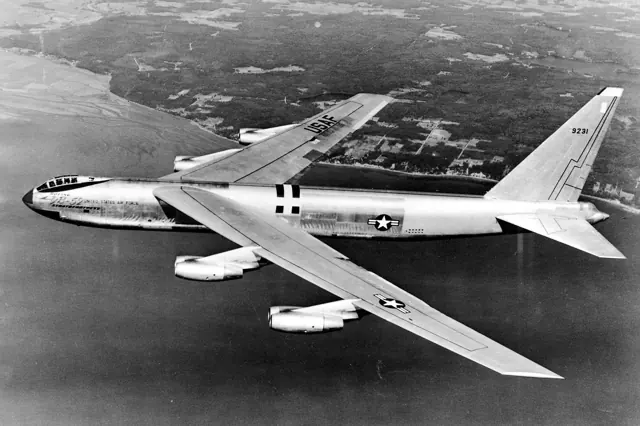
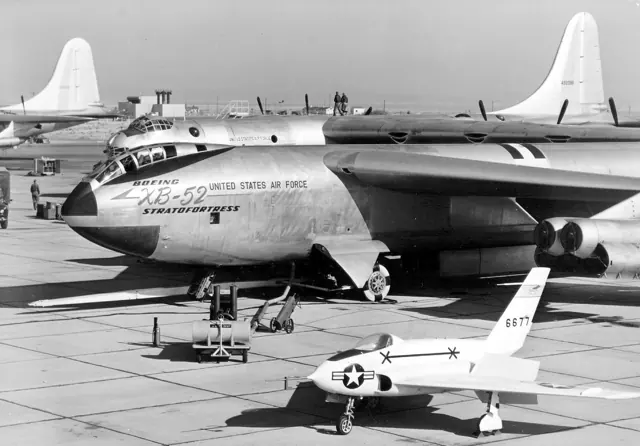
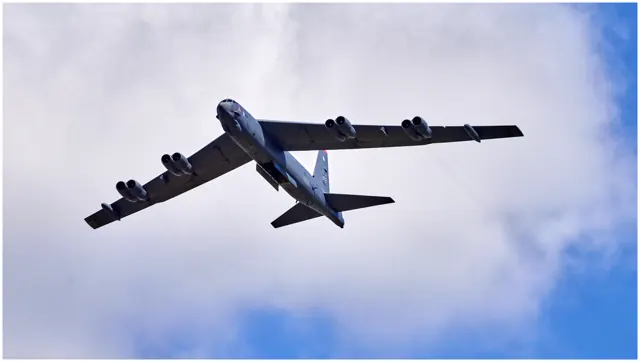
The B-52 entered US Air Force service in 1955 and became a central aircraft of the Cold War bomber force. Its large wing, paired engine nacelles and bicycle-style main landing gear give it a distinctive shape. Later upgrades changed its missions and equipment over a long operational life. The B-52G represented in this catalogue is a particular historical version.
Aircraft background
Wikipedia contributors · Read more ↗Learning to manage the bomber’s inertia and its crew
Coming from instructing in the T-38, Shiban found the B-52’s size and inertia a major adjustment. The aircraft responded more slowly than the trainer he knew, and after his first training flight he was astonished to look back at the bomber and realise he had landed it. Aerial refuelling took several sorties before it began to feel manageable. Command also meant listening to a much larger crew.
Hush-Kit interview · June 2016. B-52G experience, including the 1991 Gulf War; handling comparisons are the pilot’s recollections.
Hush-Kit · Read more ↗Into the cockpit
 YouTube
 Eric Gattenby · 18 min ·
B-52G "Osiris" 4K Cockpit Tour
A detailed tour of the B-52G cockpit section displayed at Tillamook Air Museum.
Real aircraft · Boeing B-52G Stratofortress
Watch on YouTube ↗Preview images are served by AirframeDB. Videos open on YouTube only when you choose to watch.
Meet Boeing B-52G Stratofortress
The B-52 entered US Air Force service in 1955 and became a central aircraft of the Cold War bomber force. Its large wing, paired engine nacelles and bicycle-style main landing gear give it a distinctive shape. Later upgrades changed its missions and equipment over a long operational life.
The simulator product represents the historical B-52G. The B-52H and its later upgrades have different equipment.
Boeing B-52G Stratofortress
Boeing → · Explore the family →
Boeing B-52G Stratofortress
Wikipedia contributors · Boeing B-52 Stratofortress ↗Laminar Research · X-Plane 11 →Aircraft type designators
Use the code for the model you are flying. The linked authority lists the applicable aircraft.
History & design
A navigator’s milestone belongs to the whole crew story
A congressional announcement identifies Steve “Thirsty” Smith as a 93rd Bomb Squadron navigator when he reached 10,000 B-52 flying hours in March 2017.
Office of U.S. Representative Mike Johnson · Steve Smith reaches 10,000 B-52 flying hours ↗Role checked against the contemporary announcement; other reports use pilot terminology inconsistently
Development milestones
First flight: 15 April 1952 ( 1952-04-15 )
Wikipedia contributors · Boeing B-52 Stratofortress ↗Boeing B-52 Stratofortress · family/variant named by the source · Wikipedia revision 1374248432
Pilot accounts
Learning to manage the bomber’s inertia and its crew
Coming from instructing in the T-38, Shiban found the B-52’s size and inertia a major adjustment. The aircraft responded more slowly than the trainer he knew, and after his first training flight he was astonished to look back at the bomber and realise he had landed it. Aerial refuelling took several sorties before it began to feel manageable.
Command also meant listening to a much larger crew. Navigators and electronic-warfare specialists could have different immediate concerns, leaving the aircraft commander to weigh their advice while keeping the aircraft flying. Shiban was clear that success belonged to the whole crew. His account makes learning the bomber a combination of physical coordination, patience and trust in the people at the other stations.
Hush-Kit interview · June 2016. B-52G experience, including the 1991 Gulf War; handling comparisons are the pilot’s recollections.
Read the full account · Hush-Kit ↗Watching aircraft outside the laboratory leads to a cockpit career
Jensen already held a private pilot’s licence when she began work as a project engineer at Edwards. Watching the aircraft outside the laboratory helped turn flying from a hobby into a career ambition. Pilot training and a period instructing on the T-37 eventually led to B-52 conversion and command qualification in 2004.
By the interview, she had about two years on the bomber and was flying over Afghanistan. She valued the connection with controllers on the ground, whose calm voices helped the crew understand situations that looked very different from high above. Jensen also reflected on the women whose earlier service had made her own path possible.
U.S. Air Force interview · March 2006. B-52 pilot with the 40th Air Expeditionary Group; her later-era experience is not presented as a B-52G-specific account.
Read the full account · U.S. Air Force ↗Jet power changes a bomber pilot’s working day
Of the large bombers Potter had flown, the B-52 was his favourite. He appreciated the reduction in engine-management tasks compared with the B-36, where descent preparation involved several systems and a carefully ordered sequence. The jet still kept the crew busy with checklists, but he remembered its quicker pace as enjoyable.
A Pacific assignment also left a vivid memory of flying over Manila with crowds below and a senior officer in the jumpseat. Potter recalled the visitor’s enthusiasm at a first ride in the bomber. His later interview mixes that public occasion with the demands of Strategic Air Command life, including long working hours and separation from family. The dates of some recalled events are uncertain.
March 1990 interview preserved by the pilot’s family. B-52 family experience following piston bombers; exact variant is not identified in the selected passages.
Read the full account · Francis Harold Potter family archive ↗In your simulator
Systems, equipment and documentation for each developer’s aircraft.
X-Plane 11Boeing B-52G Stratofortress
Laminar Research · Released
Boeing B-52G Stratofortress
Laminar Research · Released
Aircraft specifications
Published figures for the named real-aircraft variant. Simulator equipment and performance can differ.
| Specification | Published value |
|---|---|
| Length | 159 ft 4 in (48.5 m) |
| Wingspan | 185 ft 0 in (56.4 m) |
| Height | 40 ft 8 in (12.4 m) |
| Wing area | 4,000 sq ft (370 m² ) |
| Empty weight | 185,000 lb (83,250 kg) |
| Gross weight | 265,000 lb (120,000 kg) |
| Max takeoff weight | 488,000 lb (221,323 kg) |
| Powerplant | 8 × Pratt & Whitney TF33 -P-3/103 turbofans , 17,000 lbf (76 kN) thrust each |
| Maximum speed | 650 mph (1,050 km/h, 560 kn) |
| Cruise speed | 509 mph (819 km/h, 442 kn) |
| Service ceiling | 50,000 ft (15,000 m) |
| Rate of climb | 6,270 ft/min (31.85 m/s) |
Manuals & resources
Find your next read
Choose a topic for a short introduction and a link to the original source. Simulator references identify the developer and edition they cover.
Pilot account
Learning to manage the bomber’s inertia and its crewHush-Kit interview · June 2016. B-52G experience, including the 1991 Gulf War; handling comparisons are the pilot’s recollections.
Coming from instructing in the T-38, Shiban found the B-52’s size and inertia a major adjustment. The aircraft responded more slowly than the trainer he knew, and after his first training flight he was astonished to look back at the bomber and realise he had landed it. Aerial refuelling took several sorties before it began to feel manageable. Command also meant listening to a much larger crew.
Keith Shiban
Hush-Kit · Read the source ↗Watching aircraft outside the laboratory leads to a cockpit careerU.S. Air Force interview · March 2006. B-52 pilot with the 40th Air Expeditionary Group; her later-era experience is not presented as a B-52G-specific account.
Jensen already held a private pilot’s licence when she began work as a project engineer at Edwards. Watching the aircraft outside the laboratory helped turn flying from a hobby into a career ambition. Pilot training and a period instructing on the T-37 eventually led to B-52 conversion and command qualification in 2004. By the interview, she had about two years on the bomber and was flying over Afghanistan.
Andrea Jensen
U.S. Air Force · Read the source ↗Read the original documentation from the people who created it. Manuals open on their publisher’s website.
Manual
X-Plane 11 Desktop ManualLaminar Research X-Plane aircraft and avionics manualsLaminar ResearchAircraft background
Boeing B-52 StratofortressWikipedia contributors · Research background · Wikipedia revision 1374248432 · retrieved 2026-09-12 Steve Smith reaches 10,000 B-52 flying hoursOffice of U.S. Representative Mike Johnson · 3 March 2017 · explicitly identifies Smith as a navigatorType designator
ICAO Doc 8643 — aircraft type designatorsInternational Civil Aviation Organization · Public search data retrieved 2026-09-14; authority update 2026-09-03Built-in force-feedback profiles
Read the documentary basis, editable starting settings and remaining questions for the aircraft you fly. Each explanation refers to the exact profile revision shown.
Catalogue programme-20261022-v1 · 1 profile choice
Boeing B-52G Stratofortress
Free and Pro · Revision 1 · Review pending
X-Plane 11
Boeing B-52G Stratofortress: The configured control response is a nominal B-52G starting estimate; its size and engine count do not establish a cockpit force schedule.
Boeing B-52G Stratofortress
Boeing B-52G Stratofortress: The configured control response is a nominal B-52G starting estimate; its size and engine count do not establish a cockpit force schedule.
Aircraft and simulator scope
- Boeing B-52G Stratofortress · X-Plane 11 · family starting point
Boeing B-52G Stratofortress · Historical XP11 catalogue scope; compatibility is not transferred to XP12.
The simulator model and controls
The B-52 entered US Air Force service in 1955 and became a central aircraft of the Cold War bomber force. Its large wing, paired engine nacelles and bicycle-style main landing gear give it a distinctive shape. Later upgrades changed its missions and equipment over a long operational life.
This starting point selects Boeing B-52G Stratofortress. Its aircraft-level settings do not select a particular developer’s custom systems.
How this profile feels
Spring resistance builds with the selected airspeed response. A separate aerodynamic term adds speed-dependent control load.
Valid trim provides the configured pressure relief. Autopilot following is off.
Controls and trim
This reference selects the historical B-52G rather than modern B-52H equipment or current upgrade plans. Its paired engine nacelles and bicycle-style main gear define the bomber's configuration. The retained aircraft background supplies identity and history without an exact cockpit-force, trim or autopilot-output specification for this selected model.
About the values
The gains are normalized profile settings. They describe the chosen effect balance; hand force depends on the device and its output limits. IAS references are tuning values rather than operating limits. Physical acceptance of this revision remains pending.
Documentary review and sources
These decisions describe the documentary basis and remaining gaps for this revision. Aircraft documentation and a starting setting describe different kinds of evidence.
Aircraft and variant
Not yet reviewedThis starting point selects Boeing B-52G Stratofortress. Its aircraft-level settings do not select a particular developer’s custom systems.
Flight controls
Not yet reviewedThis reference selects the historical B-52G rather than modern B-52H equipment or current upgrade plans. Its paired engine nacelles and bicycle-style main gear define the bomber's configuration. The retained aircraft background supplies identity and history without an exact cockpit-force, trim or autopilot-output specification for this selected model.
Trim
Not yet reviewedPitch relief is a selected software approximation, with no exact trim-to-hardware relationship established by the retained background source. Pitch authority 0.3 relieves permitted loading; hydraulic centre movement is off. Roll authority is 0.09.
Autopilot and stability
Not yet reviewedAutopilot following is off; the configured spring and load retain the hardware feel.
Equipment
Not yet reviewedGear, flap and ground cues follow the selected settings and available simulator-reported states.
Speeds and limits
Not yet reviewedThe indicated-speed references set the profile response scale; they are separate from aircraft operating limits.
Simulator integration
Not yet reviewedThe profile targets xplane11. Add-on-specific controls use only the supported references configured by this profile.
Force-feedback settings
Not yet reviewedThe settings define the profile’s effect balance. Device output limits affect physical hand force.
Starting settings and their rationale
These configured values are starting estimates. The explanations describe what each setting controls; physical validation appears separately below.
| Setting | Starting value | What it controls and why |
|---|---|---|
| Spring strength | Starting value0.8 | What it controls and whyThe configured control response is a nominal B-52G starting estimate; its size and engine count do not establish a cockpit force schedule. The baseline spring is 0.8. Its low-speed blend reaches baseline strength at 90 KIAS. |
| Master force gain | Starting value0.85 | What it controls and whyScales overall profile strength while preserving effect balance, subject to device and output limits. |
| Profile force gain | Starting value0.25 | What it controls and whyThe aerodynamic-load gain is 0.25 with an indicated-speed reference of 260 KIAS. The hydraulic-load factor of 0.35 scales that modeled term; it is a selected artificial-feel approximation. |
| Force tuning speed/reference | Starting value260.0 kt | What it controls and whySets the IAS reference for aerodynamic loading. It is an estimate, not published cruise TAS or a flight limit. |
| Spring response reference speed | Starting value90 kt | What it controls and whySets the IAS where the low-speed blend reaches baseline strength; high-speed stiffening also uses it. |
| Aileron force scale | Starting value0.65 | What it controls and whyRoll and pitch aerodynamic scales are 0.65 and 0.65, respectively. They set the aerodynamic axis balance. No custom spring-travel curve is enabled. |
| Elevator force scale | Starting value0.65 | What it controls and whyScales pitch aerodynamic loading; pitch spring travel and trim responses are separate settings. |
| Trim feel | Starting valueEnabled | What it controls and whyRetained for compatibility and group membership. Trim relief, rather than this flag, controls centre movement. |
| Trim relief | Starting valueEnabled | What it controls and whyAllows trim relief with supported control law and valid telemetry. Axis authorities set its amount. |
| Autopilot follow | Starting valueDisabled | What it controls and whyAutopilot following is off; the configured spring and load retain the hardware feel. |
| Autopilot neutral hold | Starting valueDisabled | What it controls and whyPermits centering hold during a supported AP state, separate from following a moving target. |
| Output force limit | Starting value0.55 | What it controls and whyCaps directed-force output. Native spring effects and device limits remain separate. |
All 44 starting settings and their rationale
The settings define the profile’s effect balance. Device output limits affect physical hand force.
| Setting | Starting value | What it controls and why |
|---|---|---|
| Spring strength | Starting value0.8 | What it controls and whyThe configured control response is a nominal B-52G starting estimate; its size and engine count do not establish a cockpit force schedule. The baseline spring is 0.8. Its low-speed blend reaches baseline strength at 90 KIAS. |
| Spring deadband | Starting value0.035 | What it controls and whySets travel around the centre before the baseline spring resists. Smaller values engage it sooner. |
| Profile force gain | Starting value0.25 | What it controls and whyThe aerodynamic-load gain is 0.25 with an indicated-speed reference of 260 KIAS. The hydraulic-load factor of 0.35 scales that modeled term; it is a selected artificial-feel approximation. |
| Master force gain | Starting value0.85 | What it controls and whyScales overall profile strength while preserving effect balance, subject to device and output limits. |
| QBlend Enabled | Starting valueEnabled | What it controls and whyAllows baseline spring strength to rise with indicated airspeed where the control law permits it. |
| QSpring Minimum Factor | Starting value0.55 | What it controls and whySets low-speed spring strength as a fraction of baseline when blending is enabled. One keeps full strength. |
| QSpring Start Knots | Starting value20 kt | What it controls and whySets the IAS where the low-speed spring blend starts rising. This is a feel threshold, not a flight limit. |
| Spring response reference speed | Starting value90 kt | What it controls and whySets the IAS where the low-speed blend reaches baseline strength; high-speed stiffening also uses it. |
| Force tuning speed/reference | Starting value260.0 kt | What it controls and whySets the IAS reference for aerodynamic loading. It is an estimate, not published cruise TAS or a flight limit. |
| Airspeed spring stiffening gain | Starting value0 | What it controls and whyThe high-speed spring-stiffening gain is 0. No additional speed-driven stiffening is added; this does not disable independent aerodynamic loading. |
| Airspeed spring stiffening limit | Starting value5 | What it controls and whyLimits the squared airspeed ratio used for high-speed spring stiffening; it is not a device-force cap. |
| Aileron force scale | Starting value0.65 | What it controls and whyRoll and pitch aerodynamic scales are 0.65 and 0.65, respectively. They set the aerodynamic axis balance. No custom spring-travel curve is enabled. |
| Elevator force scale | Starting value0.65 | What it controls and whyScales pitch aerodynamic loading; pitch spring travel and trim responses are separate settings. |
| Output force limit | Starting value0.55 | What it controls and whyCaps directed-force output. Native spring effects and device limits remain separate. |
| Trim feel | Starting valueEnabled | What it controls and whyRetained for compatibility and group membership. Trim relief, rather than this flag, controls centre movement. |
| Trim relief | Starting valueEnabled | What it controls and whyAllows trim relief with supported control law and valid telemetry. Axis authorities set its amount. |
| Elevator Authority | Starting value0.3 | What it controls and whyPitch relief is a selected software approximation, with no exact trim-to-hardware relationship established by the retained background source. Pitch authority 0.3 relieves permitted loading; hydraulic centre movement is off. Roll authority is 0.09. |
| Aileron Authority | Starting value0.09 | What it controls and whyScales supported roll-trim relief and permitted centre movement. Zero removes roll response. |
| Force Trim Enabled | Starting valueDisabled | What it controls and whyEnables local force trim, separate from aircraft-owned trim and add-on integration qualification. |
| GLoad Enabled | Starting valueEnabled | What it controls and whyAllows load-factor changes to modify permitted spring laws. Passive fly-by-wire feel can suppress it. |
| Rate Damping Enabled | Starting valueEnabled | What it controls and whyEnables rate damping with the configured coefficients and control law. |
| Autopilot follow | Starting valueDisabled | What it controls and whyAutopilot following is off; the configured spring and load retain the hardware feel. |
| Autopilot follow authority | Starting value0.1 | What it controls and whySets admitted AP-follow gain, not a percentage of travel. Runtime ownership and input limits still apply. |
| Autopilot neutral hold | Starting valueDisabled | What it controls and whyPermits centering hold during a supported AP state, separate from following a moving target. |
| Autopilot neutral hold strength | Starting value0.6 | What it controls and whySets admitted AP neutral-hold strength; inactive while neutral hold is disabled. |
| Enabled | Starting valueEnabled | What it controls and whyEnables aerodynamic cues; each still needs nonzero strength and its simulator conditions. |
| Gain | Starting value0.3 | What it controls and whySets stall-buffet strength. Zero removes the cue without changing simulator stalls or warnings. |
| Gain | Starting value0.22 | What it controls and whySets high-Mach buffet strength; onset and full-strength thresholds are separate. |
| Gain | Starting value0.14 | What it controls and whySets flap buffet at the configured position and speed gates. Flap movement texture is separate. |
| Maximum flap index | Starting value2 | What it controls and whySets the final flap index for detent normalization. UP plus three detents uses maximum index3. |
| Minimum flap index | Starting value2 | What it controls and whySets the first flap detent that admits buffet; this is a handle index, not degrees. |
| Gain | Starting value0.1 | What it controls and whySets gear aerodynamic buffet; movement and ground-contact cues are separate. |
| Shaker Enabled | Starting valueEnabled | What it controls and whyPermits shaker at supported warning conditions; the switch does not establish aircraft equipment. |
| Stick shaker amplitude | Starting value0.9 | What it controls and whySets triggered shaker strength; inactive while the shaker feature is disabled. |
| Enabled | Starting valueEnabled | What it controls and whyEnables ground effects; each still needs its own strength and contact or motion telemetry. |
| Gain | Starting value0.4 | What it controls and whySets rolling texture strength, modified by speed, surface and undercarriage configuration. |
| Gain | Starting value0.32 | What it controls and whySets gear-bump texture during ground motion, separate from touchdown impact. |
| Gain | Starting value0.9 | What it controls and whySets landing-impact strength; landing telemetry and response shape determine the pulse. |
| Gain | Starting value0.5 | What it controls and whySets reverse-thrust vibration with valid reverser and engine conditions. Zero removes the cue. |
| Enabled | Starting valueEnabled | What it controls and whyEnables engine cues with nonzero settings and valid running-engine telemetry. |
| Gain | Starting value0.06 | What it controls and whySets estimated engine vibration using configured telemetry and response, not measured cockpit vibration. |
| Enabled | Starting valueEnabled | What it controls and whyEnables accessory cues with configured strengths and observed accessory movement. |
| Gain | Starting value0.12 | What it controls and whySets texture from observed flap movement; a command without movement does not establish the cue. |
| Gain | Starting value0.12 | What it controls and whySets texture from observed gear movement, separate from aerodynamic and touchdown effects. |
Limits and open questions
- B-52G identity/control/equipment remain unresolved from this selected publication. No museum text is presented as an artificial-feel calibration.
- No simulator launch or physical force validation.
Physical validation
No physical force validation is recorded in this public catalogue for this revision. Documentary review and software checks do not establish how a particular device feels.
Discuss this aircraft (0)
Questions, observations and useful sources from the community.
No published discussions yet. Bring a question or share a useful source.
Open aircraft discussions →Content expanded · What’s new
Something missing or a source that needs attention?
Suggest a correction ↗