
Start here
A few places to begin, from the aircraft’s story to the people who fly it.
Meet the aircraft
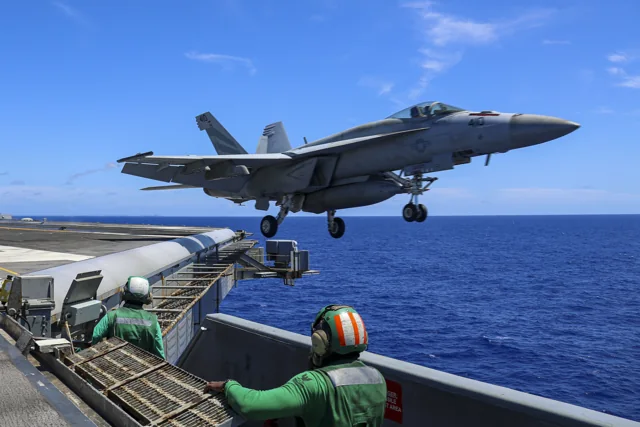
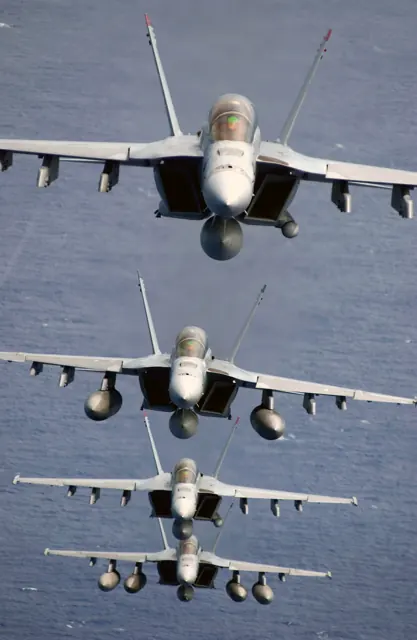
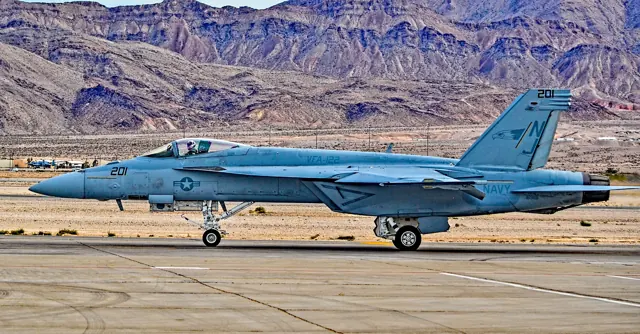
The Super Hornet family comprises the single-seat F/A-18E and tandem-seat F/A-18F. Although the name and outline recall the earlier Hornet, the Super Hornet is a substantially developed aircraft with a larger airframe. Twin engines, outward-canted fins and carrier equipment define its configuration. The E and F also make a useful image distinction: a two-seat photograph depicts the F variant.
Aircraft background
Wikipedia contributors · Read more ↗A familiar cockpit brings some unfamiliar habits
Moving from the older Hornet to the Super Hornet gave Buonerba a cockpit that was familiar enough to feel welcoming. In the air, however, he noticed a heavier character and still regarded the legacy aircraft as a little more nimble. Returning to the carrier was where he particularly appreciated the newer aircraft’s more accommodating handling. The cockpit update also required changes to habits built over years.
Hush-Kit interview · July 2012. Pilot comparing legacy F/A-18C with the E/F Super Hornet family; two-seat mission comments concern the F model.
Hush-Kit · Read more ↗Into the cockpit
 YouTube
 USA Military Channel · 3 min ·
F/A-18E Super Hornets Cool Cockpit Video Aboard USS Ronald Reagan
Carrier-operation cockpit footage from F/A-18E Super Hornets aboard USS Ronald Reagan.
Real aircraft · Boeing F/A-18E
Watch on YouTube ↗Preview images are served by AirframeDB. Videos open on YouTube only when you choose to watch.
Meet Boeing F/A-18E
The Super Hornet family comprises the single-seat F/A-18E and tandem-seat F/A-18F. Although the name and outline recall the earlier Hornet, the Super Hornet is a substantially developed aircraft with a larger airframe. Twin engines, outward-canted fins and carrier equipment define its configuration.
Two-seat photographs depict the F variant. The MSFS entry represents the E, with its systems described in the developer documentation.
Boeing F/A-18E
Aircraft type designators
Use the code for the model you are flying. The linked authority lists the applicable aircraft.
History & design
First impressions were followed by months of sea-trial preparation
Niewoehner recalls colleagues teasing Fred Madenwald for declaring the aircraft ready for sea after its first flight. Fourteen months of testing preceded its initial carrier landings; their later success prompted the team to acknowledge his confidence.
Federation of American Scientists archive · The F/A-18E/F Super Hornet: A Test Pilot Dispels the Myths ↗Test-team recollection, not a claim that testing was unnecessary
Development milestones
First flight: 29 November 1995 ( 1995-11-29 )
Developed from: McDonnell Douglas F/A-18 Hornet
Wikipedia contributors · Boeing F/A-18E/F Super Hornet ↗Boeing F/A-18E/F Super Hornet · family/variant named by the source · Wikipedia revision 1372781952
Pilot accounts
A familiar cockpit brings some unfamiliar habits
Moving from the older Hornet to the Super Hornet gave Buonerba a cockpit that was familiar enough to feel welcoming. In the air, however, he noticed a heavier character and still regarded the legacy aircraft as a little more nimble. Returning to the carrier was where he particularly appreciated the newer aircraft’s more accommodating handling.
The cockpit update also required changes to habits built over years. On the old keypad, he could enter information largely by touch; the touchscreen needed him to look at the display and check where he was pressing. He admitted occasionally getting into arguments with it.
Hush-Kit interview · July 2012. Pilot comparing legacy F/A-18C with the E/F Super Hornet family; two-seat mission comments concern the F model.
Read the full account · Hush-Kit ↗The test pilot finds familiar controls in a larger aircraft
Niewoehner’s first impression of the Super Hornet was shaped by how much he already recognised. Switch locations and procedures helped a Hornet pilot settle in quickly, while the larger aircraft’s behaviour around the landing pattern made a favourable impression. Greater weight had not, in his view, made it an awkward aircraft to bring home.
His work also took him far beyond that familiar introduction. He describes flying the E4 test aircraft with external tanks, stores and ballast while the team investigated demanding corners of its handling envelope. Those trials formed part of the evidence behind his confidence in the design.
First-person development report archived by FAS. Navy lead test pilot describes E/F flying, including a specifically identified E4 test aircraft; historical test configurations are not operating guidance.
Read the full account · Federation of American Scientists archive ↗A calm instructor helps a nervous visitor through the flight
Rehfeld spent considerable time helping aviation writer Brad Elward prepare for a Super Hornet flight. He explained the plan, answered questions and maintained a calm manner that made the unfamiliar equipment and procedures less intimidating. Once airborne, he continued talking his guest through what the aircraft was doing.
Over the training area, Rehfeld demonstrated manoeuvres and explained some of the changing sounds and sensations at lower speeds. Elward’s enthusiasm eventually met the physical limits of a first-time passenger: aerobatics and practice approaches left him feeling ill. Rehfeld adapted the return accordingly, telling the tower they would spend a while flying straight and level. The writer remembered that consideration alongside the aircraft’s performance.
Brad Elward’s eyewitness account of a VFA-122 familiarization flight from NAS Lemoore. Rehfeld piloted the two-seat F/A-18F; Elward was the passenger and narrator, not its pilot.
Read the full account · Brad Elward ↗In your simulator
Systems, equipment and documentation for each developer’s aircraft.
Compare simulator versions →MSFS 2024F/A-18E
Microsoft Flight Simulator · Released
F/A-18E
Microsoft Flight Simulator · Released
MSFS 2020F/A-18E
Microsoft Flight Simulator · Released
F/A-18E
Microsoft Flight Simulator · Released
Aircraft specifications
Published figures for the named real-aircraft variant. Simulator equipment and performance can differ.
| Specification | Published value |
|---|---|
| Length | 60 ft 1.25 in (18.31 m) |
| Wingspan | 44 ft 8.5 in (13.62 m) |
| Height | 16 ft 0 in (4.88 m) |
| Wing area | 500 sq ft (46.5 m² ) |
| Empty weight | 32,081 lb (14,552 kg) |
| Gross weight | 47,000 lb (21,320 kg) (equipped for fighter escort) |
| Max takeoff weight | 66,000 lb (29,937 kg) |
| Powerplant | 2 × General Electric F414-GE-400 turbofans , 13,000 lbf (58 kN) thrust each dry, 22,000 lbf (98 kN) with afterburner |
| Maximum speed | Mach 1.8, 1,030 kn (1,185 mph; 1,908 km/h) clean at 40,000 ft Mach 1.06, 700 kn (806 mph; 1,296 km/h) at sea level Mach 1.62, 932 kn (1,073 mph; 1,726 km/h) at 36,000 ft, air-to-air loadout (2× AIM-120, 2× AIM-9, internal fuel only) |
| Cruise speed | 482 kn (555 mph, 893 km/h) fighter escort |
| Stall speed | 129 kn (148 mph, 239 km/h) power-off |
| Range | 1,275 nmi (1,458 mi, 2,346 km) with armament of two AIM-9s |
| Service ceiling | 52,300 ft (15,940 m) |
| Rate of climb | 44,882 ft/min (228 m/s) |
Manuals & resources
Find your next read
Choose a topic for a short introduction and a link to the original source. Simulator references identify the developer and edition they cover.
Pilot account
A familiar cockpit brings some unfamiliar habitsHush-Kit interview · July 2012. Pilot comparing legacy F/A-18C with the E/F Super Hornet family; two-seat mission comments concern the F model.
Moving from the older Hornet to the Super Hornet gave Buonerba a cockpit that was familiar enough to feel welcoming. In the air, however, he noticed a heavier character and still regarded the legacy aircraft as a little more nimble. Returning to the carrier was where he particularly appreciated the newer aircraft’s more accommodating handling. The cockpit update also required changes to habits built over years.
Dave Buonerba
Hush-Kit · Read the source ↗The test pilot finds familiar controls in a larger aircraftFirst-person development report archived by FAS. Navy lead test pilot describes E/F flying, including a specifically identified E4 test aircraft; historical test configurations are not operating guidance.
Niewoehner’s first impression of the Super Hornet was shaped by how much he already recognised. Switch locations and procedures helped a Hornet pilot settle in quickly, while the larger aircraft’s behaviour around the landing pattern made a favourable impression. Greater weight had not, in his view, made it an awkward aircraft to bring home. His work also took him far beyond that familiar introduction.
Rob Niewoehner
Federation of American Scientists archive · Read the source ↗Read the original documentation from the people who created it. Manuals open on their publisher’s website.
Manual
Microsoft Flight Simulator aircraft manualsMicrosoft / aircraft developersAircraft background
Boeing F/A-18E/F Super HornetWikipedia contributors · Research background · Wikipedia revision 1372781952 · retrieved 2026-09-12Resource
MSFS 2024 FAQ and edition aircraft inventoryMicrosoft MSFS 2020 FAQ and edition aircraft inventoryMicrosoftType designator
ICAO Doc 8643 — aircraft type designatorsInternational Civil Aviation Organization · Public search data retrieved 2026-09-14; authority update 2026-09-03Built-in force-feedback profiles
Read the documentary basis, editable starting settings and remaining questions for the aircraft you fly. Each explanation refers to the exact profile revision shown.
Catalogue programme-20261022-v1 · 1 profile choice
Boeing F/A-18E
Free and Pro · Revision 1 · Partial review
MSFS 2024 · MSFS 2020
Boeing F/A-18E: The selected electronic-control spring is nominal; NAVAIR's engine and seating details do not define inceptor resistance.
Boeing F/A-18E
Boeing F/A-18E: The selected electronic-control spring is nominal; NAVAIR's engine and seating details do not define inceptor resistance.
Aircraft and simulator scope
- Boeing F/A-18E · MSFS 2024 · family starting point
- Boeing F/A-18E · MSFS 2020 · family starting point
NAVAIR F/A-18E/F public overview; this is not an F/A-18C simulator manual or a force-feedback integration specification. · Selected choice: Boeing F/A-18E. Documentary scope does not establish every variant, add-on revision or simulator binding.
The simulator model and controls
The Super Hornet family comprises the single-seat F/A-18E and tandem-seat F/A-18F. Although the name and outline recall the earlier Hornet, the Super Hornet is a substantially developed aircraft with a larger airframe. Twin engines, outward-canted fins and carrier equipment define its configuration.
This starting point selects Boeing F/A-18E. Its aircraft-level settings do not select a particular developer’s custom systems.
How this profile feels
The spring stays independent of airspeed. Directed aerodynamic loading is omitted.
Pitch-trim relief is off. Autopilot following is off.
Controls and trim
NAVAIR separates the single-seat F/A-18E from the two-seat F/A-18F and identifies their twin F414 engines. This row selects the E. The manufacturer equipment description supplies model context, while the profile's electronic-control feel and engine/configuration cues remain chosen approximations without a measured stick-force schedule.
About the values
The gains are normalized profile settings. They describe the chosen effect balance; hand force depends on the device and its output limits. IAS references are tuning values rather than operating limits. Physical acceptance of this revision remains pending.
What the documentation establishes
NAVAIR distinguishes the single-seat E and two-seat F and identifies their twin F414 engines.
Two F414-GE-400 engines are documented; the page does not calibrate cockpit vibration or equipment motion cues.
Documentary review and sources
These decisions describe the documentary basis and remaining gaps for this revision. Aircraft documentation and a starting setting describe different kinds of evidence.
Aircraft and variant
ReviewedThis starting point selects Boeing F/A-18E. Its aircraft-level settings do not select a particular developer’s custom systems.
Flight controls
Not yet reviewedNAVAIR separates the single-seat F/A-18E from the two-seat F/A-18F and identifies their twin F414 engines. This row selects the E. The manufacturer equipment description supplies model context, while the profile's electronic-control feel and engine/configuration cues remain chosen approximations without a measured stick-force schedule.
Trim
Not yet reviewedHardware trim response is kept separate from aircraft control-law behavior because the selected overview does not quantify a trim-neutral force relationship. Pitch relief is off, with stored authority 0.3; roll authority is 0.3.
Autopilot and stability
Not yet reviewedAutopilot following is off; the configured spring and load retain the hardware feel.
Equipment
ReviewedGear, flap and ground cues follow the selected settings and available simulator-reported states.
Speeds and limits
Not yet reviewedThe indicated-speed references set the profile response scale; they are separate from aircraft operating limits.
Simulator integration
Not yet reviewedThe profile targets msfs2024, msfs2020. Add-on-specific controls use only the supported references configured by this profile.
Force-feedback settings
Not yet reviewedThe settings define the profile’s effect balance. Device output limits affect physical hand force.
Starting settings and their rationale
These configured values are starting estimates. The explanations describe what each setting controls; physical validation appears separately below.
| Setting | Starting value | What it controls and why |
|---|---|---|
| Spring strength | Starting value0.55 | What it controls and whyThe selected electronic-control spring is nominal; NAVAIR's engine and seating details do not define inceptor resistance. The baseline spring is 0.55. Low-speed spring blending is off. |
| Master force gain | Starting value0.85 | What it controls and whyScales overall profile strength while preserving effect balance, subject to device and output limits. |
| Profile force gain | Starting value0.04 | What it controls and whyThe stored 0.04 aerodynamic-load gain is inactive under the fixed-centre control law. |
| Force tuning speed/reference | Starting value300.0 kt | What it controls and whySets the IAS reference for aerodynamic loading. It is an estimate, not published cruise TAS or a flight limit. |
| Spring response reference speed | Starting value90 kt | What it controls and whySets the IAS where the low-speed blend reaches baseline strength; high-speed stiffening also uses it. |
| Aileron force scale | Starting value1 | What it controls and whyRoll and pitch aerodynamic scales are 1 and 1, respectively. These stored weights do not create directed aerodynamic loading while that term is inactive. No custom spring-travel curve is enabled. |
| Elevator force scale | Starting value1 | What it controls and whyScales pitch aerodynamic loading; pitch spring travel and trim responses are separate settings. |
| Trim feel | Starting valueDisabled | What it controls and whyRetained for compatibility and group membership. Trim relief, rather than this flag, controls centre movement. |
| Trim relief | Starting valueDisabled | What it controls and whyAllows trim relief with supported control law and valid telemetry. Axis authorities set its amount. |
| Autopilot follow | Starting valueDisabled | What it controls and whyAutopilot following is off; the configured spring and load retain the hardware feel. |
| Autopilot neutral hold | Starting valueDisabled | What it controls and whyPermits centering hold during a supported AP state, separate from following a moving target. |
| Output force limit | Starting value0.55 | What it controls and whyCaps directed-force output. Native spring effects and device limits remain separate. |
All 44 starting settings and their rationale
The settings define the profile’s effect balance. Device output limits affect physical hand force.
| Setting | Starting value | What it controls and why |
|---|---|---|
| Spring strength | Starting value0.55 | What it controls and whyThe selected electronic-control spring is nominal; NAVAIR's engine and seating details do not define inceptor resistance. The baseline spring is 0.55. Low-speed spring blending is off. |
| Spring deadband | Starting value0.04 | What it controls and whyThe centre preload is 0. No added preload builds a breakout cue; baseline centering and travel curves remain separate. |
| Profile force gain | Starting value0.04 | What it controls and whyThe stored 0.04 aerodynamic-load gain is inactive under the fixed-centre control law. |
| Master force gain | Starting value0.85 | What it controls and whyScales overall profile strength while preserving effect balance, subject to device and output limits. |
| QBlend Enabled | Starting valueDisabled | What it controls and whyAllows baseline spring strength to rise with indicated airspeed where the control law permits it. |
| QSpring Minimum Factor | Starting value0.5 | What it controls and whySets low-speed spring strength as a fraction of baseline when blending is enabled. One keeps full strength. |
| QSpring Start Knots | Starting value20 kt | What it controls and whySets the IAS where the low-speed spring blend starts rising. This is a feel threshold, not a flight limit. |
| Spring response reference speed | Starting value90 kt | What it controls and whySets the IAS where the low-speed blend reaches baseline strength; high-speed stiffening also uses it. |
| Force tuning speed/reference | Starting value300.0 kt | What it controls and whySets the IAS reference for aerodynamic loading. It is an estimate, not published cruise TAS or a flight limit. |
| Airspeed spring stiffening gain | Starting value0 | What it controls and whyAdds permitted spring resistance above the full-blend speed. Zero removes this high-speed increase. |
| Airspeed spring stiffening limit | Starting value5 | What it controls and whyLimits the squared airspeed ratio used for high-speed spring stiffening; it is not a device-force cap. |
| Aileron force scale | Starting value1 | What it controls and whyRoll and pitch aerodynamic scales are 1 and 1, respectively. These stored weights do not create directed aerodynamic loading while that term is inactive. No custom spring-travel curve is enabled. |
| Elevator force scale | Starting value1 | What it controls and whyScales pitch aerodynamic loading; pitch spring travel and trim responses are separate settings. |
| Output force limit | Starting value0.55 | What it controls and whyCaps directed-force output. Native spring effects and device limits remain separate. |
| Trim feel | Starting valueDisabled | What it controls and whyRetained for compatibility and group membership. Trim relief, rather than this flag, controls centre movement. |
| Trim relief | Starting valueDisabled | What it controls and whyAllows trim relief with supported control law and valid telemetry. Axis authorities set its amount. |
| Elevator Authority | Starting value0.3 | What it controls and whyHardware trim response is kept separate from aircraft control-law behavior because the selected overview does not quantify a trim-neutral force relationship. Pitch relief is off, with stored authority 0.3; roll authority is 0.3. |
| Aileron Authority | Starting value0.3 | What it controls and whyScales supported roll-trim relief and permitted centre movement. Zero removes roll response. |
| Force Trim Enabled | Starting valueDisabled | What it controls and whyEnables local force trim, separate from aircraft-owned trim and add-on integration qualification. |
| GLoad Enabled | Starting valueDisabled | What it controls and whyAllows load-factor changes to modify permitted spring laws. Passive fly-by-wire feel can suppress it. |
| Rate Damping Enabled | Starting valueEnabled | What it controls and whyEnables rate damping with the configured coefficients and control law. |
| Autopilot follow | Starting valueDisabled | What it controls and whyAutopilot following is off; the configured spring and load retain the hardware feel. |
| Autopilot follow authority | Starting value0.05 | What it controls and whySets admitted AP-follow gain, not a percentage of travel. Runtime ownership and input limits still apply. |
| Autopilot neutral hold | Starting valueDisabled | What it controls and whyPermits centering hold during a supported AP state, separate from following a moving target. |
| Autopilot neutral hold strength | Starting value0.6 | What it controls and whySets admitted AP neutral-hold strength; inactive while neutral hold is disabled. |
| Enabled | Starting valueEnabled | What it controls and whyEnables aerodynamic cues; each still needs nonzero strength and its simulator conditions. |
| Gain | Starting value0.15 | What it controls and whySets stall-buffet strength. Zero removes the cue without changing simulator stalls or warnings. |
| Gain | Starting value0 | What it controls and whySets high-Mach buffet strength; onset and full-strength thresholds are separate. |
| Gain | Starting value0.14 | What it controls and whySets flap buffet at the configured position and speed gates. Flap movement texture is separate. |
| Maximum flap index | Starting value2 | What it controls and whySets the final flap index for detent normalization. UP plus three detents uses maximum index3. |
| Minimum flap index | Starting value2 | What it controls and whySets the first flap detent that admits buffet; this is a handle index, not degrees. |
| Gain | Starting value0.1 | What it controls and whySets gear aerodynamic buffet; movement and ground-contact cues are separate. |
| Shaker Enabled | Starting valueDisabled | What it controls and whyPermits shaker at supported warning conditions; the switch does not establish aircraft equipment. |
| Stick shaker amplitude | Starting value0.5 | What it controls and whySets triggered shaker strength; inactive while the shaker feature is disabled. |
| Enabled | Starting valueEnabled | What it controls and whyEnables ground effects; each still needs its own strength and contact or motion telemetry. |
| Gain | Starting value0.36 | What it controls and whySets rolling texture strength, modified by speed, surface and undercarriage configuration. |
| Gain | Starting value0.3 | What it controls and whySets gear-bump texture during ground motion, separate from touchdown impact. |
| Gain | Starting value0.88 | What it controls and whySets landing-impact strength; landing telemetry and response shape determine the pulse. |
| Gain | Starting value0.44 | What it controls and whySets reverse-thrust vibration with valid reverser and engine conditions. Zero removes the cue. |
| Enabled | Starting valueEnabled | What it controls and whyEnables engine cues with nonzero settings and valid running-engine telemetry. |
| Gain | Starting value0.06 | What it controls and whySets estimated engine vibration using configured telemetry and response, not measured cockpit vibration. |
| Enabled | Starting valueEnabled | What it controls and whyEnables accessory cues with configured strengths and observed accessory movement. |
| Gain | Starting value0.12 | What it controls and whySets texture from observed flap movement; a command without movement does not establish the cue. |
| Gain | Starting value0.12 | What it controls and whySets texture from observed gear movement, separate from aerodynamic and touchdown effects. |
Limits and open questions
- The overview does not establish flight-control law details, hydraulic irreversibility or controller feel.
- The overview does not describe trim mechanism, ownership or pilot-control trim forces.
- No autopilot mode or external servo-following interface is documented in the examined overview.
- The overview does not derive the preset's indicated-speed reference or configuration-specific Mach/overspeed cues.
- An aircraft overview does not establish simulator bindings, and F/A-18C-specific interfaces cannot be substituted.
- Neither military aircraft identity nor engine power calibrates the preset's passive spring force or axis response.
Physical validation
No physical force validation is recorded in this public catalogue for this revision. Documentary review and software checks do not establish how a particular device feels.
Discuss this aircraft (0)
Questions, observations and useful sources from the community.
No published discussions yet. Bring a question or share a useful source.
Open aircraft discussions →Content expanded · What’s new
Something missing or a source that needs attention?
Suggest a correction ↗