

Start here
A few places to begin, from the aircraft’s story to the people who fly it.
Meet the aircraft
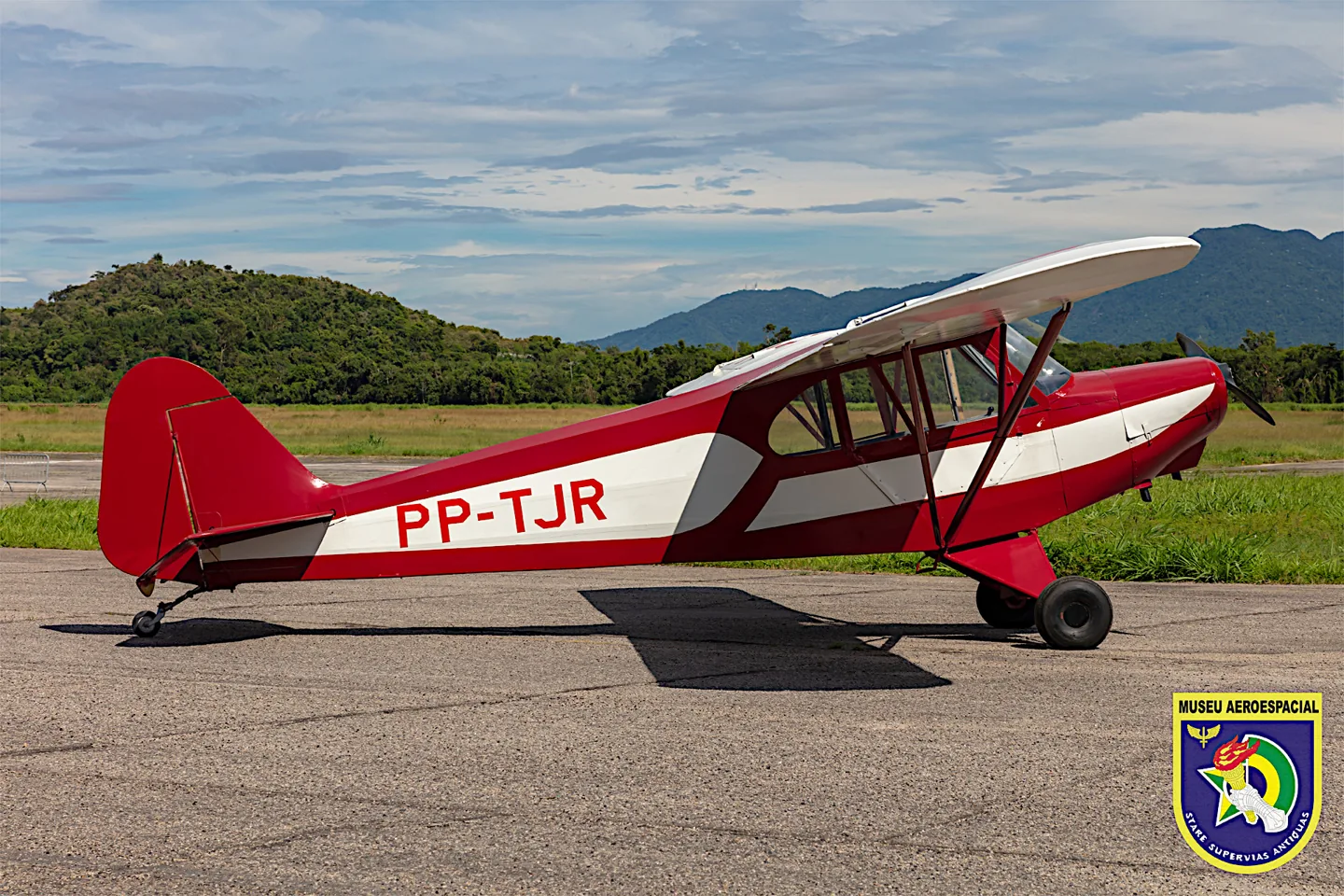
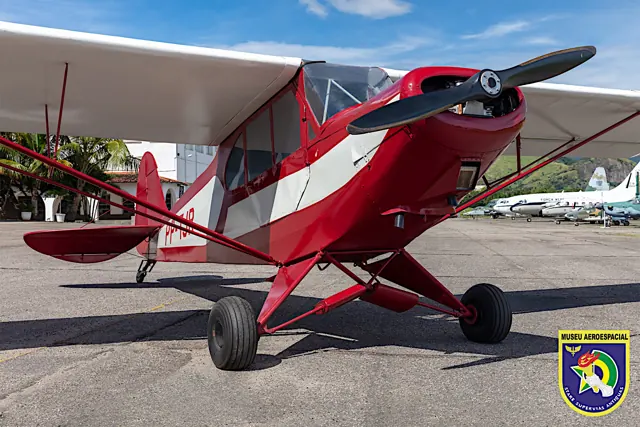
The Paulistinha belongs to the history of Brazilian flying clubs and basic aviation training. Its braced high wing, enclosed tandem cabin and tailwheel undercarriage follow the practical light-aircraft pattern of the period. The CAP-4 name identifies a particular development within that history.
Aircraft background
Wikipedia contributors · Read more ↗An empty front seat changes the whole first-solo flight
Sharp had practised from the CAP-4’s rear seat while his instructor, Salo Roth, occupied the front. Then Roth unfastened his belt, climbed out and handed over the aircraft. The empty seat made the responsibility immediate: Sharp would have to take it into the air and bring it back alone. He had been warned about the missing weight, but was still surprised by the quicker acceleration and more responsive feel.
First solo in CAP-4 PP-ROL at Nova Iguaçu, recalled in 2014. Earlier lessons in the memoir also involve the P-56; this selection follows the explicitly identified CAP-4 flight.
Autoentusiastas / Bob Sharp · Read more ↗The original MSFS 2020 release
The March 2025 Local Legend 20 release offers the Paulistinha separately in the original MSFS Marketplace, while giving it free to MSFS 2024 owners. The package includes six liveries.
CAP-4 Paulistinha · Microsoft Flight Simulator · MSFS 2020
Microsoft Flight Simulator Team · Read more ↗Into the cockpit
 YouTube
 Aviação Executiva Brazil x USA · 14 min ·
CAP-4 ...1948 - Paulistinha...!
A short video introduction to a 1948 Paulistinha.
Real aircraft · CAP 4 Paulistinha
Watch on YouTube ↗Preview images are served by AirframeDB. Videos open on YouTube only when you choose to watch.
Meet CAP 4 Paulistinha
The Paulistinha belongs to the history of Brazilian flying clubs and basic aviation training. Its braced high wing, enclosed tandem cabin and tailwheel undercarriage follow the practical light-aircraft pattern of the period.
The CAP-4 name identifies a particular development of this compact trainer.
CAP 4 Paulistinha
Aircraft type designators
Use the code for the model you are flying. The linked authority lists the applicable aircraft.
History & design
A trainer built for a growing network of flying clubs
The museum places the CAP-4 in the Campanha Nacional de Aviação, which raised private funds for aircraft, airfields and aeroclubs. The EAY-201 design was revised before the CAP-4’s homologation flight in January 1943, with the first production aircraft completed that April. The museum cautions that surviving records do not establish an unquestionable production total.
Museu Aeroespacial · O primeiro avião Paulistinha CAP-4 é entregue ↗Museum historical account · numerical production totals excluded
The later Neiva Paulistinha is a related development
Neiva acquired manufacturing rights in 1955 and developed the design further. The museum identifies its N-56B as a descendant of the CAP-4, with the military L-6 used for liaison and observation as well as training. The P56B and P56C training memories on this page concern that later family, with their differences stated in each account.
Museu Aeroespacial · Neiva N-56B (L-6) Paulistinha ↗Museum lineage description; the accounts themselves identify the P56B and P56C
Development milestones
EAY-201 predecessor first flight: 1935
Wikipedia contributors · CAP-4 Paulistinha ↗Predecessor date; CAP-4 production followed in 1943, as explained in the linked museum history.
Pilot accounts
An empty front seat changes the whole first-solo flight
Sharp had practised from the CAP-4’s rear seat while his instructor, Salo Roth, occupied the front. Then Roth unfastened his belt, climbed out and handed over the aircraft. The empty seat made the responsibility immediate: Sharp would have to take it into the air and bring it back alone. He had been warned about the missing weight, but was still surprised by the quicker acceleration and more responsive feel.
The change also appeared on approach, when the aircraft seemed reluctant to lose height. Sharp recalled using the sideslip he had practised and completing the landing. Roth sent him around twice more. After parking, Sharp escaped on his Vespa before anyone could give him the customary first-solo bath in used oil.
First solo in CAP-4 PP-ROL at Nova Iguaçu, recalled in 2014. Earlier lessons in the memoir also involve the P-56; this selection follows the explicitly identified CAP-4 flight.
Read the full account · Autoentusiastas / Bob Sharp ↗Learning to fly brings freedom beyond the aeroclub
Negreiros joined the aeroclub at eighteen, remembering how a childhood flight had made her want to become an aviator. Training brought delight in the changing landscape below. Her first solo remained especially vivid: the aircraft was under her own control and responsibility, and the celebration afterwards mattered more than the discomfort of the customary oil bath.
She explicitly recalled soloing both the Paulistinha CAP-4 and the Piper J-3 during her years at the school. Flying also meant negotiating the expectations placed on a young woman in that environment; her father required her to attend the hangar and classes with companions. She remembered those years as an experience of independence and freedom, even after a judicial career occupied her time.
Her own memoir names solo flying in both the CAP-4 and Piper J-3. The first-solo memory below is not assigned to one type because her text does not specify which aircraft it involved.
Read the full account · Tribuna do Norte / Ângela Negreiros ↗A first lesson turns preparation into the experience of control
Ferrão arrived for his first lesson having studied the manual and completed the aeroclub’s ground assessment. His instructor then explained the training areas, walkaround and departure. PP-GXN differed from the other Paulistinhas there by having electric starting and an intercom. Taxiing brought an early challenge: limited forward visibility and unfamiliar tailwheel steering made progress less straightforward than the preparation on paper.
Once established in flight, the instructor gave him control. He practised holding the aircraft steady, watched demonstrations and explored the training areas around Bragança Paulista. Near the end, the instructor asked him to find the way home. Ferrão remembered the simple act of keeping an aircraft in the air as something difficult to describe, and left looking forward to the next lesson.
Related Paulistinha family: Neiva P56C PP-GXN, not the CAP-4. The article is filed under Lucas Ferrão and signed Ferrão, despite its site-level Renato Cobel byline.
Read the full account · Canal Piloto / Lucas Ferrão ↗Familiarity gradually replaces a student’s first-flight fear
Duque remembered his first Paulistinha flight as a mixture of a fulfilled dream and unexpected fear. Engine power, the departure and even light turbulence felt alarming. When the instructor handed over control, he suddenly understood how different the experience was from imagining himself as a pilot. Those feelings persisted into the early lessons.
With more flying, the movements that had unsettled him became familiar. He learned about thermals, stalls and coordination, and admitted needing three attempts to pass one coordination exercise. His account does not describe instant confidence or effortless mastery. It follows a student becoming more comfortable through practice, learning about his own reactions as well as the aircraft he had wanted so much to fly.
Related Paulistinha family: Neiva P56B training at Bragança Paulista, not the CAP-4. His personal reactions are retained; the article’s loose historical and technical claims are not adopted.
Read the full account · Espaço Aéreo / Felipe Duque ↗In your simulator
Systems, equipment and documentation for each developer’s aircraft.
Compare simulator versions →MSFS 2024CAP 4 Paulistinha
Microsoft Flight Simulator · Released
CAP 4 Paulistinha
Microsoft Flight Simulator · Released
MSFS 2020CAP-4 Paulistinha
Microsoft Flight Simulator · Released
CAP-4 Paulistinha
Microsoft Flight Simulator · Released
Aircraft specifications
Published figures for the named real-aircraft variant. Simulator equipment and performance can differ.
| Specification | Published value |
|---|---|
| Length | 6.65 m (21 ft 10 in) |
| Wingspan | 10.10 m (33 ft 2 in) |
| Height | 1.95 m (6 ft 5 in) |
| Wing area | 17.0 m² (183 sq ft) |
| Empty weight | 320 kg (705 lb) |
| Gross weight | 540 kg (1,190 lb) |
| Powerplant | 1 × Franklin 4AC air-cooled flat-four engine, 48 kW (65 hp) |
| Maximum speed | 155 km/h (96 mph, 84 kn) |
| Cruise speed | 140 km/h (87 mph, 76 kn) |
| Range | 500 km (310 mi, 270 nmi) |
| Service ceiling | 4,000 m (13,000 ft) |
| Rate of climb | 3.1 m/s (610 ft/min) |
Manuals & resources
Find your next read
Choose a topic for a short introduction and a link to the original source. Simulator references identify the developer and edition they cover.
Simulator documentation
The original MSFS 2020 releaseCAP-4 Paulistinha · Microsoft Flight Simulator · MSFS 2020
The March 2025 Local Legend 20 release offers the Paulistinha separately in the original MSFS Marketplace, while giving it free to MSFS 2024 owners. The package includes six liveries.
2025-03-11 · release and package scope
Microsoft Flight Simulator Team · Read the source ↗Pilot account
An empty front seat changes the whole first-solo flightFirst solo in CAP-4 PP-ROL at Nova Iguaçu, recalled in 2014. Earlier lessons in the memoir also involve the P-56; this selection follows the explicitly identified CAP-4 flight.
Sharp had practised from the CAP-4’s rear seat while his instructor, Salo Roth, occupied the front. Then Roth unfastened his belt, climbed out and handed over the aircraft. The empty seat made the responsibility immediate: Sharp would have to take it into the air and bring it back alone. He had been warned about the missing weight, but was still surprised by the quicker acceleration and more responsive feel. The change also appeared on approach, when the aircraft seemed reluctant to lose height.
Bob Sharp
Autoentusiastas / Bob Sharp · Read the source ↗Learning to fly brings freedom beyond the aeroclubHer own memoir names solo flying in both the CAP-4 and Piper J-3. The first-solo memory below is not assigned to one type because her text does not specify which aircraft it involved.
Negreiros joined the aeroclub at eighteen, remembering how a childhood flight had made her want to become an aviator. Training brought delight in the changing landscape below. Her first solo remained especially vivid: the aircraft was under her own control and responsibility, and the celebration afterwards mattered more than the discomfort of the customary oil bath. She explicitly recalled soloing both the Paulistinha CAP-4 and the Piper J-3 during her years at the school.
Ângela Negreiros
Tribuna do Norte / Ângela Negreiros · Read the source ↗Read the original documentation from the people who created it. Manuals open on their publisher’s website.
Manual
Microsoft Flight Simulator aircraft manualsMicrosoft / aircraft developersAircraft background
CAP-4 PaulistinhaWikipedia contributors · Research background · Wikipedia revision 1280901579 · retrieved 2026-09-12 Paulistinha — CAP 4AMuseu Aeroespacial · Museum collection description; predecessor and production aircraft distinguished O primeiro avião Paulistinha CAP-4 é entregueMuseu Aeroespacial · Historical article citing INCAER and Autoentusiastas; production totals explicitly uncertain Neiva N-56B (L-6) PaulistinhaMuseu Aeroespacial · Related development; not the same aircraft variantResource
CAP4 free for MSFS 2024 ownersMicrosoftType designator
ICAO Doc 8643 — aircraft type designatorsInternational Civil Aviation Organization · Public search data retrieved 2026-09-14; authority update 2026-09-03Built-in force-feedback profiles
Read the documentary basis, editable starting settings and remaining questions for the aircraft you fly. Each explanation refers to the exact profile revision shown.
Catalogue programme-20261022-v1 · 1 profile choice
CAP 4 Paulistinha
Free and Pro · Revision 2 · Partial review
MSFS 2024 · MSFS 2020
CAP 4 Paulistinha: Nominal manual-control resistance accompanies the light trainer; its published cruise figure does not provide a measured force curve.
CAP 4 Paulistinha
CAP 4 Paulistinha: Nominal manual-control resistance accompanies the light trainer; its published cruise figure does not provide a measured force curve.
Aircraft and simulator scope
- CAP 4 Paulistinha · MSFS 2024 · family starting point
- CAP 4 Paulistinha · MSFS 2020 · family starting point
Microsoft CAP-4 Local Legend announcement; control-system detail is not included. · Selected choice: CAP 4 Paulistinha. Documentary scope does not establish every variant, add-on revision or simulator binding.
The simulator model and controls
The Paulistinha belongs to the history of Brazilian flying clubs and basic aviation training. Its braced high wing, enclosed tandem cabin and tailwheel undercarriage follow the practical light-aircraft pattern of the period.
This starting point selects CAP 4 Paulistinha. Its aircraft-level settings do not select a particular developer’s custom systems.
How this profile feels
Spring resistance builds with the selected airspeed response. A separate aerodynamic term adds speed-dependent control load.
Valid trim provides the configured pressure relief. Autopilot following is off.
Controls and trim
The CAP-4 announcement describes a high-wing trainer with fixed conventional gear, a 65-hp Franklin engine and a wooden fixed-pitch propeller. These details identify the selected light-aircraft configuration. The source does not establish absence of flaps, so a disabled profile flap cue is an omission rather than an aircraft-system claim.
About the values
The gains are normalized profile settings. They describe the chosen effect balance; hand force depends on the device and its output limits. IAS references are tuning values rather than operating limits. Physical acceptance of this revision remains pending.
What the documentation establishes
The announcement identifies the CAP-4 high-wing aircraft with conventional fixed gear and a small piston engine.
Fixed conventional gear, a Franklin 65-hp engine and wooden fixed-pitch propeller are described; flap absence is not established here.
The stated 87-mph cruise figure is not a direct indicated-knot force calibration.
Documentary review and sources
These decisions describe the documentary basis and remaining gaps for this revision. Aircraft documentation and a starting setting describe different kinds of evidence.
Aircraft and variant
ReviewedThis starting point selects CAP 4 Paulistinha. Its aircraft-level settings do not select a particular developer’s custom systems.
Flight controls
Not yet reviewedThe CAP-4 announcement describes a high-wing trainer with fixed conventional gear, a 65-hp Franklin engine and a wooden fixed-pitch propeller. These details identify the selected light-aircraft configuration. The source does not establish absence of flaps, so a disabled profile flap cue is an omission rather than an aircraft-system claim.
Trim
Not yet reviewedPitch relief remains a selected response to valid trim input, with its numerical authority unresolved by the announcement. Pitch authority 0.3 provides load relief and permitted centre movement; roll authority is 0.
Autopilot and stability
Not yet reviewedAutopilot following is off; the configured spring and load retain the hardware feel.
Equipment
ReviewedGear, flap and ground cues follow the selected settings and available simulator-reported states.
Speeds and limits
ReviewedThe indicated-speed references set the profile response scale; they are separate from aircraft operating limits.
Simulator integration
Not yet reviewedThe profile targets msfs2024, msfs2020. Add-on-specific controls use only the supported references configured by this profile.
Force-feedback settings
Not yet reviewedThe settings define the profile’s effect balance. Device output limits affect physical hand force.
Starting settings and their rationale
These configured values are starting estimates. The explanations describe what each setting controls; physical validation appears separately below.
| Setting | Starting value | What it controls and why |
|---|---|---|
| Spring strength | Starting value0.64 | What it controls and whyNominal manual-control resistance accompanies the light trainer; its published cruise figure does not provide a measured force curve. The baseline spring is 0.64. Its low-speed blend reaches baseline strength at 37.5 KIAS. |
| Master force gain | Starting value0.85 | What it controls and whyScales overall profile strength while preserving effect balance, subject to device and output limits. |
| Profile force gain | Starting value0.8 | What it controls and whyThe aerodynamic-load gain is 0.8 with an indicated-speed reference of 75 KIAS. This supplies speed-dependent loading alongside the spring. |
| Force tuning speed/reference | Starting value75.0 kt | What it controls and whySets the IAS reference for aerodynamic loading. It is an estimate, not published cruise TAS or a flight limit. |
| Spring response reference speed | Starting value37.5 kt | What it controls and whySets the IAS where the low-speed blend reaches baseline strength; high-speed stiffening also uses it. |
| Aileron force scale | Starting value0.6 | What it controls and whyRoll and pitch aerodynamic scales are 0.6 and 0.78, respectively. They set the aerodynamic axis balance. No custom spring-travel curve is enabled. |
| Elevator force scale | Starting value0.78 | What it controls and whyScales pitch aerodynamic loading; pitch spring travel and trim responses are separate settings. |
| Trim feel | Starting valueEnabled | What it controls and whyRetained for compatibility and group membership. Trim relief, rather than this flag, controls centre movement. |
| Trim relief | Starting valueEnabled | What it controls and whyAllows trim relief with supported control law and valid telemetry. Axis authorities set its amount. |
| Autopilot follow | Starting valueDisabled | What it controls and whyAutopilot following is off; the configured spring and load retain the hardware feel. |
| Autopilot neutral hold | Starting valueDisabled | What it controls and whyPermits centering hold during a supported AP state, separate from following a moving target. |
| Output force limit | Starting value0.55 | What it controls and whyCaps directed-force output. Native spring effects and device limits remain separate. |
All 44 starting settings and their rationale
The settings define the profile’s effect balance. Device output limits affect physical hand force.
| Setting | Starting value | What it controls and why |
|---|---|---|
| Spring strength | Starting value0.64 | What it controls and whyNominal manual-control resistance accompanies the light trainer; its published cruise figure does not provide a measured force curve. The baseline spring is 0.64. Its low-speed blend reaches baseline strength at 37.5 KIAS. |
| Spring deadband | Starting value0.045 | What it controls and whySets travel around the centre before the baseline spring resists. Smaller values engage it sooner. |
| Profile force gain | Starting value0.8 | What it controls and whyThe aerodynamic-load gain is 0.8 with an indicated-speed reference of 75 KIAS. This supplies speed-dependent loading alongside the spring. |
| Master force gain | Starting value0.85 | What it controls and whyScales overall profile strength while preserving effect balance, subject to device and output limits. |
| QBlend Enabled | Starting valueEnabled | What it controls and whyAllows baseline spring strength to rise with indicated airspeed where the control law permits it. |
| QSpring Minimum Factor | Starting value0.5 | What it controls and whySets low-speed spring strength as a fraction of baseline when blending is enabled. One keeps full strength. |
| QSpring Start Knots | Starting value10.5 kt | What it controls and whySets the IAS where the low-speed spring blend starts rising. This is a feel threshold, not a flight limit. |
| Spring response reference speed | Starting value37.5 kt | What it controls and whySets the IAS where the low-speed blend reaches baseline strength; high-speed stiffening also uses it. |
| Force tuning speed/reference | Starting value75.0 kt | What it controls and whySets the IAS reference for aerodynamic loading. It is an estimate, not published cruise TAS or a flight limit. |
| Airspeed spring stiffening gain | Starting value0.15 | What it controls and whyThe high-speed spring-stiffening gain is 0.15. It strengthens the permitted spring response above 37.5 KIAS, with the squared-speed ratio capped at 5. |
| Airspeed spring stiffening limit | Starting value5 | What it controls and whyLimits the squared airspeed ratio used for high-speed spring stiffening; it is not a device-force cap. |
| Aileron force scale | Starting value0.6 | What it controls and whyRoll and pitch aerodynamic scales are 0.6 and 0.78, respectively. They set the aerodynamic axis balance. No custom spring-travel curve is enabled. |
| Elevator force scale | Starting value0.78 | What it controls and whyScales pitch aerodynamic loading; pitch spring travel and trim responses are separate settings. |
| Output force limit | Starting value0.55 | What it controls and whyCaps directed-force output. Native spring effects and device limits remain separate. |
| Trim feel | Starting valueEnabled | What it controls and whyRetained for compatibility and group membership. Trim relief, rather than this flag, controls centre movement. |
| Trim relief | Starting valueEnabled | What it controls and whyAllows trim relief with supported control law and valid telemetry. Axis authorities set its amount. |
| Elevator Authority | Starting value0.3 | What it controls and whyPitch relief remains a selected response to valid trim input, with its numerical authority unresolved by the announcement. Pitch authority 0.3 provides load relief and permitted centre movement; roll authority is 0. |
| Aileron Authority | Starting value0 | What it controls and whyScales supported roll-trim relief and permitted centre movement. Zero removes roll response. |
| Force Trim Enabled | Starting valueDisabled | What it controls and whyEnables local force trim, separate from aircraft-owned trim and add-on integration qualification. |
| GLoad Enabled | Starting valueEnabled | What it controls and whyAllows load-factor changes to modify permitted spring laws. Passive fly-by-wire feel can suppress it. |
| Rate Damping Enabled | Starting valueEnabled | What it controls and whyEnables rate damping with the configured coefficients and control law. |
| Autopilot follow | Starting valueDisabled | What it controls and whyAutopilot following is off; the configured spring and load retain the hardware feel. |
| Autopilot follow authority | Starting value0.1 | What it controls and whySets admitted AP-follow gain, not a percentage of travel. Runtime ownership and input limits still apply. |
| Autopilot neutral hold | Starting valueDisabled | What it controls and whyPermits centering hold during a supported AP state, separate from following a moving target. |
| Autopilot neutral hold strength | Starting value0.6 | What it controls and whySets admitted AP neutral-hold strength; inactive while neutral hold is disabled. |
| Enabled | Starting valueEnabled | What it controls and whyEnables aerodynamic cues; each still needs nonzero strength and its simulator conditions. |
| Gain | Starting value0.35 | What it controls and whySets stall-buffet strength. Zero removes the cue without changing simulator stalls or warnings. |
| Gain | Starting value0 | What it controls and whySets high-Mach buffet strength; onset and full-strength thresholds are separate. |
| Gain | Starting value0 | What it controls and whySets flap buffet at the configured position and speed gates. Flap movement texture is separate. |
| Maximum flap index | Starting value1 | What it controls and whySets the final flap index for detent normalization. UP plus three detents uses maximum index3. |
| Minimum flap index | Starting value1 | What it controls and whySets the first flap detent that admits buffet; this is a handle index, not degrees. |
| Gain | Starting value0 | What it controls and whySets gear aerodynamic buffet; movement and ground-contact cues are separate. |
| Shaker Enabled | Starting valueDisabled | What it controls and whyPermits shaker at supported warning conditions; the switch does not establish aircraft equipment. |
| Stick shaker amplitude | Starting value0.5 | What it controls and whySets triggered shaker strength; inactive while the shaker feature is disabled. |
| Enabled | Starting valueEnabled | What it controls and whyEnables ground effects; each still needs its own strength and contact or motion telemetry. |
| Gain | Starting value0.4 | What it controls and whySets rolling texture strength, modified by speed, surface and undercarriage configuration. |
| Gain | Starting value0.25 | What it controls and whySets gear-bump texture during ground motion, separate from touchdown impact. |
| Gain | Starting value0.65 | What it controls and whySets landing-impact strength; landing telemetry and response shape determine the pulse. |
| Gain | Starting value0 | What it controls and whySets reverse-thrust vibration with valid reverser and engine conditions. Zero removes the cue. |
| Enabled | Starting valueEnabled | What it controls and whyEnables engine cues with nonzero settings and valid running-engine telemetry. |
| Gain | Starting value0.12 | What it controls and whySets estimated engine vibration using configured telemetry and response, not measured cockpit vibration. |
| Enabled | Starting valueEnabled | What it controls and whyEnables accessory cues with configured strengths and observed accessory movement. |
| Gain | Starting value0 | What it controls and whySets texture from observed flap movement; a command without movement does not establish the cue. |
| Gain | Starting value0 | What it controls and whySets texture from observed gear movement, separate from aerodynamic and touchdown effects. |
Limits and open questions
- The short description does not establish primary-control linkage or the source of pilot stick loads.
- No CAP-4 trim mechanism, travel or authority is documented in the announcement.
- No autopilot installation or external servo interface is identified by the announcement.
- Aircraft identity and engine description do not establish simulator bindings or force-feedback telemetry.
- Engine power and cruise speed do not calibrate CAP-4 spring response, propwash gain or axis ratio.
Physical validation
No physical force validation is recorded in this public catalogue for this revision. Documentary review and software checks do not establish how a particular device feels.
Discuss this aircraft (0)
Questions, observations and useful sources from the community.
No published discussions yet. Bring a question or share a useful source.
Open aircraft discussions →Content expanded · What’s new
Something missing or a source that needs attention?
Suggest a correction ↗

