
Start here
A few places to begin, from the aircraft’s story to the people who fly it.
Meet the aircraft
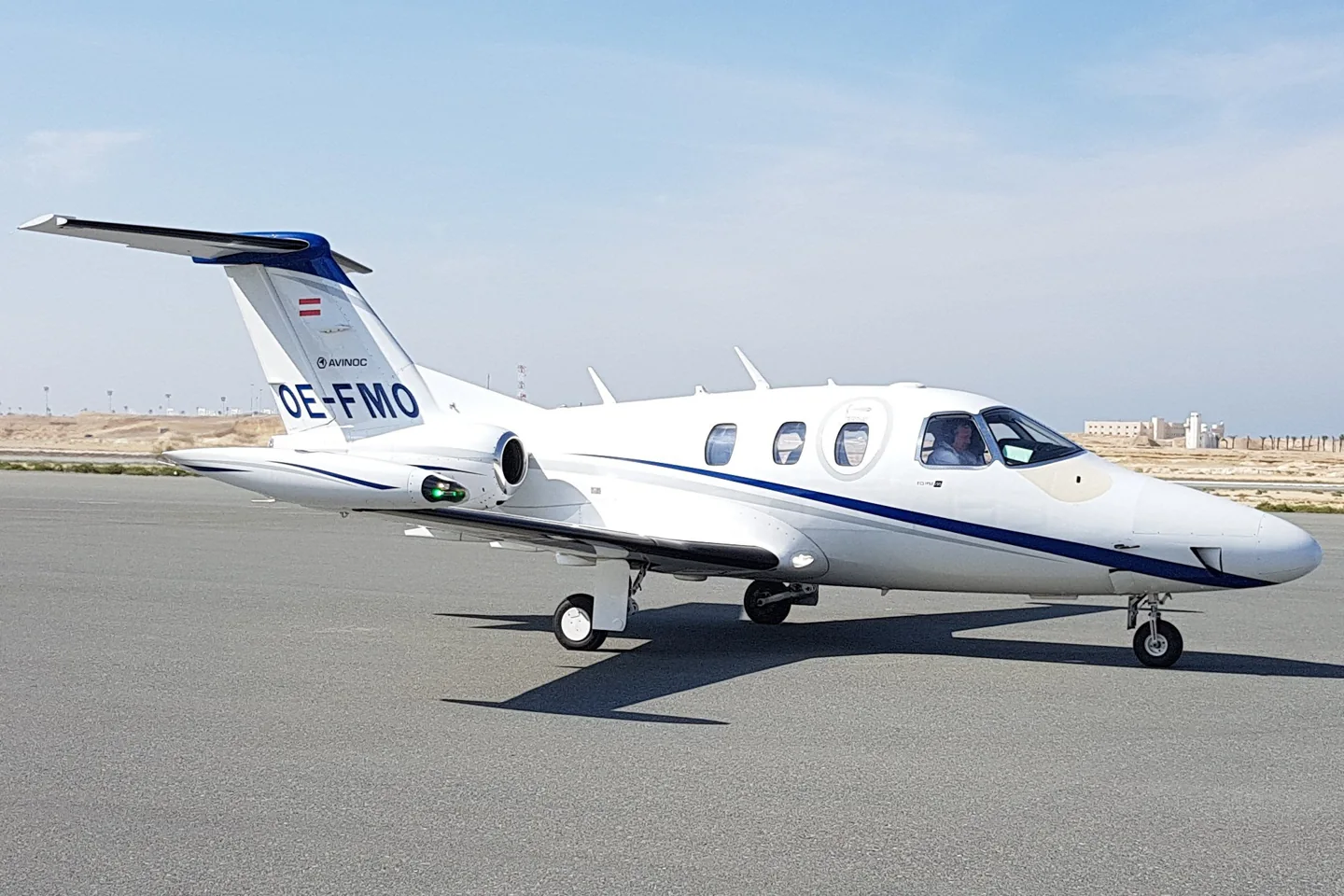
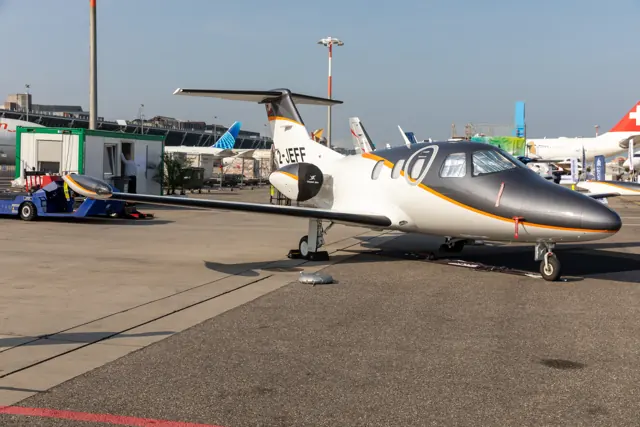
The 550 continued the Eclipse 500 design under Eclipse Aerospace and later One Aviation. It retains the compact, low-wing, twin-engine configuration and six-seat cabin arrangement of that lineage. The real aircraft was certified for single-pilot operation. The simulator listings identify each developer's avionics and supported versions.
Aircraft background
Wikipedia contributors · Read more ↗Returning to an Eclipse with more complete systems
Haines returned to the Eclipse with experience of its much earlier cockpit. In the 550 he found the systems closer to what he expected in a business jet, with the autothrottle particularly useful during descent. Smith also demonstrated the way it responded at the low-speed end of the envelope, giving Haines a chance to see an unfamiliar feature in a controlled setting.
AOPA Pilot · August 2014. Eclipse 550 flight at Charleston with Andy Smith; Haines had previously trained in the earlier 500.
AOPA Pilot · Read more ↗The 550 NG uses Aerobask’s chosen avionics
Aerobask explicitly describes equipping its Eclipse 550 NG with custom Dynon SkyView and Garmin GTN750/650 simulations. This is the developer’s selected cockpit arrangement. The documented package targets X-Plane 11 and includes separate manuals for the aircraft and its avionics.
Eclipse 550 · Aerobask · X-Plane 11
Aerobask · Read more ↗Into the cockpit
 YouTube
 KFEAvia · 14 min ·
CAN THE ECLIPSE 550 REALLY DO THIS?! (Full Test Flight)
An Eclipse 550 flight demonstration by an aircraft sales and charter presenter.
Real aircraft · Eclipse 550
Watch on YouTube ↗Preview images are served by AirframeDB. Videos open on YouTube only when you choose to watch.
Meet Eclipse 550
The 550 continued the Eclipse 500 design under Eclipse Aerospace and later One Aviation. It retains the compact, low-wing, twin-engine configuration and six-seat cabin arrangement of that lineage. The real aircraft was certified for single-pilot operation. The simulator listings identify each developer's avionics and supported versions.
Eclipse 550
Eclipse Aerospace → · Explore the family →
Eclipse 550
Wikipedia contributors · Eclipse 550 ↗Aerobask · X-Plane 11 →Aircraft type designators
Use the code for the model you are flying. The linked authority lists the applicable aircraft.
History & design
From the early 500 to the renewed 550
Haines recalls the incomplete avionics capabilities of the early aircraft and describes the later return to production with the 550. The newer model brought autothrottles, revised windshields and backup displays, while antiskid braking addressed a notable earlier omission.
AOPA Pilot · Crossing the threshold ↗Contemporary comparison based on the author’s experience of both generations
Earlier aircraft continued through refurbishment
Feingold’s Total Eclipse was a refurbished 500 rather than a newly built 550. His 2013 ownership account shows an earlier aircraft serving the same personal-travel role, with equipment differences that are important when comparing experiences across the family.
Plane & Pilot · Owners’ Analysis: Eclipse, Mustang, And Phenom ↗Owner’s configuration at the time of the interview
Development milestones
Developed from: Eclipse 500
Wikipedia contributors · Eclipse 550 ↗Eclipse 550 · family/variant named by the source · Wikipedia revision 1346505788
Pilot accounts
Returning to an Eclipse with more complete systems
Haines returned to the Eclipse with experience of its much earlier cockpit. In the 550 he found the systems closer to what he expected in a business jet, with the autothrottle particularly useful during descent. Smith also demonstrated the way it responded at the low-speed end of the envelope, giving Haines a chance to see an unfamiliar feature in a controlled setting.
The last part of the landing still required manual power management after the autothrottle disconnected with the landing configuration. Haines did not regard his approach as perfect, but the touchdown went well. He also welcomed the antiskid braking improvement. His account traces a practical change from his earlier Eclipse experience while acknowledging that software refinements remained part of the aircraft’s development.
AOPA Pilot · August 2014. Eclipse 550 flight at Charleston with Andy Smith; Haines had previously trained in the earlier 500.
Read the full account · AOPA Pilot ↗A first Eclipse flight ends in a gusty Arizona landing
Hayes had seen the Eclipse before, but this invitation finally put him in the cockpit. He found more useful space than its compact exterior suggested, liked the sidestick and appreciated the organised systems displays. The navigation keyboard was less immediately comfortable because its layout differed from the familiar computer keyboard. Initial doubts about the autothrottle softened as he saw how much work it removed during the flight.
Back at Ryan Field, gusty wind made the first landing a more demanding introduction than a calm demonstration might have been. Oden nevertheless let Hayes continue, and he brought the aircraft down successfully. Hayes’s enthusiasm comes through clearly, alongside his reservations about the early vertical-navigation interface. It is a report of an enjoyable first encounter with the 550, including the adjustments that its equipment and the weather demanded.
Plane & Pilot · September 2014. Eclipse 550 demonstration from Ryan Field near Tucson with Ken Oden and Iggy Burkhardt.
Read the full account · Plane & Pilot ↗Photographing a solar eclipse from an Eclipse
The morning began with breakfast planning and uncertainty about cloud cover. Whyte’s Eclipse and the Bonanza photography aircraft needed a clear patch of sky for a picture during totality. The team also discussed the jet’s bright lights, with Whyte asking for warning before they were flashed so that his vision would be protected during the formation flight.
As darkness arrived, streetlights appeared below and the horizon took on an unusual glow. Maintaining the photograph required close coordination between the aircraft. After a prolonged turning orbit, Whyte experienced vertigo and changed the formation arrangement, taking the lead for the journey home.
21 August 2017 mission, reported by Dave Hirschman for AOPA. Whyte flew the 550 with safety pilot Chris Collins; Hirschman piloted the separate Bonanza camera aircraft.
Read the full account · AOPA ↗A retirement plan with room for luggage
Feingold’s aircraft was part of a retirement plan shared with his wife: more time to travel after a career that had included professional flying and running a software company. He chose a Total Eclipse 500 and removed the two aft seats to make more room for baggage. After about 140 hours, the aircraft had become a way to turn those travel ambitions into regular journeys.
He particularly valued pressurisation and arriving with less fatigue. Ownership also exposed equipment he would have liked to improve, including the absence of antiskid braking and a wish for synthetic vision. His account therefore records an earlier stage of the Eclipse family than the 550 reviews. It combines a clear personal reason for owning the aircraft with limitations that mattered in his own use.
Owner interviewed by Bill Cox · Plane & Pilot, July 2013. Total Eclipse 500 family account, preceding the 550; equipment differences are retained.
Read the full account · Plane & Pilot ↗In your simulator
Systems, equipment and documentation for each developer’s aircraft.
X-Plane 11Eclipse 550
Aerobask · Released
Eclipse 550
Aerobask · Released
Aircraft specifications
Published figures for the named real-aircraft variant. Simulator equipment and performance can differ.
| Specification | Published value |
|---|---|
| Length | 33.5 ft (10.2 m) |
| Wingspan | 37.9 ft (11.6 m) |
| Height | 11 ft (3.4 m) |
| Empty weight | 3,634 lb (1,648 kg) |
| Gross weight | 6,034 lb (2,737 kg) |
| Max takeoff weight | 6,000 lb (2,722 kg) |
| Powerplant | 2 × Pratt & Whitney Canada PW610F turbofan , 900 lbf (4.0 kN) thrust each |
| Maximum speed | 432 mph (694 km/h, 375 kn) |
| Range | 1,295 mi (2,084 km, 1,125 nmi) |
| Service ceiling | 41,000 ft (12,000 m) |
| Rate of climb | 3,456 ft/min (17.56 m/s) |
Manuals & resources
Find your next read
Choose a topic for a short introduction and a link to the original source. Simulator references identify the developer and edition they cover.
Simulator documentation
The 550 NG uses Aerobask’s chosen avionicsEclipse 550 · Aerobask · X-Plane 11
Aerobask explicitly describes equipping its Eclipse 550 NG with custom Dynon SkyView and Garmin GTN750/650 simulations. This is the developer’s selected cockpit arrangement. The documented package targets X-Plane 11 and includes separate manuals for the aircraft and its avionics.
Gathered Aerobask Eclipse page
Aerobask · Read the source ↗Cabin controls and loading accompany the flight deckEclipse 550 · Aerobask · X-Plane 11
The VIP touchscreen controller operates in the cabin and as a popup, while passengers and luggage can be configured. Cockpit instruments also have popup displays and mouse-scroll support. Aerobask lists FMOD sound from version 1.1.0, weather effects on the windshield and interiors that vary with the chosen livery.
Published XP11 feature list; no XP12 compatibility inferred
Aerobask · Read the source ↗Pilot account
Returning to an Eclipse with more complete systemsAOPA Pilot · August 2014. Eclipse 550 flight at Charleston with Andy Smith; Haines had previously trained in the earlier 500.
Haines returned to the Eclipse with experience of its much earlier cockpit. In the 550 he found the systems closer to what he expected in a business jet, with the autothrottle particularly useful during descent. Smith also demonstrated the way it responded at the low-speed end of the envelope, giving Haines a chance to see an unfamiliar feature in a controlled setting.
Thomas B. Haines
AOPA Pilot · Read the source ↗A first Eclipse flight ends in a gusty Arizona landingPlane & Pilot · September 2014. Eclipse 550 demonstration from Ryan Field near Tucson with Ken Oden and Iggy Burkhardt.
Hayes had seen the Eclipse before, but this invitation finally put him in the cockpit. He found more useful space than its compact exterior suggested, liked the sidestick and appreciated the organised systems displays. The navigation keyboard was less immediately comfortable because its layout differed from the familiar computer keyboard. Initial doubts about the autothrottle softened as he saw how much work it removed during the flight.
John Hayes
Plane & Pilot · Read the source ↗Read the original documentation from the people who created it. Manuals open on their publisher’s website.
Aircraft background
Eclipse 550Wikipedia contributors · Research background · retrieved 2026-09-12Product
Eclipse 550 NGAerobask · Official developer / designated store catalogue · checked 2026-09-12Type designator
ICAO Doc 8643 — aircraft type designatorsInternational Civil Aviation Organization · Public search data retrieved 2026-09-14; authority update 2026-09-03Built-in force-feedback profiles
Read the documentary basis, editable starting settings and remaining questions for the aircraft you fly. Each explanation refers to the exact profile revision shown.
Catalogue programme-20261022-v1 · 1 profile choice
Eclipse 550
Free and Pro · Revision 2 · Partial review
X-Plane 11
Eclipse 550: The profile supplies its selected jet-cockpit resistance.
Eclipse 550
Eclipse 550: The profile supplies its selected jet-cockpit resistance.
Aircraft and simulator scope
- Eclipse 550 · X-Plane 11 · family starting point
Eclipse 550 · Historical XP11 catalogue scope; compatibility is not transferred to XP12.
The simulator model and controls
The 550 continued the Eclipse 500 design under Eclipse Aerospace and later One Aviation. It retains the compact, low-wing, twin-engine configuration and six-seat cabin arrangement of that lineage. The real aircraft was certified for single-pilot operation. The simulator listings identify each developer's avionics and supported versions.
This starting point selects Eclipse 550. Its aircraft-level settings do not select a particular developer’s custom systems.
How this profile feels
The profile supplies its selected jet-cockpit resistance. Spring resistance builds with the selected airspeed response. A separate aerodynamic term adds speed-dependent control load.
Pitch trim response is defined by the current profile authority. Valid trim provides the configured pressure relief. Autopilot following is enabled for supported control references.
Controls and trim
The Eclipse 550 is a small twin-jet business aircraft with an automated glass cockpit. Its compact cabin and avionics-oriented flight deck give the selected rendition a light-jet configuration, with its own simulator equipment and control implementation.
About the values
The gains are normalized profile settings. They describe the chosen effect balance; hand force depends on the device and its output limits. IAS references are tuning values rather than operating limits. Physical acceptance of this revision remains pending.
What the documentation establishes
Aerobask identifies Eclipse550 NG for XP11, with custom Dynon Skyview and GTN750/650.
Documentary review and sources
These decisions describe the documentary basis and remaining gaps for this revision. Aircraft documentation and a starting setting describe different kinds of evidence.
Aircraft and variant
ReviewedThis starting point selects Eclipse 550. Its aircraft-level settings do not select a particular developer’s custom systems.
Flight controls
Not yet reviewedThe Eclipse 550 is a small twin-jet business aircraft with an automated glass cockpit. Its compact cabin and avionics-oriented flight deck give the selected rendition a light-jet configuration, with its own simulator equipment and control implementation.
Trim
Not yet reviewedPitch trim response is defined by the current profile authority. Pitch authority 0.3 provides load relief and permitted centre movement; roll authority is 0.
Autopilot and stability
Not yet reviewedFollowing is on at 0.1 authority when a supported, valid autopilot control reference is available.
Equipment
Not yet reviewedGear, flap and ground cues follow the selected settings and available simulator-reported states.
Speeds and limits
Not yet reviewedThe indicated-speed references set the profile response scale; they are separate from aircraft operating limits.
Simulator integration
Not yet reviewedThe profile targets xplane11. Add-on-specific controls use only the supported references configured by this profile.
Force-feedback settings
Not yet reviewedThe settings define the profile’s effect balance. Device output limits affect physical hand force.
Starting settings and their rationale
These configured values are starting estimates. The explanations describe what each setting controls; physical validation appears separately below.
| Setting | Starting value | What it controls and why |
|---|---|---|
| Spring strength | Starting value0.74 | What it controls and whyThe profile supplies its selected jet-cockpit resistance. The baseline spring is 0.74. Its low-speed blend reaches baseline strength at 90 KIAS. |
| Master force gain | Starting value0.85 | What it controls and whyScales overall profile strength while preserving effect balance, subject to device and output limits. |
| Profile force gain | Starting value0.8 | What it controls and whyThe aerodynamic-load gain is 0.8 with an indicated-speed reference of 230 KIAS. This supplies speed-dependent loading alongside the spring. |
| Force tuning speed/reference | Starting value230.0 kt | What it controls and whySets the IAS reference for aerodynamic loading. It is an estimate, not published cruise TAS or a flight limit. |
| Spring response reference speed | Starting value90 kt | What it controls and whySets the IAS where the low-speed blend reaches baseline strength; high-speed stiffening also uses it. |
| Aileron force scale | Starting value0.72 | What it controls and whyRoll and pitch aerodynamic scales are 0.72 and 1, respectively. They set the aerodynamic axis balance. No custom spring-travel curve is enabled. |
| Elevator force scale | Starting value1.0 | What it controls and whyScales pitch aerodynamic loading; pitch spring travel and trim responses are separate settings. |
| Trim feel | Starting valueEnabled | What it controls and whyRetained for compatibility and group membership. Trim relief, rather than this flag, controls centre movement. |
| Trim relief | Starting valueEnabled | What it controls and whyAllows trim relief with supported control law and valid telemetry. Axis authorities set its amount. |
| Autopilot follow | Starting valueEnabled | What it controls and whyFollowing is on at 0.1 authority when a supported, valid autopilot control reference is available. |
| Autopilot neutral hold | Starting valueDisabled | What it controls and whyPermits centering hold during a supported AP state, separate from following a moving target. |
| Output force limit | Starting value0.55 | What it controls and whyCaps directed-force output. Native spring effects and device limits remain separate. |
All 44 starting settings and their rationale
The settings define the profile’s effect balance. Device output limits affect physical hand force.
| Setting | Starting value | What it controls and why |
|---|---|---|
| Spring strength | Starting value0.74 | What it controls and whyThe profile supplies its selected jet-cockpit resistance. The baseline spring is 0.74. Its low-speed blend reaches baseline strength at 90 KIAS. |
| Spring deadband | Starting value0.045 | What it controls and whySets travel around the centre before the baseline spring resists. Smaller values engage it sooner. |
| Profile force gain | Starting value0.8 | What it controls and whyThe aerodynamic-load gain is 0.8 with an indicated-speed reference of 230 KIAS. This supplies speed-dependent loading alongside the spring. |
| Master force gain | Starting value0.85 | What it controls and whyScales overall profile strength while preserving effect balance, subject to device and output limits. |
| QBlend Enabled | Starting valueEnabled | What it controls and whyAllows baseline spring strength to rise with indicated airspeed where the control law permits it. |
| QSpring Minimum Factor | Starting value0.5 | What it controls and whySets low-speed spring strength as a fraction of baseline when blending is enabled. One keeps full strength. |
| QSpring Start Knots | Starting value20 kt | What it controls and whySets the IAS where the low-speed spring blend starts rising. This is a feel threshold, not a flight limit. |
| Spring response reference speed | Starting value90 kt | What it controls and whySets the IAS where the low-speed blend reaches baseline strength; high-speed stiffening also uses it. |
| Force tuning speed/reference | Starting value230.0 kt | What it controls and whySets the IAS reference for aerodynamic loading. It is an estimate, not published cruise TAS or a flight limit. |
| Airspeed spring stiffening gain | Starting value0.15 | What it controls and whyThe high-speed spring-stiffening gain is 0.15. It strengthens the permitted spring response above 90 KIAS, with the squared-speed ratio capped at 5. |
| Airspeed spring stiffening limit | Starting value5 | What it controls and whyLimits the squared airspeed ratio used for high-speed spring stiffening; it is not a device-force cap. |
| Aileron force scale | Starting value0.72 | What it controls and whyRoll and pitch aerodynamic scales are 0.72 and 1, respectively. They set the aerodynamic axis balance. No custom spring-travel curve is enabled. |
| Elevator force scale | Starting value1.0 | What it controls and whyScales pitch aerodynamic loading; pitch spring travel and trim responses are separate settings. |
| Output force limit | Starting value0.55 | What it controls and whyCaps directed-force output. Native spring effects and device limits remain separate. |
| Trim feel | Starting valueEnabled | What it controls and whyRetained for compatibility and group membership. Trim relief, rather than this flag, controls centre movement. |
| Trim relief | Starting valueEnabled | What it controls and whyAllows trim relief with supported control law and valid telemetry. Axis authorities set its amount. |
| Elevator Authority | Starting value0.3 | What it controls and whyPitch trim response is defined by the current profile authority. Pitch authority 0.3 provides load relief and permitted centre movement; roll authority is 0. |
| Aileron Authority | Starting value0 | What it controls and whyScales supported roll-trim relief and permitted centre movement. Zero removes roll response. |
| Force Trim Enabled | Starting valueDisabled | What it controls and whyEnables local force trim, separate from aircraft-owned trim and add-on integration qualification. |
| GLoad Enabled | Starting valueEnabled | What it controls and whyAllows load-factor changes to modify permitted spring laws. Passive fly-by-wire feel can suppress it. |
| Rate Damping Enabled | Starting valueEnabled | What it controls and whyEnables rate damping with the configured coefficients and control law. |
| Autopilot follow | Starting valueEnabled | What it controls and whyFollowing is on at 0.1 authority when a supported, valid autopilot control reference is available. |
| Autopilot follow authority | Starting value0.1 | What it controls and whySets admitted AP-follow gain, not a percentage of travel. Runtime ownership and input limits still apply. |
| Autopilot neutral hold | Starting valueDisabled | What it controls and whyPermits centering hold during a supported AP state, separate from following a moving target. |
| Autopilot neutral hold strength | Starting value0.6 | What it controls and whySets admitted AP neutral-hold strength; inactive while neutral hold is disabled. |
| Enabled | Starting valueEnabled | What it controls and whyEnables aerodynamic cues; each still needs nonzero strength and its simulator conditions. |
| Gain | Starting value0.35 | What it controls and whySets stall-buffet strength. Zero removes the cue without changing simulator stalls or warnings. |
| Gain | Starting value0.22 | What it controls and whySets high-Mach buffet strength; onset and full-strength thresholds are separate. |
| Gain | Starting value0.14 | What it controls and whySets flap buffet at the configured position and speed gates. Flap movement texture is separate. |
| Maximum flap index | Starting value2 | What it controls and whySets the final flap index for detent normalization. UP plus three detents uses maximum index3. |
| Minimum flap index | Starting value2 | What it controls and whySets the first flap detent that admits buffet; this is a handle index, not degrees. |
| Gain | Starting value0.1 | What it controls and whySets gear aerodynamic buffet; movement and ground-contact cues are separate. |
| Shaker Enabled | Starting valueDisabled | What it controls and whyPermits shaker at supported warning conditions; the switch does not establish aircraft equipment. |
| Stick shaker amplitude | Starting value0.5 | What it controls and whySets triggered shaker strength; inactive while the shaker feature is disabled. |
| Enabled | Starting valueEnabled | What it controls and whyEnables ground effects; each still needs its own strength and contact or motion telemetry. |
| Gain | Starting value0.4 | What it controls and whySets rolling texture strength, modified by speed, surface and undercarriage configuration. |
| Gain | Starting value0.25 | What it controls and whySets gear-bump texture during ground motion, separate from touchdown impact. |
| Gain | Starting value0.65 | What it controls and whySets landing-impact strength; landing telemetry and response shape determine the pulse. |
| Gain | Starting value0 | What it controls and whySets reverse-thrust vibration with valid reverser and engine conditions. Zero removes the cue. |
| Enabled | Starting valueEnabled | What it controls and whyEnables engine cues with nonzero settings and valid running-engine telemetry. |
| Gain | Starting value0.06 | What it controls and whySets estimated engine vibration using configured telemetry and response, not measured cockpit vibration. |
| Enabled | Starting valueEnabled | What it controls and whyEnables accessory cues with configured strengths and observed accessory movement. |
| Gain | Starting value0.12 | What it controls and whySets texture from observed flap movement; a command without movement does not establish the cue. |
| Gain | Starting value0.12 | What it controls and whySets texture from observed gear movement, separate from aerodynamic and touchdown effects. |
Limits and open questions
- The NG avionics installation is narrower than the family name. Custom touch-screen instruments do not qualify primary-control forces or autopilot demands.
- No simulator launch or physical force validation.
Physical validation
No physical force validation is recorded in this public catalogue for this revision. Documentary review and software checks do not establish how a particular device feels.
Discuss this aircraft (0)
Questions, observations and useful sources from the community.
No published discussions yet. Bring a question or share a useful source.
Open aircraft discussions →Content expanded · What’s new
Something missing or a source that needs attention?
Suggest a correction ↗