


Start here
A few places to begin, from the aircraft’s story to the people who fly it.
Meet the aircraft
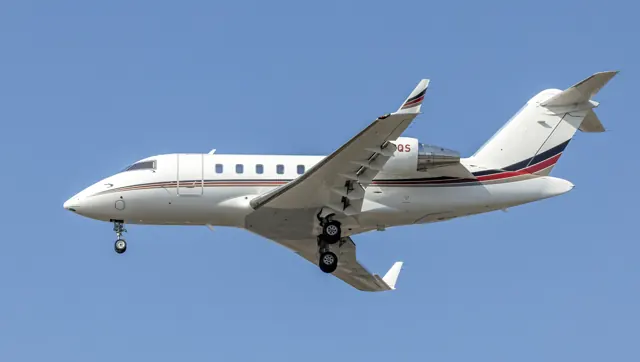
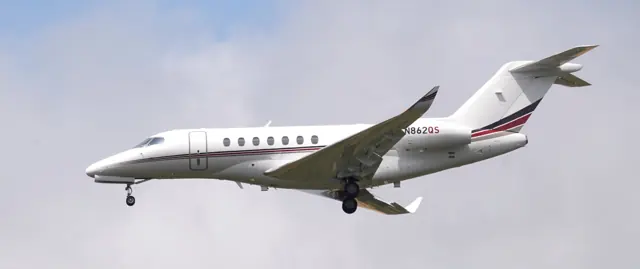
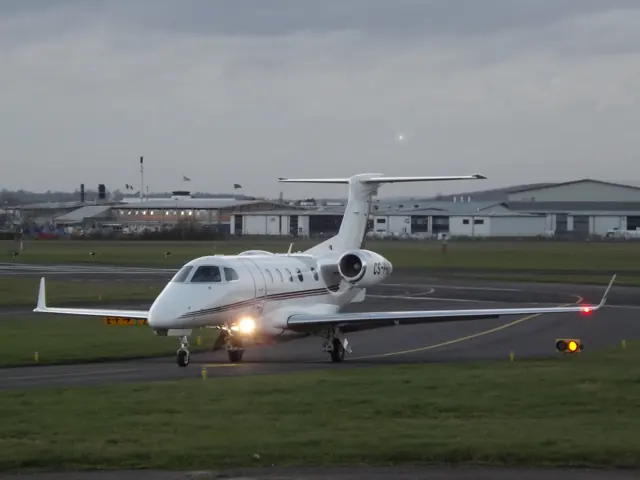
Embraer developed the Phenom 300 after identifying demand for a larger aircraft than the Phenom 100. It received a new airframe, more powerful engines, winglets and spoilers. It is certificated for single-pilot operation. Aerobask's X-Plane aircraft combines a G1000-based cockpit with custom engine and system features.
Aircraft background
Wikipedia contributors · Read more ↗A factory introduction above Brazil
Horne visited Embraer for an introduction that included about an hour and a half of instruction. He found the taxi steering and braking smooth, then climbed high before descending for handling demonstrations. The cockpit’s familiar Garmin foundations helped make a much larger aircraft approachable, while the controls felt appropriately substantial without requiring as much roll effort as he had expected.
AOPA Pilot · June 2010. Early Phenom 300 flown at São José dos Campos with Embraer instructor Marcio Miranda. This and the 2020 account are separate flights by the same reviewer.
AOPA Pilot · Read more ↗An enhanced G1000 with clearly identified simulator conveniences
Aerobask extends Laminar’s G1000 with synthetic vision, custom alerts, engine displays and selectable units. The developer explicitly calls the buttons used to access electrical, anti-ice, fuel and status diagrams fictional. Optional input aids and detachable windows support different simulator setups. This cockpit should not be confused with the later real-world G3000-equipped 300E.
Phenom 300 · Aerobask · X-Plane 12
Aerobask · Read more ↗Into the cockpit
 YouTube
 Shu Goes Flying · 13 min ·
Private Jet Cockpit Flight in Phenom 300 - with ATC Radio
A Phenom 300 repositioning flight to Las Vegas, with cockpit radio audio.
Real aircraft · Embraer Phenom 300
Watch on YouTube ↗Preview images are served by AirframeDB. Videos open on YouTube only when you choose to watch.
Meet Embraer Phenom 300
Embraer developed the Phenom 300 after identifying demand for a larger aircraft than the Phenom 100. It received a new airframe, more powerful engines, winglets and spoilers. It is certificated for single-pilot operation.
Aerobask's X-Plane aircraft combines a G1000-based cockpit with custom engine and system features. The developer documents its FADEC, cruise-speed control and the different jobs performed by the spoilers.
Embraer Phenom 300
Embraer → · Explore the family →
Embraer Phenom 300
Wikipedia contributors · Embraer Phenom 300 ↗Aerobask · X-Plane 12 →Aircraft type designators
Use the code for the model you are flying. The linked authority lists the applicable aircraft.
History & design
Development milestones
The Phenom 300 first flew in 2008.
Wikipedia contributors · Embraer Phenom 300 ↗First-flight year from the linked Phenom 300 history
A separate design within the Phenom family
Horne’s contemporary introduction records December 2009 certification and Embraer’s description of the 300 as a new design with its own type certificate. The swept wing, systems and larger cabin made it more than a stretched Phenom 100.
AOPA Pilot · Phenom 300 debut ↗Contemporary AOPA report of Embraer’s design explanation
The 300E brought successive cockpit and cabin changes
The 2020 review distinguishes the earlier move to G3000 avionics and the 2017 introduction of the 300E interior from the further approach-alerting and cockpit changes in the aircraft Horne flew.
AOPA Pilot · The reimagined Phenom 300E ↗Contemporary review; configuration changes are not applied retrospectively to older aircraft
Pilot accounts
A factory introduction above Brazil
Horne visited Embraer for an introduction that included about an hour and a half of instruction. He found the taxi steering and braking smooth, then climbed high before descending for handling demonstrations. The cockpit’s familiar Garmin foundations helped make a much larger aircraft approachable, while the controls felt appropriately substantial without requiring as much roll effort as he had expected.
Closing summer weather left time for only one instrument approach back to the airport. The excellent forward view created an unexpected temptation to flare too early, because the runway appeared closer than it was. He finished with a good landing and a favourable impression of the aircraft’s manners. His account explicitly leaves single-engine handling untested, keeping that part of the evaluation separate from what he experienced.
AOPA Pilot · June 2010. Early Phenom 300 flown at São José dos Campos with Embraer instructor Marcio Miranda. This and the 2020 account are separate flights by the same reviewer.
Read the full account · AOPA Pilot ↗Returning to a jet with new approach alerts
A decade after his early Phenom report, Horne flew the updated 300E from Embraer’s Florida base. Automated weather-data entry reduced setup work, and the lightly loaded jet accelerated briskly enough to keep his attention on the initial climb. At altitude he checked its cruise performance before returning to demonstrate the new approach features.
Deliberate changes to the approach brought the stabilised-approach and runway-overrun alerts into play, followed by go-arounds and a final landing in a crosswind. These were demonstrations with a company test pilot, not unexpected emergencies. After leaving the cockpit, Horne realised he had again spent too little time appreciating the cabin. The avionics features described concern the 300E Horne flew.
AOPA Pilot · May 2020. Revised Phenom 300E demonstration from Melbourne, Florida, with production test pilot Steve Baerst; later configuration than the Aerobask G1000 model.
Read the full account · AOPA Pilot ↗More room for friends, with a bigger wing to watch
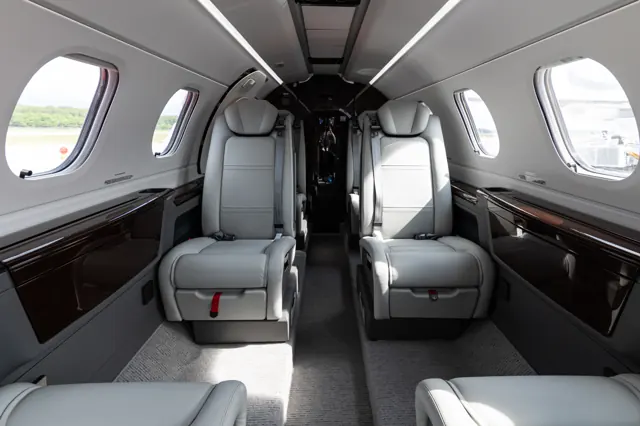
Adolfsson moved up within the Phenom family after deciding he wanted more capacity and reach. The larger aircraft made it easier to include friends alongside his immediate family on longer journeys. He appreciated the integrated cockpit and familiar systems, while passengers valued conveniences such as connectivity, the airstair and an externally serviced lavatory.
The transition still required a new sense of scale. At first, the longer wing made him wary of obstacles while manoeuvring on the ground, especially where he could not see the right wingtip from his seat. Ownership also led him to create the Phenom Pilots community, bringing pilots and maintenance specialists together to exchange experience. His account combines enthusiasm for his own aircraft with a practical adjustment that the familiar cockpit alone could not solve.
Twin & Turbine · December 2022. Owner of a 2011 Phenom 300, acquired after previous Eclipse 500 and Phenom 100 ownership.
Read the full account · Twin & Turbine ↗In your simulator
Systems, equipment and documentation for each developer’s aircraft.
Compare simulator versions →X-Plane 12Phenom 300
Aerobask · Released
Phenom 300
Aerobask · Released
MSFS 2024Phenom 300E
FSReborn · Released
Phenom 300E
FSReborn · Released
Aircraft specifications
Published figures for the named real-aircraft variant. Simulator equipment and performance can differ.
| Specification | Published value |
|---|---|
| Length | 15.64 m (51 ft 4 in) |
| Wingspan | 15.91 m (52 ft 2 in) |
| Height | 5.1 m (16 ft 9 in) |
| Max takeoff weight | 8,414.59 kg (18,551 lb) |
| Powerplant | 2 × Pratt & Whitney Canada PW535E1 turbofans, 15.471 kN (3,478 lbf) thrust each |
| Maximum speed | 859 km/h (534 mph, 464 kn) at FL330 |
| Cruise speed | 839 km/h (521 mph, 453 kn) |
| Range | 3,723 km (2,313 mi, 2,010 nmi) with IFR reserves, 5 occupants |
| Service ceiling | 13,716 m (45,000 ft) |
Manuals & resources
Find your next read
Choose a topic for a short introduction and a link to the original source. Simulator references identify the developer and edition they cover.
Simulator documentation
An enhanced G1000 with clearly identified simulator conveniencesPhenom 300 · Aerobask · X-Plane 12
Aerobask extends Laminar’s G1000 with synthetic vision, custom alerts, engine displays and selectable units. The developer explicitly calls the buttons used to access electrical, anti-ice, fuel and status diagrams fictional. Optional input aids and detachable windows support different simulator setups. This cockpit should not be confused with the later real-world G3000-equipped 300E.
Gathered Aerobask XP12 page; same work as the catalogue source without www
Aerobask · Read the source ↗Cabin controls and refuelling are interactivePhenom 300 · Aerobask · X-Plane 12
The package lists a functioning exterior refuelling panel, baggage and service doors, and a passenger tablet controlling cabin features such as shades and tables. Preferences carry between flights, while AviTab and a separate options panel provide access to simulator settings.
Aerobask’s published X-Plane 12 feature description
Aerobask · Read the source ↗FADEC, cruise-speed control and three spoiler rolesPhenom 300 · Aerobask · X-Plane 12
Aerobask pairs Laminar's GFC700 with custom FADEC and current-speed-control logic in the Phenom 300. The spoilers perform distinct jobs as roll aids, ground spoilers and speed brakes. The published systems also include pressurisation, oxygen and standby instrumentation, as described in the developer documentation.
Phenom300 XP12 page · Avionics; deep system emulation
Aerobask · Read the source ↗Pilot account
A factory introduction above BrazilAOPA Pilot · June 2010. Early Phenom 300 flown at São José dos Campos with Embraer instructor Marcio Miranda. This and the 2020 account are separate flights by the same reviewer.
Horne visited Embraer for an introduction that included about an hour and a half of instruction. He found the taxi steering and braking smooth, then climbed high before descending for handling demonstrations. The cockpit’s familiar Garmin foundations helped make a much larger aircraft approachable, while the controls felt appropriately substantial without requiring as much roll effort as he had expected. Closing summer weather left time for only one instrument approach back to the airport.
Thomas A. Horne
AOPA Pilot · Read the source ↗Returning to a jet with new approach alertsAOPA Pilot · May 2020. Revised Phenom 300E demonstration from Melbourne, Florida, with production test pilot Steve Baerst; later configuration than the Aerobask G1000 model.
A decade after his early Phenom report, Horne flew the updated 300E from Embraer’s Florida base. Automated weather-data entry reduced setup work, and the lightly loaded jet accelerated briskly enough to keep his attention on the initial climb. At altitude he checked its cruise performance before returning to demonstrate the new approach features.
Thomas A. Horne
AOPA Pilot · Read the source ↗Developer documentation
Phenom 300E — product listingPhenom 300E · MSFS 2024
Product listing captured 2026-09-30; edition scope from the reviewed catalogue
www.fsreborn.com · Read the source ↗Read the original documentation from the people who created it. Manuals open on their publisher’s website.
Manual
X-Plane aircraft and avionics manualsLaminar ResearchAircraft background
Embraer Phenom 300Wikipedia contributors · Research background · Wikipedia revision 1374202941 · retrieved 2026-09-12Resource
Phenom 300AerobaskProduct
Phenom 300Aerobask · Official developer / designated store catalogue · checked 2026-09-12 FSReborn by Flight sim Technologieswww.fsreborn.com · Product listing captured 2026-09-30; edition scope from the reviewed catalogueType designator
ICAO Doc 8643 — aircraft type designatorsInternational Civil Aviation Organization · Public search data retrieved 2026-09-14; authority update 2026-09-03Built-in force-feedback profiles
Read the documentary basis, editable starting settings and remaining questions for the aircraft you fly. Each explanation refers to the exact profile revision shown.
Catalogue programme-20261022-v1 · 3 profile choices
Aerobask Phenom 300
Aerobask · Free and Pro · Revision 3 · Inherited starting point
X-Plane 12
Aerobask Phenom 300: The profile supplies selected yoke resistance for the Phenom 300 rendition.
FSReborn Phenom 300E
FSReborn · Free and Pro · Revision 3 · Inherited starting point
MSFS 2024
FSReborn Phenom 300E: The profile supplies selected yoke resistance for the Phenom 300 rendition.
Embraer Phenom 300
Free and Pro · Revision 2 · Partial review
X-Plane 12
Embraer Phenom 300: The profile supplies selected yoke resistance for the Phenom 300 rendition.
Aerobask Phenom 300
Aerobask Phenom 300: The profile supplies selected yoke resistance for the Phenom 300 rendition.
Aircraft and simulator scope
- Aerobask Phenom 300 · Aerobask · X-Plane 12 · Add-on starting point
The simulator model and controls
Embraer developed the Phenom 300 after identifying demand for a larger aircraft than the Phenom 100. It received a new airframe, more powerful engines, winglets and spoilers. It is certificated for single-pilot operation.
This profile selects Aerobask Phenom 300 for X-Plane 12.
How this profile feels
The profile supplies selected yoke resistance for the Phenom 300 rendition. Spring resistance builds with the selected airspeed response. A separate aerodynamic term adds speed-dependent control load.
Configured pitch relief does not borrow the Phenom 100’s warning or trim schedule. Pitch-trim relief is off. Autopilot following is off.
Controls and trim
The Phenom 300 cockpit brings a light business-jet airframe together with automated engine and navigation functions. Its model and flight-deck generation remain named in the simulator product, distinct from the smaller Phenom 100.
The selected implementation
Aerobask’s Phenom 300 enhances the Laminar G1000/GFC700 with custom FADEC and cruise-speed control. The spoilers combine roll, ground and speedbrake functions.
About the values
The gains are normalized profile settings. They describe the chosen effect balance; hand force depends on the device and its output limits. IAS references are tuning values rather than operating limits. Physical acceptance of this revision remains pending.
Documentary review and sources
These decisions describe the documentary basis and remaining gaps for this revision. Aircraft documentation and a starting setting describe different kinds of evidence.
Aircraft and variant
InheritedThis profile selects Aerobask Phenom 300 for X-Plane 12.
Flight controls
InheritedThe Phenom 300 cockpit brings a light business-jet airframe together with automated engine and navigation functions. Its model and flight-deck generation remain named in the simulator product, distinct from the smaller Phenom 100.
Trim
InheritedConfigured pitch relief does not borrow the Phenom 100’s warning or trim schedule. Pitch relief is off, with stored authority 0; roll authority is 0.
Autopilot and stability
InheritedAutopilot following is off; the configured spring and load retain the hardware feel.
Equipment
InheritedAerobask’s Phenom 300 enhances the Laminar G1000/GFC700 with custom FADEC and cruise-speed control. The spoilers combine roll, ground and speedbrake functions.
Speeds and limits
InheritedThe indicated-speed references set the profile response scale; they are separate from aircraft operating limits.
Simulator integration
InheritedThe profile targets xplane12. Add-on-specific controls use only the supported references configured by this profile.
Force-feedback settings
InheritedThe settings define the profile’s effect balance. Device output limits affect physical hand force.
Starting settings and their rationale
These configured values are starting estimates. The explanations describe what each setting controls; physical validation appears separately below.
| Setting | Starting value | What it controls and why |
|---|---|---|
| Spring strength | Starting value0.74 | What it controls and whyThe profile supplies selected yoke resistance for the Phenom 300 rendition. The baseline spring is 0.74. Its low-speed blend reaches baseline strength at 65 KIAS. |
| Master force gain | Starting value0.85 | What it controls and whyScales overall profile strength while preserving effect balance, subject to device and output limits. |
| Profile force gain | Starting value0.8 | What it controls and whyThe aerodynamic-load gain is 0.8 with an indicated-speed reference of 200 KIAS. This supplies speed-dependent loading alongside the spring. |
| Force tuning speed/reference | Starting value200 kt | What it controls and whySets the IAS reference for aerodynamic loading. It is an estimate, not published cruise TAS or a flight limit. |
| Spring response reference speed | Starting value65 kt | What it controls and whySets the IAS where the low-speed blend reaches baseline strength; high-speed stiffening also uses it. |
| Aileron force scale | Starting value0.72 | What it controls and whyRoll and pitch aerodynamic scales are 0.72 and 1, respectively. They set the aerodynamic axis balance. No custom spring-travel curve is enabled. |
| Elevator force scale | Starting value1 | What it controls and whyScales pitch aerodynamic loading; pitch spring travel and trim responses are separate settings. |
| Trim feel | Starting valueDisabled | What it controls and whyRetained for compatibility and group membership. Trim relief, rather than this flag, controls centre movement. |
| Trim relief | Starting valueDisabled | What it controls and whyAllows trim relief with supported control law and valid telemetry. Axis authorities set its amount. |
| Autopilot follow | Starting valueDisabled | What it controls and whyAutopilot following is off; the configured spring and load retain the hardware feel. |
| Autopilot neutral hold | Starting valueDisabled | What it controls and whyPermits centering hold during a supported AP state, separate from following a moving target. |
| Output force limit | Starting value0.55 | What it controls and whyCaps directed-force output. Native spring effects and device limits remain separate. |
All 44 starting settings and their rationale
The settings define the profile’s effect balance. Device output limits affect physical hand force.
| Setting | Starting value | What it controls and why |
|---|---|---|
| Spring strength | Starting value0.74 | What it controls and whyThe profile supplies selected yoke resistance for the Phenom 300 rendition. The baseline spring is 0.74. Its low-speed blend reaches baseline strength at 65 KIAS. |
| Spring deadband | Starting value0.045 | What it controls and whySets travel around the centre before the baseline spring resists. Smaller values engage it sooner. |
| Profile force gain | Starting value0.8 | What it controls and whyThe aerodynamic-load gain is 0.8 with an indicated-speed reference of 200 KIAS. This supplies speed-dependent loading alongside the spring. |
| Master force gain | Starting value0.85 | What it controls and whyScales overall profile strength while preserving effect balance, subject to device and output limits. |
| QBlend Enabled | Starting valueEnabled | What it controls and whyAllows baseline spring strength to rise with indicated airspeed where the control law permits it. |
| QSpring Minimum Factor | Starting value0.5 | What it controls and whySets low-speed spring strength as a fraction of baseline when blending is enabled. One keeps full strength. |
| QSpring Start Knots | Starting value8 kt | What it controls and whySets the IAS where the low-speed spring blend starts rising. This is a feel threshold, not a flight limit. |
| Spring response reference speed | Starting value65 kt | What it controls and whySets the IAS where the low-speed blend reaches baseline strength; high-speed stiffening also uses it. |
| Force tuning speed/reference | Starting value200 kt | What it controls and whySets the IAS reference for aerodynamic loading. It is an estimate, not published cruise TAS or a flight limit. |
| Airspeed spring stiffening gain | Starting value0.15 | What it controls and whyThe high-speed spring-stiffening gain is 0.15. It strengthens the permitted spring response above 65 KIAS, with the squared-speed ratio capped at 5. |
| Airspeed spring stiffening limit | Starting value5 | What it controls and whyLimits the squared airspeed ratio used for high-speed spring stiffening; it is not a device-force cap. |
| Aileron force scale | Starting value0.72 | What it controls and whyRoll and pitch aerodynamic scales are 0.72 and 1, respectively. They set the aerodynamic axis balance. No custom spring-travel curve is enabled. |
| Elevator force scale | Starting value1 | What it controls and whyScales pitch aerodynamic loading; pitch spring travel and trim responses are separate settings. |
| Output force limit | Starting value0.55 | What it controls and whyCaps directed-force output. Native spring effects and device limits remain separate. |
| Trim feel | Starting valueDisabled | What it controls and whyRetained for compatibility and group membership. Trim relief, rather than this flag, controls centre movement. |
| Trim relief | Starting valueDisabled | What it controls and whyAllows trim relief with supported control law and valid telemetry. Axis authorities set its amount. |
| Elevator Authority | Starting value0 | What it controls and whyConfigured pitch relief does not borrow the Phenom 100’s warning or trim schedule. Pitch relief is off, with stored authority 0; roll authority is 0. |
| Aileron Authority | Starting value0 | What it controls and whyScales supported roll-trim relief and permitted centre movement. Zero removes roll response. |
| Force Trim Enabled | Starting valueDisabled | What it controls and whyEnables local force trim, separate from aircraft-owned trim and add-on integration qualification. |
| GLoad Enabled | Starting valueEnabled | What it controls and whyAllows load-factor changes to modify permitted spring laws. Passive fly-by-wire feel can suppress it. |
| Rate Damping Enabled | Starting valueEnabled | What it controls and whyEnables rate damping with the configured coefficients and control law. |
| Autopilot follow | Starting valueDisabled | What it controls and whyAutopilot following is off; the configured spring and load retain the hardware feel. |
| Autopilot follow authority | Starting value0.1 | What it controls and whySets admitted AP-follow gain, not a percentage of travel. Runtime ownership and input limits still apply. |
| Autopilot neutral hold | Starting valueDisabled | What it controls and whyPermits centering hold during a supported AP state, separate from following a moving target. |
| Autopilot neutral hold strength | Starting value0.6 | What it controls and whySets admitted AP neutral-hold strength; inactive while neutral hold is disabled. |
| Enabled | Starting valueEnabled | What it controls and whyEnables aerodynamic cues; each still needs nonzero strength and its simulator conditions. |
| Gain | Starting value0.35 | What it controls and whySets stall-buffet strength. Zero removes the cue without changing simulator stalls or warnings. |
| Gain | Starting value0 | What it controls and whySets high-Mach buffet strength; onset and full-strength thresholds are separate. |
| Gain | Starting value0 | What it controls and whySets flap buffet at the configured position and speed gates. Flap movement texture is separate. |
| Maximum flap index | Starting value4 | What it controls and whySets the final flap index for detent normalization. UP plus three detents uses maximum index3. |
| Minimum flap index | Starting value2 | What it controls and whySets the first flap detent that admits buffet; this is a handle index, not degrees. |
| Gain | Starting value0 | What it controls and whySets gear aerodynamic buffet; movement and ground-contact cues are separate. |
| Shaker Enabled | Starting valueDisabled | What it controls and whyPermits shaker at supported warning conditions; the switch does not establish aircraft equipment. |
| Stick shaker amplitude | Starting value0.5 | What it controls and whySets triggered shaker strength; inactive while the shaker feature is disabled. |
| Enabled | Starting valueEnabled | What it controls and whyEnables ground effects; each still needs its own strength and contact or motion telemetry. |
| Gain | Starting value0.4 | What it controls and whySets rolling texture strength, modified by speed, surface and undercarriage configuration. |
| Gain | Starting value0.25 | What it controls and whySets gear-bump texture during ground motion, separate from touchdown impact. |
| Gain | Starting value0.65 | What it controls and whySets landing-impact strength; landing telemetry and response shape determine the pulse. |
| Gain | Starting value0 | What it controls and whySets reverse-thrust vibration with valid reverser and engine conditions. Zero removes the cue. |
| Enabled | Starting valueEnabled | What it controls and whyEnables engine cues with nonzero settings and valid running-engine telemetry. |
| Gain | Starting value0.06 | What it controls and whySets estimated engine vibration using configured telemetry and response, not measured cockpit vibration. |
| Enabled | Starting valueEnabled | What it controls and whyEnables accessory cues with configured strengths and observed accessory movement. |
| Gain | Starting value0.12 | What it controls and whySets texture from observed flap movement; a command without movement does not establish the cue. |
| Gain | Starting value0.12 | What it controls and whySets texture from observed gear movement, separate from aerodynamic and touchdown effects. |
Limits and open questions
- Aerobask Phenom 300; xplane12. Previously observed titles and implementation identifiers are retained; installed matching remains deferred.
- Manual primary-control approximation with independently powered spoilers. The hydraulic spoiler circuit does not justify a hydraulic-boosted yoke for all axes. Exact spoiler-assist feel is uncalibrated.
- No exact Aerobask stabilizer/trim-input neutral calibration established; pitch/roll neutral-shift remains off. Cross-simulator FSReborn trim claims are excluded from integration evidence.
- Laminar GFC700 with developer extensions and CSC speed control; a flight-path or autothrottle demand is not a physical yoke target. AP servo-follow and neutral hold remain disabled; engagement indicators are not force-demand signals.
- EMB505 twin jet with retractable gear/flaps and three-function spoilers; cosmetic cabin choices share the same nominal force profile.
- 200 KIAS is an estimated feel reference, not cruise TAS or a certified limit. No invented Mach, VNE or weight scheduling.
- Read-only native telemetry for aircraft motion and accessory positions. Custom switches, display animations and mode lamps are not calibrated servo targets. No unverified LVars/datarefs or simulator writes.
- Spring 0.74; lateral scale 0.72; trim authorities 0/0; per-axis output cap 0.55. Editable engineering estimates, not measured hand forces. No body-rate torque, surface following or fabricated hydraulic-failure loads.
- New physical and installed-product checks deferred by owner. Existing separately recorded acceptance retains its original device, simulator, add-on and version limits. Source review does not broaden custom telemetry acceptance.
- Only actual accessory position changes drive movement texture; static drag and command-triggered kicks are disabled. Select and save an aircraft default when telemetry lacks a discriminating developer/configuration identity.
Physical validation
No physical force validation is recorded in this public catalogue for this revision. Documentary review and software checks do not establish how a particular device feels.
Discuss this aircraft (0)
Questions, observations and useful sources from the community.
No published discussions yet. Bring a question or share a useful source.
Open aircraft discussions →Content expanded · What’s new
Something missing or a source that needs attention?
Suggest a correction ↗