

Start here
A few places to begin, from the aircraft’s story to the people who fly it.
Meet the aircraft
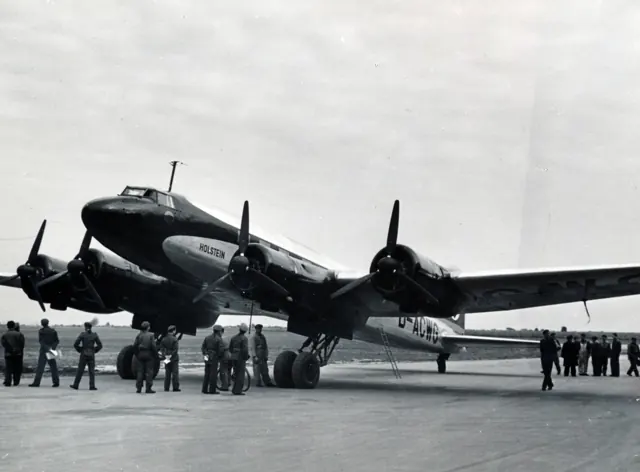
The Condor began as an all-metal transport aircraft. Its long, slim fuselage and four wing-mounted engines expressed the ambitions of late-1930s airline travel. A Berlin-to-New York demonstration flight in 1938 helped draw attention to its long-distance capability. Military Fw 200 developments later served very different roles and carried different equipment.
Aircraft background
Wikipedia contributors · Read more ↗An old adversary finally becomes an aircraft to fly
Brown first admired the Condor at Tempelhof in 1937. Wartime encounters from a Martlet fighter then gave him a very different relationship with it. After the war, he finally entered its cockpit as a pilot. The orderly, almost civilian arrangement appealed to him, although the windscreen framework restricted the view to either side. Takeoff proved the most demanding part of its handling, with a strong tendency to swing left.
Postwar flight report in a special armed VIP transport, identified in Brown’s narrative as Fw 200 C-4/U1 Werk-Nr. 137. His military aircraft differs from the civil Condor. Photographic captions also discuss the U2.
Air International / Captain Eric Brown · Read more ↗Period trim and course instruments
The earlier MSFS 2020 guide labels trim and course instruments; it does not establish unchanged MSFS 2024 operation.
FW 200 Condor · Microsoft Flight Simulator · MSFS 2024
Microsoft / aircraft developers · Read more ↗Into the cockpit
 YouTube
 Microsoft Flight Simulator · 2 min ·
Microsoft Flight Simulator | Local Legend 19: Focke-Wulf Fw 200 Condor
Microsoft's introduction to its Fw 200 Condor simulator release.
Simulator · Microsoft Fw 200 · MSFS
Watch on YouTube ↗Preview images are served by AirframeDB. Videos open on YouTube only when you choose to watch.
Meet Focke-Wulf Fw 200 Condor
The Condor began as an all-metal transport aircraft. Its long, slim fuselage and four wing-mounted engines expressed the ambitions of late-1930s airline travel. A Berlin-to-New York demonstration flight in 1938 helped draw attention to its long-distance capability.
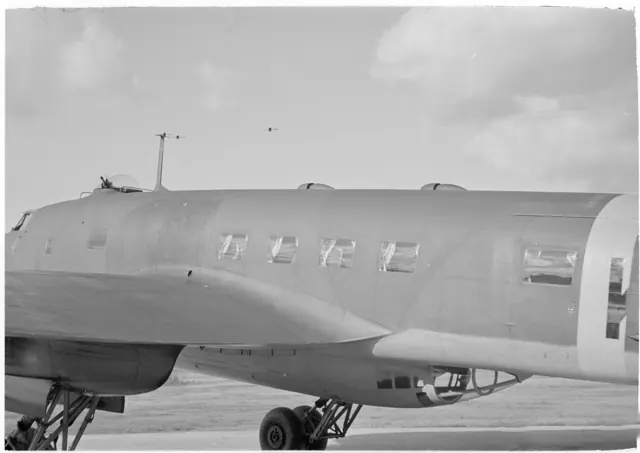
Military Fw 200 developments later served very different roles and carried different equipment. The photographs identify civil airliners and armed wartime variants, whose cabins and cockpits differed.
Focke-Wulf Fw 200 Condor
Aircraft type designators
A model-specific ICAO or FAA designator has not been confirmed in the references reviewed for this aircraft.
History & design
The pilot meets his recovered aircraft sixty years later
At the restoration team’s 2003 reception, Thieme stood quietly before the remains of 0063, visibly moved. The team presented him with a framed piece of its metal. As the formalities ended, he began speaking enthusiastically about flying the Condor and its qualities. The wreck had become a connection between a wartime crew’s survival and the people preserving its aircraft.
Condor Team Bremen · Thieme und sein Flugzeug ↗Restoration team’s own record of the reunion
A former pilot remembers the comfort of the Condor
The restoration team records Franz Dehner comparing Condor flying with travelling in a luxury car. It also recalls Dehner and Thieme’s enthusiasm for its performance.
Condor Team Bremen · Fw 200 Condor im Flug ↗Brief reported recollection; exact aircraft variant not identified
Development milestones
First flight: 27 July 1937
Wikipedia contributors · Focke-Wulf Fw 200 Condor ↗Focke-Wulf Fw 200 Condor · family/variant named by the source · Wikipedia revision 1363681586
Pilot accounts
An old adversary finally becomes an aircraft to fly
Brown first admired the Condor at Tempelhof in 1937. Wartime encounters from a Martlet fighter then gave him a very different relationship with it. After the war, he finally entered its cockpit as a pilot. The orderly, almost civilian arrangement appealed to him, although the windscreen framework restricted the view to either side.
Takeoff proved the most demanding part of its handling, with a strong tendency to swing left. Once airborne, Brown found a stable aircraft that needed prompt trimming after changes of speed or power. He also recalled reliable equipment during several flights in unpleasant weather. His affection for its appearance survived, tempered by practical experience of its limitations and the effort required to fly this particular Condor.
Postwar flight report in a special armed VIP transport, identified in Brown’s narrative as Fw 200 C-4/U1 Werk-Nr. 137. His military aircraft differs from the civil Condor. Photographic captions also discuss the U2.
Read the full account · Air International / Captain Eric Brown ↗A long patrol ends with the crew escaping into a dinghy
Thieme was approaching Vaernes after a long Atlantic sortie when the landing became an emergency. The restoration team’s account says that only the left flaps extended, pulling the aircraft strongly to that side. He struggled to stabilise it, then had to bring it down on the Trondheimfjord instead of reaching the runway.
The water landing gave the crew a chance to escape. Everyone left the aircraft and climbed into the dinghy before the Condor sank, nose first. Thieme later described the event as a controlled crash. The explanation of the flap problem comes from the restoration team’s historical account.
Reported experience in Fw 200 C-3 0063, F8+BR. The restoration team links a 2002 interview, but this summary uses its written account; the recording has not been reviewed.
Read the full account · Condor Team Bremen ↗After crossing the Atlantic, the crew cannot open the door
Henke’s crew had brought the Brandenburg across the Atlantic from Berlin, but reaching New York did not immediately let them leave their seats behind. At Floyd Bennett Field, a ladder arrived beside the aircraft and the cabin door handle moved. Nobody emerged: the door remained shut.
Police tried pulling from outside while a spectator joked that the crew might have to return to Germany for the key. Eventually the door opened and Henke stepped out. His first concern was ordinary after such a long journey: having spent more than a day sitting down, the crew wanted to rest by standing.
Contemporary TIME report of the Brandenburg’s New York arrival in August 1938. Reported remarks, not a later first-person memoir. The brief source supports this arrival episode.
Read the full account · TIME ↗In your simulator
Systems, equipment and documentation for each developer’s aircraft.
Compare simulator versions →MSFS 2024FW 200 Condor
Microsoft Flight Simulator · Released
FW 200 Condor
Microsoft Flight Simulator · Released
MSFS 2020Fw 200 Condor
Microsoft Flight Simulator · Released
Fw 200 Condor
Microsoft Flight Simulator · Released
Aircraft specifications
Published figures for the named real-aircraft variant. Simulator equipment and performance can differ.
| Specification | Published value |
|---|---|
| Length | 23.45 m (76 ft 11 in) |
| Wingspan | 32.85 m (107 ft 9 in) |
| Height | 6.3 m (20 ft 8 in) |
| Wing area | 119.85 m² (1,290.1 sq ft) |
| Empty weight | 17,005 kg (37,490 lb) |
| Max takeoff weight | 22,714 kg (50,076 lb) |
| Powerplant | 4 × Bramo 323R-2 nine-cylinder single-row air-cooled radial piston engine , 809 kW (1,085 hp) each |
| Propellers | 3-bladed variable-pitch propellers |
| Maximum speed | 380 km/h (240 mph, 210 kn) at 4,800 m (15,700 ft) |
| Cruise speed | 335 km/h (208 mph, 181 kn) at 4,000 m (13,000 ft) (Max cruise) |
| Range | 3,560 km (2,210 mi, 1,920 nmi) |
| Service ceiling | 6,000 m (20,000 ft) |
Manuals & resources
Find your next read
Choose a topic for a short introduction and a link to the original source. Simulator references identify the developer and edition they cover.
Simulator documentation
Period trim and course instrumentsFW 200 Condor · Microsoft Flight Simulator · MSFS 2024
The earlier MSFS 2020 guide labels trim and course instruments; it does not establish unchanged MSFS 2024 operation.
August 2024 guide · PDF pages 10,19; later simulator implementation not tested
Microsoft / aircraft developers · Read the source ↗Locate the fuel-system controlsFw 200 Condor · Microsoft Flight Simulator · MSFS 2020
The main fuel panel sits behind the copilot on the right; pump controls also occupy the copilot’s left console.
MSFS 2020 guide · PDF pages 5–9
Microsoft / aircraft developers · Read the source ↗Set the autopilot’s target altitudeFw 200 Condor · Microsoft Flight Simulator · MSFS 2020
Separate knobs capture the current altitude or adjust the target manually.
MSFS 2020 guide · PDF page 12
Microsoft / aircraft developers · Read the source ↗Find the autopilot modesFw 200 Condor · Microsoft Flight Simulator · MSFS 2020
The panel labels GPS, heading, altitude and vertical-speed hold, with manual heading and vertical-speed adjustments.
MSFS 2020 guide · PDF page 11
Microsoft / aircraft developers · Read the source ↗Use the radio operator’s stationFw 200 Condor · Microsoft Flight Simulator · MSFS 2020
The rear console includes COM, NAV, ADF and transponder controls.
MSFS 2020 guide · PDF pages 24–26
Microsoft / aircraft developers · Read the source ↗Clear the yokes from viewFw 200 Condor · Microsoft Flight Simulator · MSFS 2020
Pilot and copilot yokes have separate visibility controls.
MSFS 2020 guide · PDF page 23
Microsoft / aircraft developers · Read the source ↗Pilot account
An old adversary finally becomes an aircraft to flyPostwar flight report in a special armed VIP transport, identified in Brown’s narrative as Fw 200 C-4/U1 Werk-Nr. 137. His military aircraft differs from the civil Condor. Photographic captions also discuss the U2.
Brown first admired the Condor at Tempelhof in 1937. Wartime encounters from a Martlet fighter then gave him a very different relationship with it. After the war, he finally entered its cockpit as a pilot. The orderly, almost civilian arrangement appealed to him, although the windscreen framework restricted the view to either side. Takeoff proved the most demanding part of its handling, with a strong tendency to swing left.
Eric Brown
Air International / Captain Eric Brown · Read the source ↗A long patrol ends with the crew escaping into a dinghyReported experience in Fw 200 C-3 0063, F8+BR. The restoration team links a 2002 interview, but this summary uses its written account; the recording has not been reviewed.
Thieme was approaching Vaernes after a long Atlantic sortie when the landing became an emergency. The restoration team’s account says that only the left flaps extended, pulling the aircraft strongly to that side. He struggled to stabilise it, then had to bring it down on the Trondheimfjord instead of reaching the runway. The water landing gave the crew a chance to escape. Everyone left the aircraft and climbed into the dinghy before the Condor sank, nose first.
Werner Thieme
Condor Team Bremen · Read the source ↗Read the original documentation from the people who created it. Manuals open on their publisher’s website.
Manual
Focke-Wulf Fw 200 Condor ManualMicrosoft / aircraft developers Microsoft Flight Simulator aircraft manualsMicrosoft / aircraft developersAircraft background
Focke-Wulf Fw 200 CondorWikipedia contributors · Research background · Wikipedia revision 1363681586 · retrieved 2026-09-12 Thieme und sein FlugzeugCondor Team Bremen · The team’s record of its 2 September 2003 reunion with Thieme Fw 200 Condor im FlugCondor Team Bremen · Brief reported recollections; insufficient material for another substantial pilot accountResource
MSFS 2024 FAQ and edition aircraft inventoryMicrosoftDeveloper documentation
Microsoft Flight Simulator Releases Local Legend 19: The Focke-Wulf Fw 200 CondorMicrosoft Flight Simulator Team · 2024-08-22 · release and package scopeBuilt-in force-feedback profiles
Read the documentary basis, editable starting settings and remaining questions for the aircraft you fly. Each explanation refers to the exact profile revision shown.
Catalogue programme-20261022-v1 · 1 profile choice
Focke-Wulf Fw 200 Condor
Free and Pro · Revision 2 · Partial review
MSFS 2024 · MSFS 2020
Focke-Wulf Fw 200 Condor: The profile supplies its chosen large-transport resistance.
Focke-Wulf Fw 200 Condor
Focke-Wulf Fw 200 Condor: The profile supplies its chosen large-transport resistance.
Aircraft and simulator scope
- Focke-Wulf Fw 200 Condor · MSFS 2024 · family starting point
- Focke-Wulf Fw 200 Condor · MSFS 2020 · family starting point
Focke-Wulf Fw 200 Condor · The simulator manual distinguishes V1/S1 and V2 aircraft, with different engine installations.
The simulator model and controls
The Condor began as an all-metal transport aircraft. Its long, slim fuselage and four wing-mounted engines expressed the ambitions of late-1930s airline travel. A Berlin-to-New York demonstration flight in 1938 helped draw attention to its long-distance capability.
This starting point selects Focke-Wulf Fw 200 Condor. Its aircraft-level settings do not select a particular developer’s custom systems.
How this profile feels
The profile supplies its chosen large-transport resistance. Spring resistance builds with the selected airspeed response. A separate aerodynamic term adds speed-dependent control load.
Pitch trim relief is independent of equipment added to armed Condor variants. Valid trim provides the configured pressure relief. Autopilot following is off.
Controls and trim
The civil Fw 200 began as a four-engine metal transport, with a long-distance Berlin–New York demonstration in 1938. Armed wartime developments later changed its mission and equipment. The civil airliner’s cockpit is the scope of its own simulator rendition.
About the values
The gains are normalized profile settings. They describe the chosen effect balance; hand force depends on the device and its output limits. IAS references are tuning values rather than operating limits. Physical acceptance of this revision remains pending.
What the documentation establishes
The simulator manual distinguishes V1/S1 and V2 aircraft, with different engine installations.
The sources describe four piston engines and retractable conventional undercarriage. Cowl-flap controls must not be treated as wing-flap evidence.
The release quotes V2 cruise at 208 mph and maximum speed at 233 mph, without an IAS basis for a force-loading reference.
Documentary review and sources
These decisions describe the documentary basis and remaining gaps for this revision. Aircraft documentation and a starting setting describe different kinds of evidence.
Aircraft and variant
ReviewedThis starting point selects Focke-Wulf Fw 200 Condor. Its aircraft-level settings do not select a particular developer’s custom systems.
Flight controls
Not yet reviewedThe civil Fw 200 began as a four-engine metal transport, with a long-distance Berlin–New York demonstration in 1938. Armed wartime developments later changed its mission and equipment. The civil airliner’s cockpit is the scope of its own simulator rendition.
Trim
Not yet reviewedPitch trim relief is independent of equipment added to armed Condor variants. Pitch authority 0.3 provides load relief and permitted centre movement; roll authority is 0.
Autopilot and stability
Not yet reviewedAutopilot following is off; the configured spring and load retain the hardware feel.
Equipment
ReviewedGear, flap and ground cues follow the selected settings and available simulator-reported states.
Speeds and limits
ReviewedThe indicated-speed references set the profile response scale; they are separate from aircraft operating limits.
Simulator integration
Not yet reviewedThe profile targets msfs2024, msfs2020. Add-on-specific controls use only the supported references configured by this profile.
Force-feedback settings
Not yet reviewedThe settings define the profile’s effect balance. Device output limits affect physical hand force.
Starting settings and their rationale
These configured values are starting estimates. The explanations describe what each setting controls; physical validation appears separately below.
| Setting | Starting value | What it controls and why |
|---|---|---|
| Spring strength | Starting value0.74 | What it controls and whyThe profile supplies its chosen large-transport resistance. The baseline spring is 0.74. Its low-speed blend reaches baseline strength at 85 KIAS. |
| Master force gain | Starting value0.85 | What it controls and whyScales overall profile strength while preserving effect balance, subject to device and output limits. |
| Profile force gain | Starting value0.8 | What it controls and whyThe aerodynamic-load gain is 0.8 with an indicated-speed reference of 170 KIAS. This supplies speed-dependent loading alongside the spring. |
| Force tuning speed/reference | Starting value170.0 kt | What it controls and whySets the IAS reference for aerodynamic loading. It is an estimate, not published cruise TAS or a flight limit. |
| Spring response reference speed | Starting value85.0 kt | What it controls and whySets the IAS where the low-speed blend reaches baseline strength; high-speed stiffening also uses it. |
| Aileron force scale | Starting value0.72 | What it controls and whyRoll and pitch aerodynamic scales are 0.72 and 1, respectively. They set the aerodynamic axis balance. No custom spring-travel curve is enabled. |
| Elevator force scale | Starting value1.0 | What it controls and whyScales pitch aerodynamic loading; pitch spring travel and trim responses are separate settings. |
| Trim feel | Starting valueEnabled | What it controls and whyRetained for compatibility and group membership. Trim relief, rather than this flag, controls centre movement. |
| Trim relief | Starting valueEnabled | What it controls and whyAllows trim relief with supported control law and valid telemetry. Axis authorities set its amount. |
| Autopilot follow | Starting valueDisabled | What it controls and whyAutopilot following is off; the configured spring and load retain the hardware feel. |
| Autopilot neutral hold | Starting valueDisabled | What it controls and whyPermits centering hold during a supported AP state, separate from following a moving target. |
| Output force limit | Starting value0.55 | What it controls and whyCaps directed-force output. Native spring effects and device limits remain separate. |
All 44 starting settings and their rationale
The settings define the profile’s effect balance. Device output limits affect physical hand force.
| Setting | Starting value | What it controls and why |
|---|---|---|
| Spring strength | Starting value0.74 | What it controls and whyThe profile supplies its chosen large-transport resistance. The baseline spring is 0.74. Its low-speed blend reaches baseline strength at 85 KIAS. |
| Spring deadband | Starting value0.045 | What it controls and whySets travel around the centre before the baseline spring resists. Smaller values engage it sooner. |
| Profile force gain | Starting value0.8 | What it controls and whyThe aerodynamic-load gain is 0.8 with an indicated-speed reference of 170 KIAS. This supplies speed-dependent loading alongside the spring. |
| Master force gain | Starting value0.85 | What it controls and whyScales overall profile strength while preserving effect balance, subject to device and output limits. |
| QBlend Enabled | Starting valueEnabled | What it controls and whyAllows baseline spring strength to rise with indicated airspeed where the control law permits it. |
| QSpring Minimum Factor | Starting value0.5 | What it controls and whySets low-speed spring strength as a fraction of baseline when blending is enabled. One keeps full strength. |
| QSpring Start Knots | Starting value20 kt | What it controls and whySets the IAS where the low-speed spring blend starts rising. This is a feel threshold, not a flight limit. |
| Spring response reference speed | Starting value85.0 kt | What it controls and whySets the IAS where the low-speed blend reaches baseline strength; high-speed stiffening also uses it. |
| Force tuning speed/reference | Starting value170.0 kt | What it controls and whySets the IAS reference for aerodynamic loading. It is an estimate, not published cruise TAS or a flight limit. |
| Airspeed spring stiffening gain | Starting value0.15 | What it controls and whyThe high-speed spring-stiffening gain is 0.15. It strengthens the permitted spring response above 85 KIAS, with the squared-speed ratio capped at 5. |
| Airspeed spring stiffening limit | Starting value5 | What it controls and whyLimits the squared airspeed ratio used for high-speed spring stiffening; it is not a device-force cap. |
| Aileron force scale | Starting value0.72 | What it controls and whyRoll and pitch aerodynamic scales are 0.72 and 1, respectively. They set the aerodynamic axis balance. No custom spring-travel curve is enabled. |
| Elevator force scale | Starting value1.0 | What it controls and whyScales pitch aerodynamic loading; pitch spring travel and trim responses are separate settings. |
| Output force limit | Starting value0.55 | What it controls and whyCaps directed-force output. Native spring effects and device limits remain separate. |
| Trim feel | Starting valueEnabled | What it controls and whyRetained for compatibility and group membership. Trim relief, rather than this flag, controls centre movement. |
| Trim relief | Starting valueEnabled | What it controls and whyAllows trim relief with supported control law and valid telemetry. Axis authorities set its amount. |
| Elevator Authority | Starting value0.3 | What it controls and whyPitch trim relief is independent of equipment added to armed Condor variants. Pitch authority 0.3 provides load relief and permitted centre movement; roll authority is 0. |
| Aileron Authority | Starting value0 | What it controls and whyScales supported roll-trim relief and permitted centre movement. Zero removes roll response. |
| Force Trim Enabled | Starting valueDisabled | What it controls and whyEnables local force trim, separate from aircraft-owned trim and add-on integration qualification. |
| GLoad Enabled | Starting valueEnabled | What it controls and whyAllows load-factor changes to modify permitted spring laws. Passive fly-by-wire feel can suppress it. |
| Rate Damping Enabled | Starting valueEnabled | What it controls and whyEnables rate damping with the configured coefficients and control law. |
| Autopilot follow | Starting valueDisabled | What it controls and whyAutopilot following is off; the configured spring and load retain the hardware feel. |
| Autopilot follow authority | Starting value0.1 | What it controls and whySets admitted AP-follow gain, not a percentage of travel. Runtime ownership and input limits still apply. |
| Autopilot neutral hold | Starting valueDisabled | What it controls and whyPermits centering hold during a supported AP state, separate from following a moving target. |
| Autopilot neutral hold strength | Starting value0.6 | What it controls and whySets admitted AP neutral-hold strength; inactive while neutral hold is disabled. |
| Enabled | Starting valueEnabled | What it controls and whyEnables aerodynamic cues; each still needs nonzero strength and its simulator conditions. |
| Gain | Starting value0.35 | What it controls and whySets stall-buffet strength. Zero removes the cue without changing simulator stalls or warnings. |
| Gain | Starting value0 | What it controls and whySets high-Mach buffet strength; onset and full-strength thresholds are separate. |
| Gain | Starting value0.14 | What it controls and whySets flap buffet at the configured position and speed gates. Flap movement texture is separate. |
| Maximum flap index | Starting value3 | What it controls and whySets the final flap index for detent normalization. UP plus three detents uses maximum index3. |
| Minimum flap index | Starting value2 | What it controls and whySets the first flap detent that admits buffet; this is a handle index, not degrees. |
| Gain | Starting value0.1 | What it controls and whySets gear aerodynamic buffet; movement and ground-contact cues are separate. |
| Shaker Enabled | Starting valueDisabled | What it controls and whyPermits shaker at supported warning conditions; the switch does not establish aircraft equipment. |
| Stick shaker amplitude | Starting value0.5 | What it controls and whySets triggered shaker strength; inactive while the shaker feature is disabled. |
| Enabled | Starting valueEnabled | What it controls and whyEnables ground effects; each still needs its own strength and contact or motion telemetry. |
| Gain | Starting value0.4 | What it controls and whySets rolling texture strength, modified by speed, surface and undercarriage configuration. |
| Gain | Starting value0.25 | What it controls and whySets gear-bump texture during ground motion, separate from touchdown impact. |
| Gain | Starting value0.65 | What it controls and whySets landing-impact strength; landing telemetry and response shape determine the pulse. |
| Gain | Starting value0 | What it controls and whySets reverse-thrust vibration with valid reverser and engine conditions. Zero removes the cue. |
| Enabled | Starting valueEnabled | What it controls and whyEnables engine cues with nonzero settings and valid running-engine telemetry. |
| Gain | Starting value0.12 | What it controls and whySets estimated engine vibration using configured telemetry and response, not measured cockpit vibration. |
| Enabled | Starting valueEnabled | What it controls and whyEnables accessory cues with configured strengths and observed accessory movement. |
| Gain | Starting value0.12 | What it controls and whySets texture from observed flap movement; a command without movement does not establish the cue. |
| Gain | Starting value0.12 | What it controls and whySets texture from observed gear movement, separate from aerodynamic and touchdown effects. |
Limits and open questions
- The manual's cockpit guide does not establish primary-control boost, linkage or force gearing.
- An applicable trim mechanism is not explained in the retained manual.
- Course indicators refer to automatic flight, but do not establish the complete installed autopilot or external following behavior.
- Neither source defines external control, trim or autopilot status signals.
- No measured control-force or vibration data appears in the retained Fw 200 sources.
- Focke-Wulf Fw 200 Condor documentary evidence does not establish force-feedback hardware acceptance.
Physical validation
No physical force validation is recorded in this public catalogue for this revision. Documentary review and software checks do not establish how a particular device feels.
Discuss this aircraft (0)
Questions, observations and useful sources from the community.
No published discussions yet. Bring a question or share a useful source.
Open aircraft discussions →Content expanded · What’s new
Something missing or a source that needs attention?
Suggest a correction ↗

