

Start here
A few places to begin, from the aircraft’s story to the people who fly it.
Meet the aircraft
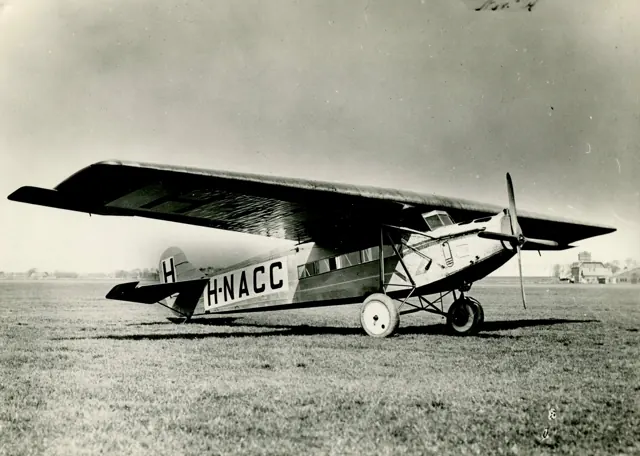
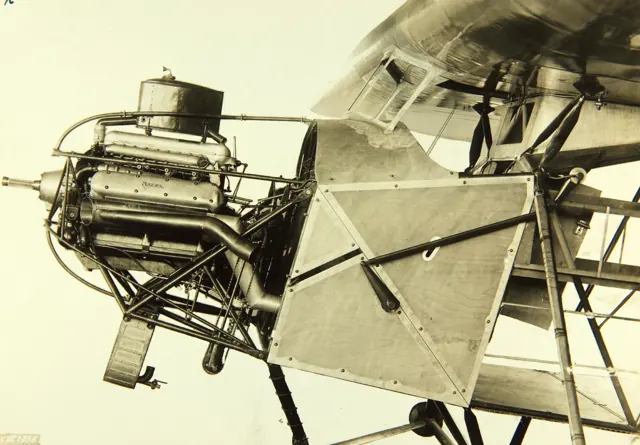
Fokker's F.VII began as a single-engine airliner, with its engine in the nose. The trimotor developments added two engines beneath the wing and helped establish early airline networks and long-distance routes. Cabin size and engine choices varied across the family and licensed production.
Aircraft background
Wikipedia contributors · Read more ↗A celebrated arrival prompts thanks to the whole crew
After the Tasman crossing, Kingsford Smith found facing the crowd a different challenge from flying. He joked about his speaking ability and recalled being swept away from the aircraft by the reception. His thanks concentrated on the other three members of the crew. He credited Ulm’s organisation, Litchfield’s navigation and McWilliam’s efforts to restore communications in the storm.
Contemporary report of his Christchurch reception speech after the September 1928 Tasman crossing. Original Southern Cross; distinct from his earlier Pacific flight.
Otago Witness / Papers Past · Read more ↗The package includes different engine configurations
The linked MSFS 2020 guide distinguishes single-engine and trimotor configurations. It provides family background; this older document does not establish unchanged MSFS 2024 controls.
F.VII · Microsoft Flight Simulator · MSFS 2024
Microsoft / aircraft developers · Read more ↗Into the cockpit
 YouTube
 Microsoft Flight Simulator · 2 min ·
Microsoft Flight Simulator | Local Legend 2: Fokker F.VII
Microsoft presents the Fokker F.VII package and its historic variants.
Simulator · Microsoft Fokker F.VII · MSFS
Watch on YouTube ↗Preview images are served by AirframeDB. Videos open on YouTube only when you choose to watch.
Meet Fokker F.VII
Fokker's F.VII began as a single-engine airliner, with its engine in the nose. The trimotor developments added two engines beneath the wing and helped establish early airline networks and long-distance routes. Cabin size and engine choices varied across the family and licensed production.
The F.VIIa and F.VIIb differed in configuration. The simulator package includes several historical aircraft and later retrofits, with different ground controls and navigation equipment.
Fokker F.VII
Aircraft type designators
A model-specific ICAO or FAA designator has not been confirmed in the references reviewed for this aircraft.
History & design
A damaged replica returns through a long restoration
HARS records a landing-gear failure in 2002, subsequent storage and its acquisition of the dismantled replica in 2010. A dedicated restoration team rebuilt the aircraft; the operator links a proving flight dated 5 December 2023.
Historical Aircraft Restoration Society · Fokker FVIIB Southern Cross Replica ↗History of replica VH-USU; separate from the preserved original
Development milestones
Designer: Walter Rethel
First flight: 24 November 1924
Developed from: Fokker F.V
Wikipedia contributors · Fokker F.VII ↗Fokker F.VII · family/variant named by the source · Wikipedia revision 1353777083
Pilot accounts
A celebrated arrival prompts thanks to the whole crew
After the Tasman crossing, Kingsford Smith found facing the crowd a different challenge from flying. He joked about his speaking ability and recalled being swept away from the aircraft by the reception. His thanks concentrated on the other three members of the crew.
He credited Ulm’s organisation, Litchfield’s navigation and McWilliam’s efforts to restore communications in the storm. The flight, he insisted, depended on all four men. He also explained the wreaths they had dropped for Hood and Moncrieff, who had disappeared attempting the crossing.
Contemporary report of his Christchurch reception speech after the September 1928 Tasman crossing. Original Southern Cross; distinct from his earlier Pacific flight.
Read the full account · Otago Witness / Papers Past ↗Taking over after a night in the storm
Ulm recalled a night of lightning, rain and ice over the Tasman. Water entered the cockpit, the windscreen repeatedly iced over, and the cold became intense. Kingsford Smith flew through most of the worst weather while the crew members worked at navigation and radio repairs.
When conditions improved, Ulm relieved him at the controls for much of the remaining journey. A gap in the clouds revealed land, followed by a flight over Wellington and a welcome at Christchurch. Afterwards, Ulm praised his colleagues and defended the radio operator, whose equipment had failed despite hours of determined work in difficult conditions.
Contemporary first-person interview after the September 1928 Tasman crossing. The same newspaper also reports Kingsford Smith’s separate speech.
Read the full account · Otago Witness / Papers Past ↗A retired airline pilot takes a replica around Australia
Watt’s airline career had taken him through several generations of transport aircraft before the Southern Cross replica offered a different sort of journey. After endorsement training, he set out with copilot Peter Gardiner on a promotional tour visiting Australian capitals, regional towns and outback centres. The aircraft helped raise money for the Royal Flying Doctor Service.
The biography follows the flying through three months of stops and returns to Adelaide, then into a later New Zealand tour. That overseas journey required extra fuel tanks and navigation equipment. Watt continued making occasional promotional flights before his last recorded outing in the replica in 1995.
Squadron Association biography recording the Southern Cross replica tours from 1987. Modern engines, propellers and ground equipment distinguish this aircraft from the 1928 original.
Read the full account · 44 (Rhodesia) Squadron Association ↗In your simulator
Systems, equipment and documentation for each developer’s aircraft.
Compare simulator versions →MSFS 2024F.VII
Microsoft Flight Simulator · Released
F.VII
Microsoft Flight Simulator · Released
MSFS 2020F.VII
Microsoft Flight Simulator · Released
F.VII
Microsoft Flight Simulator · Released
Aircraft specifications
Published figures for the named real-aircraft variant. Simulator equipment and performance can differ.
| Specification | Published value |
|---|---|
| Length | 14.50 m (47 ft 7 in) |
| Wingspan | 21.71 m (71 ft 3 in) |
| Wing area | 67.6 m² (728 sq ft) |
| Empty weight | 3,100 kg (6,834 lb) |
| Gross weight | 5,300 kg (11,684 lb) |
| Powerplant | 3 × Wright J-6 Whirlwind 9-cylinder air-cooled radial piston engine, 220 kW (300 hp) each |
| Maximum speed | 210 km/h (130 mph, 110 kn) |
| Cruise speed | 178 km/h (111 mph, 96 kn) |
| Range | 1,200 km (750 mi, 650 nmi) |
| Service ceiling | 4,400 m (14,400 ft) |
Manuals & resources
Find your next read
Choose a topic for a short introduction and a link to the original source. Simulator references identify the developer and edition they cover.
Simulator documentation
The package includes different engine configurationsF.VII · Microsoft Flight Simulator · MSFS 2024
The linked MSFS 2020 guide distinguishes single-engine and trimotor configurations. It provides family background; this older document does not establish unchanged MSFS 2024 controls.
Legacy manual · MSFS 2024 interface remains unverified
Microsoft / aircraft developers · Read the source ↗Ground controls differ between the original and retrofit aircraftF.VII · Microsoft Flight Simulator · MSFS 2020
The single-engine F.VIIa and original Southern Cross use tailskids without toe brakes. Modern retrofits have toe brakes and a castoring tailwheel; the guide requires full forward yoke to enable its free movement during taxi.
MSFS 2020 manual · PDF page 31, visually checked
Microsoft / aircraft developers · Read the source ↗Select the configuration before the liveryF.VII · Microsoft Flight Simulator · MSFS 2020
The guide lists a single-engine transport, original Southern Cross trimotor, Friendship floatplane, modern retrofits and ski-equipped Josephine Ford. Aircraft selection comes before the separate livery tab.
MSFS 2020 manual · PDF pages 10–11
Microsoft / aircraft developers · Read the source ↗Choose an in-game checklist or the reference cardsF.VII · Microsoft Flight Simulator · MSFS 2020
The manual offers in-game checklists, its included Quick Reference Cards or the Ctrl+E quick-start command.
MSFS 2020 manual · PDF page 31
Microsoft / aircraft developers · Read the source ↗Check the units for the selected variantF.VII · Microsoft Flight Simulator · MSFS 2020
The original configurations’ speed tables use kilometres per hour; the modern retrofit table uses knots. The two tables use different speed units.
MSFS 2020 manual · PDF pages 29–30
Microsoft / aircraft developers · Read the source ↗The original MSFS 2020 releaseF.VII · Microsoft Flight Simulator · MSFS 2020
The January 2022 Local Legend II announcement offers the F.VII for both PC and Xbox. Its recreated historic aircraft include Southern Cross, Josephine Ford and Friendship.
2022-01-31 · release and package scope
Microsoft Flight Simulator Team · Read the source ↗Pilot account
A celebrated arrival prompts thanks to the whole crewContemporary report of his Christchurch reception speech after the September 1928 Tasman crossing. Original Southern Cross; distinct from his earlier Pacific flight.
After the Tasman crossing, Kingsford Smith found facing the crowd a different challenge from flying. He joked about his speaking ability and recalled being swept away from the aircraft by the reception. His thanks concentrated on the other three members of the crew. He credited Ulm’s organisation, Litchfield’s navigation and McWilliam’s efforts to restore communications in the storm. The flight, he insisted, depended on all four men.
Charles Kingsford Smith
Otago Witness / Papers Past · Read the source ↗Taking over after a night in the stormContemporary first-person interview after the September 1928 Tasman crossing. The same newspaper also reports Kingsford Smith’s separate speech.
Ulm recalled a night of lightning, rain and ice over the Tasman. Water entered the cockpit, the windscreen repeatedly iced over, and the cold became intense. Kingsford Smith flew through most of the worst weather while the crew members worked at navigation and radio repairs. When conditions improved, Ulm relieved him at the controls for much of the remaining journey. A gap in the clouds revealed land, followed by a flight over Wellington and a welcome at Christchurch.
Charles Ulm
Otago Witness / Papers Past · Read the source ↗Read the original documentation from the people who created it. Manuals open on their publisher’s website.
Manual
Fokker F. VII ManualMicrosoft / aircraft developers Microsoft Flight Simulator aircraft manualsMicrosoft / aircraft developersAircraft background
Fokker F.VIIWikipedia contributors · Research background · Wikipedia revision 1353777083 · retrieved 2026-09-12 Fokker FVIIB Southern Cross ReplicaHistorical Aircraft Restoration Society · Operator’s aircraft history · retrieved September 2026Resource
MSFS 2024 FAQ and edition aircraft inventoryMicrosoftDeveloper documentation
Local Legend II: Fokker F.VIIMicrosoft Flight Simulator Team · 2022-01-31 · release and package scopeBuilt-in force-feedback profiles
Read the documentary basis, editable starting settings and remaining questions for the aircraft you fly. Each explanation refers to the exact profile revision shown.
Catalogue programme-20261022-v1 · 1 profile choice
Fokker F.VII
Free and Pro · Revision 2 · Partial review
MSFS 2024 · MSFS 2020
Fokker F.VII: The chosen response supplies period-transport resistance.
Fokker F.VII
Fokker F.VII: The chosen response supplies period-transport resistance.
Aircraft and simulator scope
- Fokker F.VII · MSFS 2024 · family starting point
- Fokker F.VII · MSFS 2020 · family starting point
Fokker F.VII · The manual covers F.VIIa, F.VIIb/3m and modernized cockpit editions, rather than a single uniform trimotor installation.
The simulator model and controls
Fokker's F.VII began as a single-engine airliner, with its engine in the nose. The trimotor developments added two engines beneath the wing and helped establish early airline networks and long-distance routes. Cabin size and engine choices varied across the family and licensed production.
This starting point selects Fokker F.VII. Its aircraft-level settings do not select a particular developer’s custom systems.
How this profile feels
The chosen response supplies period-transport resistance. Spring resistance builds with the selected airspeed response. A separate aerodynamic term adds speed-dependent control load.
Configured pitch relief is scoped to the selected F.VII model. Valid trim provides the configured pressure relief. Autopilot following is off.
Controls and trim
The F.VII family includes an original single-engine aircraft and later trimotors with engines beneath the wing. F.VIIa and F.VIIb identify configuration differences in an aircraft that helped establish early airline and long-distance networks.
About the values
The gains are normalized profile settings. They describe the chosen effect balance; hand force depends on the device and its output limits. IAS references are tuning values rather than operating limits. Physical acceptance of this revision remains pending.
What the documentation establishes
The manual covers F.VIIa, F.VIIb/3m and modernized cockpit editions, rather than a single uniform trimotor installation.
Elevator and rudder trim indicators and controls appear in the modernized cockpit; applicability to each historic airframe is not established.
The normal-flight chapter explicitly describes operation without flaps. Single-engine and trimotor propulsion must remain distinct.
The manual describes approximately 80 knots IAS in cruise while headline cruise is 96 knots without an IAS basis. The retained 90-knot reference is an estimate between different contexts.
The manual describes substantial aileron drag and rudder coordination, supporting qualitative handling context without a hand-force curve.
Documentary review and sources
These decisions describe the documentary basis and remaining gaps for this revision. Aircraft documentation and a starting setting describe different kinds of evidence.
Aircraft and variant
ReviewedThis starting point selects Fokker F.VII. Its aircraft-level settings do not select a particular developer’s custom systems.
Flight controls
Not yet reviewedThe F.VII family includes an original single-engine aircraft and later trimotors with engines beneath the wing. F.VIIa and F.VIIb identify configuration differences in an aircraft that helped establish early airline and long-distance networks.
Trim
ReviewedConfigured pitch relief is scoped to the selected F.VII model. Pitch authority 0.3 provides load relief and permitted centre movement; roll authority is 0.
Autopilot and stability
Not yet reviewedAutopilot following is off; the configured spring and load retain the hardware feel.
Equipment
ReviewedGear, flap and ground cues follow the selected settings and available simulator-reported states.
Speeds and limits
ReviewedThe indicated-speed references set the profile response scale; they are separate from aircraft operating limits.
Simulator integration
Not yet reviewedThe profile targets msfs2024, msfs2020. Add-on-specific controls use only the supported references configured by this profile.
Force-feedback settings
ReviewedThe settings define the profile’s effect balance. Device output limits affect physical hand force.
Starting settings and their rationale
These configured values are starting estimates. The explanations describe what each setting controls; physical validation appears separately below.
| Setting | Starting value | What it controls and why |
|---|---|---|
| Spring strength | Starting value0.74 | What it controls and whyThe chosen response supplies period-transport resistance. The baseline spring is 0.74. Its low-speed blend reaches baseline strength at 45 KIAS. |
| Master force gain | Starting value0.85 | What it controls and whyScales overall profile strength while preserving effect balance, subject to device and output limits. |
| Profile force gain | Starting value0.8 | What it controls and whyThe aerodynamic-load gain is 0.8 with an indicated-speed reference of 90 KIAS. This supplies speed-dependent loading alongside the spring. |
| Force tuning speed/reference | Starting value90.0 kt | What it controls and whySets the IAS reference for aerodynamic loading. It is an estimate, not published cruise TAS or a flight limit. |
| Spring response reference speed | Starting value45.0 kt | What it controls and whySets the IAS where the low-speed blend reaches baseline strength; high-speed stiffening also uses it. |
| Aileron force scale | Starting value0.6 | What it controls and whyRoll and pitch aerodynamic scales are 0.6 and 0.78, respectively. They set the aerodynamic axis balance. No custom spring-travel curve is enabled. |
| Elevator force scale | Starting value0.78 | What it controls and whyScales pitch aerodynamic loading; pitch spring travel and trim responses are separate settings. |
| Trim feel | Starting valueEnabled | What it controls and whyRetained for compatibility and group membership. Trim relief, rather than this flag, controls centre movement. |
| Trim relief | Starting valueEnabled | What it controls and whyAllows trim relief with supported control law and valid telemetry. Axis authorities set its amount. |
| Autopilot follow | Starting valueDisabled | What it controls and whyAutopilot following is off; the configured spring and load retain the hardware feel. |
| Autopilot neutral hold | Starting valueDisabled | What it controls and whyPermits centering hold during a supported AP state, separate from following a moving target. |
| Output force limit | Starting value0.55 | What it controls and whyCaps directed-force output. Native spring effects and device limits remain separate. |
All 44 starting settings and their rationale
The settings define the profile’s effect balance. Device output limits affect physical hand force.
| Setting | Starting value | What it controls and why |
|---|---|---|
| Spring strength | Starting value0.74 | What it controls and whyThe chosen response supplies period-transport resistance. The baseline spring is 0.74. Its low-speed blend reaches baseline strength at 45 KIAS. |
| Spring deadband | Starting value0.045 | What it controls and whySets travel around the centre before the baseline spring resists. Smaller values engage it sooner. |
| Profile force gain | Starting value0.8 | What it controls and whyThe aerodynamic-load gain is 0.8 with an indicated-speed reference of 90 KIAS. This supplies speed-dependent loading alongside the spring. |
| Master force gain | Starting value0.85 | What it controls and whyScales overall profile strength while preserving effect balance, subject to device and output limits. |
| QBlend Enabled | Starting valueEnabled | What it controls and whyAllows baseline spring strength to rise with indicated airspeed where the control law permits it. |
| QSpring Minimum Factor | Starting value0.5 | What it controls and whySets low-speed spring strength as a fraction of baseline when blending is enabled. One keeps full strength. |
| QSpring Start Knots | Starting value12.6 kt | What it controls and whySets the IAS where the low-speed spring blend starts rising. This is a feel threshold, not a flight limit. |
| Spring response reference speed | Starting value45.0 kt | What it controls and whySets the IAS where the low-speed blend reaches baseline strength; high-speed stiffening also uses it. |
| Force tuning speed/reference | Starting value90.0 kt | What it controls and whySets the IAS reference for aerodynamic loading. It is an estimate, not published cruise TAS or a flight limit. |
| Airspeed spring stiffening gain | Starting value0.15 | What it controls and whyThe high-speed spring-stiffening gain is 0.15. It strengthens the permitted spring response above 45 KIAS, with the squared-speed ratio capped at 5. |
| Airspeed spring stiffening limit | Starting value5 | What it controls and whyLimits the squared airspeed ratio used for high-speed spring stiffening; it is not a device-force cap. |
| Aileron force scale | Starting value0.6 | What it controls and whyRoll and pitch aerodynamic scales are 0.6 and 0.78, respectively. They set the aerodynamic axis balance. No custom spring-travel curve is enabled. |
| Elevator force scale | Starting value0.78 | What it controls and whyScales pitch aerodynamic loading; pitch spring travel and trim responses are separate settings. |
| Output force limit | Starting value0.55 | What it controls and whyCaps directed-force output. Native spring effects and device limits remain separate. |
| Trim feel | Starting valueEnabled | What it controls and whyRetained for compatibility and group membership. Trim relief, rather than this flag, controls centre movement. |
| Trim relief | Starting valueEnabled | What it controls and whyAllows trim relief with supported control law and valid telemetry. Axis authorities set its amount. |
| Elevator Authority | Starting value0.3 | What it controls and whyConfigured pitch relief is scoped to the selected F.VII model. Pitch authority 0.3 provides load relief and permitted centre movement; roll authority is 0. |
| Aileron Authority | Starting value0 | What it controls and whyScales supported roll-trim relief and permitted centre movement. Zero removes roll response. |
| Force Trim Enabled | Starting valueDisabled | What it controls and whyEnables local force trim, separate from aircraft-owned trim and add-on integration qualification. |
| GLoad Enabled | Starting valueEnabled | What it controls and whyAllows load-factor changes to modify permitted spring laws. Passive fly-by-wire feel can suppress it. |
| Rate Damping Enabled | Starting valueEnabled | What it controls and whyEnables rate damping with the configured coefficients and control law. |
| Autopilot follow | Starting valueDisabled | What it controls and whyAutopilot following is off; the configured spring and load retain the hardware feel. |
| Autopilot follow authority | Starting value0.1 | What it controls and whySets admitted AP-follow gain, not a percentage of travel. Runtime ownership and input limits still apply. |
| Autopilot neutral hold | Starting valueDisabled | What it controls and whyPermits centering hold during a supported AP state, separate from following a moving target. |
| Autopilot neutral hold strength | Starting value0.6 | What it controls and whySets admitted AP neutral-hold strength; inactive while neutral hold is disabled. |
| Enabled | Starting valueEnabled | What it controls and whyEnables aerodynamic cues; each still needs nonzero strength and its simulator conditions. |
| Gain | Starting value0.35 | What it controls and whySets stall-buffet strength. Zero removes the cue without changing simulator stalls or warnings. |
| Gain | Starting value0 | What it controls and whySets high-Mach buffet strength; onset and full-strength thresholds are separate. |
| Gain | Starting value0 | What it controls and whySets flap buffet at the configured position and speed gates. Flap movement texture is separate. |
| Maximum flap index | Starting value1 | What it controls and whySets the final flap index for detent normalization. UP plus three detents uses maximum index3. |
| Minimum flap index | Starting value1 | What it controls and whySets the first flap detent that admits buffet; this is a handle index, not degrees. |
| Gain | Starting value0 | What it controls and whySets gear aerodynamic buffet; movement and ground-contact cues are separate. |
| Shaker Enabled | Starting valueDisabled | What it controls and whyPermits shaker at supported warning conditions; the switch does not establish aircraft equipment. |
| Stick shaker amplitude | Starting value0.5 | What it controls and whySets triggered shaker strength; inactive while the shaker feature is disabled. |
| Enabled | Starting valueEnabled | What it controls and whyEnables ground effects; each still needs its own strength and contact or motion telemetry. |
| Gain | Starting value0.4 | What it controls and whySets rolling texture strength, modified by speed, surface and undercarriage configuration. |
| Gain | Starting value0.25 | What it controls and whySets gear-bump texture during ground motion, separate from touchdown impact. |
| Gain | Starting value0.65 | What it controls and whySets landing-impact strength; landing telemetry and response shape determine the pulse. |
| Gain | Starting value0 | What it controls and whySets reverse-thrust vibration with valid reverser and engine conditions. Zero removes the cue. |
| Enabled | Starting valueEnabled | What it controls and whyEnables engine cues with nonzero settings and valid running-engine telemetry. |
| Gain | Starting value0.12 | What it controls and whySets estimated engine vibration using configured telemetry and response, not measured cockpit vibration. |
| Enabled | Starting valueEnabled | What it controls and whyEnables accessory cues with configured strengths and observed accessory movement. |
| Gain | Starting value0 | What it controls and whySets texture from observed flap movement; a command without movement does not establish the cue. |
| Gain | Starting value0 | What it controls and whySets texture from observed gear movement, separate from aerodynamic and touchdown effects. |
Limits and open questions
- The guide describes control-yoke operation and severe aileron drag, but does not document the primary linkage or a measured gearing ratio.
- No applicable installed autopilot is established by this retained manual.
- The cockpit manual does not define external control or trim telemetry.
- Fokker F.VII documentary evidence does not establish force-feedback hardware acceptance.
Physical validation
No physical force validation is recorded in this public catalogue for this revision. Documentary review and software checks do not establish how a particular device feels.
Discuss this aircraft (0)
Questions, observations and useful sources from the community.
No published discussions yet. Bring a question or share a useful source.
Open aircraft discussions →Content expanded · What’s new
Something missing or a source that needs attention?
Suggest a correction ↗

