

Start here
A few places to begin, from the aircraft’s story to the people who fly it.
Meet the aircraft
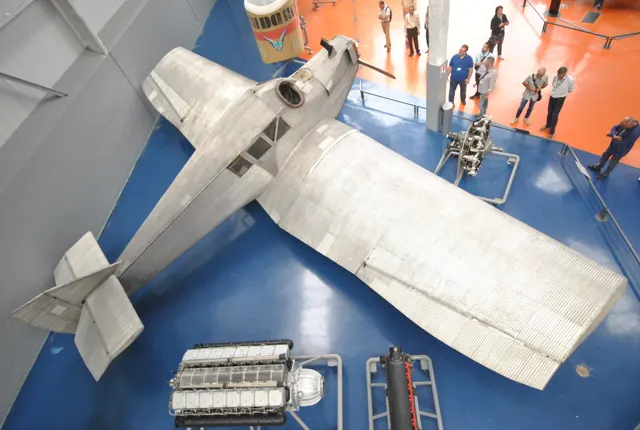
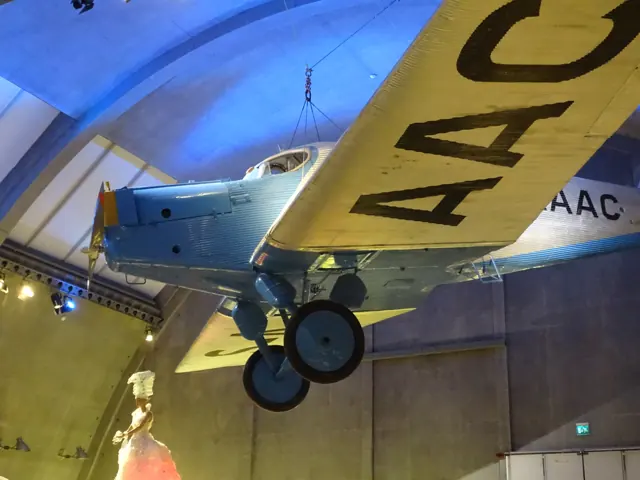
The F 13 introduced metal construction to early commercial air transport, with a cantilever low wing, corrugated skin and an enclosed passenger cabin. It served operators in several countries on wheels and floats.
Aircraft background
Wikipedia contributors · Read more ↗Old flight reports help a test pilot prepare for a new replica
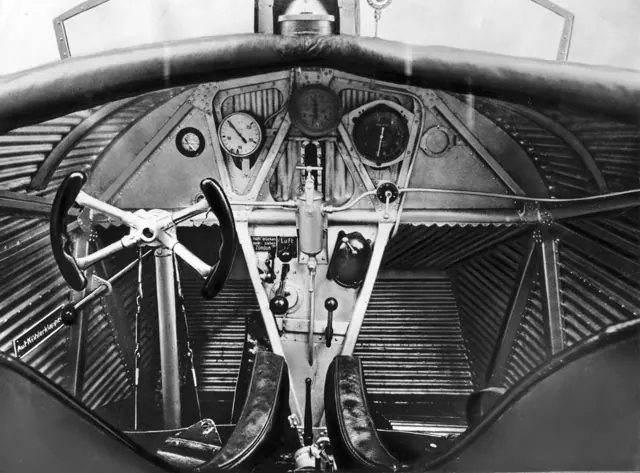
Bachmann described the open cockpit as an unusually direct encounter with the aircraft: its smells, engine vibration and the surrounding air were all part of the flight. After the public demonstration at Dübendorf, he told the audience how much he had enjoyed flying the recreated F13 and how honoured he felt to have joined the project. That enjoyment followed a considerable effort to understand an old design.
Patrick Huber’s Cockpit report, November 2016. Replica demonstration at Dübendorf on 15 September 2016.
Cockpit · Read more ↗A radial engine identifies the announced recreation
Microsoft’s 2022 release identifies a Pratt & Whitney R-985-AN-14B radial with a fixed-pitch two-blade propeller. That configuration belongs to the announced simulator recreation; historical F13s also used several inline engines.
F 13 · Microsoft Flight Simulator · MSFS 2020
Microsoft Flight Simulator Team · Read more ↗Into the cockpit
 YouTube
 AHTVFILM · 100 min ·
„The Return of the Junkers F13“ - F13 DOCUMENTARY 100min ENGLISH
A documentary follows the effort to bring a new-build Junkers F13 into the air.
Modern reconstruction · Junkers F13
Watch on YouTube ↗Preview images are served by AirframeDB. Videos open on YouTube only when you choose to watch.
Meet Junkers F13
The F 13 introduced metal construction to early commercial air transport, with a cantilever low wing, corrugated skin and an enclosed passenger cabin. It served operators in several countries on wheels and floats.
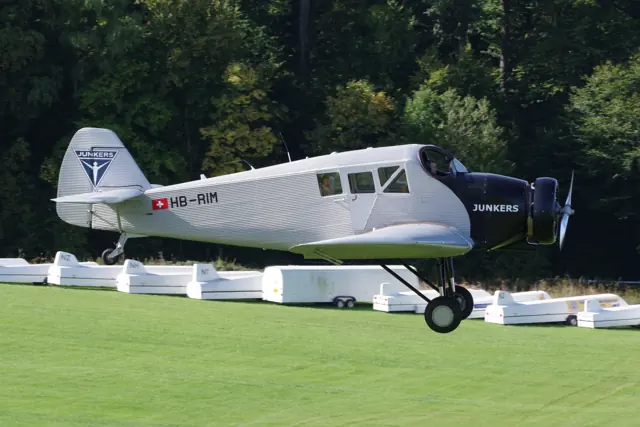
The crew flew from a cockpit separate from the enclosed passenger accommodation. Modern flying replicas also appear in the photographic record and are identified in their captions.
Junkers F13
Aircraft type designators
A model-specific ICAO or FAA designator has not been confirmed in the references reviewed for this aircraft.
History & design
Recreating the aircraft required new equipment as well as old plans
The 2016 Cockpit report describes the replica’s radial engine, modern radio, transponder and engine monitoring. These changes accompanied the recreation of the corrugated-metal airframe; certification and future passenger flights were still being discussed at the time.
Cockpit · Junkers F13: the replica takes flight ↗Historical development report; not a current certification or availability statement
Development milestones
Designer: Otto Reuter
First flight: 25 June 1919
Wikipedia contributors · Junkers F 13 ↗Junkers F 13 · family/variant named by the source · Wikipedia revision 1348811575
Pilot accounts
Old flight reports help a test pilot prepare for a new replica
Bachmann described the open cockpit as an unusually direct encounter with the aircraft: its smells, engine vibration and the surrounding air were all part of the flight. After the public demonstration at Dübendorf, he told the audience how much he had enjoyed flying the recreated F13 and how honoured he felt to have joined the project.
That enjoyment followed a considerable effort to understand an old design. The engineering team studied historical flight reports, and Bachmann found his own gliding experience useful when handling the aircraft. He described a lively machine that required active work on the rudder pedals.
Patrick Huber’s Cockpit report, November 2016. Replica demonstration at Dübendorf on 15 September 2016.
Read the full account · Cockpit ↗The open cockpit makes the weather part of every flight
Schmuck regarded the replica as fairly straightforward to fly once its tailwheel behaviour was understood. He joked that climbing into and out of the cockpit could be the more demanding task. Its apparent simplicity did not remove one persistent feature: the pilots remained outside, exposed to the weather throughout the flight.
The report followed a windy sightseeing outing along the Rhine and over Mainz. Passengers sat in the cabin behind the open cockpit, enjoying clear views while feeling the turbulence. Schmuck’s explanation of the noise and exposure gave their flight a practical context. The successful return in gusty conditions illustrates the particular outing the programme recorded; his relaxed assessment remains an experienced pilot’s impression of the replica.
17:30 Live’s published transcript, September 2026. Flying a modern F13 replica at Mainz-Finthen; passenger comments in the report are separate from the pilot’s observations.
Read the full account · 17:30 Live Rheinland-Pfalz/Hessen ↗A project initiator experiences the public debut from the cockpit
For Morszeck, sitting beside Bachmann during the F13 replica’s public debut completed a project that had occupied years of research and preparation. Afterwards, he described the experience as the fulfilment of a personal ambition. The aircraft was flying again, and he had been able to experience that moment from its cockpit.
People gathered at Dübendorf could follow cockpit images on large screens. Among the guests was Hans-Walter Bender, whose own connection to the original F13 began with a childhood sightseeing flight in 1929. That meeting of generations gave the launch a human dimension beyond the new aircraft. Morszeck’s brief reaction is a crew participant’s recollection of the event, rather than an extended handling report or an independent evaluation of his project.
Shots Magazin report, September 2016. Licensed private pilot and project initiator accompanying test pilot Oliver Bachmann as a crew member; the source does not establish that Morszeck handled the controls.
Read the full account · Shots Magazin ↗In your simulator
Systems, equipment and documentation for each developer’s aircraft.
Compare simulator versions →MSFS 2024F13
Microsoft Flight Simulator · Released
F13
Microsoft Flight Simulator · Released
MSFS 2020F 13
Microsoft Flight Simulator · Released
F 13
Microsoft Flight Simulator · Released
Aircraft specifications
Published figures for the named real-aircraft variant. Simulator equipment and performance can differ.
| Specification | Published value |
|---|---|
| Length | 9.59 m (31 ft 6 in) |
| Wingspan | 14.8 m (48 ft 7 in) |
| Height | 3.50 m (11 ft 6 in) |
| Wing area | 34.50 m² (371.4 sq ft) |
| Empty weight | 951 kg (2,097 lb) |
| Max takeoff weight | 1,640 kg (3,616 lb) |
| Powerplant | 1 × Mercedes D.IIIa six-cylinder water-cooled in-line piston engine, 118 kW (158 hp) |
| Maximum speed | 173 km/h (107 mph, 93 kn) |
| Cruise speed | 160 km/h (99 mph, 86 kn) |
| Range | 1,400 km (870 mi, 760 nmi) |
| Service ceiling | 5,000 m (16,000 ft) |
| Rate of climb | 2.40 m/s (472 ft/min) |
Manuals & resources
Find your next read
Choose a topic for a short introduction and a link to the original source. Simulator references identify the developer and edition they cover.
Simulator documentation
A radial engine identifies the announced recreationF 13 · Microsoft Flight Simulator · MSFS 2020
Microsoft’s 2022 release identifies a Pratt & Whitney R-985-AN-14B radial with a fixed-pitch two-blade propeller. That configuration belongs to the announced simulator recreation; historical F13s also used several inline engines.
Local Legend VI announcement · 25 August 2022; no dedicated operating manual established
Microsoft Flight Simulator Team · Read the source ↗The original MSFS 2020 releaseF 13 · Microsoft Flight Simulator · MSFS 2020
The August 2022 Local Legend VI release describes a radial-engined F 13 recreation and ten liveries. It identifies a particular simulated configuration within the wider F 13 family.
2022-08-25 · release and package scope
Microsoft Flight Simulator Team · Read the source ↗Pilot account
Old flight reports help a test pilot prepare for a new replicaPatrick Huber’s Cockpit report, November 2016. Replica demonstration at Dübendorf on 15 September 2016.
Bachmann described the open cockpit as an unusually direct encounter with the aircraft: its smells, engine vibration and the surrounding air were all part of the flight. After the public demonstration at Dübendorf, he told the audience how much he had enjoyed flying the recreated F13 and how honoured he felt to have joined the project. That enjoyment followed a considerable effort to understand an old design.
Oliver Bachmann
Cockpit · Read the source ↗The open cockpit makes the weather part of every flight17:30 Live’s published transcript, September 2026. Flying a modern F13 replica at Mainz-Finthen; passenger comments in the report are separate from the pilot’s observations.
Schmuck regarded the replica as fairly straightforward to fly once its tailwheel behaviour was understood. He joked that climbing into and out of the cockpit could be the more demanding task. Its apparent simplicity did not remove one persistent feature: the pilots remained outside, exposed to the weather throughout the flight. The report followed a windy sightseeing outing along the Rhine and over Mainz.
Uwe Schmuck
17:30 Live Rheinland-Pfalz/Hessen · Read the source ↗Read the original documentation from the people who created it. Manuals open on their publisher’s website.
Manual
Microsoft Flight Simulator aircraft manualsMicrosoft / aircraft developersAircraft background
Junkers F 13Wikipedia contributors · Research background · Wikipedia revision 1348811575 · retrieved 2026-09-12Resource
MSFS 2024 FAQ and edition aircraft inventoryMicrosoftDeveloper documentation
Local Legend VI: Junkers F 13Microsoft Flight Simulator Team · 2022-08-25 · release and package scopeBuilt-in force-feedback profiles
Read the documentary basis, editable starting settings and remaining questions for the aircraft you fly. Each explanation refers to the exact profile revision shown.
Catalogue programme-20261022-v1 · 1 profile choice
Junkers F13
Free and Pro · Revision 1 · Partial review
MSFS 2024 · MSFS 2020
Junkers F13: The spring supplies period-transport stick resistance.
Junkers F13
Junkers F13: The spring supplies period-transport stick resistance.
Aircraft and simulator scope
- Junkers F13 · MSFS 2024 · family starting point
- Junkers F13 · MSFS 2020 · family starting point
Junkers F13 · The release identifies the MSFS F13, explicitly separating its engine installation from historical inline and radial variants.
The simulator model and controls
The F 13 introduced metal construction to early commercial air transport, with a cantilever low wing, corrugated skin and an enclosed passenger cabin. It served operators in several countries on wheels and floats.
This starting point selects Junkers F13. Its aircraft-level settings do not select a particular developer’s custom systems.
How this profile feels
The spring supplies period-transport stick resistance. Spring resistance builds with the selected airspeed response. A separate aerodynamic term adds speed-dependent control load.
Configured pitch relief is separate from the wheel/float fit. Valid trim provides the configured pressure relief. Autopilot following is off.
Controls and trim
The F13 brought a cantilever metal wing and enclosed passenger cabin into early airline travel. Wheel and float versions retained that transport idea while changing surface operation. Modern flying replicas have their own equipment within the photographic and historical record.
About the values
The gains are normalized profile settings. They describe the chosen effect balance; hand force depends on the device and its output limits. IAS references are tuning values rather than operating limits. Physical acceptance of this revision remains pending.
What the documentation establishes
The release identifies the MSFS F13, explicitly separating its engine installation from historical inline and radial variants.
The simulator uses a 450-horsepower R-985 radial with a fixed-pitch two-blade propeller and fixed traditional undercarriage. The page does not substantiate every historic F13 or float edition.
Quoted cruise is 100 mph and top speed 106 mph, without an IAS basis supporting the retained 85-knot loading reference.
Documentary review and sources
These decisions describe the documentary basis and remaining gaps for this revision. Aircraft documentation and a starting setting describe different kinds of evidence.
Aircraft and variant
ReviewedThis starting point selects Junkers F13. Its aircraft-level settings do not select a particular developer’s custom systems.
Flight controls
Not yet reviewedThe F13 brought a cantilever metal wing and enclosed passenger cabin into early airline travel. Wheel and float versions retained that transport idea while changing surface operation. Modern flying replicas have their own equipment within the photographic and historical record.
Trim
Not yet reviewedConfigured pitch relief is separate from the wheel/float fit. Pitch authority 0.3 provides load relief and permitted centre movement; roll authority is 0.
Autopilot and stability
Not yet reviewedAutopilot following is off; the configured spring and load retain the hardware feel.
Equipment
ReviewedGear, flap and ground cues follow the selected settings and available simulator-reported states.
Speeds and limits
ReviewedThe indicated-speed references set the profile response scale; they are separate from aircraft operating limits.
Simulator integration
Not yet reviewedThe profile targets msfs2024, msfs2020. Add-on-specific controls use only the supported references configured by this profile.
Force-feedback settings
Not yet reviewedThe settings define the profile’s effect balance. Device output limits affect physical hand force.
Starting settings and their rationale
These configured values are starting estimates. The explanations describe what each setting controls; physical validation appears separately below.
| Setting | Starting value | What it controls and why |
|---|---|---|
| Spring strength | Starting value0.74 | What it controls and whyThe spring supplies period-transport stick resistance. The baseline spring is 0.74. Its low-speed blend reaches baseline strength at 42.5 KIAS. |
| Master force gain | Starting value0.85 | What it controls and whyScales overall profile strength while preserving effect balance, subject to device and output limits. |
| Profile force gain | Starting value0.8 | What it controls and whyThe aerodynamic-load gain is 0.8 with an indicated-speed reference of 85 KIAS. This supplies speed-dependent loading alongside the spring. |
| Force tuning speed/reference | Starting value85.0 kt | What it controls and whySets the IAS reference for aerodynamic loading. It is an estimate, not published cruise TAS or a flight limit. |
| Spring response reference speed | Starting value42.5 kt | What it controls and whySets the IAS where the low-speed blend reaches baseline strength; high-speed stiffening also uses it. |
| Aileron force scale | Starting value0.6 | What it controls and whyRoll and pitch aerodynamic scales are 0.6 and 0.78, respectively. They set the aerodynamic axis balance. No custom spring-travel curve is enabled. |
| Elevator force scale | Starting value0.78 | What it controls and whyScales pitch aerodynamic loading; pitch spring travel and trim responses are separate settings. |
| Trim feel | Starting valueEnabled | What it controls and whyRetained for compatibility and group membership. Trim relief, rather than this flag, controls centre movement. |
| Trim relief | Starting valueEnabled | What it controls and whyAllows trim relief with supported control law and valid telemetry. Axis authorities set its amount. |
| Autopilot follow | Starting valueDisabled | What it controls and whyAutopilot following is off; the configured spring and load retain the hardware feel. |
| Autopilot neutral hold | Starting valueDisabled | What it controls and whyPermits centering hold during a supported AP state, separate from following a moving target. |
| Output force limit | Starting value0.55 | What it controls and whyCaps directed-force output. Native spring effects and device limits remain separate. |
All 44 starting settings and their rationale
The settings define the profile’s effect balance. Device output limits affect physical hand force.
| Setting | Starting value | What it controls and why |
|---|---|---|
| Spring strength | Starting value0.74 | What it controls and whyThe spring supplies period-transport stick resistance. The baseline spring is 0.74. Its low-speed blend reaches baseline strength at 42.5 KIAS. |
| Spring deadband | Starting value0.045 | What it controls and whySets travel around the centre before the baseline spring resists. Smaller values engage it sooner. |
| Profile force gain | Starting value0.8 | What it controls and whyThe aerodynamic-load gain is 0.8 with an indicated-speed reference of 85 KIAS. This supplies speed-dependent loading alongside the spring. |
| Master force gain | Starting value0.85 | What it controls and whyScales overall profile strength while preserving effect balance, subject to device and output limits. |
| QBlend Enabled | Starting valueEnabled | What it controls and whyAllows baseline spring strength to rise with indicated airspeed where the control law permits it. |
| QSpring Minimum Factor | Starting value0.5 | What it controls and whySets low-speed spring strength as a fraction of baseline when blending is enabled. One keeps full strength. |
| QSpring Start Knots | Starting value11.9 kt | What it controls and whySets the IAS where the low-speed spring blend starts rising. This is a feel threshold, not a flight limit. |
| Spring response reference speed | Starting value42.5 kt | What it controls and whySets the IAS where the low-speed blend reaches baseline strength; high-speed stiffening also uses it. |
| Force tuning speed/reference | Starting value85.0 kt | What it controls and whySets the IAS reference for aerodynamic loading. It is an estimate, not published cruise TAS or a flight limit. |
| Airspeed spring stiffening gain | Starting value0.15 | What it controls and whyThe high-speed spring-stiffening gain is 0.15. It strengthens the permitted spring response above 42.5 KIAS, with the squared-speed ratio capped at 5. |
| Airspeed spring stiffening limit | Starting value5 | What it controls and whyLimits the squared airspeed ratio used for high-speed spring stiffening; it is not a device-force cap. |
| Aileron force scale | Starting value0.6 | What it controls and whyRoll and pitch aerodynamic scales are 0.6 and 0.78, respectively. They set the aerodynamic axis balance. No custom spring-travel curve is enabled. |
| Elevator force scale | Starting value0.78 | What it controls and whyScales pitch aerodynamic loading; pitch spring travel and trim responses are separate settings. |
| Output force limit | Starting value0.55 | What it controls and whyCaps directed-force output. Native spring effects and device limits remain separate. |
| Trim feel | Starting valueEnabled | What it controls and whyRetained for compatibility and group membership. Trim relief, rather than this flag, controls centre movement. |
| Trim relief | Starting valueEnabled | What it controls and whyAllows trim relief with supported control law and valid telemetry. Axis authorities set its amount. |
| Elevator Authority | Starting value0.3 | What it controls and whyConfigured pitch relief is separate from the wheel/float fit. Pitch authority 0.3 provides load relief and permitted centre movement; roll authority is 0. |
| Aileron Authority | Starting value0 | What it controls and whyScales supported roll-trim relief and permitted centre movement. Zero removes roll response. |
| Force Trim Enabled | Starting valueDisabled | What it controls and whyEnables local force trim, separate from aircraft-owned trim and add-on integration qualification. |
| GLoad Enabled | Starting valueEnabled | What it controls and whyAllows load-factor changes to modify permitted spring laws. Passive fly-by-wire feel can suppress it. |
| Rate Damping Enabled | Starting valueEnabled | What it controls and whyEnables rate damping with the configured coefficients and control law. |
| Autopilot follow | Starting valueDisabled | What it controls and whyAutopilot following is off; the configured spring and load retain the hardware feel. |
| Autopilot follow authority | Starting value0.1 | What it controls and whySets admitted AP-follow gain, not a percentage of travel. Runtime ownership and input limits still apply. |
| Autopilot neutral hold | Starting valueDisabled | What it controls and whyPermits centering hold during a supported AP state, separate from following a moving target. |
| Autopilot neutral hold strength | Starting value0.6 | What it controls and whySets admitted AP neutral-hold strength; inactive while neutral hold is disabled. |
| Enabled | Starting valueEnabled | What it controls and whyEnables aerodynamic cues; each still needs nonzero strength and its simulator conditions. |
| Gain | Starting value0.35 | What it controls and whySets stall-buffet strength. Zero removes the cue without changing simulator stalls or warnings. |
| Gain | Starting value0 | What it controls and whySets high-Mach buffet strength; onset and full-strength thresholds are separate. |
| Gain | Starting value0 | What it controls and whySets flap buffet at the configured position and speed gates. Flap movement texture is separate. |
| Maximum flap index | Starting value1 | What it controls and whySets the final flap index for detent normalization. UP plus three detents uses maximum index3. |
| Minimum flap index | Starting value1 | What it controls and whySets the first flap detent that admits buffet; this is a handle index, not degrees. |
| Gain | Starting value0 | What it controls and whySets gear aerodynamic buffet; movement and ground-contact cues are separate. |
| Shaker Enabled | Starting valueDisabled | What it controls and whyPermits shaker at supported warning conditions; the switch does not establish aircraft equipment. |
| Stick shaker amplitude | Starting value0.5 | What it controls and whySets triggered shaker strength; inactive while the shaker feature is disabled. |
| Enabled | Starting valueEnabled | What it controls and whyEnables ground effects; each still needs its own strength and contact or motion telemetry. |
| Gain | Starting value0.4 | What it controls and whySets rolling texture strength, modified by speed, surface and undercarriage configuration. |
| Gain | Starting value0.25 | What it controls and whySets gear-bump texture during ground motion, separate from touchdown impact. |
| Gain | Starting value0.65 | What it controls and whySets landing-impact strength; landing telemetry and response shape determine the pulse. |
| Gain | Starting value0 | What it controls and whySets reverse-thrust vibration with valid reverser and engine conditions. Zero removes the cue. |
| Enabled | Starting valueEnabled | What it controls and whyEnables engine cues with nonzero settings and valid running-engine telemetry. |
| Gain | Starting value0.12 | What it controls and whySets estimated engine vibration using configured telemetry and response, not measured cockpit vibration. |
| Enabled | Starting valueEnabled | What it controls and whyEnables accessory cues with configured strengths and observed accessory movement. |
| Gain | Starting value0 | What it controls and whySets texture from observed flap movement; a command without movement does not establish the cue. |
| Gain | Starting value0 | What it controls and whySets texture from observed gear movement, separate from aerodynamic and touchdown effects. |
Limits and open questions
- Responsive-control marketing does not establish control linkage or force gearing.
- No trim mechanism is documented.
- No installed automatic-flight system is documented.
- The release supplies no simulator status or control telemetry definitions.
- Handling adjectives do not provide a measured control-force curve or engine vibration amplitude.
- Junkers F13 documentary evidence does not establish force-feedback hardware acceptance.
Physical validation
No physical force validation is recorded in this public catalogue for this revision. Documentary review and software checks do not establish how a particular device feels.
Discuss this aircraft (0)
Questions, observations and useful sources from the community.
No published discussions yet. Bring a question or share a useful source.
Open aircraft discussions →Content expanded · What’s new
Something missing or a source that needs attention?
Suggest a correction ↗

