


Start here
A few places to begin, from the aircraft’s story to the people who fly it.
Meet the aircraft
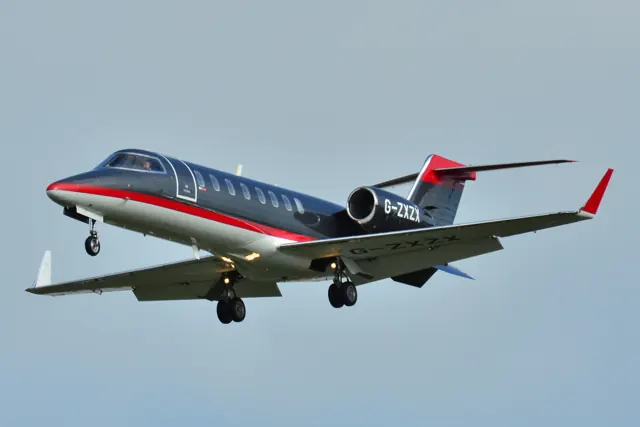
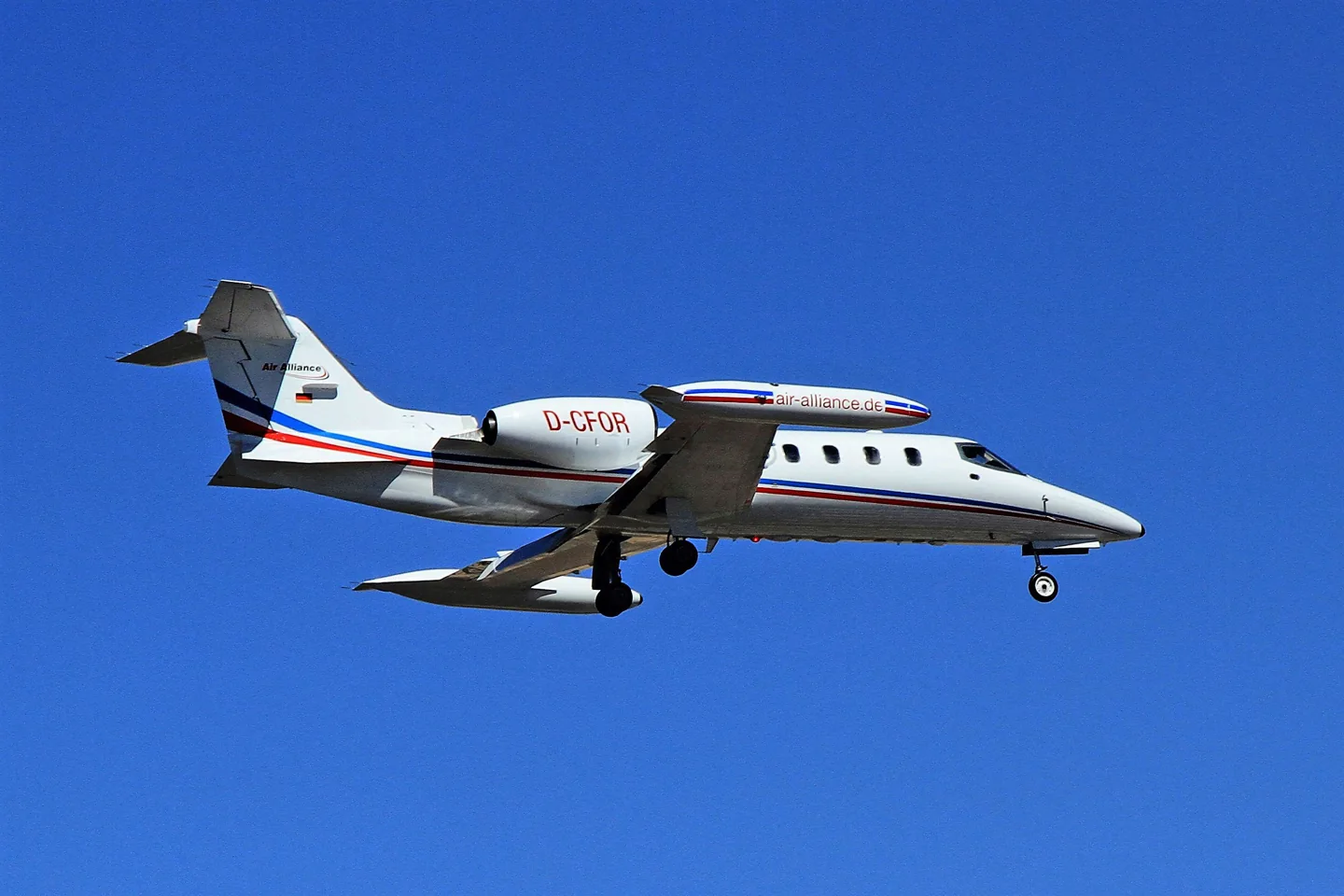
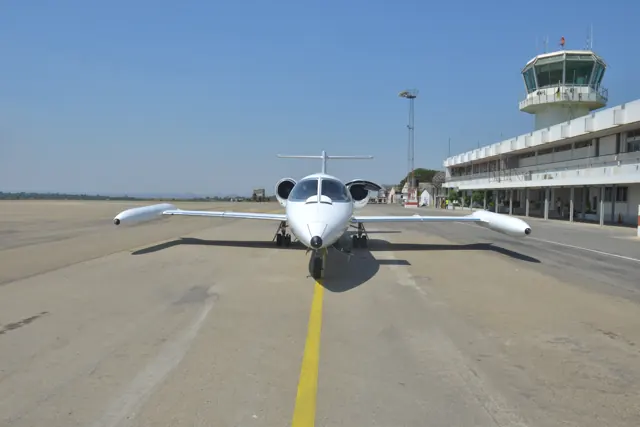
The Learjet 35 and longer-range 36 developed the earlier Learjet around Garrett TFE731 turbofans. Rear-mounted engines, a swept wing and prominent tip tanks formed the family outline. The 35A improved the Model 35; the 36 exchanged some passenger accommodation for additional fuel.
Aircraft background
Wikipedia contributors · Read more ↗Getting ahead of a fast-moving cockpit
Mahany describes a long-awaited training flight in a privately operated Learjet 35A. Even entering the small cockpit required explanation. Once airborne, the acceleration and climb demanded attention, and the firm feel of the controls was immediately apparent. Finding a reliable outside reference and holding altitude precisely took practice as he became accustomed to the aircraft.
Real Learjet 35A training flight, May 2020. First-person account; source accessed through its public web extraction.
John Mahany CFI · Read more ↗Native systems and aircraft condition
Flysimware describes a rebuild using MSFS 2024 electrical, hydraulic and fuel systems, plus custom pneumatics and 179 functional circuit breakers. Its Free Flight failure options are separate from Career-mode condition tracking. The tablet exposes aircraft configuration, performance tools and live fuel/pneumatic pages.
Learjet 35A — native MSFS 2024 · Flysimware · MSFS 2024
Flysimware · Read more ↗Into the cockpit
 YouTube
 lucas_mj · 6 min ·
Learjet 35 Cockpit Pre-flight inspection Demo
A Learjet 35 preflight cockpit inspection, with an upgraded instrument fit.
Real aircraft · Learjet 35 / 36
Watch on YouTube ↗Preview images are served by AirframeDB. Videos open on YouTube only when you choose to watch.
Meet Learjet 35 / 36
The Learjet 35 and longer-range 36 developed the earlier Learjet around Garrett TFE731 turbofans. Rear-mounted engines, a swept wing and prominent tip tanks formed the family outline. The 35A improved the Model 35; the 36 exchanged some passenger accommodation for additional fuel.
Flysimware represents the Learjet 35A in separate original MSFS and native MSFS 2024 releases.
Learjet 35 / 36
Aircraft type designators
Use the code for the model you are flying. The linked authority lists the applicable aircraft.
History & design
Turbofans and a longer career
The 35/36 family entered production in the 1970s. More economical turbofans extended the usefulness of the compact Learjet airframe, and the aircraft found roles beyond executive transport. Medical evacuation and military support are part of that history, as the attributed accounts illustrate.
Wikipedia contributors · Learjet 35 / 36 background ↗Real-aircraft family history
Pilot accounts
Getting ahead of a fast-moving cockpit
Mahany describes a long-awaited training flight in a privately operated Learjet 35A. Even entering the small cockpit required explanation. Once airborne, the acceleration and climb demanded attention, and the firm feel of the controls was immediately apparent. Finding a reliable outside reference and holding altitude precisely took practice as he became accustomed to the aircraft.
Circuit work made the workload especially clear. Power changes, configuration, bank, pitch and the setting sun all competed for attention. Repeated approaches gradually brought improvement, and his final circuit felt much more controlled. He also recalls learning the sensitive steering on the ground.
Real Learjet 35A training flight, May 2020. First-person account; source accessed through its public web extraction.
Read the full account · John Mahany CFI ↗A very different business-jet mission
Haines’s first encounter with a Learjet was aboard a 35A acting as a practice target for the US Navy in 1987. From a rapid descent to a low-level pass near a destroyer, the experience showed him a working side of the business jet that a corporate cabin photograph would never convey. He was an observer on this sortie, not the pilot flying it.
His later retrospective follows several other Learjet models and the end of production, but the 35A episode remains a striking introduction to the family’s versatility. The low-level naval exercise belongs specifically to that operator and mission. His later hands-on flights in a 31A and 45 are separate experiences and are not treated here as 35A handling evidence.
Observer aboard Flight International’s Learjet 35A in 1987; AOPA retrospective, June 2022. Later Learjet models are distinguished.
Read the full account · AOPA ↗The medical transport mission behind the flight
Lynch introduces his account from an FBO in Las Vegas, where his air-ambulance crew had finished transporting a patient and was waiting for its next assignment. Instead of receiving hotel arrangements, they were told to take their Learjet 35 to Chicago to help with another aircraft’s interrupted medical transfer. The crew included a first officer, nurse and paramedic, a reminder of the coordinated work behind this use of the aircraft.
FLYING’s publicly available synopsis describes the later loss of both engines and an unpowered landing at Page, Arizona. It attributes the event to contaminated fuel. The full narrative requires publisher access; this summary is limited to the public introduction and synopsis, without reconstructing the crew’s unseen decisions or procedures.
Air-ambulance pilot’s account published 3 July 2025. Public introduction and publisher synopsis only; full article requires an account.
Read the full account · FLYING ↗In your simulator
Systems, equipment and documentation for each developer’s aircraft.
Compare simulator versions →MSFS 2020 · MSFS 2024Learjet 35A — original MSFS release
Flysimware · Released
Learjet 35A — original MSFS release
Flysimware · Released
MSFS 2024Learjet 35A — native MSFS 2024
Flysimware · Released
Learjet 35A — native MSFS 2024
Flysimware · Released
X-Plane 12Learjet 35A
X-Hangar · Released
Learjet 35A
X-Hangar · Released
Aircraft specifications
Published figures for the named real-aircraft variant. Simulator equipment and performance can differ.
| Specification | Published value |
|---|---|
| Wingspan | 39 ft 6 in Flysimware original MSFS manual v1.4, PDF p. 4 |
| Length | 48 ft 7 in Flysimware original MSFS manual v1.4, PDF p. 4 |
| Crew | 2 Flysimware original MSFS manual v1.4, PDF p. 4 |
| Engine family | 2 × TFE731 Flysimware original MSFS manual v1.4, PDF p. 4 |
Manuals & resources
Find your next read
Choose a topic for a short introduction and a link to the original source. Simulator references identify the developer and edition they cover.
Simulator documentation
Native systems and aircraft conditionLearjet 35A — native MSFS 2024 · Flysimware · MSFS 2024
Flysimware describes a rebuild using MSFS 2024 electrical, hydraulic and fuel systems, plus custom pneumatics and 179 functional circuit breakers. Its Free Flight failure options are separate from Career-mode condition tracking. The tablet exposes aircraft configuration, performance tools and live fuel/pneumatic pages.
Native-2024 product description; no runtime qualification claimed
Flysimware · Read the source ↗Included configurations and Career accessLearjet 35A — native MSFS 2024 · Flysimware · MSFS 2024
The native release includes the earlier expansion packs and a long-tip-tank configuration with a ventral fin. Flysimware states that Career missions require a Marketplace purchase. These purchase and configuration distinctions are specific to the native release and should not be inferred for the original 2020 package.
Native-2024 official product description
Flysimware · Read the source ↗Pilot account
Getting ahead of a fast-moving cockpitReal Learjet 35A training flight, May 2020. First-person account; source accessed through its public web extraction.
Mahany describes a long-awaited training flight in a privately operated Learjet 35A. Even entering the small cockpit required explanation. Once airborne, the acceleration and climb demanded attention, and the firm feel of the controls was immediately apparent. Finding a reliable outside reference and holding altitude precisely took practice as he became accustomed to the aircraft. Circuit work made the workload especially clear.
John Mahany
John Mahany CFI · Read the source ↗A very different business-jet missionObserver aboard Flight International’s Learjet 35A in 1987; AOPA retrospective, June 2022. Later Learjet models are distinguished.
Haines’s first encounter with a Learjet was aboard a 35A acting as a practice target for the US Navy in 1987. From a rapid descent to a low-level pass near a destroyer, the experience showed him a working side of the business jet that a corporate cabin photograph would never convey. He was an observer on this sortie, not the pilot flying it.
Thomas B. Haines
AOPA · Read the source ↗Developer documentation
Learjet 35A — product listingLearjet 35A · X-Plane 12
Product listing captured 2026-09-30; edition scope from the reviewed catalogue
store.x-plane.org · Read the source ↗Read the original documentation from the people who created it. Manuals open on their publisher’s website.
Manual
Learjet 35A manual v1.4Flysimware · Flysimware original MSFS manual v1.4, PDF p. 4 Learjet 35A native-2024 manual v1.2Flysimware · Native MSFS 2024 release; downloaded manual v1.2Aircraft background
Learjet 35 / 36 backgroundWikipedia contributors · Family background; article retrieved 13 September 2026Product page
Learjet 35A — original MSFS releaseFlysimware · Official product page; checked 13 September 2026 Learjet 35A — native MSFS 2024Flysimware · Official product page; checked 13 September 2026Type designator
ICAO Doc 8643 — aircraft type designatorsInternational Civil Aviation Organization · Public search data retrieved 2026-09-14; authority update 2026-09-03Product
Learjet 35A-xhangar-lear35store.x-plane.org · Product listing captured 2026-09-30; edition scope from the reviewed catalogueBuilt-in force-feedback profiles
Read the documentary basis, editable starting settings and remaining questions for the aircraft you fly. Each explanation refers to the exact profile revision shown.
Catalogue programme-20261022-v1 · 4 profile choices
Flysimware Learjet 35A
Flysimware · Free and Pro · Revision 5 · Inherited starting point
MSFS 2020 · MSFS 2024
Flysimware Learjet 35A: The spring supplies the selected business-jet yoke resistance.
X-Hangar Learjet 35A
X-Hangar · Free and Pro · Revision 3 · Inherited starting point
X-Plane 12
X-Hangar Learjet 35A: The spring supplies the selected business-jet yoke resistance.
Learjet 35A
Free and Pro · Revision 2 · Partial review
MSFS 2020 · MSFS 2024
Learjet 35A: The spring supplies the selected business-jet yoke resistance.
Learjet 36A
Free and Pro · Revision 1 · Review pending
MSFS 2020 · MSFS 2024
Learjet 36A: The spring supplies the selected business-jet yoke resistance.
Learjet 36A
Learjet 36A: The spring supplies the selected business-jet yoke resistance.
Aircraft and simulator scope
- Learjet 36A · MSFS 2020 · Variant starting point
- Learjet 36A · MSFS 2024 · Variant starting point
Learjet 36A · The selected Learjet 36A is outside the Flysimware 35A manual's documented exact variant scope. Both manuals identify Learjet 35A simulator editions. The selected 36A is outside their documented variant scope.
The simulator model and controls
The Learjet 35 and longer-range 36 developed the earlier Learjet around Garrett TFE731 turbofans. Rear-mounted engines, a swept wing and prominent tip tanks formed the family outline. The 35A improved the Model 35; the 36 exchanged some passenger accommodation for additional fuel.
This starting point selects Learjet 36A. Its aircraft-level settings do not select a particular developer’s custom systems.
How this profile feels
The spring supplies the selected business-jet yoke resistance. Spring resistance builds with the selected airspeed response. A separate aerodynamic term adds speed-dependent control load.
The trim switches and AP manoeuvre controls have distinct armed functions. Valid trim provides the configured pressure relief. Autopilot following is enabled for supported control references.
Controls and trim
The Learjet documentation separates primary/secondary pitch trim, aileron trim and rudder trim. An unarmed barrel switch can command the autopilot; arming trim changes that function. MANUV/RP releases servos, while PITCH SYNC concerns the flight director.
About the values
The gains are normalized profile settings. They describe the chosen effect balance; hand force depends on the device and its output limits. IAS references are tuning values rather than operating limits. Physical acceptance of this revision remains pending.
Documentary review and sources
These decisions describe the documentary basis and remaining gaps for this revision. Aircraft documentation and a starting setting describe different kinds of evidence.
Aircraft and variant
Not yet reviewedThis starting point selects Learjet 36A. Its aircraft-level settings do not select a particular developer’s custom systems.
Flight controls
Not yet reviewedThe Learjet documentation separates primary/secondary pitch trim, aileron trim and rudder trim. An unarmed barrel switch can command the autopilot; arming trim changes that function. MANUV/RP releases servos, while PITCH SYNC concerns the flight director.
Trim
Not yet reviewedThe trim switches and AP manoeuvre controls have distinct armed functions. Pitch authority 0.3 provides load relief and permitted centre movement; roll authority is 0.
Autopilot and stability
Not yet reviewedFollowing is on at 0.1 authority when a supported, valid autopilot control reference is available.
Equipment
Not yet reviewedGear, flap and ground cues follow the selected settings and available simulator-reported states.
Speeds and limits
Not yet reviewedThe indicated-speed references set the profile response scale; they are separate from aircraft operating limits.
Simulator integration
Not yet reviewedThe profile targets msfs2020, msfs2024. Add-on-specific controls use only the supported references configured by this profile.
Force-feedback settings
Not yet reviewedThe settings define the profile’s effect balance. Device output limits affect physical hand force.
Starting settings and their rationale
These configured values are starting estimates. The explanations describe what each setting controls; physical validation appears separately below.
| Setting | Starting value | What it controls and why |
|---|---|---|
| Spring strength | Starting value0.74 | What it controls and whyThe spring supplies the selected business-jet yoke resistance. The baseline spring is 0.74. Its low-speed blend reaches baseline strength at 90 KIAS. |
| Master force gain | Starting value0.85 | What it controls and whyScales overall profile strength while preserving effect balance, subject to device and output limits. |
| Profile force gain | Starting value0.8 | What it controls and whyThe aerodynamic-load gain is 0.8 with an indicated-speed reference of 260 KIAS. This supplies speed-dependent loading alongside the spring. |
| Force tuning speed/reference | Starting value260.0 kt | What it controls and whySets the IAS reference for aerodynamic loading. It is an estimate, not published cruise TAS or a flight limit. |
| Spring response reference speed | Starting value90 kt | What it controls and whySets the IAS where the low-speed blend reaches baseline strength; high-speed stiffening also uses it. |
| Aileron force scale | Starting value0.72 | What it controls and whyRoll and pitch aerodynamic scales are 0.72 and 1, respectively. They set the aerodynamic axis balance. No custom spring-travel curve is enabled. |
| Elevator force scale | Starting value1.0 | What it controls and whyScales pitch aerodynamic loading; pitch spring travel and trim responses are separate settings. |
| Trim feel | Starting valueEnabled | What it controls and whyRetained for compatibility and group membership. Trim relief, rather than this flag, controls centre movement. |
| Trim relief | Starting valueEnabled | What it controls and whyAllows trim relief with supported control law and valid telemetry. Axis authorities set its amount. |
| Autopilot follow | Starting valueEnabled | What it controls and whyFollowing is on at 0.1 authority when a supported, valid autopilot control reference is available. |
| Autopilot neutral hold | Starting valueDisabled | What it controls and whyPermits centering hold during a supported AP state, separate from following a moving target. |
| Output force limit | Starting value0.55 | What it controls and whyCaps directed-force output. Native spring effects and device limits remain separate. |
All 44 starting settings and their rationale
The settings define the profile’s effect balance. Device output limits affect physical hand force.
| Setting | Starting value | What it controls and why |
|---|---|---|
| Spring strength | Starting value0.74 | What it controls and whyThe spring supplies the selected business-jet yoke resistance. The baseline spring is 0.74. Its low-speed blend reaches baseline strength at 90 KIAS. |
| Spring deadband | Starting value0.045 | What it controls and whySets travel around the centre before the baseline spring resists. Smaller values engage it sooner. |
| Profile force gain | Starting value0.8 | What it controls and whyThe aerodynamic-load gain is 0.8 with an indicated-speed reference of 260 KIAS. This supplies speed-dependent loading alongside the spring. |
| Master force gain | Starting value0.85 | What it controls and whyScales overall profile strength while preserving effect balance, subject to device and output limits. |
| QBlend Enabled | Starting valueEnabled | What it controls and whyAllows baseline spring strength to rise with indicated airspeed where the control law permits it. |
| QSpring Minimum Factor | Starting value0.5 | What it controls and whySets low-speed spring strength as a fraction of baseline when blending is enabled. One keeps full strength. |
| QSpring Start Knots | Starting value20 kt | What it controls and whySets the IAS where the low-speed spring blend starts rising. This is a feel threshold, not a flight limit. |
| Spring response reference speed | Starting value90 kt | What it controls and whySets the IAS where the low-speed blend reaches baseline strength; high-speed stiffening also uses it. |
| Force tuning speed/reference | Starting value260.0 kt | What it controls and whySets the IAS reference for aerodynamic loading. It is an estimate, not published cruise TAS or a flight limit. |
| Airspeed spring stiffening gain | Starting value0.15 | What it controls and whyThe high-speed spring-stiffening gain is 0.15. It strengthens the permitted spring response above 90 KIAS, with the squared-speed ratio capped at 5. |
| Airspeed spring stiffening limit | Starting value5 | What it controls and whyLimits the squared airspeed ratio used for high-speed spring stiffening; it is not a device-force cap. |
| Aileron force scale | Starting value0.72 | What it controls and whyRoll and pitch aerodynamic scales are 0.72 and 1, respectively. They set the aerodynamic axis balance. No custom spring-travel curve is enabled. |
| Elevator force scale | Starting value1.0 | What it controls and whyScales pitch aerodynamic loading; pitch spring travel and trim responses are separate settings. |
| Output force limit | Starting value0.55 | What it controls and whyCaps directed-force output. Native spring effects and device limits remain separate. |
| Trim feel | Starting valueEnabled | What it controls and whyRetained for compatibility and group membership. Trim relief, rather than this flag, controls centre movement. |
| Trim relief | Starting valueEnabled | What it controls and whyAllows trim relief with supported control law and valid telemetry. Axis authorities set its amount. |
| Elevator Authority | Starting value0.3 | What it controls and whyThe trim switches and AP manoeuvre controls have distinct armed functions. Pitch authority 0.3 provides load relief and permitted centre movement; roll authority is 0. |
| Aileron Authority | Starting value0 | What it controls and whyScales supported roll-trim relief and permitted centre movement. Zero removes roll response. |
| Force Trim Enabled | Starting valueDisabled | What it controls and whyEnables local force trim, separate from aircraft-owned trim and add-on integration qualification. |
| GLoad Enabled | Starting valueEnabled | What it controls and whyAllows load-factor changes to modify permitted spring laws. Passive fly-by-wire feel can suppress it. |
| Rate Damping Enabled | Starting valueEnabled | What it controls and whyEnables rate damping with the configured coefficients and control law. |
| Autopilot follow | Starting valueEnabled | What it controls and whyFollowing is on at 0.1 authority when a supported, valid autopilot control reference is available. |
| Autopilot follow authority | Starting value0.1 | What it controls and whySets admitted AP-follow gain, not a percentage of travel. Runtime ownership and input limits still apply. |
| Autopilot neutral hold | Starting valueDisabled | What it controls and whyPermits centering hold during a supported AP state, separate from following a moving target. |
| Autopilot neutral hold strength | Starting value0.6 | What it controls and whySets admitted AP neutral-hold strength; inactive while neutral hold is disabled. |
| Enabled | Starting valueEnabled | What it controls and whyEnables aerodynamic cues; each still needs nonzero strength and its simulator conditions. |
| Gain | Starting value0.35 | What it controls and whySets stall-buffet strength. Zero removes the cue without changing simulator stalls or warnings. |
| Gain | Starting value0.22 | What it controls and whySets high-Mach buffet strength; onset and full-strength thresholds are separate. |
| Gain | Starting value0.14 | What it controls and whySets flap buffet at the configured position and speed gates. Flap movement texture is separate. |
| Maximum flap index | Starting value2 | What it controls and whySets the final flap index for detent normalization. UP plus three detents uses maximum index3. |
| Minimum flap index | Starting value2 | What it controls and whySets the first flap detent that admits buffet; this is a handle index, not degrees. |
| Gain | Starting value0.1 | What it controls and whySets gear aerodynamic buffet; movement and ground-contact cues are separate. |
| Shaker Enabled | Starting valueDisabled | What it controls and whyPermits shaker at supported warning conditions; the switch does not establish aircraft equipment. |
| Stick shaker amplitude | Starting value0.5 | What it controls and whySets triggered shaker strength; inactive while the shaker feature is disabled. |
| Enabled | Starting valueEnabled | What it controls and whyEnables ground effects; each still needs its own strength and contact or motion telemetry. |
| Gain | Starting value0.4 | What it controls and whySets rolling texture strength, modified by speed, surface and undercarriage configuration. |
| Gain | Starting value0.25 | What it controls and whySets gear-bump texture during ground motion, separate from touchdown impact. |
| Gain | Starting value0.65 | What it controls and whySets landing-impact strength; landing telemetry and response shape determine the pulse. |
| Gain | Starting value0 | What it controls and whySets reverse-thrust vibration with valid reverser and engine conditions. Zero removes the cue. |
| Enabled | Starting valueEnabled | What it controls and whyEnables engine cues with nonzero settings and valid running-engine telemetry. |
| Gain | Starting value0.06 | What it controls and whySets estimated engine vibration using configured telemetry and response, not measured cockpit vibration. |
| Enabled | Starting valueEnabled | What it controls and whyEnables accessory cues with configured strengths and observed accessory movement. |
| Gain | Starting value0.12 | What it controls and whySets texture from observed flap movement; a command without movement does not establish the cue. |
| Gain | Starting value0.12 | What it controls and whySets texture from observed gear movement, separate from aerodynamic and touchdown effects. |
Limits and open questions
- The selected Learjet 36A is outside the Flysimware 35A manual's documented exact variant scope. Both manuals identify Learjet 35A simulator editions. The selected 36A is outside their documented variant scope.
- The selected Learjet 36A is outside the Flysimware 35A manual's documented exact variant scope. The cockpit manuals identify augmentation and servos but do not explain the complete primary linkage or establish the retained conventional manual-control classification.
- The selected Learjet 36A is outside the Flysimware 35A manual's documented exact variant scope. Primary and secondary pitch-trim motors and their selector are documented; selecting OFF disables both trim and autopilot. The force-relief transfer is not quantified.
- The selected Learjet 36A is outside the Flysimware 35A manual's documented exact variant scope. Automatic-flight pitch/roll servos, barrel-switch attitude commands and maneuvering releases are documented. Mode details are simulator-edition specific.
- The selected Learjet 36A is outside the Flysimware 35A manual's documented exact variant scope. Retractable gear, flap indication and spoiler augmentation are documented; the text does not establish an exact two-nonzero-position flap schedule.
- The selected Learjet 36A is outside the Flysimware 35A manual's documented exact variant scope. Cockpit warning thresholds do not validate the retained 260-knot reference or Mach onset as a complete applicable speed schedule.
- The selected Learjet 36A is outside the Flysimware 35A manual's documented exact variant scope. Flysimware explicitly warns that some controls require custom assignments and documents master/maneuver switches. Exact external following still requires the selected edition's binding and status contract.
- The selected Learjet 36A is outside the Flysimware 35A manual's documented exact variant scope. Shaker, pusher and overspeed puller are separate documented functions. The 18-pound Mach-check force is a specific test description, not a general force-feedback calibration.
- Learjet 36A documentary evidence does not establish force-feedback hardware acceptance.
Physical validation
No physical force validation is recorded in this public catalogue for this revision. Documentary review and software checks do not establish how a particular device feels.
Discuss this aircraft (0)
Questions, observations and useful sources from the community.
No published discussions yet. Bring a question or share a useful source.
Open aircraft discussions →Content expanded · What’s new
Something missing or a source that needs attention?
Suggest a correction ↗