
Start here
A few places to begin, from the aircraft’s story to the people who fly it.
Meet the aircraft
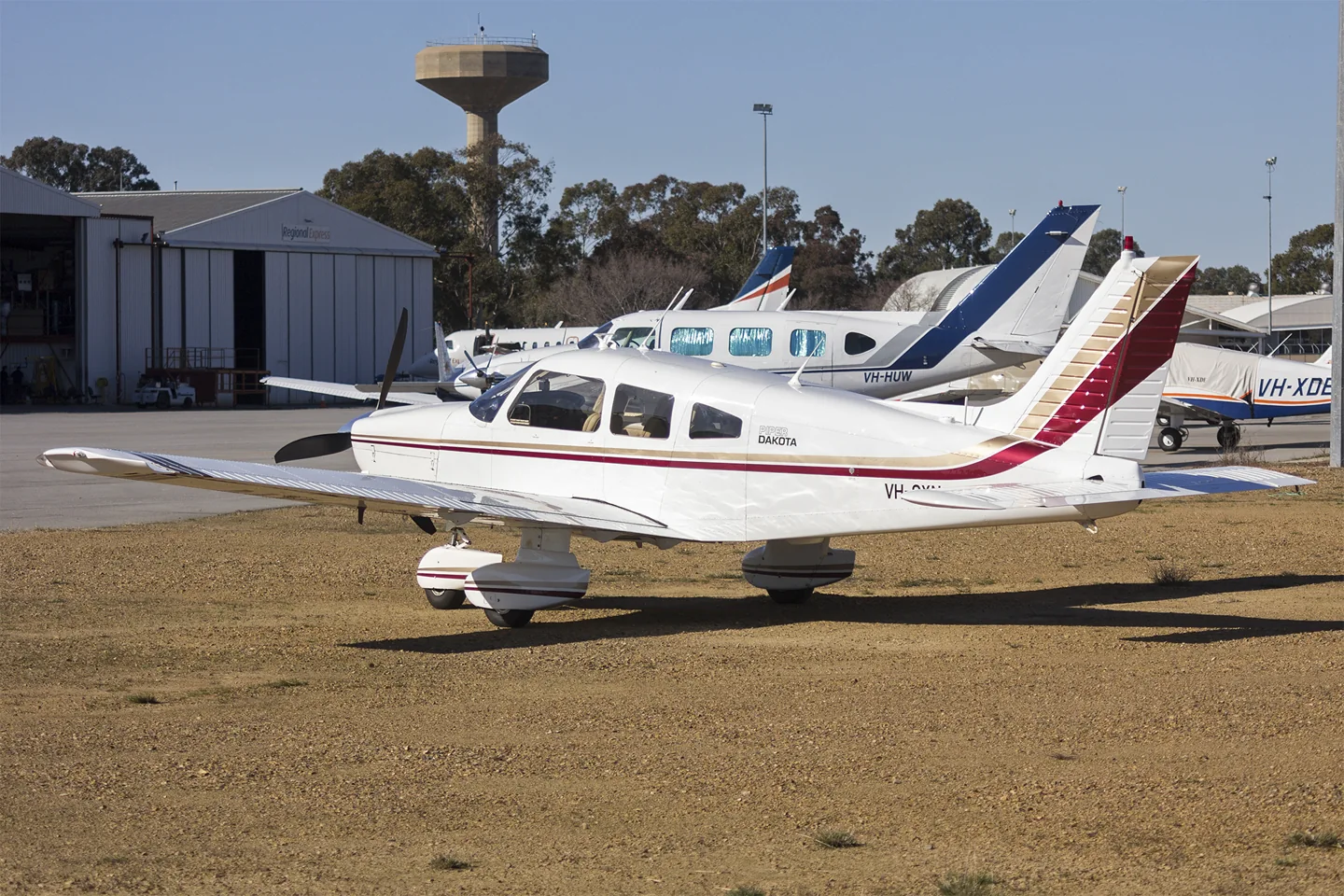
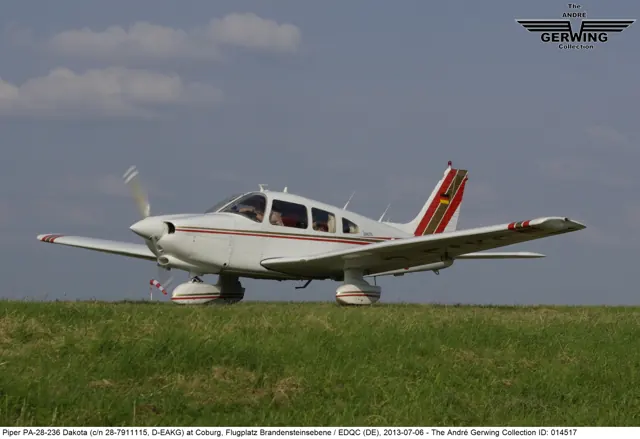
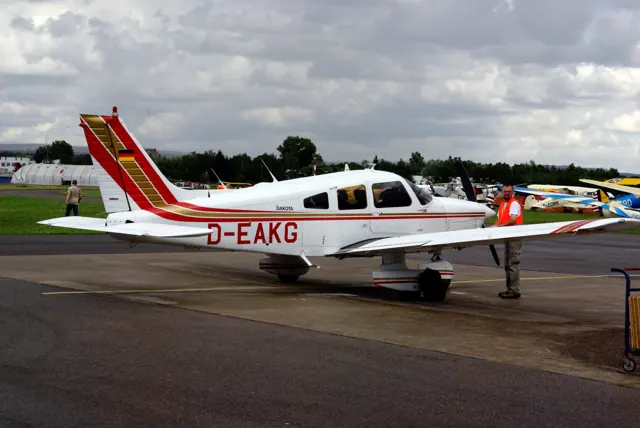
The PA-28-236 Dakota combines the PA-28's low-wing, four-seat cabin with a six-cylinder engine and fixed tricycle gear. The family also includes the smaller Warrior and retractable-gear Arrow.
Aircraft background
Wikipedia contributors · Read more ↗A long journey in the new Dakota
Tripp expected the larger engine to make the Dakota feel nose-heavy, but found it light to steer and pleasant through takeoff and climb. His evaluation ranged from small airports to busy airline fields, with day and night instrument flying and several missed approaches. The cabin and straightforward cockpit arrangement helped make the long travelling days comfortable.
AOPA Pilot · January 1979. Factory demonstrator N22336, evaluated on a 2,000-mile cross-country and local flights at different loads.
AOPA Pilot / Aero Resources archive · Read more ↗The Dakota’s release and represented configuration
Microsoft’s 27 June 2025 announcement describes the fixed-gear PA-28-236 with a 235 hp Lycoming and two-blade constant-speed propeller. The package includes ten liveries. It was offered free to MSFS 2024 owners as the third of four launch-related gifts, with a separate paid Marketplace release for MSFS 2020.
PA-28-236 Dakota · Microsoft Flight Simulator · MSFS 2024
Microsoft · Read more ↗Into the cockpit
 YouTube
 Johanns Media · 60 min ·
Behind the Scenes - Episode #07 - Piper Dakota Documentary
A Dakota owner presents the aircraft through a flight and explanatory commentary.
Real aircraft · Piper PA-28-236 Dakota
Watch on YouTube ↗Preview images are served by AirframeDB. Videos open on YouTube only when you choose to watch.
Meet Piper PA-28-236 Dakota
The PA-28-236 Dakota combines the PA-28's low-wing, four-seat cabin with a six-cylinder engine and fixed tricycle gear. The family also includes the smaller Warrior and retractable-gear Arrow.
The Dakota retains the stabilator and single right-side cabin door. Its engine, loading and performance figures are specific to this version.
Piper PA-28
Aircraft type designators
Use the code for the model you are flying. The linked authority lists the applicable aircraft.
PA-28-235, PA-28-236 Dakota and PA-28-201T Turbo Dakota
ICAO Doc 8643 — aircraft type designators ↗Checked 2026-09-14History & design
Development milestones
The 14 January 1960 first-flight date belongs to the original PA-28 Cherokee family. The PA-28-236 Dakota is a later member of that family.
Wikipedia contributors · Piper PA-28 Cherokee ↗Clarifies the family milestone in the linked PA-28 history
The Cherokee 235 becomes the Dakota
Tripp’s January 1979 flight check describes the Dakota replacing the Cherokee 235 with a longer, semi-tapered wing, revised cowling and other detail improvements. It retained a 235 hp six-cylinder Lycoming with a constant-speed propeller.
AOPA Pilot / Aero Resources archive · Piper Dakota: The Little Hauler ↗Contemporary introduction report · PDF pp.1–2
Pilot accounts
A long journey in the new Dakota
Tripp expected the larger engine to make the Dakota feel nose-heavy, but found it light to steer and pleasant through takeoff and climb. His evaluation ranged from small airports to busy airline fields, with day and night instrument flying and several missed approaches. The cabin and straightforward cockpit arrangement helped make the long travelling days comfortable.
He also recorded details that a brief demonstration might miss. The microphone was too easy to knock from its holder, the towbar felt uncomfortably short, and disturbed hands-off flight still needed attention rather than an assumption that the aeroplane would right itself. A passenger slept through most of the long cross-country, which Tripp offered as memorable evidence of the cabin’s comfort.
AOPA Pilot · January 1979. Factory demonstrator N22336, evaluated on a 2,000-mile cross-country and local flights at different loads.
Read the full account · AOPA Pilot / Aero Resources archive ↗The club aircraft chosen when people and bags come along
Baluha described the Dakota as his club’s travelling aircraft, also useful for shorter flights when additional payload was needed. One journey from Connecticut to Appleton, Wisconsin, went around the lakes with a single fuel stop. For him, the combination of cabin capacity and endurance made the aircraft useful beyond its local flying role.
The club had changed both the engine installation and propeller, and he associated the three-blade conversion with stronger climb performance. Ownership had also exposed a persistent nosewheel-shimmy problem that led to an expensive repair. His account therefore belongs to that particular modified club aeroplane: it records how members used it, what they changed and an issue they had to resolve, alongside the enthusiasm for its carrying capacity.
Flying 20 Club president, quoted by AVweb in April 2014. Club-owned 1979 PA-28-236 with a replacement engine configuration and three-blade propeller.
Read the full account · AVweb / Aviation Consumer ↗Comfort, coastal trips and one missing convenience
Cunningham wanted a simpler, comfortable aircraft after owning a faster Mooney. The Dakota’s fixed undercarriage and solid feel appealed to him, and he liked the way it settled into a landing without the prolonged float he wished to avoid. The cabin and six-cylinder engine helped compensate for the speed he still sometimes missed.
His flying included trips with his friend George Wilhite and a coastal journey that helped rescue the enjoyment of a disrupted sailing outing. The Dakota also had a notable omission: an autopilot, which Cunningham was considering adding. His account places the aeroplane among work commitments, friendship and the challenge of making time to fly.
Interviewed by Michelle Adserias, Piper Owner Society · June 2025. Cunningham’s 1981 Dakota.
Read the full account · Piper Owner Society ↗In your simulator
Systems, equipment and documentation for each developer’s aircraft.
Compare simulator versions →MSFS 2024PA-28-236 Dakota
Microsoft Flight Simulator · Released
PA-28-236 Dakota
Microsoft Flight Simulator · Released
MSFS 2020PA-28-236 Dakota
Microsoft Flight Simulator · Released
PA-28-236 Dakota
Microsoft Flight Simulator · Released
Aircraft specifications
Published figures for the named real-aircraft variant. Simulator equipment and performance can differ.
| Specification | Published value |
|---|---|
| Length | 23 ft 3.6 in (7.102 m) |
| Wingspan | 30 ft 0 in (9.14 m) |
| Height | 7 ft 3.6 in (2.225 m) |
| Wing area | 160 sq ft (15 m² ) |
| Empty weight | 1,201 lb (545 kg) |
| Gross weight | 2,150 lb (975 kg) |
| Max takeoff weight | 2,150 lb (975 kg) |
| Powerplant | 1 × Lycoming O-320-E2A 4-cylinder air-cooled horizontally-opposed piston engine, 150 hp (110 kW) |
| Propellers | Sensenich M74DM |
| Maximum speed | 123 kn (142 mph, 228 km/h) |
| Cruise speed | 108 kn (124 mph, 200 km/h) |
| Stall speed | 47 kn (54 mph, 87 km/h) |
| Range | 465 nmi (535 mi, 861 km) |
| Service ceiling | 14,300 ft (4,400 m) |
| Rate of climb | 660 ft/min (3.4 m/s) |
Manuals & resources
Find your next read
Choose a topic for a short introduction and a link to the original source. Simulator references identify the developer and edition they cover.
Simulator documentation
The Dakota’s release and represented configurationPA-28-236 Dakota · Microsoft Flight Simulator · MSFS 2024
Microsoft’s 27 June 2025 announcement describes the fixed-gear PA-28-236 with a 235 hp Lycoming and two-blade constant-speed propeller. The package includes ten liveries. It was offered free to MSFS 2024 owners as the third of four launch-related gifts, with a separate paid Marketplace release for MSFS 2020.
Official Famous Flyer 12 announcement · historical release terms
Microsoft · Read the source ↗The original MSFS 2020 releasePA-28-236 Dakota · Microsoft Flight Simulator · MSFS 2020
The June 2025 Famous Flyer 12 announcement explicitly lists a paid MSFS 2020 Marketplace release alongside the free make-good aircraft for MSFS 2024 owners.
2025-06-27 · release and package scope
Microsoft Flight Simulator Team · Read the source ↗Pilot account
A long journey in the new DakotaAOPA Pilot · January 1979. Factory demonstrator N22336, evaluated on a 2,000-mile cross-country and local flights at different loads.
Tripp expected the larger engine to make the Dakota feel nose-heavy, but found it light to steer and pleasant through takeoff and climb. His evaluation ranged from small airports to busy airline fields, with day and night instrument flying and several missed approaches. The cabin and straightforward cockpit arrangement helped make the long travelling days comfortable. He also recorded details that a brief demonstration might miss.
Edward G. Tripp
AOPA Pilot / Aero Resources archive · Read the source ↗The club aircraft chosen when people and bags come alongFlying 20 Club president, quoted by AVweb in April 2014. Club-owned 1979 PA-28-236 with a replacement engine configuration and three-blade propeller.
Baluha described the Dakota as his club’s travelling aircraft, also useful for shorter flights when additional payload was needed. One journey from Connecticut to Appleton, Wisconsin, went around the lakes with a single fuel stop. For him, the combination of cabin capacity and endurance made the aircraft useful beyond its local flying role. The club had changed both the engine installation and propeller, and he associated the three-blade conversion with stronger climb performance.
Gary Baluha
AVweb / Aviation Consumer · Read the source ↗Read the original documentation from the people who created it. Manuals open on their publisher’s website.
Manual
Microsoft Flight Simulator aircraft manualsMicrosoft / aircraft developersAircraft background
Piper PA-28 CherokeeWikipedia contributors · Research background · Wikipedia revision 1370180190 · retrieved 2026-09-12Resource
Dakota free for MSFS 2024 ownersMicrosoftType designator
ICAO Doc 8643 — aircraft type designatorsInternational Civil Aviation Organization · Public search data retrieved 2026-09-14; authority update 2026-09-03Built-in force-feedback profiles
Read the documentary basis, editable starting settings and remaining questions for the aircraft you fly. Each explanation refers to the exact profile revision shown.
Catalogue programme-20261022-v1 · 1 profile choice
Piper PA-28-236 Dakota
Free and Pro · Revision 2 · Partial review
MSFS 2024 · MSFS 2020
Piper PA-28-236 Dakota: The profile supplies selected stabilator-aircraft yoke loading.
Piper PA-28-236 Dakota
Piper PA-28-236 Dakota: The profile supplies selected stabilator-aircraft yoke loading.
Aircraft and simulator scope
- Piper PA-28-236 Dakota · MSFS 2024 · family starting point
- Piper PA-28-236 Dakota · MSFS 2020 · family starting point
Piper PA-28-236 Dakota · Family sources identify only the variants and product versions described above.
The simulator model and controls
The PA-28-236 Dakota combines the PA-28's low-wing, four-seat cabin with a six-cylinder engine and fixed tricycle gear. The family also includes the smaller Warrior and retractable-gear Arrow.
This starting point selects Piper PA-28-236 Dakota. Its aircraft-level settings do not select a particular developer’s custom systems.
How this profile feels
The profile supplies selected stabilator-aircraft yoke loading. Spring resistance builds with the selected airspeed response. A separate aerodynamic term adds speed-dependent control load.
Stabilator trim gives pitch relief in the Dakota configuration. Valid trim provides the configured pressure relief. Autopilot following is enabled for supported control references.
Controls and trim
The Dakota pairs the PA-28 stabilator and fixed tricycle gear with a six-cylinder engine. Its PA-28-236 identity separates it from smaller Warriors and retractable Arrows, while retaining a four-seat touring cockpit.
About the values
The gains are normalized profile settings. They describe the chosen effect balance; hand force depends on the device and its output limits. IAS references are tuning values rather than operating limits. Physical acceptance of this revision remains pending.
What the documentation establishes
Microsoft identifies PA-28-236 Dakota.
Documentary review and sources
These decisions describe the documentary basis and remaining gaps for this revision. Aircraft documentation and a starting setting describe different kinds of evidence.
Aircraft and variant
ReviewedThis starting point selects Piper PA-28-236 Dakota. Its aircraft-level settings do not select a particular developer’s custom systems.
Flight controls
Not yet reviewedThe Dakota pairs the PA-28 stabilator and fixed tricycle gear with a six-cylinder engine. Its PA-28-236 identity separates it from smaller Warriors and retractable Arrows, while retaining a four-seat touring cockpit.
Trim
Not yet reviewedStabilator trim gives pitch relief in the Dakota configuration. Pitch authority 0.3 provides load relief and permitted centre movement; roll authority is 0.
Autopilot and stability
Not yet reviewedFollowing is on at 0.1 authority when a supported, valid autopilot control reference is available.
Equipment
Not yet reviewedGear, flap and ground cues follow the selected settings and available simulator-reported states.
Speeds and limits
Not yet reviewedThe indicated-speed references set the profile response scale; they are separate from aircraft operating limits.
Simulator integration
Not yet reviewedThe profile targets msfs2024, msfs2020. Add-on-specific controls use only the supported references configured by this profile.
Force-feedback settings
Not yet reviewedThe settings define the profile’s effect balance. Device output limits affect physical hand force.
Starting settings and their rationale
These configured values are starting estimates. The explanations describe what each setting controls; physical validation appears separately below.
| Setting | Starting value | What it controls and why |
|---|---|---|
| Spring strength | Starting value0.74 | What it controls and whyThe profile supplies selected stabilator-aircraft yoke loading. The baseline spring is 0.74. Its low-speed blend reaches baseline strength at 62.5 KIAS. |
| Master force gain | Starting value0.85 | What it controls and whyScales overall profile strength while preserving effect balance, subject to device and output limits. |
| Profile force gain | Starting value0.8 | What it controls and whyThe aerodynamic-load gain is 0.8 with an indicated-speed reference of 125 KIAS. This supplies speed-dependent loading alongside the spring. |
| Force tuning speed/reference | Starting value125.0 kt | What it controls and whySets the IAS reference for aerodynamic loading. It is an estimate, not published cruise TAS or a flight limit. |
| Spring response reference speed | Starting value62.5 kt | What it controls and whySets the IAS where the low-speed blend reaches baseline strength; high-speed stiffening also uses it. |
| Aileron force scale | Starting value0.72 | What it controls and whyRoll and pitch aerodynamic scales are 0.72 and 1, respectively. They set the aerodynamic axis balance. No custom spring-travel curve is enabled. |
| Elevator force scale | Starting value1.0 | What it controls and whyScales pitch aerodynamic loading; pitch spring travel and trim responses are separate settings. |
| Trim feel | Starting valueEnabled | What it controls and whyRetained for compatibility and group membership. Trim relief, rather than this flag, controls centre movement. |
| Trim relief | Starting valueEnabled | What it controls and whyAllows trim relief with supported control law and valid telemetry. Axis authorities set its amount. |
| Autopilot follow | Starting valueEnabled | What it controls and whyFollowing is on at 0.1 authority when a supported, valid autopilot control reference is available. |
| Autopilot neutral hold | Starting valueDisabled | What it controls and whyPermits centering hold during a supported AP state, separate from following a moving target. |
| Output force limit | Starting value0.55 | What it controls and whyCaps directed-force output. Native spring effects and device limits remain separate. |
All 44 starting settings and their rationale
The settings define the profile’s effect balance. Device output limits affect physical hand force.
| Setting | Starting value | What it controls and why |
|---|---|---|
| Spring strength | Starting value0.74 | What it controls and whyThe profile supplies selected stabilator-aircraft yoke loading. The baseline spring is 0.74. Its low-speed blend reaches baseline strength at 62.5 KIAS. |
| Spring deadband | Starting value0.045 | What it controls and whySets travel around the centre before the baseline spring resists. Smaller values engage it sooner. |
| Profile force gain | Starting value0.8 | What it controls and whyThe aerodynamic-load gain is 0.8 with an indicated-speed reference of 125 KIAS. This supplies speed-dependent loading alongside the spring. |
| Master force gain | Starting value0.85 | What it controls and whyScales overall profile strength while preserving effect balance, subject to device and output limits. |
| QBlend Enabled | Starting valueEnabled | What it controls and whyAllows baseline spring strength to rise with indicated airspeed where the control law permits it. |
| QSpring Minimum Factor | Starting value0.5 | What it controls and whySets low-speed spring strength as a fraction of baseline when blending is enabled. One keeps full strength. |
| QSpring Start Knots | Starting value17.5 kt | What it controls and whySets the IAS where the low-speed spring blend starts rising. This is a feel threshold, not a flight limit. |
| Spring response reference speed | Starting value62.5 kt | What it controls and whySets the IAS where the low-speed blend reaches baseline strength; high-speed stiffening also uses it. |
| Force tuning speed/reference | Starting value125.0 kt | What it controls and whySets the IAS reference for aerodynamic loading. It is an estimate, not published cruise TAS or a flight limit. |
| Airspeed spring stiffening gain | Starting value0.15 | What it controls and whyThe high-speed spring-stiffening gain is 0.15. It strengthens the permitted spring response above 62.5 KIAS, with the squared-speed ratio capped at 5. |
| Airspeed spring stiffening limit | Starting value5 | What it controls and whyLimits the squared airspeed ratio used for high-speed spring stiffening; it is not a device-force cap. |
| Aileron force scale | Starting value0.72 | What it controls and whyRoll and pitch aerodynamic scales are 0.72 and 1, respectively. They set the aerodynamic axis balance. No custom spring-travel curve is enabled. |
| Elevator force scale | Starting value1.0 | What it controls and whyScales pitch aerodynamic loading; pitch spring travel and trim responses are separate settings. |
| Output force limit | Starting value0.55 | What it controls and whyCaps directed-force output. Native spring effects and device limits remain separate. |
| Trim feel | Starting valueEnabled | What it controls and whyRetained for compatibility and group membership. Trim relief, rather than this flag, controls centre movement. |
| Trim relief | Starting valueEnabled | What it controls and whyAllows trim relief with supported control law and valid telemetry. Axis authorities set its amount. |
| Elevator Authority | Starting value0.3 | What it controls and whyStabilator trim gives pitch relief in the Dakota configuration. Pitch authority 0.3 provides load relief and permitted centre movement; roll authority is 0. |
| Aileron Authority | Starting value0 | What it controls and whyScales supported roll-trim relief and permitted centre movement. Zero removes roll response. |
| Force Trim Enabled | Starting valueDisabled | What it controls and whyEnables local force trim, separate from aircraft-owned trim and add-on integration qualification. |
| GLoad Enabled | Starting valueEnabled | What it controls and whyAllows load-factor changes to modify permitted spring laws. Passive fly-by-wire feel can suppress it. |
| Rate Damping Enabled | Starting valueEnabled | What it controls and whyEnables rate damping with the configured coefficients and control law. |
| Autopilot follow | Starting valueEnabled | What it controls and whyFollowing is on at 0.1 authority when a supported, valid autopilot control reference is available. |
| Autopilot follow authority | Starting value0.1 | What it controls and whySets admitted AP-follow gain, not a percentage of travel. Runtime ownership and input limits still apply. |
| Autopilot neutral hold | Starting valueDisabled | What it controls and whyPermits centering hold during a supported AP state, separate from following a moving target. |
| Autopilot neutral hold strength | Starting value0.6 | What it controls and whySets admitted AP neutral-hold strength; inactive while neutral hold is disabled. |
| Enabled | Starting valueEnabled | What it controls and whyEnables aerodynamic cues; each still needs nonzero strength and its simulator conditions. |
| Gain | Starting value0.35 | What it controls and whySets stall-buffet strength. Zero removes the cue without changing simulator stalls or warnings. |
| Gain | Starting value0 | What it controls and whySets high-Mach buffet strength; onset and full-strength thresholds are separate. |
| Gain | Starting value0.14 | What it controls and whySets flap buffet at the configured position and speed gates. Flap movement texture is separate. |
| Maximum flap index | Starting value3 | What it controls and whySets the final flap index for detent normalization. UP plus three detents uses maximum index3. |
| Minimum flap index | Starting value2 | What it controls and whySets the first flap detent that admits buffet; this is a handle index, not degrees. |
| Gain | Starting value0 | What it controls and whySets gear aerodynamic buffet; movement and ground-contact cues are separate. |
| Shaker Enabled | Starting valueDisabled | What it controls and whyPermits shaker at supported warning conditions; the switch does not establish aircraft equipment. |
| Stick shaker amplitude | Starting value0.5 | What it controls and whySets triggered shaker strength; inactive while the shaker feature is disabled. |
| Enabled | Starting valueEnabled | What it controls and whyEnables ground effects; each still needs its own strength and contact or motion telemetry. |
| Gain | Starting value0.4 | What it controls and whySets rolling texture strength, modified by speed, surface and undercarriage configuration. |
| Gain | Starting value0.25 | What it controls and whySets gear-bump texture during ground motion, separate from touchdown impact. |
| Gain | Starting value0.65 | What it controls and whySets landing-impact strength; landing telemetry and response shape determine the pulse. |
| Gain | Starting value0 | What it controls and whySets reverse-thrust vibration with valid reverser and engine conditions. Zero removes the cue. |
| Enabled | Starting valueEnabled | What it controls and whyEnables engine cues with nonzero settings and valid running-engine telemetry. |
| Gain | Starting value0.12 | What it controls and whySets estimated engine vibration using configured telemetry and response, not measured cockpit vibration. |
| Enabled | Starting valueEnabled | What it controls and whyEnables accessory cues with configured strengths and observed accessory movement. |
| Gain | Starting value0.12 | What it controls and whySets texture from observed flap movement; a command without movement does not establish the cue. |
| Gain | Starting value0 | What it controls and whySets texture from observed gear movement, separate from aerodynamic and touchdown effects. |
Limits and open questions
- Release page supplies no stabilator/cable force details.
- Dakota trim gearing remains unresolved.
- Follow is enabled without a Dakota servo-demand contract.
- Fixed gear/flap detents need a matched variant equipment source.
- Cruise/top figures use mph without IAS/TAS scope; loading remains estimated.
- Release identity does not prove trim/AP signals.
- Engine size and fixed gear do not measure control-force magnitudes.
Physical validation
No physical force validation is recorded in this public catalogue for this revision. Documentary review and software checks do not establish how a particular device feels.
Discuss this aircraft (0)
Questions, observations and useful sources from the community.
No published discussions yet. Bring a question or share a useful source.
Open aircraft discussions →Content expanded · What’s new
Something missing or a source that needs attention?
Suggest a correction ↗