
Start here
A few places to begin, from the aircraft’s story to the people who fly it.
Meet the aircraft
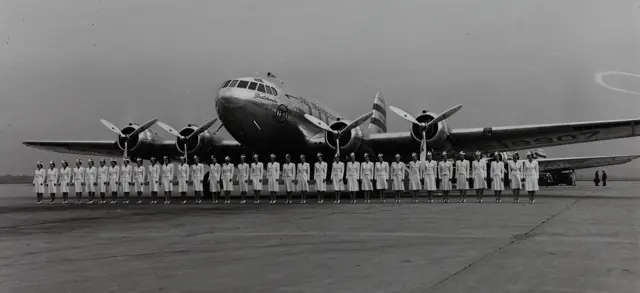
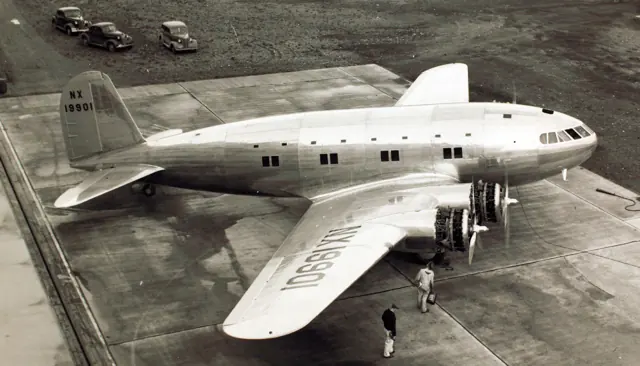
The Stratoliner drew on Boeing's B-17 engineering while using a broad circular fuselage for passengers. Four radial engines powered the low-wing, tailwheel aircraft. It entered commercial service in 1940 and represented an early move toward flying above much of the weather. Only a small number were built, and individual aircraft had eventful later histories.
Aircraft background
Wikipedia contributors · Read more ↗A glass cockpit that still offered a restricted view
Buck remembered the Stratoliner as an aircraft that demanded attention on the ground. Its appearance also gave a misleading impression of what the pilot could see. From outside, the generous wraparound glazing suggested a clear view; from his seat, the windscreen seemed distant, with the surrounding cockpit creating the impression of looking along a tunnel.
TWA pilot’s memoir remarks reproduced by C. V. Glines. The source supplies a brief recollection within an airline history, rather than a complete flight report.
HistoryNet / Aviation History · Read more ↗Early pressurised-airliner cockpit equipment
The linked 2023 guide describes the MSFS 2020 cockpit. It provides equipment background; this older manual does not establish unchanged MSFS 2024 controls.
307 Stratoliner · Microsoft Flight Simulator · MSFS 2024
Microsoft / aircraft developers · Read more ↗Into the cockpit
 YouTube
 Boeing Classics · 3 min ·
Boeing Model 307 Stratoliner in Service with PanAm and TWA | Boeing Classics
An archival look at the Boeing Stratoliner's airline service.
Real aircraft · Boeing 307 Stratoliner
Watch on YouTube ↗Preview images are served by AirframeDB. Videos open on YouTube only when you choose to watch.
Meet Boeing 307 Stratoliner
The Stratoliner drew on Boeing's B-17 engineering while using a broad circular fuselage for passengers. Four radial engines powered the low-wing, tailwheel aircraft. It entered commercial service in 1940 and represented an early move toward flying above much of the weather.
Only a small number were built, and individual aircraft had eventful later histories. A flight engineer managed its period systems, with those crew responsibilities represented in the simulator manual.
Boeing 307 Stratoliner
Aircraft type designators
A model-specific ICAO or FAA designator has not been confirmed in the references reviewed for this aircraft.
History & design
A second restoration begins with the same volunteers
After the 2002 ditching, restoration manager Gary Knowlen contacted more than seventy volunteers who had worked on the Stratoliner. All agreed to return. Gantenbein describes the aircraft being washed after its recovery and the team assessing damaged materials with the benefit of parts and templates from its earlier work.
Air & Space / Smithsonian · Restoration: Soggy Stratoliner ↗September 2002 restoration report; early accident-cause speculation is not adopted
Development milestones
First flight: December 31, 1938
Developed from: Boeing B-17 Flying Fortress
Wikipedia contributors · Boeing 307 Stratoliner ↗Boeing 307 Stratoliner · family/variant named by the source · Wikipedia revision 1367840442
Pilot accounts
A glass cockpit that still offered a restricted view
Buck remembered the Stratoliner as an aircraft that demanded attention on the ground. Its appearance also gave a misleading impression of what the pilot could see. From outside, the generous wraparound glazing suggested a clear view; from his seat, the windscreen seemed distant, with the surrounding cockpit creating the impression of looking along a tunnel.
Glines places those reservations alongside the warmer memories of other TWA pilots recorded in Robert Serling’s company history. The aircraft could be admired for its contribution to passenger flying while retaining awkward details for the people operating it.
TWA pilot’s memoir remarks reproduced by C. V. Glines. The source supplies a brief recollection within an airline history, rather than a complete flight report.
Read the full account · HistoryNet / Aviation History ↗The last delivery flight brings a restored airliner to its museum
Nelson brought the restored Stratoliner from Pittsburgh to Dulles on its final flight. A flyover preceded the landing, and applause greeted the aircraft as it taxied to a stop. The arrival completed a journey from Seattle with stops at Oshkosh and Pittsburgh.
His reaction combined affection for the aeroplane with a strong sense of travelling into the past. He praised its beauty and its place in the development of passenger flying. The delivery followed years of restoration work, including recovery from a ditching. For the museum, the aircraft’s arrival turned that effort into an exhibit ready for a new audience.
Pilot’s reaction reported after the August 2003 delivery of Clipper Flying Cloud.
Read the full account · Seattle Post-Intelligencer ↗An expected two hours of fuel becomes an emergency
Carriker told investigators that the preflight discussion had led him to expect about two hours of endurance. He heard that the remaining preparation included checking the tanks, then completed a walkaround and joined the crew’s checklist. The flight engineer’s response indicated that fuel, oil and hydraulics had been checked.
On the return towards Boeing Field, Carriker was flying when a low fuel-pressure warning appeared. He switched on a boost pump, then heard the engineer report that the aircraft had no fuel. The captain took back control and subsequently ditched in Elliott Bay. The NTSB’s final findings identified fuel exhaustion, inadequate preflight fuel determination and a crew-communication factor. Those findings accompany the recollection; they do not establish that Carriker made the ditching.
First officer’s account to investigators of the 28 March 2002 flight. James Wallace’s linked report identifies Carriker; the NTSB describes him by crew role.
Read the full account · National Transportation Safety Board ↗NTSB releases report on Stratoliner crash
James Wallace · 20 February 2003; identifies first officer Michael Carriker
In your simulator
Systems, equipment and documentation for each developer’s aircraft.
Compare simulator versions →MSFS 2024307 Stratoliner
Microsoft Flight Simulator · Released
307 Stratoliner
Microsoft Flight Simulator · Released
MSFS 2020307 Stratoliner
Microsoft Flight Simulator · Released
307 Stratoliner
Microsoft Flight Simulator · Released
Aircraft specifications
Published figures for the named real-aircraft variant. Simulator equipment and performance can differ.
| Specification | Published value |
|---|---|
| Length | 74 ft 4 in (22.66 m) |
| Wingspan | 107 ft 3 in (32.69 m) |
| Height | 20 ft 9 in (6.32 m) at rudder |
| Wing area | 1,486 sq ft (138.1 m² ) |
| Empty weight | 30,000 lb (13,608 kg) to 31,200 lb (14,200 kg) in overload condition. |
| Gross weight | 45,000 lb (20,412 kg) |
| Powerplant | 4 × Wright GR-1820-G105A Cyclone air-cooled radial engines with two-stage superchargers , 1,100 hp (820 kW) each at 2400 rpm for sea level takeoff, reduced to 900 hp (670 kW) at 2300 rpm at 17,300 ft (5,300 m) |
| Propellers | three-bladed Hamilton Standard all-metal Hydromatic constant-speed propellers, 11 ft 6 in (3.51 m) diameter |
| Maximum speed | 250 mph (400 km/h, 220 kn) at 16,200 ft (4,900 m) |
| Cruise speed | 222 mph (357 km/h, 193 kn) at 19,000 ft (5,800 m) and 75% power |
| Range | 1,300 mi (2,100 km, 1,100 nmi) at 19,000 ft (5,800 m) & 75% power |
| Service ceiling | 23,800 ft (7,300 m) , reduced to 18,000 ft (5,500 m) when on three engines |
| Rate of climb | 1,200 ft/min (6.1 m/s) initial, from sea level |
Manuals & resources
Find your next read
Choose a topic for a short introduction and a link to the original source. Simulator references identify the developer and edition they cover.
Simulator documentation
Early pressurised-airliner cockpit equipment307 Stratoliner · Microsoft Flight Simulator · MSFS 2024
The linked 2023 guide describes the MSFS 2020 cockpit. It provides equipment background; this older manual does not establish unchanged MSFS 2024 controls.
Legacy guide; MSFS 2024 interface remains unverified
Microsoft / aircraft developers · Read the source ↗A panel-light click hides the control yokes307 Stratoliner · Microsoft Flight Simulator · MSFS 2020
The guide locates the yoke visibility click on the small pilot panel lights at the forward ends of the side consoles.
MSFS 2020 guide · PDF page 4
Microsoft / aircraft developers · Read the source ↗The Gyropilot requires manual pitch adjustments307 Stratoliner · Microsoft Flight Simulator · MSFS 2020
The illustrated Sperry controls set heading, bank and pitch. The guide explicitly says it will not capture the selected altitude; pitch adjustment remains part of levelling off.
MSFS 2020 guide · PDF page 6
Microsoft / aircraft developers · Read the source ↗Choose traditional radios or the GNS suite307 Stratoliner · Microsoft Flight Simulator · MSFS 2020
The upper-panel toggle selects traditional instruments or the GNS suite. The avionics master must be on for either arrangement.
MSFS 2020 guide · PDF page 3, visually checked
Microsoft / aircraft developers · Read the source ↗Ground power and batteries use the same selector307 Stratoliner · Microsoft Flight Simulator · MSFS 2020
GROUND connects the external power unit; FLIGHT removes it and brings the batteries online. The guide also provides an interactive checklist.
MSFS 2020 guide · PDF pages 7–8
Microsoft / aircraft developers · Read the source ↗Bring the period ground scene into view307 Stratoliner · Microsoft Flight Simulator · MSFS 2020
Separate upper-panel switches show the fuel truck and services scene, including boarding steps, attendant and baggage.
MSFS 2020 guide · PDF pages 3 and 7
Microsoft / aircraft developers · Read the source ↗Pilot account
A glass cockpit that still offered a restricted viewTWA pilot’s memoir remarks reproduced by C. V. Glines. The source supplies a brief recollection within an airline history, rather than a complete flight report.
Buck remembered the Stratoliner as an aircraft that demanded attention on the ground. Its appearance also gave a misleading impression of what the pilot could see. From outside, the generous wraparound glazing suggested a clear view; from his seat, the windscreen seemed distant, with the surrounding cockpit creating the impression of looking along a tunnel. Glines places those reservations alongside the warmer memories of other TWA pilots recorded in Robert Serling’s company history.
Bob Buck
HistoryNet / Aviation History · Read the source ↗The last delivery flight brings a restored airliner to its museumPilot’s reaction reported after the August 2003 delivery of Clipper Flying Cloud.
Nelson brought the restored Stratoliner from Pittsburgh to Dulles on its final flight. A flyover preceded the landing, and applause greeted the aircraft as it taxied to a stop. The arrival completed a journey from Seattle with stops at Oshkosh and Pittsburgh. His reaction combined affection for the aeroplane with a strong sense of travelling into the past. He praised its beauty and its place in the development of passenger flying.
Buzz Nelson
Seattle Post-Intelligencer · Read the source ↗Read the original documentation from the people who created it. Manuals open on their publisher’s website.
Manual
Boeing 307 Stratoliner ManualMicrosoft / aircraft developers Microsoft Flight Simulator aircraft manualsMicrosoft / aircraft developersAircraft background
Boeing 307 StratolinerWikipedia contributors · Research background · Wikipedia revision 1367840442 · retrieved 2026-09-12 Restoration: Soggy StratolinerAir & Space / Smithsonian · Douglas Gantenbein · September 2002Resource
MSFS 2024 FAQ and edition aircraft inventoryMicrosoftDeveloper documentation
Microsoft Flight Simulator Releases Local Legend 10: Boeing 307 StratolinerMicrosoft Flight Simulator Team · 2023-06-30 · release and package scopeBuilt-in force-feedback profiles
Read the documentary basis, editable starting settings and remaining questions for the aircraft you fly. Each explanation refers to the exact profile revision shown.
Catalogue programme-20261022-v1 · 1 profile choice
Boeing 307 Stratoliner
Free and Pro · Revision 2 · Partial review
MSFS 2024 · MSFS 2020
Boeing 307 Stratoliner: The selected resistance accompanies the early pressurized transport.
Boeing 307 Stratoliner
Boeing 307 Stratoliner: The selected resistance accompanies the early pressurized transport.
Aircraft and simulator scope
- Boeing 307 Stratoliner · MSFS 2024 · family starting point
- Boeing 307 Stratoliner · MSFS 2020 · family starting point
Boeing 307 Stratoliner · Family sources identify only the variants and product versions described above.
The simulator model and controls
The Stratoliner drew on Boeing's B-17 engineering while using a broad circular fuselage for passengers. Four radial engines powered the low-wing, tailwheel aircraft. It entered commercial service in 1940 and represented an early move toward flying above much of the weather.
This starting point selects Boeing 307 Stratoliner. Its aircraft-level settings do not select a particular developer’s custom systems.
How this profile feels
The selected resistance accompanies the early pressurized transport. Spring resistance builds with the selected airspeed response. A separate aerodynamic term adds speed-dependent control load.
Pitch relief remains separate from engine-management and cabin systems. Valid trim provides the configured pressure relief. Autopilot following is off.
Controls and trim
The Stratoliner combined Boeing’s B17 engineering with a circular passenger fuselage and four radial engines. Commercial service began in 1940. A flight-engineer station and period systems divide work differently from later two-pilot jets.
About the values
The gains are normalized profile settings. They describe the chosen effect balance; hand force depends on the device and its output limits. IAS references are tuning values rather than operating limits. Physical acceptance of this revision remains pending.
What the documentation establishes
Microsoft guide identifies Boeing B307 Stratoliner.
Guide identifies Wright 1820 radials and 45-degree flap travel; detent count needs exact control section.
Documentary review and sources
These decisions describe the documentary basis and remaining gaps for this revision. Aircraft documentation and a starting setting describe different kinds of evidence.
Aircraft and variant
ReviewedThis starting point selects Boeing 307 Stratoliner. Its aircraft-level settings do not select a particular developer’s custom systems.
Flight controls
Not yet reviewedThe Stratoliner combined Boeing’s B17 engineering with a circular passenger fuselage and four radial engines. Commercial service began in 1940. A flight-engineer station and period systems divide work differently from later two-pilot jets.
Trim
Not yet reviewedPitch relief remains separate from engine-management and cabin systems. Pitch authority 0.3 provides load relief and permitted centre movement; roll authority is 0.
Autopilot and stability
Not yet reviewedAutopilot following is off; the configured spring and load retain the hardware feel.
Equipment
ReviewedGear, flap and ground cues follow the selected settings and available simulator-reported states.
Speeds and limits
Not yet reviewedThe indicated-speed references set the profile response scale; they are separate from aircraft operating limits.
Simulator integration
Not yet reviewedThe profile targets msfs2024, msfs2020. Add-on-specific controls use only the supported references configured by this profile.
Force-feedback settings
Not yet reviewedThe settings define the profile’s effect balance. Device output limits affect physical hand force.
Starting settings and their rationale
These configured values are starting estimates. The explanations describe what each setting controls; physical validation appears separately below.
| Setting | Starting value | What it controls and why |
|---|---|---|
| Spring strength | Starting value0.74 | What it controls and whyThe selected resistance accompanies the early pressurized transport. The baseline spring is 0.74. Its low-speed blend reaches baseline strength at 82.5 KIAS. |
| Master force gain | Starting value0.85 | What it controls and whyScales overall profile strength while preserving effect balance, subject to device and output limits. |
| Profile force gain | Starting value0.8 | What it controls and whyThe aerodynamic-load gain is 0.8 with an indicated-speed reference of 165 KIAS. This supplies speed-dependent loading alongside the spring. |
| Force tuning speed/reference | Starting value165.0 kt | What it controls and whySets the IAS reference for aerodynamic loading. It is an estimate, not published cruise TAS or a flight limit. |
| Spring response reference speed | Starting value82.5 kt | What it controls and whySets the IAS where the low-speed blend reaches baseline strength; high-speed stiffening also uses it. |
| Aileron force scale | Starting value0.72 | What it controls and whyRoll and pitch aerodynamic scales are 0.72 and 1, respectively. They set the aerodynamic axis balance. No custom spring-travel curve is enabled. |
| Elevator force scale | Starting value1.0 | What it controls and whyScales pitch aerodynamic loading; pitch spring travel and trim responses are separate settings. |
| Trim feel | Starting valueEnabled | What it controls and whyRetained for compatibility and group membership. Trim relief, rather than this flag, controls centre movement. |
| Trim relief | Starting valueEnabled | What it controls and whyAllows trim relief with supported control law and valid telemetry. Axis authorities set its amount. |
| Autopilot follow | Starting valueDisabled | What it controls and whyAutopilot following is off; the configured spring and load retain the hardware feel. |
| Autopilot neutral hold | Starting valueDisabled | What it controls and whyPermits centering hold during a supported AP state, separate from following a moving target. |
| Output force limit | Starting value0.55 | What it controls and whyCaps directed-force output. Native spring effects and device limits remain separate. |
All 44 starting settings and their rationale
The settings define the profile’s effect balance. Device output limits affect physical hand force.
| Setting | Starting value | What it controls and why |
|---|---|---|
| Spring strength | Starting value0.74 | What it controls and whyThe selected resistance accompanies the early pressurized transport. The baseline spring is 0.74. Its low-speed blend reaches baseline strength at 82.5 KIAS. |
| Spring deadband | Starting value0.045 | What it controls and whySets travel around the centre before the baseline spring resists. Smaller values engage it sooner. |
| Profile force gain | Starting value0.8 | What it controls and whyThe aerodynamic-load gain is 0.8 with an indicated-speed reference of 165 KIAS. This supplies speed-dependent loading alongside the spring. |
| Master force gain | Starting value0.85 | What it controls and whyScales overall profile strength while preserving effect balance, subject to device and output limits. |
| QBlend Enabled | Starting valueEnabled | What it controls and whyAllows baseline spring strength to rise with indicated airspeed where the control law permits it. |
| QSpring Minimum Factor | Starting value0.5 | What it controls and whySets low-speed spring strength as a fraction of baseline when blending is enabled. One keeps full strength. |
| QSpring Start Knots | Starting value20 kt | What it controls and whySets the IAS where the low-speed spring blend starts rising. This is a feel threshold, not a flight limit. |
| Spring response reference speed | Starting value82.5 kt | What it controls and whySets the IAS where the low-speed blend reaches baseline strength; high-speed stiffening also uses it. |
| Force tuning speed/reference | Starting value165.0 kt | What it controls and whySets the IAS reference for aerodynamic loading. It is an estimate, not published cruise TAS or a flight limit. |
| Airspeed spring stiffening gain | Starting value0.15 | What it controls and whyThe high-speed spring-stiffening gain is 0.15. It strengthens the permitted spring response above 82.5 KIAS, with the squared-speed ratio capped at 5. |
| Airspeed spring stiffening limit | Starting value5 | What it controls and whyLimits the squared airspeed ratio used for high-speed spring stiffening; it is not a device-force cap. |
| Aileron force scale | Starting value0.72 | What it controls and whyRoll and pitch aerodynamic scales are 0.72 and 1, respectively. They set the aerodynamic axis balance. No custom spring-travel curve is enabled. |
| Elevator force scale | Starting value1.0 | What it controls and whyScales pitch aerodynamic loading; pitch spring travel and trim responses are separate settings. |
| Output force limit | Starting value0.55 | What it controls and whyCaps directed-force output. Native spring effects and device limits remain separate. |
| Trim feel | Starting valueEnabled | What it controls and whyRetained for compatibility and group membership. Trim relief, rather than this flag, controls centre movement. |
| Trim relief | Starting valueEnabled | What it controls and whyAllows trim relief with supported control law and valid telemetry. Axis authorities set its amount. |
| Elevator Authority | Starting value0.3 | What it controls and whyPitch relief remains separate from engine-management and cabin systems. Pitch authority 0.3 provides load relief and permitted centre movement; roll authority is 0. |
| Aileron Authority | Starting value0 | What it controls and whyScales supported roll-trim relief and permitted centre movement. Zero removes roll response. |
| Force Trim Enabled | Starting valueDisabled | What it controls and whyEnables local force trim, separate from aircraft-owned trim and add-on integration qualification. |
| GLoad Enabled | Starting valueEnabled | What it controls and whyAllows load-factor changes to modify permitted spring laws. Passive fly-by-wire feel can suppress it. |
| Rate Damping Enabled | Starting valueEnabled | What it controls and whyEnables rate damping with the configured coefficients and control law. |
| Autopilot follow | Starting valueDisabled | What it controls and whyAutopilot following is off; the configured spring and load retain the hardware feel. |
| Autopilot follow authority | Starting value0.1 | What it controls and whySets admitted AP-follow gain, not a percentage of travel. Runtime ownership and input limits still apply. |
| Autopilot neutral hold | Starting valueDisabled | What it controls and whyPermits centering hold during a supported AP state, separate from following a moving target. |
| Autopilot neutral hold strength | Starting value0.6 | What it controls and whySets admitted AP neutral-hold strength; inactive while neutral hold is disabled. |
| Enabled | Starting valueEnabled | What it controls and whyEnables aerodynamic cues; each still needs nonzero strength and its simulator conditions. |
| Gain | Starting value0.35 | What it controls and whySets stall-buffet strength. Zero removes the cue without changing simulator stalls or warnings. |
| Gain | Starting value0 | What it controls and whySets high-Mach buffet strength; onset and full-strength thresholds are separate. |
| Gain | Starting value0.14 | What it controls and whySets flap buffet at the configured position and speed gates. Flap movement texture is separate. |
| Maximum flap index | Starting value3 | What it controls and whySets the final flap index for detent normalization. UP plus three detents uses maximum index3. |
| Minimum flap index | Starting value2 | What it controls and whySets the first flap detent that admits buffet; this is a handle index, not degrees. |
| Gain | Starting value0.1 | What it controls and whySets gear aerodynamic buffet; movement and ground-contact cues are separate. |
| Shaker Enabled | Starting valueDisabled | What it controls and whyPermits shaker at supported warning conditions; the switch does not establish aircraft equipment. |
| Stick shaker amplitude | Starting value0.5 | What it controls and whySets triggered shaker strength; inactive while the shaker feature is disabled. |
| Enabled | Starting valueEnabled | What it controls and whyEnables ground effects; each still needs its own strength and contact or motion telemetry. |
| Gain | Starting value0.4 | What it controls and whySets rolling texture strength, modified by speed, surface and undercarriage configuration. |
| Gain | Starting value0.25 | What it controls and whySets gear-bump texture during ground motion, separate from touchdown impact. |
| Gain | Starting value0.65 | What it controls and whySets landing-impact strength; landing telemetry and response shape determine the pulse. |
| Gain | Starting value0 | What it controls and whySets reverse-thrust vibration with valid reverser and engine conditions. Zero removes the cue. |
| Enabled | Starting valueEnabled | What it controls and whyEnables engine cues with nonzero settings and valid running-engine telemetry. |
| Gain | Starting value0.12 | What it controls and whySets estimated engine vibration using configured telemetry and response, not measured cockpit vibration. |
| Enabled | Starting valueEnabled | What it controls and whyEnables accessory cues with configured strengths and observed accessory movement. |
| Gain | Starting value0.12 | What it controls and whySets texture from observed flap movement; a command without movement does not establish the cue. |
| Gain | Starting value0.12 | What it controls and whySets texture from observed gear movement, separate from aerodynamic and touchdown effects. |
Limits and open questions
- Cockpit guide does not calibrate manual control gearing.
- Trim authority remains unresolved.
- Follow is off; no servo-demand contract was established.
- Release mph figures lack IAS/TAS scope and are not loading anchors.
- Vintage product identity does not qualify trim/engine signals.
- B307 radial/manual estimate is not later 707 jet/powered-rudder feel.
Physical validation
No physical force validation is recorded in this public catalogue for this revision. Documentary review and software checks do not establish how a particular device feels.
Discuss this aircraft (0)
Questions, observations and useful sources from the community.
No published discussions yet. Bring a question or share a useful source.
Open aircraft discussions →Content expanded · What’s new
Something missing or a source that needs attention?
Suggest a correction ↗