Start here
A few places to begin, from the aircraft’s story to the people who fly it.
Meet the aircraft
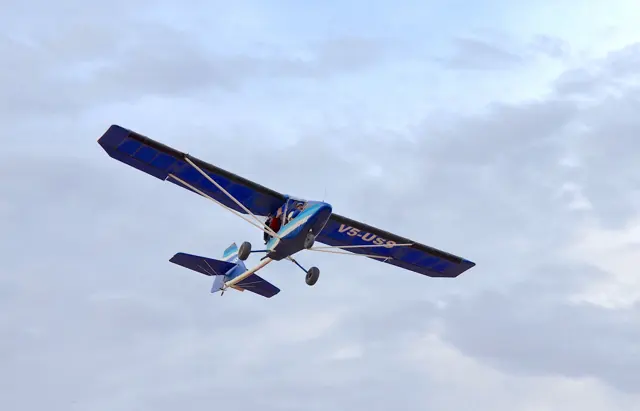
The Zenith CH 701 is an all-metal light aircraft designed for short takeoffs and landings.
Zenith CH 701
contrail.shop · Read more ↗Meet Zenith CH 701
The Zenith CH 701 is an all-metal light aircraft designed for short takeoffs and landings.
Zenith CH 701
Zenith Aircraft → · Explore the family →
Zenith CH 701
contrail.shop · Zenith CH 701 — aircraft background ↗Aircraft type designators
No type designator selected for this reference.
History & design
An off-airport kit aircraft
Chris Heintz’s CH 701 was introduced in 1986 for short-field operation and home construction. Its design combined fixed leading-edge slats, full-span flaperons and an all-moving rudder in an all-metal aircraft.
Zenith Aircraft · Introducing the STOL CH 701 ↗Original design
Improving the kit while retaining the concept
Zenith describes later changes as improvements in useful load, kit construction and instructions while retaining the underlying design. The aircraft’s appearance follows its short-field purpose rather than a conventional streamlined touring-aircraft shape.
Zenith Aircraft · Introducing the STOL CH 701 ↗Manufacturer development account
Systems & details
Full-span flaperons do two jobs
The trailing-edge surfaces combine flap and aileron functions. The sample manual shows a central Y-shaped dual control stick, electrically operated elevator trim and rudder pedals linked to a steerable nosewheel. These details explain the cockpit layout without implying every builder has identical equipment.
In your simulator
Systems, equipment and documentation for each developer’s aircraft.
MSFS 2020 · MSFS 2024Zenith CH701 STOL
SimWorks Studios · Released
Zenith CH701 STOL
SimWorks Studios · Released
Manuals & resources
Find your next read
Choose a topic for a short introduction and a link to the original source. Simulator references identify the developer and edition they cover.
Manufacturer, developer or authorized-product aircraft context
Zenith CH 701 — aircraft backgroundZenith CH 701
Background on the all-metal Zenith CH 701 and its short-takeoff-and-landing design.
Aircraft-context passage, preserved text line 66; reviewed 2026-09-29
contrail.shop · Read the source ↗Developer documentation
Zenith CH701 STOL — product listingZenith CH701 STOL · MSFS 2020 · MSFS 2024
Individual product listing and edition passage reviewed 2026-09-29
contrail.shop · Read the source ↗Read the original documentation from the people who created it. Manuals open on their publisher’s website.
Manufacturer, developer or authorized-product aircraft context
Zenith CH 701 — aircraft backgroundcontrail.shop · Aircraft-context passage, preserved text line 66; reviewed 2026-09-29Manufacturer aircraft information
STOL CH 701 specificationsZenith Aircraft · STOL CH 701: Zenith 1,100 lb gross-weight configuration Introducing the STOL CH 701Zenith Aircraft · Manufacturer design history STOL CH 701 operating manual sampleZenith Aircraft · Sample operating manual, section 7Built-in force-feedback profiles
Read the documentary basis, editable starting settings and remaining questions for the aircraft you fly. Each explanation refers to the exact profile revision shown.
Catalogue programme-20261022-v1 · 6 profile choices
SimWorks Studios Zenith CH701 Floats
SimWorks Studios · Free and Pro · Revision 2 · Inherited starting point
MSFS 2020 · MSFS 2024
The Zenith CH 701 is an all-metal light aircraft designed for short takeoffs and landings.
SimWorks Studios Zenith CH701 Skis
SimWorks Studios · Free and Pro · Revision 2 · Inherited starting point
MSFS 2020 · MSFS 2024
The Zenith CH 701 is an all-metal light aircraft designed for short takeoffs and landings.
SimWorks Studios Zenith CH701 Wheels
SimWorks Studios · Free and Pro · Revision 2 · Inherited starting point
MSFS 2020 · MSFS 2024
The Zenith CH 701 is an all-metal light aircraft designed for short takeoffs and landings.
Zenith CH701
Free and Pro · Revision 1 · Partial review
MSFS 2020 · MSFS 2024 · X-Plane 12
The Zenith CH 701 is an all-metal light aircraft designed for short takeoffs and landings.
Zenith CH701 Floats
Free and Pro · Revision 1 · Partial review
MSFS 2020 · MSFS 2024 · X-Plane 12
The Zenith CH 701 is an all-metal light aircraft designed for short takeoffs and landings.
Zenith CH701 Skis
Free and Pro · Revision 1 · Partial review
MSFS 2020 · MSFS 2024 · X-Plane 12
The Zenith CH 701 is an all-metal light aircraft designed for short takeoffs and landings.
SimWorks Studios Zenith CH701 Wheels
The Zenith CH 701 is an all-metal light aircraft designed for short takeoffs and landings.
Aircraft and simulator scope
- SimWorks Studios Zenith CH701 Wheels · SimWorks Studios · MSFS 2020 · Add-on starting point
- SimWorks Studios Zenith CH701 Wheels · SimWorks Studios · MSFS 2024 · Add-on starting point
The simulator model and controls
SimWorks Studios Zenith CH701 Wheels is the selected SimWorks Studios configuration.
How this profile feels
Spring resistance builds with the selected airspeed response. A separate aerodynamic term adds speed-dependent control load.
Valid trim provides the configured pressure relief. Autopilot following is off.
Aircraft and configuration
The Zenith CH 701 is an all-metal light aircraft designed for short takeoffs and landings.
About the values
Strengths are normalized hardware-feel settings. They set the effect balance; hand force depends on the device and its limits. The IAS reference is a tuning value.
Documentary review and sources
These decisions describe the documentary basis and remaining gaps for this revision. Aircraft documentation and a starting setting describe different kinds of evidence.
Aircraft and variant
InheritedSimWorks Studios Zenith CH701 Wheels is the selected SimWorks Studios configuration.
Flight controls
InheritedThe Zenith CH 701 is an all-metal light aircraft designed for short takeoffs and landings.
Trim
InheritedThe profile uses the trim behaviour configured below. Pitch authority 0.3 provides load relief and permitted centre movement; roll authority is 0.
Autopilot and stability
InheritedAutopilot following is off; the configured spring and load retain the hardware feel.
Equipment
InheritedThe Zenith CH 701 is an all-metal light aircraft designed for short takeoffs and landings.
Speeds and limits
InheritedThe indicated-speed references set the profile response scale; they are separate from aircraft operating limits.
Simulator integration
InheritedThe profile targets msfs2020, msfs2024. Add-on-specific controls use only the supported references configured by this profile.
Force-feedback settings
InheritedThe settings define the profile’s effect balance. Device output limits affect physical hand force.
Starting settings and their rationale
These configured values are starting estimates. The explanations describe what each setting controls; physical validation appears separately below.
| Setting | Starting value | What it controls and why |
|---|---|---|
| Spring strength | Starting value0.74 | What it controls and whyThis profile uses reversible-control loading for Zenith CH 701. The baseline spring is 0.74. Its low-speed blend reaches baseline strength at 35 KIAS. |
| Master force gain | Starting value0.85 | What it controls and whyScales overall profile strength while preserving effect balance, subject to device and output limits. |
| Profile force gain | Starting value0.8 | What it controls and whyThe aerodynamic-load gain is 0.8 with an indicated-speed reference of 65 KIAS. This supplies speed-dependent loading alongside the spring. |
| Force tuning speed/reference | Starting value65 kt | What it controls and whySets the IAS reference for aerodynamic loading. It is an estimate, not published cruise TAS or a flight limit. |
| Spring response reference speed | Starting value35 kt | What it controls and whySets the IAS where the low-speed blend reaches baseline strength; high-speed stiffening also uses it. |
| Aileron force scale | Starting value0.72 | What it controls and whyRoll and pitch aerodynamic scales are 0.72 and 1, respectively. They set the aerodynamic axis balance. No custom spring-travel curve is enabled. |
| Elevator force scale | Starting value1.0 | What it controls and whyScales pitch aerodynamic loading; pitch spring travel and trim responses are separate settings. |
| Trim feel | Starting valueEnabled | What it controls and whyRetained for compatibility and group membership. Trim relief, rather than this flag, controls centre movement. |
| Trim relief | Starting valueEnabled | What it controls and whyAllows trim relief with supported control law and valid telemetry. Axis authorities set its amount. |
| Autopilot follow | Starting valueDisabled | What it controls and whyAutopilot following is off; the configured spring and load retain the hardware feel. |
| Autopilot neutral hold | Starting valueDisabled | What it controls and whyPermits centering hold during a supported AP state, separate from following a moving target. |
| Output force limit | Starting value0.55 | What it controls and whyCaps directed-force output. Native spring effects and device limits remain separate. |
All 44 starting settings and their rationale
The settings define the profile’s effect balance. Device output limits affect physical hand force.
| Setting | Starting value | What it controls and why |
|---|---|---|
| Spring strength | Starting value0.74 | What it controls and whyThis profile uses reversible-control loading for Zenith CH 701. The baseline spring is 0.74. Its low-speed blend reaches baseline strength at 35 KIAS. |
| Spring deadband | Starting value0.045 | What it controls and whySets travel around the centre before the baseline spring resists. Smaller values engage it sooner. |
| Profile force gain | Starting value0.8 | What it controls and whyThe aerodynamic-load gain is 0.8 with an indicated-speed reference of 65 KIAS. This supplies speed-dependent loading alongside the spring. |
| Master force gain | Starting value0.85 | What it controls and whyScales overall profile strength while preserving effect balance, subject to device and output limits. |
| QBlend Enabled | Starting valueEnabled | What it controls and whyAllows baseline spring strength to rise with indicated airspeed where the control law permits it. |
| QSpring Minimum Factor | Starting value0.5 | What it controls and whySets low-speed spring strength as a fraction of baseline when blending is enabled. One keeps full strength. |
| QSpring Start Knots | Starting value10 kt | What it controls and whySets the IAS where the low-speed spring blend starts rising. This is a feel threshold, not a flight limit. |
| Spring response reference speed | Starting value35 kt | What it controls and whySets the IAS where the low-speed blend reaches baseline strength; high-speed stiffening also uses it. |
| Force tuning speed/reference | Starting value65 kt | What it controls and whySets the IAS reference for aerodynamic loading. It is an estimate, not published cruise TAS or a flight limit. |
| Airspeed spring stiffening gain | Starting value0.15 | What it controls and whyThe high-speed spring-stiffening gain is 0.15. It strengthens the permitted spring response above 35 KIAS, with the squared-speed ratio capped at 5. |
| Airspeed spring stiffening limit | Starting value5 | What it controls and whyLimits the squared airspeed ratio used for high-speed spring stiffening; it is not a device-force cap. |
| Aileron force scale | Starting value0.72 | What it controls and whyRoll and pitch aerodynamic scales are 0.72 and 1, respectively. They set the aerodynamic axis balance. No custom spring-travel curve is enabled. |
| Elevator force scale | Starting value1.0 | What it controls and whyScales pitch aerodynamic loading; pitch spring travel and trim responses are separate settings. |
| Output force limit | Starting value0.55 | What it controls and whyCaps directed-force output. Native spring effects and device limits remain separate. |
| Trim feel | Starting valueEnabled | What it controls and whyRetained for compatibility and group membership. Trim relief, rather than this flag, controls centre movement. |
| Trim relief | Starting valueEnabled | What it controls and whyAllows trim relief with supported control law and valid telemetry. Axis authorities set its amount. |
| Elevator Authority | Starting value0.3 | What it controls and whyThe profile uses the trim behaviour configured below. Pitch authority 0.3 provides load relief and permitted centre movement; roll authority is 0. |
| Aileron Authority | Starting value0 | What it controls and whyScales supported roll-trim relief and permitted centre movement. Zero removes roll response. |
| Force Trim Enabled | Starting valueDisabled | What it controls and whyEnables local force trim, separate from aircraft-owned trim and add-on integration qualification. |
| GLoad Enabled | Starting valueEnabled | What it controls and whyAllows load-factor changes to modify permitted spring laws. Passive fly-by-wire feel can suppress it. |
| Rate Damping Enabled | Starting valueEnabled | What it controls and whyEnables rate damping with the configured coefficients and control law. |
| Autopilot follow | Starting valueDisabled | What it controls and whyAutopilot following is off; the configured spring and load retain the hardware feel. |
| Autopilot follow authority | Starting value0.1 | What it controls and whySets admitted AP-follow gain, not a percentage of travel. Runtime ownership and input limits still apply. |
| Autopilot neutral hold | Starting valueDisabled | What it controls and whyPermits centering hold during a supported AP state, separate from following a moving target. |
| Autopilot neutral hold strength | Starting value0.6 | What it controls and whySets admitted AP neutral-hold strength; inactive while neutral hold is disabled. |
| Enabled | Starting valueEnabled | What it controls and whyEnables aerodynamic cues; each still needs nonzero strength and its simulator conditions. |
| Gain | Starting value0.35 | What it controls and whySets stall-buffet strength. Zero removes the cue without changing simulator stalls or warnings. |
| Gain | Starting value0 | What it controls and whySets high-Mach buffet strength; onset and full-strength thresholds are separate. |
| Gain | Starting value0 | What it controls and whySets flap buffet at the configured position and speed gates. Flap movement texture is separate. |
| Maximum flap index | Starting value3 | What it controls and whySets the final flap index for detent normalization. UP plus three detents uses maximum index3. |
| Minimum flap index | Starting value2 | What it controls and whySets the first flap detent that admits buffet; this is a handle index, not degrees. |
| Gain | Starting value0 | What it controls and whySets gear aerodynamic buffet; movement and ground-contact cues are separate. |
| Shaker Enabled | Starting valueDisabled | What it controls and whyPermits shaker at supported warning conditions; the switch does not establish aircraft equipment. |
| Stick shaker amplitude | Starting value0.5 | What it controls and whySets triggered shaker strength; inactive while the shaker feature is disabled. |
| Enabled | Starting valueEnabled | What it controls and whyEnables ground effects; each still needs its own strength and contact or motion telemetry. |
| Gain | Starting value0.4 | What it controls and whySets rolling texture strength, modified by speed, surface and undercarriage configuration. |
| Gain | Starting value0.25 | What it controls and whySets gear-bump texture during ground motion, separate from touchdown impact. |
| Gain | Starting value0.65 | What it controls and whySets landing-impact strength; landing telemetry and response shape determine the pulse. |
| Gain | Starting value0 | What it controls and whySets reverse-thrust vibration with valid reverser and engine conditions. Zero removes the cue. |
| Enabled | Starting valueEnabled | What it controls and whyEnables engine cues with nonzero settings and valid running-engine telemetry. |
| Gain | Starting value0.12 | What it controls and whySets estimated engine vibration using configured telemetry and response, not measured cockpit vibration. |
| Enabled | Starting valueEnabled | What it controls and whyEnables accessory cues with configured strengths and observed accessory movement. |
| Gain | Starting value0.12 | What it controls and whySets texture from observed flap movement; a command without movement does not establish the cue. |
| Gain | Starting value0 | What it controls and whySets texture from observed gear movement, separate from aerodynamic and touchdown effects. |
Limits and open questions
- Forces, damping, spring curves and cue levels are engineering estimates, not measured hand forces. Installed and physical acceptance remain deferred.
- AP follow and neutral hold are off. No invented servo, circuit-breaker, gust-lock, protection or maintenance-state interface is used.
- Panel, propeller, cargo and livery options share the force estimate unless a documented mechanical distinction warrants a separate configuration.
- Stall-speed disagreement is preserved with engine,weight and IAS conditions. Manufacturer samplePOH is markedSAMPLE ONLY and is not the SWS 80/110 hp variant operating handbook.
- Ground contact and propwash are generic estimates. No measured flaperon hinge moment,water load or ski friction is claimed.2024EFB integration remains limited by2020avionics.
Physical validation
No physical force validation is recorded in this public catalogue for this revision. Documentary review and software checks do not establish how a particular device feels.
Discuss this aircraft (0)
Questions, observations and useful sources from the community.
No published discussions yet. Bring a question or share a useful source.
Open aircraft discussions →Content expanded · What’s new
Something missing or a source that needs attention?
Suggest a correction ↗