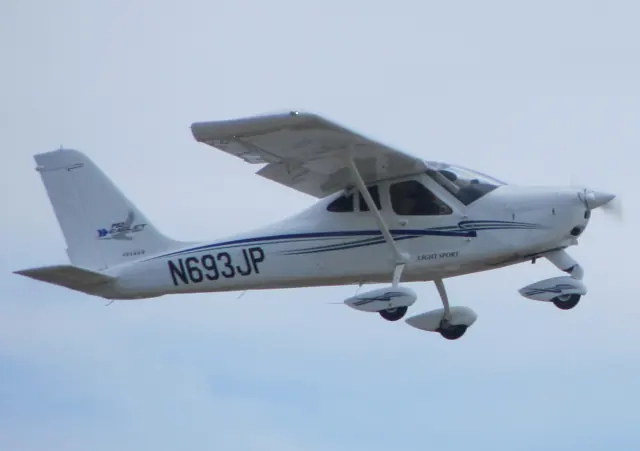
Tecnam P92 ↗Pilot account
Echoes of the future
Steve Hitchen · 5 October 2021
SourceEchoes of the future ↗Australian Flying
Find aircraft background, systems descriptions and manuals for the aircraft you are researching. Each note keeps its source and version context close by.
Steve Hitchen · 5 October 2021
Personal blog · displayed publication date 1 September 2009
Tensor 600X · VSKYLABS · X-Plane 11 · X-Plane 12
The Tensor 600X product is released for X-Plane 11 and 12. VSKYLABS says it used aircraft development information supplied for the project; the real aircraft’s prototype status is distinct from simulator availability.
Official developer / designated-store reference · checked 2026-09-14
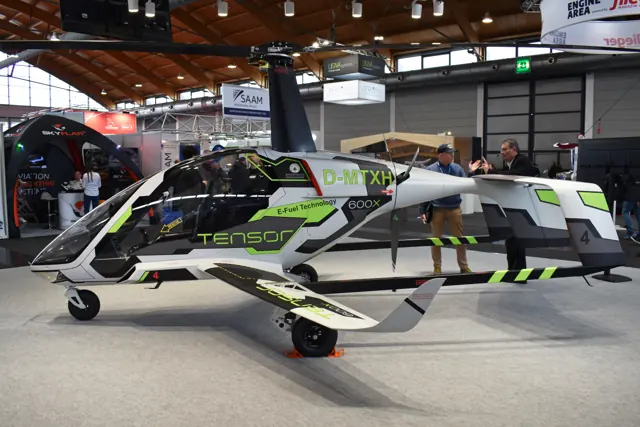
The German Tensor 600X is a tandem two-seat autogyro prototype. An autorotating main rotor provides lift, with a separate system producing forward thrust.
VSKYLABS developed its X-Plane 11 and 12 simulation using information supplied for the Tensor project. Those simulator products are released; the physical aircraft remains a prototype in the selected documentation.
Tensor 600X prototype and VSKYLABS simulation
The Tipsy B developed from Ernest Oscar Tips’ single-seat Tipsy S into a two-seat touring aircraft. Belgian aviation historian Jean-Pierre Decock describes a wooden, fabric-covered low-wing monoplane with an elliptical cantilever wing and staggered side-by-side seats in an open cockpit. The prototype used a 50-hp Walter Mikron engine.
Belgian production began in 1937, including enclosed-cockpit Bc aircraft. British Trainer developments were another branch of the programme.
Original prototype · Historical aircraft description · Original Tipsy B · Decock historical Tipsy B reference
TorqueSim Pocket Rocket · TorqueSim · X-Plane 11
On the PFD, select PFD then SYN VIS to control terrain, heading marks, airport labels and flight-plan pathways.
Pocket Rocket 2019 manual · PDF pp.23–24 · X-Plane 11 edition
TorqueSim Pocket Rocket · TorqueSim · X-Plane 11
The engine sidebar displays fuel in gallons. The SYSTEM sidebar uses pounds and includes a totalizer for fuel used and remaining.
Pocket Rocket manual · PDF pp.26–28; source units checked
TorqueSim Pocket Rocket · TorqueSim · X-Plane 11
CHKLIST opens the checklist page. The FMS knobs select groups and items; ENT checks an item and advances the selection.
Pocket Rocket manual · PDF pp.28–29
TorqueSim Pocket Rocket · TorqueSim · X-Plane 11
The guide limits the G5 to PFD mode. Its right knob selects barometric-pressure or altitude-preselect adjustment.
Pocket Rocket manual · PDF pp.29–30
TorqueSim Pocket Rocket · TorqueSim · X-Plane 11
With AviTab installed, enable AviTab Tablet in the Aircraft menu to use the integrated tablet.
Pocket Rocket manual · PDF p.30; no bundled-plugin claim
TorqueSim Pocket Rocket · TorqueSim · X-Plane 11
The starter switch sits under a cap on top of the fuel-control lever; its lower position aborts a start.
Pocket Rocket manual · PDF p.31
TorqueSim Pocket Rocket · TorqueSim · X-Plane 11
The documented AUTO selection uses the centre tank first, then switches between the wing tanks.
Pocket Rocket manual · PDF p.33
New aircraft, useful sources and improvements to AirframeDB. Occasional updates, when there’s something to share.