Find aircraft background, systems descriptions and manuals for the aircraft you are researching. Each note keeps its source and version context close by.
Simulator manuals describe the developer’s implementation. Aircraft background is research-based; pilot accounts describe an individual’s experience. Coverage here is limited to the selected notes and linked resources, not the full contents of every manual.
TacFlight 58D · TacFlight · MSFS 2020 · MSFS 2024 (legacy compatibility)
Controls and systems in the developer manual
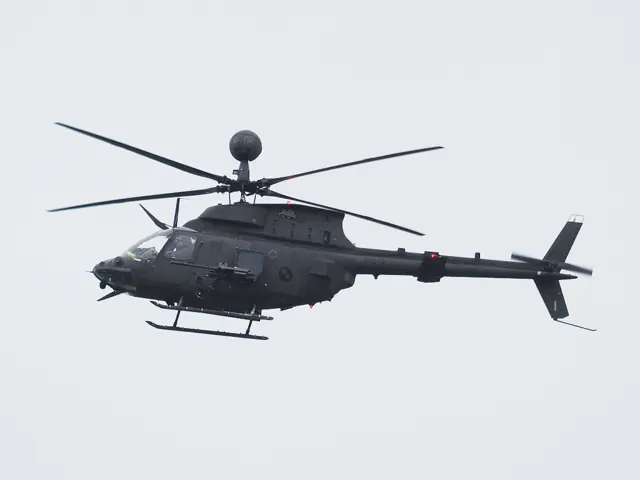
The TacFlight manual describes force-trim and SCAS switches. Its vertical situation display presents flight information; the display itself is not evidence of a hover autopilot.
Manual captured 28 September 2026; OH-58D, force trim, SCAS and vertical situation display
UH-1H / B205A-1 · Taog's Hangar · MSFS 2020
Read the simulation notes beside the real-system description
Taog's v1.0.6 manual explains the Huey's hydraulic assistance and magnetic/spring force-trim devices, then explicitly marks hydraulic-control and force-trim support as not simulated in that documented release. The limitation applies to the v1.0.6 Taog release; the first-party Huey has separate documentation.
UH-1H/B205A-1 manual v1.0.6 · PDF p.27; HYD CONT and FORCE TRIM rows
Flying Fries Blackshape Gabriel · Flying Fries · MSFS 2020 · MSFS 2024
Two substantially different variants
The manual distinguishes the BK160-TR from the fictional BK420-MO, with differences in power and response. Both have retractable gear and pitch trim. KIAS limits and cruise groundspeeds are labelled separately; runway starts can initialise non-neutral trim.
Gabriel manual v2.0; PDF pp.5–7 revision and background; pp.8–11 variants; p.25 speed references
Flying Fries Blackshape Gabriel BK420-MO · Flying Fries · MSFS 2020 · MSFS 2024
Two substantially different variants
The manual distinguishes the BK160-TR from the fictional BK420-MO, with differences in power and response. Both have retractable gear and pitch trim. KIAS limits and cruise groundspeeds are labelled separately; runway starts can initialise non-neutral trim.
Gabriel manual v2.0; PDF pp.5–7 revision and background; pp.8–11 variants; p.25 speed references
Blackshape Gabriel BK160-TR
Flying Fries' manual follows the Gabriel through Blackshape's development from the Prime ultralight lineage. The simulated BK160-TR has retractable landing gear and pitch trim, with a Garmin glass-cockpit installation.
The package also includes the fictional BK420-MO. Its much greater power and different response belong to that simulator variant, with separate speed references in the manual.
Blackshape Gabriel BK160-TR
Blackwing BW 635RG
The BW 635RG combines a Rotax 915 iS installation with retractable landing gear. The Orbx model uses single-lever power control for the engine and propeller, with stick controls, elevator trim and flaps. Its GFC 500 provides the documented autopilot functions.
Blackwing BW 635RG
Bloch MB.152
Restauravia's MB.152 has retractable main landing gear and two nonzero flap settings. The cockpit places the elevator-trim control on the left console and also provides rudder trim. The manual describes hydraulic operation for gear and flaps.
Bloch MB.152
707-320C · Microsoft Flight Simulator · MSFS 2024
Control tabs and hydraulic assistance share the aircraft
The manual describes tab-assisted elevator and aileron controls, hydraulic roll spoilers and a boosted rudder. Outboard ailerons are inactive with flaps up. Stabiliser trim has interlinked manual wheels, electric control, a motion light and electrical cutouts.
Working Title / iniBuilds · MSFS 2024 manual v4.1, 11 August 2026 · physical PDF pp.100–105; §§14.1–14.6
Boeing 737-800 · Laminar Research · X-Plane 12
Visible switches do not all imply working systems
Laminar's 737 guide documents hydraulic source controls and the STAB OUT OF TRIM indication. It also limits the pictured flight-control panel's implemented functionality to the yaw damper.
Archived simulator manual; installed package revision not observed · PDF pp.18,22,31
Boeing 737-800 · Laminar Research · X-Plane 11
Visible switches do not all imply working systems
Laminar's 737 guide documents hydraulic source controls and the STAB OUT OF TRIM indication. It also limits the pictured flight-control panel's implemented functionality to the yaw damper.
Archived simulator manual; installed package revision not observed · PDF pp.18,22,31
Boeing 737 family · PMDG · PMDG · MSFS 2024 · MSFS 2020
Control-wheel steering and hardware options
PMDG documents autopilot reversion to control-wheel steering when the simulated controls are displaced. An aircraft option can instead ignore hardware input during autopilot operation. The introduction also gives electric-trim travel limits that depend on the 737 body variant.
MSFS introduction November 2022 · PDF p.30; AP reversion and electric-trim limits
C-17 Globemaster III · Microsoft Flight Simulator · MSFS 2024
Modern transport controls with an explicit feature boundary
Miltech's C-17 guide describes fly-by-wire stabilisation and trim, selectable autopilot modes and stall-test controls. It explicitly marks VNAV, TURB and several other controls as unsupported in that version.
Archived simulator manual; installed package revision not observed · PDF pp.6,8,45,58