Find aircraft background, systems descriptions and manuals for the aircraft you are researching. Each note keeps its source and version context close by.
Simulator manuals describe the developer’s implementation. Aircraft background is research-based; pilot accounts describe an individual’s experience. Coverage here is limited to the selected notes and linked resources, not the full contents of every manual.
C208 Grand Caravan DGS · Thranda · X-Plane 11 · X-Plane 12
Two airframes and configurable cockpits
The DGS package includes the Caravan 675 and Grand Caravan, each with passenger and cargo arrangements. Its expansion adds plain and amphibious floats, landplane options and a G1000 choice in the configurable panel. Instrument presets and an in-sim livery editor let the cockpit and exterior be personalised. The gathered store page lists version 1.2.2, dated June 2023.
Designated X-Plane.org store · gathered 10 September 2026
C208 Grand Caravan DGS · Thranda · X-Plane 11 · X-Plane 12
Configuration and flight-model development
Thranda's Caravan development includes configurable avionics and changes to its X-Plane flight model. The published history records trim balance, propeller drag, G1000 pitch-button behaviour, landing-gear springiness and stall-warning calibration changes. The changes are identified by release number.
C208 DGS; XP12 added v1.2 February 2023 · Version history; v1.2 and later XP12 tuning
Cessna Caravan family
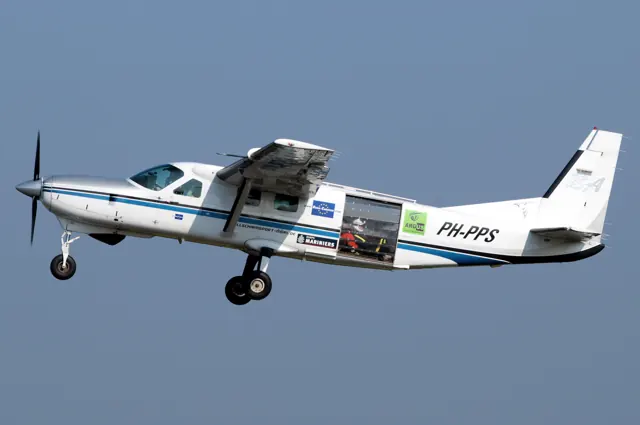
The Caravan programme began in the early 1980s, with the prototype flying in 1982. Its high wing, fixed gear and large cabin were organised around practical utility work. The longer 208B developed into the Grand Caravan as well as dedicated freight configurations.
Wheeled aircraft, cargo pods and amphibious floats give the family several recognisable forms. Simulator versions also differ sharply in cockpit philosophy, from modern glass panels to analogue conversions and new standalone aircraft. Each product has its own cockpit and systems description.
Aircraft / family
Turbine Pilot: Cessna Caravan — Sky Truck
Thomas A. Horne · 1 March 2009
A Caravan Experience
Steve Hitchen · 5 March 2020
Caravan
Scott Humphries · 23 August 2021
LivToAir Citation CJ3+ · LivToAir · MSFS 2020 · MSFS 2024
Aircraft pages and warnings
The developer describes custom G3000 and GTC pages with CJ3+ takeoff and landing data. The same product material identifies de-icing functions and a simulated stick shaker.
Custom avionics, deicing and warning features
Cessna Citation CJ3+
LivToAir represents the Citation CJ3+ 525B with a G3000/GTC-based cockpit. Its custom pages include aircraft-specific takeoff and landing data, alongside ice-protection and warning functions.
The product description identifies a simulated stick shaker. These avionics and warning details belong to the named CJ3+ implementation; the broader Citation family is documented across separate aircraft entries.
Cessna Citation CJ3+
Citation CJ4 · Microsoft Flight Simulator · MSFS 2024
How this guide describes vertical navigation
The FMC displays loaded or manually entered altitude restrictions without filling in predicted crossing altitudes at every waypoint. In climb, VNAV works with the pilot’s selected VS or FLC mode and the programmed restrictions. Descent uses calculated path segments, which can include level-offs and more than one top-of-descent marker.
CJ4 Operator’s Guide v1 · PDF pp.55–56; exact release applicability unresolved
Citation CJ4 · Microsoft Flight Simulator · MSFS 2024
Following a path still leaves speed to the pilot
The guide explicitly states that VNAV does not move the throttles. The pilot manages speed while the flight guidance follows the descent path. VNAV provides flight guidance without automatic thrust control.
CJ4 Operator’s Guide v1 · PDF p.56; exact release applicability unresolved
Citation CJ4 · Microsoft Flight Simulator · MSFS 2024
Flight guidance and yaw damping are separate controls
The CJ4 guide documents a flight-guidance panel with flight-level-change, heading and navigation functions. It treats yaw-damper engagement separately from autopilot use and includes pilot-managed pitch trim.
CJ4 user guide v1; exact release applicability unresolved · PDF pp.8,10; climb and AP operation
Cessna Citation CJ4 · Microsoft Flight Simulator · MSFS 2020
How this guide describes vertical navigation
The FMC displays loaded or manually entered altitude restrictions without filling in predicted crossing altitudes at every waypoint. In climb, VNAV works with the pilot’s selected VS or FLC mode and the programmed restrictions. Descent uses calculated path segments, which can include level-offs and more than one top-of-descent marker.
CJ4 Operator’s Guide v1 · PDF pp.55–56; exact release applicability unresolved