

Start here
A few places to begin, from the aircraft’s story to the people who fly it.
Meet the aircraft
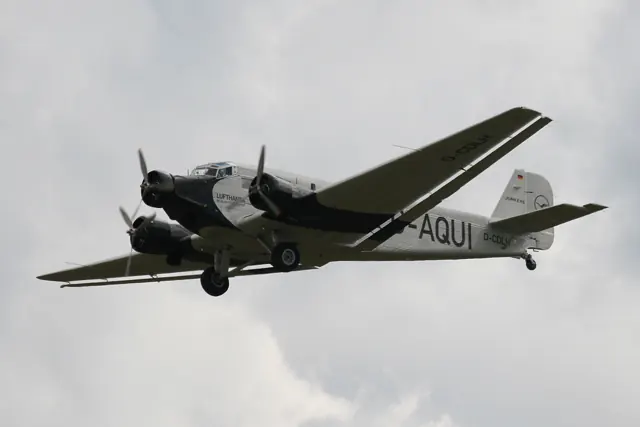
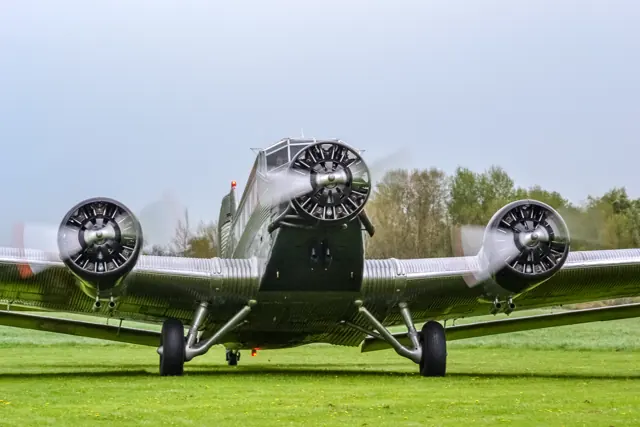
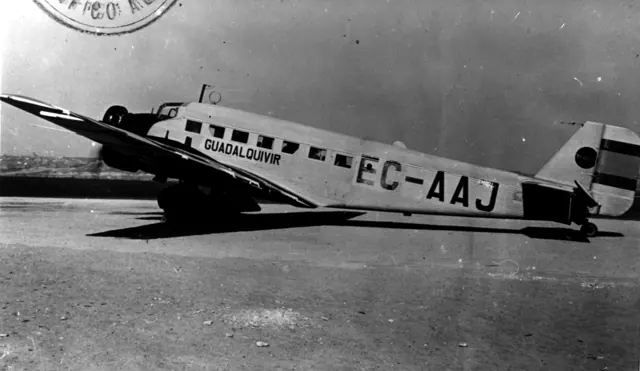
The Ju 52 began as a civil transport, with the three-engine Ju 52/3m becoming the familiar version. Fixed gear, a thick wing and corrugated skin accompanied airline and extensive military transport service.
Aircraft background
Wikipedia contributors · Read more ↗Fine weather turns the day’s work into a lasting memory
Cordes’s recollection of a June 2013 visit to Heringsdorf begins with improving weather on the journey north. After a cold front passed, the wind eased and the view opened out. The crew ate outdoors that evening and watched the lingering northern twilight from the pier. The next day’s sightseeing route followed Usedom and Peenemünde before returning along the coast.
First-person Ju 52 reports on the pilot’s own website. German sightseeing operations in 2011 and 2013; historical flights, not an assertion of current availability.
Claus Cordes · Read more ↗A combined trim-and-flap control
The linked 2022 MSFS 2020 manual illustrates a shared trim/flap wheel. It provides background for the aircraft family; this older document does not establish unchanged MSFS 2024 controls.
JU 52 · Microsoft Flight Simulator · MSFS 2024
Microsoft / aircraft developers · Read more ↗Into the cockpit
 YouTube
 Warbirds · 18 min ·
How to fly the Junkers Ju 52 Airplane - Inside the Cockpit
Cockpit teamwork during a Ju 52 flight, from engine start to grass-strip landing.
Real aircraft · Junkers JU 52
Watch on YouTube ↗Preview images are served by AirframeDB. Videos open on YouTube only when you choose to watch.
Meet Junkers JU 52
The Ju 52 began as a civil transport, with the three-engine Ju 52/3m becoming the familiar version. Fixed gear, a thick wing and corrugated skin accompanied airline and extensive military transport service.
Versions differed in engines, equipment and roles. The period cockpit includes a combined trim-and-flap control mechanism described in the simulator documentation.
Junkers JU 52
Aircraft type designators
Use the code for the model you are flying. The linked authority lists the applicable aircraft.
History & design
A restored airframe begins another public flying life
The Lufthansa anniversary report describes D-AQUI returning to flight in 1986 after restoration in Hamburg. Renewed engines and equipment supported later public appearances, while technicians and volunteer crews maintained the aircraft between seasons.
Austrian Wings / Lufthansa · 10,000 flight hours: Lufthansa’s Tante Ju ↗History reported in 2013; subsequent operating status is separate
Development milestones
Designer: Ernst Zindel
First flight: 13 October 1930 (Ju 52/1m); 7 March 1932 (Ju 52/3m)
Wikipedia contributors · Junkers Ju 52 ↗Junkers Ju 52 · family/variant named by the source · Wikipedia revision 1371954372
Pilot accounts
Fine weather turns the day’s work into a lasting memory
Cordes’s recollection of a June 2013 visit to Heringsdorf begins with improving weather on the journey north. After a cold front passed, the wind eased and the view opened out. The crew ate outdoors that evening and watched the lingering northern twilight from the pier.
The next day’s sightseeing route followed Usedom and Peenemünde before returning along the coast. Cordes remembered the conditions as giving both crew and passengers something lasting to take home. An earlier series of flights from Hamburg and Flensburg had left a similar impression: welcoming local aviators, agreeable guests and an aircraft running well.
First-person Ju 52 reports on the pilot’s own website. German sightseeing operations in 2011 and 2013; historical flights, not an assertion of current availability.
Read the full account · Claus Cordes ↗Returning an aircraft to familiar places brings mixed emotions
Bonsmann remembered taking D-AQUI back to Dessau in March 1990 as an especially moving experience. People who had once built aircraft there were able to approach and touch the familiar machine again. For its chief pilot, the landing connected the restored transport with people from its much earlier life.
Berlin-Tempelhof carried memories at both ends of the emotional scale. Bringing the aircraft there in June 1991 was one of the highlights he recalled. The airport’s closure in 2008 was much harder to revisit: after the Ju 52’s late departure, the runway lights went out.
Recollections quoted in a Lufthansa report carried by Austrian Wings in July 2013. D-AQUI after its restoration; the airframe’s 10,000 hours are not Bonsmann’s personal total.
Read the full account · Austrian Wings / Lufthansa ↗A former night-fighter pilot finds an aircraft he loves
Asked about the Ju 52, Axente responded with particular affection. After his night-fighter squadron was disbanded, he moved to heavy transport flying and remembered trips to places including Oradea and Miskolc. The aircraft’s modest pace did not diminish his enjoyment of flying it.
One memory involved returning from Arad to Bucharest with a senior officer beside him. The mountains were hidden by cloud, and the other man became anxious when Axente reached into his jacket. He was only looking for a cigarette; the officer offered to light it for him. Axente told the story while discussing his confidence in instrument flying.
May 2002 interview in Bucharest. Romanian Ju 52 transport service after a late 1944 transfer; other aircraft and wartime allegations in the interview are separate.
Read the full account · WorldWar2.ro ↗New Guinea transport work teaches the value of knowing the weather
Cresswell remembered New Guinea as a fascinating place to fly, but one where local weather knowledge mattered greatly. In his later transport work, he planned around the arrival of rain and cloud rather than assuming that a usable morning would last. Early departures gave him time to deliver stores in the interior and return before afternoon conditions deteriorated.
Elsewhere in the interview, he identified that period as chief-pilot work flying Ju 52s with Bobby Gibbes. It belonged to a restless chapter after leaving the air force, alongside other ventures that took him away from a settled service career.
Australians at War oral history, September 2003. Postwar Ju 52 work with Bobby Gibbes, whose name is rendered “Gibbs” in the transcript; separate from Cresswell’s wartime fighter flying.
Read the full account · Australians at War Film Archive / UNSW ↗In your simulator
Systems, equipment and documentation for each developer’s aircraft.
Compare simulator versions →MSFS 2024JU 52
Microsoft Flight Simulator · Released
JU 52
Microsoft Flight Simulator · Released
MSFS 2020Ju 52
Microsoft Flight Simulator · Released
Ju 52
Microsoft Flight Simulator · Released
Aircraft specifications
Published figures for the named real-aircraft variant. Simulator equipment and performance can differ.
| Specification | Published value |
|---|---|
| Length | 19 m (62 ft) |
| Wingspan | 29 m (96 ft) |
| Height | 5.5 m (18.2 ft) |
| Wing area | 110.50 m² (1,189.4 sq ft) |
| Empty weight | 5,720 kg (12,610 lb) |
| Gross weight | 9,500 kg (20,944 lb) |
| Max takeoff weight | 10,500 kg (23,146 lb) |
| Powerplant | 3 × BMW 132A-3 9-cylinder air-cooled radial piston engines , 510 kW (680 hp) each for take-off (510 kW (690 PS) ) |
| Propellers | 2-bladed fixed-pitch propeller |
| Maximum speed | 265.5 km/h (165.0 mph, 143.4 kn) at sea level |
| Cruise speed | 246 km/h (153 mph, 133 kn) maximum continuous at 910 m (3,000 ft) |
| Range | 1,000 km (620 mi, 540 nmi) |
| Service ceiling | 5,900 m (19,360 ft) |
| Rate of climb | 3.9 m/s (770 ft/min) |
Manuals & resources
Find your next read
Choose a topic for a short introduction and a link to the original source. Simulator references identify the developer and edition they cover.
Simulator documentation
A combined trim-and-flap controlJU 52 · Microsoft Flight Simulator · MSFS 2024
The linked 2022 MSFS 2020 manual illustrates a shared trim/flap wheel. It provides background for the aircraft family; this older document does not establish unchanged MSFS 2024 controls.
Legacy documentation · MSFS 2024 package interface remains unverified
Microsoft / aircraft developers · Read the source ↗A clutch chooses between trim and flap adjustmentJu 52 · Microsoft Flight Simulator · MSFS 2020
The shared wheel adjusts either trim or flaps. The clutch selects its function; the manual explicitly says the other adjustment is unavailable while that function is engaged.
MSFS 2020 manual · page 20
Microsoft / aircraft developers · Read the source ↗The 1939 autopilot keeps a selected headingJu 52 · Microsoft Flight Simulator · MSFS 2020
The historical cockpit has a heading clutch, heading selector and separate autopilot master and emergency stop. The manual describes course holding only.
MSFS 2020 manual · pages 14–15; no altitude-hold claim
Microsoft / aircraft developers · Read the source ↗Some quantity gauges are outside the cockpitJu 52 · Microsoft Flight Simulator · MSFS 2020
Oil quantity indications are on each engine. Left and right fuel quantities are indicated on the corresponding outer engines.
MSFS 2020 manual · page 22
Microsoft / aircraft developers · Read the source ↗A throttle stop limits normal lever travelJu 52 · Microsoft Flight Simulator · MSFS 2020
The Normalgas control distinguishes normal throttle travel from the full-power position beyond the stop. Both cockpit layouts show this control.
MSFS 2020 manual · pages 9,18
Microsoft / aircraft developers · Read the source ↗The two cockpit layouts have different navigation equipmentJu 52 · Microsoft Flight Simulator · MSFS 2020
The modern layout includes HSI, RMI and DME indications with radios on a pedestal. The 1939 layout has its own course-pointer and heading controls.
MSFS 2020 manual · pages 6–15
Microsoft / aircraft developers · Read the source ↗Pilot account
Fine weather turns the day’s work into a lasting memoryFirst-person Ju 52 reports on the pilot’s own website. German sightseeing operations in 2011 and 2013; historical flights, not an assertion of current availability.
Cordes’s recollection of a June 2013 visit to Heringsdorf begins with improving weather on the journey north. After a cold front passed, the wind eased and the view opened out. The crew ate outdoors that evening and watched the lingering northern twilight from the pier. The next day’s sightseeing route followed Usedom and Peenemünde before returning along the coast. Cordes remembered the conditions as giving both crew and passengers something lasting to take home.
Claus Cordes
Claus Cordes · Read the source ↗Returning an aircraft to familiar places brings mixed emotionsRecollections quoted in a Lufthansa report carried by Austrian Wings in July 2013. D-AQUI after its restoration; the airframe’s 10,000 hours are not Bonsmann’s personal total.
Bonsmann remembered taking D-AQUI back to Dessau in March 1990 as an especially moving experience. People who had once built aircraft there were able to approach and touch the familiar machine again. For its chief pilot, the landing connected the restored transport with people from its much earlier life. Berlin-Tempelhof carried memories at both ends of the emotional scale. Bringing the aircraft there in June 1991 was one of the highlights he recalled.
Hennes Bonsmann
Austrian Wings / Lufthansa · Read the source ↗Read the original documentation from the people who created it. Manuals open on their publisher’s website.
Manual
Junkers Ju-52 ManualMicrosoft / aircraft developers Microsoft Flight Simulator aircraft manualsMicrosoft / aircraft developersAircraft background
Junkers Ju 52Wikipedia contributors · Research background · Wikipedia revision 1371954372 · retrieved 2026-09-12Resource
MSFS 2024 FAQ and edition aircraft inventoryMicrosoftDeveloper documentation
Local Legends 1: Junkers Ju 52Microsoft Flight Simulator Team · 2021-09-28 · release and package scopeType designator
ICAO Doc 8643 — aircraft type designatorsInternational Civil Aviation Organization · Public search data retrieved 2026-09-14; authority update 2026-09-03Built-in force-feedback profiles
Read the documentary basis, editable starting settings and remaining questions for the aircraft you fly. Each explanation refers to the exact profile revision shown.
Catalogue programme-20261022-v1 · 1 profile choice
Junkers JU 52
Free and Pro · Revision 1 · Partial review
MSFS 2024 · MSFS 2020
Junkers JU 52: The selected loading accompanies the manually controlled trimotor.
Junkers JU 52
Junkers JU 52: The selected loading accompanies the manually controlled trimotor.
Aircraft and simulator scope
- Junkers JU 52 · MSFS 2024 · family starting point
- Junkers JU 52 · MSFS 2020 · family starting point
Junkers JU 52 · The manual distinguishes 1939 and later cockpit equipment and land versus sea configurations; the selected wheeled edition must keep that scope.
The simulator model and controls
The Ju 52 began as a civil transport, with the three-engine Ju 52/3m becoming the familiar version. Fixed gear, a thick wing and corrugated skin accompanied airline and extensive military transport service.
This starting point selects Junkers JU 52. Its aircraft-level settings do not select a particular developer’s custom systems.
How this profile feels
The selected loading accompanies the manually controlled trimotor. Spring resistance builds with the selected airspeed response. A separate aerodynamic term adds speed-dependent control load.
The combined trim/flap arrangement needs its own aircraft context. Valid trim provides the configured pressure relief. Autopilot following is off.
Controls and trim
The Ju 52/3m uses three engines and fixed gear around a corrugated-metal transport airframe. Its period cockpit links trim and flap operation through a combined mechanism. Different engine and mission fits retain their own configuration within the family.
About the values
The gains are normalized profile settings. They describe the chosen effect balance; hand force depends on the device and its output limits. IAS references are tuning values rather than operating limits. Physical acceptance of this revision remains pending.
What the documentation establishes
The manual distinguishes 1939 and later cockpit equipment and land versus sea configurations; the selected wheeled edition must keep that scope.
A shared adjustment wheel and clutch select trim or flaps, making simultaneous adjustment unavailable. Horizontal-stabilizer adjustment and flap coupling are described.
The manual states that the historic autopilot only holds a selected course, with master and emergency-stop controls.
Flap settings differ by land and sea configuration, including 25 and 40 degrees, with 10 degrees in the climb discussion. A uniform assumed detent count is not established.
The guide quotes cruise at 185 or 200 km/h depending on altitude, without a clear IAS basis. The retained 115-knot reference is a tuning estimate.
The manual describes softer aileron forces and reduced effectiveness with flaps, plus elevator shaking near low-speed conditions. It supplies no numerical hand-force or buffet curve.
Documentary review and sources
These decisions describe the documentary basis and remaining gaps for this revision. Aircraft documentation and a starting setting describe different kinds of evidence.
Aircraft and variant
ReviewedThis starting point selects Junkers JU 52. Its aircraft-level settings do not select a particular developer’s custom systems.
Flight controls
Not yet reviewedThe Ju 52/3m uses three engines and fixed gear around a corrugated-metal transport airframe. Its period cockpit links trim and flap operation through a combined mechanism. Different engine and mission fits retain their own configuration within the family.
Trim
ReviewedThe combined trim/flap arrangement needs its own aircraft context. Pitch authority 0.3 provides load relief and permitted centre movement; roll authority is 0.
Autopilot and stability
ReviewedAutopilot following is off; the configured spring and load retain the hardware feel.
Equipment
ReviewedGear, flap and ground cues follow the selected settings and available simulator-reported states.
Speeds and limits
ReviewedThe indicated-speed references set the profile response scale; they are separate from aircraft operating limits.
Simulator integration
Not yet reviewedThe profile targets msfs2024, msfs2020. Add-on-specific controls use only the supported references configured by this profile.
Force-feedback settings
ReviewedThe settings define the profile’s effect balance. Device output limits affect physical hand force.
Starting settings and their rationale
These configured values are starting estimates. The explanations describe what each setting controls; physical validation appears separately below.
| Setting | Starting value | What it controls and why |
|---|---|---|
| Spring strength | Starting value0.74 | What it controls and whyThe selected loading accompanies the manually controlled trimotor. The baseline spring is 0.74. Its low-speed blend reaches baseline strength at 57.5 KIAS. |
| Master force gain | Starting value0.85 | What it controls and whyScales overall profile strength while preserving effect balance, subject to device and output limits. |
| Profile force gain | Starting value0.8 | What it controls and whyThe aerodynamic-load gain is 0.8 with an indicated-speed reference of 115 KIAS. This supplies speed-dependent loading alongside the spring. |
| Force tuning speed/reference | Starting value115.0 kt | What it controls and whySets the IAS reference for aerodynamic loading. It is an estimate, not published cruise TAS or a flight limit. |
| Spring response reference speed | Starting value57.5 kt | What it controls and whySets the IAS where the low-speed blend reaches baseline strength; high-speed stiffening also uses it. |
| Aileron force scale | Starting value0.72 | What it controls and whyRoll and pitch aerodynamic scales are 0.72 and 1, respectively. They set the aerodynamic axis balance. No custom spring-travel curve is enabled. |
| Elevator force scale | Starting value1.0 | What it controls and whyScales pitch aerodynamic loading; pitch spring travel and trim responses are separate settings. |
| Trim feel | Starting valueEnabled | What it controls and whyRetained for compatibility and group membership. Trim relief, rather than this flag, controls centre movement. |
| Trim relief | Starting valueEnabled | What it controls and whyAllows trim relief with supported control law and valid telemetry. Axis authorities set its amount. |
| Autopilot follow | Starting valueDisabled | What it controls and whyAutopilot following is off; the configured spring and load retain the hardware feel. |
| Autopilot neutral hold | Starting valueDisabled | What it controls and whyPermits centering hold during a supported AP state, separate from following a moving target. |
| Output force limit | Starting value0.55 | What it controls and whyCaps directed-force output. Native spring effects and device limits remain separate. |
All 44 starting settings and their rationale
The settings define the profile’s effect balance. Device output limits affect physical hand force.
| Setting | Starting value | What it controls and why |
|---|---|---|
| Spring strength | Starting value0.74 | What it controls and whyThe selected loading accompanies the manually controlled trimotor. The baseline spring is 0.74. Its low-speed blend reaches baseline strength at 57.5 KIAS. |
| Spring deadband | Starting value0.045 | What it controls and whySets travel around the centre before the baseline spring resists. Smaller values engage it sooner. |
| Profile force gain | Starting value0.8 | What it controls and whyThe aerodynamic-load gain is 0.8 with an indicated-speed reference of 115 KIAS. This supplies speed-dependent loading alongside the spring. |
| Master force gain | Starting value0.85 | What it controls and whyScales overall profile strength while preserving effect balance, subject to device and output limits. |
| QBlend Enabled | Starting valueEnabled | What it controls and whyAllows baseline spring strength to rise with indicated airspeed where the control law permits it. |
| QSpring Minimum Factor | Starting value0.5 | What it controls and whySets low-speed spring strength as a fraction of baseline when blending is enabled. One keeps full strength. |
| QSpring Start Knots | Starting value16.1 kt | What it controls and whySets the IAS where the low-speed spring blend starts rising. This is a feel threshold, not a flight limit. |
| Spring response reference speed | Starting value57.5 kt | What it controls and whySets the IAS where the low-speed blend reaches baseline strength; high-speed stiffening also uses it. |
| Force tuning speed/reference | Starting value115.0 kt | What it controls and whySets the IAS reference for aerodynamic loading. It is an estimate, not published cruise TAS or a flight limit. |
| Airspeed spring stiffening gain | Starting value0.15 | What it controls and whyThe high-speed spring-stiffening gain is 0.15. It strengthens the permitted spring response above 57.5 KIAS, with the squared-speed ratio capped at 5. |
| Airspeed spring stiffening limit | Starting value5 | What it controls and whyLimits the squared airspeed ratio used for high-speed spring stiffening; it is not a device-force cap. |
| Aileron force scale | Starting value0.72 | What it controls and whyRoll and pitch aerodynamic scales are 0.72 and 1, respectively. They set the aerodynamic axis balance. No custom spring-travel curve is enabled. |
| Elevator force scale | Starting value1.0 | What it controls and whyScales pitch aerodynamic loading; pitch spring travel and trim responses are separate settings. |
| Output force limit | Starting value0.55 | What it controls and whyCaps directed-force output. Native spring effects and device limits remain separate. |
| Trim feel | Starting valueEnabled | What it controls and whyRetained for compatibility and group membership. Trim relief, rather than this flag, controls centre movement. |
| Trim relief | Starting valueEnabled | What it controls and whyAllows trim relief with supported control law and valid telemetry. Axis authorities set its amount. |
| Elevator Authority | Starting value0.3 | What it controls and whyThe combined trim/flap arrangement needs its own aircraft context. Pitch authority 0.3 provides load relief and permitted centre movement; roll authority is 0. |
| Aileron Authority | Starting value0 | What it controls and whyScales supported roll-trim relief and permitted centre movement. Zero removes roll response. |
| Force Trim Enabled | Starting valueDisabled | What it controls and whyEnables local force trim, separate from aircraft-owned trim and add-on integration qualification. |
| GLoad Enabled | Starting valueEnabled | What it controls and whyAllows load-factor changes to modify permitted spring laws. Passive fly-by-wire feel can suppress it. |
| Rate Damping Enabled | Starting valueEnabled | What it controls and whyEnables rate damping with the configured coefficients and control law. |
| Autopilot follow | Starting valueDisabled | What it controls and whyAutopilot following is off; the configured spring and load retain the hardware feel. |
| Autopilot follow authority | Starting value0.1 | What it controls and whySets admitted AP-follow gain, not a percentage of travel. Runtime ownership and input limits still apply. |
| Autopilot neutral hold | Starting valueDisabled | What it controls and whyPermits centering hold during a supported AP state, separate from following a moving target. |
| Autopilot neutral hold strength | Starting value0.6 | What it controls and whySets admitted AP neutral-hold strength; inactive while neutral hold is disabled. |
| Enabled | Starting valueEnabled | What it controls and whyEnables aerodynamic cues; each still needs nonzero strength and its simulator conditions. |
| Gain | Starting value0.35 | What it controls and whySets stall-buffet strength. Zero removes the cue without changing simulator stalls or warnings. |
| Gain | Starting value0 | What it controls and whySets high-Mach buffet strength; onset and full-strength thresholds are separate. |
| Gain | Starting value0.14 | What it controls and whySets flap buffet at the configured position and speed gates. Flap movement texture is separate. |
| Maximum flap index | Starting value3 | What it controls and whySets the final flap index for detent normalization. UP plus three detents uses maximum index3. |
| Minimum flap index | Starting value2 | What it controls and whySets the first flap detent that admits buffet; this is a handle index, not degrees. |
| Gain | Starting value0 | What it controls and whySets gear aerodynamic buffet; movement and ground-contact cues are separate. |
| Shaker Enabled | Starting valueDisabled | What it controls and whyPermits shaker at supported warning conditions; the switch does not establish aircraft equipment. |
| Stick shaker amplitude | Starting value0.5 | What it controls and whySets triggered shaker strength; inactive while the shaker feature is disabled. |
| Enabled | Starting valueEnabled | What it controls and whyEnables ground effects; each still needs its own strength and contact or motion telemetry. |
| Gain | Starting value0.4 | What it controls and whySets rolling texture strength, modified by speed, surface and undercarriage configuration. |
| Gain | Starting value0.25 | What it controls and whySets gear-bump texture during ground motion, separate from touchdown impact. |
| Gain | Starting value0.65 | What it controls and whySets landing-impact strength; landing telemetry and response shape determine the pulse. |
| Gain | Starting value0 | What it controls and whySets reverse-thrust vibration with valid reverser and engine conditions. Zero removes the cue. |
| Enabled | Starting valueEnabled | What it controls and whyEnables engine cues with nonzero settings and valid running-engine telemetry. |
| Gain | Starting value0.12 | What it controls and whySets estimated engine vibration using configured telemetry and response, not measured cockpit vibration. |
| Enabled | Starting valueEnabled | What it controls and whyEnables accessory cues with configured strengths and observed accessory movement. |
| Gain | Starting value0.12 | What it controls and whySets texture from observed flap movement; a command without movement does not establish the cue. |
| Gain | Starting value0 | What it controls and whySets texture from observed gear movement, separate from aerodynamic and touchdown effects. |
Limits and open questions
- The guide describes control behavior but not a complete linkage or boost architecture.
- The cockpit guide does not publish external trim/flap clutch state or automatic-flight telemetry.
- Junkers JU 52 documentary evidence does not establish force-feedback hardware acceptance.
Physical validation
No physical force validation is recorded in this public catalogue for this revision. Documentary review and software checks do not establish how a particular device feels.
Discuss this aircraft (0)
Questions, observations and useful sources from the community.
No published discussions yet. Bring a question or share a useful source.
Open aircraft discussions →Content expanded · What’s new
Something missing or a source that needs attention?
Suggest a correction ↗

